An uncensored AI image generator creates images from text prompts without applying the content filters that block mature, artistic, or niche subjects on mainstream platforms. This guide covers every major category: the best uncensored AI generators, free uncensored AI tools with no signup, image editors, image-to-video pipelines, open-source models, and four detailed tool reviews, giving you everything needed to find the right option for your workflow.
What Is an Uncensored AI Image Generator?
Standard AI image tools, including most consumer-facing products, run every prompt through a content classifier before generating an image. That classifier blocks a broad range of subjects: nudity, NSFW, gore, certain political imagery, and even ambiguous artistic content that triggers false positives. An uncensored AI image generator either removes that classifier entirely or replaces it with a much lighter filter, giving the model full access to its training data.
How it differs from standard AI image tools
The difference isn't in the base model architecture. Both filtered and uncensored AI generators often run on the same underlying weights: FLUX Dev, Stable Diffusion XL, or similar. The gap is in the inference pipeline. Filtered platforms add a safety layer that intercepts the prompt, checks the output, or both. Uncensored platforms skip that layer, run a custom fine-tune on top, or host the model locally where no external policy applies.
In practice, this means an uncensored tool generates the same subject a filtered tool refuses: mature artwork, graphic medical imagery, violent game assets, or content that mainstream classifiers flag as sensitive even when it isn't. The model's raw capability doesn't change; the gatekeeping does.
Why Censorship Filters Exist and Why Some Users Bypass Them
Content filters exist for a mix of legal liability, advertiser safety, and platform terms of service. A company hosting image generation at scale can't manually review every output, so automated moderation is the practical default. That makes sense for consumer products.
The problem is over-filtering. Artists, game developers, medical illustrators, and writers run into blocked prompts that have no harmful intent. A character design with exposed anatomy gets flagged the same as genuinely harmful content. That mismatch drives users toward platforms and models that don't apply the same broad brush.
For a breakdown of the underlying models that power these tools, the best uncensored AI models guide covers architectures, fine-tunes, and capability comparisons.
Best Uncensored AI Image Generators
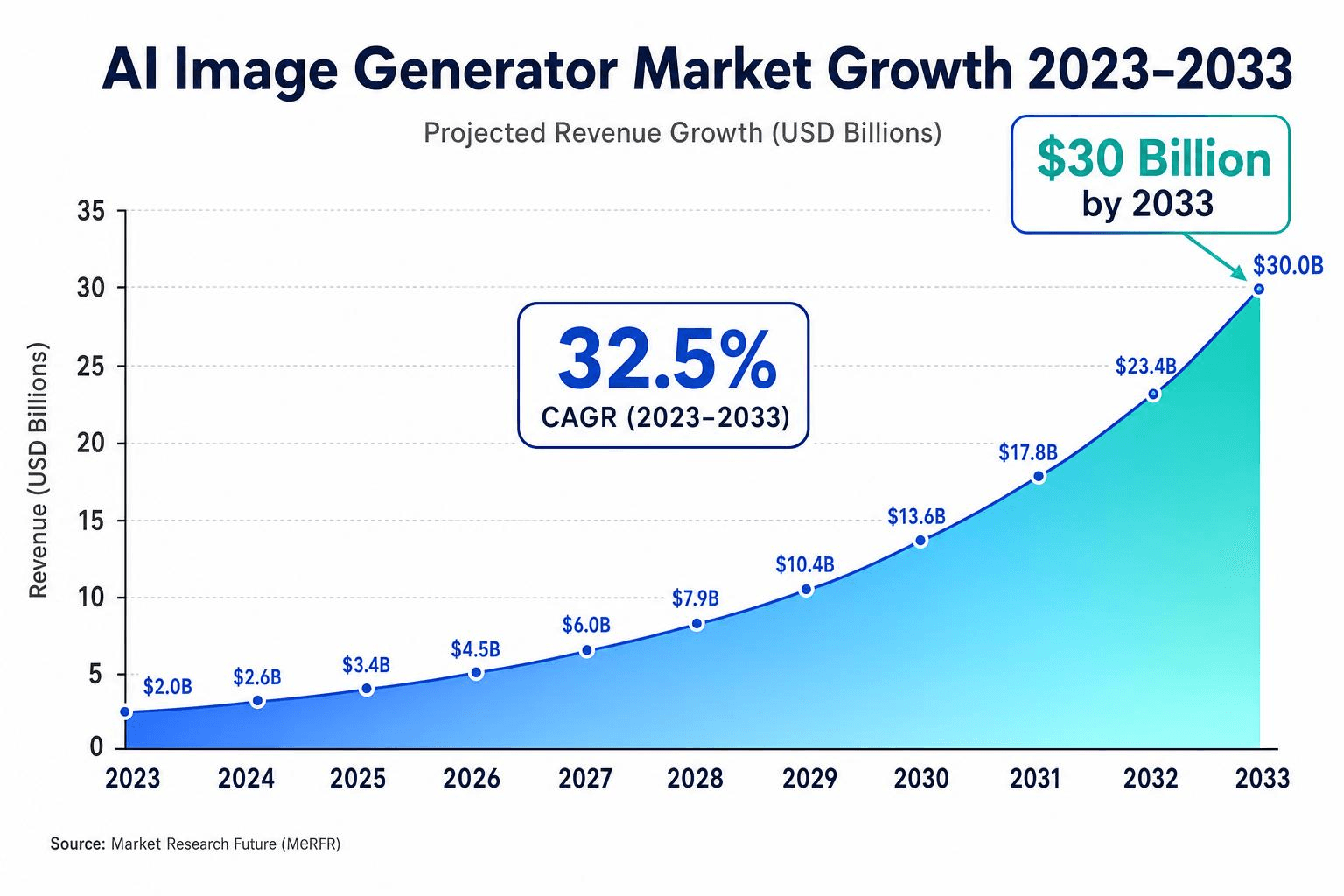
In 2026, the AI image generator market is growing at a 32.5% compound annual growth rate and is projected to reach $30 billion by 2033 (SkyQuest, AI Image Generator Market Report, 2025). That growth has brought genuine competition, and the quality gap between the top tools and mid-tier options is now visible in every generation.
The key criteria for ranking uncensored generators: output resolution, prompt fidelity, generation speed, free quota, and how thoroughly content filters are removed versus simply loosened.
Top Uncensored AI Image Generators at a Glance
Atlas Cloud's uncensored API is built for "professional adult content creators who need full creative control without content moderation barriers." Generated content is never used for training and never reviewed. A single API key unlocks 18 NSFW video models and 40+ image generation models: Wan 2.7 Image-to-Video and Text-to-Video run at $0.02/sec in 1080p; Seedance v1.5 Spicy delivers higher quality at $0.049/sec in 720p; the Wan 2.2 Spicy LoRA variant supports custom fine-tunes at $0.03/sec. Pricing starts from $0.01/sec. For development teams building adult content platforms that need programmatic, scalable output, it's the only API combining an NSFW video catalog with a 40+ image model library under one key.
For teams evaluating browser-based platforms as an alternative, the BasedLabs uncensored AI review covers pricing, model quality, and API availability in a direct comparison.
For illustrated or anime-style character output specifically, the uncensored anime AI image generators guide covers the specialized models that outperform general-purpose tools on style and character consistency.
Free Uncensored Image AI Generations
Free uncensored image generators exist across the web, though generation quality, resolution limits, and data privacy practices vary widely. Most cap daily usage or restrict model access on free tiers. For teams with ongoing needs, per-image API pricing is often cheaper than it appears: FLUX Schnell via the Atlas Cloud API starts at $0.003 per image, making 1,000 images cost $3 with no daily cap, no account restrictions, and no content stored for training.
The best uncensored NSFW AI image generators guide covers the full trade-off landscape: quality ceilings, daily limits, resolution restrictions, and privacy policies across zero-cost options.
Uncensored AI Image Editors: Modify Without Limits
Generating from scratch and editing an existing image are different workflows. An image editor takes an input (a photo, a sketch, or a previous generation) and modifies it through inpainting, outpainting, style transfer, or object replacement. The uncensored distinction applies here too: standard editing tools refuse certain modifications that uncensored editors will handle.
Top uncensored AI image editors in 2026
Uncensored image editing differs from generation in one critical way: the input is an existing image, and the modification must preserve context while making targeted changes a standard platform would refuse. Inpainting a character's clothing, replacing an object in a scene, or applying a style transfer to mature artwork all require the editor to understand and reproduce content that filtered tools block at the prompt stage.
The core editing workflows where uncensored capability matters most:
- Inpainting: masks a region and regenerates it from a prompt, the most common workflow for targeted NSFW edits
- Image-to-image: feeds a reference image to guide output style, pose, or composition
- Style transfer: applies a visual style from a reference onto existing content without rebuilding the scene from scratch
- Outpainting: extends the canvas beyond original borders, useful for widening crops or adding background detail
Browser-based uncensored editors prioritize ease of use; API-based editors prioritize repeatability and scale. The distinction matters for workflow: a solo creator working on individual pieces has different requirements than a team generating edited variants at volume.
For the complete breakdown of both browser-based and API options with example outputs, the best uncensored AI image editors guide covers tools across both categories, including capability comparisons and pricing.
Uncensored AI Image to Image Generator
Image-to-image generation is a specific editing mode where the model uses an uploaded image as structural guidance and repaints it according to a new prompt. The output keeps the composition and rough shapes of the input but replaces style, texture, or specific elements. It's the standard approach for character redesigns, style transfers, and controlled variations.
For tools focused specifically on this workflow, the uncensored AI image-to-image guide compares the leading options on prompt adherence, structural preservation, and processing speed.
Uncensored AI Image to Video Generator
Image-to-video pipelines take a static image and animate it, adding motion, camera movement, or scene continuation, to produce a short video clip. It's a distinct capability from text-to-video generation and requires different model architecture. The uncensored dimension here refers to platforms that animate mature or restricted content without blocking the source image.
Best uncensored image-to-video tools
Uncensored image-to-video generation takes a static image and animates it into a video clip, with no content filter intercepting the motion output. The uncensored distinction applies at the video inference stage: standard platforms refuse to animate images containing mature content even when the source image was generated elsewhere, making the uncensored video pipeline a separate requirement from uncensored image generation.
The key variables that separate tools in this category:
- Motion consistency: how well the model maintains character and scene coherence across frames without drift or distortion
- Prompt adherence: how accurately a text prompt directs the motion, camera angle, or action applied to the input image
- Resolution and duration: most NSFW-capable models output 480p to 1080p at 5 to 8 seconds per clip; longer duration requires either chaining or a video extension model
- LoRA support: custom fine-tunes let teams apply a specific character or style consistently across multiple generations
Consumer platforms in this space typically offer browser-based interfaces with credit systems. API-based options expose the same models programmatically for teams building automated pipelines or generating at volume.
For a full comparison of consumer platforms and API options, including sample output quality ratings and pricing, the best uncensored AI image-to-video generators guide covers both categories side by side.
Standalone uncensored AI video generators
Not every video use case starts from an image. Text-to-video and prompt-driven video generation are growing categories with their own set of uncensored platforms. These tools generate video from a written description rather than a reference image, which means they depend entirely on the model's ability to interpret and render motion from text.
The best uncensored AI video generators guide covers standalone video tools, including prompt structuring tips that improve output consistency for mature or niche subjects.
Uncensored AI Models: What Powers These Tools
Every uncensored image generator runs on a model. Understanding which model a platform uses tells you about its output quality ceiling, fine-tune availability, and whether you can run it locally. In 2026, FLUX-based architectures dominate the high-quality end; Stable Diffusion variants remain common for lightweight and open-source deployments.
Hosted vs. open source models
Hosted models run on a provider's infrastructure. You send a prompt via API or browser interface, the provider runs inference, and the image comes back. You don't manage hardware, don't download weights, and don't configure runtimes. Atlas Cloud's image catalog includes GPT Image 2 at $0.01/image, Z-Image Turbo at $0.01/image, and Wan-2.7 from $0.03/image. All are accessible via a single API key.
Open-source models run on your own hardware. You download the weights, install a runtime like ComfyUI or A1111, and run inference locally. No prompt reaches an external server. The tradeoff is setup complexity and hardware cost. A capable FLUX inference machine requires at minimum 12 GB of VRAM.
The best uncensored AI image models guide ranks both hosted and open-source options across output quality, speed, and cost per image. For teams specifically looking to run models locally, the guide to running uncensored AI models locally walks through the full setup process with hardware recommendations.
How to Choose the Right Uncensored AI Image Generator
The right tool depends on three variables: how much you're willing to pay, whether you need an interface or an API, and what output specifications your use case requires.
Free vs. Paid: When It's Worth Upgrading
Free uncensored image generators impose three consistent constraints regardless of platform: resolution caps that limit output to 512px or 768px, daily or session-based credit ceilings that interrupt workflow mid-project, and older model weights that produce noticeably lower quality than current FLUX-based architectures. For a single test prompt, these trade-offs are acceptable. For any recurring use case, they compound quickly.
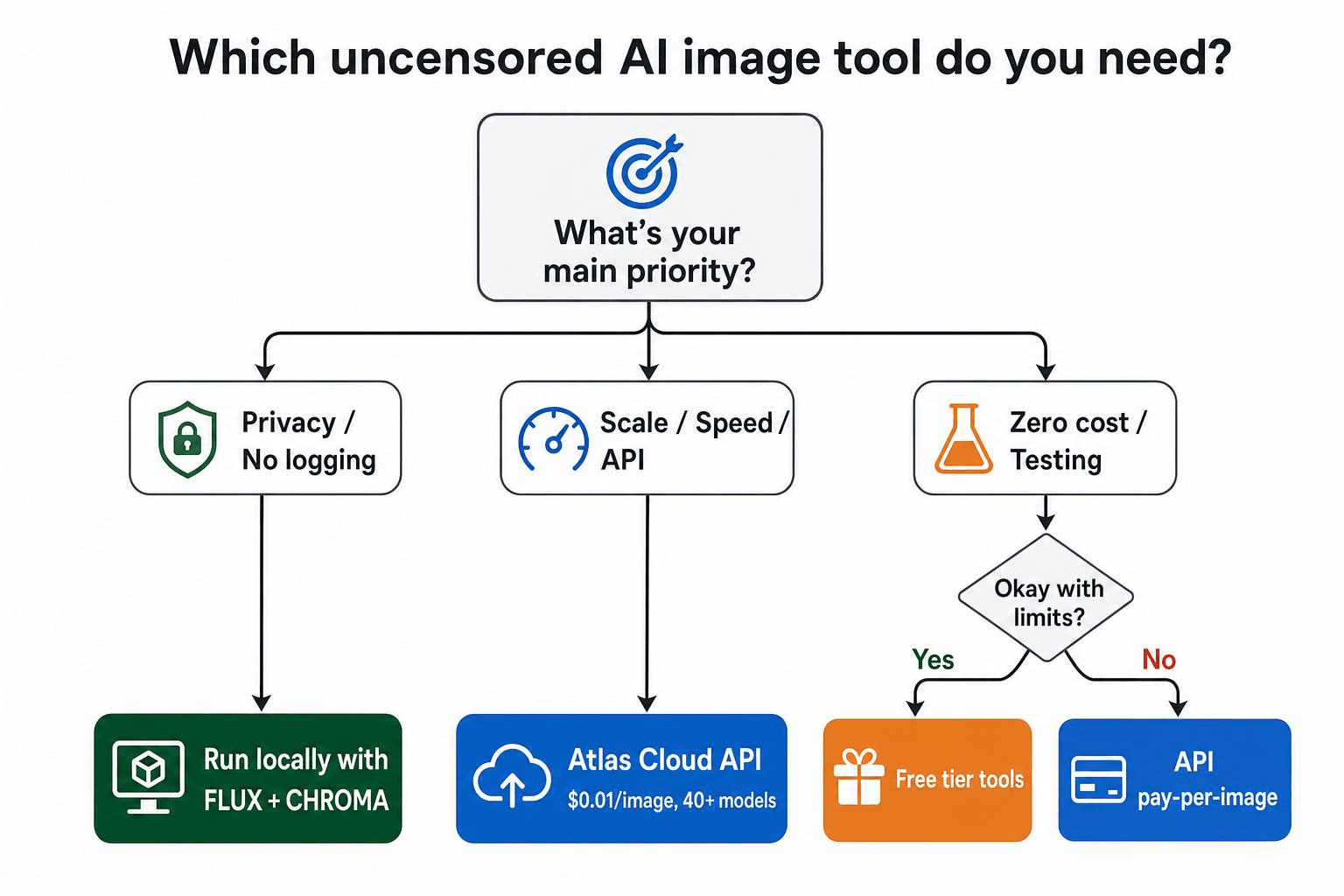
The upgrade threshold is straightforward: if you're generating more than 20 images per week, per-image API pricing becomes cheaper than managing credit limits across multiple free platforms. At $0.003 per image for FLUX Schnell via the Atlas Cloud API, 1,000 images costs $3 with no daily cap and no session interruptions.
Use cases where paid access pays for itself within the first week:
- Game asset generation: volume and consistency requirements make credit ceilings a production bottleneck
- Character design iterations: high-resolution output matters; free tiers rarely exceed 768px
- Illustration workflows: reproducible seeds and prompt fidelity require model access that free tiers restrict
The practical test: if you've hit a free-tier limit more than twice in a single project, the time cost of working around it already exceeds the monthly cost of a paid plan.
Hosted tools vs. running locally
Hosted tools are faster to start and require no hardware investment. The tradeoff is that every prompt leaves your machine, which matters for privacy-sensitive content, and you're subject to the platform's content policy, even if it's liberal.
Local models require a GPU with at least 12 GB of VRAM for FLUX and 8 GB for smaller SDXL checkpoints. Setup takes an afternoon. Once running, generation is private, unlimited, and not subject to any external policy. CHROMA is the recommended runtime for FLUX local deployment in 2026.
For developers who want the speed and simplicity of hosted inference without browser-based interfaces, Atlas Cloud's API provides programmatic access to Wan-2.7, Nano Banana 2, Z-Image Turbo, and other image models at per-image pricing with no subscription commitment. That covers most production use cases without the hardware overhead of local deployment.
Key specs to check
Maximum resolution. Consumer tools often cap at 1024×1024 or 1024×768. API models like Wan-2.7 and Seedream v5.0 support higher resolutions depending on the inference configuration.
Daily generation quota. Free tiers vary widely: some impose hard daily limits, others are unlimited. Perchance advertises no daily cap, but verify current limits at the official site. Paid tiers are usually credit-based.
Model selection. Single-model platforms give you less control over style. Multi-model platforms like Atlas Cloud, with 300+ models across all modalities, let you match the model to the prompt type. The uncensored AI prompt guide covers the five-element formula that produces consistent results across all model types.
API access. If you need to generate images programmatically, whether in a script, an app, or an automated pipeline, browser-based tools won't work. Atlas Cloud, which provides an OpenAI-compatible LLM endpoint alongside its image API, is designed for this use case.
Frequently Asked Questions
Is it legal to use uncensored AI image generators?
In most jurisdictions, generating AI images for personal use, including mature content, is legal as long as the output doesn't involve real people without their consent and doesn't constitute child sexual abuse material (which is illegal everywhere). Laws vary by country and are evolving. Always check your local regulations before distributing AI-generated content commercially.
Can I run an uncensored AI model locally?
Yes. FLUX Dev and FLUX Schnell are both open-weight models you can download and run locally using CHROMA, ComfyUI, or A1111. You need at minimum a GPU with 12 GB of VRAM. Fine-tunes like Flux-Uncensored-V2 and Fluxed Up are available on CivitAI and HuggingFace. The local model setup guide covers the full installation process.
What is FLUX and why is it popular for uncensored generation?
FLUX is a transformer-based image generation architecture from Black Forest Labs. It produces sharper detail, better anatomical accuracy, and cleaner prompt fidelity than older diffusion models. Its open weights make it fine-tunable: the community has produced dozens of NSFW-capable fine-tunes that run on the base FLUX architecture without the default safety classifier. The FLUX uncensored guide covers every major variant and how to access them.
Where to Go From Here
If you're comparing tools for the first time, the best uncensored AI image generators roundup covers the full landscape with scored comparisons. If budget is the constraint, start with the free options guide, which filters to zero-cost tools that don't require account creation.
For developers who need image generation at scale, Atlas Cloud provides API access to FLUX variants, Nano Banana 2, Z-Image Turbo, and ten other image models starting at $0.01 per image, with no subscription and no per-seat pricing.






