That picture in your head, the one you can see so clearly. Why does the AI keep refusing to film it?
Most of the time it isn't the model failing you. It's that something is missing between you and the model: a translator.
You have seen this kind of AI video before. The face is sharp, the limbs do not clip through each other, the lighting is even considered. You watch it and your only reaction is a flat "huh," and then you scroll past. Something is missing. You reach for words like "atmosphere," "cinematic," "texture," but the moment you type them into a prompt, they stop working. Twenty rewrites later, you have burned through your credits gambling on rerolls.
This guide does two things. First, it shows you how a method called Vibe Creating translates the feeling you can't name into language a model can actually act on. Second, it gives you a zero-setup way to test it yourself and generate your first video with "that feeling" inside ten minutes.
What Is Vibe Creating, and Why Does It Fix Your Prompts?
Vibe Creating is the practice of describing the emotional result you want and letting a method translate it into the concrete filmmaking choices that create it. You stay in charge of "what I want to feel." It handles "how to shoot that."
If the phrasing sounds familiar, that is on purpose. In early 2025, Andrej Karpathy coined "vibe coding" to describe a workflow where you stop writing code line by line and instead describe intent to a model and let it generate the implementation (Vibe coding, Wikipedia, February 2025). The term spread fast enough that Collins named it a word of the year. Vibe Creating applies the same shift to video. You stop micromanaging focal lengths and start describing the experience.
Here is the trap that makes most prompts fail. When you want a scene to feel dangerous, you instinctively type "dangerous atmosphere." The model receives five abstract words and gives you the elements of danger: a robot, a gun, a dark sky. Every ingredient is present, and you feel nothing. The phrase was too abstract to point at any specific visual mechanism.
Vibe Creating does not rush to generate. It first works out what actually produces the feeling of danger, then writes the prompt as a felt image rather than a parameter list. That distinction is the whole method, so the rest of this vibe creating tutorial walks through five real examples of it in action.
Vibe Creating Tutorial Case 1: How "Danger" Becomes a Camera Move
Start with the opening frame of a viral AI short, a robot cowboy wandering a zombie town. The plot fits in one sentence, yet your heart rate tracks the camera. The first shot puts a gun barrel right against the lens, and your subconscious receives a single message: you are in danger right now.
You try to recreate the scene. Type "dangerous atmosphere" and you get the props of danger with none of the dread.
Here is the trap that makes most prompts fail. When you want a scene to feel dangerous, you instinctively type "dangerous atmosphere." The model receives five abstract words and gives you the elements of danger: a robot, a gun, a dark sky. Every ingredient is present, and you feel nothing. The phrase was too abstract to point at any specific visual mechanism.
Hand the same intent to Vibe Creating and it reasons about three things that have to happen at once:
- Lock the eye onto the gun barrel and blur the background into mush. That is shallow depth of field doing its job.
- Make you feel like you are kneeling and looking up at a gun pointed down at you. That is a low angle doing its job.
- Push the barrel almost out of the screen and into your face. That is mild wide angle distortion doing its job.
Here is the key move. What finally goes into the prompt is not "shallow depth of field, low angle, wide angle distortion." Those are the mechanics. What gets written is the felt image those mechanics create. Vibe Creating translates professional technique into something both a model and a human grasp instantly. Three effects fire together, your subconscious genuinely registers "you are in danger," and your conscious mind just thinks "what a great shot."
That is the nature of atmosphere. The information travels through the subconscious channel and bypasses your reasoning. Vibe Creating is the translator that builds that channel. You say what you want. It works out how to film it.
Vibe Creating Tutorial Case 2: A Garden That Feels Wrong on Purpose
Now a harder feeling. Here was everything in my head when I opened the generator:
A silver-haired girl in a crystal gauze dress, standing in the garden in front of a Nordic wooden cabin under a burning sunset sky. Every frame is beautiful, yet something quietly signals that it is not safe.
I genuinely did not know how you manufacture "unsafe." Vibe Creating expresses it as a kind of recipe: beauty + 30% uncanny valley + ritual props + a voyeur camera + mismatched light source = evil under a fairy-tale skin
Every term in that recipe is a parameter that works the moment it lands in a prompt. The only problem is whether you can recall it, describe it, and make the model understand it in the instant you sit down to create. If you cannot, that is exactly the job Vibe Creating takes off your hands. It catches that one vague sentence and writes the recipe for you. The output reads like this:
Notice the camera never shows the monster's body, only the eyes, one limb, and the swaying shadows. That restraint is a deliberate translation of "unsafe." It is also far easier for a model to render than a full creature, which is part of why it generates cleanly.
Vibe Creating Tutorial Case 3: Making AI Video Feel Like a Movie Trailer
Send the next example to a friend who studied film, hide the source, and they will probably guess it is the trailer for a ballet feature. It is a single uncut generation. No editing, no color grade.
The intent was "give me trailer-grade texture" for a young dancer in a theater backstage that is alive and humming before a show. When you hand "trailer texture" to Vibe Creating, its logic runs like this:
The backstage opening is not showing off, it is a narrative strategy. Pushing from a dim, cluttered backstage toward the lit stage is a path that Black Swan and The Red Shoes both used. Walking toward the stage is itself a metaphor for fate. The model does not just render the picture, it renders the blocking.
Three variables have to be correct at the same time: the angle of the floor reflection, the direction of the shadows, and the subtle delay in the motion. Get any one wrong and the dreamlike quality collapses into security-camera footage.
The frame where the man and woman lock eyes uses Hollywood's standard "the moment love happens" template: side backlight tracing their outlines, background bulbs melting into bokeh, shallow focus shoving the world away until only two people remain. It proves one thing. The ceiling of what these models can do already reaches movie-trailer quality. What holds you back was never the model. It is the prompt.
Vibe Creating Tutorial Case 4: Translating "Loneliness" Into Images
This one is a single abstract word, and watching how it gets unpacked is the most useful part of any vibe creating tutorial. The clip is an astronaut on an unknown planet, recalling happy fragments of life back on Earth. You feel like you are standing there with her. How?
Vibe Creating refuses to render the word "lonely." It auto-expands the abstraction into a chain of concrete choices. Here is the translation table:
| What you said | What it translated to |
|---|---|
| Lonely | A violent scale contrast: a tiny person against a vast floating object, your insignificance before something enormous |
| Lonely | A gray-blue, low-saturation wasteland with a cruelly clean horizon, an environment that is itself "no one here" |
| Lonely | A hand reaching to touch the strands of light, because the lonely crave connection even with a thing made only of light |
| Lonely | Every memory inside the light is human connection: a mother's hand, a running child, a grandmother watering flowers |
| Lonely | Memory rendered in warm gold, reality in cold gray, color temperature as the two ends of an emotion |
| Lonely | The final frame: she stands dead center, facing the camera alone |
The method understands a thing every writing class teaches but no one remembers to use. Loneliness is not emptiness. Loneliness is still remembering what warmth looked like. You give it one word. It gives back a structure of images that actually carries the word.
Vibe Creating Tutorial Case 5: The A/B Test That Proves the Point
At this point a fair objection shows up: if I just write a more professional prompt, do I even need this? So here is the controlled test, and the result is the strongest piece of evidence in this whole vibe creating tutorial.
Group A input. A fully production-ready shot list. Shot sizes labeled, camera moves spec'd, timecodes, sound design, the works. Three shots covering a little girl in a rain alley who hesitates, then jumps into a puddle, water explodes, she bursts out laughing. On paper the story is complete and the document could go straight to a real film crew.
Shot 1: Wet Memory (Setup) (00:00 – 00:03) | Duration: 3 seconds Shot Size: Wide Shot → Full Shot Camera Movement: Static frame, fixed focus. Visuals: The rain has just stopped. Cold-toned mist drifts through the air. The cobblestone path is covered in puddles, reflecting the weathered, peeling, moss-covered old walls on either side. At the edge of the frame, a pair of oversized bright yellow rubber rain boots — far too big for the feet inside them — slowly steps into view. A little girl in those bright yellow boots tiptoes carefully to the edge of the largest puddle and stops, lowering her gaze to stare into the vast reflection on its surface. Sound: Damp, hollow post-rain wind; the monotonous drip of water from roof tiles; the faint squeak-squeak of rubber boots on wet stone. Shot 2: The Standoff Before the Leap (Hesitation CU) (00:03 – 00:08) | Duration: 5 seconds (key emotional beat) Shot Size: Extreme Close-Up → Close-Up Camera Movement: An extremely slow push-in (a "slow-breathing" pace), focusing on her face and eyes. Visuals: The camera locks onto the girl's cheek. Her brows knit tightly together as her gaze darts back and forth between the massive puddle and her oversized yellow boots. She bites down lightly on her lower lip, and her nose scrunches faintly from the intensity of nervous anticipation. She draws in a deep breath — her entire face an exquisitely vivid portrait of internal conflict: "I want to jump… but I don't dare." The shot stretches out unhurriedly, as if time itself has frozen. Sound: All ambient wind fades to near silence (a vacuum-like hush), leaving only crisp, slightly hurried breathing and the faint sound of her tongue brushing her lower lip. At the very end of the 8th second, a heavy, suppressed heartbeat suddenly thunders in — a deep cardiac pulse. VFX Notes: Hyper-detailed facial texture rendering (SSS skin shader); dynamic micro-capillary responses beneath the skin; her eyes catching the reflected light of the puddle; physical simulation of raindrops sliding down strands of her hair. Shot 3: The Burst and Its Echo (Reaction) (00:08 – 00:15) | Duration: 7 seconds Shot Size: Low-Angle Wide Shot → Static Medium Shot Camera Movement: At the instant the action explodes, the camera snaps outward and locks into a fixed frame. Visuals: (End of second 8) The heartbeat thunders — and in that instant, all hesitation drains from the girl's face. Her eyes turn resolute. She slams both feet together and leaps into the puddle. Captured in high-speed photography, the water erupts into the air as countless crystalline droplets, shattering like diamonds. In the background, a ginger cat that had been dozing peacefully is jolted awake by the violent splash — fur bristling, it scrambles in a wonderfully undignified leap onto a higher wall. The camera then cuts back to a medium shot: the girl standing amid the scattered remnants of water on the stone path, looking up — and in that moment, her face erupts into a smile so brilliant, so pure, so crystal-clear in its laughter, that her eyes glisten with tears. Sound: A violent, bass-heavy splash impact (slow-motion splash sound design); the cat's frantic scrambling and hiss; the girl's clear, unrestrained child laughter. Inner Monologue: (None) VFX Notes: Realistic volumetric fluid simulation for the splash; slow-motion physical simulation of water droplets suspended in air; a subtle shift in color grading toward warmer, more saturated tones at the moment of the laughter's release.
Group A result. The wet cobblestones, the mist, the puddle reflections all showed up. The technical parameters were executed. But two things broke:
- The instruction "a pair of rain boots slowly enters frame" got rendered literally as a pair of empty boots standing alone in the middle of the alley, with a figure drifting in through the fog behind them. The shot list wanted cozy and childlike. The output became the opening of a horror film.
- The emotional arc dissolved. The girl's face only showed tears. The progression of hesitation, resolve, eruption, laughter was gone.
Group B input. The exact same shot list, handed to Vibe Creating to rewrite. The method does not add things. It removes noise. Its reasoning runs roughly: this document is written in pure execution style, but underneath it is a complete emotional narrative, so it is a good candidate for translation. Keep the three-beat progression of approaching the puddle, the brief internal battle, the sudden burst. Delete most of the low-value technical terms, shot sizes, and timecodes. Keep the details that carry real emotional weight: the yellow boots, the wet stone, the leap, the startled orange cat, the laughter and the damp eyes. Convert the sound design into natural experiential language. The rewrite reads
The rain has just stopped. Cold mist still drifts through the old alleyway, and puddles cover the cobblestone path, reflecting the weathered, peeling, moss-covered walls on either side. A pair of oversized bright yellow rain boots slowly steps into the frame. A little girl carefully makes her way to the largest puddle and stops, lowering her head to gaze at the trembling reflection below. The air carries only the damp, hollow sound of post-rain wind, the intermittent drip of water from the eaves, and the soft, delicate squeak of her boots against the wet stone. She stares at the puddle, then looks down at her boots, her brows knitting tightly together, her lips pressed faintly shut — as if locked in a solemn, childlike duel with herself. She clearly wants to jump in, yet hesitates at the very last moment. Her breathing turns sharp and quickened, and everything around her seems suddenly drained away, leaving only that taut, trembling anticipation — the feeling of being one breath away from leaping, just shy of the courage to do it. The next second, resolve floods through her. She slams both feet together and plunges into the puddle. The water erupts skyward, shattering into bright shards of light. Beside her, a ginger cat that had been dozing snaps awake and bolts in a panic, scrambling up onto a higher wall. As the splash fades, the little girl stands amid the scattered remnants of water on the stone path, lifts her head, and bursts into laughter — clear, brilliant, utterly unguarded — her eyes glistening faintly with tears, as if a rain-washed world has just been lit up by her own two hands.
Not a single technical term. But you finished reading it and the scene already played in your head. The model reads it the same way.
Group B result. A little girl with pigtails in a green raincoat and yellow boots, stopping at the puddle, a close-up of hesitation with knit brows, then both feet slamming down, water exploding, the cat by the wall bolting upward, and her face lifting into a laugh with damp eyes. The arc survived intact.
Here is the comparison in one table.
| Dimension | Group A: execution shot list | Group B: Vibe Creating rewrite |
|---|---|---|
| Prompt form | Stuffed with shot sizes, moves, timecodes | One breathing emotional narrative |
| What the model reads | Half of it is noise | All of it is image and emotion |
| Signature failure | Empty boots standing eerily in the alley | None |
| Emotional arc | Collapsed into vague "sad" | Hesitation, eruption, release, all three |
| Key details | Lost | Startled cat and damp eyes both kept |
The lesson is blunt. More technical detail did not help. It actively hurt, because half of it was noise the model had to fight through.
How to Start Your First Vibe Creating Project in Three Steps
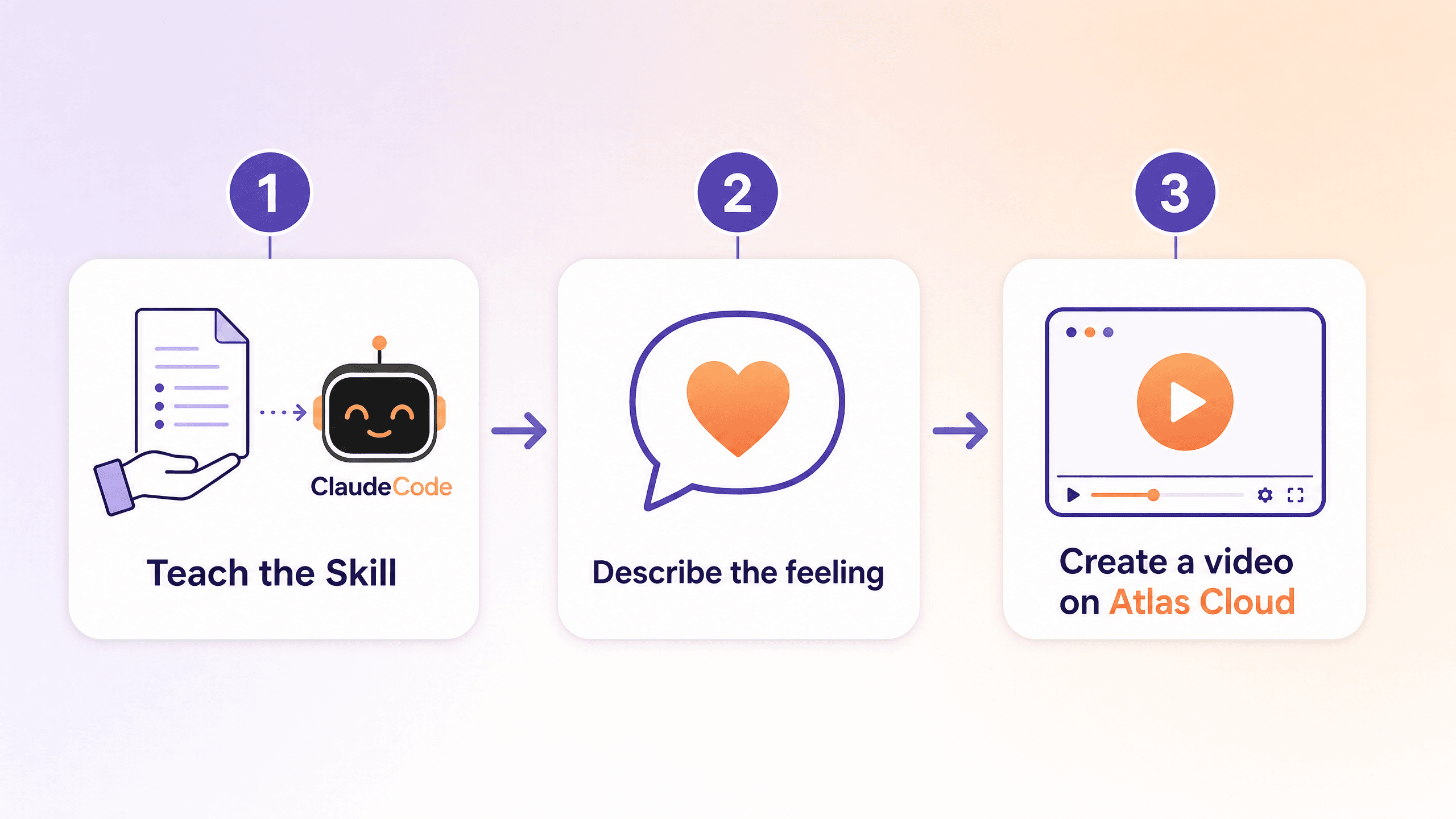
You do not need to learn any prompt engineering. The full workflow is three steps, and the only paid part is the final render.
Step one: teach your AI assistant the Skill. Copy the full Vibe Creating Skill at the bottom of this article and paste it into whatever AI assistant you already use. Claude Code, Codex, and TRAE all work, and if you just want a fast test, paste it straight into any AI chat box. No install, no config, no dependencies. It reads it once and it knows it.
Step two: describe the feeling in plain words. Anything works. One word, like "freedom." One sentence, like "I want that Love Death and Robots opening energy." Or a vague mood, like "saw the sunset today and suddenly wanted to film something, can't say what." The Skill figures out which atmospheric family your feeling belongs to, asks you a question or two if needed, then outputs a complete prompt: camera, light, color temperature, pacing, props, reference style, all written for you.
Step three: render it somewhere that can actually run it. Copy the prompt, paste it into a Seedance 2.0 video model, and generate.
A note on where to render, since it matters more than people expect. The example videos in this tutorial were generated on Seedance 2.0 on Atlas Cloud. Seedance 2.0 is ByteDance's audio-video model that produces up to 15 seconds of synchronized footage from text and image inputs, and it is the same engine behind CapCut and Dreamina. The reasons it fits this workflow specifically:
- Faces stay stable and expressions hold, which is exactly where a "vibe" video lives or dies. A great atmosphere collapses the instant a face warps.
- Global access with no waitlist, so you can act on a feeling the moment you have it.
- Over 300 models behind a single API key, which makes it easy to run the same prompt across different models and compare, or wire generation into an existing pipeline.
A minute later, the picture that only ever existed in your head, the one you could never explain to anyone, shows up on screen for the first time.
The Full Vibe Creating Skill (Copy and Use)
This is the genuinely useful part. Paste the block below into your AI assistant and it will run the whole method for you. It is written as a Skill specification, so it works whether you drop it into a coding assistant or a plain chat box.
plaintext1--- 2name: vibe-creating-prompt 3description: Decide whether a user's input suits Vibe Creating. When it does, distill single-shot prompts, multi-shot descriptions, emotional scenes, or mixed input into prompts that generate better video, while preserving any user-specified dialogue, voiceover, music, sound effects, and other hard constraints. Not for long dialogue-synced narrative films, industrial execution shot lists, feature demos, or UI tutorials. 4--- 5 6# Vibe Creating Prompt Skill 7 8## Overview 9The goal is to distill what the user actually wants to express, so the model can grasp the visual center, emotional direction, and continuity of experience. Prioritize creative intent, emotional value, key imagery, and visual unity. De-emphasize low-value technical parameters and mechanical execution language. 10 11## Quick Start 12On receiving input, run three steps: 131. First judge whether it suits Vibe Creating (VC). 142. Then judge the best handling right now: pass through, light distill, full rewrite, ask first, keep as is, or offer an optional VC version. 153. When information is insufficient, ask. Only ask what is required to complete the current action. Do not interrogate for the sake of classification. 16 17## Scene and Expression Judgment 18First use Scene judgment (S) to decide if VC fits, then Expression judgment (E) to decide handling. Information-density check (I) takes priority over the specific action: whenever key information is missing, ask first, then proceed. 19 20### S1: Native fit for VC 21- E1 (close to VC expression): default full rewrite; if the text is already mature, switch to light distill or pass through. 22- E2 (mixed expression): default light distill then rewrite, preserving valid structure, narrative order, and emotional progression. 23- E3 (precise-control expression): treat as VC-translatable; do not reject just because it is written as execution. Remove low-value technical control and convert to natural visual language that generates better. 24 25### S2: Partial fit for VC 26- E1: default light distill; if already usable, pass through. 27- E2: default to offering an optional VC version and let the user decide. 28- E3: default keep the original meaning, and gently note that a VC rewrite is available if wanted. 29 30### S3: Low fit for VC 31- E1: stay close to the original, do not force VC; keep as is if necessary. 32- E2: prefer keep as is or very limited cleanup; only stylize locally when explicitly asked. 33- E3: default keep as is; explain that this need suits a traditional storyboard workflow rather than continued VC rewriting. 34 35Four hard rules during routing: 36- Insufficient info asks first: however well the scene fits, if the visual anchor, main action, or style direction is missing, ask before writing. 37- User hard constraints win: if the user explicitly requires keeping dialogue, music, shot numbers, parameters, paragraph structure, or delivery format, do not delete them; a VC version should be an extra version or provided after the user agrees. 38- Multi-shot preserves structure: when the user is already expressing one unified experience across shot segments, do not crush it into a single prose block; but do not default to numbered output unless the user explicitly asks to keep numbers or list format. 39- Precise-control writing is not the same as a low-fit scene: judge the scene goal first, then decide whether to translate. 40 41### Information-density check 42Even when the scene fits VC, do not force a rewrite when key information is missing. Ask first if: there is no clear visual anchor; only an abstract feeling with no character, object, or scene; a subject but no action or state; visual fragments but no main relationship or style direction; a very short input that has subject and event but lacks clear style direction, viewing method, or key moment; multi-shot content with obvious jumps where the reason they belong together is unclear. 43 44Under Vibe Creating, a prompt should satisfy these four layers; fill whichever is missing first, no need to mechanically ask for all in order: 451. Visual anchor: the core that most needs to be seen (person / object / named concept / the effect itself). 462. Action or state: what is happening (write only one: action / state / plot). 473. Local tone: how this beat feels (one mood word or adjective). 484. Video theme: the use case plus visual style. 49 - Use case: concept short, micro-narrative, film previz, emotional expression, explainer, effects clip. 50 - Visual style: hyperreal, cinematic, animation, claymation, Eastern ink, cyber, illustrative. 51 52Asking principle: the density check is not a gate separate from S and E, it runs in parallel as a stability check on whether the input can land directly on the routed action. Fill the minimum information needed to rewrite, usually one round. Only keep asking when a gap clearly blocks the image from landing. For very short, abstract, single-image input, prioritize converting the abstract word into the information a visible image needs; if the direction is mostly clear, give an initial judgment first, then ask about the 1 to 3 most critical gaps. 53 54## Interaction Policy 55Do not expose internal classification labels, but internally complete the three judgments: Scene (S), Expression (E), Information density (I). Initial judgments are allowed; do not force a class when info is insufficient. 56 57After judging, decide the action: pass through, light distill, full rewrite, ask first, keep as is, optional VC version. 58 59Handling principles: 60- Scene fits VC but info is short: fill the minimum info required for the current action. 61- When the input already has a clear subject, structure, time relationship, core imagery, and a clear emotional goal, and the text is already strongly generation-ready, default to pass through; only light-distill for clarity if needed, do not actively rewrite. 62- Scene fits VC but contains undeclared precise control: default to de-emphasize, delete, or translate it; if you did so, you must note it and tell the user they can specify what to keep. 63- Partial fit: do not push VC by default; preserve meaning or offer an optional VC version. 64- Low fit: explain it is a goal or workflow mismatch, not a rejection of the user's creativity. 65- User-specified dialogue, voiceover, music, sound effects, structure, and parameter requirements are preserved first. 66 67## Camera Language Policy 68Do not delete camera language wholesale. What to delete is the low-value technical parameters that tell the system how to shoot. What to keep or translate is the camera intent that tells the viewer how to feel. 69 70Default to de-emphasize or delete: focal length, millimeters, camera-position jargon, camera-move parameters, shot numbers, depth of field, aperture, exposure, shutter, equipment notes, A/B cam, coverage, pure editing instructions. 71 72When the user explicitly asks to keep parameters, follow the constraint first, then decide whether to also offer a VC version. 73 74When it is undeclared whether to keep precise control: do not treat technical control as a must-keep; still process as the more generation-friendly VC creative version; preserve the parts that contribute to emotion, narrative, or viewing experience; for purely technical camera control, delete or translate into a natural result; do not interrupt to confirm first, but if you de-emphasized, deleted, or translated technical control, you must note it briefly, and offer a constraint-preserving version if the user wants specific parameters, structure, or beats kept. 75 76## Sound and Constraint Priority Rules 77Dialogue, voiceover, music, sound effects, lyrics, narration, and other explicitly specified sound content rank above creative optimization. The Skill may reorder, but must not rewrite the wording, replace the content, or delete a user's explicit sound requirement. 78 79On conflict, execute in this order: 801. User-specified content and hard constraints (dialogue, voiceover, music, SFX, shot structure, parameter retention, format, style limits). 812. Creative optimization (distill story, emotion, memory, imagery, and unified experience without breaking constraints). 823. VC paradigm consistency (only after the first two, tighten language so the prompt is easier for the model to understand and generate). 83 84Supplementary: keep user-written dialogue, voiceover, music, or SFX verbatim. When visual description and sound requirements are mixed, you may reorder but not alter the sound content. If the visual part suits VC but the sound part does not, rewrite only the visual part. If the whole thing only holds together with long, strict, word-level dialogue sync, default to no VC rewrite. 85 86## Rewrite Modes 87Choose the mode by the dominant factor in the input: 88- Narrative rewrite: for story-, relationship-, or event-driven input. Output one continuous prompt or keep 2 to 5 segmented beats, preserving event order and emotional turns. 89- Emotional rewrite: for mood-, feeling-, or state-driven input. Concentrate on environment, pacing, texture, and viewing experience; do not force a causal chain to look like a story. 90- Memory rewrite: for recollection, flashback, oldness, fading, things being remembered. Preserve blur, bleaching, gaps, and fragility; strengthen recurring imagery and the sense of time passing. 91- Stream-of-consciousness rewrite: for association, fragments, subjective perception, nonlinear expression. Incompleteness is allowed, but the image must stay perceivable and the imagery internally unified. 92- Multi-shot experience rewrite: for multi-segment, multi-scene, multi-cut input that serves one experience. Segment naturally, or group by number only when explicitly asked, 1 to 3 sentences each; keep scene flow, emotional progression, and visual motifs, drop low-value execution jargon. 93- Mixed distill: for input mixing creative content with execution language. Keep the original structure and valid info as much as possible, remove only technical noise, repetition, and low-value control; do not over-rewrite or invent new beats. 94 95## Output Rules 96The goal is to help the user express more accurately, not to rewrite their work into a different piece. 97 98Length and form: 99- Default not significantly longer than the original, and do not balloon very short input into long prose. 100- Add nothing unsupported, especially no invented relationships, plot twists, scene details, or emotional changes. 101- For single-segment output, tighten to one prompt that can be used to generate directly. 102- Preserving structure is not preserving numbers; shot numbers, segment numbers, or list format in the input do not by themselves count as a request to keep numbering. Keep numbered output only when the user explicitly asks; otherwise default to natural segmentation. 103- With sufficient info and no extra constraints, a single segment or shot is usually 30 to 120 words; loosen when preserving structure, dialogue, or multi-segment progression. 104- When the user explicitly asks to keep the original structure, preserve structure over brevity. 105 106User-visible format: 107- Do not expose internal labels like S1 + E2 or Mode 5. 108- Default to a four-part output, fixed order: Judgment / Action / Result / Notes (if any). 109- Judgment: briefly state whether it suits VC, whether the original is already usable, whether info is sufficient. 110- Action: explicitly use one label: pass through / light distill / full rewrite / ask first / keep as is / optional VC version. 111- Result: the actual rewrite, the kept-as-is text, or the questions. 112- Notes (if any): technical control de-emphasized, deleted, or translated this time; hard constraints kept like dialogue, voiceover, music, SFX; or a prompt that the user can specify parameters, structure, or beats to keep. 113- Output should be natural, concise, and fit the user's original task context. 114- Omit the fourth part when no notes are needed.
Frequently Asked Questions About Vibe Creating
Do I need to know prompt engineering to follow a vibe creating tutorial?
No. The entire point of Vibe Creating is that you describe the feeling in plain words and the method handles the translation into camera, light, and pacing. The companion Skill is copy-paste into any AI assistant, with no install or config. It is closer to vibe coding, where you describe intent and let the tool generate the implementation (Simon Willison, "Not all AI-assisted programming is vibe coding", March 2025).
Why did the detailed shot list lose to the simpler prompt in the A/B test?
Because half of a spec shot list is noise the model has to fight through. Shot sizes, timecodes, and camera moves do not carry emotion, and they can be misread, like "boots enter frame" becoming a pair of empty boots standing alone. The Vibe Creating rewrite kept the three-beat emotional arc and the meaningful details, so the model received pure image and feeling.
Is Vibe Creating the same thing as vibe coding?
They are cousins, not the same. Vibe coding, coined by Andrej Karpathy in 2025, is about generating software by describing intent. Vibe Creating applies the same describe-the-result philosophy to video, translating a feeling into the filmmaking choices that produce it. Both shift your effort from "how" to "what I want."
What model should I actually render on after writing the prompt?
The examples here used Seedance 2.0, ByteDance's audio-video model that outputs up to 15 seconds of synced footage. For atmosphere-driven work, stable faces and expressions matter most, which is where it holds up well. You can run it through Atlas Cloud with no waitlist and compare against other models on the same API key.
How long does the whole vibe creating tutorial workflow take?
Roughly ten minutes end to end for your first try. A minute or two to paste the Skill, a minute to describe your feeling and get a finished prompt back, and about a minute to render a clip. Most of the wait is the generation itself, not setup.
Wrapping Up
The thing standing between your imagination and the screen was never the model. The ceiling on these tools already reaches movie-trailer quality, as the dancer example showed. What stops you is the gap between the feeling you have and the language a model can act on.
Vibe Creating closes that gap. You name the feeling, it writes the shot. The five cases here, danger as a camera move, a garden that feels wrong, trailer-grade blocking, loneliness unpacked into images, and a rewrite that beat a full spec sheet, all come down to the same move: write how a viewer should feel, not what camera to use.
Paste the Skill, describe something you have wanted to film, and render it on Atlas Cloud. The discount window closes June 15, so this is a good few days to see that picture in your head show up on screen for the first time.





