


Shengshu Tech's Vidu Q3 brings two capabilities to AI video generation that most models still treat as afterthoughts: native audio generation and Smart Cuts. Native audio means the model produces synchronized sound alongside the visual output in one pass -- no separate audio pipeline, no post-production syncing. Smart Cuts is an automatic scene detection system that identifies logical edit points within the generated footage, giving editors pre-segmented clips ready for assembly. For teams building content pipelines at scale, these two features together remove significant manual work from the production process.
This guide covers everything you need to start using Vidu Q3 through the Atlas Cloud API: technical specifications, pricing breakdown, Python integration examples, prompt optimization strategies, and a direct comparison with Veo 3.1, Kling 3.0, Seedance 2.0, and Hailuo 2.3. Whether you are evaluating Vidu Q3 for a new project or comparing it against your current model, this is the comprehensive reference.
*Last Updated: February 28, 2026*
See how Vidu Q3 compares to other top AI video models:
The Vidu Q3 API is available through Atlas Cloud at $0.07 per second of generated video.
Vidu Q3 at a Glance
| Spec | Detail |
| Developer | Shengshu Technology |
| API Model ID | `shengshu/vidu-q3/text-to-video` |
| Max Resolution | 1080p |
| Max Duration | 12 seconds |
| Native Audio | Yes -- synchronized audio generated with video |
| Smart Cuts | Yes -- automatic scene detection and segmentation |
| Atlas Cloud Price | $0.07/sec |
| Best Strength | Native audio + Smart Cuts workflow integration |
| Input Modes | Text-to-video, Image-to-video |
Key Features of Vidu Q3
Native Audio Generation
Vidu Q3 generates synchronized audio as part of the video creation process. When the prompt describes a scene with environmental sounds -- rain on a window, footsteps on gravel, a crowd murmuring -- the model produces both the visual and the audio track in one generation pass. The audio is contextually aware, matching the visual content in timing and intensity.
This is a meaningful differentiator. Most AI video models still output silent video, requiring teams to either source stock audio, generate audio separately through a dedicated model, or manually add sound in post-production. With Vidu Q3, the audio-visual pairing is handled at generation time. For content creators producing social media clips, product demos, or ambient content, this eliminates an entire workflow step and the synchronization challenges that come with it.
The quality of Vidu Q3's audio generation covers ambient soundscapes, environmental effects, and contextual sounds effectively. Dialogue and music generation are not primary strengths -- those still benefit from dedicated audio models -- but for natural environmental audio, the output is production-ready in many scenarios.
Smart Cuts -- Automatic Scene Detection
Smart Cuts is Vidu Q3's automatic scene detection and segmentation system. After generating a video clip, the model identifies logical scene boundaries and provides metadata about where natural edit points fall within the footage. This is particularly useful for longer generations approaching the 12-second maximum, where the model may produce content with natural visual transitions.
For video editing pipelines, Smart Cuts metadata reduces the time spent manually scrubbing through footage to identify cut points. Teams building automated content systems can use this information to programmatically segment clips, recombine them with other generated footage, or select specific scenes for different distribution channels. The feature transforms raw AI-generated output from "a clip that needs editing" into "pre-segmented content ready for assembly."
1080p Output at 12 Seconds
Vidu Q3 supports 1080p resolution with a maximum duration of 12 seconds. The 12-second ceiling places it among the longer-duration models available -- exceeding Veo 3.1's 8 seconds and Kling 3.0's 10 seconds, while falling short of Seedance 2.0's 15-second maximum. For many use cases -- social media ads, product showcases, ambient loops -- 12 seconds provides sufficient canvas to convey a complete visual narrative.
The 1080p resolution is standard for web and social media distribution. Output quality is clean, with good temporal coherence across the full generation window. Objects maintain consistent form, lighting transitions are smooth, and camera movements proceed without visible artifacts.
Image-to-Video
Beyond text-to-video, Vidu Q3 supports image-to-video generation. This allows teams to use an existing image -- a product photo, a brand asset, a design comp -- as the starting frame and generate motion from it. The model animates the scene based on the combination of the input image and the text prompt, maintaining visual consistency with the source material.
Image-to-video is particularly valuable for e-commerce teams that have existing product photography and want to create video content without reshooting. A static product image can be animated into a rotating showcase, a lifestyle scene, or a dynamic advertisement.
Motion and Physics Handling
Vidu Q3's physics simulation sits in a solid middle ground. Fluid dynamics, particle effects, and basic object interactions are rendered convincingly. Camera movements -- pans, dollies, tracking shots -- are handled smoothly. Where the model occasionally shows limitations is in complex multi-object physics: collisions between multiple rigid bodies or intricate mechanical movements can sometimes appear slightly off. For most content production scenarios, however, the physics handling is more than adequate.
Vidu Q3 Pricing
Atlas Cloud API Pricing
Atlas Cloud provides straightforward per-second pricing for Vidu Q3 with no hidden fees, subscription tiers, or credit packs.
| Model | Atlas Cloud Price | Per 12s Video |
| Vidu Q3 (Text-to-Video) | $0.07/sec | $0.84 |
A full 12-second Vidu Q3 generation costs $0.84. For shorter clips, the cost scales linearly -- a 6-second video costs $0.42, a 4-second clip costs $0.28.
Why developers choose Atlas Cloud for Vidu Q3:
- Single API key for Vidu Q3 alongside 300+ other AI models -- video, image, text, and multimodal. One integration, one bill.
- No queue delays -- production-grade infrastructure with consistent generation times.
- Transparent pricing -- $0.07 per second, calculated precisely. No credit packs, no subscription tiers, no expiring tokens.
Cost Comparison: Vidu Q3 at Scale
| Volume | Monthly Videos | Total Seconds | Atlas Cloud Cost |
| Light | 50 videos | 600s | $42.00 |
| Medium | 200 videos | 2,400s | $168.00 |
| Heavy | 500 videos | 6,000s | $420.00 |
| Enterprise | 2,000 videos | 24,000s | $1,680.00 |
At $0.07/second, Vidu Q3 occupies a mid-range position in the pricing landscape. It is more expensive than Veo 3.1 ($0.03/sec) and Seedance 2.0 ($0.022/sec), but substantially cheaper than Kling 3.0 ($0.126/sec) and Sora 2 ($0.15/sec). The native audio and Smart Cuts features can offset the price difference by eliminating downstream audio sourcing and manual editing costs.
Price Per Feature Comparison
| Model | Price/sec | Native Audio | Smart Cuts | Max Duration |
| Vidu Q3 | $0.07 | Yes | Yes | 12s |
| Veo 3.1 | $0.03 | Yes | No | 8s |
| Seedance 2.0 | $0.022 | Yes | No | 15s |
| Kling 3.0 | $0.126 | Yes | No | 10s |
| Sora 2 | $0.15 | Yes | No | 12s |
When evaluating cost, teams should factor in the downstream savings from native audio and Smart Cuts. A workflow that previously required separate audio generation ($0.02-0.05 per clip) and manual scene segmentation (5-10 minutes of editor time per clip) may find that Vidu Q3's all-in-one approach actually reduces total cost of content production.
How to Access Vidu Q3 API
Getting started with the Vidu Q3 API through Atlas Cloud takes less than five minutes. This tutorial walks through a complete working example using Python.
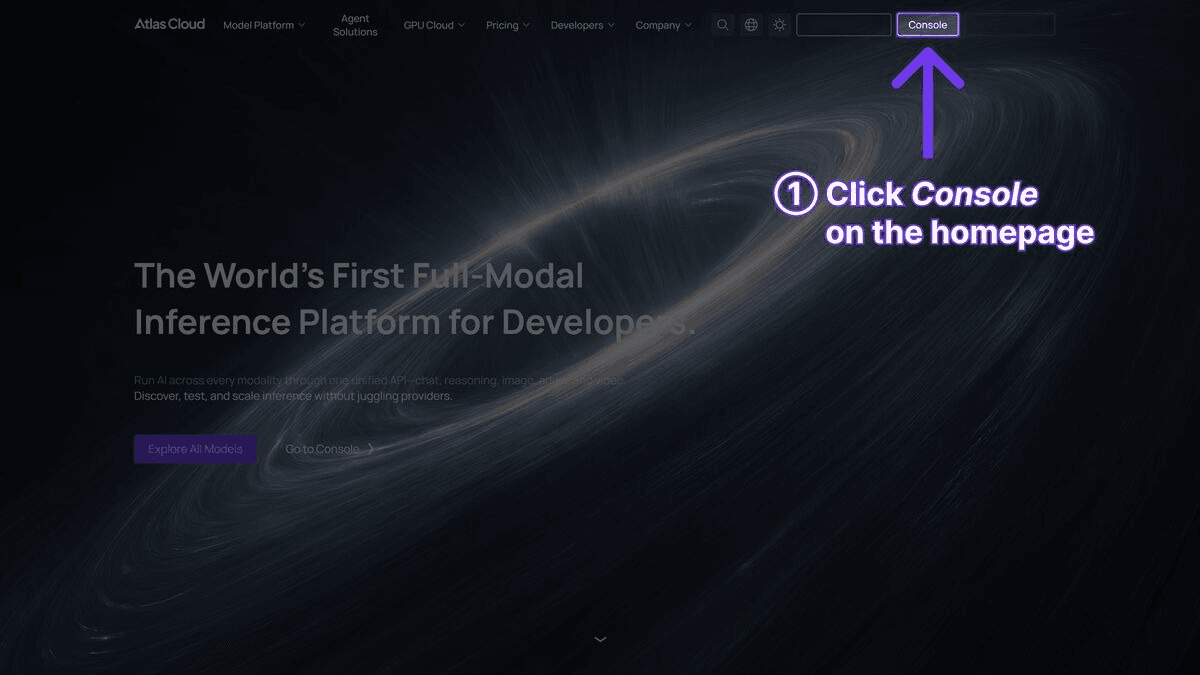
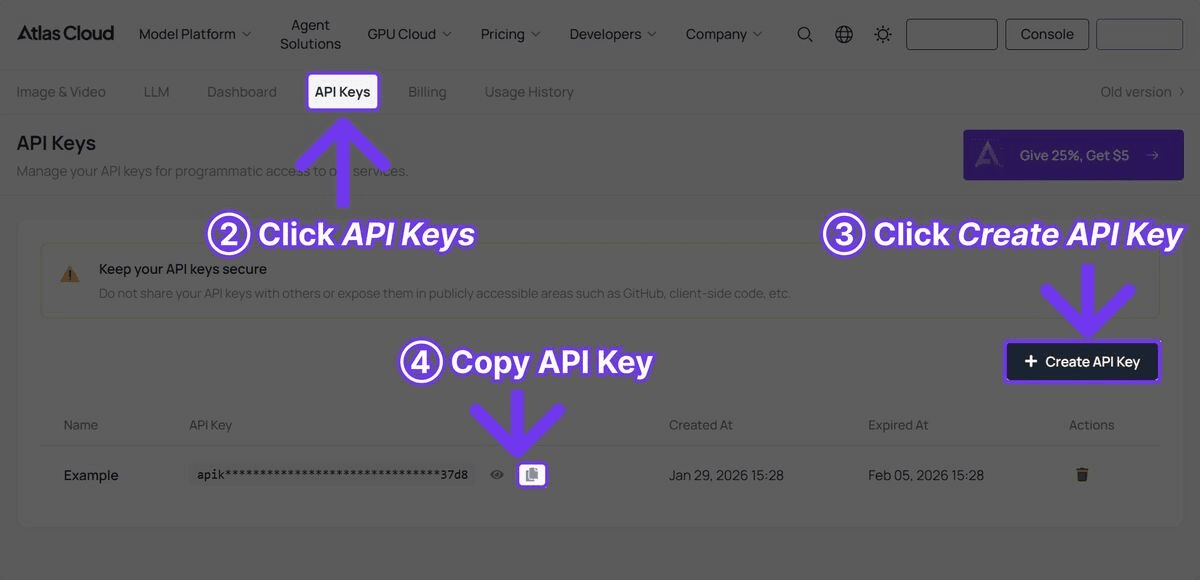
Step 1: Get Your API Key
Register an account at Atlas Cloud and go to the API Keys tab in the console.
Step 2: Generate Video with Native Audio
plaintext1```python 2import requests 3import time 4 5API_KEY = "your-atlas-cloud-api-key" 6BASE_URL = "https://api.atlascloud.ai/api/v1" 7 8response = requests.post( 9 f"{BASE_URL}/model/generateVideo", 10 headers={ 11 "Authorization": f"Bearer {API_KEY}", 12 "Content-Type": "application/json" 13 }, 14 json={ 15 "model": "shengshu/vidu-q3/text-to-video", 16 "prompt": "A street musician plays acoustic guitar on a cobblestone European alley at dusk, warm cafe lights in the background, gentle crowd ambiance, shallow depth of field", 17 "duration": 12, 18 "resolution": "1080p" 19 } 20) 21 22result = response.json() 23 24while True: 25 status = requests.get( 26 f"{BASE_URL}/model/prediction/{result['request_id']}/get", 27 headers={"Authorization": f"Bearer {API_KEY}"} 28 ).json() 29 if status["status"] == "completed": 30 print(f"Video: {status['output']['video_url']}") 31 break 32 elif status["status"] == "failed": 33 print(f"Generation failed: {status.get('error', 'Unknown error')}") 34 break 35 time.sleep(5) 36```
Step 3: Retrieve and Use
The response will contain a `video_url` field linking to the generated video file. Native audio is included in the output file by default -- no additional API call or parameters are needed. Smart Cuts metadata, when available, is included in the response as scene boundary timestamps that can be used for programmatic editing.
Vidu Q3 Prompt Tips
Effective prompting for Vidu Q3 requires attention to both visual and audio cues. The model responds well to scene descriptions that are rich in environmental detail, as this gives both the video and audio generation systems strong context to work with.
1. Describe the Soundscape
Because Vidu Q3 generates native audio, prompts that describe audio elements explicitly will produce better-synchronized results. Don't just describe what the scene looks like -- describe what it sounds like.
- Effective: "Rain falling on a tin roof of a countryside barn, thunder rumbling in the distance, occasional wind gusts rattling the door"
- Less effective: "A barn in a rainstorm"
2. Leverage the 12-Second Window
With 12 seconds of generation time, Vidu Q3 can handle slightly more complex narratives than shorter-duration models. A single prompt can include a beginning and an evolution -- not a full story, but a visual progression.
- "A paper boat drifts down a rain gutter, picks up speed as the water flow increases, and passes under a stone bridge into a wider stream"
- "Morning mist lifts slowly from a lake surface, revealing a wooden dock, a canoe tied to a post gently rocking"
3. Use Environmental Detail for Audio Context
The richer your environmental description, the more contextually accurate the generated audio will be.
- "Busy Tokyo crosswalk at night -- neon signs reflecting on wet pavement, car tires on wet road, distant train horn, pedestrian signal beeping"
- "Quiet library reading room -- pages turning, soft whispers, distant footsteps on hardwood floor, clock ticking"
4. Specify Camera Movement
Vidu Q3 handles standard cinematographic camera movements well. Being explicit about camera motion improves output consistency.
-
"Slow dolly forward through a dimly lit wine cellar, camera at eye level, passing rows of aged barrels"
-
"Overhead tracking shot following a cyclist along a coastal road, ocean on the left, cliff face on the right"
5. Keep Scene Complexity Manageable
While Vidu Q3 handles multi-element scenes, the best results come from prompts that focus on one primary subject with supporting environmental detail, rather than trying to choreograph multiple characters or actions simultaneously.
Example Prompts That Perform Well
Ambient content:
plaintext1``` 2A campfire crackles in a forest clearing at night, sparks drifting 3upward into a starry sky, crickets chirping, occasional owl hoot, 4warm orange light illuminating nearby pine trees 5```
Product showcase:
plaintext1``` 2A ceramic coffee mug filled with steaming black coffee sits on a 3wooden table by a window, morning rain visible outside, raindrops 4tapping on glass, steam curling upward in soft light 5```
Travel content:
plaintext1``` 2Slow aerial drone shot over a terraced rice paddy at golden hour, 3workers in the distance, water reflecting the sunset sky, insects 4buzzing, distant village sounds 5```
Vidu Q3 vs Competitors
The AI video generation landscape in 2026 offers several strong options. Here is a direct comparison of Vidu Q3 against the other leading models, all accessible through a single Atlas Cloud API key.
| Feature | Vidu Q3 | Veo 3.1 | Kling 3.0 | Seedance 2.0 | Hailuo 2.3 |
| Max Resolution | 1080p | Cinematic | Ultra HD | High Definition | 1080p |
| Max Duration | 12s | 8s | 10s | 15s | 8s |
| API Cost (Atlas Cloud) | $0.07/sec | $0.03/sec | $0.126/sec | $0.022/sec | $0.08/sec |
| Native Audio | Yes | Yes | Yes (5 languages) | Yes | No |
| Smart Cuts | Yes | No | No | No | No |
| Image-to-Video | Yes | No | Yes | Yes | Yes |
| Best Strength | Audio + Smart Cuts | Cinematic polish | Resolution | Multimodal control | Anime/illustration styles |
Where Vidu Q3 Wins
- Smart Cuts: No other model in this comparison offers automatic scene detection and segmentation. For teams building automated video editing pipelines, this feature alone can justify the model choice.
- Audio + duration combination: Vidu Q3 offers 12 seconds of native audio-video generation. Only Sora 2 matches this duration with audio, but at more than double the price ($0.15/sec vs. $0.07/sec).
- Image-to-video with audio: The ability to animate a static image with synchronized audio in one pass is a workflow that few competitors replicate as cleanly.
- Balanced pricing: At $0.07/sec, Vidu Q3 sits in a comfortable middle ground -- significantly cheaper than the premium models (Kling 3.0, Sora 2) while offering features that the budget models (Veo 3.1, Seedance 2.0) lack.
Where Competitors Have the Edge
- Cinematic quality: Veo 3.1 produces more polished, broadcast-grade visual output with superior color grading and depth of field. For premium brand content, Veo 3.1's visual quality is a step above.
- Resolution: Kling 3.0 supports ultra-high-definition output. For teams requiring the highest resolution deliverables, Kling remains the leader.
- Duration and price: Seedance 2.0 offers 15 seconds at $0.022/sec -- nearly 7x cheaper per second than Vidu Q3 and 3 seconds longer. For budget-conscious teams that don't need Smart Cuts, Seedance is the value leader.
- Stylized content: Hailuo 2.3 excels at anime and illustration styles, which is important for creative and stylized content production.
- Multimodal input: Seedance 2.0 accepts up to 9 images, 3 videos, and 3 audio files as reference material, providing unmatched creative control for complex projects.
Choosing the Right Model
The decision between these models depends on your workflow priorities:
- Choose Vidu Q3 when you need native audio with Smart Cuts for streamlined post-production, particularly for social media, ambient content, or automated video pipelines.
- Choose Veo 3.1 when cinematic visual quality is the top priority and budget is a key constraint.
- Choose Kling 3.0 when ultra-high-definition resolution is a hard requirement.
- Choose Seedance 2.0 when you need the longest clips at the lowest price with multi-reference creative control.
- Choose Hailuo 2.3 when anime or illustration-style content is the priority.
Who Should Use Vidu Q3?
Choose Vidu Q3 If:
- You build automated content pipelines. Smart Cuts provides programmatic scene segmentation that feeds directly into editing workflows. Combined with native audio, Vidu Q3 outputs clips that require minimal post-processing before distribution.
- Audio-visual synchronization matters. Ambient content, product demos with environmental sounds, travel videos, ASMR-style content -- any use case where sound and image need to be tightly coupled benefits from native audio generation.
- You produce social media content at scale. The 12-second duration covers most social media clip formats (Instagram Reels, TikTok, YouTube Shorts), and the native audio eliminates the need to source and sync separate audio tracks.
- Your team has limited post-production resources. Smart Cuts and native audio together remove two of the most time-consuming post-production steps: audio sourcing/syncing and manual scene detection/cutting.
- You need image-to-video with sound. Animating existing product photos or brand assets with synchronized environmental audio in one API call is a workflow that Vidu Q3 handles particularly well.
Consider Alternatives If:
- Budget is the primary concern. Seedance 2.0 at $0.022/sec and Veo 3.1 at $0.03/sec are both significantly cheaper. If Smart Cuts and tightly integrated audio are not critical requirements, the savings add up quickly at scale.
- You need the highest visual quality. Veo 3.1's cinematic polish and Kling 3.0's ultra-high-definition output both exceed Vidu Q3's visual fidelity for premium brand content.
- You need clips longer than 12 seconds. Seedance 2.0 offers 15-second generations, which may be necessary for certain content formats.
- Complex multi-reference workflows are required. Seedance 2.0's support for up to 12 reference files provides creative control that Vidu Q3 cannot match.
Ideal Use Cases for Vidu Q3
-
Social media content -- 12-second clips with native audio ready for immediate posting
-
Ambient and ASMR content -- environmental scenes with contextually accurate soundscapes
-
Automated video pipelines -- Smart Cuts metadata enables programmatic editing and assembly
-
E-commerce product videos -- image-to-video with environmental audio for product showcases
-
Travel and lifestyle content -- atmospheric scenes with synchronized natural sounds
-
Podcast and blog video assets -- quick ambient clips to supplement written or audio content
Frequently Asked Questions
How much does Vidu Q3 cost on Atlas Cloud?
Vidu Q3 costs $0.07 per second on Atlas Cloud. A full 12-second generation costs $0.84.
Does Vidu Q3 generate audio automatically?
Yes. Vidu Q3 generates synchronized audio as part of the video generation process. The audio is contextually aware -- it matches the visual content described in the prompt. Environmental sounds, ambient noise, and atmospheric audio are generated alongside the video in one pass. No separate audio API call is required.
What are Smart Cuts?
Smart Cuts is Vidu Q3's automatic scene detection feature. After generating a video clip, the model identifies logical scene boundaries and provides metadata about natural edit points within the footage. This metadata can be used for programmatic clip segmentation, making it easier to integrate Vidu Q3 output into automated editing pipelines.
Does Vidu Q3 support image-to-video?
Yes. Vidu Q3 accepts an image as input and generates a video that animates from that starting frame. This is useful for teams with existing product photography or brand assets who want to create video content without starting from scratch. The text prompt guides the animation direction and style.
How does Vidu Q3 compare to Veo 3.1?
Both models generate native audio, but they serve different primary use cases. Veo 3.1 excels in cinematic visual quality with superior color grading and depth of field at a lower price ($0.03/sec vs. $0.07/sec). Vidu Q3 offers longer duration (12s vs. 8s), Smart Cuts for automated editing, and image-to-video capability. Choose Veo 3.1 for premium visual quality at budget prices. Choose Vidu Q3 when you need Smart Cuts, longer clips, or image-to-video with audio.
Can I use Vidu Q3 for commercial projects?
Yes. Video generated through the Atlas Cloud API can be used for commercial purposes. As with all AI-generated content, teams should review the applicable terms of service and comply with regulations regarding disclosure of AI-generated media in their jurisdiction.
Verdict
Vidu Q3 occupies a distinctive position in the AI video generation landscape. It is not the cheapest model (Seedance 2.0 and Veo 3.1 are more affordable), not the highest resolution (Kling 3.0 leads there), and not the most visually polished (Veo 3.1 wins on cinematic quality). What it offers is a combination of features -- native audio generation and Smart Cuts -- that no other model currently bundles together. For teams where post-production efficiency matters as much as raw output quality, that combination is compelling.
The $0.07/sec price point through Atlas Cloud places it in a reasonable middle ground. Teams producing ambient content, social media clips, or building automated video pipelines will find that the elimination of separate audio sourcing and manual scene detection pays for the price premium over cheaper alternatives.
Evaluate Vidu Q3 alongside competing models using a single Atlas Cloud account and API key.1, Seedance 2.0, Kling 3.0, and Hailuo 2.3. Choose the model -- or combination of models -- that best fits your specific workflow and quality requirements.
Get Started Free on Atlas Cloud | View All Video Models | Read the API Docs
────────────────────────────────────────────────────────────





