When you paste a sensitive business proposal, an internal financial report, or deeply personal thoughts into those cloud-based AI text boxes, where does that data actually go? Is it truly safe?
Among the thousands of AI repositories on GitHub, Osaurus stands out for a surprisingly simple reason: it solves a problem that almost every AI user worries about, but few tools truly address—privacy. For Mac users looking to run AI without surrendering control of their data, Osaurus may be one of the most compelling open-source projects available today.It completely redefines the dynamic between humans and artificial intelligence by championing a strict, uncompromising philosophy: “Inference is all you need. Everything else can be owned by you.”
This article explores what makes Osaurus an industry-disrupting tool for macOS users, how it solves the most frustrating pain points of modern AI, and how its newly minted integration with Atlas Cloud delivers an unbeatable combination of top-tier cloud intelligence and ultimate local privacy.
Introducing Osaurus: The Localized AI Agent Framework Built Like a Vault
Osaurus is an open-source, local-first AI harness and agent orchestration framework designed exclusively for macOS. In the traditional AI paradigm, every critical layer of your interaction—your short-term memory, your historical context, your configured tools, and your personal identity—is stored on a third-party server managed by an AI vendor. Osaurus turns this model on its head. It acts as a local "brain" and an impenetrable shield, sitting squarely on your machine and mediating all interactions with AI models, whether they run on your local hardware or in the cloud.
The Underlying Technical Framework
Instead of relying on heavy, cross-platform web wrappers that hog system resources, Osaurus is engineered with a modern, high-performance architecture:
- Pure Native Swift Architecture: Written from scratch in Swift, Osaurus is tailor-made for Apple Silicon (M-series chips). It runs with a featherweight memory footprint, boasts incredibly snappy UI responsiveness, and integrates deeply with native macOS sub-systems without the baggage of Electron or heavy JavaScript runtimes.
- Zero-Knowledge Local Storage: By default, your conversation transcripts, personal configuration files, agent behaviors, and long-term memories are compiled and encrypted locally in a native SQLite database. Nothing leaves your Mac without your explicit permission.
- Isolated Virtualization Sandbox: When an AI agent needs to perform actual work—such as writing files, modifying code, or executing Shell commands—Osaurus spins up an isolated, micro-Linux virtual machine (VM) via Apple’s native Virtualization framework. The AI operates within this securely sandboxed environment, meaning it can test code and install dependencies without risking the integrity or safety of your host macOS file system.
- On-Device Privacy Filtering: Even when you choose to route tasks to heavy cloud-based models, Osaurus doesn't just send your text raw. It funnels your prompt through a local, specialized 1.5B parameter MoE privacy filter model running on Apple’s Neural Engine via MLX. This filter automatically catches, flags, and masks names, credit cards, API keys, and email addresses, substituting them with anonymous placeholders before transmission.
How Atlas Cloud Integrates with Osaurus: Setup and Core Advantages
While running open-source models completely offline (such as Qwen or Gemma via MLX) is ideal for basic tasks, complex software engineering, massive document cross-referencing, and deep reasoning still demand the sheer compute power of industrial cloud models.
With the framework's latest update, Osaurus has introduced native, out-of-the-box support for Atlas Cloud presets. This partnership marries the localized, secure wrapper of Osaurus with the elite, high-performance compute backend of Atlas Cloud.
Step-by-Step Configuration Method
Setting up Atlas Cloud within Osaurus takes less than a minute, requiring zero complex technical knowledge:
- Open the Osaurus management console and navigate to the AI Provider configuration screen.
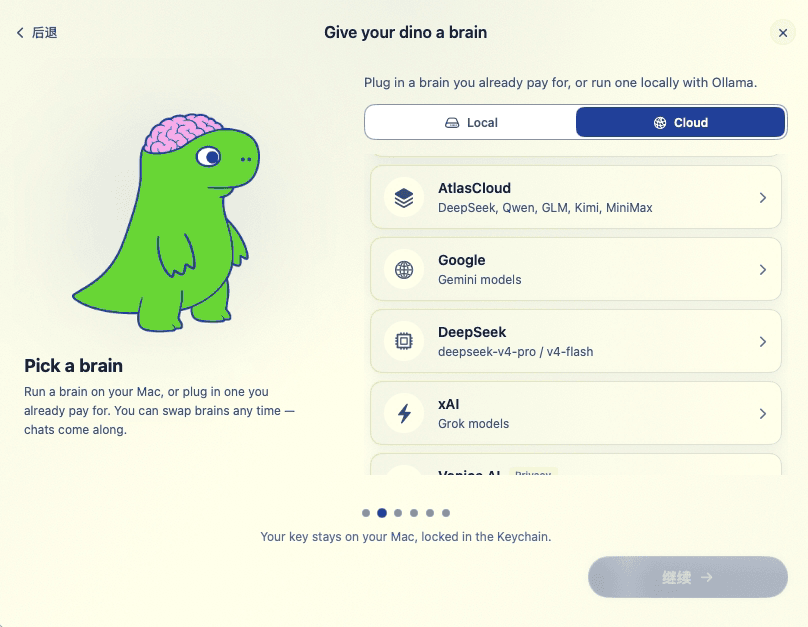
2.Select the pre-configured Atlas Cloud preset from the vendor roster.
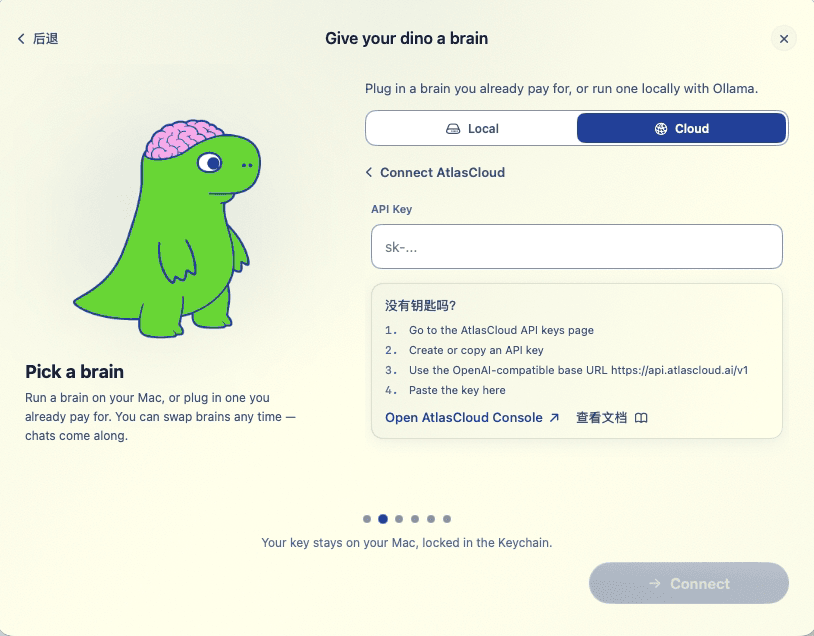
3.Click the provided shortcut link to open your Atlas Cloud Console dashboard, log into your account, and generate a secure API Key.
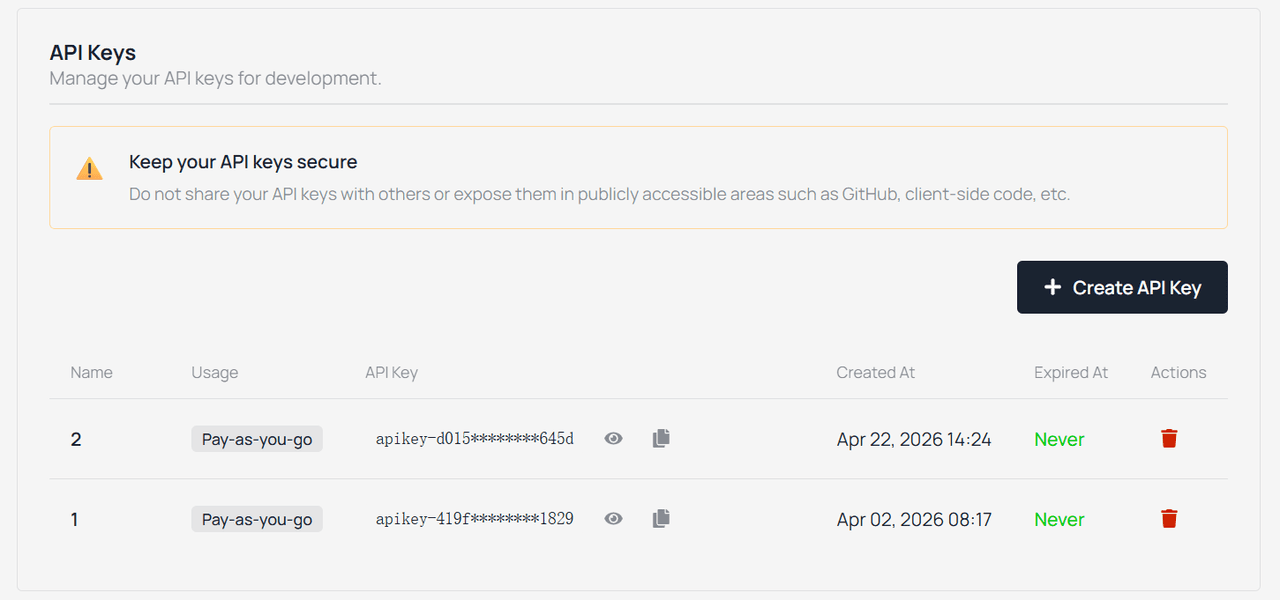
4.Paste the API Key back into the Osaurus credential field and click save.
Once saved, Osaurus instantly populates your agent dropdown menus with Atlas Cloud’s curated suite of state-of-the-art models, including Qwen 3.6, DeepSeek v4 pro, Kimi k2.6, GLM 5.1.
The Strategic Advantages of This Combination
Fully Optimized Tool Calling via OpenAI Legacy Protocol
Atlas Cloud routes requests through an ultra-compatible, optimized OpenAI Legacy API structure. In the world of autonomous agents, this is crucial. When an Osaurus agent determines it needs to read a local file or run a script, it relies on incremental tool calling. Because Atlas Cloud handles streaming tool execution natively and flawlessly, the agent loop runs without weird communication hiccups or format drops, resulting in fluid, rapid-fire automation.
Unified Access to Elite Open-Weight Models
Instead of managing five separate developer accounts, handling multiple billing platforms, and tracking diverse API endpoints, Atlas Cloud gives Osaurus users a single, streamlined gateway. You can switch models instantly depending on the task at hand: dispatch Qwen3.6 to refactor your codebase, swap to DeepSeek-V4 for complex analytical thinking, or invoke Kimi for dense, long-context research parsing.
The Ultimate Privacy-Preserving Cloud Pipeline
When you pair Osaurus with Atlas Cloud, you experience a pristine data security workflow:
plaintext1[User Raw Input] 2 │ 3 ▼ (Stays Local on Mac) 4[Osaurus Privacy Filter Model] ──► Scrubs Name, Keys, Emails with [PLACEHOLDERS] 5 │ 6 ▼ (Encrypted Transit via api.Atlas Cloud.ai) 7[Atlas Cloud Secure API Gateway] ──► Computes Logic via Premium LLMs 8 │ 9 ▼ (Returns Streamed Response) 10[Osaurus Local UI] ───────────────► Restores Original Values On-The-Fly 11 │ 12 ▼ 13[Perfect, Uncompromised Output]
This hybrid workflow gives you the ultimate best of both worlds. You get the raw analytical horsepower of world-class cloud models without handing over unencrypted corporate assets or identifying information to external servers.
Frequently Asked Questions (FAQ)
Q1: Is the Osaurus framework free to use?
A: Yes, completely. Osaurus is a fully open-source project distributed under the highly permissive MIT License. Downloading the application, utilizing the local sandboxing features, orchestrating agents, and running offline models via MLX or Ollama costs absolutely nothing. You only pay for the cloud tokens you actually consume through your service providers, like Atlas Cloud, with zero markup from the app itself.
Q2: Do I need a high-end, maxed-out Mac Studio to run this setup?
A: Not at all. Because Osaurus is compiled natively in Swift, its idle resource usage is remarkably low. If you choose to offload the heavy model computation to Atlas Cloud's server array, even a base-model M1 MacBook Air can run complex autonomous agent workflows perfectly. High amounts of unified memory are only necessary if you intend to load heavy 70B+ models completely offline on your own local device.
Q3: Why should I use Osaurus instead of just going to an LLM web interface?
A: Web interfaces are locked inside your browser tab; they cannot see your local files, interact with your development environment, or remember details across different platforms. Osaurus is a comprehensive local workflow engine. It gives you an integrated Linux sandbox, links directly to your project directories, hooks into various tools via the Model Context Protocol (MCP), and manages a tailored local memory vault. It changes the AI from an external counselor into a deeply integrated digital coworker.
Q4: How stable and fast is the network connection when using Atlas Cloud inside Osaurus?
A: It is lightning fast and highly stable. Osaurus features dedicated, hardcoded routing paths optimized specifically for api.Atlas Cloud.ai/v1. Because the endpoint strictly honors streaming text and structured tool-calling syntax, responses begin printing to your screen almost instantly, providing a premium, production-ready developer experience.





