


Carly from iCarly struts across a floodlit lawn, rapping YoungBoy's verse while a quad bike pops a wheelie behind her. Cut to a blue-lit studio, then a field of golden grass, where Sam takes the close-up. Neither of them was ever on that set. The clip has 2.8 million TikTok plays, and its top comment, liked more than 77,000 times, says Freddy must be the one holding the camera.
That is the Bandit AI trend: AI recasts the 2019 "Bandit" video by Juice WRLD and YoungBoy Never Broke Again, shot for shot. A wave of tutorial posts promises a free CapCut template for it. We pulled those templates apart, traced the trend back to its first posts and rebuilt the clip with two kittens. Here is what actually works.
Key Takeaways
- The Bandit AI trend recasts the 2019 Juice WRLD and YoungBoy music video with new faces, shot for shot.
- An iCarly version posted on November 19, 2026 turned it into a trend with 2.8 million TikTok plays.
- The CapCut template behind most "how to" tutorials we checked lists no AI feature, so it cannot swap in a face.
- Two photos, the trend clip and a shot-by-shot prompt in the Atlas Cloud video generator rebuild it with Kling Video 4.0.
- Post it with the trend sound inside TikTok and switch on the AI-generated label.
What Is the Bandit AI Trend?
Trend clips borrow the same 15 seconds: YoungBoy's verse from the official music video, 1:48 to 2:03, from the floodlit lawn to the blue studio close-up. The camera moves, the cuts and the sets stay. Only the two rappers change.
The song came out on October 4, 2019, with a video directed by Cole Bennett for Lyrical Lemonade. It was Juice WRLD's last single as a lead artist released in his lifetime, and the official video has passed 525 million views on YouTube.
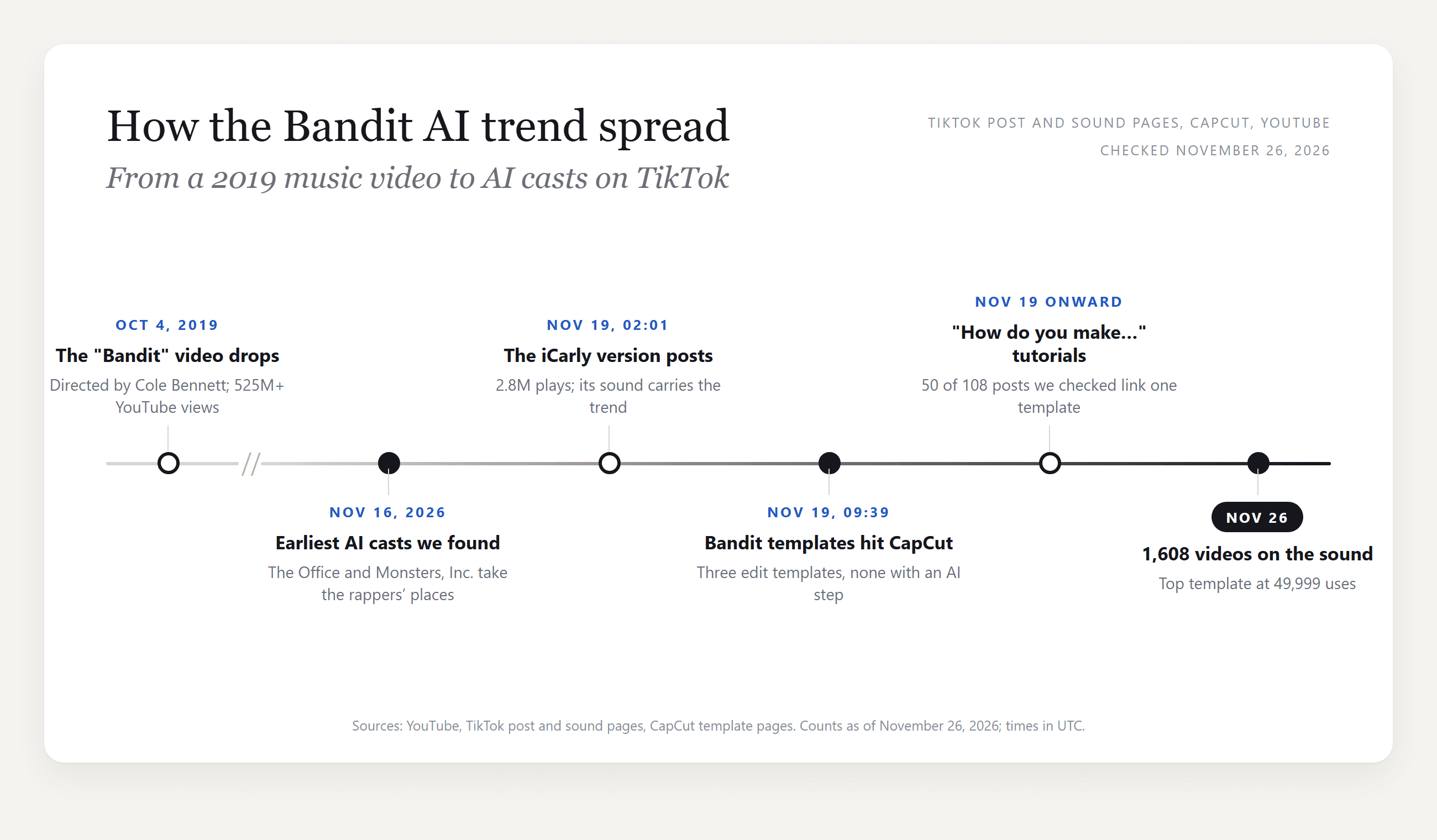
The first AI versions we found went up on November 16, 2026. One TikTok creator put Michael Scott and Dwight Schrute from The Office in both rappers' places, and another used Boo and Sulley from Monsters, Inc. Three days later, @novarunee posted the iCarly version, and that is the one that spread. Its original sound now sits under 1,608 videos.
iCarly Bandit, The Office and the Casts That Went Viral
The joke lands because the cast is the last group you would picture on YoungBoy's lawn. These are the versions behind the biggest posts we opened, with plays as of November 26, 2026:
| Cast | Who takes whose place | First seen | Plays (top post) |
|---|---|---|---|
| iCarly: Carly and Sam | Both take YoungBoy's shots; Juice WRLD stays in his | November 19 | 2.8 million |
| Despicable Me: Agnes and a pink fairy | Both rappers replaced, every scene turned 3D-animated | November 22 | 540,700 |
| Monsters, Inc.: Boo and Sulley | Both rappers replaced, every scene turned 3D-animated | November 16 | 83,100 |
| The Office: Michael Scott and Dwight Schrute | Both rappers replaced | November 16 | 62,500 |
Cartoon casts pull the whole video into their own style. We went the other way below and cast two real kittens, filmed at their own height.
How to Do the Bandit AI Trend With Two Photos
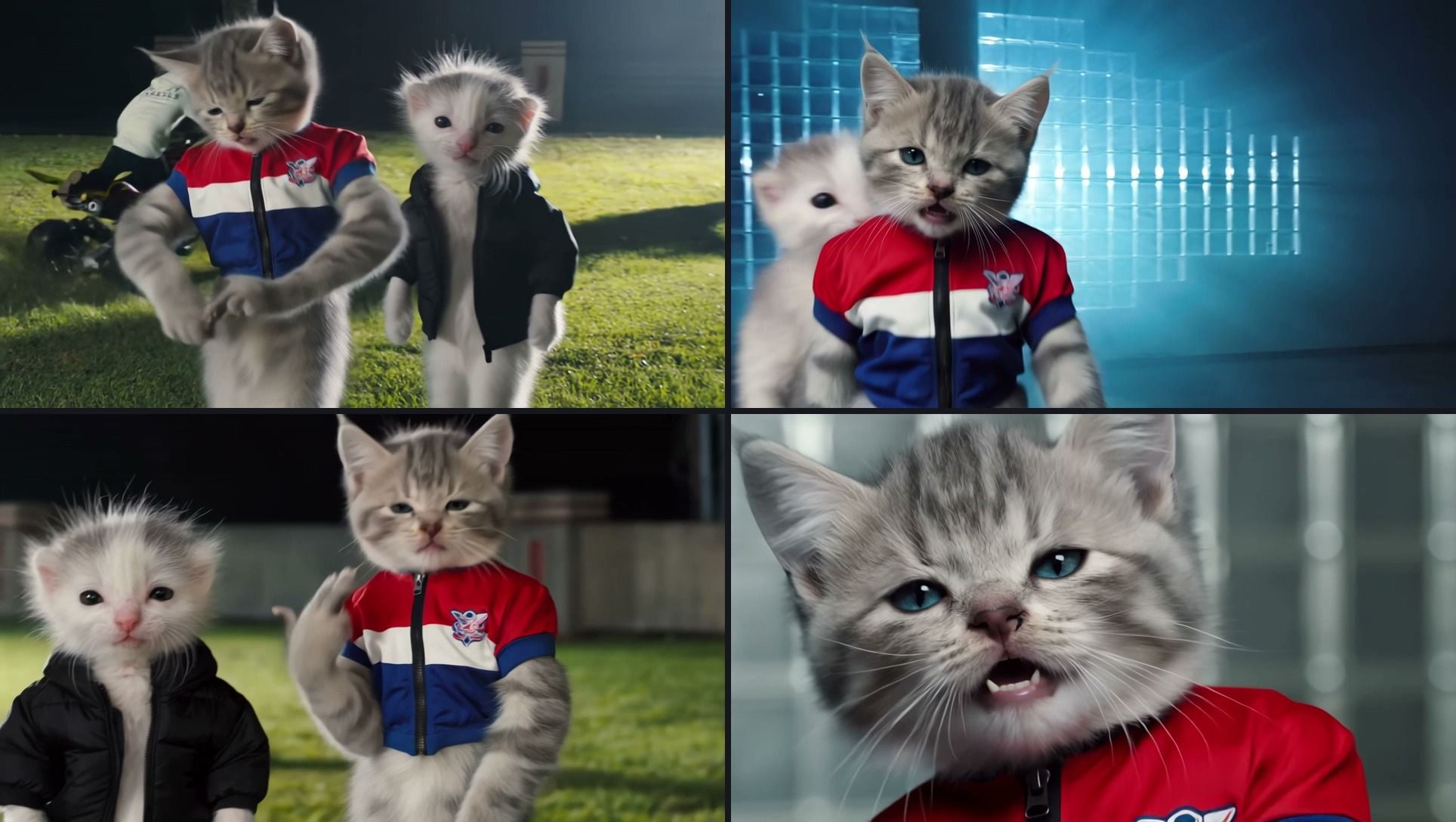
Two photos and the trend's 15 seconds are all it takes. The clip brings every set, cut and camera move, one photo takes the lead rapper's place, the other takes the partner's, and a shot list tells the model who goes where. Here is our run on Atlas Cloud, with a gray tabby kitten as the lead and a white kitten as his partner:
Audio: the original 15 seconds of "Bandit" by Juice WRLD and YoungBoy Never Broke Again, laid back over the clip after generation.
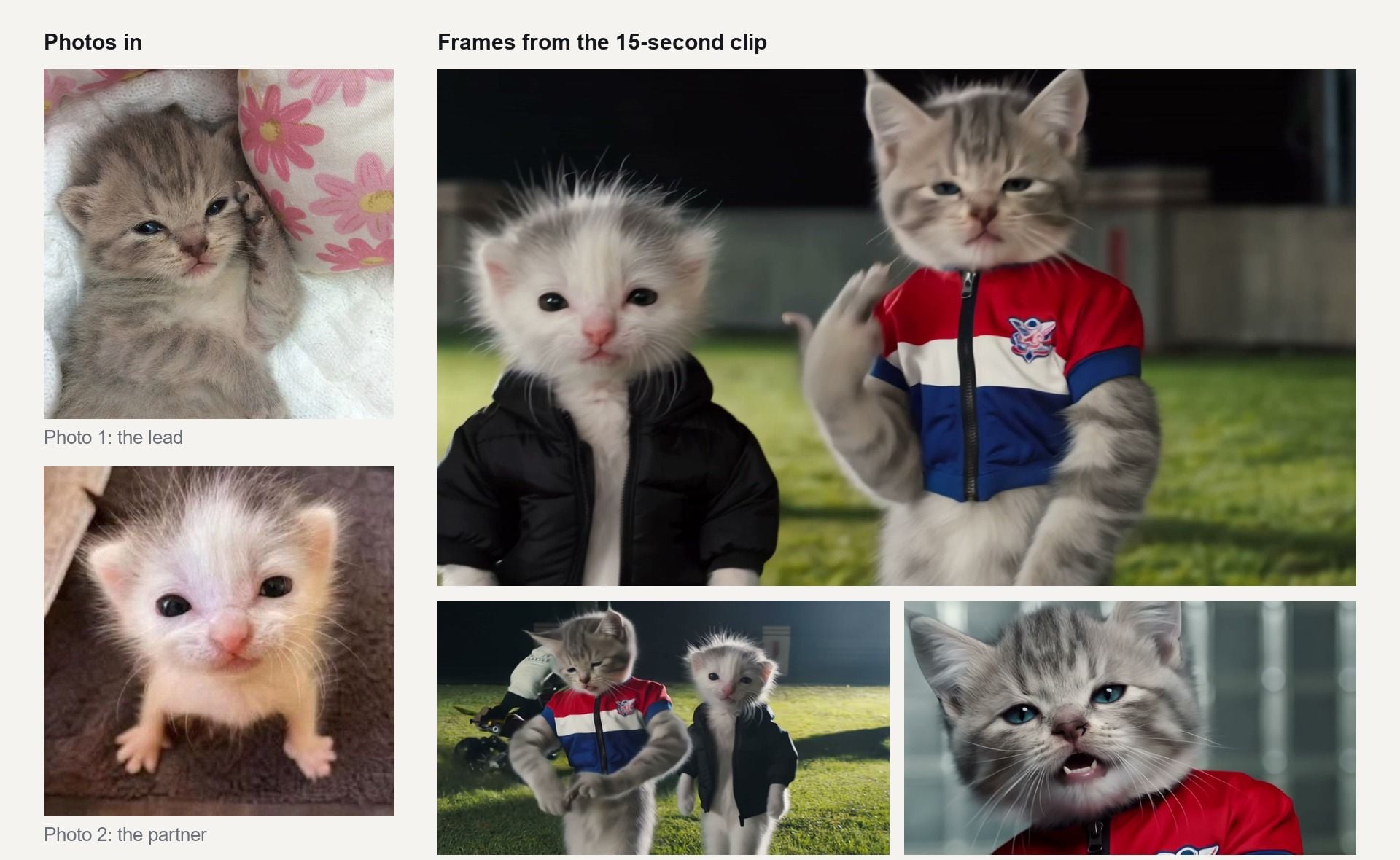
The model is Kling Video 4.0 in its video-edit mode. It keeps the sets, cuts and camera moves of the clip you upload and swaps in the subjects from your photos. Everything runs in the video generator, on the Video Edit tab.
In our run, both kittens kept their markings from the first shot to the last, the tabby's mouth moves through the studio close-ups, and the gold sketch shot came out as two kitten outlines.
Method 1: Cast Both Rappers in the Atlas Cloud Video Generator
Follow the numbers on the screenshot:
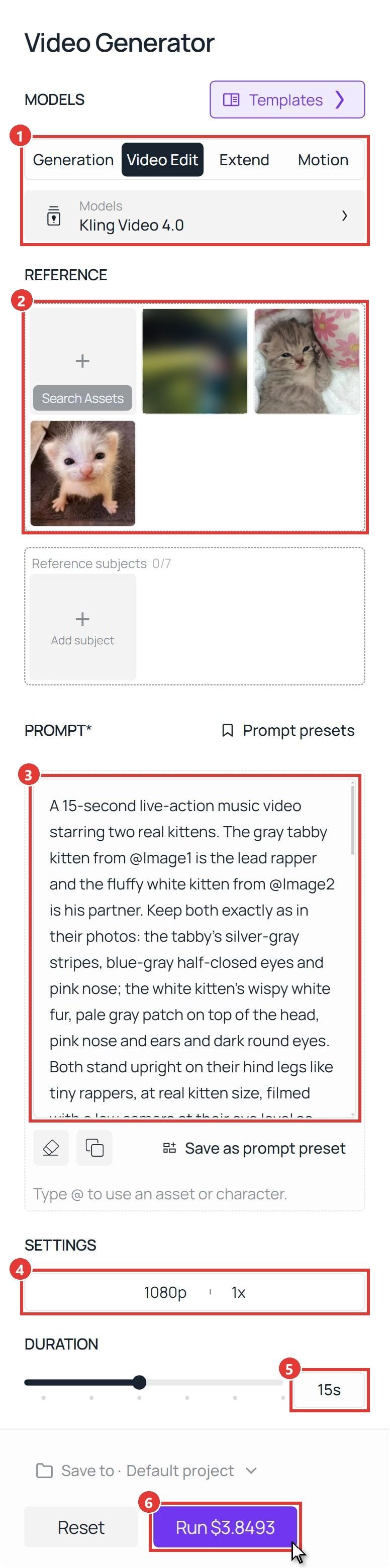
- Model: open Video Edit and pick Kling Video 4.0.
- Video to edit: upload the clip first (the official video from 1:48 to 2:03, sound muted), then the lead's photo, then the partner's. Upload order makes the photos @Image1 and @Image2, and Reference subjects can stay empty. The Jingle Bell Brazil dance guide tags photos the same way.
- Prompt: paste the prompt below. If a tag stays plain text, type @ in the box and pick the file.
- Resolution: 720p for a first take, 1080p for the final. The output keeps the clip's 16:9 frame.
- Duration: set 15 seconds.
- Run. The clip shows up in the panel on the right.
plaintext1A 15-second live-action music video starring two real kittens. The gray tabby kitten from @Image1 is the lead rapper and the fluffy white kitten from @Image2 is his partner. Keep both exactly as in their photos: the tabby's silver-gray stripes, blue-gray half-closed eyes and pink nose; the white kitten's wispy white fur, pale gray patch on top of the head, pink nose and ears and dark round eyes. Both stand upright on their hind legs like tiny rappers, at real kitten size, filmed with a low camera at their eye level so they fill the frame. The lead wears a tiny red, white and blue racing jacket (a tiny white racing jacket in shots 6 and 7); the partner wears a tiny open black puffer jacket. No humans appear except one distant quad bike rider whose face is never shown. 2 3Shot 1 (0-1.9s): a night lawn under a bright floodlight, wide low shot. The lead struts toward the camera, waving his front paws like he is rapping; the partner waddles behind him on the right; quad bikes parked in the background. 4Shot 2 (1.9-4.4s): hard cut to a dark studio with glowing blue glass-block light panels and haze. The lead raps to the camera in a medium shot as the camera slowly pushes in, mouth opening and closing; near the end the partner pokes his head in over the lead's shoulder. 5Shot 3 (4.4-5.4s): hard cut to a warm gold-brown backdrop. The two kittens stand side by side, then turn into gold hand-drawn line sketches. 6Shot 4 (5.4-7.3s): hard cut to the night lawn. A rider in a helmet pops a wheelie on a green quad bike far from the camera. 7Shot 5 (7.3-9.7s): hard cut to a low concrete wall at night. The lead raps to the camera and waves one front paw; the partner sits on the left, looking cool. 8Shot 6 (9.7-12.3s): hard cut to a field of tall golden grass at kitten height. The lead raps in the white racing jacket as the camera moves in. 9Shot 7 (12.3-15s): hard cut back to the blue studio, a close-up of the lead's face rapping straight into the lens, whiskers twitching. 10 11Photorealistic, real fur texture, cinematic music video lighting, shallow depth of field. No text, no captions, no logos, no watermark.
Video-edit mode swaps only what the prompt names, so the quad bike riders in the background stay as they are in the clip.
Casting yourself and a friend instead? Use this version with your two photos:
plaintext1A 15-second live-action music video starring two friends. The person from @Image1 is the lead rapper and the person from @Image2 is the partner. Keep each face, hairstyle, skin tone and age exactly as in their photo, also with the mouth open. The lead wears a red, white and blue racing jacket over a white T-shirt (a white racing jacket in shots 6 and 7); the partner wears an open black puffer jacket over a black T-shirt. No other people appear except one distant quad bike rider whose face is never shown. 2 3Shot 1 (0-1.9s): a night lawn under a bright floodlight, wide shot. The lead walks toward the camera rapping with big hand gestures; the partner follows on the right; quad bikes parked in the background. 4Shot 2 (1.9-4.4s): hard cut to a dark studio with glowing blue glass-block light panels and haze. The lead raps to the camera in a medium shot as the camera slowly pushes in; near the end the partner leans in over the lead's shoulder. 5Shot 3 (4.4-5.4s): hard cut to a warm gold-brown backdrop. The two stand side by side, then turn into gold hand-drawn line sketches. 6Shot 4 (5.4-7.3s): hard cut to the night lawn. A rider in a helmet pops a wheelie on a green quad bike far from the camera. 7Shot 5 (7.3-9.7s): hard cut to a low concrete wall at night. The lead raps to the camera and waves one hand; the partner stands on the left. 8Shot 6 (9.7-12.3s): hard cut to a field of tall golden grass. The lead raps in the white racing jacket as the camera moves in. 9Shot 7 (12.3-15s): hard cut back to the blue studio, a close-up of the lead rapping straight into the lens. 10 11Photorealistic, cinematic music video lighting, shallow depth of field. No text, no captions, no logos, no watermark.
Method 2: Run the Same Prompt Through the Kling Video 4.0 API
Making a version for every pair of friends in the group chat? The API takes the same clip, the same two photos and the same prompt.
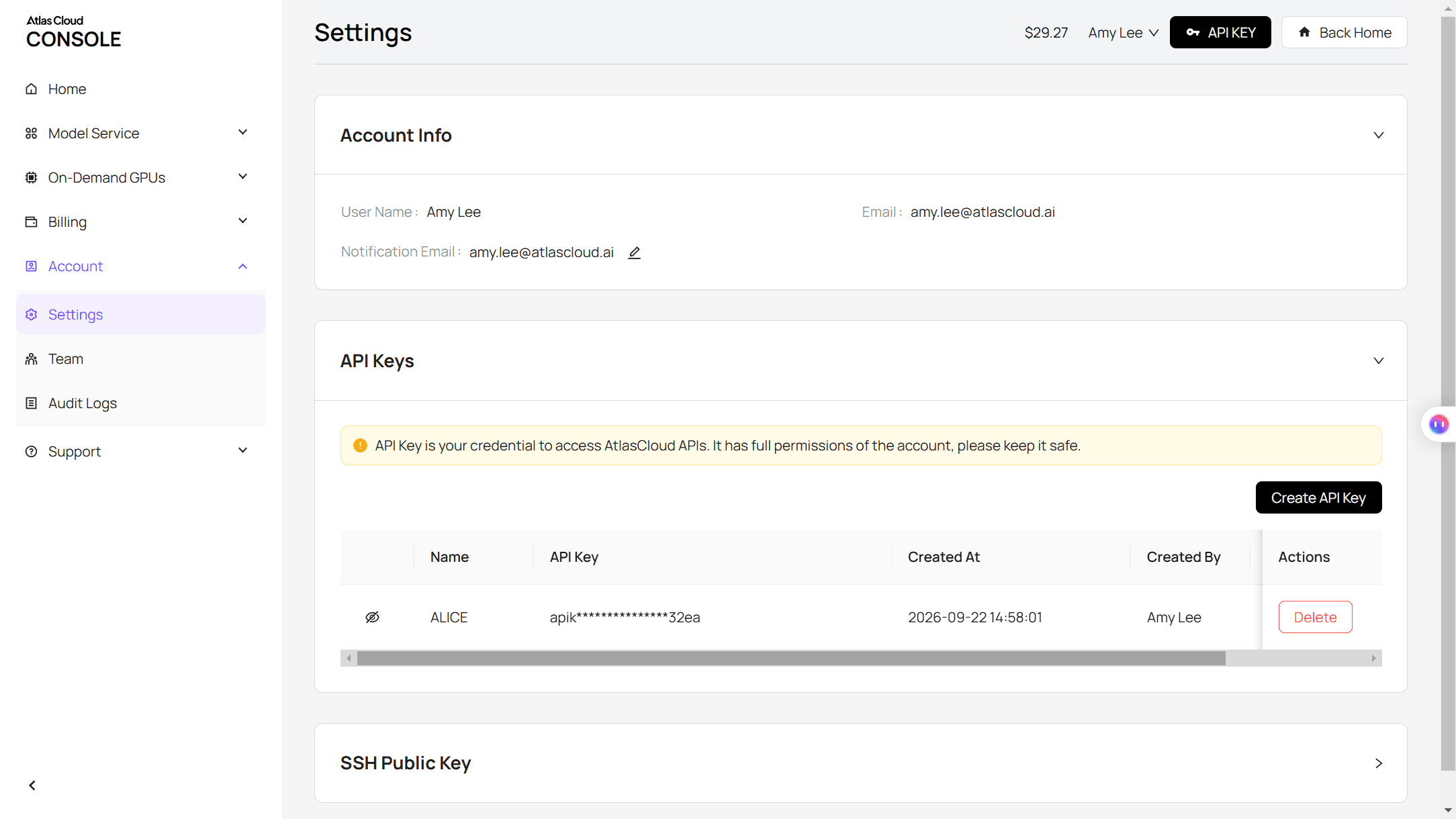
Step 1: Create an API key. In the console, open Settings and create a key under API Keys.
Step 2: Check the request format. The API docs cover authentication, and the API tab on the Kling Video 4.0 video-edit model page lists every field.
Step 3: Send the request and poll. The clip goes in video and the two photos in reference_images, all as public URLs. In API prompts, write the tags as @video_1, @image_1 and @image_2:
plaintext1curl -X POST https://api.atlascloud.ai/api/v1/model/generateVideo \ 2 -H "Authorization: Bearer $ATLASCLOUD_API_KEY" \ 3 -H "Content-Type: application/json" \ 4 -d '{ 5 "model": "kwaivgi/kling-v4.0/video-edit", 6 "prompt": "<paste the Bandit prompt here, tagged @image_1 and @image_2>", 7 "video": "https://your-cdn.com/bandit-clip.mp4", 8 "reference_images": [ 9 "https://your-cdn.com/lead.jpg", 10 "https://your-cdn.com/partner.jpg" 11 ], 12 "resolution": "1080p", 13 "duration": 15 14 }'
Poll the returned prediction ID until the status reads completed, then download the clip from the outputs array:
plaintext1curl https://api.atlascloud.ai/api/v1/model/prediction/<prediction_id> \ 2 -H "Authorization: Bearer $ATLASCLOUD_API_KEY"
The endpoint and the key stay the same across every video model on Atlas Cloud. Trying another one means changing the model string.
The Bandit CapCut Template: What It Really Does
Search for a Bandit CapCut template and you land on posts titled "How do you make the Bandit YB and Juice WRLD AI trend?" They open on someone else's AI clip, often the iCarly one, then film a phone tapping through to a CapCut template. Of the 108 Bandit posts we checked, 50 link the same one: "trend" by Beyond726.
| Template | Creator | Uses on November 26 | Slots and length | What the preview shows | AI feature listed |
|---|---|---|---|---|---|
| trend | Beyond726 | 49,999 | 1 slot, 42.7 s | The original music video, unchanged | No |
| Noiain'tcrazyyb | Iris735 | 2,518 | 4 slots, 13.2 s | The iCarly AI clip, reposted | No |
| Video | NiNi9540 | 1,021 | 3 slots, 21.5 s | The Office AI clip, reposted | No |
A CapCut template page lists the editing features the template is built from. The one-photo AI templates we checked list an AI painting feature: the WWE SmackDown template behind another November trend does, and so does the Snowman template. The Beyond726 template lists clipping, a filter and a text template, nothing else.
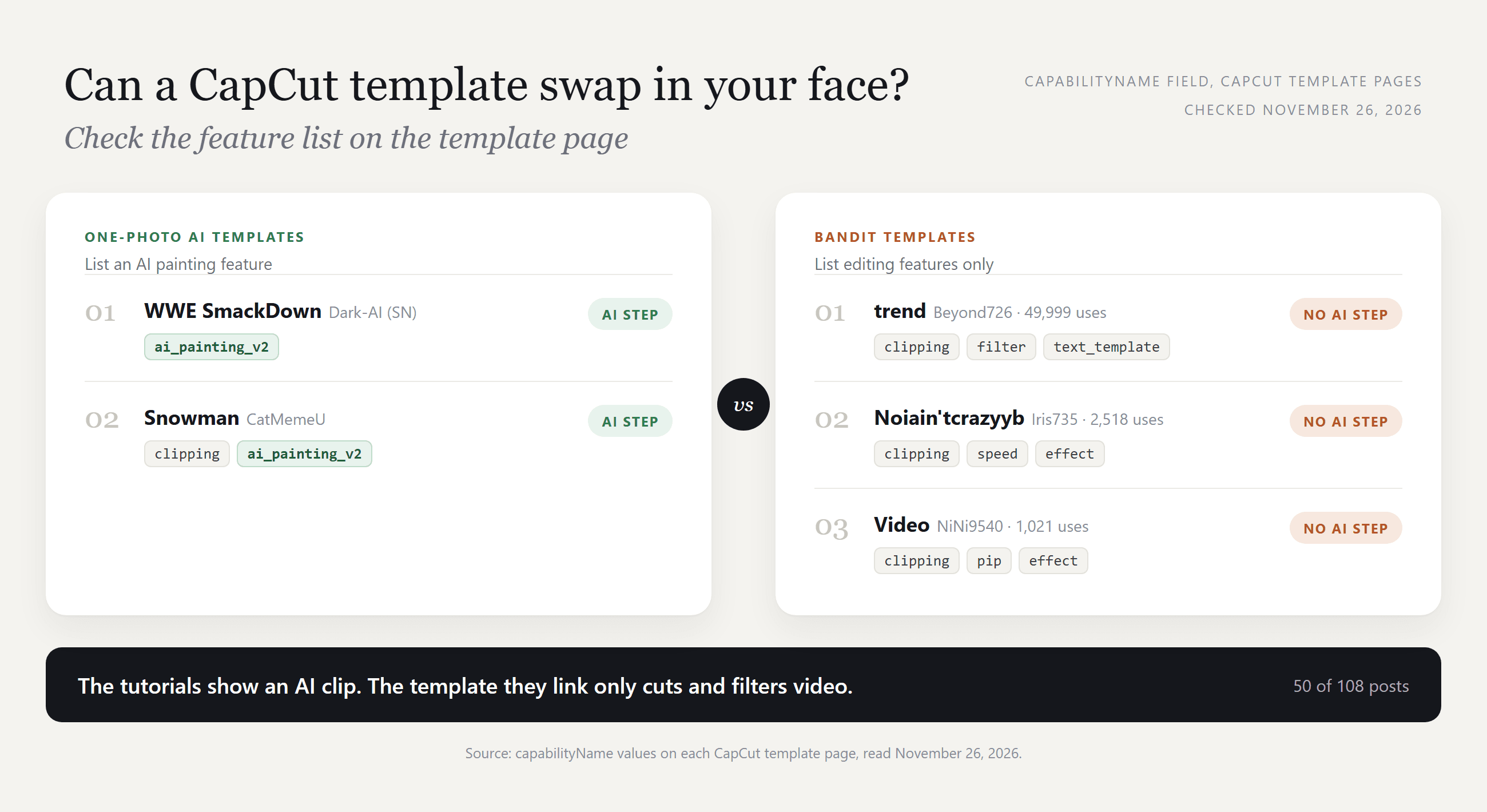
With no AI feature listed, none of the three can put your face into the clip that sold it. Many of the tutorial posts carry #capcutpioneer, the tag of CapCut's Pioneer creator program.
Bandit YB and Juice WRLD AI Trend Tips Before You Post
Run through these before you upload:
| Check | Why it matters |
|---|---|
| One subject per photo, face toward the camera | Each photo fills one role, and the studio close-ups put the face front and center |
| Lead first, partner second | Upload order decides who wears the racing jacket |
| Mouth visible in the photo | The lead raps in most shots, so a covered mouth leaves the model guessing |
| Add the sound inside TikTok | The model returns its own AI audio, not the song, and the trend's original sound from the iCarly post is in TikTok's sound library |
| Turn on the AI-generated label | The clip restages a real music video, so viewers should know it is AI |
Would you rather build an original track around your own character? Start with how to make an AI music video.
Frequently Asked Questions
What song is in the Bandit AI trend?
"Bandit" by Juice WRLD and YoungBoy Never Broke Again, from 2019. Many posts run on the original sound from the iCarly post, so pick that sound in TikTok when you upload and your clip joins the same feed.
Is the iCarly Bandit video real?
No. It is an AI edit of the official music video, and the creator tagged the post as AI-generated on TikTok. Plenty of commenters still play along as if it were real, which is why a clear AI label matters when you post your own.
Can I do the Bandit AI trend with one photo?
Yes. The iCarly original recast only YoungBoy's shots. With one photo, drop @Image2 from the prompt and describe the partner as an original character instead, with his own face and the same black jacket. That keeps the duo framing without copying a real artist's face.
Can I put my pets in the Bandit AI trend?
Yes. Our lead and partner are two kittens. Describe each pet's fur and markings in the prompt as well as uploading the photo, and ask for an upright pose in tiny jackets so they rap like the original. For real people, use your own photo or a friend who said yes, never a celebrity or a stranger.
How much does a 15-second Bandit AI video cost on Atlas Cloud?
With the 15-second clip and two photos, a 15-second 720p run costs about $2.57, which is 30% off the $3.67 list price, and 1080p costs about $3.85 against a $5.50 list price, as of November 26, 2026. The clip's own seconds count toward the price, so trim it to the 15 seconds you need. Discounts change, and the Run button shows the exact price before you generate.
Conclusion
The trend runs on contrast: a sitcom cast, a cartoon kid or a pair of kittens doing YoungBoy's verse on his own lawn. The shots stay the same from post to post, and that is exactly why a shot-by-shot prompt can rebuild them.
To do the Bandit AI trend yourself, skip the template that only re-cuts the original. Pick two clear photos, upload them with the 15-second clip, paste the shot list and add the trend sound in TikTok before you post.







