API 키
Atlas Cloud API 인증을 위한 API 키 생성 및 관리
모델 API 키(apikey-...)는 모델 호출과 Billing Public API 조회에 사용합니다. 프로젝트 자동 생성에는 Management API Key를 사용하세요.
API 키 생성
- API Keys로 이동
- API 키 생성을 클릭합니다
- 새 API 키를 복사하여 안전하게 보관합니다
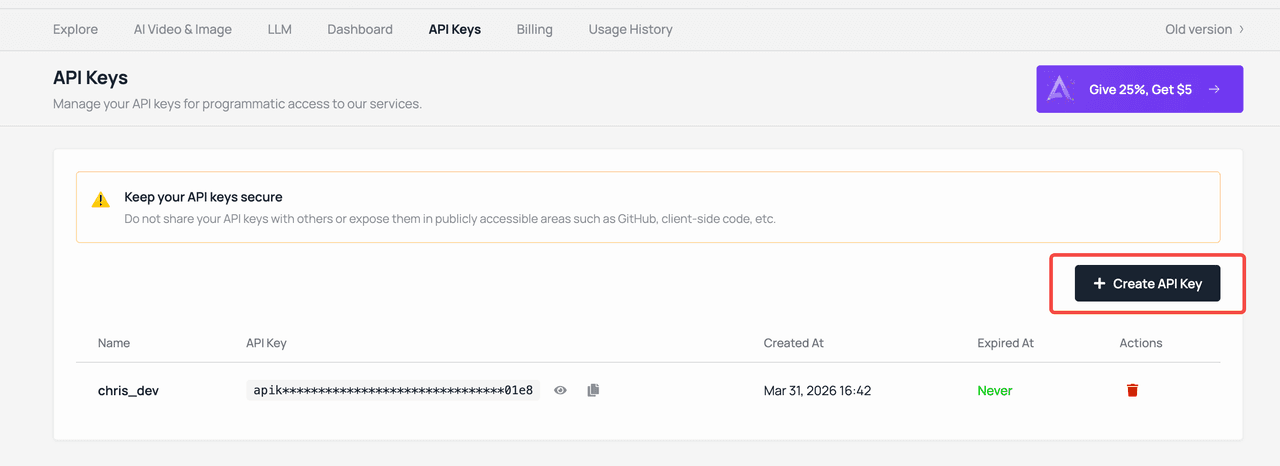
API 키는 생성 시 한 번만 표시됩니다. 분실한 경우 새로 생성해야 합니다.
API 키 사용하기
모델 호출 시 Authorization 헤더에 모델 API 키를 넣으세요:
Authorization: Bearer your-api-keyLLM / 채팅 완성 (OpenAI 호환)
기본 URL: https://api.atlascloud.ai/v1
from openai import OpenAI

client = OpenAI(
    api_key="your-api-key",
    base_url="https://api.atlascloud.ai/v1"
)

response = client.chat.completions.create(
    model="deepseek-v3",
    messages=[{"role": "user", "content": "Hello!"}]
)
이미지 / 동영상 생성
기본 URL: https://api.atlascloud.ai/api/v1
import requests

response = requests.post(
    "https://api.atlascloud.ai/api/v1/model/generateImage",
    headers={"Authorization": "Bearer your-api-key"},
    json={
        "model": "seedream-3.0",
        "prompt": "A cat sitting on a rainbow"
    }
)
미디어 업로드
import requests

response = requests.post(
    "https://api.atlascloud.ai/api/v1/model/uploadMedia",
    headers={"Authorization": "Bearer your-api-key"},
    files={"file": open("photo.jpg", "rb")}
)

# 생성 작업에 사용할 임시 URL을 반환합니다
print(response.json())
서드파티 도구 연동
Atlas Cloud API 키는 OpenAI 호환 도구나 애플리케이션에서 사용할 수 있습니다. 주요 옵션:
| 도구 | 유형 | 설정 |
|---|---|---|
| Chatbox | 데스크톱 앱 | API Host를 https://api.atlascloud.ai/v1로 설정 |
| Cherry Studio | 데스크톱 앱 | 커스텀 OpenAI 제공업체로 추가 |
| OpenWebUI | 웹 UI | OpenAI 호환 엔드포인트 설정 |
| Cursor | IDE | MCP 서버를 통해 사용 |
| Claude Code | CLI | MCP 서버 또는 Skills를 통해 사용 |
서드파티 도구 설정 시:
- API Host / 기본 URL:
https://api.atlascloud.ai/v1(/v1접미사 필수) - API 키: Atlas Cloud API 키
- 모델 이름: 모델 라이브러리의 모든 모델
키 관리
계정 설정에서 API 키를 관리할 수 있습니다:
- 생성 — 필요에 따라 새 API 키 생성
- 삭제 — 더 이상 필요 없거나 유출된 API 키 폐기
- 사용량 조회 — 각 키에 연관된 API 사용량 및 비용 모니터링
요청 제한
API 요청 제한은 계정 등급 및 모델 유형에 따라 다릅니다. 요청 제한 오류(429 Too Many Requests)가 발생하면 다음을 고려하세요:
- 요청 간 짧은 대기 시간 추가
- 지수 백오프를 사용한 재시도
- 더 높은 제한을 위해 [email protected]에 문의
Last updated on