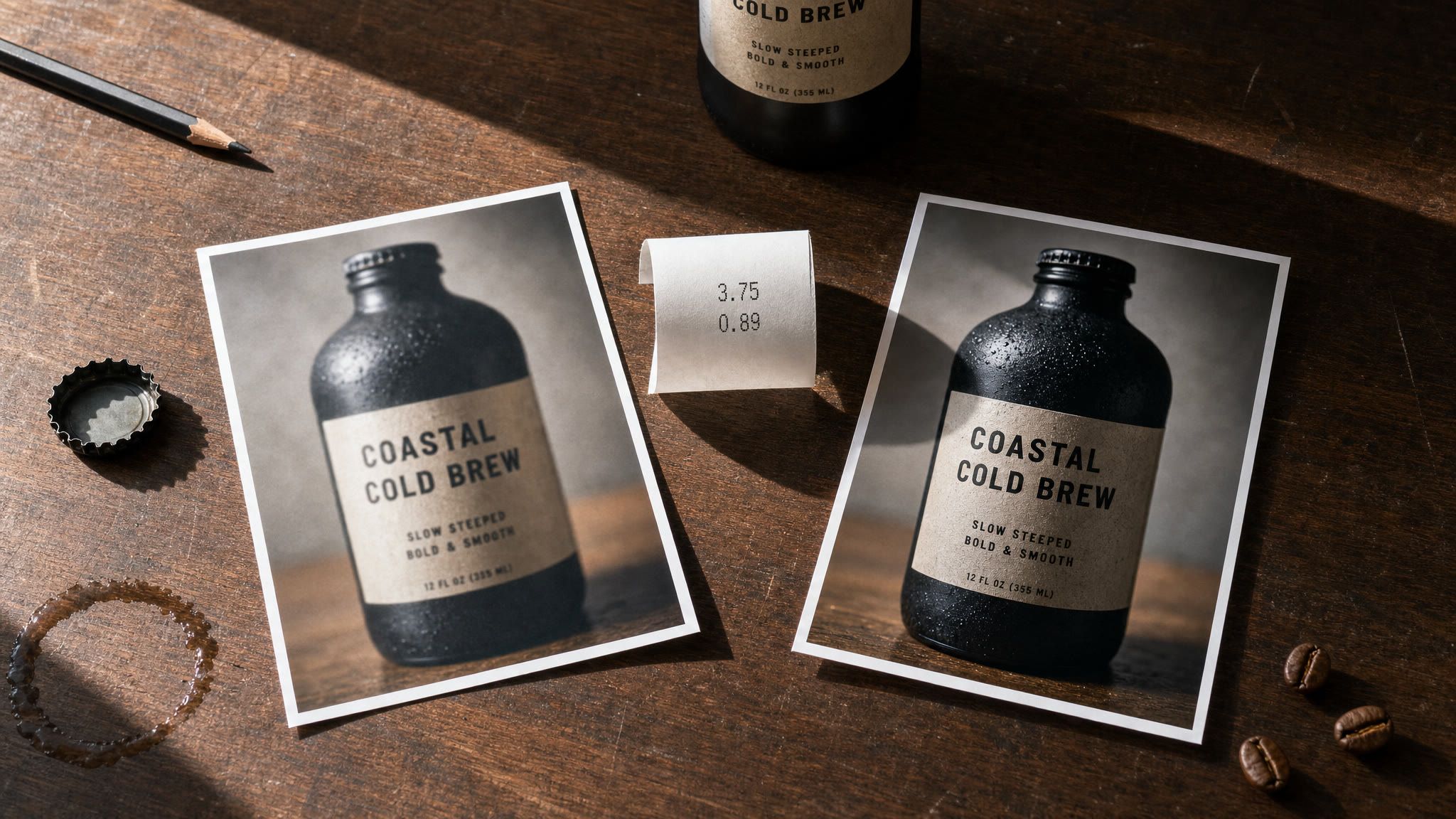
Two prints of the same cold brew bottle shot lying on a cafe counter, one soft and one sharp, with a receipt between them
Two prints of the same shot, one soft and one sharp. On MiniMax H3 that gap is not a quality slider. Generated with openai/gpt-image-2/text-to-image.
I submitted the same prompt twice. The only thing I changed was one dropdown: 768P, then 2K.
The first run cost $0.40 and came back in 130 seconds. The second cost $0.56 and took 181 seconds. Then I put the two frames side by side and something felt wrong. The bottle was still there. The label was still there, small print and all. But the counter had changed from warm wood to pale stone, a shelf had appeared in the background behind the barista, the condensation on the glass was suddenly everywhere, and the light had shifted colour.
I had not saved money on a draft. I had shot two different films.
This is not a bug. It is what "2K" actually means on H3, and once you understand it the standard advice everybody gives, draft cheap then finish expensive, quietly falls apart. Below is every number from that test, plus the one change that makes cheap drafting work.
Key takeaways (all figures measured on Atlas Cloud, 2026-08-05)
- 768P delivered 1344x768, 2K delivered 2560x1440 on a 16:9 request. That is 3.6x the pixels and 3.6x the video bitrate.
- Billing was $0.40 vs $0.56 for a 4 second clip, so $0.10/s vs $0.14/s. 768P is 29% cheaper per second, not half price.
- 768P came back 28% faster on the text-to-video pair (130s vs 181s) and 17% faster on the image-to-video pair (194s vs 234s).
- Text-to-video at 768P and 2K on the same prompt produced two different takes, not two qualities of one take. A bare 768P draft does not preview your 2K final.
- Lock the first frame with image-to-video and the drift stops. Same set, same framing, same label position, and 2K spends its extra pixels exactly where MiniMax says it does: the small print.
- 768P is not gated. Both tiers are live in the resolution enum and selectable in the dropdown as of 2026-08-05, whatever the older roundups still say.
MiniMax H3 2K vs 768P: Is 768P Still in Closed Beta?
No, and this one is worth killing early because it is still repeated in most pricing roundups written in the days after launch.
I pulled the live input schema for all three H3 endpoints today. The resolution field reads enum: ["768P", "2K"] with default: "2K" on text-to-video, image-to-video and reference-to-video alike, and duration runs every whole second from 4 to 15 on all three. No flag, no gate, no sales form. I then submitted a 768P job on two different endpoints and both completed and billed at the lower rate. If a page tells you to contact sales for 768P, that page is describing the first week of the launch, not this week.
MiniMax H3 2K vs 768P, Same Prompt, Side by Side
Left is 768P. Right is 2K. Identical prompt, identical duration=4, identical ratio=16:9, submitted back to back to minimax/h3/text-to-video.
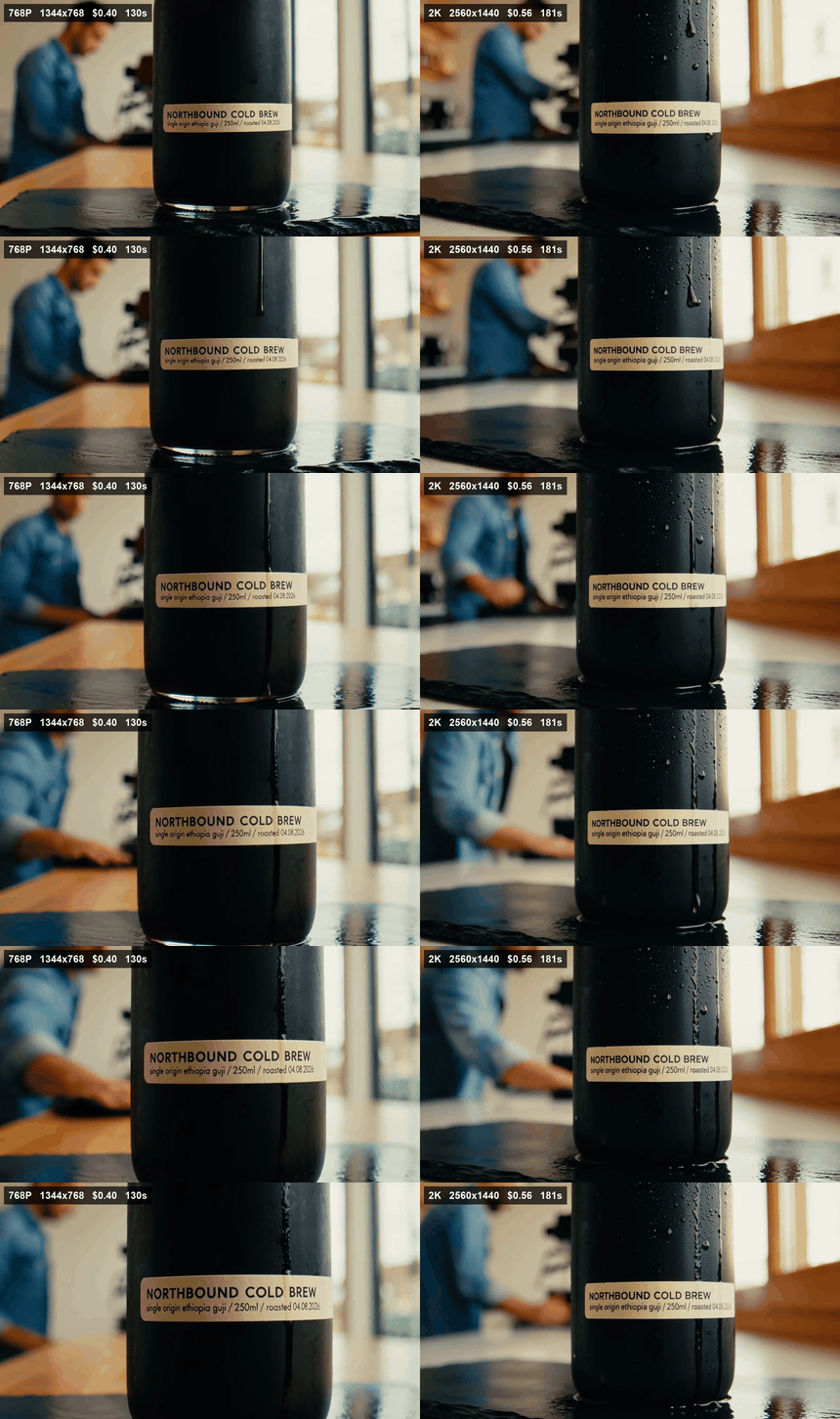
MiniMax H3 2K vs 768P split screen from the same text-to-video prompt, with resolution, price and wall clock burned in
Same prompt, two runs. Left: 768P, 1344x768, $0.40, 130s. Right: 2K, 2560x1440, $0.56, 181s. Shown as a silent GIF; both delivered files carry 32 kHz stereo audio. Measured on Atlas Cloud, 2026-08-05.
Look at what actually differs. It is not sharpness. It is the film. Different counter material, different background dressing, different amount of condensation, different height for the camera, different colour temperature, and the label sits at a different point on the bottle. Nothing in the prompt asked for any of that to change.
Now the part everybody assumes goes the other way. Here is the label area from both takes, cropped from the native files and blown up to the same width, so the 768P crop is magnified more than the 2K crop.
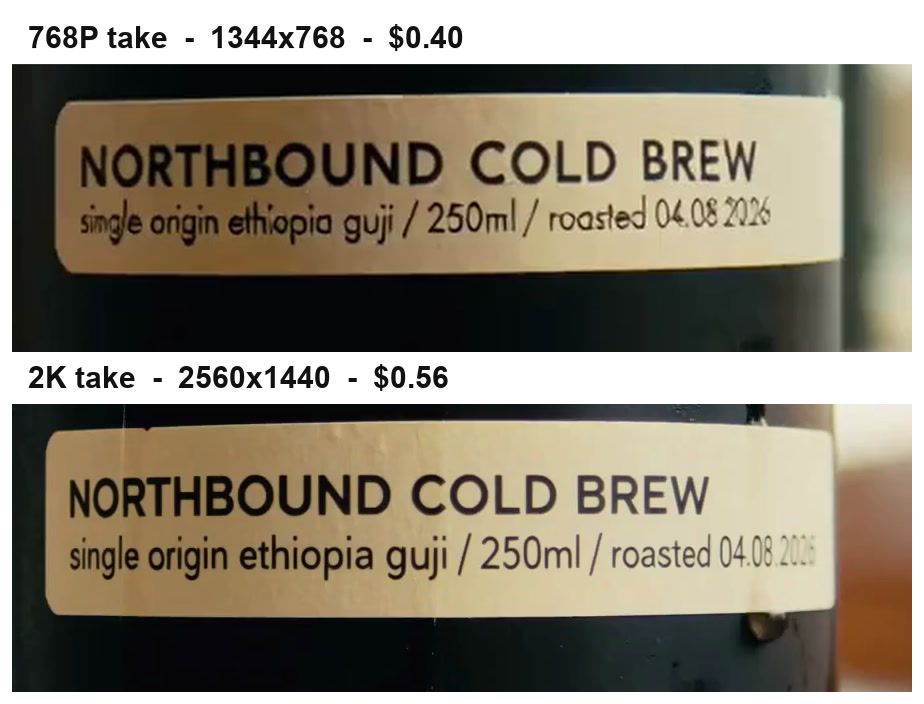
Label crop comparison between the MiniMax H3 768P and 2K takes, both showing the small ingredient line as readable
The small line "single origin ethiopia guji / 250ml / roasted 04.08.2026" survives at 768P. It is softer and the letter spacing wobbles, but nothing is illegible. The real cost of 768P here was not mushy text, it was a different composition.
So the honest framing of MiniMax H3 2K vs 768P is not "sharp versus blurry". It is "this take versus a different take, plus a detail pass on top".
The MiniMax H3 2K vs 768P Spec Sheet, Measured
Everything in this table came out of ffmpeg -i on the delivered files and out of the price field on the finished prediction, not from a docs page.
| Measured on the delivered file | 768P | 2K | Ratio |
|---|---|---|---|
| Delivered resolution (16:9 request) | 1344x768 | 2560x1440 | 3.6x pixels |
| Video bitrate | 998 kb/s | 3,624 kb/s | 3.6x |
| File size, 4.46s clip | 620 KB | 2.00 MB | 3.3x |
| Frame rate | 24 fps | 24 fps | same |
| Audio track | AAC stereo, 32,000 Hz, 131 kb/s | AAC stereo, 32,000 Hz, 127 kb/s | same |
| Container duration for duration=4 | 4.46s | 4.46s | same |
| Submit to completed, wall clock | 130s | 181s | 1.39x |
| Actually billed | $0.40 | $0.56 | 1.4x |
| Effective rate | $0.10/s | $0.14/s | 29% cheaper |
Two footnotes that cost me money to learn. First, both tiers delivered 4.46 seconds for a duration=4 request and both billed 4 seconds, so you get the spare 0.46s free but you cannot plan a cut around it. Second, the audio is identical across tiers. If your clip is carried by dialogue or a music sync, 2K buys you nothing on the thing that matters.
Why MiniMax H3 2K vs 768P Trips Everyone Up
Because 2K on H3 is not an upscale step. It is a second generation.
MiniMax describes the mechanism directly: "For H3's 2K output, instead of using a conventional dedicated super-resolution module, we have the H3 base model regenerate its own low-resolution output in-context." They spell out why they built it that way too: the in-context approach "lets it draw on the original multimodal context again to produce high-resolution output, recovering details that traditional super-resolution can only 'guess' at and often can't restore, like small text and fine detail" (MiniMax, July 2026).
Read that again with a production hat on. The 2K pass goes back to your original context and generates again. When your context is nothing but a text prompt, "generate again" means "roll the dice again". That is exactly what my two takes show. The model was never told to reproduce the 768P version, because it never saw the 768P version.
Three ways this bites in practice:
- You roll cheap drafts at 768P on text-to-video, pick a winner, then rerun it at 2K. You get a stranger back. The prompt is honoured, the film is new. That is the test at the top of this page.
- You budget as if 29% cheaper per second means 29% cheaper. It does not, because the finals are the expensive part of any real batch, and one wasted 2K reroll erases the saving on several drafts.
- You assume the cheap upgrade path is sitting there somewhere. I checked the full catalogue on Atlas Cloud today: 452 models, three H3 endpoints, and no H3 regeneration endpoint among them. Where only the three generation endpoints are exposed, "upgrade this clip to 2K" means either rerolling it or running a separate upscaler over it. Both cost money, and they do not buy the same thing.
Worth saying why it is even worth engineering around this model rather than switching. The headline offer at launch was video "at up to 2K resolution, in clips of up to 15 seconds, with native stereo audio" (DataNorth AI, August 2026), and the scores backed it up: H3 currently sits at the top of the Artificial Analysis video editing Elo board at 1,130, ahead of Gemini Omni Flash at 1,122 and 93 points clear of Dreamina Seedance 2.0 720p at 1,037 (Artificial Analysis, August 2026). The quality is worth a workflow. The workflow just has to respect how 2K is produced.
The Four Models Behind This MiniMax H3 2K vs 768P Test, in One Tab
The whole test is four models, one API key, one bill. I ran it on Atlas Cloud because switching between an image model, two H3 endpoints and an upscaler otherwise means three accounts and three invoices to reconcile at the end of the month.
| Job in this test | Model | Price as of August 2026 | What I actually paid |
|---|---|---|---|
| Lock the first frame | openai/gpt-image-2/text-to-image | listed from $0.009/image (token tiers above it) | $0.1745 for one 2048x1152 at quality high |
| Draft and final, locked frame | minimax/h3/image-to-video | $0.14/s at 2K, $0.10/s at 768P | $0.40 and $0.56 for 4s each |
| Bare control pair | minimax/h3/text-to-video | same two tiers | $0.40 and $0.56 for 4s each |
| Keep the take, raise the pixels | atlascloud/video-upscaler | $0.018/s to 1080p, $0.024/s to 2K, 5s minimum | $0.12 for the 4.46s clip |
Two notes before you copy the numbers. The H3 endpoints all publish a single headline rate of $0.14/s, which is the 2K tier; the 768P rate shows up in the bill, not in the listing, so measure it once yourself. And none of these four models is discounted right now. If you want to trim the frame-locking step, openai/gpt-image-2-developer/text-to-image is running at 50% off ($0.004 from $0.009) as of August 2026, and it is the same family doing the same job.
How to Run the MiniMax H3 2K vs 768P Test Yourself
Five steps, $2.21 of credit, and about 15 minutes of total wall clock. Every prompt below is the exact string I sent.
Three parameter notes first, because each one can quietly cost you a run:
- On text-to-video the field is
ratio, notaspect_ratio, its default is1:1, and its enum has noadaptiveoption. Pass16:9yourself or you get a square clip. On image-to-video the enum is onlyadaptive, because your first frame decides the shape. - Always send
durationexplicitly rather than trusting the documented default of 8. What you are billed follows what is delivered, not what you assumed. - Every H3 job outlives a normal inline timeout, so submit async and poll. The
pricefield also fills in late: whenstatusflips tocompletedit is often still empty, and you have to poll the prediction id once more to get the real number. Without that second poll you cannot build an honest cost table.
Step 1: Lock the Frame With GPT Image 2
This is the step that turns a draft into a preview instead of a lottery ticket. Generate the finished composition as a still, and it becomes the immovable part of both video runs.
text1Macro product photograph of a matte black cold-brew coffee bottle standing on a wet slate slab, morning window light raking across it from the right. A cream paper label wraps the bottle, sharply legible: bold uppercase title "NORTHBOUND COLD BREW" on one line, and directly beneath it in small type "single origin ethiopia guji / 250ml / roasted 04.08.2026". Condensation beads on the glass, an espresso machine and a barista in a denim shirt softly out of focus in the background. Cinematic, shallow depth of field, warm neutral grade, photoreal, 16:9. 2
Settings: quality high, size 2048x1152. Do not economise here. Every detail you want the 2K pass to protect has to exist in this frame first.
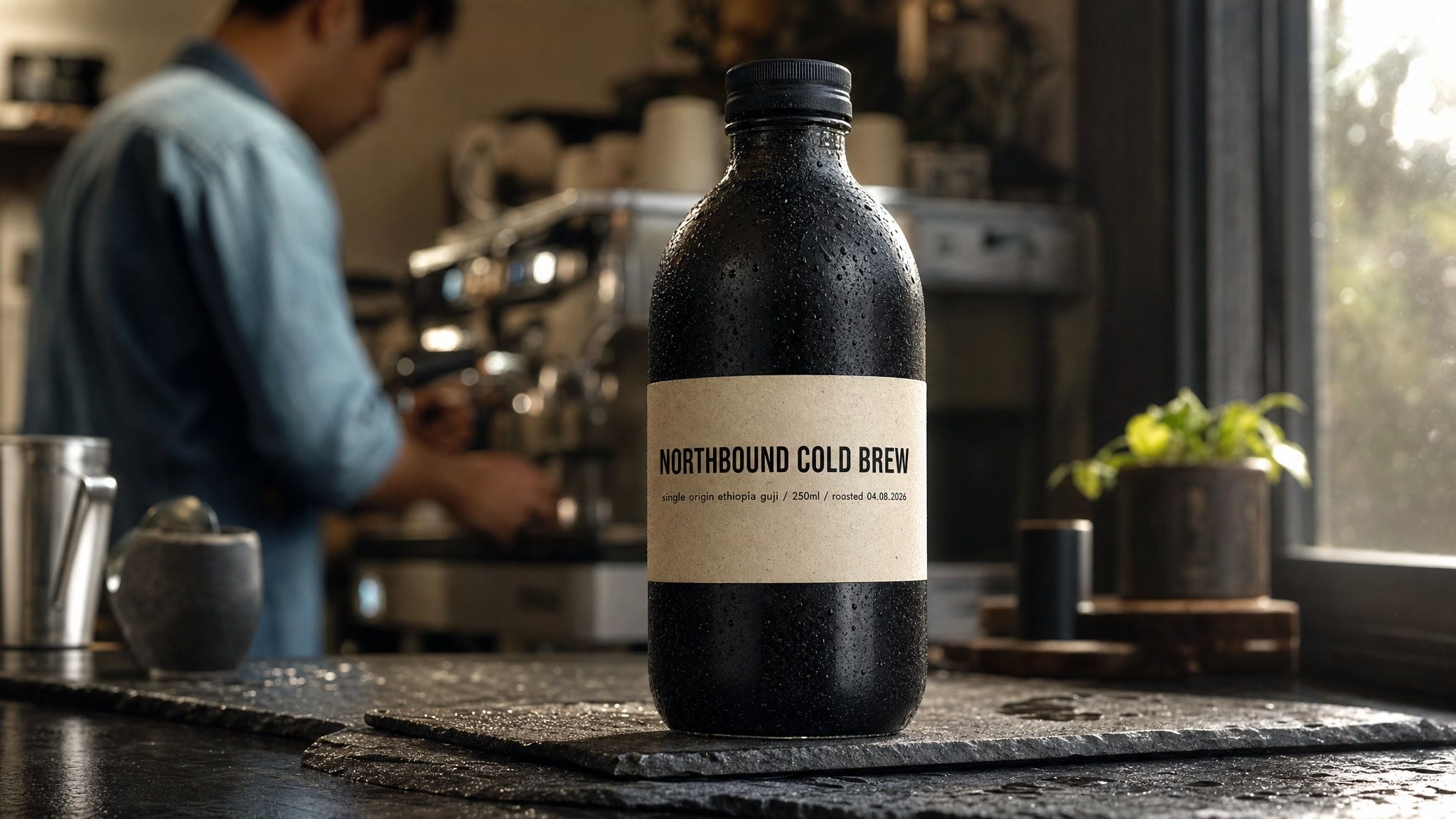
The locked first frame generated with GPT Image 2 at 2048x1152, showing the cold brew bottle and its legible small print
Generated with openai/gpt-image-2/text-to-image, quality high, 2048x1152. Billed $0.1745, back in 146s.
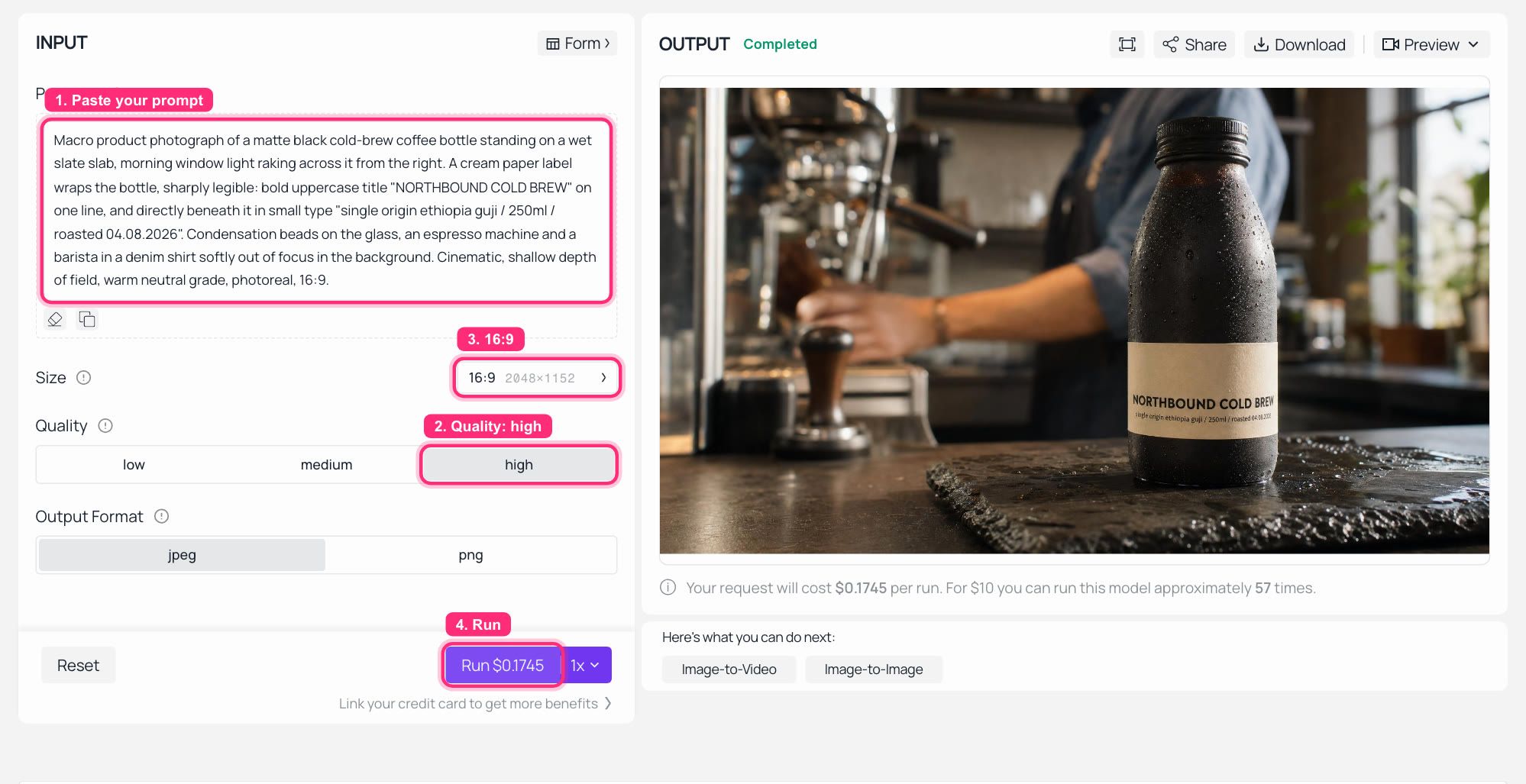
GPT Image 2 playground on Atlas Cloud with the frame prompt filled in and the generated bottle in the output panel
GPT Image 2 on Atlas Cloud: quality set to high, 16:9, the locked frame rendered on the right.
Step 2: Draft It at 768P
Same endpoint you will use for the final. Only the resolution differs between this step and step 4.
text1Slow macro dolly-in on the bottle. Condensation beads slide down the glass. The label stays perfectly still and legible. In the soft background the barista wipes the counter once. Natural cafe room tone, a faint espresso machine hiss. No camera shake. 2
Settings on minimax/h3/image-to-video: first frame = your step 1 output, resolution=768P, duration=4, ratio=adaptive.
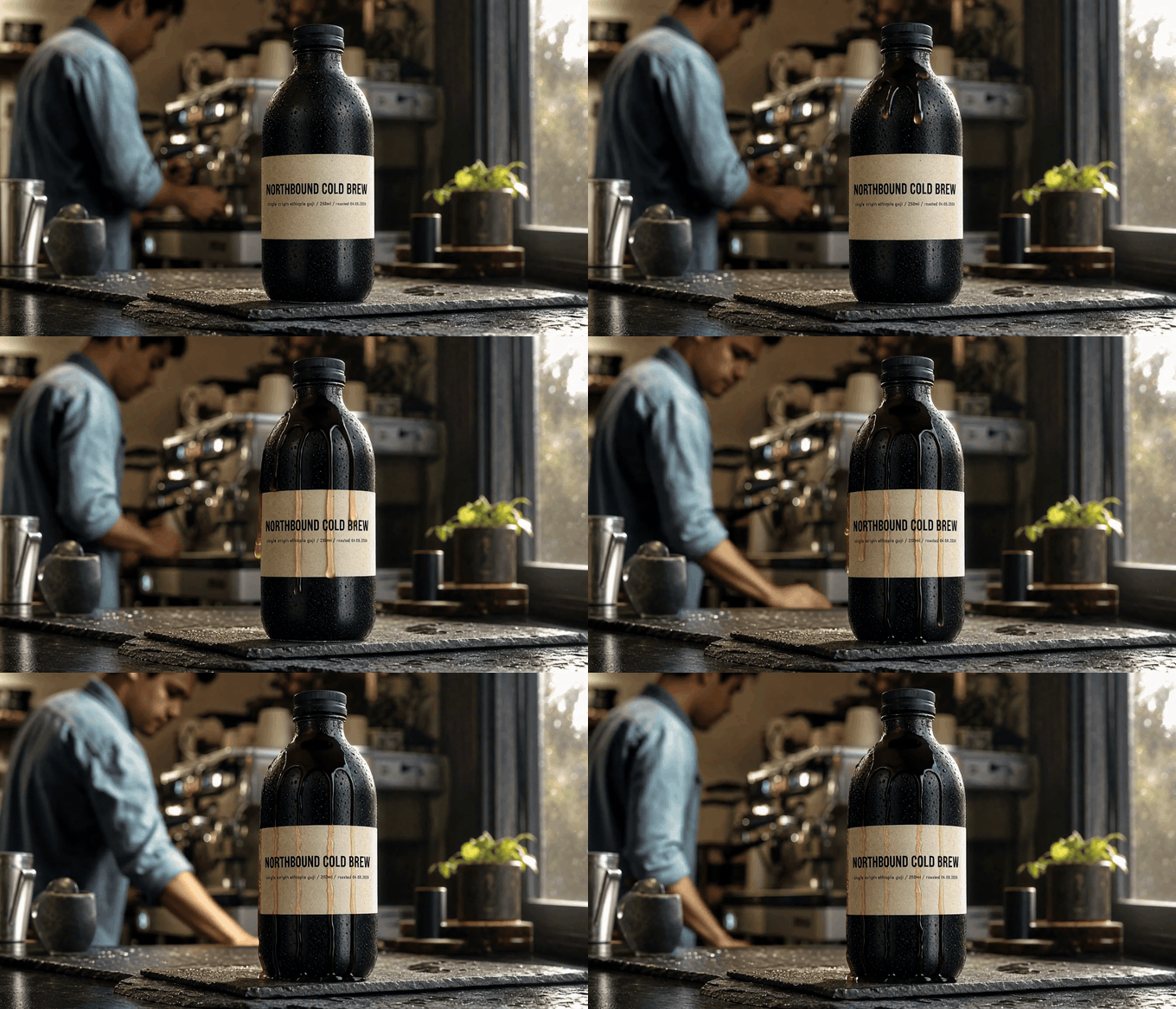
The MiniMax H3 768P draft clip, a slow macro dolly-in on the cold brew bottle
The 768P draft: 1344x768, billed $0.40, back in 194s. Shown as a silent GIF; the file itself carries 32 kHz stereo. Note the four heavy drip streaks smeared down the label.
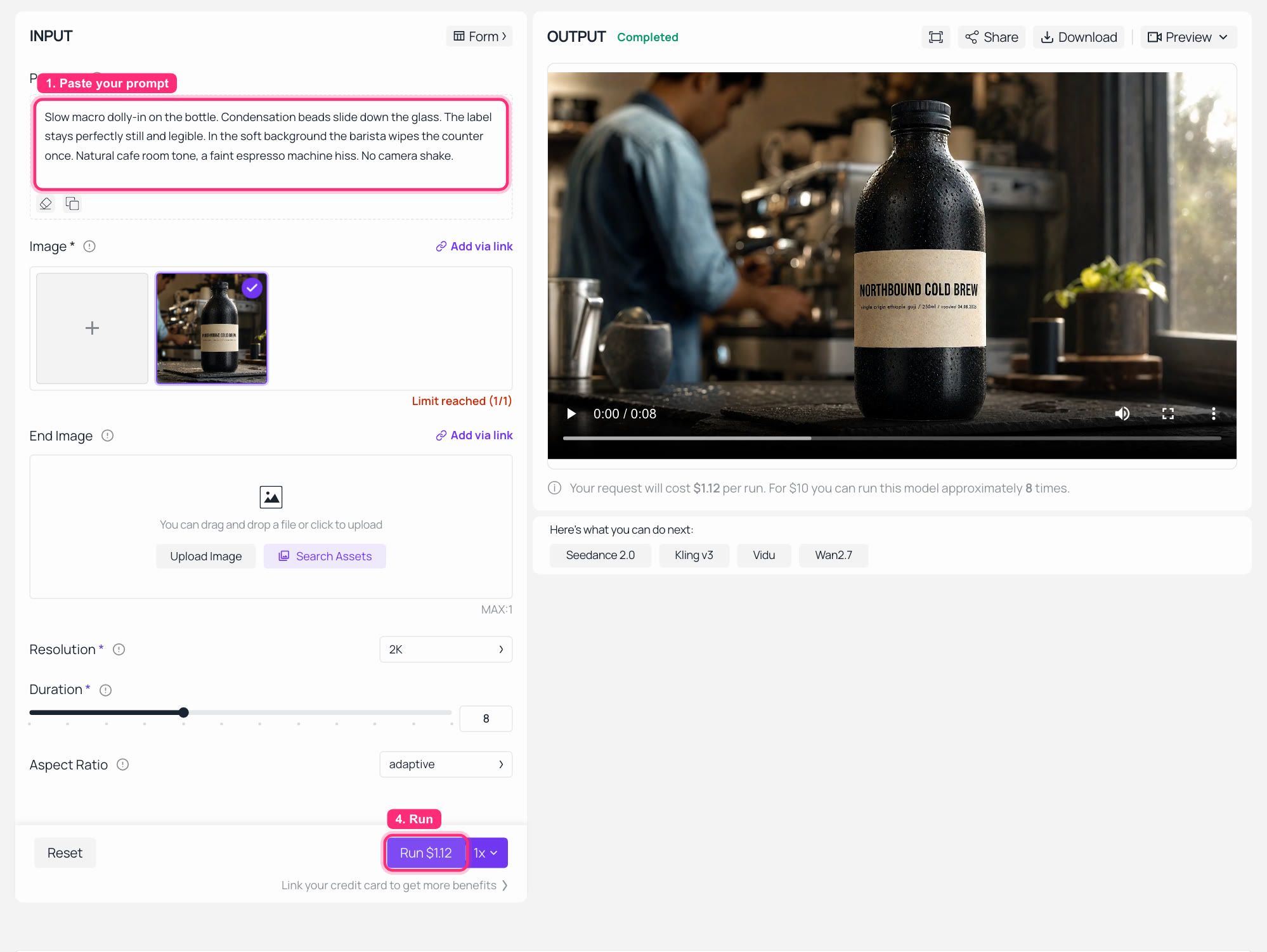
MiniMax H3 image-to-video playground on Atlas Cloud with the locked frame uploaded, the prompt typed and a finished clip in the output panel
The image-to-video form with the locked frame loaded. Resolution and Duration are the only two fields that separate this step from step 4, and both tiers sit in the same list with nothing gating either one. This capture was left on the 2K and 8 second defaults, which is why the Run button quotes $1.12; switch Resolution to 768P and Duration to 4 and that quote drops to $0.40.
Step 3: Judge the MiniMax H3 2K vs 768P Draft on the Right Things
The draft is a rehearsal, not a proof. From my two pairs, here is what it reliably tells you and what it does not.
Trust it for: prompt wording, whether the motion reads at all, the amount of camera movement, pacing across the four seconds, and the audio bed. All of that transferred cleanly.
Do not trust it for: fine surface texture, the smallest type on your product, or any artefact it invents. In my 768P draft the label picked up four thick brown drips that the 2K run did not produce, and the small ingredient line collapsed into mush. If I had rejected that draft for looking dirty, I would have rejected a prompt that was working.
That is the real division of labour. 768P answers "is this the right shot", 2K answers "is this deliverable".
Step 4: Flip One Field and Finish at 2K
Same endpoint, same first frame, same prompt string. Change resolution to 2K and nothing else.
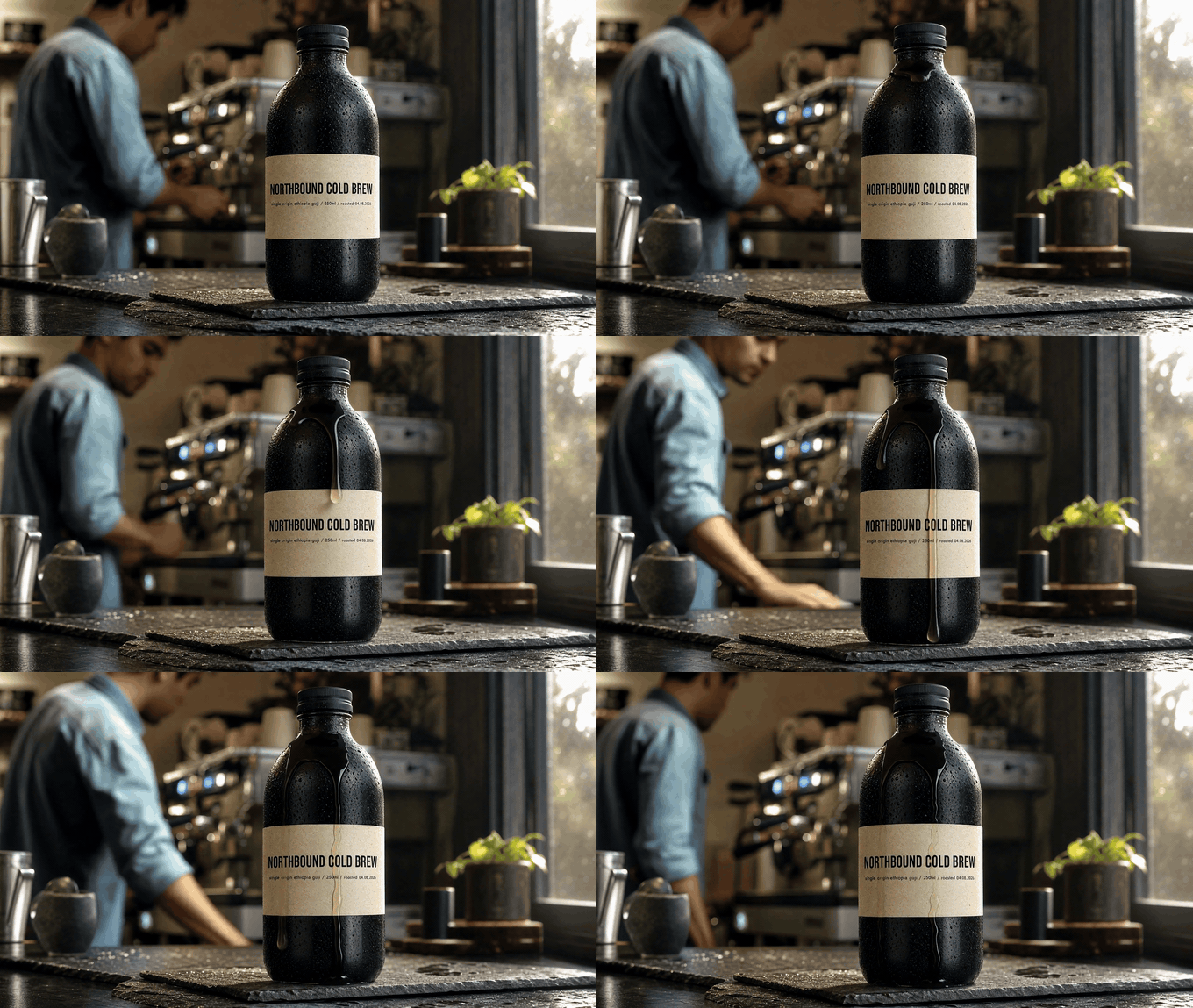
The MiniMax H3 2K final clip from the same locked first frame, with a clean label and readable small print
The 2K final: 2560x1440, billed $0.56, back in 234s. Same slab, same espresso machine, same plant, same barista, same label position as the draft.
Here is the answer to the question this whole article was built to test, and it went the good way. With the first frame locked, the drift stopped. The set, the framing, the camera height and the typography position all held between the 768P draft and the 2K final. The differences were confined to detail: the 2K pass cleaned the smeared drips down to one thin runnel, resolved the paper grain, and turned the small ingredient line from noise back into words. That is exactly the behaviour MiniMax claims for in-context regeneration, and it is the first time in this test that 2K looked like a quality tier rather than a reroll.
For contrast, the control group. This is the bare text-to-video run at 2K, the one that produced the stranger at the top of this page. Same prompt content, no first frame, so nothing pins the composition down.
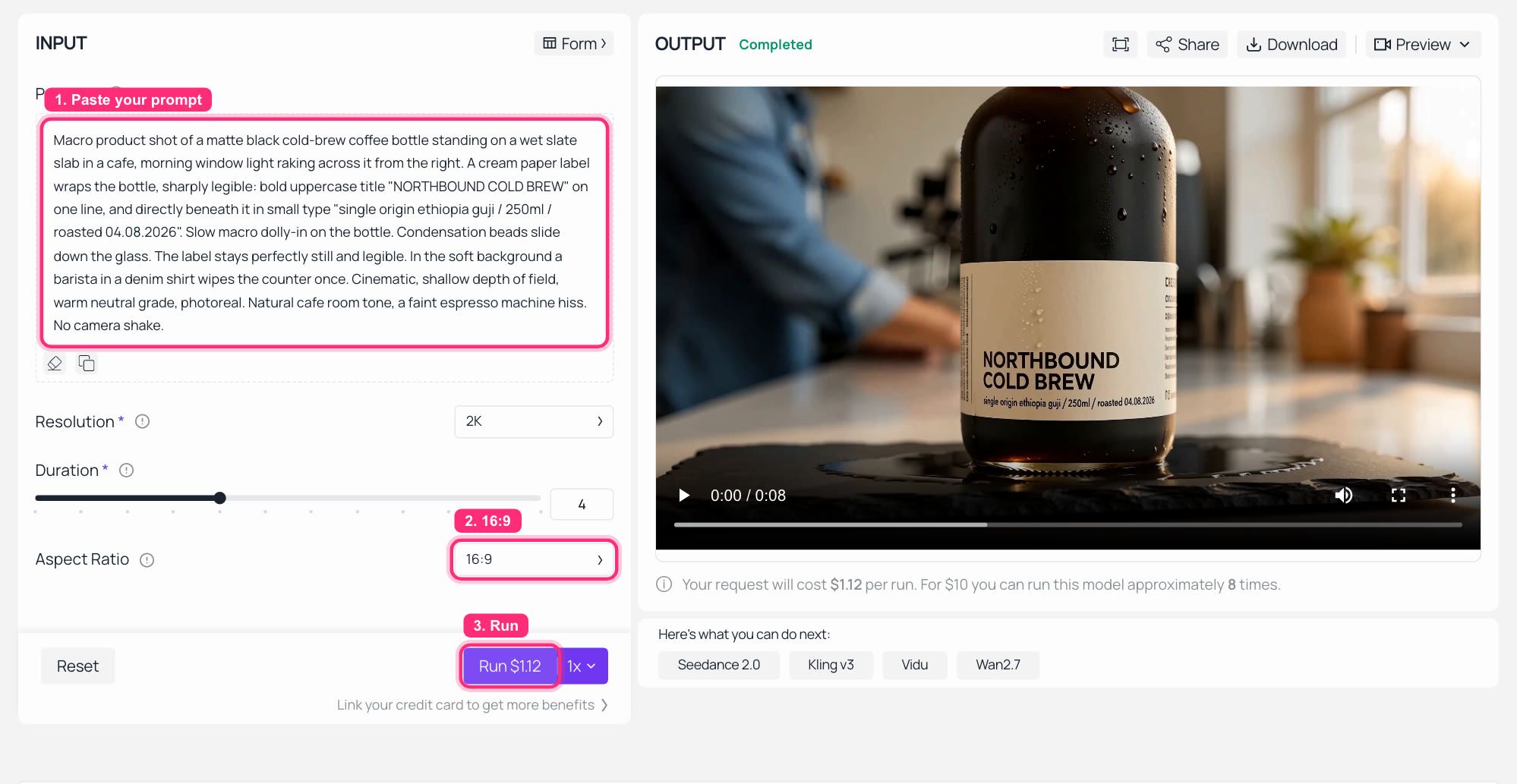
MiniMax H3 text-to-video playground at 2K with the finished control clip in the output panel
MiniMax H3 text-to-video on Atlas Cloud: no first frame, Resolution 2K, Aspect Ratio 16:9, and the finished clip in the output panel. Nothing was wrong with this generation. It just is not the same film the 768P run produced.
Step 5: Or Skip the MiniMax H3 2K vs 768P Reroll and Upscale Instead
Sometimes the 768P take is already the one. The performance landed, the timing is right, and you do not want a regeneration that might land differently. Then do not reroll it. Push the exact file through an upscaler.
Settings on atlascloud/video-upscaler: video = your 768P output URL, target_resolution=2k. Input caps at 2K are 23 seconds and 690 frames, and input fps must be 30 or lower, so H3's 24 fps clips pass comfortably.
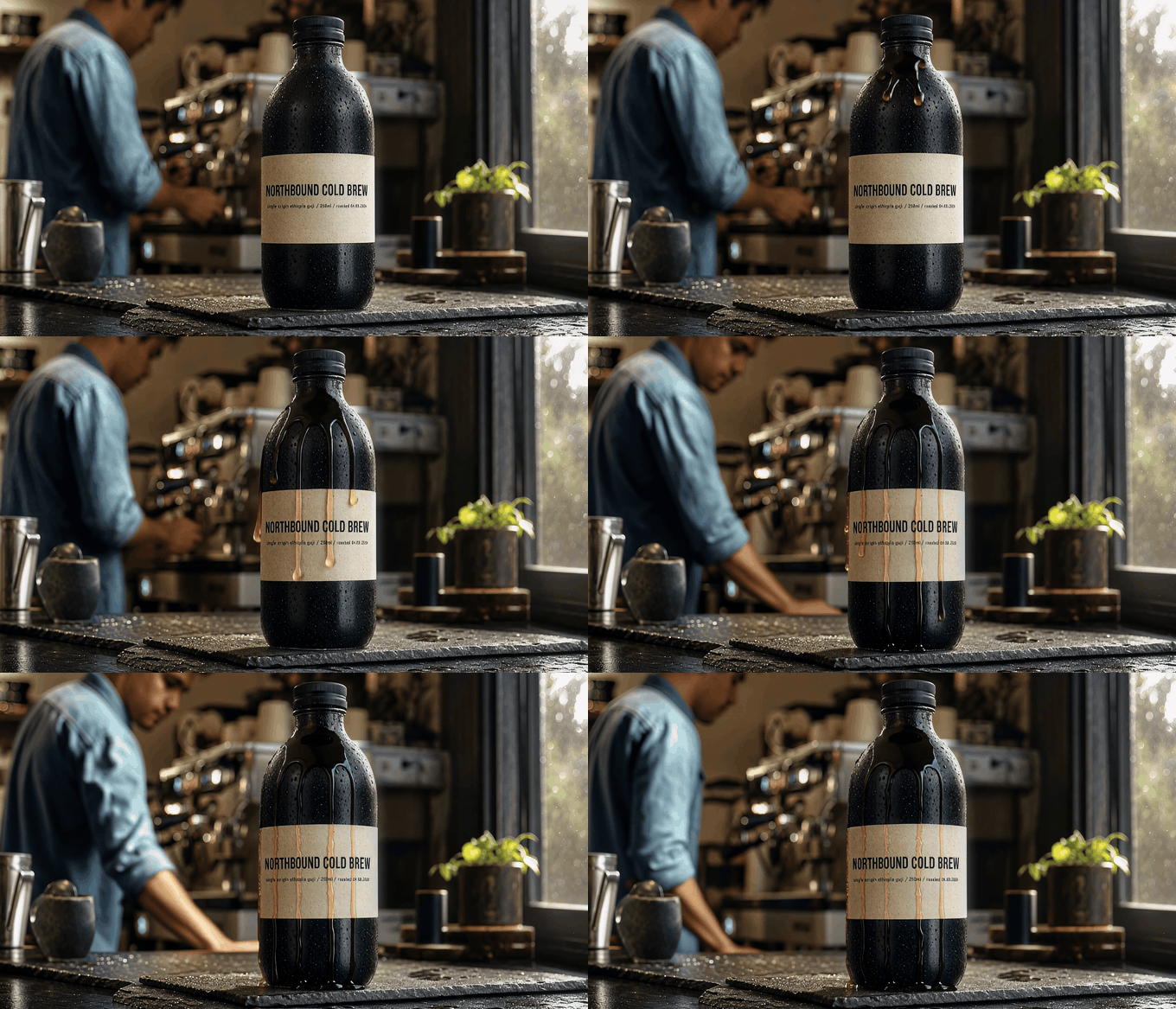
The 768P take pushed through the Atlas Cloud video upscaler to 2K, same footage at higher resolution
The upscaled take: 2540x1452, billed $0.12, back in 40s. Same four drips, same everything. This is the same film, not a new one.
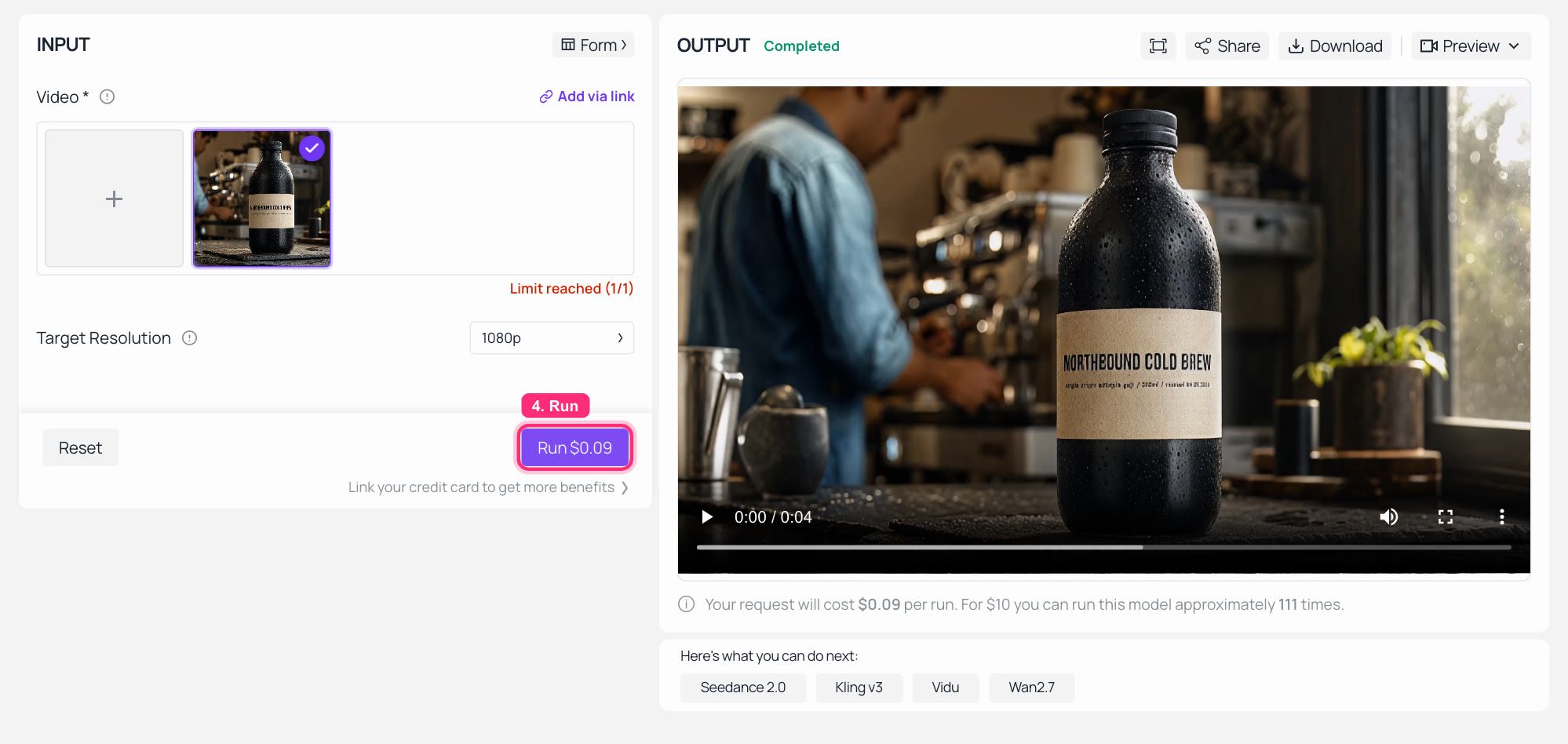
Atlas Cloud video upscaler playground with the 768P clip loaded and the 2K result in the output panel
The video upscaler on Atlas Cloud with the 768P H3 clip loaded and the upscaled result playing on the right. This capture ran on the 1080p default, which the Run button prices at $0.09 for anything under the 5 second minimum. Switch Target Resolution to 2k and you are on the $0.024/s tier, which is the $0.12 I was billed for my own run.
And here is the verdict nobody should skip, all three label crops from the same locked frame at the same magnification.
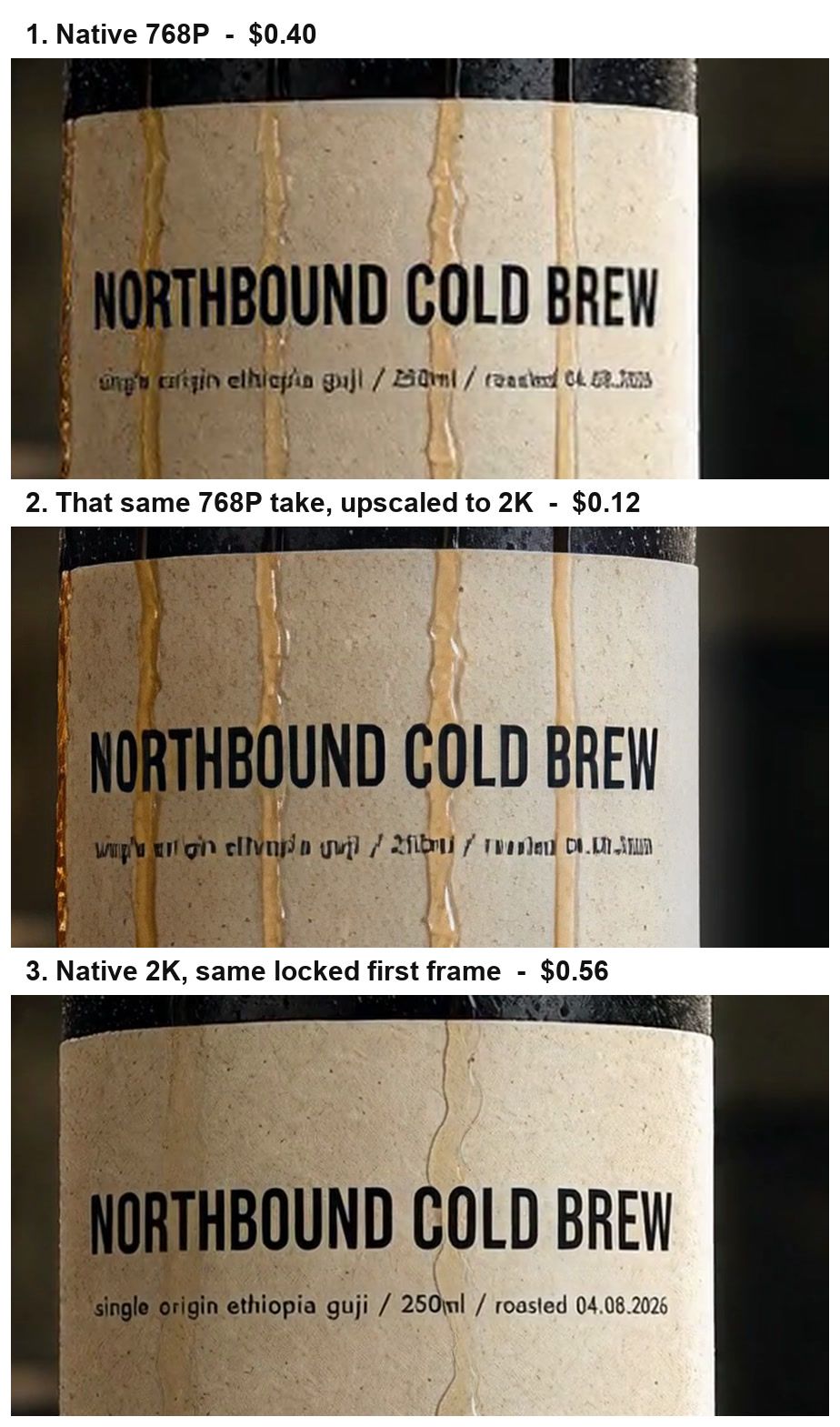
Three-way label crop comparison: native 768P, that clip upscaled to 2K, and native 2K, showing only native 2K recovers the small print
Native 768P, the same clip upscaled, and native 2K. The upscaler sharpens the paper grain and the big title beautifully, and it keeps the exact take. What it cannot do is put the small line back, because that information was never in the 768P file. The regeneration pass can, because it goes back to the context instead of to the pixels.
So the two routes are not competitors. They answer different questions. Upscaling preserves a performance. Regeneration recovers detail. Choose by whichever one your clip cannot afford to lose.
Variations Worth Testing on MiniMax H3 2K vs 768P
- Vertical. My 16:9 tests came back 1344x768, so the short side is what the tier pins. A 9:16 request should land at 768x1344 on the same logic, but measure it once before you build a vertical batch on the assumption. On image-to-video you set the shape through the first frame rather than fighting the
adaptiveenum. - Talking heads. This is where I would skip drafting entirely and go straight to 2K. Faces, teeth and eyelines are precisely the small-detail class the regeneration pass exists for, and a 768P draft will misinform you about all three.
- Long clips. At 15 seconds the gap widens to $1.50 versus $2.10, and the wall clock stretches with it. Plan the queue, not just the budget.
- Product text and multi-language work. H3's steady in-frame type and its native multilingual audio are the reasons people pick it for commercial packaging in the first place. Both survive at 768P, which makes 768P a genuinely usable delivery tier for social crops, not just a rehearsal room.
What MiniMax H3 2K vs 768P Really Costs Per Usable Clip
First the three routes to a 2K deliverable, per 8 second clip, at the rates I was actually charged.
| Route to a 2K clip | Rates used | Cost for one 8s clip | Keeps the same take | Recovers small text |
|---|---|---|---|---|
| Straight to 2K | $0.14/s | $1.12 | n/a | Yes |
| 768P draft, then 2K reroll on a locked frame | $0.10/s then $0.14/s | $0.80 + $1.12 = $1.92 | Yes, if the first frame is locked | Yes |
| 768P final, then upscale to 2K | $0.10/s then $0.024/s | $0.80 + $0.192 = $0.99 | Yes, exactly | No |
Now the number that decides your month. Take a realistic mix: ten 4 second draft rolls to find the shot, then two finished 8 second clips.
| Batch of 10 drafts + 2 finals | Drafts | Finals | Frame lock | Total |
|---|---|---|---|---|
| Everything at 2K | 10 x 4s x $0.14 = $5.60 | 2 x 8s x $0.14 = $2.24 | none | $7.84 |
| 768P drafts, 2K finals, locked frame | 10 x 4s x $0.10 = $4.00 | $2.24 | $0.17 | $6.41 (18% less) |
| 768P drafts, 768P finals, upscaled | $4.00 | 2 x ($0.80 + $0.192) = $1.98 | $0.17 | $6.15 (22% less) |
Read the middle row honestly. The per-second saving is 29%, but the per-batch saving is 18%, because your finals are still finals. The saving only grows toward 29% as drafting dominates: at twenty 8 second draft rolls instead of ten short ones, route two lands about 25% below all-2K. And every cent of it depends on the locked frame, because without it those ten cheap rolls are ten films you are not going to ship.
The second dividend is time, and it might matter more. On the text-to-video pair 768P returned 28% faster, and across both pairs it never once took longer. On 4 second clips at those wall clocks, that is roughly 27 draft rolls in an hour instead of 20. When you are still hunting for the right prompt, seven extra swings matter more than the $1.60 you saved.
One legal note if you were planning to dodge all of this by self-hosting. The open weights on Hugging Face are H3-Base, which generates at the 768 short side. The 2K pass lives on the API side, so open weights get you the draft tier and not the finish tier. The community licence also carries excluded territories covering the EU, the UK, Korea and the US, with a separate authorisation channel open, so read the licence before you build a commercial pipeline on a local checkout. For a wider look at what the released weights do and do not include, see our MiniMax H3 review, and the full model catalogue if you want to price H3 against the rest of the current video field.
Frequently Asked Questions
In MiniMax H3 2K vs 768P, is 768P actually cheaper per clip?
Yes. I was billed $0.40 for a 4 second 768P clip and $0.56 for the identical request at 2K, so $0.10/s against $0.14/s, a 29% saving per second. The catch is that the saving only counts if the cheap run teaches you something about the expensive one, which requires locking the first frame. A bare text-to-video draft at 768P is a separate film, and money spent on it is not money saved.
In MiniMax H3 2K vs 768P, is 2K just an upscale of the 768P output?
No. MiniMax has the base model regenerate its own low-resolution output in context rather than running a dedicated super-resolution module, which is why 2K can restore small text and fine surface detail that an upscaler can only approximate. My three-way label crop shows exactly that: the upscaled 768P clip sharpened the paper grain but left the small ingredient line as unreadable noise, while the native 2K run turned it back into words.
Will my MiniMax H3 768P draft look like my 2K final?
Only if you lock the first frame. On bare text-to-video the two tiers gave me different set dressing, different camera height, different condensation and a different label position from the same prompt. On image-to-video with a fixed first frame, the composition, framing and typography all held between tiers and the only changes were in detail and texture.
Do I still need to contact sales for MiniMax H3 768P?
No, not as of 2026-08-05. The live schema on all three H3 endpoints lists resolution as enum: ["768P", "2K"], the playground shows both in one dropdown, and my 768P jobs completed and billed at the lower rate on two different endpoints. The closed-beta line comes from coverage written in the first days after launch.
In MiniMax H3 2K vs 768P, how much slower is 2K?
On my 4 second pairs, 1.2x to 1.4x slower: 181s versus 130s on text-to-video and 234s versus 194s on image-to-video, measured from submit to completed. Architecturally 2K is a second generation pass over the same context, so expect the absolute gap to widen on longer clips rather than stay flat.
Can I upgrade a 768P clip to 2K without rerolling it?
You can raise the resolution without touching the take by running it through a video upscaler, which cost me $0.12 for a 4.46 second clip at the 2K tier ($0.024/s with a 5 second minimum) and returned in 40 seconds. That preserves the performance frame for frame. What it will not do is recover detail that was never captured, so if the point of going to 2K is legible small type, you need the regeneration pass, not the upscaler.