Picking between Seedance 2.0 Mini and the full Seedance 2.0 is not really a quality question. Both are strong. It is a money question, and the answer depends on how their token-based pricing, resolution ceilings, and reference systems line up with the work you actually ship.
 This Seedance 2.0 Mini vs Seedance 2.0 comparison skips the marketing and gets into the mechanics: how the billing math creates the price gap, where the 720P ceiling bites, what the standard tier's reference system buys you, and what the same prompt looks like on each. By the end you will know which tier earns its keep for your projects, and how to use both without paying twice.
Before the breakdown, one practical update that changes how you can act on it. The Mini tier is no longer a wait-and-see item: it went live for production this week, and Atlas Cloud now runs both tiers side by side behind one key. You can call Mini for text-to-video, image-to-video, and reference-to-video today, then promote the approved shots to standard Seedance 2.0 without swapping SDKs or setting up a second account. With usage-based pricing across the whole family, the draft-cheap, finalize-sharp workflow this article recommends is something you can wire up right now, not a plan for later.
This Seedance 2.0 Mini vs Seedance 2.0 comparison skips the marketing and gets into the mechanics: how the billing math creates the price gap, where the 720P ceiling bites, what the standard tier's reference system buys you, and what the same prompt looks like on each. By the end you will know which tier earns its keep for your projects, and how to use both without paying twice.
Before the breakdown, one practical update that changes how you can act on it. The Mini tier is no longer a wait-and-see item: it went live for production this week, and Atlas Cloud now runs both tiers side by side behind one key. You can call Mini for text-to-video, image-to-video, and reference-to-video today, then promote the approved shots to standard Seedance 2.0 without swapping SDKs or setting up a second account. With usage-based pricing across the whole family, the draft-cheap, finalize-sharp workflow this article recommends is something you can wire up right now, not a plan for later.
Key Takeaways
- Pricing is token-based, and tokens scale with pixels, so a 720P clip costs roughly twice the tokens of 480P per second before you even change tiers
- Seedance 2.0 Mini caps at 720P, while standard Seedance 2.0 reaches 1080P and up to 2K at 2048 by 1080, both at 24fps in 4 to 15 second clips
- Standard keeps the full Universal Reference system, accepting up to 12 reference files, which is the real control gap, not raw sharpness
- Mini runs about half the standard cost per second, so the smart play is drafting on Mini and rendering finals on standard
- Both tiers are now live on Atlas Cloud behind a single API with usage-based pricing, so moving a shot from the Mini draft tier to the standard final tier is a model-name change, not a re-setup
Seedance 2.0 Mini vs Seedance 2.0: The Core Difference in 60 Seconds
The short version: Mini is the cost-and-speed tier, standard is the fidelity-and-control tier, and they share the same DNA. Both generate at 24fps in 4 to 15 second clips and accept text, image, and reference inputs. The split shows up in three places that actually matter. Resolution is the obvious one. Mini outputs 480P and 720P only, while standard Seedance 2.0 delivers native 1080p and up to 2K (2048 by 1080) (Dreamina, 2026). The second is the reference and control system, where standard pulls ahead. The third is price, which is downstream of the first two because of how tokens are counted. Get those three straight and every other decision falls into place.
Seedance 2.0 Mini vs Seedance 2.0: How Token Pricing Drives the Cost Gap
Here is the part most comparisons skip. Seedance bills by tokens, and a video token is a measure of pixels processed per second, not a flat per-clip fee. That single design choice explains the whole price structure (Segmind, 2026). Because tokens track pixels, resolution is the biggest cost lever you control. A 16:9 clip at 480P burns about 10,044 tokens per second. The same clip at 720P jumps to about 21,600 tokens per second, more than double. So even on one model, choosing 720P over 480P roughly doubles your bill before you touch anything else. Stack the tier rates on top and the gap widens. On standard Seedance 2.0, text or image input runs about $0.0070 per 1,000 tokens, which lands at roughly $0.070 per second at 480P and $0.151 per second at 720P. A five second 720P clip on standard therefore costs about $0.76. Mini runs near half the standard cost, so the same clip lands closer to $0.38 (Pexo, 2026). The lesson is practical. The cheapest way to cut a Seedance bill is not always switching tiers, it is matching resolution to the delivery surface. A vertical social clip viewed on a phone rarely needs more than 720P, which is exactly Mini's home turf.
Seedance 2.0 Mini vs Seedance 2.0: The Reference and Control Gap
If sharpness were the only difference, Mini would win on value every time. The real reason to reach for standard is control. Seedance 2.0 ships a Universal Reference system, sometimes called the @-reference system, that accepts up to 12 reference files at once, around 9 images plus 3 videos plus 3 audio clips, and pulls camera movement, motion style, and look from them. That is a director's toolkit, not just an input slot. You can borrow the camera move from one reference video, the motion energy from another, and the visual style from a third, then have the model fill the gaps between keyframes while holding identity, lighting, and style consistent across multiple shots. For anything that needs to match an existing brand look or stitch several shots into a coherent sequence, that control is the whole game. Mini keeps reference-based generation, so you are not flying blind, but the deep multi-reference control is where the standard tier justifies its price. If your project is one clean shot from a text prompt, you will barely notice. If it is a multi-shot sequence that has to match a style guide, you will feel the difference fast. The honest framing: the Seedance 2.0 Mini vs Seedance 2.0 decision is less about pixels and more about how much directorial control a given shot needs.
Seedance 2.0 Mini vs Seedance 2.0: Side-by-Side Video Tests
Specs only tell you so much. The fastest way to feel the gap is to run the same prompt on both tiers and compare. Below are three test prompts built to expose where the tiers diverge, each meant to be rendered twice, once on Mini at 720P and once on standard at 1080p or 2K.
Test 1, Fluid Motion and Physics: Seedance 2.0 Mini vs Seedance 2.0
Water is the classic torture test, because fluid simulation falls apart the instant a model cuts corners. This prompt pressures motion realism and fine particle detail.
Test 2, Close-Up Detail and Texture
Macro shots reward resolution. Reflections, micro-texture, and small text on a label are where a 720P ceiling shows its limits most plainly.
Test 3, Complex Crowded Scenes
Busy scenes with many small moving elements stress a model's ability to hold the whole frame together. This is where multi-shot consistency and resolution compound.
Score each pair on three things: motion realism, detail retention, and how well the frame holds together at distance. On short single shots the gap is often small. On detail and scale, standard earns its premium.
Seedance 2.0 Mini vs Seedance 2.0: Where the 720P Ceiling Hurts
The 720P cap is Mini's defining limit, and it matters in specific situations rather than all of them. Knowing which is which saves you money and reruns. It hurts when the output lands on a large screen, a TV, a cinema, or a desktop hero banner, where compression and scaling expose soft detail. It hurts for macro and product shots where texture is the point. And it hurts when you plan to upscale in post, because upscaling soft 720P never matches native 1080p or 2K. For those, standard Seedance 2.0 at up to 2048 by 1080 is the right call (ByteDance Seed, 2026). It does not hurt for vertical social video, stories, reels, draft review, or anything watched on a phone, which is a huge share of real-world output. For that work the ceiling is invisible and the savings are real.
Seedance 2.0 Mini vs Seedance 2.0: Real Cost Per Project
Abstract per-second rates are easy to wave away, so here is a concrete project. Say you are producing a batch of 20 short social clips, each 6 seconds at 720P, and you expect to iterate three times per clip before approval. That is 60 draft renders plus 20 final renders, 80 generations of 6 seconds each. On standard at roughly $0.151 per second, every 6 second clip is about $0.91, so 80 of them run near $73. Draft everything on Mini at about half the rate, roughly $0.45 per clip, and the 60 drafts cost about $27 instead of $55. Render only the 20 finals on standard for about $18. Total drops from around $73 to around $45, a cut of nearly 40% with zero loss in final quality. That is the entire argument for using both. The drafts never needed standard fidelity, and the finals never needed to be expensive to reach.
Seedance 2.0 Mini vs Seedance 2.0: Which Should You Pick?
Match the tier to the job rather than picking a favorite. Here is the clean decision rule. Pick Mini when output is 720P or below, when you iterate heavily, when volume is high, or when the clip lives on a phone screen. Pick standard when you need 1080p to 2K, when the shot demands the full reference system for multi-shot or brand-matched work, when audio sync is critical, or when the deliverable is a polished final on a big screen.
| Your situation | Better tier |
|---|---|
| High-volume social drafts at 720P | Seedance 2.0 Mini |
| Rapid prompt iteration before approval | Seedance 2.0 Mini |
| 1080p or 2K final delivery | Seedance 2.0 Standard |
| Multi-shot sequence matched to a style guide | Seedance 2.0 Standard |
| Large-screen or product detail shots | Seedance 2.0 Standard |
The reflex to always pick the strongest model is what quietly wastes budget. Most pipelines need both.
A Workflow That Uses Both Tiers
The pattern that beats picking one tier is simple: iterate cheap, finalize sharp. Explore on Mini until the prompt and composition are locked, then re-render just the approved shots on standard. The cost example above shows why that habit alone can shave close to 40% off a project.
The friction usually comes from switching models, since separate keys, billing, and SDKs add up. Platforms like Atlas Cloud aggregate leading video models behind one API with usage-based pricing, so promoting a shot from a draft tier to a final tier is a model-name change, not a rebuild. For anyone running this draft-then-finalize loop regularly, that is the difference between a smooth pipeline and a chore.
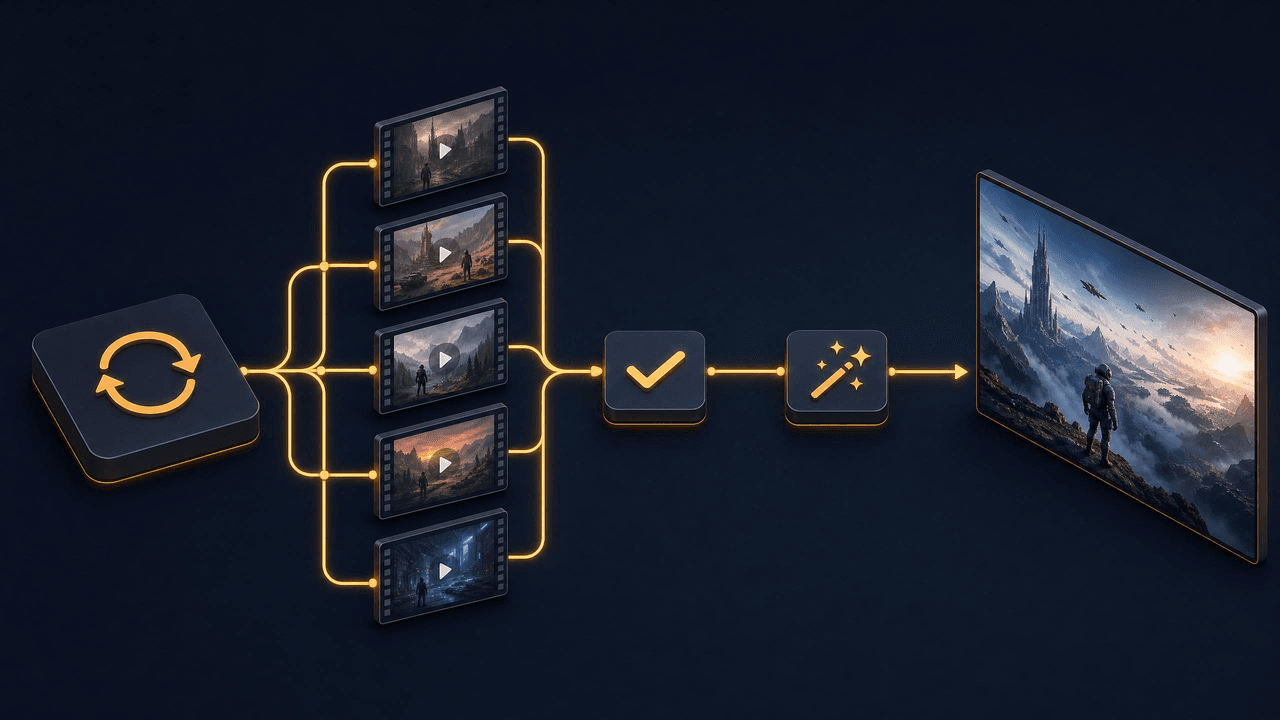 【改③】 Both tiers are already live on Atlas Cloud, Mini included, so the draft-then-finalize loop is something you can stand up today rather than wait on. If a single-API setup fits how you build, you can point your draft stage at Mini and keep the standard tier one parameter away for finals.
Frequently Asked Questions
Is the Seedance 2.0 Mini vs Seedance 2.0 quality gap really noticeable?
On short single-shot clips viewed on a phone, usually not. The gap becomes obvious in three cases: high resolution on large screens, fine detail in macro and product shots, and complex multi-shot sequences. For those, standard Seedance 2.0 at 1080p to 2K clearly leads. For phone-first social content, Mini holds its own.
Does Seedance 2.0 Mini support 1080p or 2K?
No. Mini outputs 480P and 720P only, in 4 to 15 second clips at 24fps. Native 1080p and up to 2K at 2048 by 1080 are exclusive to standard Seedance 2.0 (Dreamina, 2026). If you need higher resolution, render the final pass on standard.
Seedance 2.0 Mini vs Seedance 2.0: which is better for social ads?
For most social ads, a hybrid wins. Draft and test concepts on Mini at 720P where iteration is cheap, then render the approved cut on standard if it needs 1080p, tight audio sync, or the full reference system. Phone-only placements can often ship straight from Mini.
Can I move a project between the two tiers?
Yes, and it is the recommended workflow. Because both tiers share the same family and input types, you can lock a prompt on Mini and re-render it on standard with minimal changes. Keeping both behind one API makes that switch a single parameter rather than a re-setup.
The Bottom Line on Seedance 2.0 Mini vs Seedance 2.0
The Seedance 2.0 Mini vs Seedance 2.0 choice is not about which model is better, because they are built for different points in the same pipeline. Mini wins on cost, speed, and high-volume 720P work. Standard wins on resolution up to 2K, the full reference system, and final-cut fidelity. The token-based billing means resolution is your biggest cost lever, so matching it to the delivery surface saves more than agonizing over tiers. The move that actually saves money is using both: draft on Mini, finalize on standard, and keep them behind one integration so switching costs you nothing. Do that and a typical project bill drops by close to 40% with no hit to final quality. If a single-API setup fits your pipeline, both Seedance 2.0 tiers are live on Atlas Cloud now, so you can wire up the draft-then-finalize loop today.