Upload one spreadsheet. Get back a 23-second business animation with music.
That is the promise of Wan 3.0 document to video, the family's first native document input, and the official demo delivers on it more literally than I expected. The numbers are right. $1,580 grows to $3,460, the badge reads +45.7%, and those figures trace straight back to specific cells in the source sheet.
Then I dragged the playhead to the 12-second mark and read the chart legend.
"Southeasta North America."
Two sales regions crushed into a word that does not exist. That is the real waterline of document-to-video in 2026: the model genuinely read your table, and it still cannot draw your chart. Below is the frame-by-frame audit nobody else has published, plus a three-step chain you can actually run this afternoon.
Key takeaways
- Wan 3.0 accepts 1 file or 1 link, up to 100MB or 50 pages, and outputs up to 30 seconds at 1080p.
- It re-directs a film from your document. It does not turn slide 3 into shot 3.
- Cell values survive intact. Chart legends, axis ticks and thousands separators do not.
- Ceilings are hard: no 4K, no open weights, first-party channels only.
- A long-context model plus a 15-second video model reproduces most of it today.
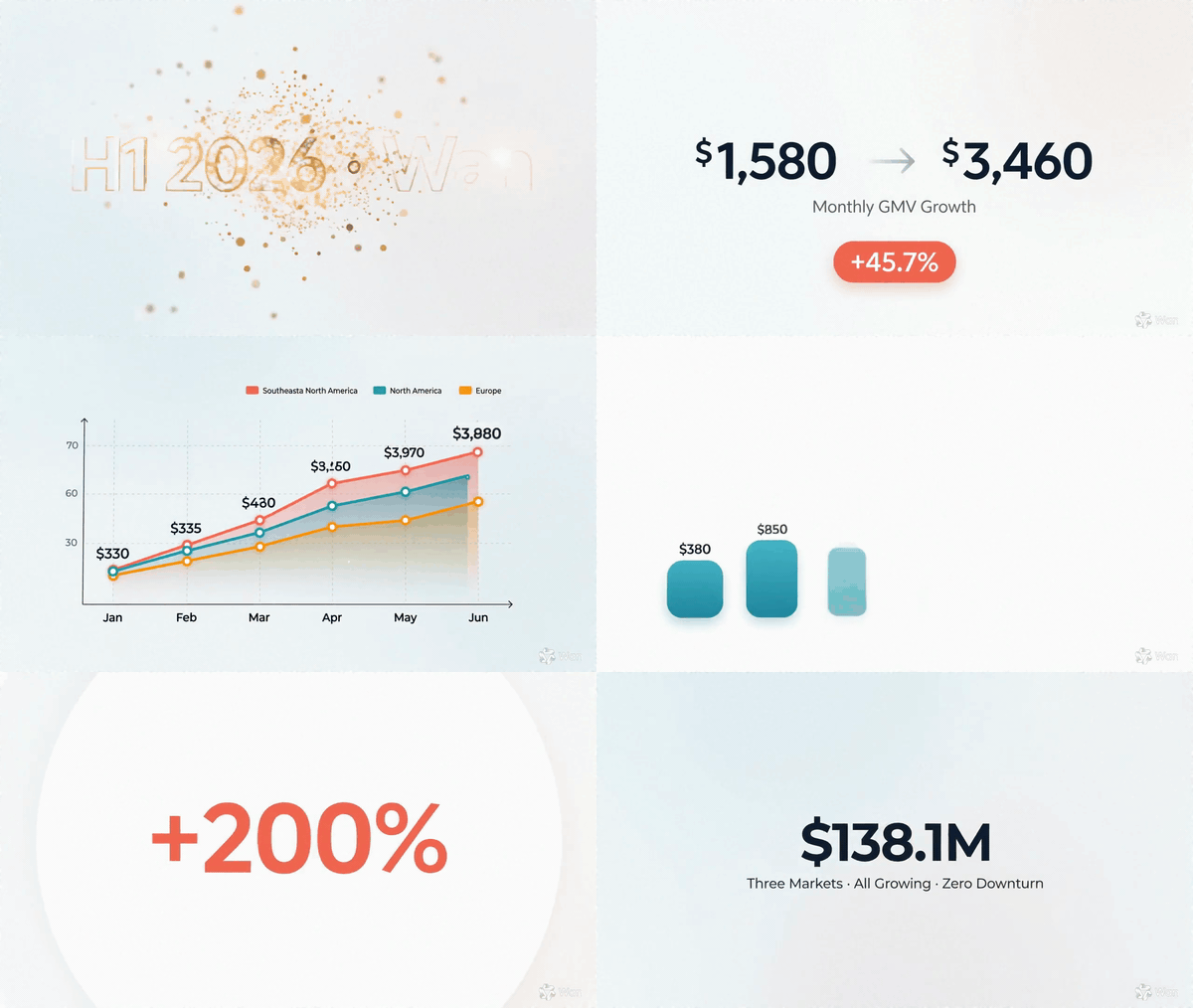
Wan 3.0 document to video output: the official xlsx demo rendered as a Keynote-style animated data film
The showcase: Alibaba's official Wan 3.0 public-beta demo, one .xlsx of monthly GMV in, 23 seconds of animated data film out. Shown here as a silent GIF; the delivered file carries a 44.1kHz stereo AAC track. Source: Alibaba's official Wan 3.0 creator handbook.
What Wan 3.0 Document to Video Actually Does
Short version, so you can leave in a minute if that is all you need.
You hand it one document or one web link. It reads the whole thing, decides what the story is, and generates a video with picture and sound in the same pass. Maximum 30 seconds, maximum 1080p. It does not walk your pages in order.
Here are the limits that actually govern a project.
| Spec | Wan 3.0 document input |
|---|---|
| Formats | doc, xls, ppt, pdf, txt, md, plus key / pages / numbers and a plain web link |
| Inputs per job | 1 file or 1 link (not both, not several) |
| Size ceiling | 100MB |
| Page ceiling | 50 pages |
| Max output | 30 seconds, single continuous pass |
| Max resolution | 1080p (no 4K tier) |
| Audio | generated in the same pass as the picture |
| Open weights | none; Wan 2.2 is still the last open-weight release |
| Where to get it | Alibaba Cloud Model Studio (Bailian) and Qwen Cloud, invitation gated |
Public beta opened on 6 August 2026 (AgentUpdate, August 2026). The format list and the two published price sheets come from a separate spec roundup (Ngram, August 2026).
The official handbook ships four document use cases, and they map cleanly onto four jobs people already pay agencies for:
- Proposal doc into a brand film. A skincare pitch document becomes a 30-second ad with a lead actress and a morning-light story.
- Courseware into a video lesson. An encyclopedia entry becomes an animated class for first-graders.
- Spreadsheet into animated charts. The demo above, and by far the hardest of the four.
- Report into a spoken recap. A written report becomes a presenter-style briefing.
Now here is where most write-ups get the category wrong.
The incumbents in "PDF to video" are not doing this. Kapwing's document-to-video pulls the text out of your file and lays it onto a timeline, no scene building and no presenter. Pictory and Powtoon assemble stock footage or template animation, and Powtoon's own product pages advertise AI avatars and voices reading your script. All three produce narrated slides.
| Wan 3.0 | Kapwing Document to Video | Pictory | Powtoon Anything-to-Video | |
|---|---|---|---|---|
| What comes out | a generated film | your text on a timeline | stock footage cut to a script | template animation |
| Invents new imagery | yes, every frame | no | no, library clips | no, template assets |
| AI presenter | none by default | none | optional voice | avatars and voices |
| Audio | generated with the picture | you add it | TTS voiceover | TTS voiceover |
| Longest single output | 30s | project length | project length | project length |
| Availability | invite-only, first-party | public | public | public |
Read that table twice, because it is the whole argument: these are not competitors in the same category. One makes narrated slideshows. The other makes footage that never existed. Comparing them on price per minute is like comparing a photocopier to a film crew.
Can Wan 3.0 do the slideshow thing too? Yes, and that is the honest caveat.
Counterexample: asked to turn a web page about quantum mechanics into a fun explainer, Wan 3.0 produced exactly the presenter-plus-caption format the incumbents sell. It hits the 30-second wall at 30.02s. Official Alibaba public-beta demo, audio on.
So the difference is not that Wan 3.0 cannot make talking-head explainers. It is that with the incumbents, that format is the only thing on the menu.
Why Wan 3.0 Document to Video Breaks Charts but Keeps Your Numbers
Here is the single most useful thing in this article: I pulled 12 evenly spaced frames out of the official spreadsheet demo and read every glyph.
The verdict splits cleanly in two. Values pass. Chart furniture fails.
What survived. At the 4-second mark the frame reads $1,580, a thin grey arrow, $3,460, the caption "Monthly GMV Growth", and a coral badge reading +45.7%. Typography is clean, commas are in the right place, no garbled characters. The prompt behind this demo cites specific spreadsheet cells, and the figures on screen match them. A third-party test on an 8-page product deck found the same thing: 45g, 12 hours and 55 degrees all rendered correctly, and the closing slogan came out without a single wrong character (AI-Driven Lab, August 2026).
That answers the question finance and L&D teams actually care about. Your figures do not silently mutate.
What broke. The chart frames are a different story.
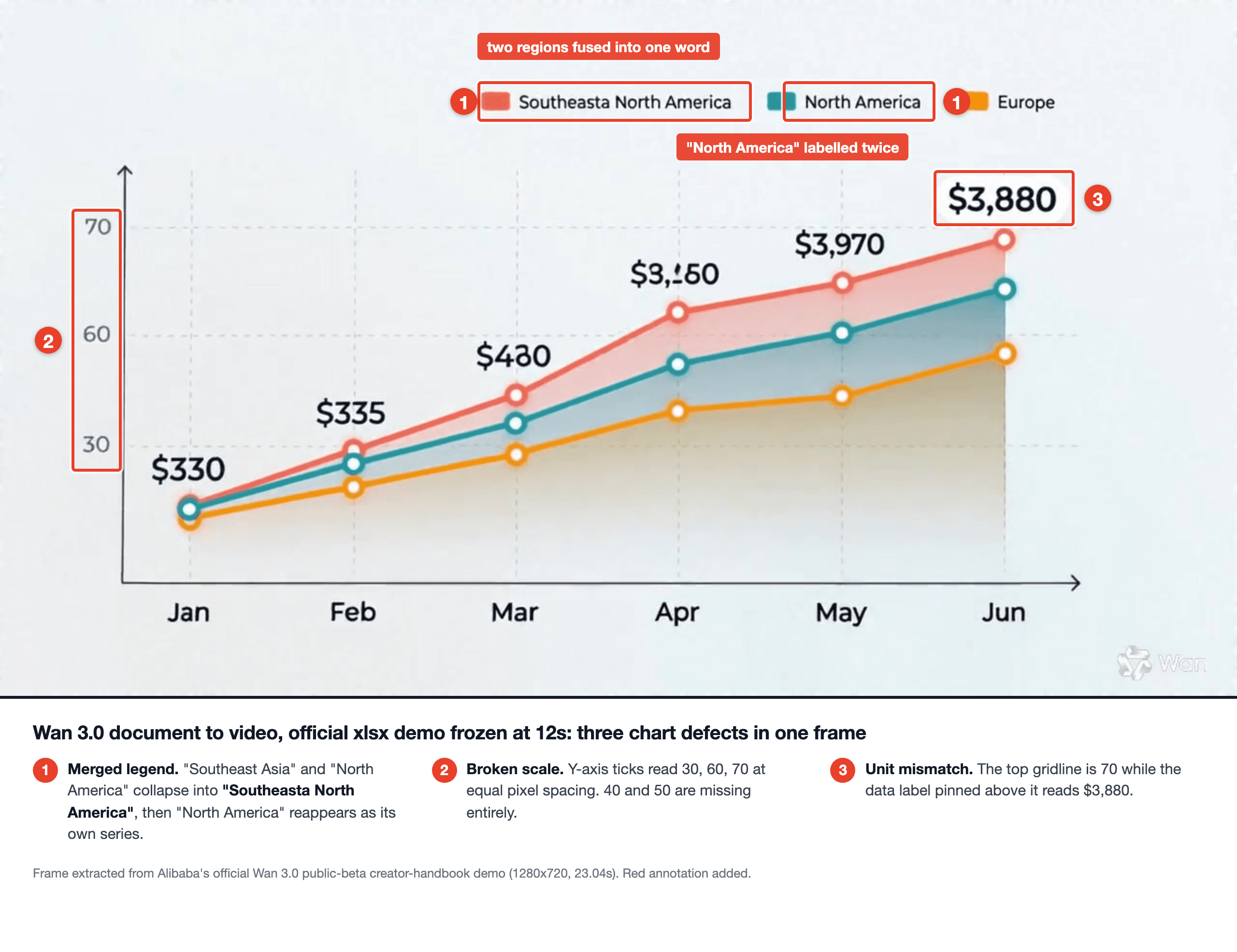
Wan 3.0 document to video frame audit showing a merged chart legend and a broken y-axis
Frozen at 12s in the official demo. Three defects in one frame: two region names fused into "Southeasta North America", "North America" then repeated as its own series, and a y-axis reading 30, 60, 70 while the top data label says $3,880.
Count the failures in that one frame:
- Merged legend. "Southeast Asia" and "North America" collide into "Southeasta North America". Then "North America" appears again as a separate series, so one region is labelled twice and one has vanished.
- A y-axis that is not a scale. The ticks read 30, 60, 70. Equal pixel gaps, unequal values, and 40 and 50 simply missing.
- Axis and labels in different units. The highest gridline is 70. The label pinned to the top data point says $3,880.
- Magnitude drift along one line. The labels on that top curve start at $330 and $335, then land on $3,970 and $3,880. A smooth ascending line cannot hold a tenfold jump between two adjacent points. The two labels in between are smeared past confident reading, which is its own kind of answer.
The bar-chart segment repeats the pattern. Four bars carry $1750, $1,580, $2,350 and $2,580, so the shortest bar holds the second-highest number, and the first label loses its thousands comma while the other three keep theirs. Next to it sit five green growth figures for four bars. And the donut segment centres on $89,7M, a comma where a decimal point belongs.
Notice what all of these have in common. Not one is a content error. Every single one is a drawing error: layout, labelling, scale, punctuation. The model understood the sheet and then rendered the chart the way a video model renders any dense text, approximately.
There is a second, structural reason the output looks nothing like your deck.
Do the arithmetic. 50 pages is the page ceiling, 30 seconds is the duration ceiling. That is 0.6 seconds per page.
You cannot present a page in 0.6 seconds, so the model does the only sane thing and makes a trailer instead. That third-party deck test reached the same conclusion independently: it treated the presentation as source material for a cinematic ad, not as slides to page through. The product's glasses frames drifted from thick to rimless to a third shape across shots.
Which is also why the 30-second ceiling is a design constraint, not a spec-sheet footnote.
We measured the delivered files: the four official document demos land at 30.04s, 30.02s, 25.03s and 23.04s. The two 30-second clips stop dead within four hundredths of a second of each other. And the spreadsheet demo was asked for 22 seconds, then delivered 23.04. We took that ceiling apart in the Wan 3.0 preview.
So: expectations calibrated. Feed it a document, get a trailer, keep your charts simple.
The Document to Video Workflow You Can Run Today
Quick reality check before the tutorial, because it saves you an hour of searching.
Wan 3.0's document input lives only on Alibaba's own channels, access is invitation gated, and the weights are not published. Nobody outside those channels can offer it, including us. What you can do today is rebuild the useful half of that xlsx demo with models that are already open for business, and the frame audit above tells you exactly how to dodge the part that breaks.
Three steps, one browser tab on Atlas Cloud:
- A million-token model reads the document and writes a timecoded shot script, with every number baked in as a literal string.
- An image model renders the first frame, which is where all the text accuracy gets locked in.
- A video model animates that frame according to the script.
| Step | Model | Listed price | Max duration | Why it is here |
|---|---|---|---|---|
| 1. Script | Qwen3.8 Max (/models/qwen/qwen3.8-max) | $2 in / $6 out per 1M tokens | n/a | 1M context swallows a whole deck |
| 2. First frame | GPT Image 2 Text-to-Image | $0.009 per image (floor) | n/a | strongest text rendering for on-screen digits |
| 3. Render | Wan 2.7 Image-to-Video | $0.1 per second | 15s | first-frame control keeps your typography stable |
| Audio option | Wan 2.7 Text-to-Video | $0.1 per second | 15s | generates music and SFX in the same pass, but takes no first frame |
| Swap for step 3 | MiniMax H3 Text-to-Video | $0.1 per second | 15s | same rate, different motion character |
| Swap for step 3 | Seedance 2.5 Text-to-Video | $0.134 per second | 30s | the only one here that reaches 30s in one pass |
Three honest limits on this chain. It does not eat a .pptx binary, so you paste the text or the CSV yourself. Wan 2.7 tops out at 15 seconds, so a single 30-second take is off the table. And the image-to-video path is silent by design: its audio parameter takes a track you supply to drive lip-sync, it does not invent a soundtrack. If you want audio generated in the same pass you use the text-to-video sibling and give up first-frame control, which for a video full of dollar figures is the wrong trade. Prices verified on the model pages on 20 August 2026, and note that a listed price is a floor: quality and resolution tiers push the live quote up, so read the Run button before you commit.
Let's build it.
Step 1: Turn Your Spreadsheet Into a Timecoded Shot Script
Video models do not remember numbers. They render whatever string you give them. So the job of this step is to convert a table into shot directions where every figure is already written out as text in quotes.
Paste your sheet between the <<< markers. Settings: temperature 0.3, max_tokens 4000. Keep max_tokens generous, because a reasoning-capable model that runs out of budget mid-thought returns you an empty answer you still pay for.
text1You are a motion-graphics director. Below is a raw spreadsheet export. 2 3<<< 4Month,North America,Southeast Asia,Europe,Total GMV 5Jan,1580,880,640,3100 6Feb,2110,1240,900,4250 7Mar,2740,1610,1150,5500 8Apr,3120,1980,1330,6430 9May,3350,2240,1460,7050 10Jun,3460,2480,1580,7520 11H1 growth,+45.7%,,, 12>>> 13 14Write a shot script for a 10-second, 16:9, Apple-Keynote-style 15business data video. Rules: 161. Exactly 2 shots. Give each an in/out timecode (00:00-00:05, 17 00:05-00:10). 182. Every number that appears on screen must be written in the shot 19 description as an exact literal string, in quotes, e.g. "$1,580". 20 Never write "the January figure" - write the digits. 213. Do NOT ask for a legend, an axis with tick labels, or more than 22 two data series on screen at once. Use big standalone numerals 23 and one coral pill-shaped badge instead. 244. Pure white background, soft coral + deep-grey palette, sans-serif. 255. End with one line of BGM + SFX direction (whoosh on slide-in, 26 one bell chime on the badge). 27Output the script only, no commentary. 28
Rule 3 is the payoff from the audit. The official output broke on exactly three things: legends, axis ticks and multi-series charts. So we delete all three from the brief and spend that screen space on oversized numerals and a colour-coded badge instead. Same information, none of the failure surface.
Rule 2 is the one people skip, and it is the reason the digits survive to the end of this chain. A shot description that says "the January figure" hands the number back to a model that has to invent glyphs for it. A shot description that says "$1,580" in quotes gives the next two steps a string to copy. You are not asking for data visualisation here, you are asking for a typing instruction.
What comes back is a two-shot script with in and out timecodes, every on-screen figure quoted as a literal, and a closing BGM and SFX line. Keep it in a scratch file; steps 2 and 3 both read from it.
Step 2: Generate the Brand First Frame
Every character of on-screen text gets decided here. An image model at high quality renders $1,580 correctly far more reliably than a video model can write it while also moving it, so we settle the typography in a still and let step 3 only push pixels around.
Open GPT Image 2 and set quality to high and the size to the 16:9 option, which on this page is 2048x1152. Match the aspect ratio to the video you are about to make, or step 3 starts by cropping your typography.
text1A pristine Apple-Keynote-style presentation frame on a pure white 2seamless background, photographed as if projected on a matte studio 3wall. Centered headline in a deep charcoal geometric sans-serif 4reading "H1 2026", set in generous negative space. Below it, two 5oversized numerals in the same typeface, "$1,580" on the left and 6"$3,460" on the right, separated by a thin light-grey arrow. Under 7the arrow, small light-grey caption text reading "Monthly GMV 8Growth". Beneath that, a single coral pill-shaped badge with white 9text reading "+45.7%". Soft even diffused lighting, faint warm 10gradient in the top-right corner, subtle paper grain, no clutter, no 11logos, no charts. Ultra-clean corporate minimalism, 16:9. 12
Two details worth copying. "No charts" is in there on purpose. And read the price quote on the Run button before you press it, because quality high on a wide 2K frame costs a multiple of the $0.009 list figure.
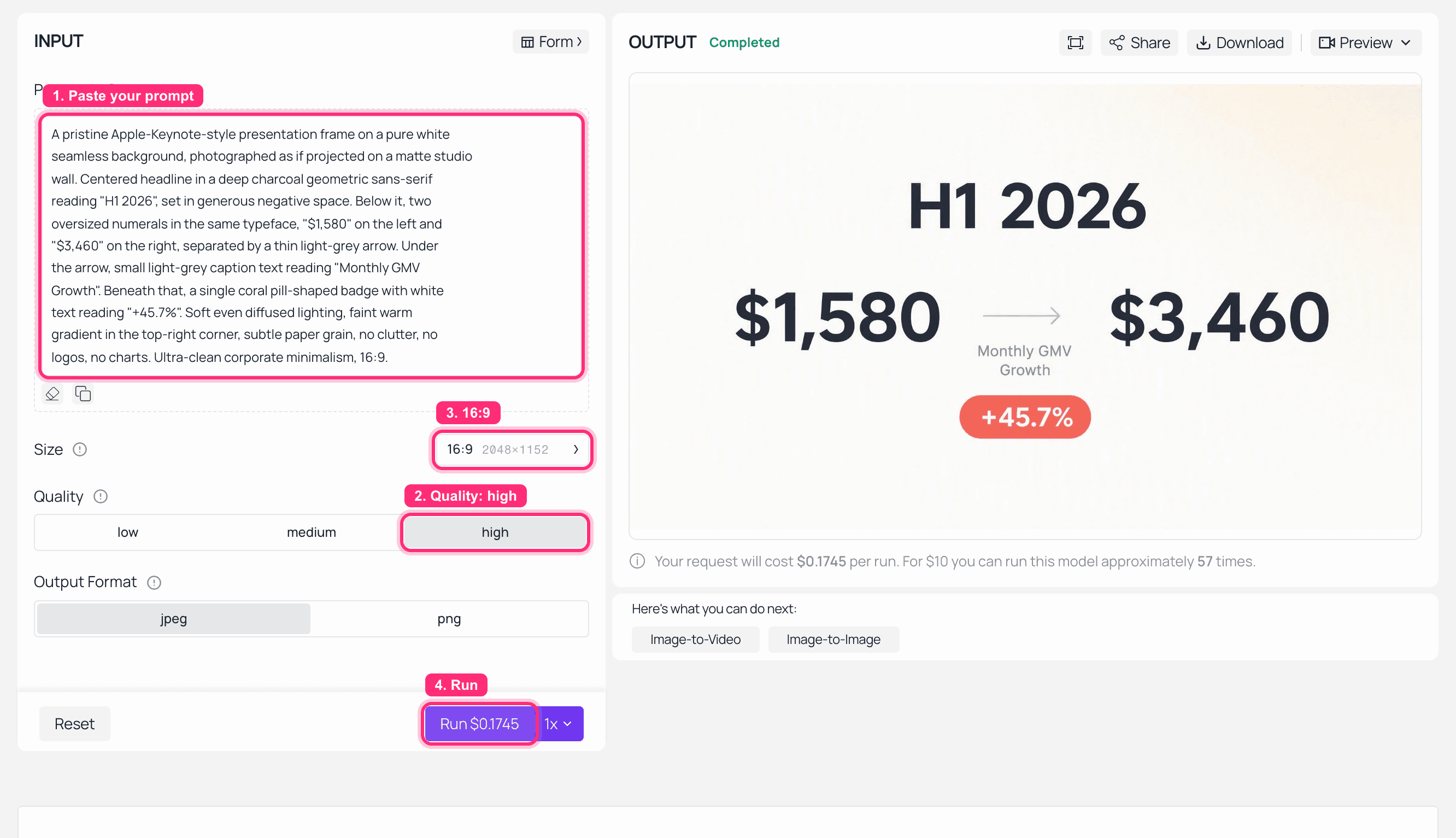
GPT Image 2 playground on Atlas Cloud with the first-frame prompt and the rendered Keynote-style frame showing every figure spelled correctly
GPT Image 2 at quality high, 16:9 at 2048x1152. Every figure landed: "H1 2026", "$1,580", "$3,460" and the coral "+45.7%" badge, which is exactly why the typography gets settled in a still and not in a video model.
Step 3: Render the Document to Video Clip and Verify Every Digit
Last step. Load the step-2 image as the first frame and let the video model animate it while holding the typography still.
Open Wan 2.7 Image-to-Video. Settings: your first frame uploaded, resolution 1080P, duration 10s. Leave the audio field empty, since this model treats audio as a driving input rather than something it creates. You are scoring this clip yourself, or in a separate text-to-video pass.
text1Animate this frame as a 10-second Apple-Keynote-style business data 2video, holding the existing typography pixel-stable. 3 400:00-00:05 - The headline "H1 2026" holds, then dissolves into 5golden particles that drift outward. The two numerals "$1,580" and 6"$3,460" slide in from left and right and lock into place; the thin 7grey arrow draws itself between them left to right. The coral badge 8reading "+45.7%" pops up from below with a slight overshoot, timed 9to a single clear bell chime. 10 1100:05-00:10 - Everything slides smoothly off to the left. Three 12thick rounded bars grow upward from a shared baseline against the 13same pure white background, coral, teal and amber, with one large 14standalone numeral above each: "$3,460", "$2,480", "$1,580". No 15legend, no axis, no tick labels, no gridlines. Camera stays locked 16and perfectly still throughout. 17
"Holding the existing typography pixel-stable" and "camera stays locked" are doing real work. Every camera move is another chance for the model to redraw text it should be leaving alone.
Then do the boring, important part: pause on each frame where a number appears and read it against the source row. That is a 30-second check, and it is the only thing standing between you and a video that confidently shows the wrong revenue figure.
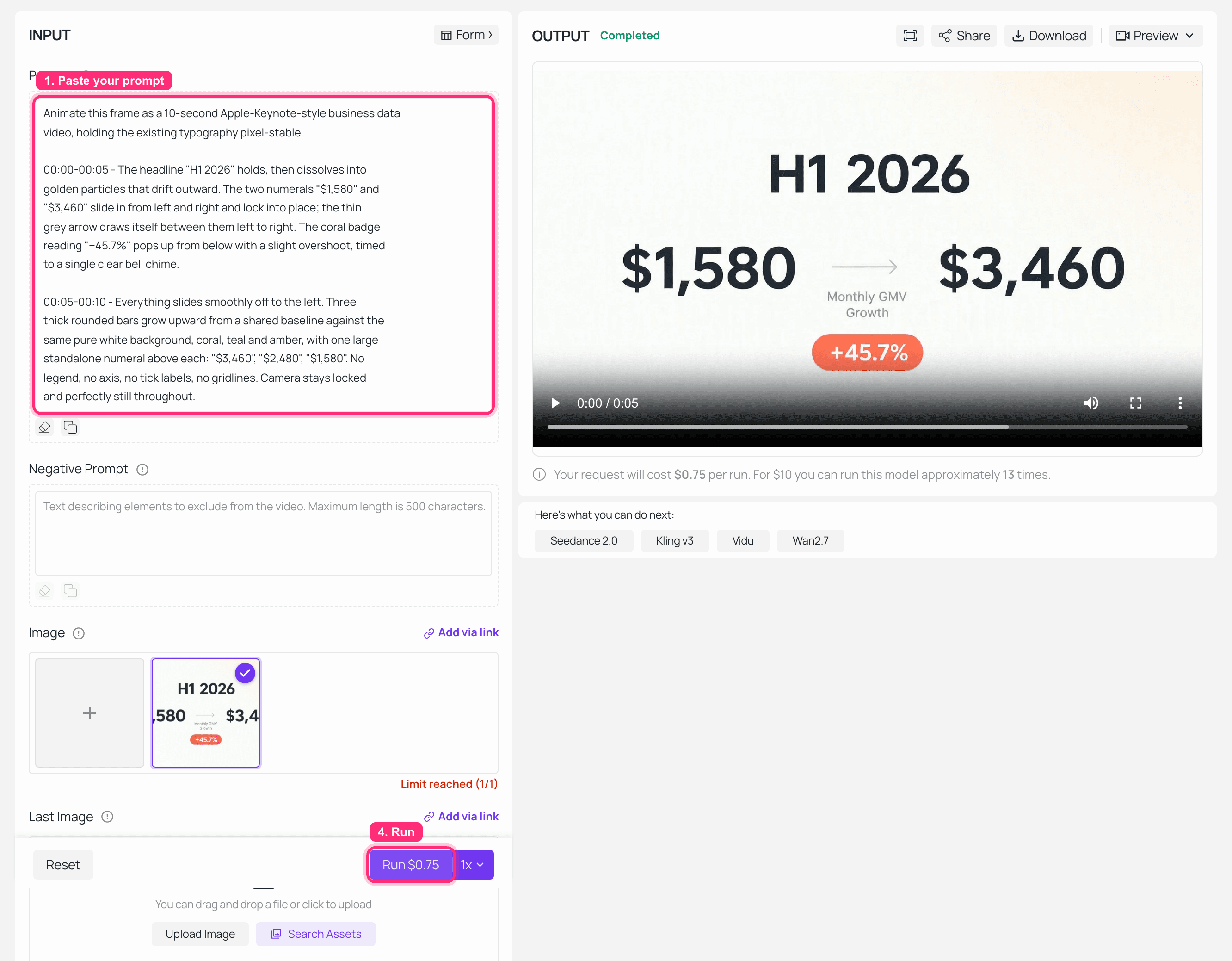
Wan 2.7 Image-to-Video playground on Atlas Cloud with the first frame loaded and the finished data clip rendered
Wan 2.7 Image-to-Video at 1080P with the step-2 first frame uploaded and the finished clip in the output panel. Worth noting what the panel says: we asked for 10 seconds, the duration field showed 10, and the render came back 5. The Run quote told us so before the file did, which is the whole reason to read it.
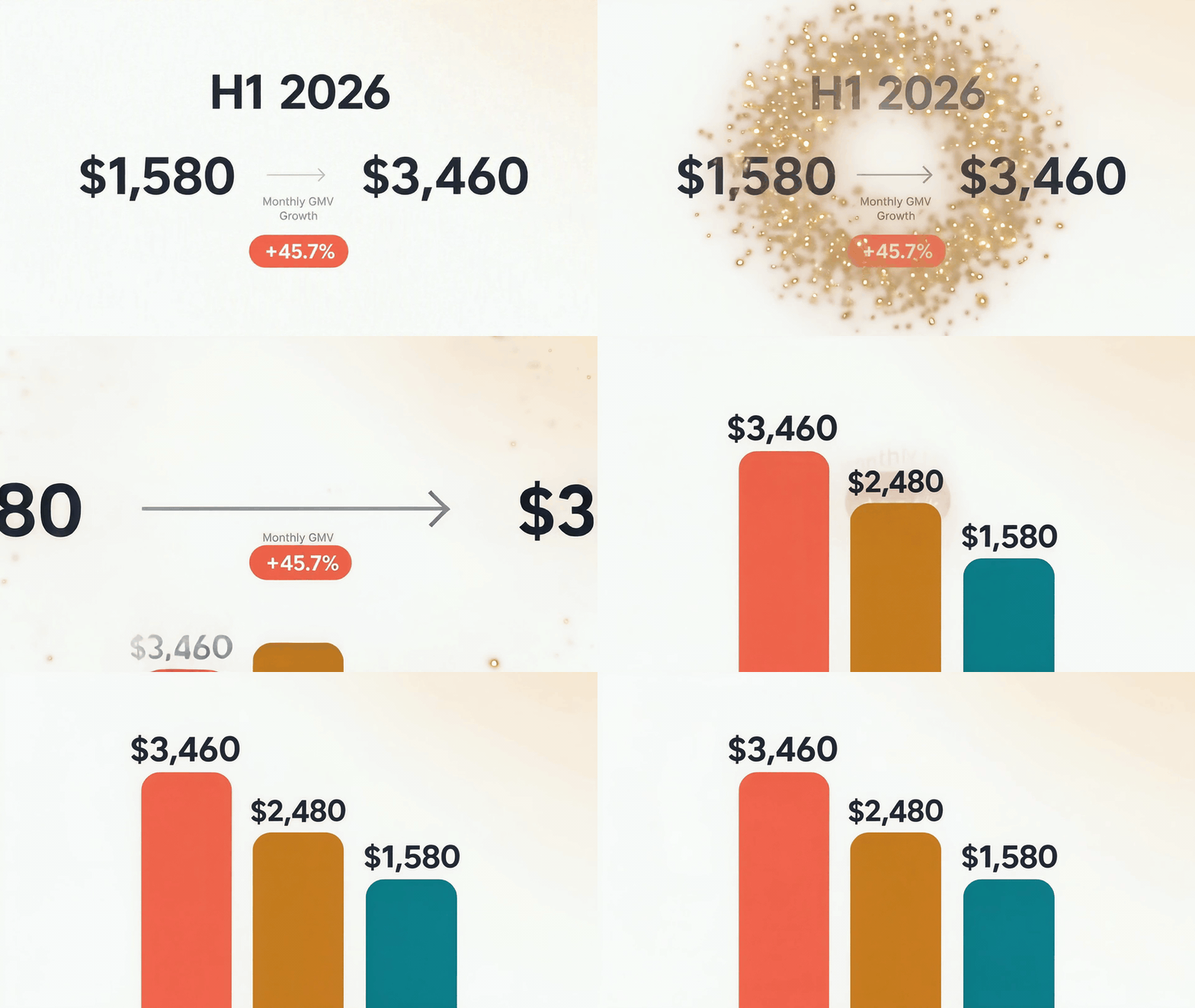
The finished data clip rebuilt from the same GMV spreadsheet, every figure intact
The payoff: the same spreadsheet, rebuilt with legends and axis ticks deliberately designed out. The model compressed both scripted shots into the five seconds it actually rendered, and every figure survived the move: "$1,580" and "$3,460" in the opening, then "$3,460", "$2,480" and "$1,580" over the three bars. Zero garbled labels, because there were no labels left to garble. Silent by design, since the image-to-video path scores nothing for you.
Document to Video Variations and What a Finished Minute Costs
The spreadsheet case is the hardest one. The other three official use cases are easier, and they are where most of the commercial value sits.
Courseware. Feed it an encyclopedia entry and ask for a lesson at a specific reading level. The output below is a chibi-styled animated class about the poet Wang Wei, 25.03 seconds long.
The drawing style holds all the way through. The character details do not. At the 3-second mark he wears a black cap against a plain white background; by 22 seconds the cap has turned pale blue and he is standing inside a classical scroll painting. Same drift the deck tester saw in those glasses frames. If you rebuild this on the three-step chain, lock a character card in step 1 and reuse the step-2 frame as your style anchor.
Encyclopedia entry into a first-grade animated lesson, 25.03s with generated audio. Official Alibaba Wan 3.0 public-beta demo.
Brand films. A proposal document becomes a full 30-second spot. It is the prettiest of the four demos and the least verifiable, since you cannot see what the source document said. Watch consistency rather than beauty: this is the failure mode that caught the third-party tester, whose product changed shape three times in one clip.
Proposal document into a 30.04s skincare brand film. Official Alibaba Wan 3.0 public-beta demo, audio on.
Report recaps. No official demo exists for this one, so treat the pattern as untested: ask for one presenter, one claim per shot, and put every figure in quotes exactly as in step 1.
Now the money.
| What | Rate | 30 seconds of finished video |
|---|---|---|
| Wan 3.0, 1080p (RMB sheet) | ¥1.2 per second | ¥36 |
| Wan 3.0, 1080p (USD sheet) | $0.20 per second | $6.00 |
| Wan 3.0, 720p (RMB sheet) | ¥0.6 per second | ¥18 |
| Three-step chain, one pass | script + frame + $0.1/s render | roughly $1.20 for 10s |
| Three-step chain, 3 attempts | script reused, frame and render repeated | roughly $3.50 |
Two published Wan 3.0 price sheets disagree on whether 1080p is ¥1.2 or $0.20 per second, which are not the same number. Check the rate on the endpoint you are actually billed against before you budget a series.
The hidden cost is not the per-second rate. It is the re-run. Document input takes one file per job, so changing a single figure means regenerating the entire video. In the three-step chain the shot script is a reusable text artifact, so a number change costs you one render instead of one full job. Over a quarterly reporting cycle, that difference dwarfs the per-second price.
One legal note before you upload anything. A document you send to a hosted model is a document that leaves your building, and internal decks and unreleased financials usually have a policy attached to that. Check it before the deadline pressure arrives, not after. And every official demo clip in this article belongs to Alibaba, cited here as public-beta material; nothing here is a licence to reuse them commercially.
Wan 3.0 Document to Video FAQ
What file types can Wan 3.0 document to video accept, and how large?
doc, xls, ppt, pdf, txt and md, with key, pages and numbers also reported, plus a plain web link instead of a file. One file or one link per job, up to 100MB or 50 pages.
Does Wan 3.0 turn each slide into a scene?
No, and this is the most common misunderstanding. It reads the whole document, then directs a video from what it learned. At the ceiling that is 50 pages into 30 seconds, or 0.6 seconds per page, so it produces a trailer rather than a page-turn. Both the official use cases and independent testing point the same way.
Are the numbers from my spreadsheet accurate in the video?
Cell values held up in every case I checked, including $1,580, $3,460 and +45.7% in the official demo. What fails is chart furniture: legends merge, axis ticks come out non-linear, and thousands separators go missing. Inject every figure as a quoted literal and design legends and tick labels out of the brief entirely.
Can I use Wan 3.0 document to video through an API today?
Only through Alibaba's own channels, currently invitation gated, and the weights are not published. Wan 2.2 remains the last open-weight release in the line. Until that changes, the three-step chain above is the practical substitute.
How much does a 30-second Wan 3.0 video cost?
At the published 1080p rate that is ¥36, or $6.00 on the international sheet, for one 30-second clip. Budget for re-runs rather than for a single pass, because a one-number correction means regenerating the whole thing.
What is the closest thing to Wan 3.0 document to video I can run right now?
A long-context model to write the shot script, then Wan 2.7 at $0.1 per second for the render, with MiniMax H3 at the same rate or Seedance 2.5 at $0.134 per second as alternatives. You get the generated-footage look and frame-accurate text. What you do not get: 30 seconds in one continuous take, audio in the same pass as the image-to-video render, or a model that reads the .pptx for you.
The honest summary: Wan 3.0 document to video is a real capability with a real ceiling, and the gap between its output and yours is smaller than it looks, as long as you stop asking either one to draw a legend.





