Saya menatap tiga papan peringkat Artificial Analysis selama sepuluh menit untuk mencari tahu siapa yang sebenarnya menang.
Teks-ke-video: Gemini Omni Flash unggul 5 poin. Gambar-ke-video: Gemini unggul 2 poin. Penyuntingan video: MiniMax H3 unggul 9 poin.
Lalu saya melihat kolom interval kepercayaan. Plus minus 7. Plus minus 9. Plus minus 10.
Tiga papan, tiga selisih, semuanya berada di dalam batas galatnya masing-masing. Dalam pemungutan suara buta, kedua model ini adalah model yang sama.
Jadi saya menutup papan peringkat dan membuka menu dropdown. Selisih itu bukan 5 poin. Selisih itu adalah satu tingkat resolusi utuh.
Poin penting
- Ketiga selisih Artificial Analysis (+5, +2, +9, tangkapan layar 6 Agustus 2026) semuanya berada di dalam interval kepercayaan ±7 hingga ±10. Dalam hal kualitas mentah, ini seri, bukan kemenangan.
- H3 menghasilkan 2K, hingga 15 detik, dan enam rasio aspek. API Gemini Omni Flash dibatasi pada 720p, 10 detik, dan dua rasio aspek. Itu adalah nilai enum, bukan opini.
- H3 menerima audio sebagai input. Gemini tidak. Gemini memiliki
seeddanthinking_level. H3 tidak memiliki keduanya. - Gemini memiliki endpoint
video-editkhusus yang memutasi klip sumber Anda. Jalur revisi H3 adalahreference-to-video, yang menghasilkan ulang dengan klip Anda sebagai referensi. Keduanya bukan operasi yang sama, dan ronde kedua membuktikannya. - Hanya satu dari keduanya yang memiliki bobot yang dapat diunduh, dan itu bukan yang dari Google.
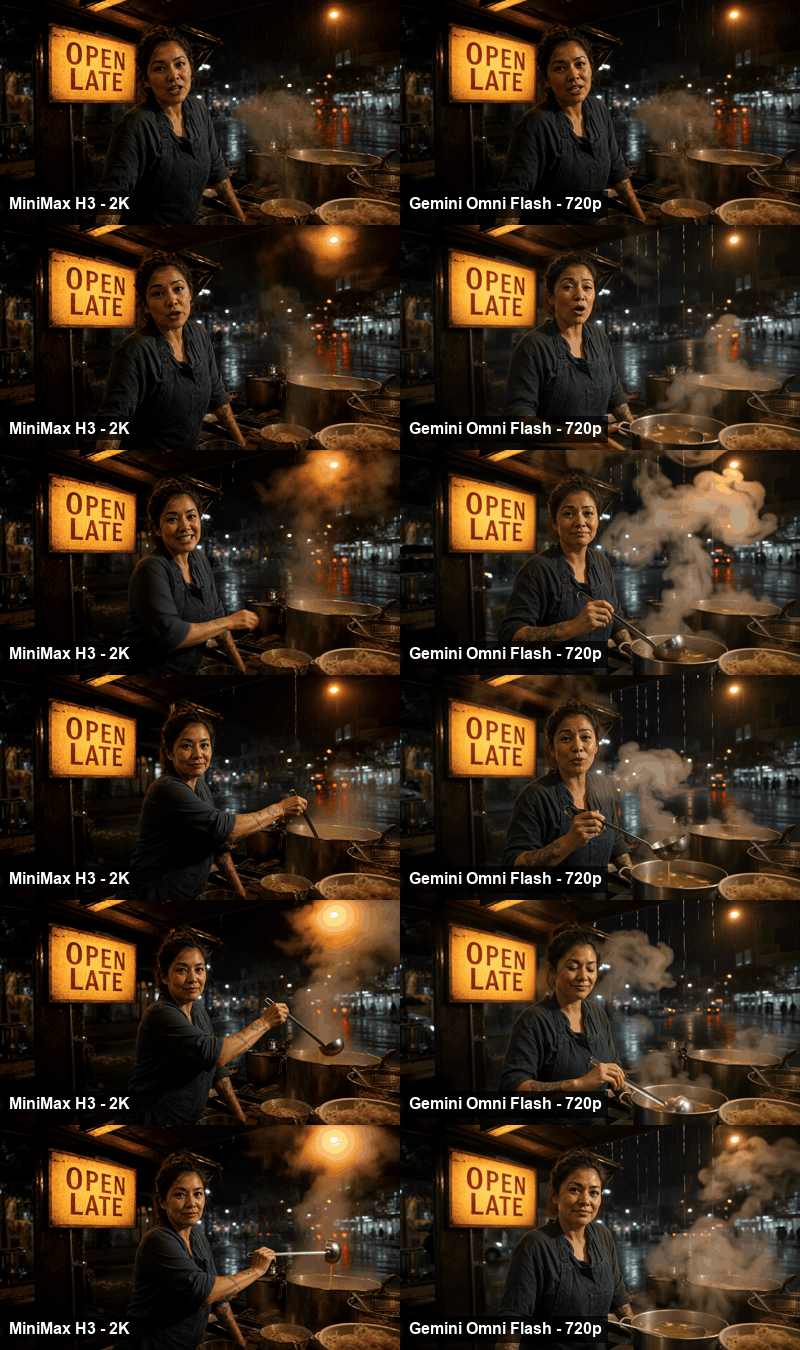
Ronde pertama pengujian MiniMax H3 vs Gemini Omni Flash, kedua model menganimasikan bingkai pertama yang identik, ditampilkan berdampingan
Ronde pertama: bingkai pertama sama, prompt sama, durasi sama. Kiri MiniMax H3 pada 2K, kanan Gemini Omni Flash pada 720p. Ditampilkan di sini sebagai GIF senyap; kedua file yang dikirimkan membawa audio asli dan keduanya disematkan sebagai video yang dapat diputar di bagian bawah. Inilah masalahnya. Keduanya sama-sama bagus.
Mengapa Selisih Papan Peringkat MiniMax H3 vs Gemini Omni Flash Sering Disalahartikan
Hampir setiap tulisan tentang MiniMax H3 vs Gemini Omni Flash yang akan Anda temukan mengutip satu papan peringkat dan satu harga. Kedua kebiasaan ini menghasilkan jawaban yang salah.
Berikut adalah ketiga papan Artificial Analysis, dengan kolom yang dilewati semua orang.
Tabel A: MiniMax H3 vs Gemini Omni Flash di tiga papan peringkat Artificial Analysis (dengan audio), tangkapan layar 6 Agustus 2026
| Papan peringkat | Gemini Omni Flash | MiniMax H3 | Selisih | Di dalam batas galat? |
|---|---|---|---|---|
| Teks-ke-video | 1.243 (#1) ±7, 11.842 suara | 1.238 (#2) ±9, 6.830 suara | Gemini +5 | Ya |
| Gambar-ke-video | 1.191 (#2) ±9, 6.506 suara | 1.189 (#3) ±10, 5.545 suara | Gemini +2 | Ya |
| Penyuntingan video | 1.123 (#2) ±5, 11.706 suara | 1.132 (#1) ±6, 9.128 suara | H3 +9 | Ya, tipis |
MiniMax H3 adalah salah satu dari 30+ model video yang dapat Anda jalankan berdampingan dengan prompt yang sama di perbandingan model Atlas Cloud — dengan biaya per detik ditampilkan sebelum Anda menghasilkan.
Angka Elo dari Video Arena Artificial Analysis (Artificial Analysis, Agustus 2026). Gambar-ke-video dipimpin oleh Dreamina Seedance 2.0 720p pada 1.197, jadi tidak satu pun dari keduanya yang memegang mahkota itu. Ini adalah skor suara publik yang bergulir dan dapat berubah, itulah sebabnya selisih 5 poin bukanlah sebuah vonis.
Keunggulan 5 poin dengan interval ±9 berarti peringkat bisa berubah minggu depan hanya karena fluktuasi suara. Itu bukan berarti "Gemini lebih baik dalam teks-ke-video." Itu adalah lemparan koin dengan papan skor.
Tiga hal lagi yang sering disalahartikan orang:
Kolom dolar per menit bukanlah yang Anda bayar. Artificial Analysis mencantumkan $6,00/menit untuk Gemini dan $7,80/menit untuk H3. Kolom itu menormalkan biaya untuk satu menit video 1080p pada pengaturan bawaan. Gemini Omni Flash tidak dapat menghasilkan 1080p sama sekali. Jadi angkanya adalah perkiraan model, bukan faktur. Bandingkan hasil akhir yang dikirimkan, bukan detiknya.
Satu papan bukanlah modelnya. H3 berada di posisi kedua, ketiga, dan pertama di tiga papan. Gemini berada di posisi pertama, kedua, dan kedua. Kutip salah satu saja dan Anda bisa membuktikan apa pun yang sudah Anda yakini.
"Omni" tidak berarti "memakan apa pun." Itu nama yang bagus dan menyesatkan. Salah satu dari keduanya menerima file audio sebagai input. Bukan yang memiliki kata "omni" di namanya.
Lembar Spesifikasi MiniMax H3 vs Gemini Omni Flash yang Tak Pernah Dicetak Orang
Jika skor Elo tidak bisa memisahkan mereka, tabel kendala bisa. Saya mengambil skema input langsung dari kedua model, bukan sekadar percaya pada posting peluncuran, dan perbedaannya tidaklah halus.
Tabel B: Kendala keras MiniMax H3 vs Gemini Omni Flash, dibaca dari skema API langsung pada 6 Agustus 2026
| Kendala | MiniMax H3 | Gemini Omni Flash |
|---|---|---|
| Resolusi | 768P atau 2K | 720p, dan itu satu-satunya nilai dalam enum |
| Durasi | 4 hingga 15 detik | 3 hingga 10 detik |
| Rasio aspek | 21:9, 16:9, 4:3, 1:1, 3:4, 9:16 | Hanya 16:9 dan 9:16 |
| Jalur revisi | reference-to-video (menghasilkan ulang dengan referensi) | Endpoint video-edit khusus (memutasi sumber Anda) |
| Kontrol bingkai akhir | end_image didukung | Tidak tersedia |
| Batas referensi | ≤9 gambar, ≤3 video, ≤3 audio, total 12 file | 1 hingga 10 gambar |
| Input audio | Ya | Tidak |
| Reproduksibilitas seed | Tidak | Ya |
| thinking_level | Tidak | Ya (bawaan / tinggi / rendah) |
| Bobot terbuka | Ya, di Hugging Face | Tidak |
Baca tabel itu dengan jujur dan Gemini memenangkan tiga baris secara mutlak. Seed yang dapat direproduksi penting jika Anda membangun pipeline yang harus merender bingkai yang sama dua kali. Endpoint video-edit yang sesungguhnya adalah alat yang benar-benar berbeda dari regenerasi yang dikondisikan oleh referensi. Dan thinking_level memberi Anda kenop kualitas yang tidak dimiliki H3.
H3 memenangkan lima baris, dan baris-baris itulah yang menentukan apakah Anda dapat mengirimkan file yang diminta klien.
Saya menjalankan semua yang di bawah ini di Atlas Cloud karena kedua model berada di belakang endpoint /api/v1/model/generateVideo yang sama di sana, yang berarti satu loop polling dan satu header auth untuk seluruh pengujian. Mengganti model hanya dengan mengubah string model. Detail itulah alasan utama mengapa "gunakan keduanya" adalah jawaban yang realistis, bukan sekadar jalan pintas.
Tabel C: Biaya setiap endpoint dalam pengujian ini, diverifikasi terhadap daftar harga langsung pada 6 Agustus 2026
| Endpoint | Harga | Klip 10 detik dalam pengujian ini |
|---|---|---|
| openai/gpt-image-2/text-to-image | $0,009 / gambar | $0,01 |
| minimax/h3/image-to-video | $0,14 / dtk | $1,40 |
| minimax/h3/reference-to-video | $0,14 / dtk | $1,40 |
| google/gemini-omni-flash/image-to-video | $0,13 / dtk | $1,30 |
| google/gemini-omni-flash/video-edit | $0,14 / dtk | $1,40 |
| google/gemini-omni-flash/text-to-video | $0,125 / dtk | tidak digunakan |
| minimax/h3/text-to-video | $0,14 / dtk | tidak digunakan |
Tidak ada model yang memberikan diskon bulan ini. Gemini juga menawarkan tingkat pengembang yang lebih murah ($0,112/dtk untuk teks-ke-video dan gambar-ke-video, $0,12/dtk untuk referensi-ke-video); H3 tidak memiliki tingkat yang setara.
Garis bobot terbuka yang tidak bisa dilintasi Gemini Omni Flash. Bobot H3 dipublikasikan di Hugging Face (MiniMax, Agustus 2026): sebuah Omni Transformer padat 33B aliran tunggal, ditambah encoder teks Qwen3-VL-32B, VAE visual, dan VAE audio. Dua peringatan lebih penting daripada ukuran unduhan. Pertama, apa yang Anda host sendiri berjalan pada sisi pendek 768 piksel; tahap prapemrosesan Context-IR dan modul Regenerate-2K tidak ada dalam rilis, dan keluaran 2K berasal dari keduanya. Kedua, lisensi komunitas saat ini tidak mencakup UE, Inggris, Korea Selatan, atau Amerika Serikat, dan ada formulir aplikasi terpisah untuk wilayah tersebut. Bacalah sebelum Anda membangun produk di atasnya. Gemini Omni Flash tidak memiliki percakapan yang setara, karena tidak ada file untuk diunduh.
Posisi bobot terbuka itu, ditambah dengan harga yang agresif, adalah keseluruhan cerita strategis dari peluncuran ini (South China Morning Post, Agustus 2026).
Jalankan Sendiri Pengujian Revisi MiniMax H3 vs Gemini Omni Flash
Inilah bagian yang belum pernah dilakukan orang. Semua orang melakukan benchmark generasi pertama. Tidak ada yang melakukan benchmark generasi kedua.
Pekerjaan nyata bukanlah satu prompt. Pekerjaan nyata adalah klip yang sudah Anda sukai, ditambah klien yang membalas "suka banget, bisakah papannya bertuliskan 24H dan celemeknya merah." Satu kalimat itulah yang membuat kedua model ini tidak lagi dapat dipertukarkan, dan kebetulan itu adalah tugas persis yang diukur oleh papan peringkat penyuntingan video.
Adegannya sengaja dibuat kejam: kios mie basah kuyup di malam hari, penjualnya berbicara langsung ke lensa, papan bertuliskan tangan dengan kata-kata yang terbaca di belakangnya, uap dari kuah, hujan di tenda. Satu bingkai yang menekankan lip sync, stabilitas teks di layar, gerakan cair, dan audio ambien berlapis sekaligus.
Kedua model mendapatkan bingkai pertama yang identik, prompt yang identik, dan catatan revisi yang identik. Setiap proses di bawah ini adalah 10 detik, yang merupakan batas atas Gemini Omni Flash dan berada dalam batas H3.
Langkah 1: Kunci bingkai pertama dengan GPT Image 2
Kedua model harus mulai dari gambar yang sama, jika tidak, ronde pertama mengukur keberuntungan komposisi, bukan model. Buka playground GPT Image 2, atur kualitas ke high dan rasio ke 16:9, lalu tempel ini:
Plain1Photoreal night street-food stall in heavy rain, shot on a 35mm lens at f/2.0. A woman in her late thirties in an indigo canvas apron stands behind a steaming noodle counter, looking straight into the lens, mid-sentence. Behind her a hand-painted tin light-box sign glows warm amber with the words "OPEN LATE" in clean bold sans-serif capitals. Rain streaks through the sodium streetlight, steam rises off the broth pot, wet asphalt reflects red and green neon from across the street. Shallow depth of field, practical lighting only, slight lens haze, natural skin texture, no text anywhere else in the frame. 16:9.
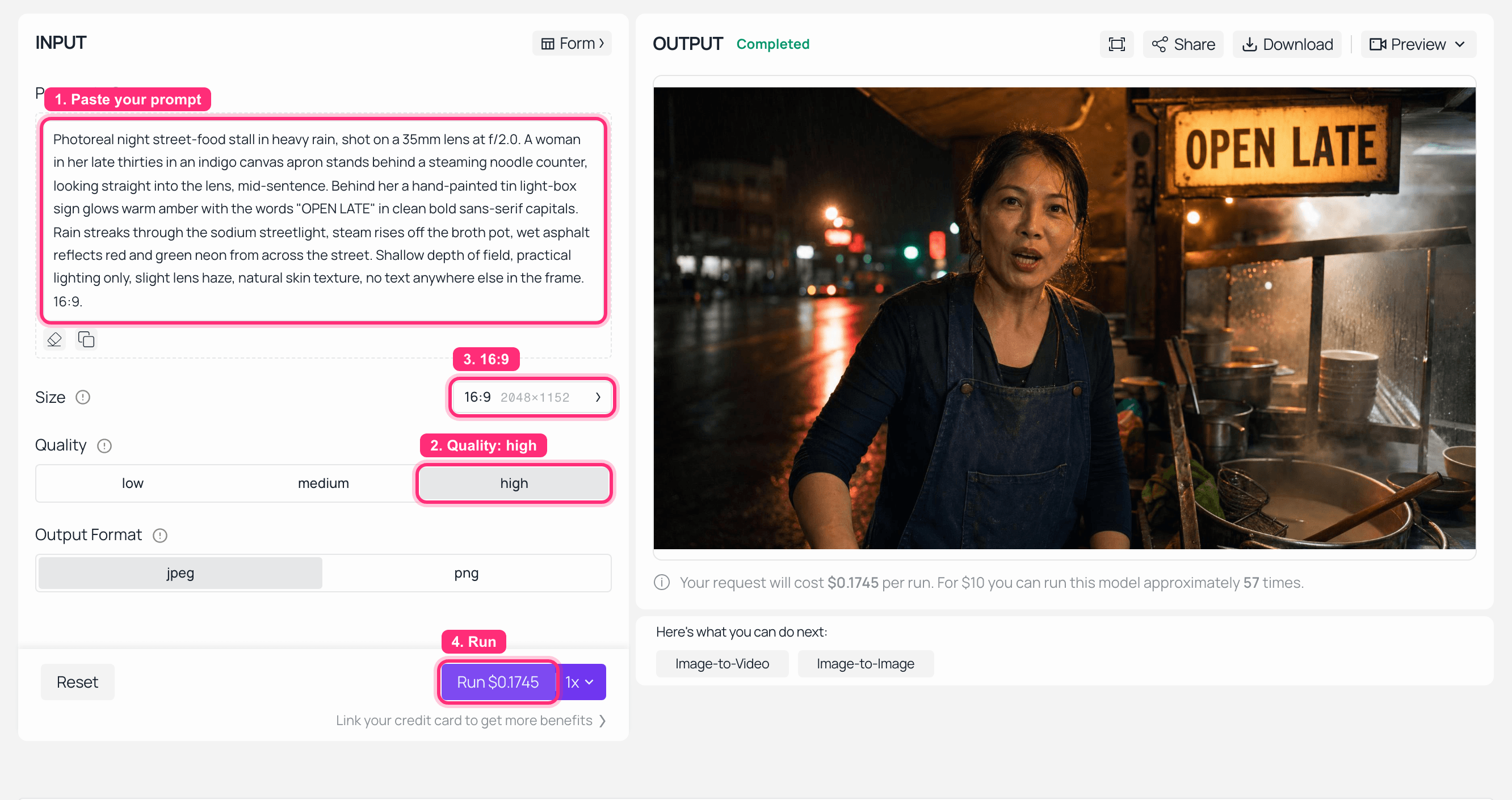
Playground GPT Image 2 di Atlas Cloud dengan prompt kios mie di sebelah kiri dan bingkai pertama yang dihasilkan di panel OUTPUT
GPT Image 2 di Atlas Cloud: prompt di kiri, bingkai pertama bersama di OUTPUT. Biaya langkah ini , $0,009.

Bingkai pertama yang dihasilkan: seorang wanita dengan celemek nila di belakang meja mie yang mengepul di malam hari saat hujan, dengan papan bertuliskan OPEN LATE yang bersinar di belakangnya
Input tunggal yang diterima kedua model. Perhatikan dua hal yang akan ditargetkan revisi: papan "OPEN LATE" dan celemek nila. Dihasilkan dengan openai/gpt-image-2/text-to-image.
Langkah 2: Ronde satu di MiniMax H3
Pergi ke playground MiniMax H3, pilih tugas image-to-video, unggah bingkai dari Langkah 1, lalu atur resolution ke 2K, duration ke 10, ratio ke adaptive (enum image-to-video hanya menawarkan adaptive). Prompt:
Plain1The vendor looks into the lens and says, in a warm tired voice: "Broth's been on since four this morning. Sit down, it's still raining." She lifts the ladle as she speaks. Steam curls up across the frame. Rain keeps falling on the awning behind her. The camera holds still, no push, no pan. Ambient audio: rain on canvas, broth simmering, distant traffic, her voice close and dry.
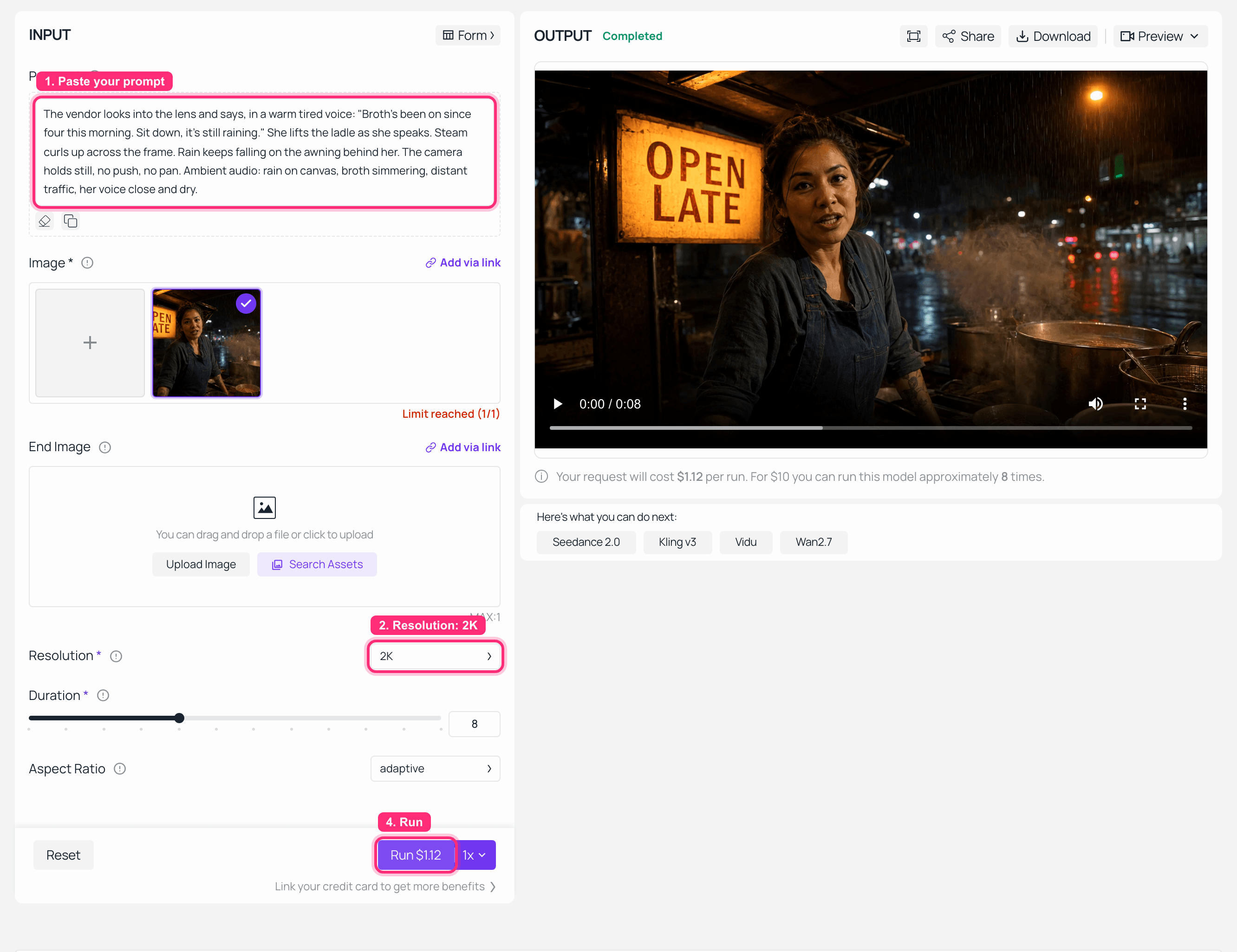
Playground MiniMax H3 image-to-video di Atlas Cloud dengan resolusi 2K dipilih dan klip selesai diputar di panel OUTPUT
MiniMax H3 image-to-video di Atlas Cloud: 2K dipilih, klip selesai di OUTPUT. Tangkapan ini berjalan pada bawaan 8 detik playground dan dihargai $1,12; versi 10 detik yang digunakan untuk perbandingan disematkan di bawah dan berharga $1,40.
MiniMax H3, ronde satu, 2K, 10 detik. Nyalakan suara: dialog, hujan, dan kuah semuanya dihasilkan dalam satu proses, bukan dilapis kemudian.
Langkah 3: Ronde satu di Gemini Omni Flash, bingkai sama, kata-kata sama
Buka playground Gemini Omni Flash, pilih image-to-video, unggah bingkai Langkah 1 yang sama, dan tempel prompt Langkah 2 tanpa mengubah satu karakter pun. Pengaturan: resolution 720p, duration 10, aspect_ratio 16:9, thinking_level bawaan, seed -1.
Dua hal yang perlu diperhatikan saat Anda berada di formulir itu, karena keduanya adalah inti artikel ini. Dropdown resolution berisi tepat satu opsi. Kolom duration berhenti di 10. Saya tidak memilih 720p daripada yang lebih baik; tidak ada yang lain untuk dipilih.
Catatan tentang apa yang hilang di sini: Saya tidak dapat menangkap tangkapan layar playground yang menunjukkan proses selesai untuk salah satu langkah Gemini. Lingkungan staging tempat saya mengambil tangkapan layar mengembalikan 403 PERMISSION_DENIED dari sisi Google pada ketiga percobaan, jadi satu-satunya tangkapan Gemini yang saya miliki menunjukkan panel OUTPUT yang gagal dan saya tidak akan mendandaninya sebagai proses yang berhasil. Klip di bawah ini asli, dihasilkan melalui API produksi dengan pengaturan yang tercantum di atas. Kedua langkah H3 berhasil ditangkap dengan bersih dan tangkapan layar itu asli.
Gemini Omni Flash, ronde satu, 720p, 10 detik, input identik. Putar ini langsung setelah klip H3 di atas dan nilai audio sendiri.
Langkah 4: Ronde dua, kirim revisi ke Gemini Omni Flash
Ini ronde yang penting. Beralih ke tugas video-edit di halaman model Gemini yang sama, unggah klip yang dihasilkan Gemini sendiri di Langkah 3 sebagai input video, atur resolution 720p dan thinking_level high (instruksi revisi dua bagian adalah kasus kompleks yang tepat untuk kenop ini). Tempel catatan ini persis seperti yang akan dikirim klien:
Plain1Keep this exact shot: same camera position, same woman, same face, same rain, same lighting, same audio. Change the hand-painted sign so it reads "OPEN 24H" instead of "OPEN LATE", in the same painted style and the same amber glow. Change her apron from indigo blue to deep crimson. Change nothing else in the frame.
Gemini Omni Flash setelah catatan revisi. Perhatikan papan, lalu celemek, lalu periksa apakah ada hal lain yang berubah.
Langkah 5: Ronde dua, kirim revisi identik ke MiniMax H3
Inilah perbedaan struktural yang jujur, dan Anda harus mengetahuinya sebelum membaca hasilnya. H3 tidak memiliki endpoint video-edit. Jalur revisinya adalah reference-to-video: Anda menyerahkan klip asli sebagai referensi dan model menghasilkan video baru yang dikondisikan pada referensi itu. Itu bukan menyunting file Anda. Itu membuat file baru yang seharusnya terlihat seperti milik Anda.
Di halaman MiniMax H3, pilih tugas reference-to-video, tambahkan klip yang dihasilkan H3 di Langkah 2 ke refers sebagai referensi video, lalu atur resolution 2K, duration 10, ratio adaptive. Tempel prompt Langkah 4 tanpa suntingan sama sekali.
Langkah ini juga tidak memiliki tangkapan layar playground, karena alasan yang berbeda dan lebih membosankan: browser headless yang saya gunakan untuk menangkap gambar crash tiga kali pada uploader referensi saat memuat referensi video. Prosesnya sendiri berjalan melalui API tanpa masalah.
MiniMax H3 setelah catatan revisi identik, melalui reference-to-video pada 2K.
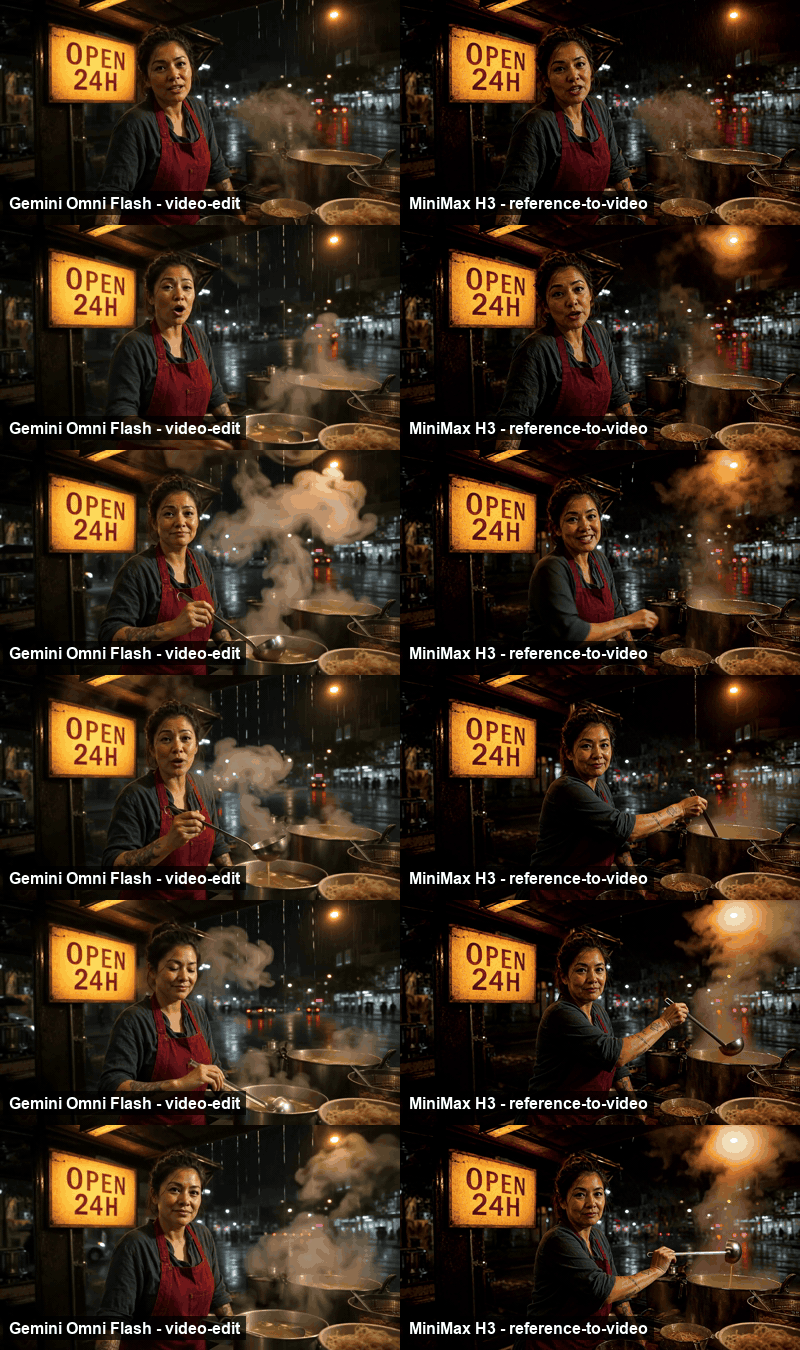
Berdampingan ronde dua: hasil video-edit Gemini Omni Flash di samping hasil reference-to-video MiniMax H3, keduanya dari catatan revisi yang sama
Ronde dua berdampingan, GIF senyap. Kiri Gemini Omni Flash melalui video-edit, kanan MiniMax H3 melalui reference-to-video. Keduanya memiliki kalimat yang sama untuk dikerjakan.
Apa yang sebenarnya terjadi di ronde dua. Saya berharap H3 akan kalah dalam ronde ini. Regenerasi yang dikondisikan oleh referensi adalah alat yang lebih tumpul daripada endpoint suntingan yang sesungguhnya, dan "hasilkan ulang seluruh klip dan berharap hasilnya sama" adalah cara yang tepat untuk mendapatkan wajah yang berbeda, kamera yang bergeser, dan klien yang bertanya apa yang terjadi pada gambar.
Namun, itu bukan yang kembali. Kedua model melakukan pekerjaan dengan baik, dan keduanya melakukannya dengan bersih.
video-edit milik Gemini berperilaku persis seperti yang diiklankan. Papan bertuliskan OPEN 24H dengan huruf yang sama, dengan cahaya kuning yang sama, dan lapuk yang sama pada timah. Celemeknya berwarna merah tua. Segala sesuatu yang lain tidak tersentuh: wajah sama, ekspresi sama, sudut sendok sama, bentuk uap sama, hujan sama, lampu belakang di latar belakang sama. Outputnya terbaca sebagai file asli dengan dua koreksi pixels-deep, karena pada dasarnya itulah file tersebut.
reference-to-video milik H3 menghasilkan dua perubahan yang sama dan mempertahankan gambar jauh lebih baik daripada yang disarankan oleh arsitekturnya. Papan berubah, celemek berubah, dan selama 10 detik penuh, framing, tuang kuah dari sendok, gumpalan uap, dan wajahnya tetap sesuai dengan klip ronde pertama. Jika ada pergeseran di sini, saya tidak dapat menemukannya dengan memeriksa bingkai demi bingkai.
Jadi ronde kedua adalah seri statistik ketiga, dan saya tidak akan berpura-pura sebaliknya untuk membuat cerita yang lebih rapi. Yang membedakan kedua keluaran bukanlah kualitas suntingan. Melainkan bahwa H3 mengembalikan 2560x1440 dengan trek stereo 32 kHz dan Gemini mengembalikan 1280x720. Instruksi sama, keberhasilan sama, hasil akhir berbeda.
Satu catatan jujur tentang metode: ini adalah satu revisi pada satu gambar, bukan studi terkontrol. Perubahan dua bagian pada papan dan pakaian adalah suntingan yang cukup ramah. Kasus yang lebih sulit (menghapus objek yang dilewati kamera, mengubah sesuatu yang terhalang subjek, empat putaran catatan yang saling bertumpuk) adalah tempat endpoint suntingan khusus seharusnya unggul, dan tempat regenerasi seharusnya mulai goyah. Jalankan milik Anda sendiri sebelum memutuskan.
Tiga Perbedaan MiniMax H3 vs Gemini Omni Flash Lain yang Layak Diuji
Ronde kedua adalah perbedaan yang mengubah pengiriman. Tiga lagi layak menghabiskan dua puluh menit dari kredit Anda sendiri.
Beri input file audio. reference-to-video H3 menerima hingga tiga klip audio masing-masing 2 hingga 15 detik, selama setidaknya satu referensi gambar atau video disertakan. Itu berarti Anda bisa memberinya rekaman suara asli dan karakternya akan membawakannya. Gemini Omni Flash tidak memiliki kolom input audio di keempat endpoint-nya, jadi perbandingan ini tidak dapat dijalankan sama sekali. Itu bukan kekalahan skor untuk Google; itu adalah kemampuan yang tidak ada.
Minta 21:9. Enum rasio reference-to-video H3 berisi 21:9, 16:9, 4:3, 1:1, 3:4, dan 9:16. Enum aspect_ratio Gemini berisi 16:9 dan 9:16. Jika hasil akhir Anda adalah urutan judul layar lebar atau potongan sosial 1:1, salah satu dari kedua model ini tidak ada dalam percakapan.
Kunci seed dan jalankan ulang. Yang ini sebaliknya. Gemini mengekspos seed; H3 tidak mengeksposnya di endpoint mana pun. Jika Anda membangun pipeline di mana permintaan yang sama harus mengembalikan bingkai yang sama pada hari Selasa seperti yang dikembalikan pada hari Senin, Gemini memberi Anda pegangan dan H3 tidak memberi apa-apa. Untuk pengujian regresi, varian salinan A/B, atau render farm otomatis apa pun, itu adalah keuntungan nyata dan itu milik pihak Google.
Berapa Biaya Sebenarnya Pengujian MiniMax H3 vs Gemini Omni Flash
Seluruh percobaan di atas, empat generasi video dan satu gambar, memakan biaya sekitar $5,51. Satu bingkai pertama seharga $0,009, dua klip ronde satu 10 detik seharga $1,40 dan $1,30, dua klip ronde dua 10 detik seharga $1,40 masing-masing.
Per detik, Gemini lebih murah: $0,125 hingga $0,14 dibandingkan $0,14 tetap untuk H3, jadi kira-kira 7 hingga 11 persen lebih rendah tergantung endpoint-nya. Angka itu benar dan juga hampir tidak berguna dengan sendirinya.
Inilah alasannya. Misalkan hasil akhirnya adalah pembuka sinematik 15 detik 21:9 pada 2K. H3 merendernya sebagai satu klip. Gemini tidak dapat merendernya sama sekali: bukan resolusinya, bukan durasinya, bukan rasio aspeknya. Anda harus menggabungkan klip 16:9 10 detik dan 5 detik, memotong untuk memalsukan layar lebar, dan mengirimkan 720p. Harga per detik dari sesuatu yang tidak dapat Anda kirimkan bukanlah penghematan.
Balikkan. Misalkan hasil akhirnya adalah potongan sosial 16:9 yang akan melalui empat putaran catatan klien dan harus kembali identik byte ketika tim hukum meminta untuk merendernya ulang dalam tiga minggu. video-edit plus seed Gemini dibuat untuk persis loop itu, dan biayanya lebih murah per detik saat melakukannya.
Tabel D: Pekerjaan MiniMax H3 vs Gemini Omni Flash mana yang cocok untuk apa
| Pekerjaan di depan Anda | Kirim ke |
|---|---|
| Pengiriman 2K | MiniMax H3 |
| Satu gambar lebih panjang dari 10 detik | MiniMax H3 |
| Framing 21:9, 4:3, 1:1, atau 3:4 | MiniMax H3 |
| Memberi input trek audio asli | MiniMax H3 |
| Hosting sendiri di GPU Anda sendiri | MiniMax H3 |
| Mendarat di bingkai akhir tertentu | MiniMax H3 |
| Revisi multi-putaran percakapan | Gemini Omni Flash |
| Melestarikan bagian klip yang tidak tersentuh | Gemini Omni Flash |
| Rendering yang dapat direproduksi melalui seed | Gemini Omni Flash |
| Bentuk pendek 16:9 biasa dengan tarif per detik terendah | Gemini Omni Flash |
Kesimpulan artikel ini adalah tabel itu, bukan skor. Jika benchmark tidak dapat memisahkan dua model lebih dari batas galatnya sendiri, benchmark itu telah memberi tahu Anda semua yang diketahuinya, dan lembar spesifikasi mengambil alih dari sana.
Untuk pandangan yang lebih luas tentang di mana H3 berada dibandingkan model lainnya, urai alternatif MiniMax H3 mencakup model yang mengalahkannya di papan yang tidak dipimpinnya.
Pertanyaan yang Sering Diajukan
Apakah MiniMax H3 lebih baik dari Gemini Omni Flash?
Pemungutan suara buta tidak dapat memisahkan mereka. Di tiga papan peringkat Artificial Analysis, selisihnya adalah 5, 2, dan 9 poin Elo, dan semuanya berada dalam interval kepercayaan ±7 hingga ±10. Pilih berdasarkan spesifikasi, bukan peringkat. Batas resolusi, batas durasi, dan daftar rasio aspek akan mengubah hasil akhir Anda; 5 poin Elo tidak akan.
Mana yang lebih murah, MiniMax H3 atau Gemini Omni Flash?
Per detik, Gemini. Di Atlas Cloud, harganya $0,125 hingga $0,14 per detik dibandingkan $0,14 tetap H3, dengan tingkat pengembang sebesar $0,112 per detik yang tidak dimiliki H3. Tetapi Gemini dibatasi pada 720p, 10 detik, dan dua rasio aspek, jadi untuk banyak hasil akhir, Anda tidak membandingkan produk yang sama. Harga hasil akhir yang sudah dipotong, bukan per detik.
Bisakah Gemini Omni Flash menghasilkan video 1080p, 2K, atau 15 detik?
Tidak. Parameter resolution API-nya memiliki satu nilai yang sah, 720p, dan duration menerima 3 hingga 10 detik. MiniMax H3 menawarkan 768P atau 2K dan 4 hingga 15 detik. Ini adalah kendala enum yang dibaca dari skema langsung pada 6 Agustus 2026, bukan opini editorial, dan Google mungkin akan menaikkannya di masa mendatang.
Bisakah saya host sendiri Gemini Omni Flash seperti saya bisa host sendiri MiniMax H3?
Tidak. Bobot H3 ada di Hugging Face dan berjalan secara lokal pada sisi pendek 768 piksel. Tahap Context-IR dan modul Regenerate-2K yang menghasilkan keluaran 2K tidak ada dalam rilis dan tetap di sisi API. Juga periksa lisensi: saat ini tidak mencakup UE, Inggris, Korea Selatan, atau AS tanpa aplikasi terpisah.
Apakah saya harus memilih hanya satu?
Tidak, dan tabel pembagian berdasarkan pekerjaan di atas adalah jawaban yang lebih baik. Kedua model berada di belakang endpoint generateVideo yang sama di Atlas Cloud, jadi menjalankan keduanya berarti satu loop polling dan string model yang berbeda, bukan dua integrasi. Menentukan rute berdasarkan hasil akhir lebih baik daripada bertaruh pada papan peringkat yang berubah setiap minggu.





