

You read your 30-second script out loud, hit the last line and look at the stopwatch. It says 41. First drafts often run long because they get written like ad copy and never get timed like a spot.
This guide gives you a commercial script template in the two-column format, a filled-in 30-second example for a fictional shoe brand, the 15-second cut made from it and a radio version. Short spots carry most of the budget: MediaRadar found that ads of 30 seconds or less took 82% of US TV ad spending in the first quarter of 2023, so those two lengths get the most room here.
Key Takeaways
- A commercial script template gives every beat two columns: what viewers see and what they hear.
- A 30-second spot holds about 70 spoken words, and each digit in a phone number counts as one.
- Write the 30-second script first, then cutthe15 fromitso both versions carry one message.
- A radio script keeps only the audio column, so sound effects have to show what a camera would.
- Paste the brief rows of your script into TVC Maker with one product photo to render the spot.
TV Commercial Script Template in the Two-Column Format
Scripts for TV and video ads are usually written in two columns. As an Ohio State educational technology guide puts it, one column notes visuals and "one notes what you hear." Each row is one beat, with its time on the left.
Copy this television commercial script template into a doc and fill it in from the top:
Brand: ______ · Spot title: ______ · Length: :30 · Version: 1 · One message: ______
| Time | Video | Audio |
|---|---|---|
| 0:00-0:03 | Opening image that works with the sound off | SFX or MUSIC that starts the spot |
| 0:03-0:08 | Who we meet and where | VO: first line |
| 0:08-0:15 | The product in use | VO: the one message |
| 0:15-0:22 | Product close-up. SUPER: the claim in a few words | VO: the proof |
| 0:22-0:27 | The payoff moment | VO: a short line |
| 0:27-0:30 | Packshot, logo and URL | VO: brand name and tagline |
Cues go in capitals so the crew can scan them: VO for voiceover, SFX for a sound effect, SUPER for text on screen, CU for a close-up and WS for a wide shot. Template tools don't agree on which column goes on the left, and nothing says they have to. Pick one order and keep it for every script your team writes.
Commercial Script Example: The Template Filled In
The first of the commercial script examples in this guide is the template filled in for the Afterhours pump from Seraine, a fictional shoe brand. The one message: this is a heel you can still stand in at midnight.
| Time | Video | Audio |
|---|---|---|
| 0:00-0:03 | CU: a red patent heel strikes wet pavement at dusk. | SFX: one sharp heel click. MUSIC: a low pulse starts. |
| 0:03-0:08 | She walks out of an office lobby and steps into the red pumps. | VO: "Some nights start at six and end whenever they end." |
| 0:08-0:15 | Rooftop dinner. She stands with friends, laughing, weight on one heel. | VO: "The Afterhours pump. Cushioned for standing, so your shoes aren't why you leave early." |
| 0:15-0:22 | Extreme close-up: a thumb presses the insole, then a slow push-in along the patent leather. SUPER: Cushioned insole. 100 mm heel. | VO: "Cherry patent. A hundred-millimeter heel. Padding where your foot lands." |
| 0:22-0:27 | WS: midnight. She walks home under streetlights, still in the heels. | VO: "Still on your feet at midnight." MUSIC swells. |
| 0:27-0:30 | Packshot of the pump on gray. Logo and URL on screen. | VO: "Seraine. Stay till the last song." |
That's 46 spoken words. The first three seconds carry no voice at all, so the heel click lands before anyone talks.
How to Write a Commercial Script in Five Steps
A template is only as good as what goes into it. These five steps produced the Seraine script above.
Start with a one-line brief. Name the product, the one message, who it's for and how it should feel. If the message needs an "and," you're looking at two spots.
Map beats to seconds before you write a single line. Decide how long the hook runs, where the product shows up and how much time the brand close gets. Here is how the 30 seconds split for Seraine:
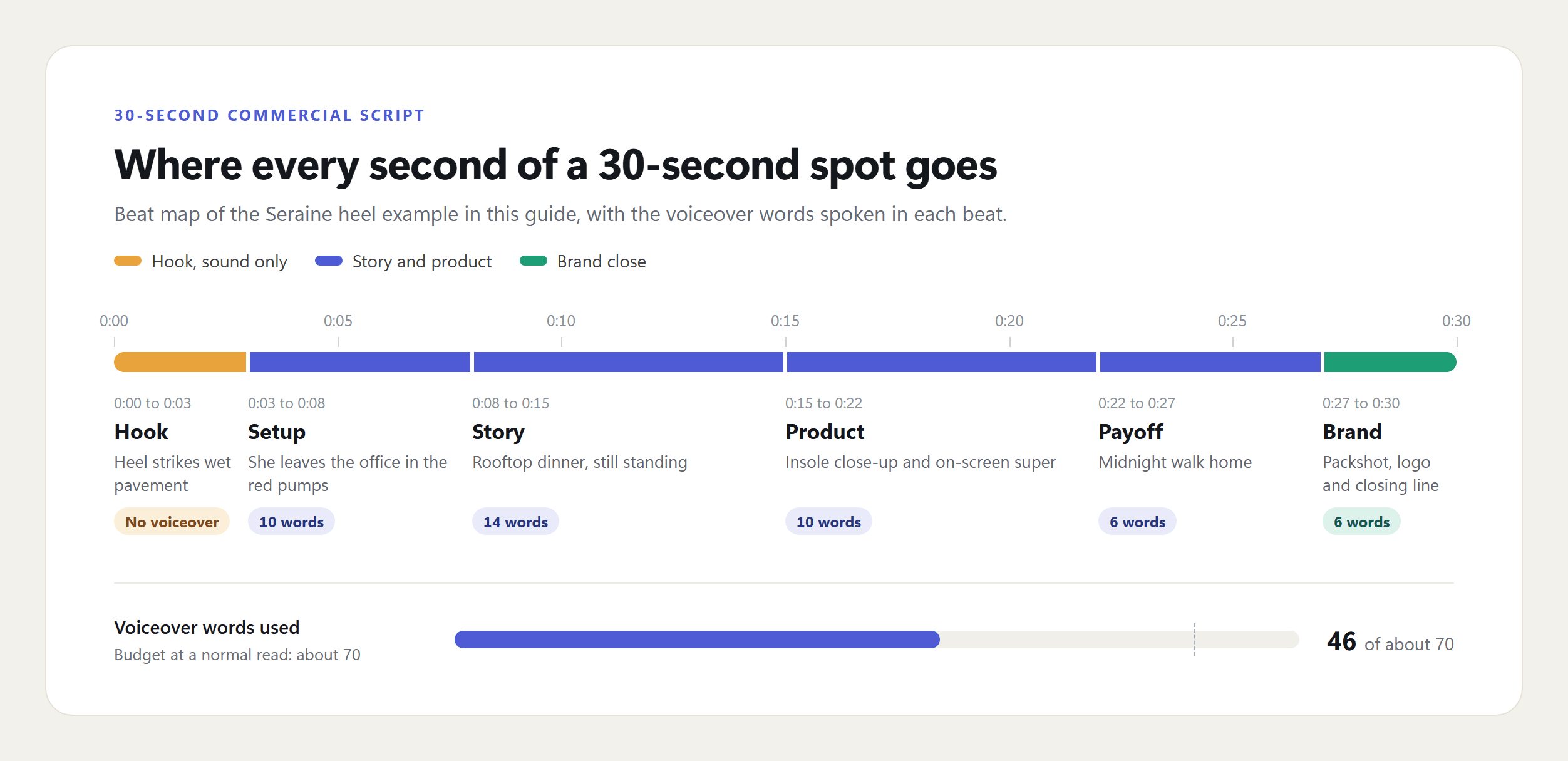
Write the video column first. If the pictures tell the story alone, the spot survives a muted TV in a bar. Google's ABCD playbook adds a timing rule worth copying: "Introduce your product or brand in the first five seconds." Seraine's heel is on screen in second one.
Write the audio column to a word budget. Every VO line has to fit the seconds printed next to it. The numbers are in the next section.
Read it aloud against a stopwatch, then cut. Read at a calm announcer's pace, not your own nervous one. Adjectives go first, then whole lines. If your ad is a creator talking to camera rather than a produced spot, the beats work differently, and our UGC ad templates cover that format.
How Many Words Fit in a 30-Second Commercial Script
About 70 at a normal read. A voice-over timing chart reprinted by editor Larry Jordan puts 35 words in 15 seconds, 70 in 30 and 140 in 60. Voices.com sets the 30-second ceiling a little higher, at "80 words or less."
The same chart breaks the budget down to single beats, which is how you check a script row by row:
| Beat length | Words at a normal read | In the Seraine script |
|---|---|---|
| 3 seconds | 7 | Brand close: 6 words |
| 5 seconds | 12 | Setup: 10 words |
| 7 seconds | 17 | Story: 14 words |
| 15 seconds | 35 | The whole 15-second cut: 22 words |
| 30 seconds | 70 | The whole 30-second spot: 46 words |
| 60 seconds | 140 | Room for a short story with a turn |
Phone numbers cost more than they look. The chart counts "each spoken number" as one word, so 1-877-000-0000 eats 11 of your 70. A web address shown as a SUPER costs nothing from the audio budget.
Turn Your TV Commercial Script Into a Video With TVC Maker
A finished script still needs a shoot. On Atlas Cloud, the TVC Maker workflow turns one product photo and your brief into a multi-shot commercial with sound. Here are highlights from the Seraine script, rendered at 30 seconds in 16:9:
Highlights from the Seraine 30-second spot made with TVC Maker, shown as a GIF without sound. In the full spot, the voiceover reads the audio column word for word.
Three inputs made that spot: the heel photo, a photo of the model and this brief, which is the script above rewritten as a prompt:
plaintext1Brand: Seraine, a women's shoe label. Product: the Afterhours pump, a cherry-red patent leather stiletto with a 100 mm heel and a cushioned insole. One message: the heel you can still stand in at midnight. Audience: women 25 to 40 who go straight from work to evening plans. Tone: confident and warm, cinematic city night, practical lights and wet pavement reflections. The woman from the model photo wears a black slip dress and never holds a phone. 2Shots: 1) close-up of the red heel striking a wet sidewalk at dusk, heel click only; 2) she walks out of an office lobby and steps into the red pumps; 3) rooftop dinner, she stands laughing with friends, weight on one heel; 4) close-up of a thumb pressing the cushioned insole, slow push-in along the patent leather; 5) midnight, she walks under streetlights still in the heels; 6) the shoe alone on a gray backdrop. 3Voiceover, calm female voice, starting after the heel click at about 0:03: "Some nights start at six and end whenever they end. The Afterhours pump. Cushioned for standing, so your shoes aren't why you leave early. Cherry patent. A hundred-millimeter heel. Padding where your foot lands. Still on your feet at midnight. Seraine. Stay till the last song."
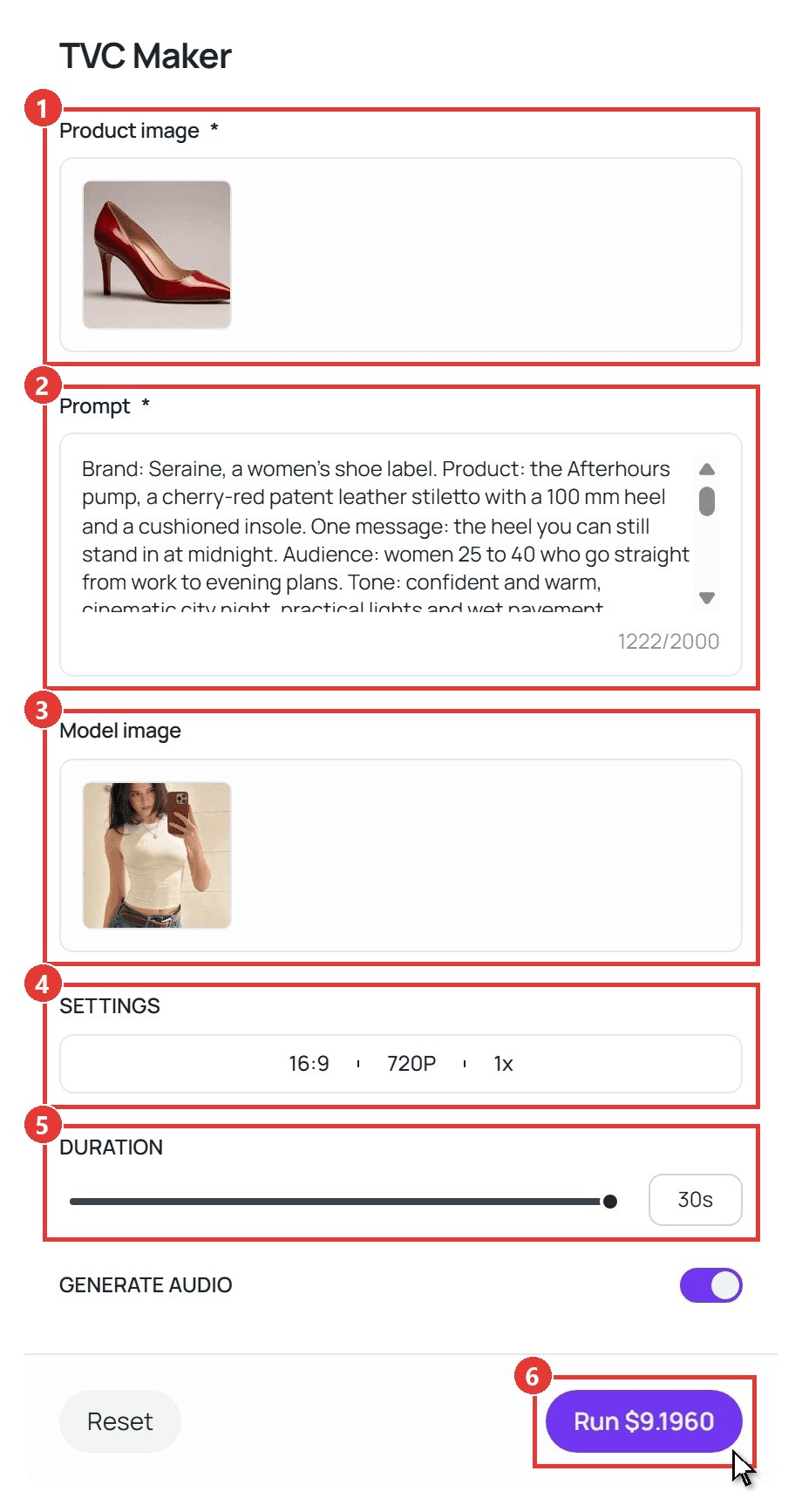
The numbered shots come straight from the video column, and the quoted lines come from the audio column. TVC Maker reads quoted lines as written, in the voice you name, with music and ambient sound under them. Fill in the form in this order:
- Upload one shot of your product in Productimage. Packaging, material and printed text follow this photo.
- Paste the brief into Prompt. The Seraine brief used about 1,200 of the 2,000 characters.
- Add a Modelimage if the spot needs a specific face. Leave it empty and the workflow casts a character to fit the brand.
- Open SETTINGS and pick the frame: 16:9 for TV and YouTube, 9:16 for Reels and TikTok. Setting No. of videos to 2x gets you two different creative takes on one brief.
- Set DURATION to the script's length, anywhere from 4 to 30 seconds.
- Leave Generate audio on and click Run.
Cutting a 30-Second Spot Down to a 15
Don't write the 15 from scratch. Cut it from the 30, so both spots say the same thing and can run side by side. Keep the hook, the one message and the brand close. Drop the setup and the second proof line.
| Time | Video | Audio |
|---|---|---|
| 0:00-0:02 | CU: red heel strikes wet pavement. | SFX: heel click. |
| 0:02-0:07 | Rooftop dinner. She stands, laughing. SUPER: Built to stand in. | VO: "Built to stand in, from six till midnight." |
| 0:07-0:12 | Extreme close-up: a thumb presses the cushioned insole. | VO: "The Afterhours pump, cushioned where your foot lands." |
| 0:12-0:15 | Packshot and logo. | VO: "Seraine. Stay till the last song." |
That's 22 words against a budget of 35. A 15 has room for one spoken idea, and the rest is picture.
For a vertical cut, put the message in the SUPER as well as the VO. Meta's advice for feed video is to "Build for sound off. Delight with sound on," and it suggests taller 4:5 or 9:16 frames. Here is the 15 rendered in 9:16 with the super on screen:

The 15-second cut rendered in 9:16 with TVC Maker. The super and the end card text came from the brief; the voiceover starts after the heel click .
Radio Commercial Script Template
Radio drops the video column. Whatever the camera did, sound now has to do: a door, a crowd, a furnace dying at 2 a.m. The Radio Advertising Bureau describes the :30 as the length "to make a single point in an ad," so give it one offer and one way to reach you.
Here is a 30-second radio commercial script template, filled in for Northfield Heating and Air, a fictional local company:
| Cue | Line |
|---|---|
| SFX | A furnace clicks off with a long, dying whir. Wind outside. |
| WOMAN | "Did the heat just stop?" |
| MAN | "At two in the morning. Of course it did." |
| ANNCR | "When the furnace quits on the coldest night of the year, call Northfield Heating and Air. A real person answers, day or night, and a technician can be at your door the same day." |
| MUSIC | A warm guitar bed comes up under the announcer. |
| ANNCR | "Northfield Heating and Air. 555-0142. Warm by morning." |
That's 62 words, with each phone digit counted as one. Swap the cue names for your own characters, but keep one rule from TV: the first sound should tell the listener where they are before anyone speaks.
FAQ
What's the difference between a commercial script and a screenplay?
A screenplay runs in one column of scene headings, action and dialogue, and it isn't timed to the second. A commercial script splits picture from sound and stamps a time on every beat, because the spot has to end on exactly :15 or :30.
Do you need a storyboard as well as a script?
For a live shoot, usually yes. The script fixes the words and the timing, and the storyboard fixes how each shot is framed so the crew isn't guessing. If you render the spot with an AI workflow instead, the video column already does that job, since each row describes one shot.
How much does it cost to turn a commercial script into a video with TVC Maker?
At 720p with audio on, a 15-second spot costs $4.651 and a 30-second spot costs $9.196, based on TVC Maker's prices on October 14, 2026. Render the 15 first to check the concept, then spend on the 30 once the look is right.
How do I set up a commercial script template in Google Docs or Word?
Insert a three-column table (time, video, audio) with one row per beat, and put the header details above it. Then select just the audio column and check the word count against your budget. Both Google Docs and Word count a selection, so you can test one row at a time.
Conclusion
Good spots are mostly subtraction. Pick one message, give each beat its seconds, keep the voiceover under budget and let the pictures carry what the words can't.
Copy the commercial script template above, write the 30 first and cut the 15 from it. When you want to see it on screen before booking a crew, drop the brief into TVC Maker and judge the cut with your own eyes.





