A night match, a stand on its feet, thousands of fans screaming at the pitch. One man in a navy suit and thin black glasses turns his back on all of it, walks toward the camera and presses both palms down: calm down. He never smiles. That nine-second clip is the he is nonchalant trend, and since the end of October AI template sites have been selling one-photo copies of it.
This guide covers where the clip came from, then how to make your own from one photo: face locked, expression flat, gesture in the right place. The video further down is our own run, and so are the two attempts that went wrong.
Key Takeaways
- The he is nonchalant trend is a 9-second AI clip: a suited man stays calm while anightstadiumroars.
- It started as an Instagram post on October 28, 2026;thereis no CapCut template or TikTok effect yet.
- You can make it from one photo in the Atlas Cloud video generator with Seedance 2.5.
- Lock the face first: edit the photo into the final calm-down frame, then animate between two frames.
- Keep the face deadpan and skip background walkers;bothfixes came from our own test runs.
What Is the He Is Nonchalant Stadium Trend?
One continuous handheld shot that looks like a live broadcast: a man at the edge of the pitch, back half turned to the camera, while the stand behind him goes wild. Then he turns, walks toward the lens and pats the air with both hands, palms down: the calm down hand gesture. The joke is the contrast: the loudest place in the city, and the one person who is not bothered.
| Time | What happens |
|---|---|
| 0 to 1.5 s | Back to the camera, head up toward the roaring stand, arms at his sides |
| 1.5 to 3 s | He turns and walks toward the camera, which backs up to keep him in frame |
| 3 to 9 s | Both hands out at hip height, palms down, pressing the air; no smile, eyes drifting to the crowd |
AI template sites renamed it "Stadium Calm Down" after the gesture. The original caption was shorter.
Where the Nonchalant Stadium Clip Came From
The clip was posted on Instagram by an account that sells AI video templates. The same account also ran the template with TV characters under the same "is nonchalant" caption, which is where the name stuck.
| Detail | Original post |
|---|---|
| Platform | Instagram Reel, AI content label shown |
| Posted | October 28, 2026 |
| Caption | "He is nonchalant 🤫" |
| Length | 9 seconds, vertical, one handheld take |
| Sound | Marked as original audio, no song credited |
The soundtrack is a slow, half-whispered vocal that sounds like a cover of "lovely" by Billie Eilish and Khalid; the post credits no song. The clip spread through Instagram and one-photo template sites rather than through any in-app effect, which is why the method below builds it from scratch.
How to Make the He Is Nonchalant Video With Seedance 2.5
The clip below took one photo and three runs on Atlas Cloud: two image edits and one video.
The video model is Seedance 2.5, which accepts a first frame and a last frame and generates the sound in the same pass.
The order of the three runs matters. Edit the photo into the final calm-down frame first, so the suit, glasses and stadium get decided while the face is still a direct copy of the photo. Then edit that frame into the opening pose. Then let the video travel between the two.
It is the two-frame method from the bicep heart trend, applied to a turn and a walk instead of a pose.
Everything below happens on the site: the two frames in the image generator's Image Edit tab, the clip in the video generator.
Method 1: First and Last Frame in the Video Generator
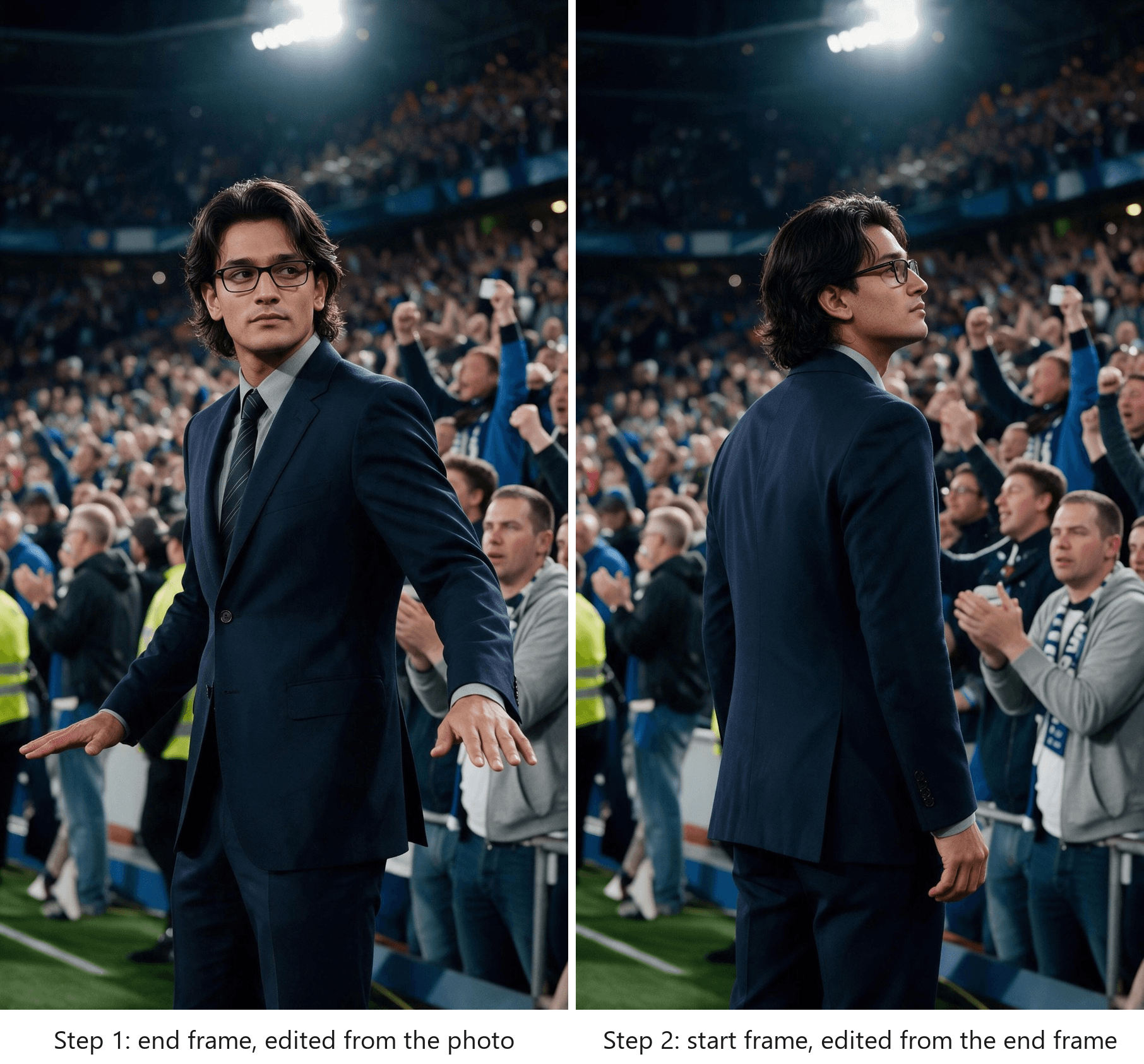
Step 1, the end frame. In the Image Edit tab, pick Seedream 5.0 Pro, upload the photo, set the size to 9:16 at 1584 by 2816 and paste:
plaintext1Turn this into a vertical frame from a live football broadcast, long telephoto lens, modern sharp broadcast camera. The same young man from the photo: same face, same shoulder-length wavy black hair, same light stubble, now in a tailored dark navy suit, light grey shirt, slim striped tie and thin black rectangular glasses. He faces the camera at the edge of the pitch, framed from mid-thigh up, arms slightly away from his body, one hand to each side of his hips, palms flat and facing down. Completely deadpan: no smile, mouth closed, eyes glancing sideways at the crowd. Behind him a packed stand at night fills the whole frame: hundreds of varied fans on their feet shouting, plain blue and white scarves, no sky visible. No text, no logos, no crests, no numbers or names on any shirt.
Step 2, the start frame. Reset, upload the end frame, keep the same size and paste:
plaintext1Keep the same man, suit, glasses, stadium, crowd, lighting and camera position exactly as in this image. Change only his pose: he has turned away from the camera toward the roaring stand on the right, so we see his back and left shoulder, his head turned up toward the crowd with his face in profile and the glasses visible, still deadpan. Both arms hang relaxed at his sides. No text, no logos, no crests.
Check both frames before moving on: glasses on, five fingers per hand, nothing readable on shirts, vests or scarves.
Step 3, the video. Open the video generator, keep the Video Generation tab and Seedance 2.5, then follow the numbers on the screenshot:
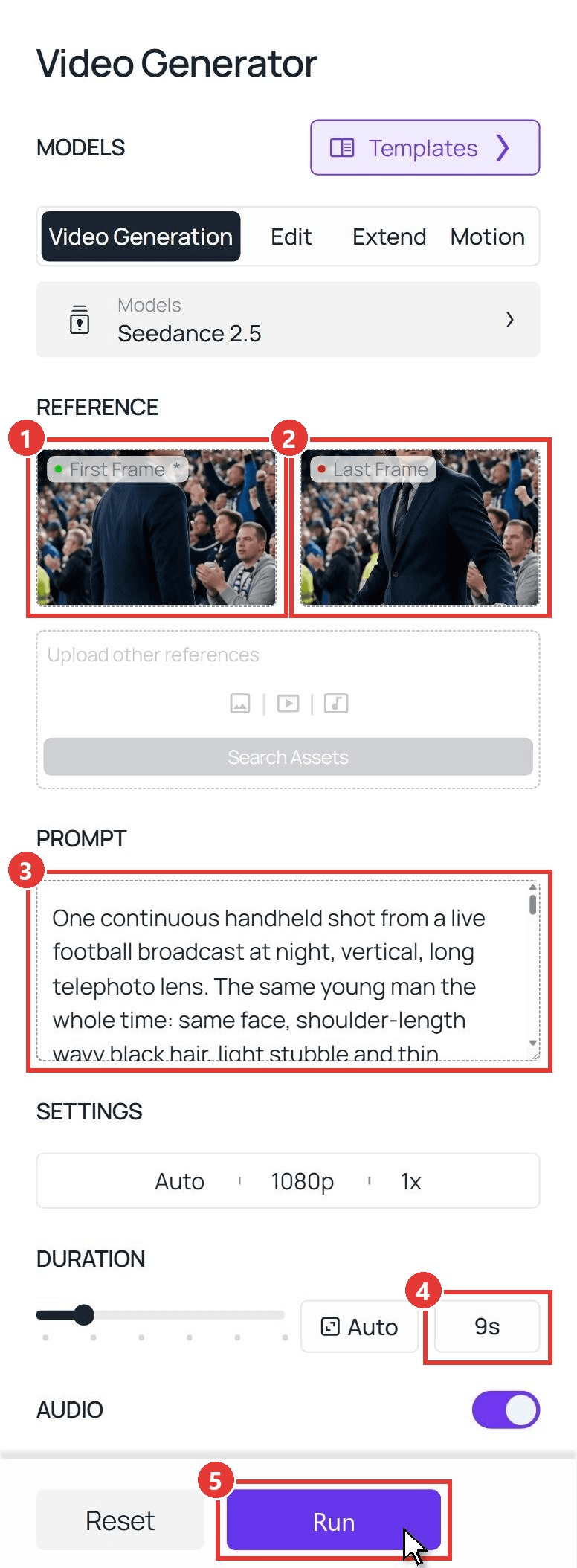
- First Frame: upload the start frame from Step 2.
- Last Frame: upload the end frame from Step 1. Leave the other references box empty.
- Prompt: paste the video prompt below.
- Duration: type 9. In Settings, pick 1080p; Audio stays on.
- Run. The clip lands in the panel on the right after a few minutes.
plaintext1One continuous handheld shot from a live football broadcast at night, vertical, long telephoto lens. The same young man the whole time: same face, shoulder-length wavy black hair, light stubble and thin mustache, dark navy suit, light grey shirt, striped dark tie, thin black glasses that stay on. Behind him the packed stand roars nonstop: a varied crowd of men and women of different ages in different clothes, on their feet, fists pumping, clapping, filming on phones, mouths open shouting. 0-1.5s: he stands with his back to the camera, looking up at the roaring stand on the right, perfectly still while everyone around him goes wild. 1.5-3s: unhurried, he turns around toward the camera and starts walking slowly toward it, his hair moving slightly with the turn; the handheld camera backs up and keeps him framed from mid-thigh up. 3-9s: still walking slowly, he holds his arms slightly away from his body, one hand to each side of his hips, palms flat and facing down, fingers together, and presses them down slowly two or three times, calm down, calm down. His face stays completely deadpan the whole time: no smile, mouth closed, eyes glancing sideways at the crowd, totally unbothered. Nobody walks behind him or crosses the frame; the only people behind him are the fans in the stand. Two hands with five fingers each. No text, no letters, no logos, no crests, no numbers or names on any clothing, no scoreboard. Sound: a deafening stadium roar, chanting, whistles and claps, no music, no singing.
Swap the first description for your own person and keep the timestamps. The line about nobody crossing the frame is there for a reason; see the mistakes section.
Method 2: Seedance 2.5 API
Making one for a whole group chat? The API takes the same two frames and the same prompt.
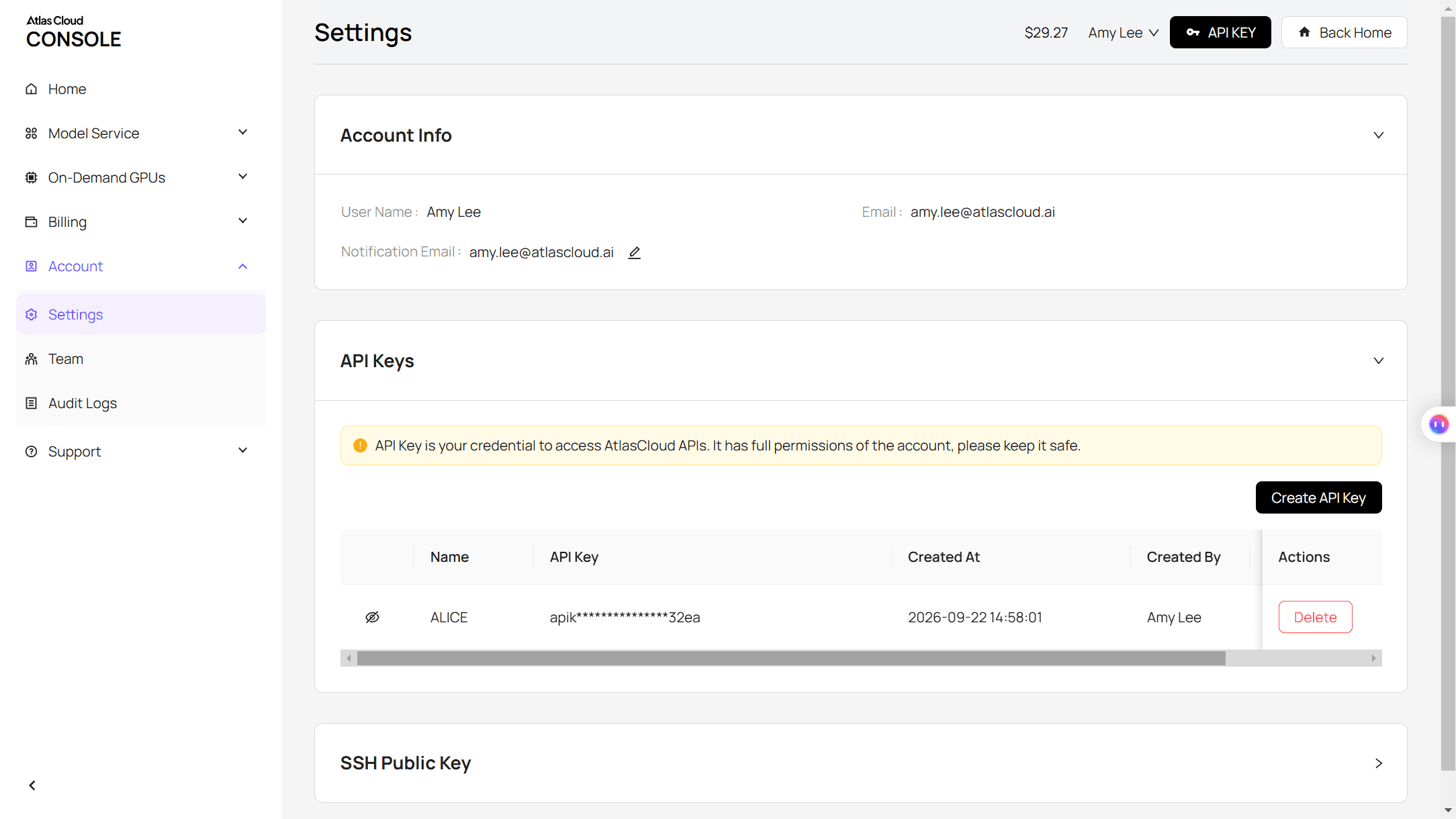
Step 1: Create an API key. In the console, open Settings and create a key under API Keys.
Step 2: Check the request format. The Atlas Cloud docs cover authentication and the video endpoint.
Step 3: Send the request and poll. The start frame goes in the image field and the end frame in last_image:
plaintext1curl -X POST https://api.atlascloud.ai/api/v1/model/generateVideo \ 2 -H "Authorization: Bearer $ATLASCLOUD_API_KEY" \ 3 -H "Content-Type: application/json" \ 4 -d '{ 5 "model": "bytedance/seedance-2.5/image-to-video", 6 "prompt": "<paste the video prompt here>", 7 "image": "https://your-cdn.com/start-frame.jpg", 8 "last_image": "https://your-cdn.com/end-frame.jpg", 9 "duration": 9, 10 "resolution": "1080p", 11 "generate_audio": true 12 }'
Poll the returned prediction ID until the status reads completed, then download the clip from the outputs array:
plaintext1curl https://api.atlascloud.ai/api/v1/model/prediction/<prediction_id> \ 2 -H "Authorization: Bearer $ATLASCLOUD_API_KEY"
The endpoint and the key stay the same across every video model on Atlas Cloud. To try another one, change the model string.
Common Mistakes in the Stadium Calm Down AI Video
Our first two videos were not usable, and neither failure came from the video model. Both came from the frames we fed it.
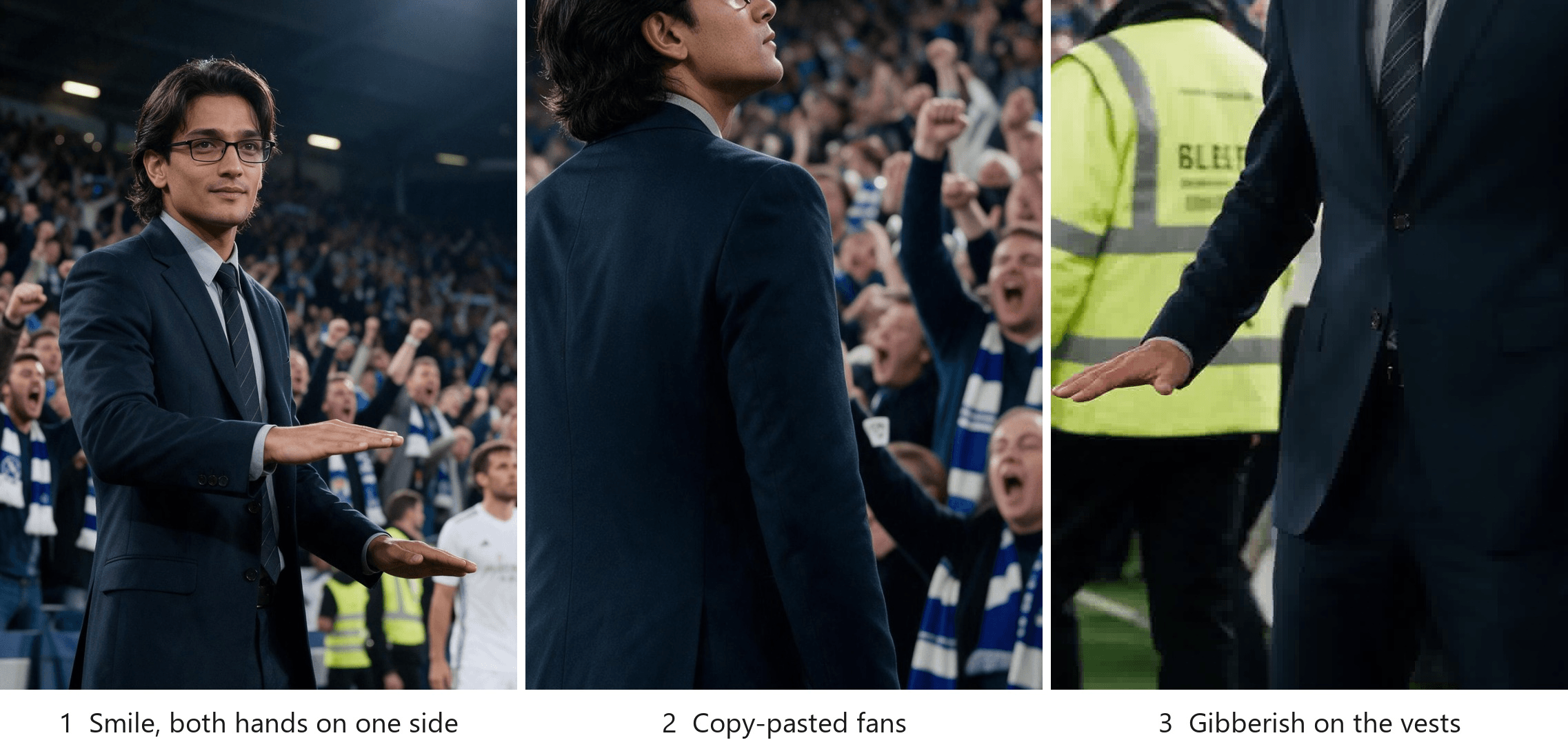
| What you see | Why it happens | Fix |
|---|---|---|
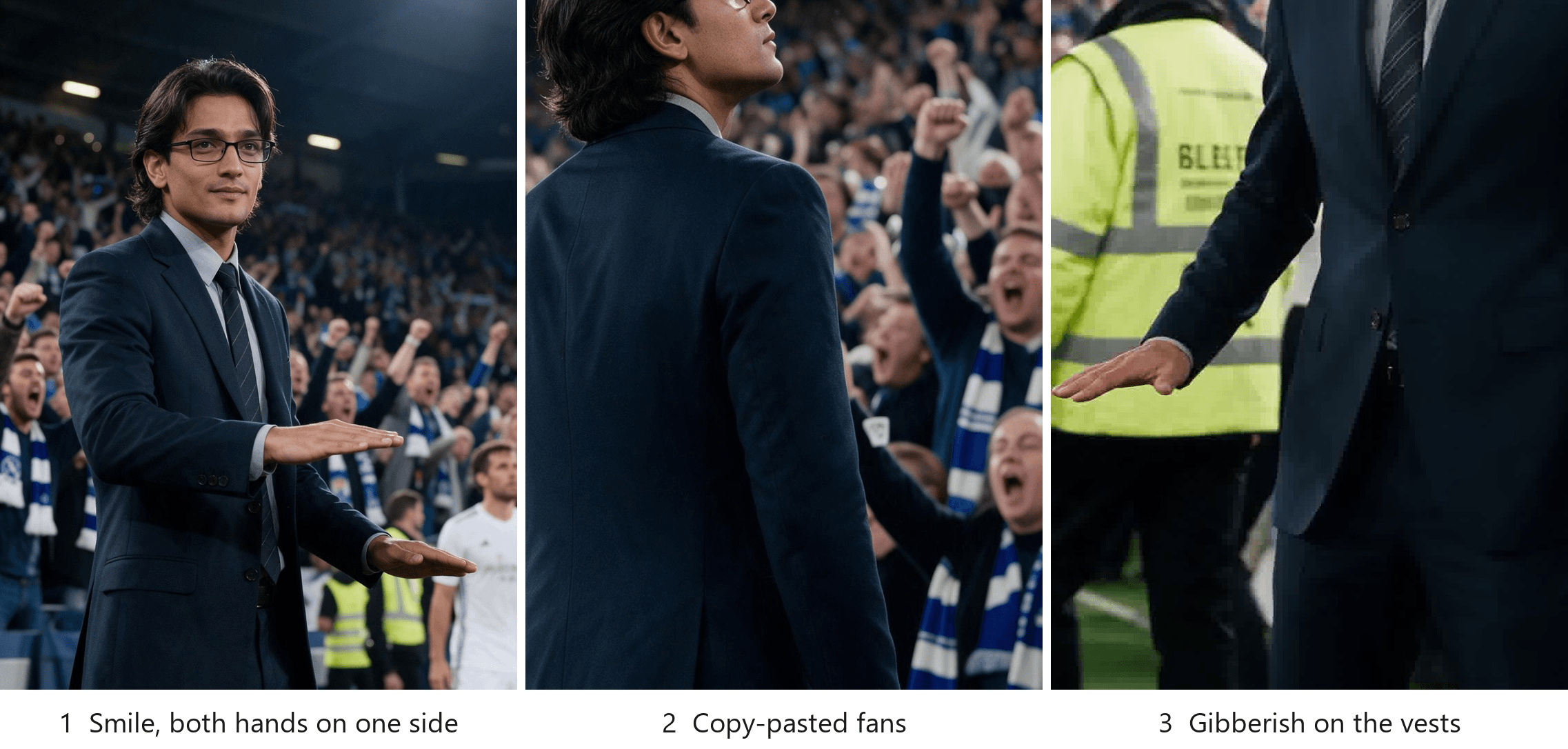
| He smiles | Our first prompt asked for "the faintest hint of a smile" and got a full one | Write "completely deadpan, no smile, mouth closed" |
| Both hands drift to one side, like pointing | "Hands in front at waist height" leaves the placement open | Write "one hand to each side of his hips, palms flat and facing down" |
| The same fan appears three times | The edit reused one fan for the whole row | Ask for "men and women of different ages, clothes and poses" in the frame prompt |
| Letters appear on vests or shirts | The stewards walking close to the camera came out with printed text | Cut "stewards cross behind him"; write "nobody crosses the frame" |
| His head looks huge | Wide-angle close-up | Write "long telephoto lens, crowd right behind him, no sky visible" |
| Crests on kits or scarves | Default football imagery | Repeat "plain white shirt, plain striped scarves, no crests" in every prompt |
If the fans or the vests are wrong in the end frame, they are wrong in every second of the clip, so fix the frame before paying for another video. And the deadpan face carries the whole joke, the way the hood carries the skull cap trend: the moment he smiles, he is just a man in a suit.
What Sound Goes With the He Is Nonchalant Trend?
The lovely cover behind the original is a copyrighted track, so do not bake it into your file. Post the clip with its generated stadium roar and pick the sound inside TikTok or Instagram when you post, the way the trend posts do. The roar can sit under the song or be muted.
| When you post | What to do |
|---|---|
| Sound | Pick the slowed "lovely" cover from the in-app library; keep or mute the generated crowd |
| Caption | " is nonchalant 🤫", the original format |
| AI label | On TikTok, open More options before posting and switch on AI-generated content; on Instagram, disclose it as AI when you share |
| Hashtags | #nonchalant #stadiumcalmdown #aivideo |
Frequently Asked Questions
Is there a he is nonchalant CapCut template or TikTok effect?
Not as of November 9, 2026. CapCut's "nonchalant" templates are older personality edits with nothing to do with a stadium, and the stadium hashtags on TikTok hold a handful of posts with a few hundred plays each. If you want the clip, you make it, which is what the two-frame method above is for.
How much does a 9-second he is nonchalant video cost on Atlas Cloud?
About $5.38 for 9 seconds at 1080p with a first frame, a last frame and audio, which is 20% off the $6.73 list price, as of November 9, 2026. The same clip at 720p is about $2.73, and each of the two image edits is $0.072. The Run button shows the exact price before you generate.
Do I need a photo in a suit?
No. The suit, shirt, tie and glasses come from the end-frame prompt; the photo only supplies the face, hair and skin. Ours was a casual snapshot in a black shirt. A sharp shot from the chest up, facing the camera or turned three quarters, gives the edit the most to work with.
Is the he is nonchalant trend the same as the nonchalant meme?
Same word, different meme. Search "nonchalant" and most of what comes back is about the nonchalant boyfriend, someone who texts back late and acts as if nothing matters. The stadium clip borrows that attitude for nine seconds. The older meme has nothing to do with football.
Do I have to label the video as AI?
Yes, on both apps. TikTok's AI content rules ask creators to label AI-made content that looks real, and the switch sits under More options on the posting screen.
Instagram already carries an "AI info" label on the original, and Meta's labeling policy applies it when a post is disclosed as AI or carries AI markers. A realistic clip of yourself in a stadium is exactly what these labels are for.
Conclusion
The trend is one person refusing to react. Keep the face flat, keep the hands low and apart, and let the crowd do the screaming.
For the AI version, edit the end frame first, derive the start frame from it, and give Seedance 2.5 both. Nine seconds later you have your own he is nonchalant clip, roar included, ready for the lovely sound in the app.


