
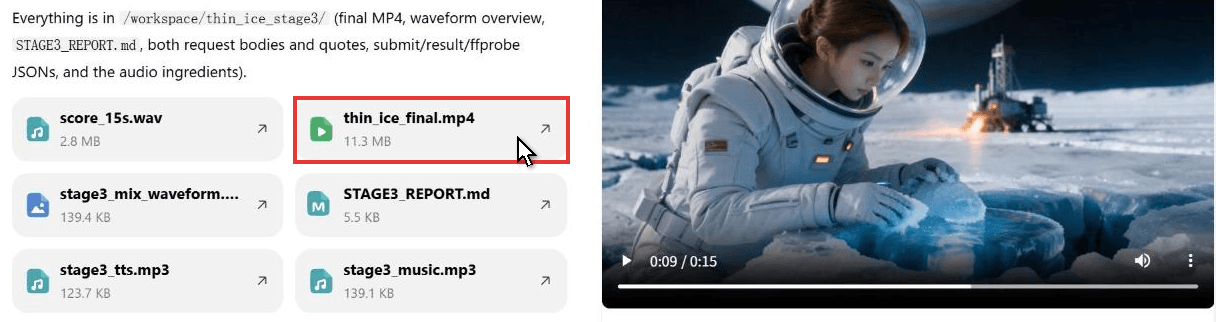
An astronaut kneels on the ice of Europa, wipes away the frost, and something underneath glows back at her. That 15-second scene came out of a single WorkBuddy task. We tested WorkBuddy video generation on the international web app two ways: the agent's own built-in video tool, and Atlas Cloud skills that call Seedance 2.5 by name. Here is what each route does, where the files land, what it cost, and the prompts we used.
Key Takeaways
- WorkBuddy added built-in image and video generationinversion 5.6.2 and asks before running costly media tools.
- The web app's built-in VideoGen tool has no model picker; ours reported Kling v3 as its fixed model.
- Atlas Cloud skills let one WorkBuddy task take a clip from storyboard to scored cut with Seedance 2.5.
- Seedance 2.5 reference-to-video turned four storyboard frames into a 15-second, three-shot scene with a whispered line.
- Searching the skill marketplace for video returns 12 picks, from Remotion motion graphics to footage editing.
Can WorkBuddy Generate Videos on Its Own?
Yes, and how far it goes depends on the edition. The international changelog lists "Image and video generation" as new in version 5.6.2, and version 5.9.4 made high-cost tools such as video generation "require confirmation before use."
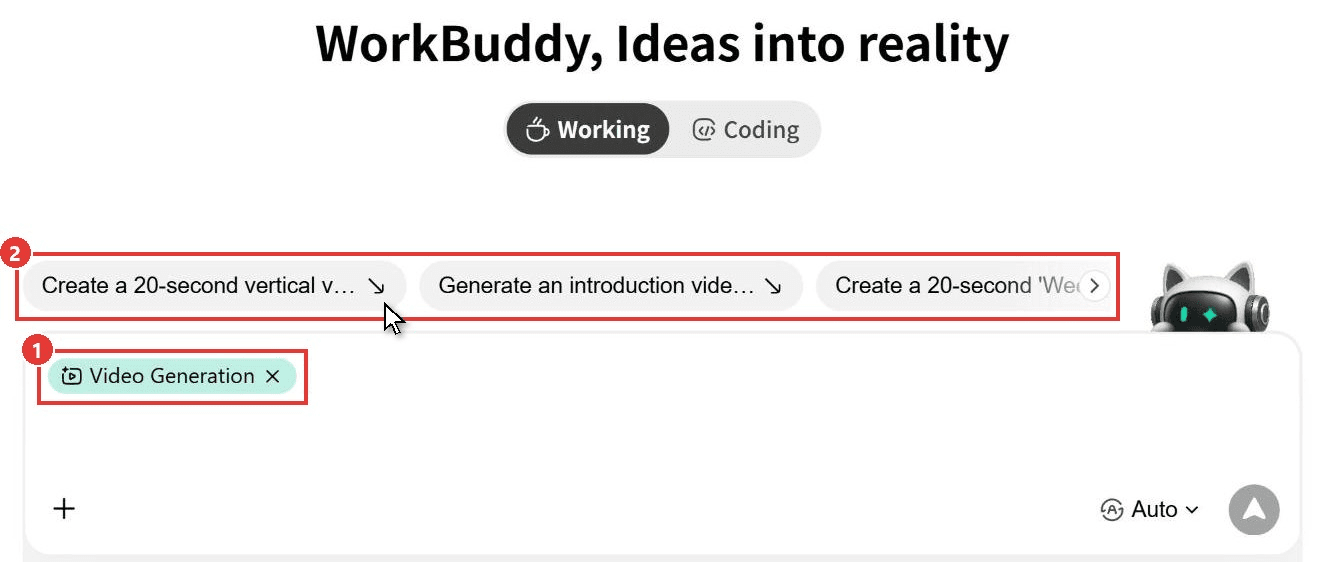
On the web app, the Video Generation chip on the home screen leans toward motion graphics: its sample prompts ask for an animated AI leaderboard and a weekly news roundup, spelled out second by second like a coded animation.
The Built-In VideoGen Tool and Design & Creative Mode
We picked that chip and told the agent to ignore every installed skill and use its own tooling. It found a tool called VideoGen. The tool's note puts a 5-second clip at roughly 50 to 100 credits and offers no model selector. On our Free web account on November 4, 2026 it reported kling-v3-t2v as its model. A sibling ImageGen tool was switched off on the same account.
The China desktop client has a dedicated mode for this. In a September 21 post, Tencent's WorkBuddy team said Design & Creative mode now connects to Miora. You pick Generate Image, Generate Video or Brand Design, confirm the deliverables, the aspect ratio or duration, and the references, and results collect on a Miora canvas that is view-only for now. On the international web app, the Mode menu under + offers only Plan and Ask.
WorkBuddy Experts and Skills for Video
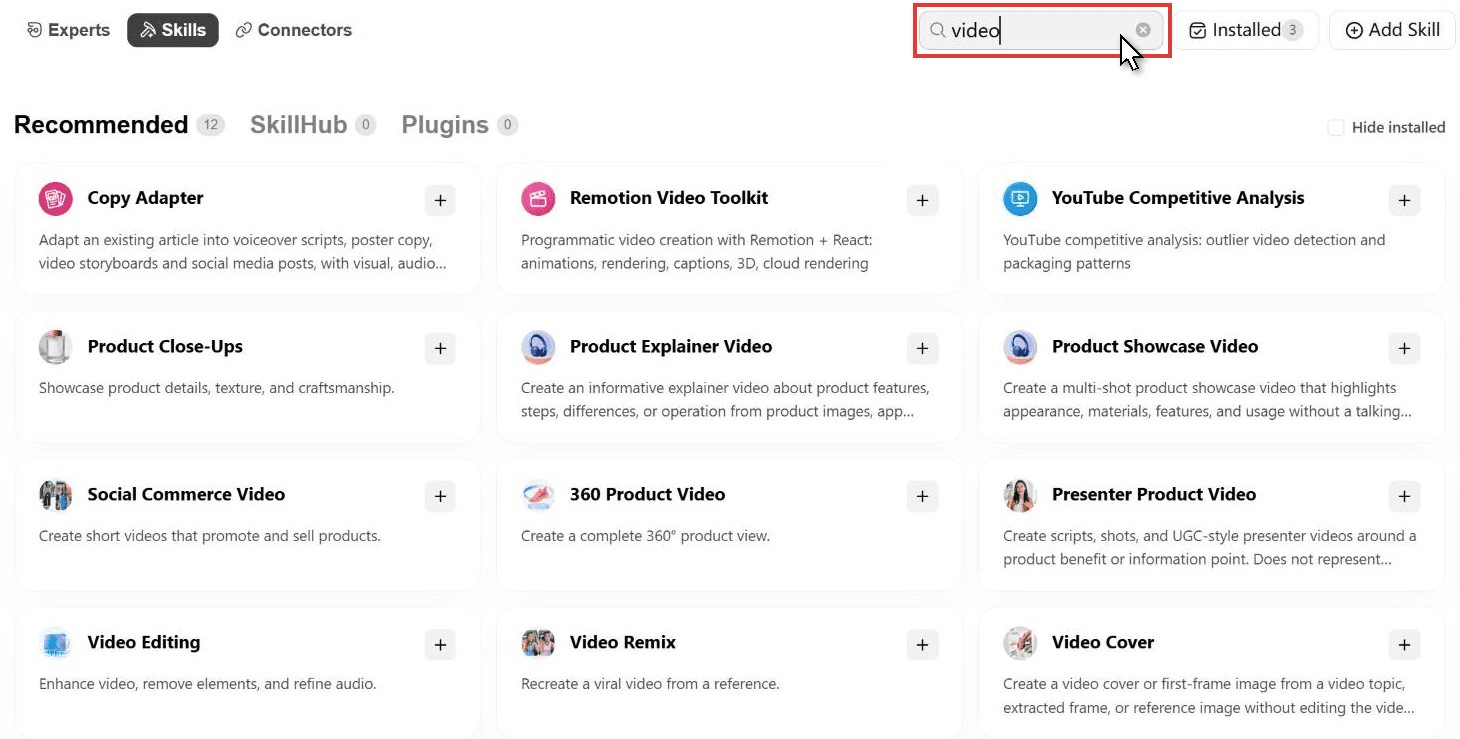
Search the skill marketplace for "video" and 12 picks come back. Remotion Video Toolkit renders animation from React code, Product Showcase Video plans multi-shot product clips, and Video Editing and Video Remix work on footage you already have.
Third-party directories also list a Video Generation Team expert that splits delivery into AI MP4, Remotion code and ffmpeg scripts. On the China edition, the Atlas Cloud media expert ships with three sample jobs: a storyboard set, a 15-second promo, and a voiceover with music. We ran all three next.
Make a Sci-Fi Short in WorkBuddy With Seedance 2.5
The built-in route picks the model for you. Atlas Cloud works the other way: its open-source skills teach WorkBuddy to call Atlas's 400+ models by name, from image and video to audio, and each job bills to your Atlas account. We gave one task a portrait of our lead and the media expert's three jobs, rewritten as a sci-fi brief called Thin Ice.

The agent made four storyboard frames and passed them to Seedance 2.5 as references. Back came a 1280 × 720 clip at 24 fps with her whispered "It's breathing" already on the soundtrack. Then it generated a narrator line and a score and mixed them in with ffmpeg inside its own sandbox.
Method 1: Run the Storyboard-to-Trailer Prompt in a WorkBuddy Task
Install the three Atlas Cloud skills first. The upload takes a minute, and our WorkBuddy AI guide shows each click. Then:
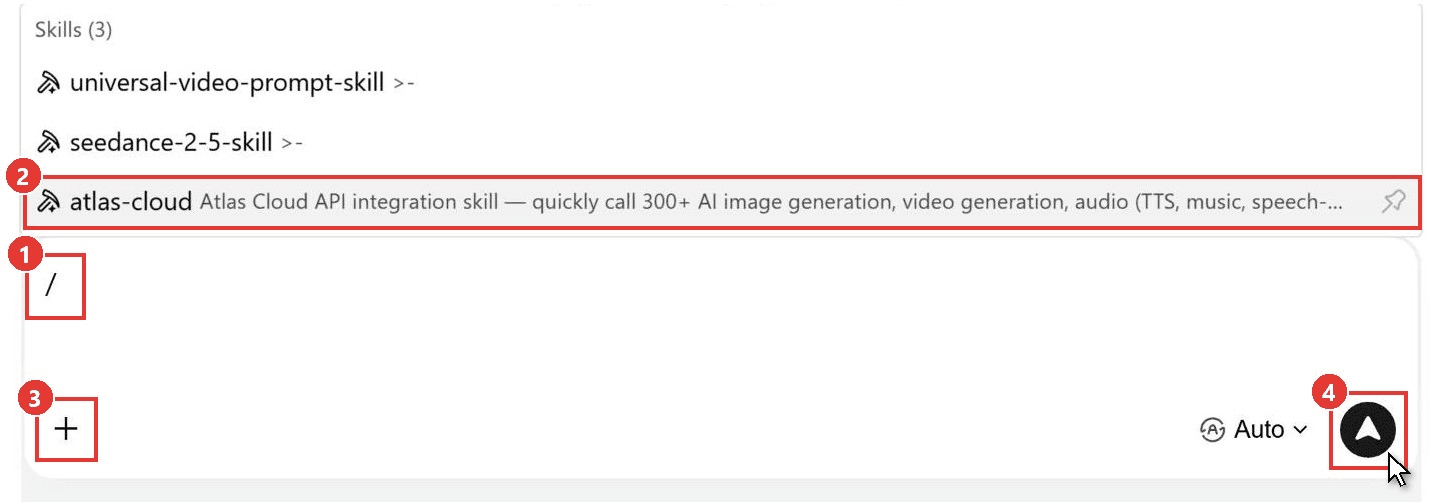
- Type / in the prompt box (1) and pick atlas-cloud (2).
- Click + (3), then Add files and Local Files, and attach a reference portrait.
- Describe stage one and send (4). The web sandbox has no environment variables, so paste your Atlas key when the agent asks, and tell it to quote before any paid job.
Stage one ran Seedream 5.0 Lite Edit Sequential, which returns a matched set from a single call. Our four 2848 × 1600 frames took about three and a half minutes.
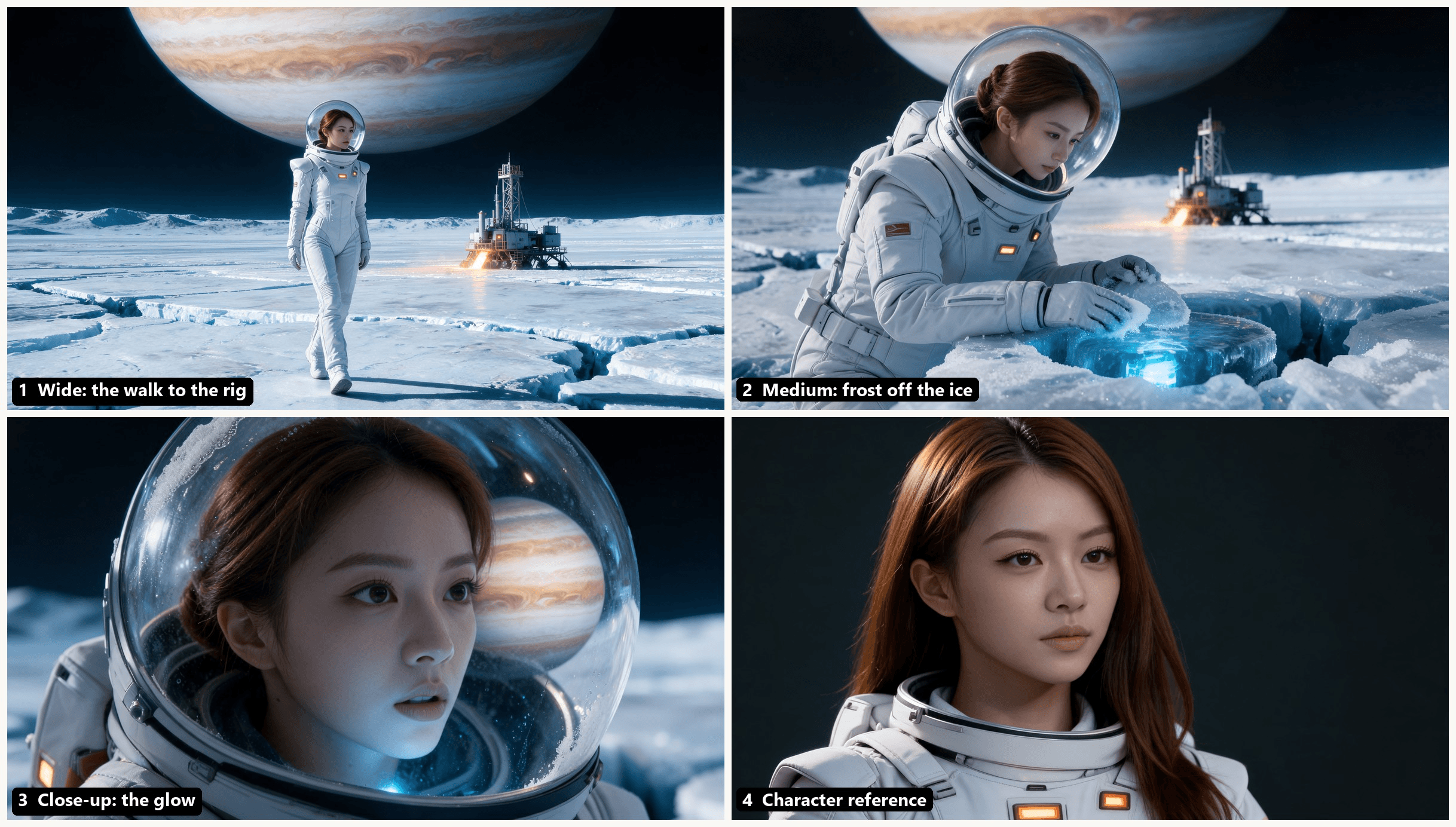
Stage two hands those frames to Seedance 2.5 reference-to-video. Put the portrait first so it anchors her face, then the three shot frames, and tie each shot to its frame with an @ tag. Our settings were 15 seconds, 720p, 16:9 with audio on, and this was the prompt:
plaintext1Three-shot sci-fi short. The woman in @Image1 is the astronaut in every shot, same face; she wears the matte-white pressure suit with amber chest lights and the clear glass dome helmet seen in @Image2, hair pinned up inside the helmet. Shot 1 (0-5s), framed like @Image2: low knee-height tracking shot as she walks across the cracked ice of Europa toward the drilling rig, Jupiter huge in the black sky, boots crunching on frost. Shot 2 (5-10s), framed like @Image3: she kneels at the borehole and wipes frost off the ice with her glove; a blue glow pulses beneath and grows brighter with each pulse; the camera sinks to ice level. Shot 3 (10-15s), framed like @Image4: close-up through her visor, blue light washes over her face, her breath fogs the glass, she whispers in English: It's breathing. Sound: thin wind, her breathing inside the helmet, a deep hum from under the ice that swells with the glow, no music. Photoreal, anamorphic 35mm, soft film grain, cold blue-white palette with warm amber suit lights.
Stage three asked for an English narrator on ElevenLabs v3 reading "Day two hundred and twelve on Europa. Nine kilometers down, the drill found water. Then the water found us." plus an instrumental from MiniMax Music 2.6, and the agent quoted both jobs first.
In its mix, the 7.8-second voiceover ends before her whispered line and the score sits 16 dB under the native sound with one-second fades. The result, a 15-second thin_ice_final.mp4, came back attached to the task.
Our character consistency guide covers how Seedance 2.5 holds a face across references, and the Seedance 2.5 prompt guide covers shot timing. To test a shot before the agent spends anything, open the Seedance 2.5 playground, which shows the exact price before you press Run.
Method 2: Call Seedance 2.5 Reference-to-Video Through the Atlas API
Prefer to script the render yourself? The same job is three steps on the Atlas API.
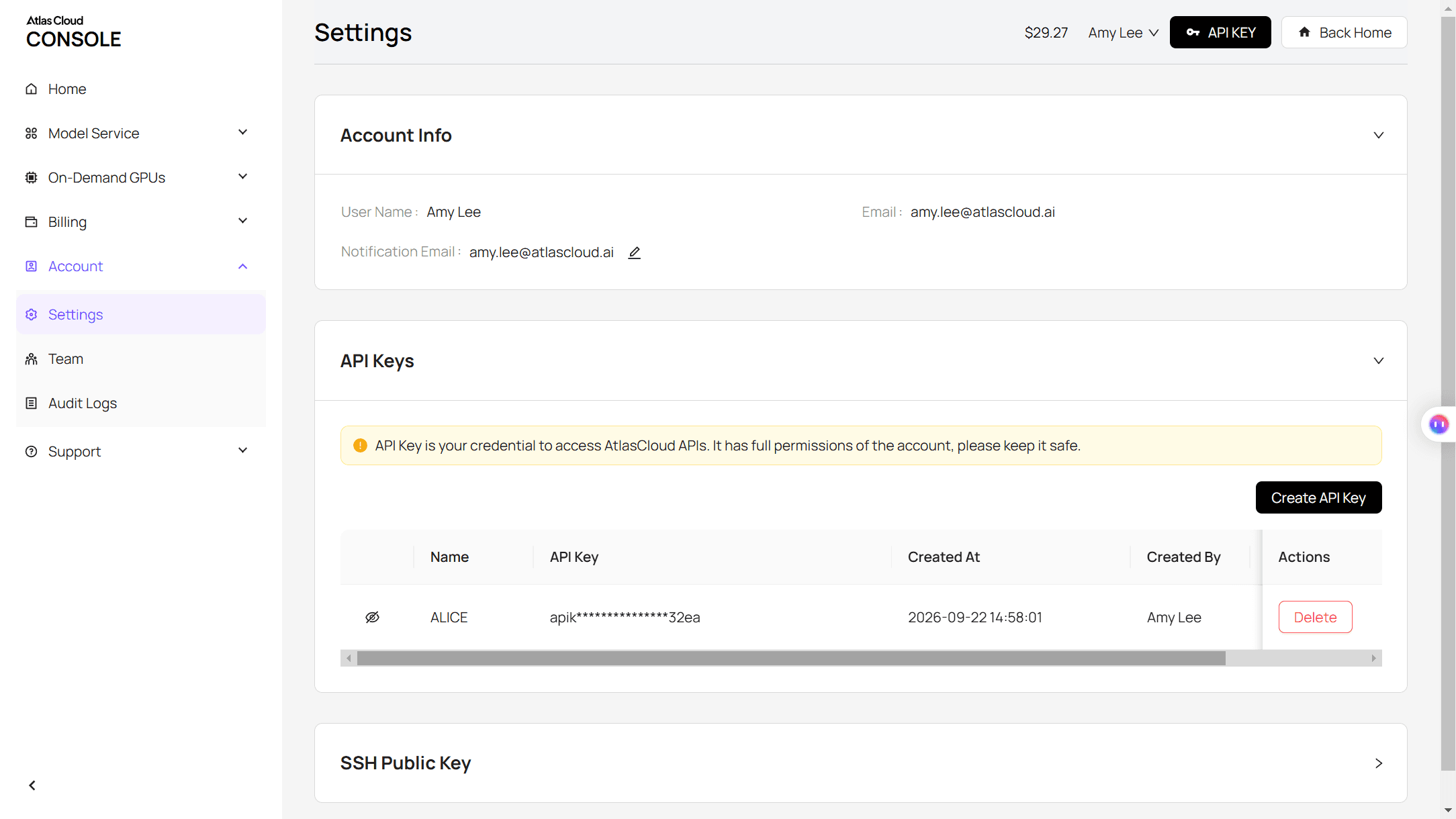
Step 1: Create an API key. Open API Keys in the Atlas console, click Create API Key and copy it. Keep it on your server; one key covers every model.
Step 2: Check the request shape. The API docs and the API tab on the model page list every field, including reference_images, duration and generate_audio.
Step 3: Submit the job and poll. List the portrait first so @Image1 matches it:
plaintext1curl -X POST https://api.atlascloud.ai/api/v1/model/generateVideo \ 2 -H "Authorization: Bearer $ATLASCLOUD_API_KEY" \ 3 -H "Content-Type: application/json" \ 4 -d '{ 5 "model": "bytedance/seedance-2.5/reference-to-video", 6 "reference_images": [ 7 "https://your-cdn.com/portrait.png", 8 "https://your-cdn.com/frame1.png", 9 "https://your-cdn.com/frame2.png", 10 "https://your-cdn.com/frame3.png" 11 ], 12 "prompt": "Three-shot sci-fi short... (paste the full Method 1 prompt)", 13 "duration": 15, 14 "resolution": "720p", 15 "ratio": "16:9", 16 "generate_audio": true 17 }'
The response carries a prediction ID. Poll it until the status reads completed and the clip URL appears in outputs:
plaintext1curl https://api.atlascloud.ai/api/v1/model/prediction/<prediction_id> \ 2 -H "Authorization: Bearer $ATLASCLOUD_API_KEY"
The endpoint and the auth header stay the same for every model, so switching the storyboard step to another image model means changing one model string.
WorkBuddy Video Generation Review: Built-In vs Atlas Skills
Both routes start from a prompt in the same task window. They differ in who picks the model and where the bill goes.
| Built-in VideoGen (web app) | Atlas Cloud skills | |
|---|---|---|
| Model | Fixed; ours reported Kling v3 text-to-video | Named in the prompt, here Seedance 2.5 |
| Inputs we used | Text prompt | Text, a reference portrait and four storyboard frames |
| Settings | 480P, 720P or 1080P; 16:9, 9:16 or 1:1 | 4 to 30 seconds; native 480p, 720p or 1080p; six ratios plus adaptive |
| Audio | Not tested | Native audio on by default, dialogue included |
| Billing | WorkBuddy credits, about 50 to 100 per 5-second clip | Per job on your Atlas account; agent reasoning uses WorkBuddy credits |
On the WorkBuddy side, the whole Thin Ice task used about 116 credits from the welcome pack. That includes one storyboard revision and an early step where the agent set up sign-in for the hosted Atlas MCP server, so tell it up front to use the REST API with your key. The Seedance render itself took about four and a half minutes.
Frequently Asked Questions
Is WorkBuddy video generation free?
Partly. The free plan's 100 monthly credits and 250 welcome credits cover a few built-in clips at the tool's stated rate. On the Atlas route, credits only pay for the agent's reasoning and Atlas bills the media.
On November 4, 2026 our storyboard set cost $0.126 and the 15-second 720p Seedance 2.5 clip $4.52, both after discounts that day (20% off Seedance 2.5, 10% off Seedream 5.0 Lite). With the $0.0107 voiceover and the $0.15 score, one pass came to about $4.81.
Does WorkBuddy support GPT Image 2 or an imagegen skill?
WorkBuddy has a built-in image tool named ImageGen, but it was switched off in our web session. The marketplace offers image skills such as OpenAI Image Gen and Nano Banana Pro, and community skills on GitHub wrap GPT Image 2. With the Atlas skill installed, you can also name openai/gpt-image-2/text-to-image in your prompt and pay per image.
Can WorkBuddy edit videos as well as generate them?
Yes, through add-ons. ChatCut connects WorkBuddy to its own editor, where the agent can turn a talking-head recording into a captioned vertical cut. The Video Editing and Video Remix skills work on uploaded footage, and the agent can also run ffmpeg in its sandbox, which is how our voiceover and score were mixed.
Is there a WorkBuddy APK for Android?
Yes. The Android Download link in the workbuddy.ai footer points to an APK file on Tencent's CodeBuddy download server, and the iOS link goes to the App Store. The phone app is built to control WorkBuddy on a signed-in computer, so video jobs still run there.
Conclusion
WorkBuddy can make video three ways today: built-in generation where the model is fixed, code-rendered motion graphics through skills such as Remotion, and model calls through skills or connectors. The first needs no setup, and it leaves the choice of model to WorkBuddy.
The Atlas skills turned one task into a small production line: a storyboard, a 15-second Seedance 2.5 shot list with its own sound, and a narrated mix, each priced before it ran. If you want WorkBuddy video generation with a model you choose and a character who stays the same across shots, that is the route we would start with.


