
Type one sentence, walk away, and come back to a finished deck, a research report, or a rendered video. That is the promise behind WorkBuddy, the office agent Tencent took global in May 2026. We signed up for the international version, installed three Atlas Cloud skills, and asked it to write a product launch outline and render the opener with Seedance 2.5. This guide covers what WorkBuddy is, where to download it, what the free and paid plans include, and exactly how that video job ran.
Key Takeaways
- WorkBuddy is Tencent's desktop AI agent that plans and finishes multi-step office tasks from one sentence.
- The international app runs on Mac, Windows and the web, while Linux builds are listed only on the China site.
- The free plan already includes experts, skills and connectors, and Pro adds credits, automations and every model.
- WorkBuddy's built-in image and video generation spends WorkBuddy credits, while Atlas skills let you pick Seedance 2.5 and pay per job.
- Uploading the Atlas Cloud skills lets one WorkBuddy task write a launch deck and render its opener with Seedance 2.5.
What Is WorkBuddy, Tencent's Office AI Agent?
WorkBuddy is Tencent's answer to the question "what if the chatbot could also do the work?" Tencent's global launch announcement on May 28, 2026 calls it "the agentic AI workspace" and says it "helps users take on complex office work." The China release came earlier, in March 2026, per TechNode. Instead of answering a question and stopping, WorkBuddy breaks a request into steps, runs tools in a sandbox, writes files, and reports back with the artifacts attached.
Three building blocks sit under the Experts · Skills · Connectors tab:
- Experts are preconfigured AI roles with a name and a brief. The international catalog groups them into Product Design, Engineering, Data & AI, Marketing & Growth, Content & Creative, Finance & Investment, Operations & HR and more. You "summon" one, and for complex jobs an expert team splits the work.
- Skills are instruction packages the agent loads when a task matches. Some ship with the client, some install from the marketplace in one click, and you can upload your own package or ask WorkBuddy to generate one.
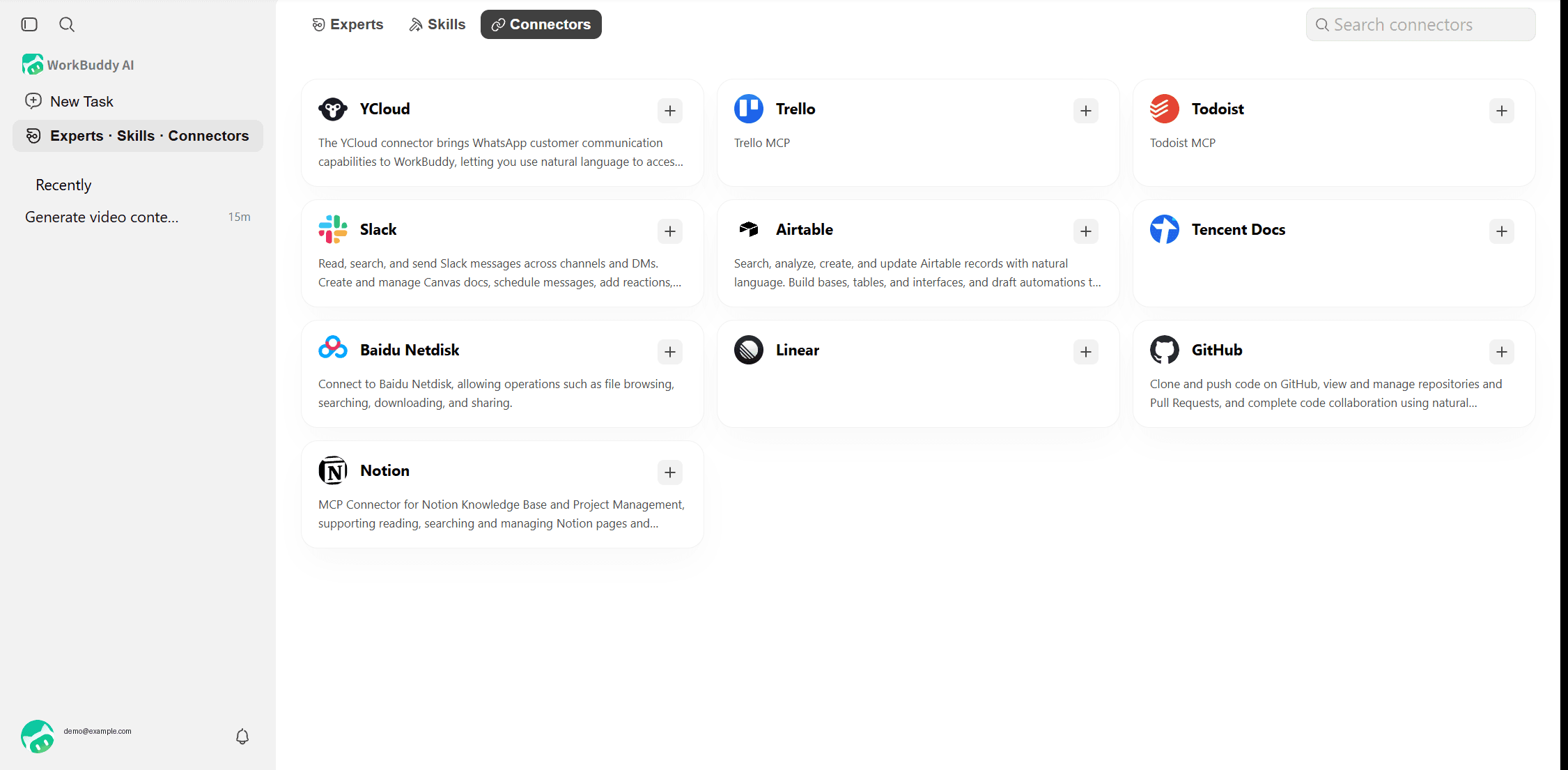
- Connectors are MCP-based integrations. The international web app lists 10 of them, from Slack to Notion, while the desktop app lists 26, including Kling AI, Canva and Tripo 3D.
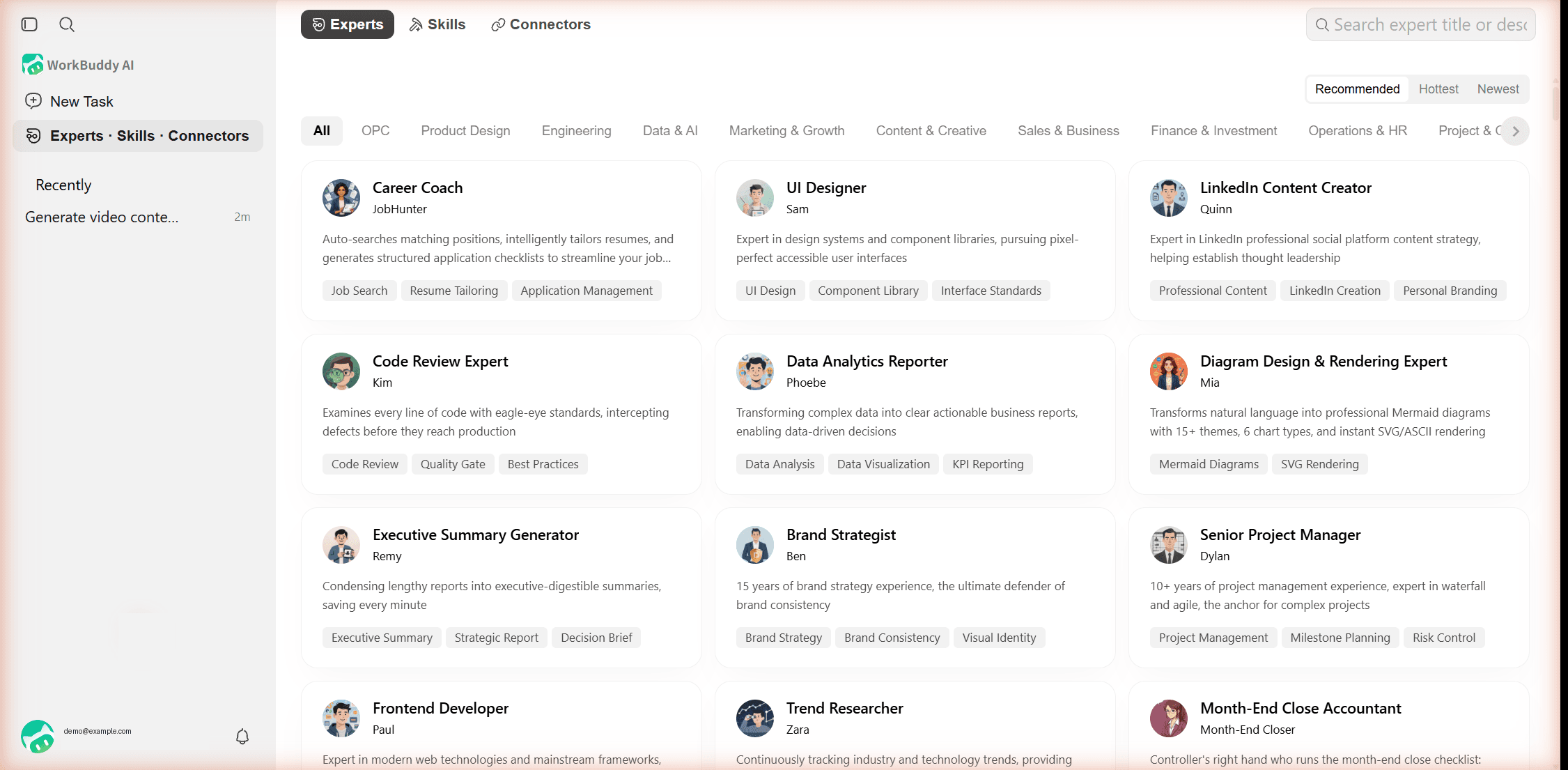
CnTechPost described the March debut as an easy-to-use version of OpenClaw, and the same client also carries a Coding mode built on CodeBuddy. The international build can be driven from your phone or from Discord, Slack and Telegram, which is why the download page lists iOS and Android apps next to the desktop installers.
Add Seedance 2.5 to WorkBuddy With Atlas Cloud
WorkBuddy's client has shipped built-in image and video generation since version 5.6.2, and those jobs draw from your WorkBuddy credit balance. If you want to name the model, control the resolution and duration, and pay only for the clip, you can route the job through Atlas Cloud instead. Atlas puts 400+ image, video, audio and 3D models behind one API, and its open-source skills teach WorkBuddy how to call them. Here is what one task produced: a six-slide launch outline for a fictional coffee grinder, plus an 8-second opener rendered with Seedance 2.5 at 1280 × 720.

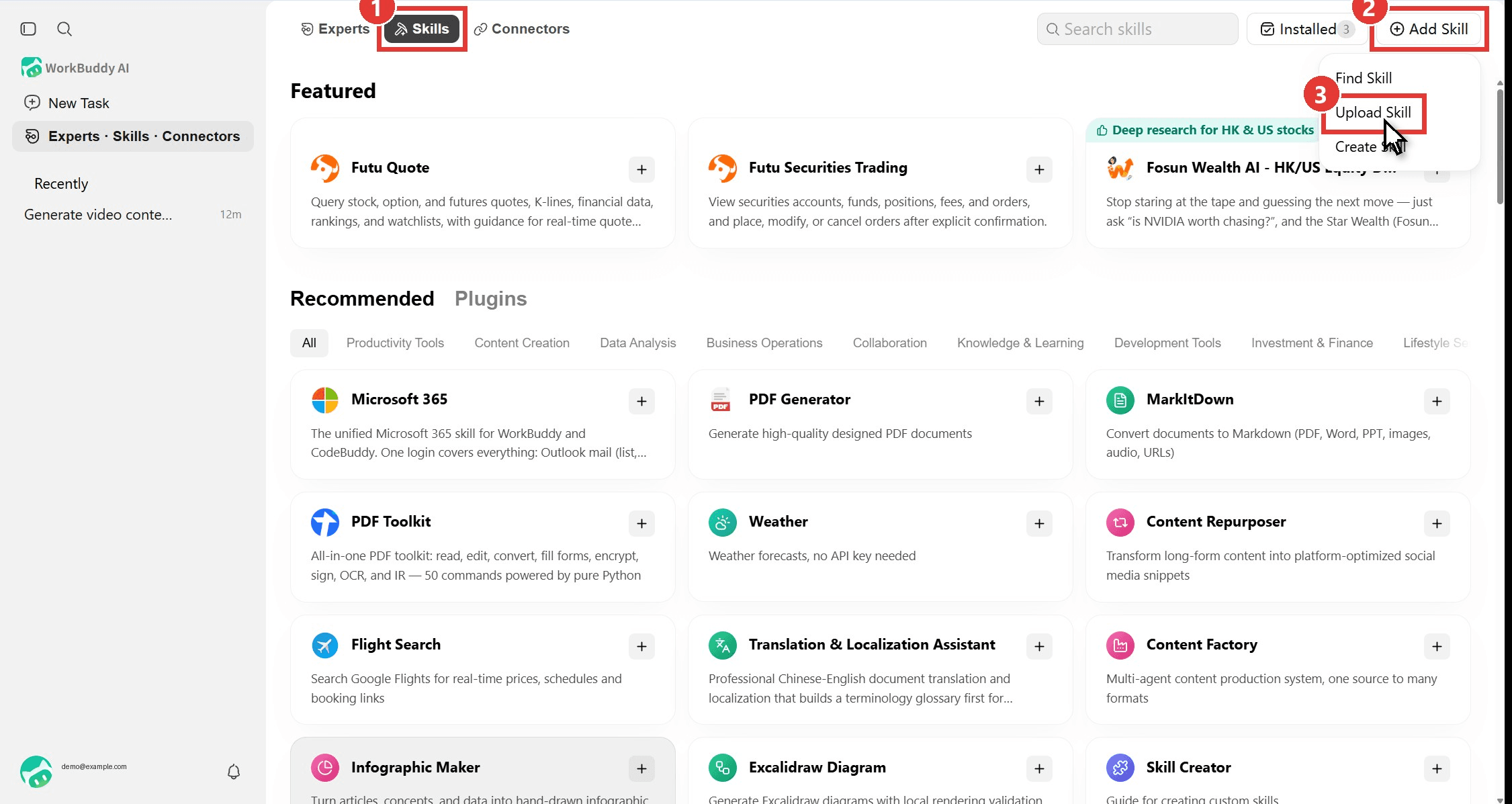
The agent loaded the atlas-cloud skill, wrote the outline to a markdown file, checked the live model list and parameter schema, showed a price quote, submitted the job, polled until it finished, and attached the MP4 in the chat. The whole task ran about ten minutes, with two and a half of those spent on rendering. The Seedance job is billed per clip to your Atlas account, so the WorkBuddy credits only cover the agent's own reasoning. Here is the upload path in three clicks.
Method 1: Upload the Atlas Cloud Skills Into WorkBuddy
This is the route we tested on the international web app, so no desktop install is required.
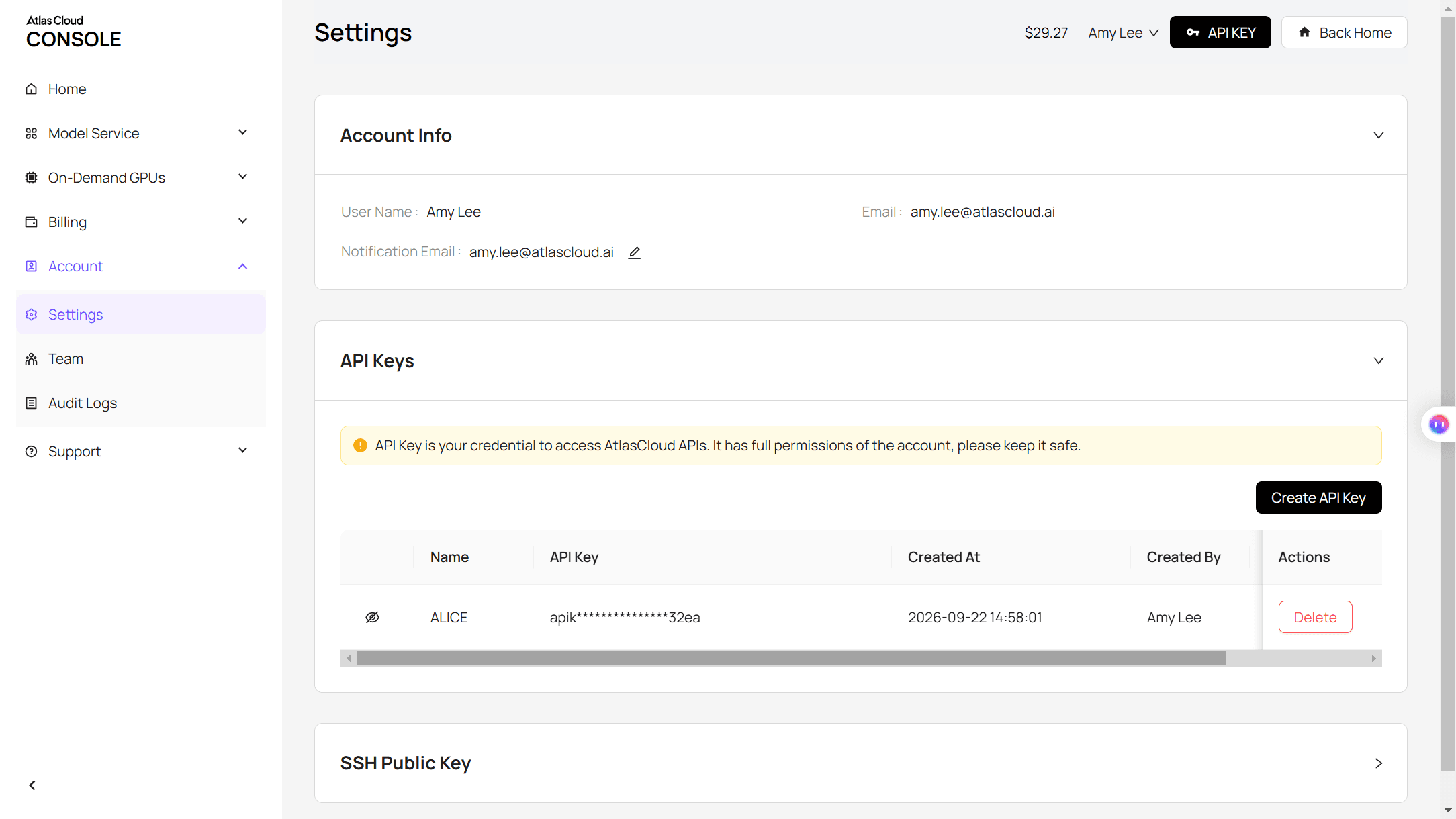
Step 1: Create an Atlas Cloud API key. Sign in to the Atlas console, open API Keys, click Create API Key and copy it. One key works for every model on the platform.
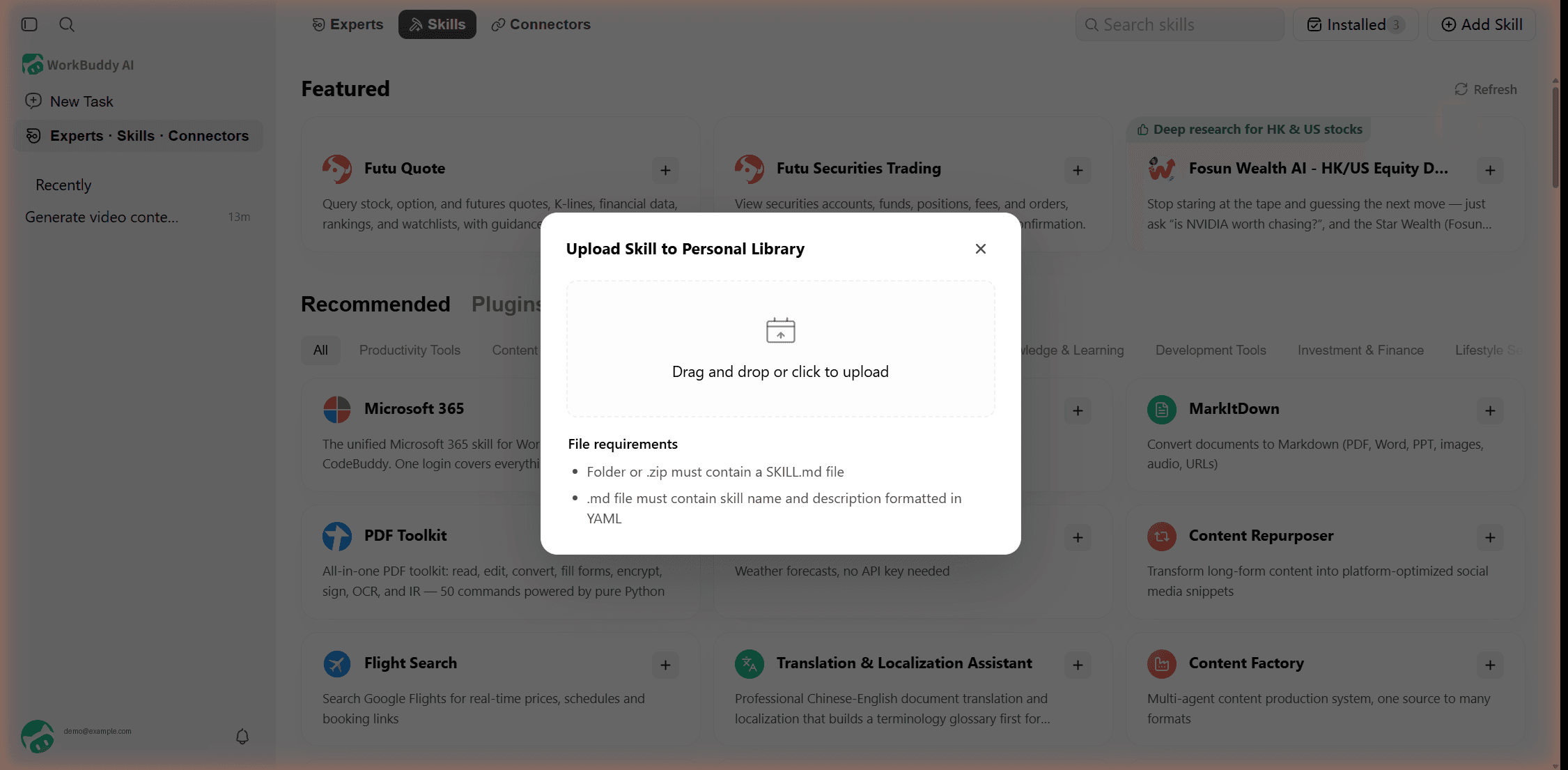
Step 2: Download the skill packages. The atlas-cloud-skills repository holds three folders: atlas-cloud (the core API skill), seedance-2-5-skill (shot planning for Seedance) and universal-video-prompt-skill (prompt specs that work across video models). Zip each folder so the folder itself is the top level of the archive. WorkBuddy's upload dialog asks for exactly that: a folder or .zip that contains a SKILL.md with a YAML name and description.
Step 3: Upload them in WorkBuddy. Open Experts · Skills · Connectors, switch to the Skills tab (1), click Add Skill (2), pick Upload Skill (3), then drop the zip onto the dialog. Repeat for the other two. In our run each package installed in a second or two, the Installed counter went from 0 to 3, and every skill appeared switched on.
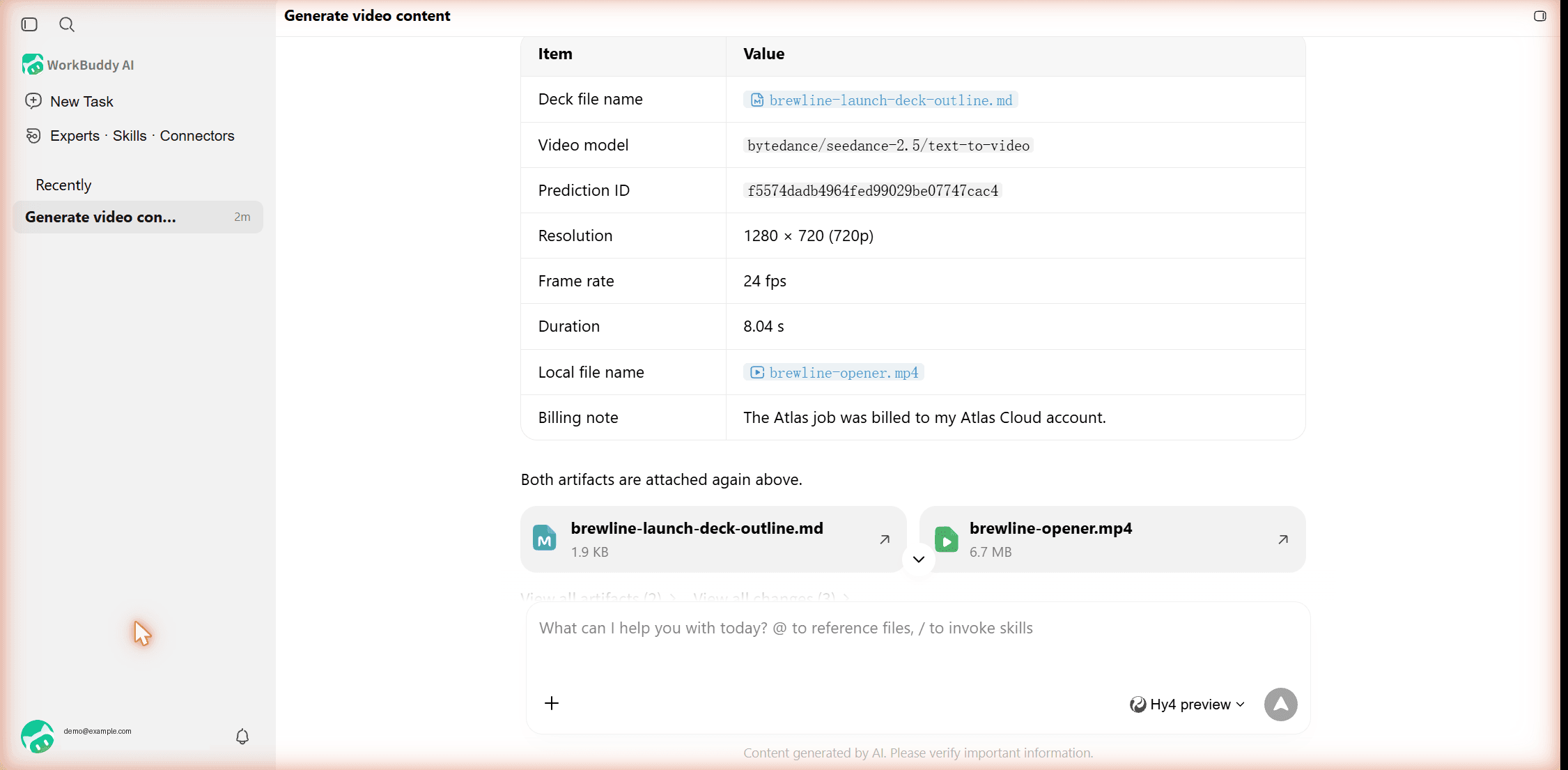
Step 4: Run a task and hand over the key. Start a new task that names the model, for example "generate the deck's opener video on Atlas Cloud with bytedance/seedance-2.5 text-to-video, 8 seconds, 16:9, 720p, show me the quote first." The web sandbox has no environment variables, so the skill asks for your key in chat; paste it as the next message and the agent takes it from there. The final reply lists the deck file, the model, the prediction ID, resolution, frame rate and duration, with both artifacts attached.
Want to tune the prompt before spending anything? Open the same model on the Atlas Seedance 2.5 playground, where the price for your exact settings shows before you press Run.
Method 2: Connect Atlas Cloud as a WorkBuddy MCP Connector
WorkBuddy's connectors are MCP servers, and the official Connector guide says you can "configure a custom MCP connector" alongside the built-in ones. Atlas publishes its own MCP server, the same one our guide to Claude video generation walks through, so the agent gets image, video, audio and 3D tools without any skill files.
The web connectors page shown below has no custom option. In the desktop app, Custom connectors opens an MCP editor where Atlas takes one JSON entry and a Trust click. Our WorkBuddy MCP connectors guide has the full setup.
WorkBuddy Download for Mac, Windows and the Web
The international site offers three desktop installers and a browser version. The web app at workbuddy.ai/app covers tasks, experts, skills and connectors, which is enough for everything in this article; the desktop client adds local workspace folders, custom MCP connectors, scheduled automations and remote control from your phone.
| Platform | Requirement | Where to get it |
|---|---|---|
| Mac (Apple silicon) | macOS 12 or later | workbuddy.ai, Download section |
| Mac (Intel) | macOS 12 or later | workbuddy.ai, Download section |
| Windows | Windows 10 or later | workbuddy.ai, Download section |
| Web | Any modern browser | workbuddy.ai/app |
| iOS and Android | A signed-in desktop or web session to control | Links in the site footer |
One caution for ARM laptops: the Windows installation guide lists ARM64 as compatible, while the FAQ says it is not supported. Try the web app first if you are on a Snapdragon machine.
WorkBuddy International Version vs the China Version
Two separate sites run two separate products. workbuddy.ai is the international edition; workbuddy.cn is the China edition, and the sites differ in pricing, downloads and catalog. We checked both in November 2026.
| International (workbuddy.ai) | China (workbuddy.cn) | |
|---|---|---|
| Desktop builds | Mac, Windows | Mac, Windows, Linux, HarmonyOS |
| Sign-in | Google, GitHub, X, Apple | Phone number |
| Connectors | 26 on desktop (10 on the web), including Kling AI, Canva and Tripo 3D | Includes media connectors such as Kling AI and LibTV |
| Atlas Cloud listing | Not listed; use the skill upload above | Atlas Cloud media expert plus three Atlas skills, developer Atlas_Cloud |
If you are on the China edition, search the Expert Center for Atlas Cloud and summon the expert instead of uploading anything. Everything else in this guide applies to both.
How to Use WorkBuddy for Your First Task
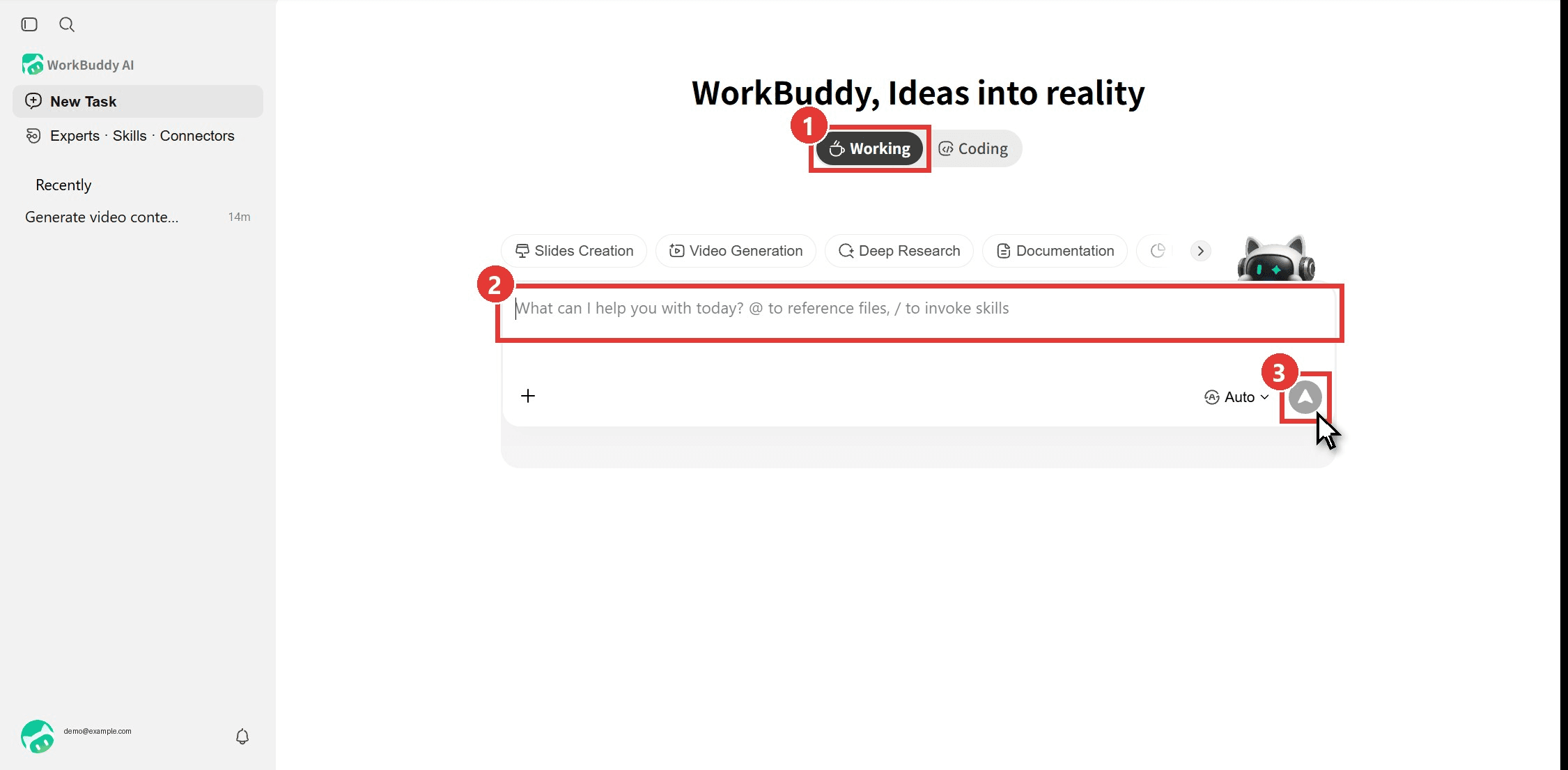
The home screen is a single prompt box with a mode switch above it. Working mode is for documents, research and media; Coding mode hands the task to the CodeBuddy engine. Scene chips such as Slides Creation and Video Generation just pre-tag the task, and the model picker defaults to Auto. Describe the outcome, attach files with @, invoke a skill with /, and press send.
A few habits make the agent faster. Say what the deliverable is (a markdown file, a deck, an MP4) so it knows when to stop. Ask for a quote or a plan before any step that costs money. And watch the right-hand panel: Task Progress shows the checklist the agent wrote for itself, and Artifacts collects every file it produced.
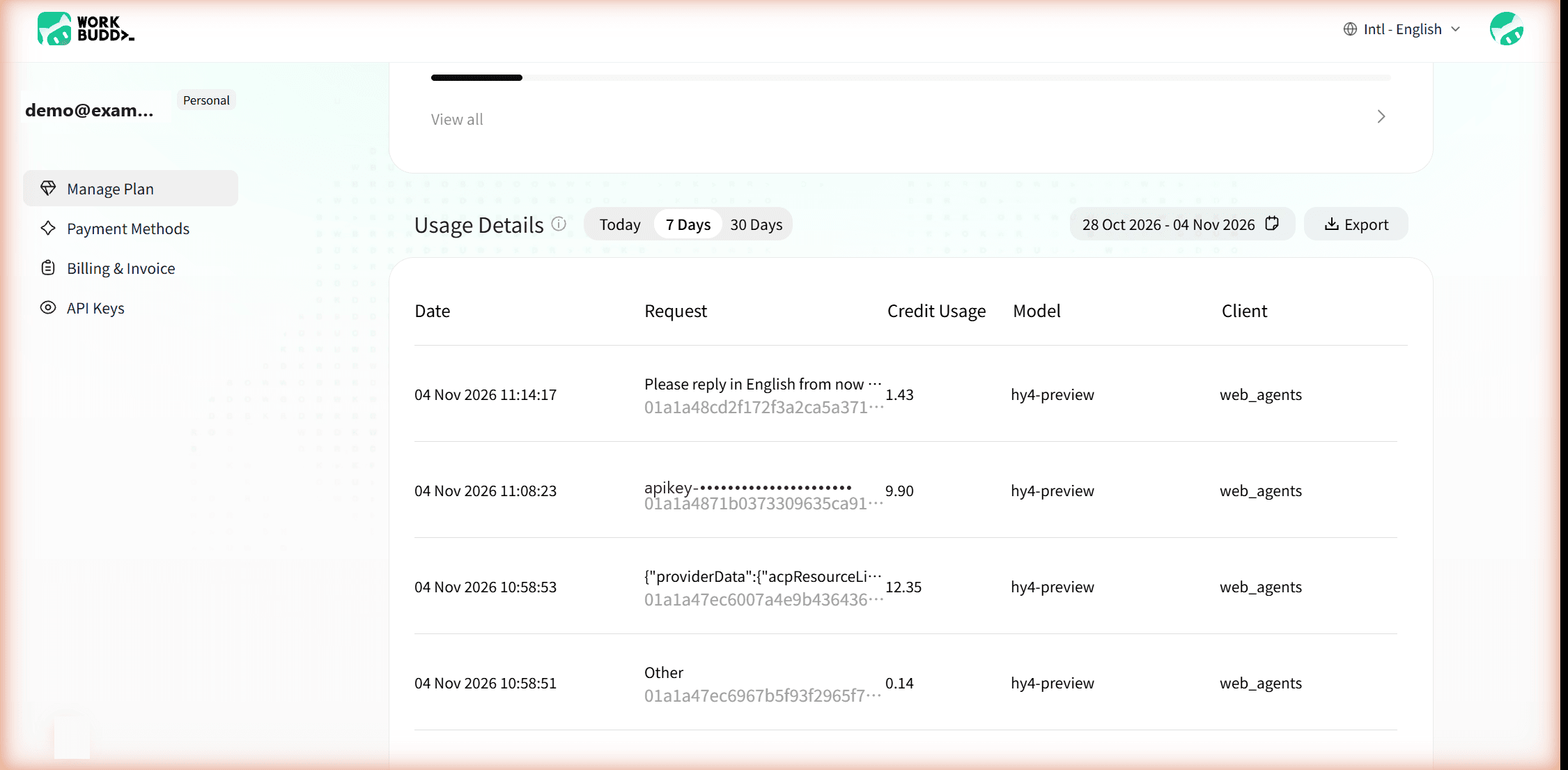
Each task also leaves a trail on the account page under Profile and Usage. Our launch-deck task logged four entries on the hy4-preview model: 12.35 credits for the first round (writing the outline, checking the model and quoting), 9.90 for submitting and polling the video, 1.43 for an English recap, and 0.14 of overhead. Total: 23.82 credits, which came out of the 250 welcome credits rather than the monthly 100.
WorkBuddy Pricing: Free Credits, Pro and Team Plans
Pricing on the international site, as of November 2026:
| Plan | Price | Credits | What else you get |
|---|---|---|---|
| Free | $0 | 100 per month, plus a 30-credit daily active reward (promo) | Experts, skills and connectors; Auto model routing; 3 automated tasks |
| Pro | $10 per month ($7 for the first month), or $96 per year | 1,000 base plus 1,000 bonus per month, plus 50 per day (promo) | Access to all models; 15 automated tasks; unlimited code completions |
| Team | $40 per seat per month, or $480 per seat per year | 1,000 base plus 1,000 bonus per seat per month | SSO, organization management, per-member usage controls, OpenAPI access |
| Enterprise | Contact sales | Custom | On-premises deployment |
New accounts receive 250 welcome credits; ours were set to expire 14 days after sign-up. Monthly credits do not roll over, and the account spends the earliest-expiring pack first. The $7 first month applies once per user and never to anyone who has held a paid plan or a trial. Benefits marked promo on the pricing page are temporary, and Tencent says limits may change.
How far do credits go? Our full agent task cost under 24 credits, so the free plan's 100 per month is roughly four tasks of that size before daily rewards.
Is WorkBuddy Safe to Use?
WorkBuddy is published by Tencent Cloud, which puts a large company behind the security model. The parts that matter most for an agent that runs code on your behalf are documented in the Function Description guides.
| Concern | What WorkBuddy does |
|---|---|
| Uploaded skills | Every upload gets a security check; non-high-risk packages install automatically, high-risk ones always need manual confirmation, and the check is never skipped |
| Local data | Skills, memories and work logs are stored on your device and in your workspace |
| Task history | Keep forever, or auto-clear after 90, 60 or 30 days (tasks saved to a workspace are kept) |
| Network | Direct, follow system, or a manual proxy with Test Connection |
| Memory | Conversation memory can be switched off, and a reset wipes it |
Two naming collisions can trip you up. workbuddy.com is an unrelated field-service management product with its own App Store app. The Chrome Web Store also has a third-party focus timer called WorkBuddy that has nothing to do with Tencent. Tencent's own browser extension is installed from inside the desktop client when you enable browser automation.
If you hand an API key to any agent, as we did above, rotate it afterwards from the Atlas console. The key is only as private as the chat log it sits in.
Frequently Asked Questions
Does WorkBuddy work on Linux?
Only through the China edition. workbuddy.cn lists Linux and HarmonyOS installers, while workbuddy.ai ships Mac and Windows builds plus the web app. Linux users on the international side can run the web version, which covers tasks, experts and skill uploads.
Is WorkBuddy the same as workbuddy.com?
No. workbuddy.com sells software for managing field technicians and has an iOS app of the same name. Tencent's agent lives at workbuddy.ai (international) and workbuddy.cn (China), and its documentation sits under workbuddy.ai/docs.
Can I use my own API key in WorkBuddy?
Yes, in two places. Custom models go in under Avatar, Settings, Models, where WorkBuddy accepts any OpenAI-compatible endpoint and a Test Connection button checks it; presets cover OpenAI, DeepSeek, Kimi, MiniMax, Gemini, OpenRouter and local Ollama. For media generation, the Atlas skills above take an Atlas key in chat. We cover the custom model route in detail in our WorkBuddy API key guide.
How much does a Seedance 2.5 clip cost inside WorkBuddy?
The clip is billed by Atlas Cloud, not by WorkBuddy credits. Our 8-second, 16:9, 720p opener without audio settled at $2.42 on the Atlas account in November 2026, and the agent's own work on the task used 23.82 WorkBuddy credits. Lower resolutions cost less per second, and the exact figure for your settings shows on the Seedance 2.5 playground before you run.
Conclusion
WorkBuddy earns its "agent" label. It planned, wrote, verified and delivered without a follow-up prompt, and the web app alone was enough to upload skills and run a multi-step job. The free plan is generous for testing, the China and international editions are different products, and the documentation is detailed enough that most questions have an official answer.
Media is where the two sides fit together. WorkBuddy's built-in generation spends credits from the plan; the Atlas Cloud skills let the same task call Seedance 2.5 by name and pay for the clip alone. If your office work ends in a video, that combination is the quickest way we found to get from a sentence in WorkBuddy to a finished MP4.


