

Pip & Oven sells one thing worth a commercial: a brown butter chocolate chunk cookie with two candy eyes. There is no crew, no agency and no shoot day on the calendar. What it has is a product photo and a few lines about the bakery.
That turned out to be enough to learn how to make a commercial that can actually run. You write one paragraph, generate two takes, fix the paragraph once, then convert the file to the spec of the screen it airs on. Pip & Oven is a fictional bakery we invented for this test, and every frame below comes from that one real run.

Key Takeaways
- You can make acommercialthree ways: hire an agency, run a one-day shoot, or generate it with AI.
- The TVC Maker workflow turns one product photo and a one-paragraph brief into a multi-shot commercial with sound.
- Ask for two takes from the same brief, pick one, then revise the brief instead of the footage.
- Broadcast and cable spots must match program loudness under the CALM Act; streaming apps set their own specs.
- FCC caption rules only treat ads longer than five minutes as programming, so a 30-second spot falls outside them.
How to Make a Commercial: Three Routes Compared by Cost
Every commercial goes through the same four jobs. Someone decides the one thing it says, someone produces pictures and sound, someone cuts them to an exact length, and someone exports a file the channel accepts. The routes differ in who does those jobs and what you pay them.
| Route | Who makes it | What you hand over | Documented cost | Where the time goes |
|---|---|---|---|---|
| Agency or production company | Director, crew, cast, editor, agency producers | A creative brief, approvals at each stage | $324,000 average production cost for a national 30-second spot made in 2010, before agency commissions and markups (4A's survey, reported by MediaPost and Shots in December 2011) | Casting, location scouting, the shoot, edit rounds, client approvals |
| One-day shoot you run yourself | You, a camera operator, friends as cast | A script, a location, props, a shoot day | About $4,500 for Dollar Shave Club's 2012 launch video (founder Michael Dubin to Fortune, 2015) | Lighting and sound on the day, retakes, editing |
| AI workflow | You | One product photo and a one-paragraph brief | Billed per second of finished video (see the FAQ) | Writing the brief, reviewing takes, one revision |
The agency figure is old. The newest edition of the 4A's Television Production Cost Survey we could find covers 2011 spots, so read $324,000 as a dated benchmark for the top of the range: a national spot with a full crew.
Dollar Shave Club is the famous counterexample. Dubin spent about $4,500 on the launch video, and some 12,000 people signed up in the first 48 hours after it went up on YouTube (Entrepreneur, October 2012). The catch? The cheap route still needs a writer, a performer and a shoot day that goes right.
The third route removes the shoot day. You still own the parts that decide whether the ad works: the message, the review and the fix. That is the route the rest of this guide walks through.
How to Make a Commercial With AI on Atlas Cloud
On Atlas Cloud, TVC Maker builds a multi-shot commercial with voiceover, music and ambient sound from one product photo and a short brief. This is the finished Pip & Oven spot, after one round of revisions:
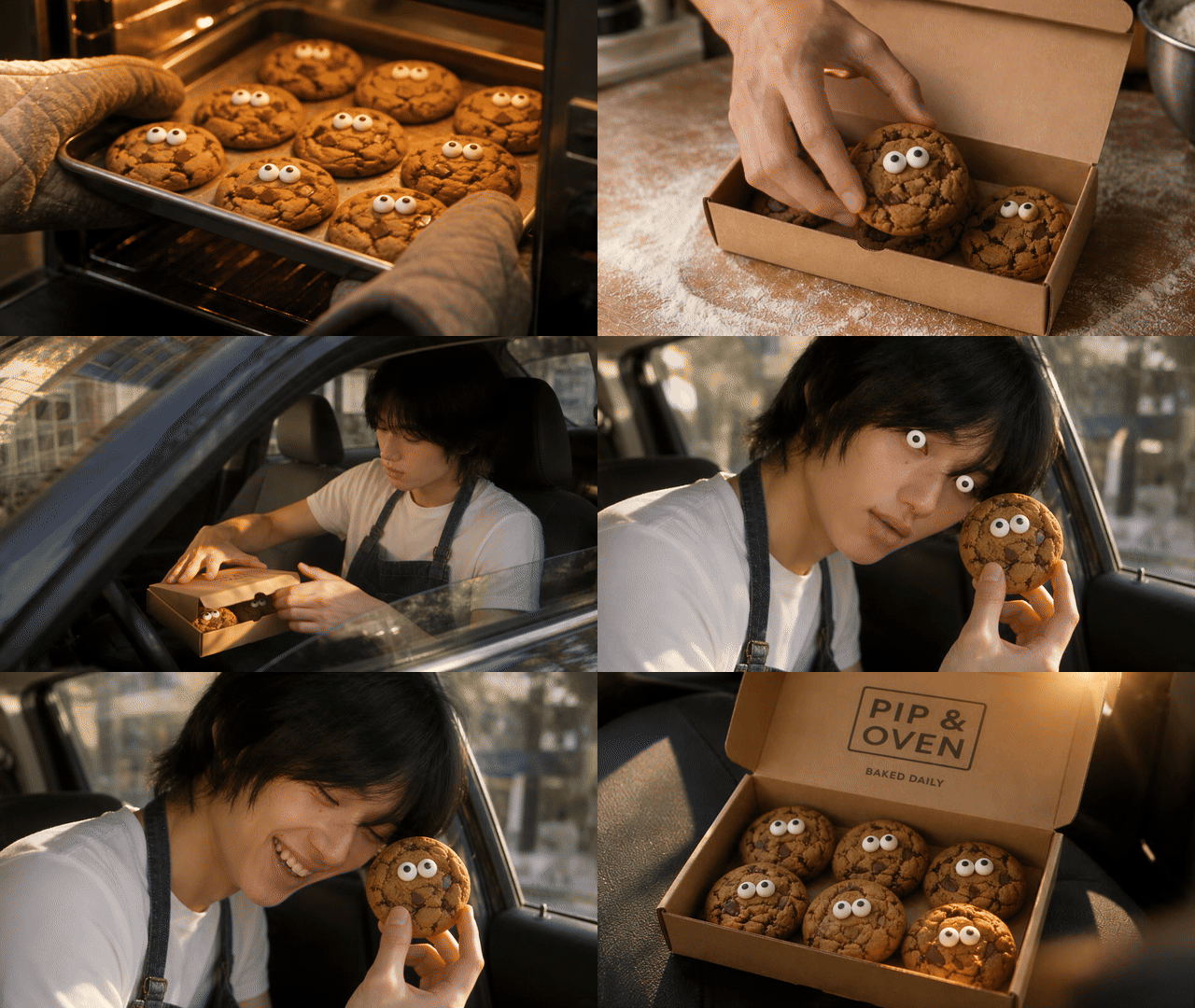
Highlights from the final 30-second, 1080p spot, shown as a GIF without sound.
Three steps got it there. The brief took a few minutes to write, and each render came back in about 11 to 12 minutes.
Step 1: Write a One-Paragraph Brief
Write the brief first. One paragraph is enough: the brand, the product, one message, who it’s for, the tone, who appears and how it ends. Put the voiceover in quotes, and TVC Maker reads it as written.
You don't need a shot list. Our brief named no shots, and the workflow planned the whole sequence itself. If every shot needs sign-off first, start from our commercial script template instead.
This is the first brief, word for word:
plaintext1Pip & Oven is a small neighborhood bakery. Product: the Peeper, a brown butter chocolate chunk cookie with two candy eyes, sold in a kraft box of six. One message: a cookie that looks back makes any afternoon funnier. Audience: adults 20 to 35 who grab a treat on the way home. Tone: playful and warm, sunny late afternoon, handheld camera, real bakery textures. The person from the model photo is the baker and owner, wearing a plain white T-shirt and a denim apron. Show the cookies in the first seconds and end on the open box with the words PIP & OVEN. Voiceover, warm friendly voice, starting at about 0:03: "Every morning at Pip & Oven, we bake a batch of Peepers. Brown butter, dark chocolate, and two eyes that follow you home. Grab a box of six. Pip & Oven."
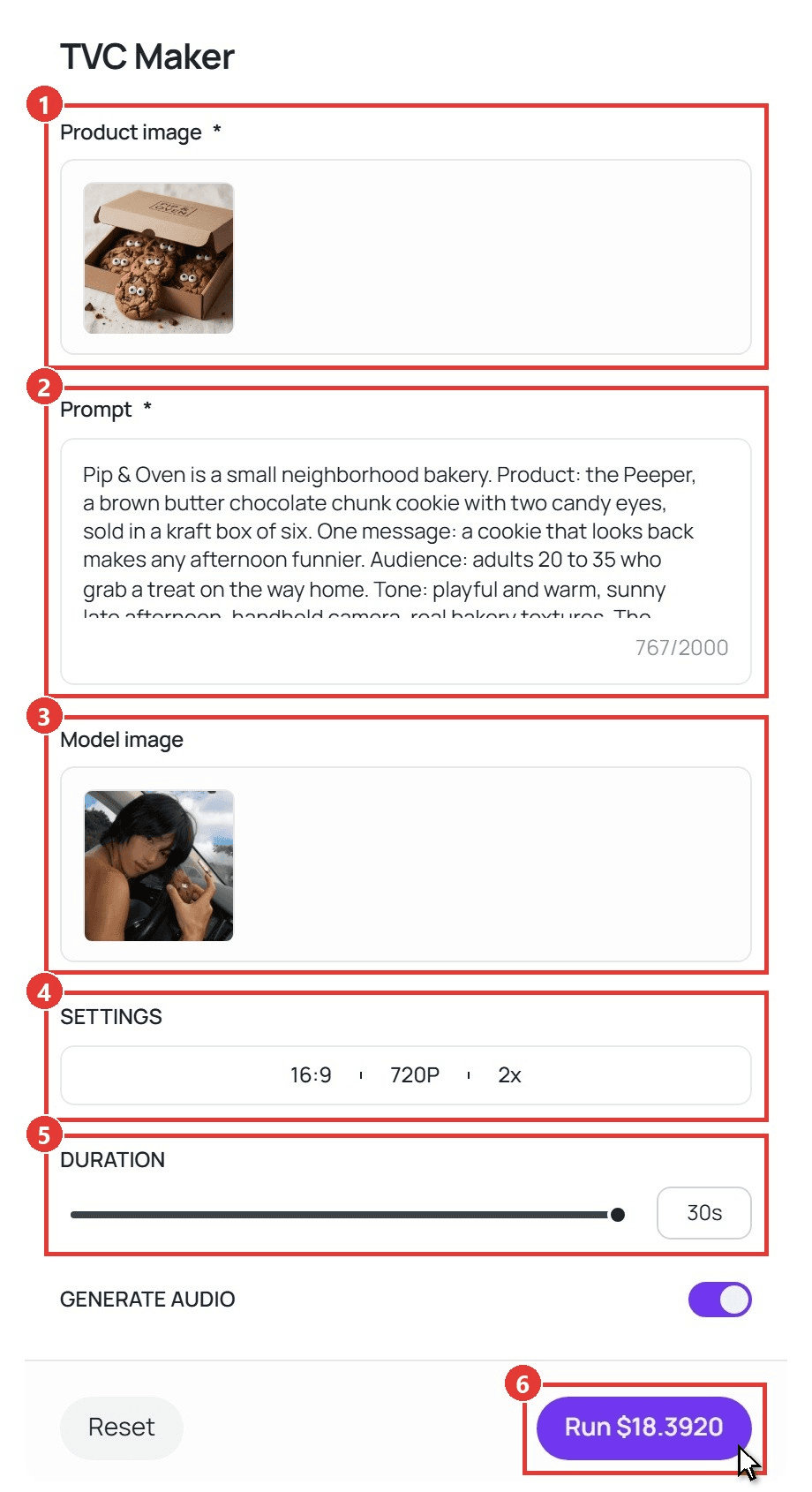
Then fill in the form in this order:
- Upload one photo in Product image. The box, the logo and the look of the cookies follow this photo.
- Paste the brief into Prompt. This one used 767 of the 2,000 characters.
- Add a Model image if a real person should appear. Ours is a photo of the baker taken in a car; the brief moved them behind the counter in a T-shirt and apron.
- Open SETTINGS and pick 16:9 for TV and streaming, 720P for drafts and 2x for two takes.
- Drag DURATION to 30 seconds.
- Leave Generate audio on and click Run.
Step 2: Get Two Video Ad Examples From One Brief
With No. of videos at 2x, one run returns two different takes on the same brief. Ours came back as two 30-second spots with the voiceover read in full.
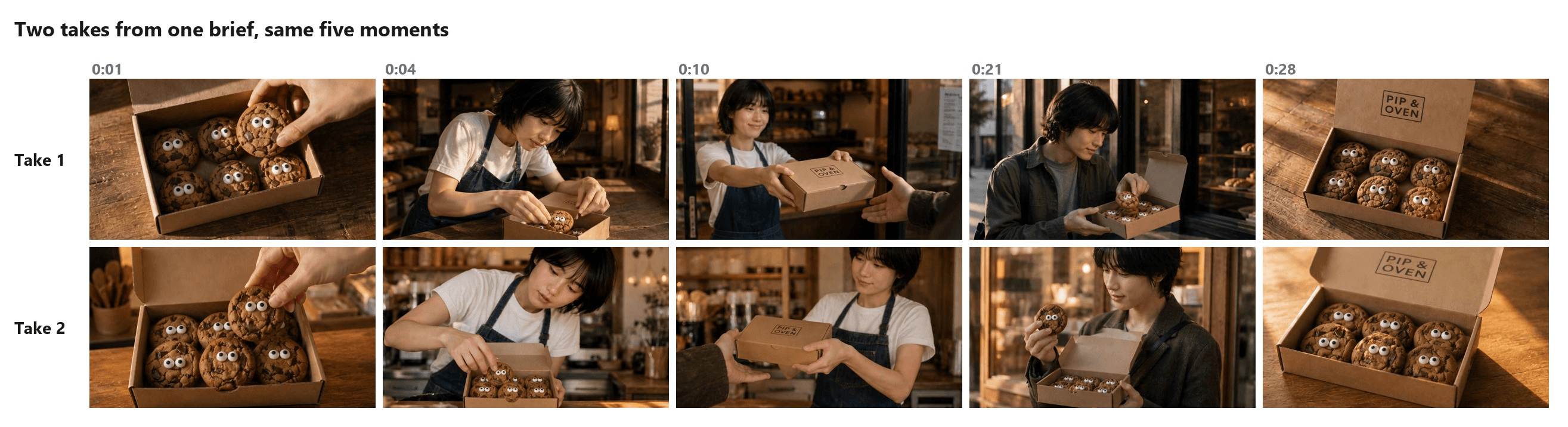
Both takes follow the beats the brief implied, in the same order. What changes is what a director would decide on set: the counter, the light, the street, the customer and the way the box closes. Take 2 had the warmer counter and the tighter read, so it became the base for the revision.
Here's the thing about reviewing: watch each take with sound three times. Once for the story, once for the words, once for the last frame. Write every problem as a plain sentence, because each sentence turns into a line of the next brief.
Step 3: Revise the Brief, Not the Footage
We checked take 2 against what makes a good TV ad and wrote down four notes. Each one became an edit to the paragraph:
| What we saw in take 2 | What changed in the brief |
|---|---|
| The message promises a funny cookie, but no joke happens on screen; the middle of the spot goes to packing and handing over a box | One new line names the joke: after closing, the baker sits in a parked car and holds a Peeper beside their face, candy eyes level with their own |
| The ampersand in "Pip & Oven" comes out as a quick "n" | The voiceover spells the name the way it should sound: "Pip and Oven" |
| The voiceover goes quiet between 0:12 and 0:23 | Each line gets a start time: 0:02, 0:10 and 0:24 |
| The last frame shows the logo with no reason to visit | An end line in short capitals: BAKED DAILY |
These are the lines that changed. Everything else in the brief stayed word for word:
plaintext1Open on a tray of Peepers coming out of the oven. Spend most of the spot on one joke: after closing, the baker sits in a parked car on a sunny street, holds a Peeper up beside their own face so its candy eyes sit level with their eyes, gives the camera a deadpan look, then breaks into a laugh. End on the open box with the words PIP & OVEN and the line BAKED DAILY. Voiceover, warm friendly voice. At 0:02: "Every morning, Pip and Oven bakes a batch of Peepers." At 0:10: "Brown butter, dark chocolate, and two eyes that follow you home." At 0:24: "Grab a box of six. Pip and Oven."
For the final render we switched SETTINGS to 1080P and 1x, since this is the version that goes to air.
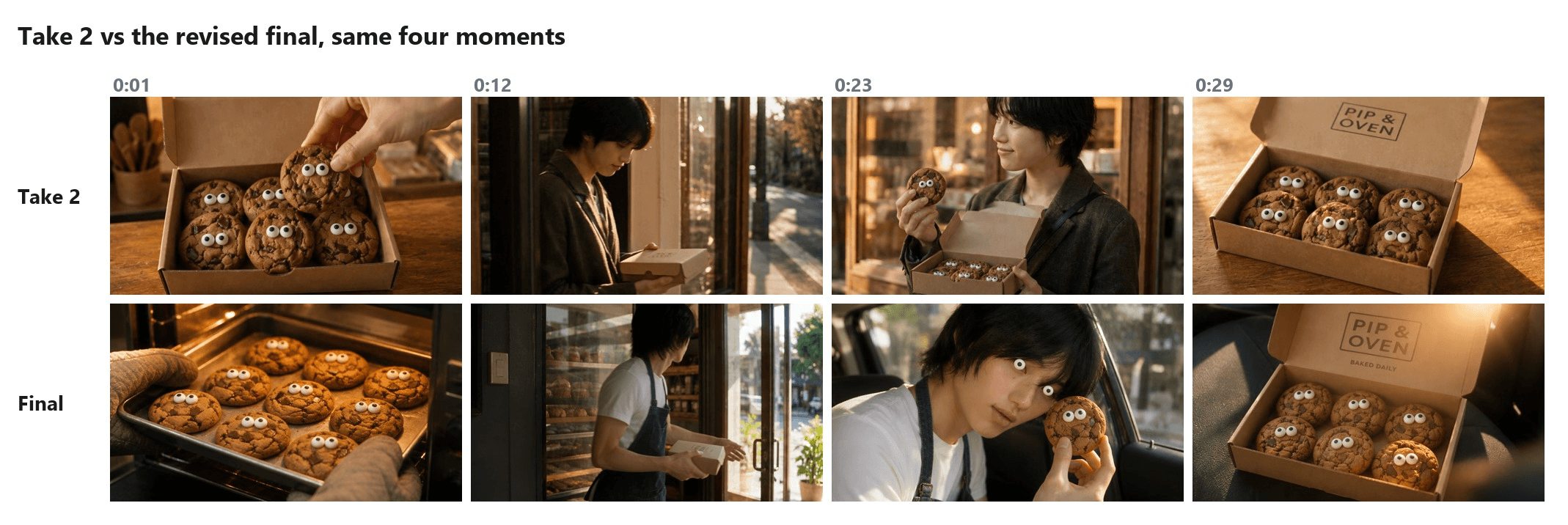
The final opens on the oven and gives the car scene, from about 0:15 to 0:25, to the joke. TVC Maker took the gag one step further than the brief asked: for the deadpan beat, the baker gets a pair of candy eyes too.
The voiceover lines start at 2.7, 10.3 and 24.5 seconds, the name comes out as "Pip and Oven," and BAKED DAILY sits under the logo in the last frame.
How to Make a TV Commercial That Passes Delivery Specs
A finished cut is half the job. Before a station or a streaming app runs your spot, the file has to pass that outlet's delivery spec, and the rules split in two.
Broadcast and cable follow federal law. The CALM Act rules, in force since December 13, 2012, require commercials to have "the same average volume as the programs they accompany," according to the FCC. The same page says the rules don't cover commercials on the internet or streaming services.
Everything else, from file format to slot length, comes from the station's or cable provider's own spec sheet, so ask its ad sales team for one before you export.
Streaming apps publish their specs instead. Two examples:
| Spec | Roku Ads Manager | Amazon streaming TV (Prime Video) |
|---|---|---|
| Length | 6 to 92 seconds | 15, 30, 45 or 60 seconds |
| Frame | 16:9 | 16:9, at least 1920 × 1080 |
| Frame rate | 23.98, 25 or 29.97 fps | 23.976 fps recommended; 24, 25 and 29.97 accepted; constant frame rate |
| File | .mov or .mp4 up to 1 GB, AVC or ProRes 422 HQ, at least 6 Mbps | Up to 500 MB, H.264, MPEG-2 or MPEG-4 video, at least 15 Mbps for Prime Video |
| Audio | PCM preferred, AAC accepted, 48 kHz, 2-channel stereo | AAC, at least 192 kbps, 44.1 or 48 kHz, at least 2 channels |
| Loudness | No value listed | No value listed |
Sources: the Roku Ads Manager creative guidelines and the Amazon Ads streaming TV specs, both checked in October 2026.
TVC Maker's 1080P setting renders a true 1920 × 1080 frame in 16:9, which meets Amazon's minimum frame size. Our download was a 24 fps MP4 running 30.08 seconds. Ad servers want a stricter master: an exact length, a frame rate on their list, 48 kHz audio and a higher bitrate. One conversion pass, in the next section, handles all of it.
Captions work the other way. The FCC's closed captioning rule counts advertisements longer than five minutes as video programming and leaves out ads of five minutes or less (47 CFR 79.1), so a 30-second spot sits outside it. Whether to add them is up to you.
Match TV Commercial Loudness to the CALM Act Before Upload
The number behind the CALM Act rules comes from ATSC A/85. Its July 2026 revision says that for delivery without loudness metadata, "the Target Loudness value should be –24 LKFS," with measurement tolerance of about ±2 dB and true peak kept below −2 dBTP (ATSC A/85:2026-07).
The standard defines LKFS as loudness measured with any meter that implements the ITU-R BS.1770 algorithm, so a free EBU R128 meter, which reports in LUFS, does the job.
We measured the downloaded Pip & Oven spot with FFmpeg's free EBU R128 meter. It read −16.1 LUFS integrated, with a true peak of −1.7 dBTP, so it needed to come down about 8 dB. This command fixes loudness, length, frame rate and codec in one pass:
plaintext1ffmpeg -i pip-and-oven-30s.mp4 -t 30 -vf fps=30000/1001 -c:v libx264 -preset slow -b:v 20M -maxrate 25M -bufsize 40M -pix_fmt yuv420p -af loudnorm=I=-24:TP=-2:LRA=7 -c:a aac -b:a 192k -ar 48000 pip-and-oven-30s-tv.mp4
Reading it left to right: -t 30 trims to exactly 30 seconds, fps=30000/1001 converts to 29.97 fps (on both lists above), libx264 at 20M re-encodes to H.264 above Prime Video's 15 Mbps floor, loudnorm aims at −24 with a −2 dBTP ceiling, and the audio leaves as 192 kbps AAC at 48 kHz.
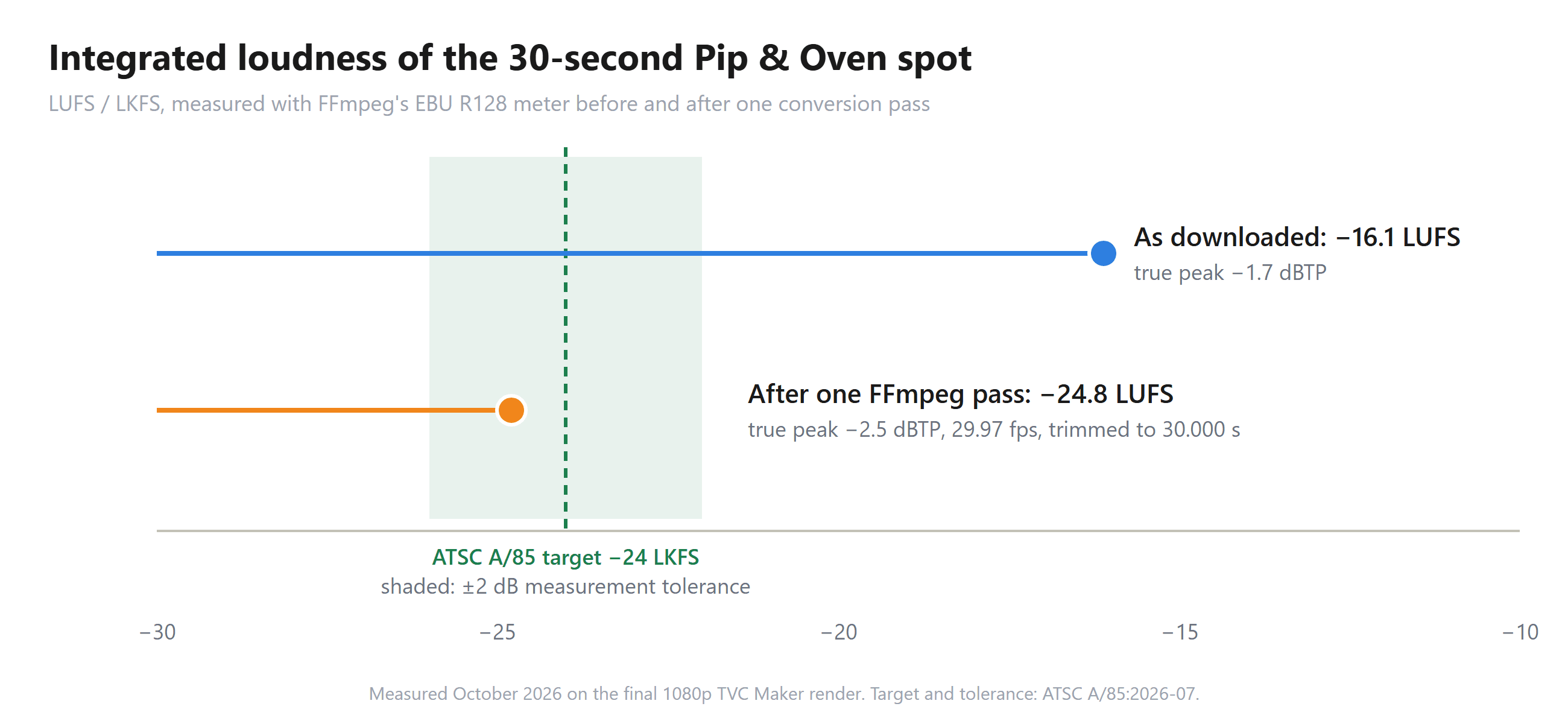
The converted file measured −24.8 LUFS with a true peak of −2.5 dBTP, at exactly 30.000 seconds. Single-pass loudnorm lands close to the target. If a station's quality check wants a reading nearer −24.0, run FFmpeg's two-pass loudnorm, which measures the file first and then corrects it.
FAQ
How much does it cost to make a commercial for TV with AI?
Our full round cost $36.39 in TVC Maker runs: $18.392 for two 30-second takes at 720P ($9.196 each) and $17.995 for the 30-second final at 1080P. Length and resolution set the price, so a 15-second 720P draft is $4.651. Prices are from the TVC Maker page in October 2026.
Can you make a commercial on your phone?
Yes, on either route. For a one-day shoot, a recent phone can film the whole spot if you shoot horizontally for TV, light the set evenly and record the voice close to the speaker. For the AI route, the phone's only job is the product photo, and TVC Maker builds the shots from it. Our guide to product photos with a phone covers getting that one shot right.
Is a product video the same as a commercial?
Not quite. A product video shows what something is and how it works, usually on a listing or product page, and it runs as long as the demo needs. A commercial has to land one message inside a fixed slot. If you're working out how to make a product video for a whole catalog, the AI product video guide covers batch generation through the API.
Do you need actors to make a commercial with AI?
No. The Model image field is optional. Leave it empty and TVC Maker writes a character to fit the brand's tone; upload a photo and that person appears in the spot, dressed the way the brief says. Our baker went from a car seat to a bakery counter in a T-shirt and apron.
Conclusion
This run started with a product photo and a paragraph, and the hard parts stayed where they always were. Someone still had to pick one message, watch the cut with fresh ears and fix what didn't land before an audience saw it. The workflow only took over the shoot.
That is how to make a commercial without a film crew: one brief, two takes, one revision, then a file conformed to the spec of the screen it plays on. Write the paragraph tonight, and the first two takes will be ready before the next batch comes out of the oven.





