You finished the shoot and the background is wrong. Maybe the client changed their mind about the season, maybe an extra wandered into frame at the worst possible second, maybe the whole scene needs to read as sunset instead of noon. Reshooting costs money you don't have and time you don't have either.
Runway Aleph is Runway's answer to that problem: an in-context video model that takes footage you already shot and rewrites it, changing camera angle, lighting, objects, or scene, based on a written instruction instead of a new production. This guide covers what the current version, Aleph 2.0, actually costs per second, how long a clip can run, whether a free account can touch it, and how the API stacks up against editing in the browser. Atlas Cloud runs a similar instruction-based editor across seven models, which gives the numbers here something to sit next to.
Key Takeaways
- Aleph 2.0 edits footage you already have. It isn't a text-to-video generator, and it won't build a shot from nothing.
- Pricing runs on credits per second, not a subscription add-on, and there's no free tier for it.
- Clips cap out at 30 seconds and 1080p, on the web app and through the API alike.
- Atlas Cloud's video editor runs the same kind of instruction-based editing across seven selectable models instead of one.
- The two products diverge more on model choice and per-second rate than on what they can actually do.
What Is Runway Aleph 2.0?
Runway ML first showed Aleph in July 2025 as a research preview: an in-context video model built to add, remove, and transform objects in a clip, generate a new camera angle for an existing scene, and shift style or lighting, all from a written instruction rather than a fresh generation. Runway rebuilt it into a shipping product on May 21, 2026, alongside a new editing surface called Edit Studio, and that combination is what most people mean when they search for aleph video AI today.
The pitch is narrower than a text-to-video model, and that's the point. Aleph 2.0 doesn't invent a shot. It reads a video you already have, along with your instruction, and changes only what the instruction asks for. Point it at a shaky handheld clip and ask for a different sky, and the camera shake, the actor's blocking, and the rest of the frame carry over untouched.
| Fact | Detail |
|---|---|
| Current version | Aleph 2.0, released May 21, 2026 with Edit Studio |
| Max clip length | 30 seconds |
| Max resolution | 1080p |
| Where it runs | Runway web app (Edit Studio) and the Runway API |
| Plans that include it | Standard ($12/mo) and above |
| Free tier | Not included |
Independent tracking gives some numbers to weigh against the marketing. Artificial Analysis's blind-vote leaderboard for video editing models placed Aleph 2.0 7th as of this writing, behind Wan 2.7, Seedance 2.0, and HappyHorse-1.0, three models that also sit inside Atlas Cloud's Video Edit tab. TechCrunch's coverage of Runway's broader model-routing push in July 2026 still called Aleph 2.0 one of the leading video editing models, even as it noted Runway's other generative models had lost ground to competitors.
How Runway Aleph 2.0 Works
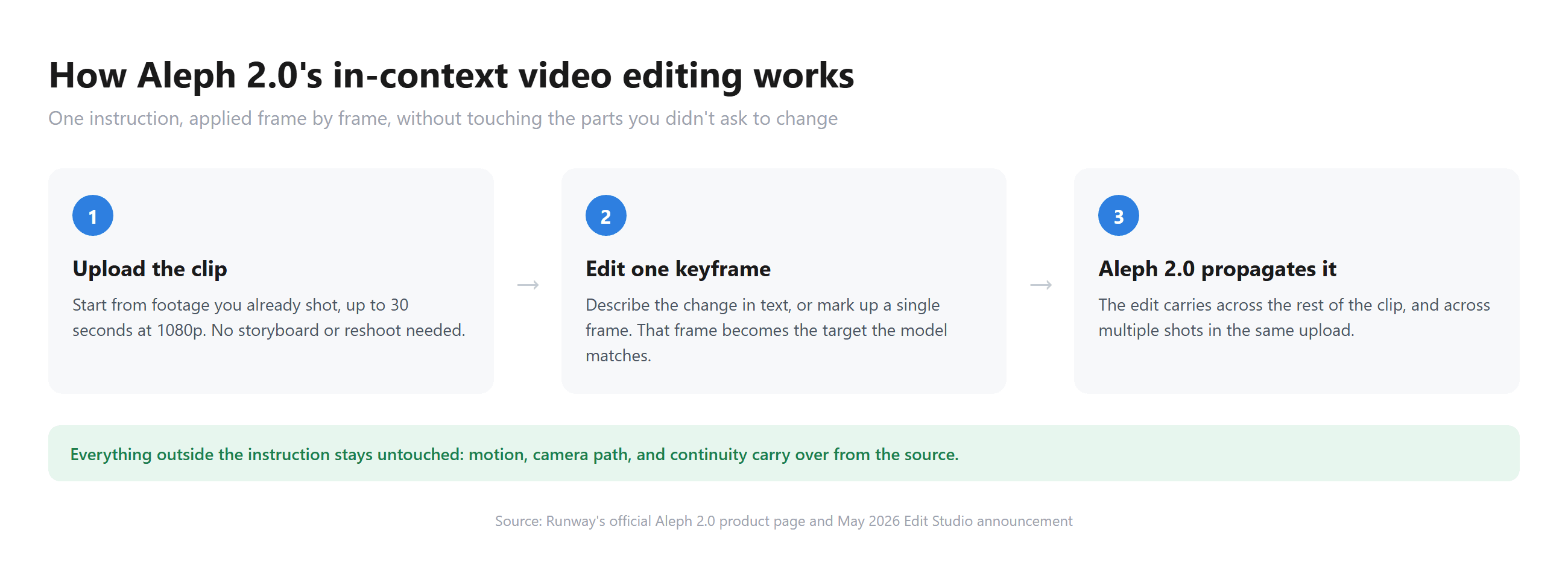
Runway calls the mechanism image-level control. Instead of describing a change in text and hoping the model interprets it the way you meant, you can hand Aleph 2.0 a single edited frame, an example of what the shot should look like after the change, and the model matches the rest of the clip to that frame. Runway's own framing for this is blunt: edit one frame, and Aleph 2.0 modifies the rest of your video to match, preserving everything you didn't ask to change.
That localized-edit behavior is the main difference from the original 2025 version. Rather than regenerating the whole frame and risking small drifts in unrelated details, the model is built to leave untouched regions alone. Runway also says the edit can carry across multiple shots in a single upload, so a cut with several different angles of the same scene doesn't need a separate pass for each one.
Atlas Cloud: Instruction-Based Video Editing With 7 Models
Atlas Cloud hosts the same kind of instruction-based video editing, but instead of one model, the Video Edit tab puts seven side by side, including the full ByteDance model family: Seedance 2.5, Seedance 2.0, Gemini Omni Flash, HappyHorse-1.0, Wan 2.7, Kling O3, and a model from xAI.
Upload a clip, describe the change, and pick whichever one handles that particular edit best, rather than being locked into a single model's strengths and blind spots.
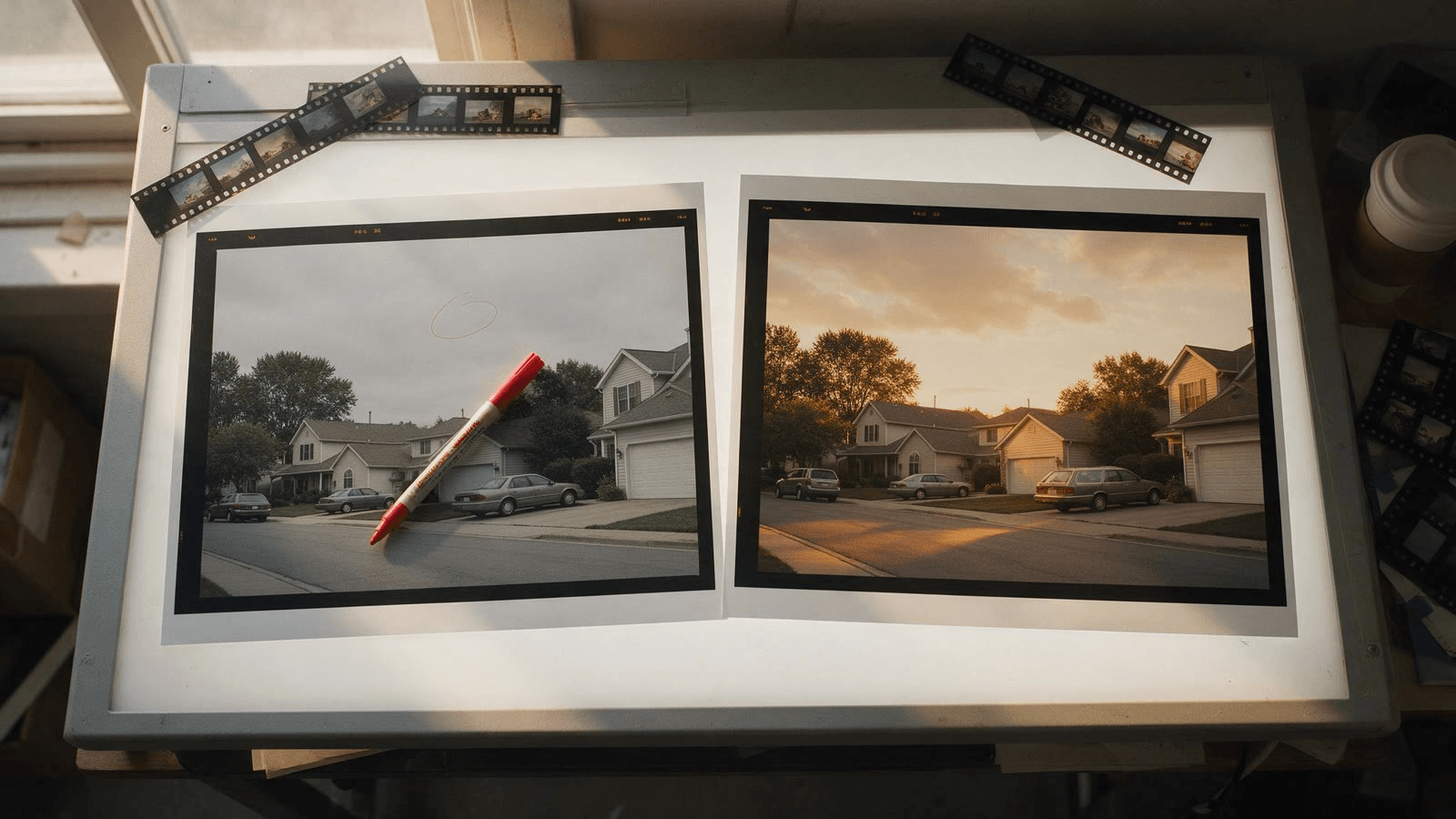
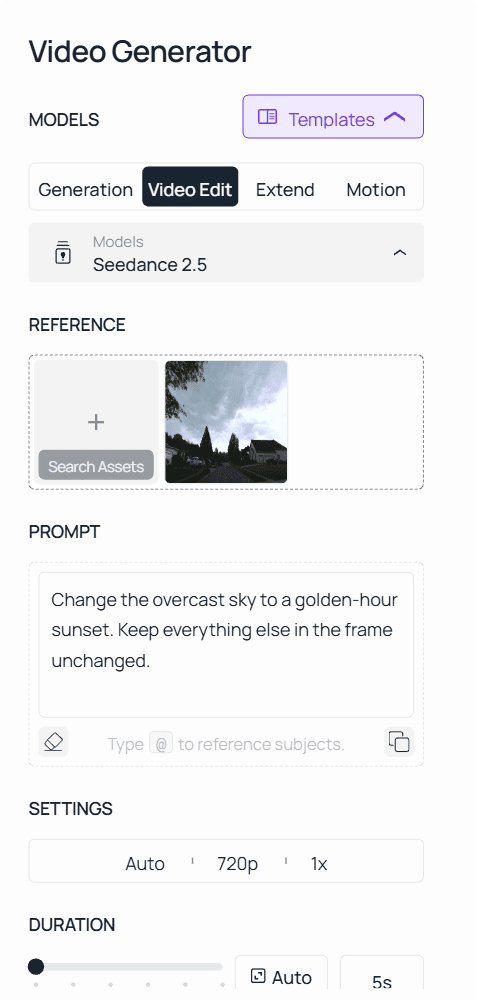
Here's that workflow on a real clip: a 5-second suburban street shot, Seedance 2.5, and one sentence asking for a golden-hour sky with nothing else touched.
Method 1: Edit From the Video Edit Tab
- Open the Video Edit tab, next to Generation, Extend, and Motion.
- Upload the source clip.
- Pick a model from the list. The Seedance 2.5 reference-to-video endpoint is the one wired for editing; switch to another model in the list if a specific edit is giving you trouble.
- Describe the change in one direct sentence, naming what should move or change and what should stay put.
- Run it, then check the result against the original before exporting.
Method 2: API Access in 3 Steps
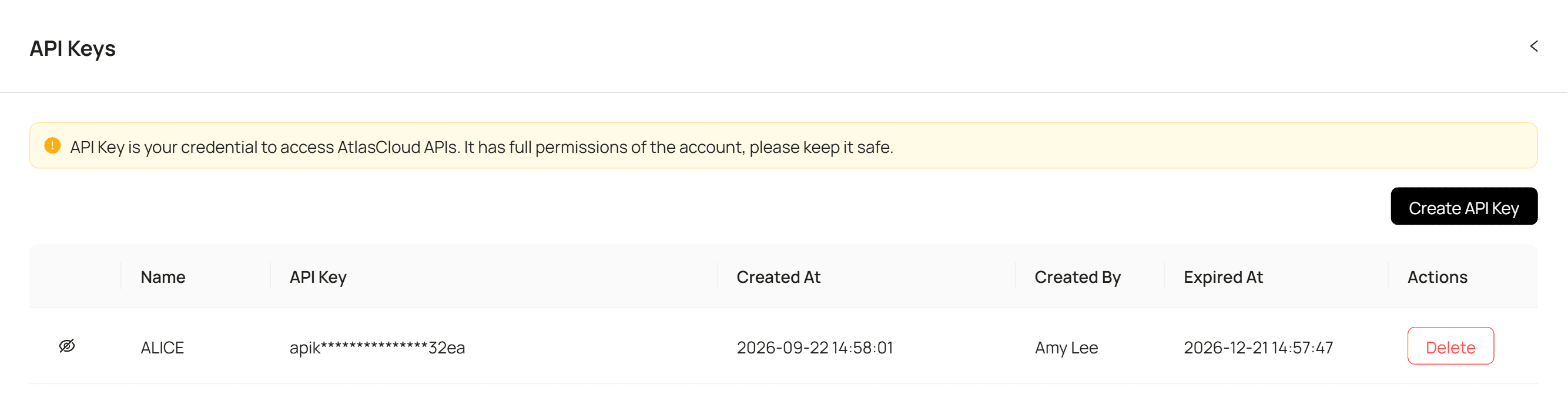
Step 1: Get your API key. Create one in the Atlas Cloud console and copy it.
Step 2: Check the API docs. Parameters, accepted formats, and duration limits live in the API documentation.
Step 3: Make your first request. Submit the clip and the instruction:
plaintext1curl -X POST https://api.atlascloud.ai/api/v1/model/generateVideo \ 2 -H "Content-Type: application/json" \ 3 -H "Authorization: Bearer $ATLASCLOUD_API_KEY" \ 4 -d '{ 5 "model": "bytedance/seedance-2.5/reference-to-video", 6 "prompt": "Change the overcast sky to a golden-hour sunset. Keep everything else in the frame unchanged.", 7 "reference_videos": ["<your_clip_url>"], 8 "duration": -1, 9 "ratio": "adaptive", 10 "resolution": "1080p" 11 }'
Poll the job until it finishes:
plaintext1curl https://api.atlascloud.ai/api/v1/model/prediction/<prediction_id> \ 2 -H "Authorization: Bearer $ATLASCLOUD_API_KEY"
duration: -1 and ratio: adaptive are what mark this as an edit rather than a generation: the output inherits the source clip's length and aspect ratio instead of taking new ones. Where Runway's aleph2 is one endpoint tied to one model, this key, this request body, and this polling loop cover every video model Atlas Cloud hosts. Swap the model string to Kling O3 or Wan 2.7 and the rest of the integration stays as it is.
Runway Aleph 2.0 Pricing: Credits, Minimums, and What a Clip Costs
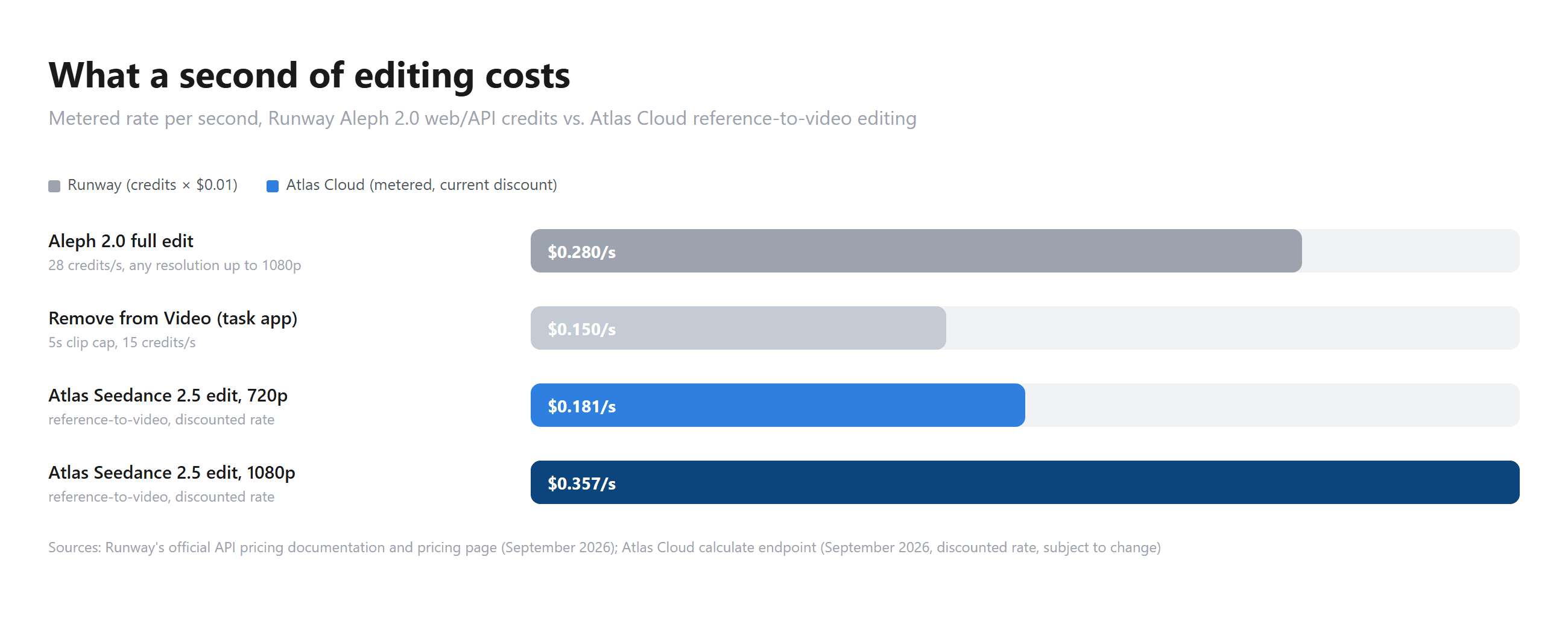
Aleph 2.0 runs on Runway's credit system rather than a flat per-edit fee. Runway's official API pricing documentation puts the rate at 28 credits per second, with a 56-credit minimum per generation, and credits cost $0.01 each. That works out to $0.28 per second of edited output, whether you're running it through the web app's Edit Studio or calling the API directly. A 5-second edit runs $1.40. A 10-second edit runs $2.80.
There's a cheaper path for narrower jobs. Runway's Remove from Video app, a task-specific tool built on the same underlying model, caps input at 5 seconds and charges 15 credits per second instead of 28, or $0.15 per second, but it requires a Standard plan or higher and only does the one job. It's a reminder that Runway's pricing isn't a single number. What you pay depends on which product wraps the model, not just which model you're using.
Duration, Resolution, and Free-Tier Limits
Runway's free plan doesn't include Aleph 2.0 at all. It hands out 125 one-time credits for testing image and lighter generative tools, with no video generation included, so there's no way to try Aleph 2.0 without moving to a paid tier first.
| Plan | Monthly price | Credits | Includes Aleph 2.0? |
|---|---|---|---|
| Free | $0 | 125 (one-time) | No |
| Standard | $12/mo (annual) | 625/mo | Yes |
| Pro | $28/mo (annual) | 2,250/mo | Yes |
| Max | $76/mo (annual) | 9,500/mo | Yes |
At 28 credits a second, a Standard plan's 625 monthly credits cover about 22 seconds of Aleph 2.0 editing before you're buying more. That's less than one full 30-second clip. Heavier use pushes toward Pro or Max fairly quickly, or toward buying additional credits on top of the plan.
The 30-second, 1080p ceiling is what Runway documents for Aleph 2.0 itself, not something tied to a specific plan. Standard, Pro, and Max mainly differ in how many monthly credits you get to spend against that same cap.
Runway Aleph API: How Developers Access aleph2
Runway Aleph API access runs through Runway Dev, the company's developer platform, under the model ID aleph2. The endpoint takes a source video and a text prompt, with optional reference images you can use to anchor the edit the way a keyframe does in Edit Studio. Pricing matches the web app: 28 credits per second, a 56-credit minimum per generation, at $0.01 per credit.
A few format options add to the base rate. Requesting ProRes or a PNG sequence instead of standard video output adds 5 credits per second. HDR output adds 20 to 40 credits per second, depending on output size.
| Parameter | Value |
|---|---|
| Model ID | aleph2 |
| Rate | 28 credits/second ($0.28/s) |
| Minimum per generation | 56 credits |
| ProRes / PNG sequence | +5 credits/second |
| HDR output | +20 to 40 credits/second |
Is There a Runway Aleph Alternative? Atlas Cloud Video Edit Compared
Both products start from the same idea: an existing clip plus a written instruction, not a generation from scratch. Where they split is scope. Runway locks you into one model at a fixed rate. Atlas Cloud's Video Edit tab lets you choose from seven, which means the per-second cost and the result both shift depending on which one fits the edit you're making.
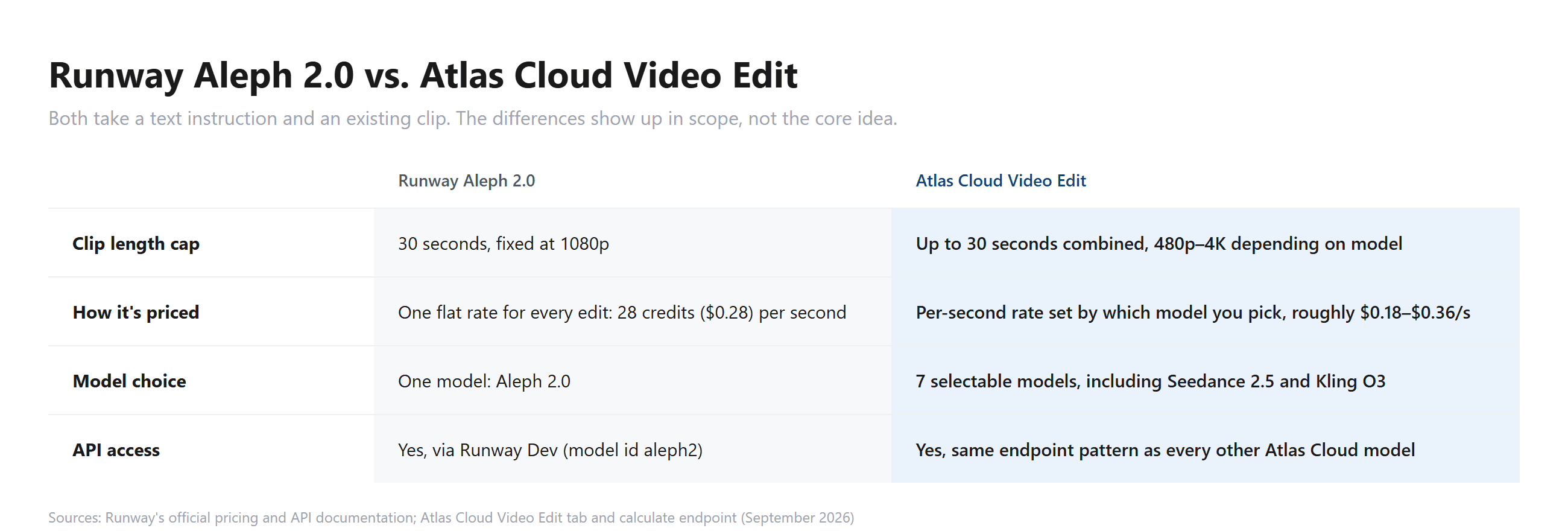
If the edit is simple and the 30-second cap fits your clip, Aleph 2.0's one-model workflow keeps decisions to a minimum. If you're running a harder case, an edit one model keeps flubbing, or a clip already past 1080p, having six other models one click away is the more practical setup.
Runway Aleph Prompt Guide: What Actually Works
Instruction-based video models, across vendors, tend to punish vague prompts more than generation models do. "Make it look better" gives the model nothing to lock onto. "Remove the coffee cup on the left side of the desk, keep the laptop and papers exactly where they are" gives it an object, a location, and an explicit boundary on what not to touch.
That gap between vague and specific shows up clearly when you run the same clip twice through an instruction-based editor. Naming the exact subject, its position in frame, and what has to stay fixed consistently produces a cleaner result than a general request does, on Atlas Cloud's Video Edit tab and, by the same logic Runway describes for keyframe-guided edits, on Aleph 2.0 as well.
The clip below used exactly that structure: "Remove the dark SUV parked in the driveway in front of the garage of the house on the right. Rebuild the empty driveway and the garage door behind it. Keep the house, the trees, the road, the white pickup on the left, the camera movement and the overcast sky unchanged." One pass, and the driveway comes back empty while the pickup across the street stays where it was.
FAQ
Is Runway Aleph free?
No. Aleph 2.0 isn't available on Runway's free plan. The free tier gives 125 one-time credits for lighter tools, but video generation and editing models start at the Standard plan, $12 a month billed annually.
What happened to the original Runway Aleph?
Runway introduced Aleph as a research preview in July 2025, described as an in-context video model for editing existing footage. Runway rebuilt it into Aleph 2.0 in May 2026, extending the clip length cap, adding keyframe-guided precision editing, and pairing it with the new Edit Studio interface.
Can I use Runway Aleph through the API?
Yes. Runway Dev exposes it under the model ID aleph2, at the same 28-credits-per-second rate as the web app, with a 56-credit minimum per generation.
Is there an alternative to Runway Aleph with more model options?
Atlas Cloud's Video Edit tab covers similar instruction-based editing across seven models instead of one, including Seedance 2.5 and Kling O3, without needing a separate subscription for each.
Conclusion
Aleph 2.0 does what it says. Point it at footage you already have, describe the change, and it edits around everything you didn't mention. The tradeoffs show up once you look past the demo: no free access, a fixed 28-credits-per-second rate regardless of the job, and one model handling every kind of edit whether it's the right tool for that edit or not.
None of that makes it a bad product. It makes it a specific one. For a single, well-defined edit on a short clip, Aleph 2.0's one-model simplicity is hard to beat. For heavier or more varied editing work, comparing it against something like Atlas Cloud's multi-model Video Edit tab before committing to a plan is worth the ten minutes it takes, especially once you've seen what runway aleph actually costs per second of finished video.





