


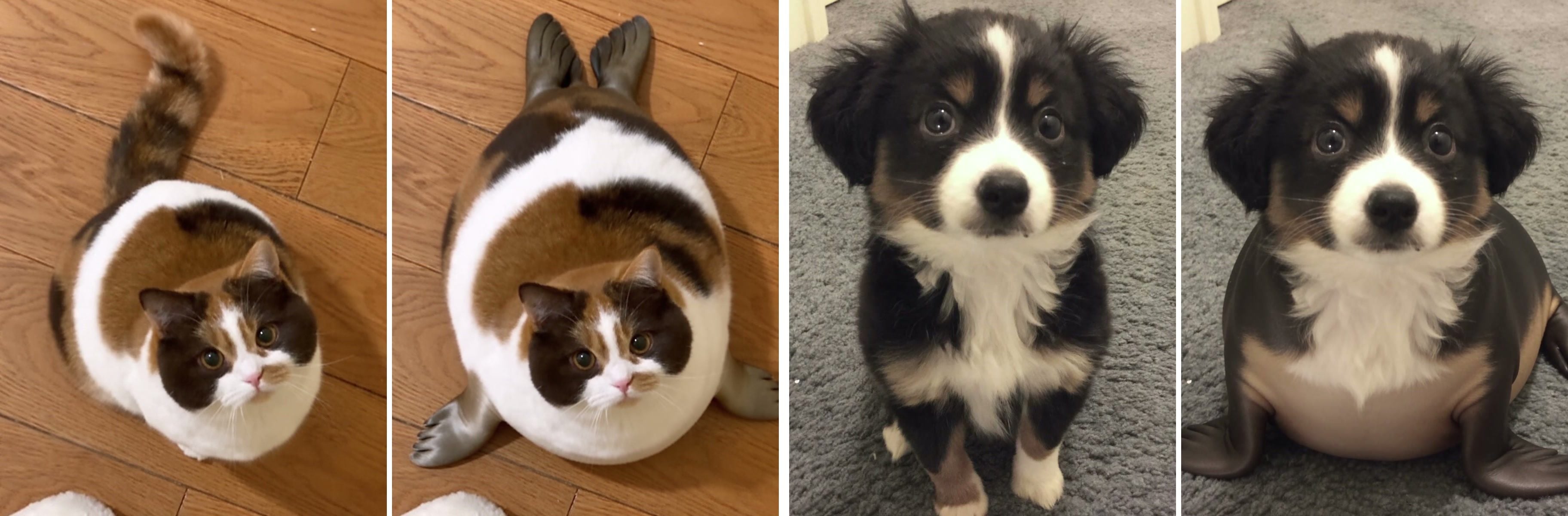
Your cat sits on the floor, looking up at you. A thin line sweeps across the screen, and on the other side of it sits a fat, glossy seal. Same face, same patches, same judgmental stare. No legs at all.
That is the seal filter, and it has been a steady pet joke on TikTok and Instagram since June 2026. It comes from a CapCut AI template, it works on cats and dogs alike, and at a glance it passes for a real pet video. Below: where the trend came from, which template your feed is using, and how to make your own from a single photo, with or without CapCut.
Key Takeaways
- The seal filter is a CapCut AI template that turns one still pet photo into a chubby seal reveal.
- Two templates drove two waves: a 10-second version in June and an 8-second line-sweep version from October.
- You can rebuild the reveal from one photo in the Atlas Cloud video generator with Seedance 2.5.
- The seal body copies your pet's coat, so a calico or a tricolor puppy keeps its own markings.
- The Instagram seal filter Reels we traced were made outside the app, then uploaded as normal videos.
What Is the Seal Filter Trend?
The seal filter trend is a before-and-after joke. A real photo of a pet holds for two seconds, then the pet becomes a plump seal that keeps its own head and coat colors. The caption reads "Trying the seal filter" plus an emoji, and the clip ends before anyone can blink.
It didn't arrive all at once. It came in two waves, each tied to a different CapCut template.
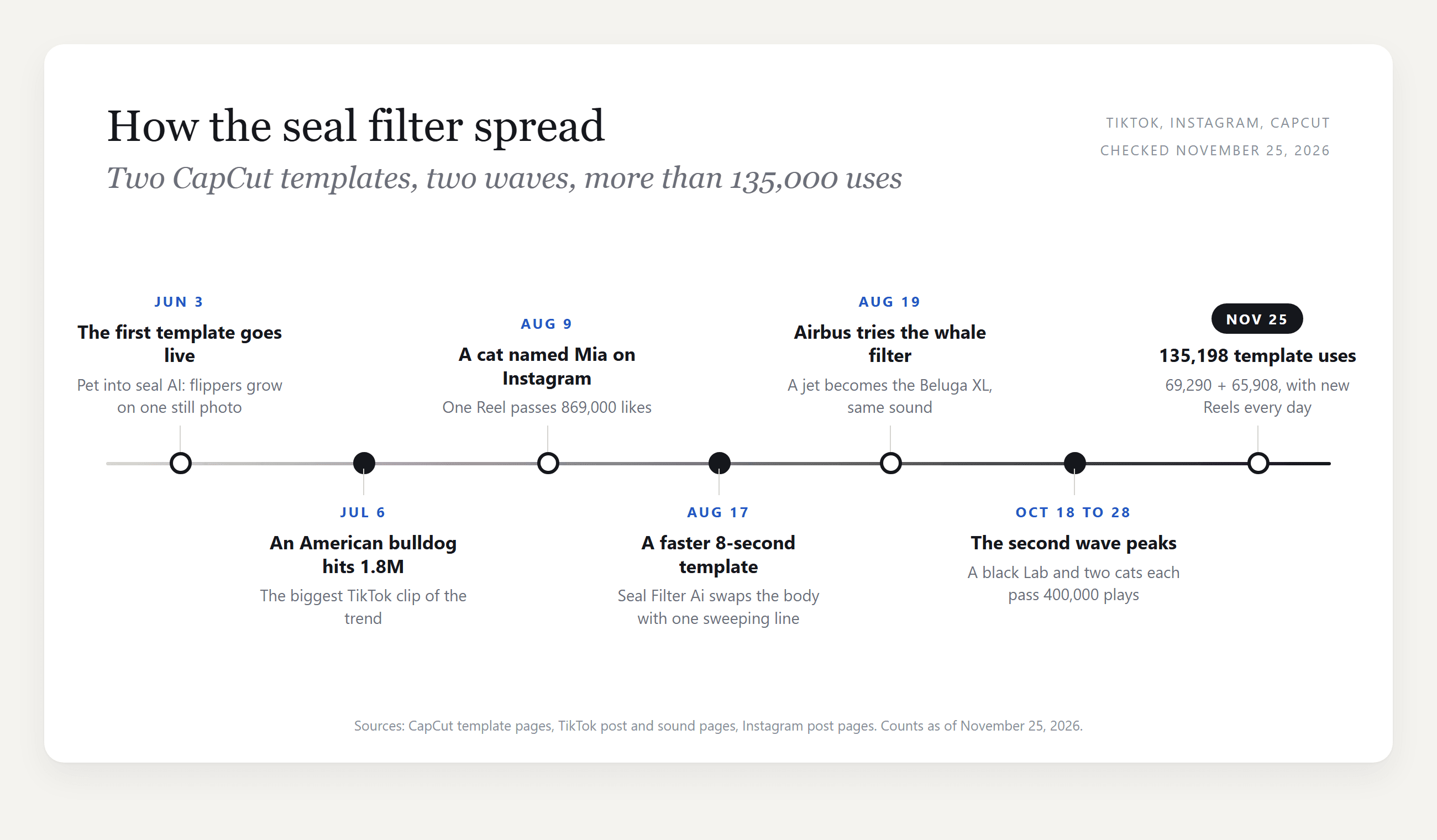
The first wave started on June 3, 2026, when the template "Pet into seal AI 🦭" went live and a template account posted a dog demo within minutes. Its biggest clip came on July 6: an American bulldog captioned "oh my boy!", which passed 1.8 million views on TikTok. On Instagram, a fluffy black-and-white cat named Mia got the same treatment on August 9, and that Reel has 869,560 likes.
Brands noticed. Airbus posted "Trying the whale filter" on August 19, turning one of its jets into the whale-shaped Beluga XL cargo plane, set to the same sound.
The second wave mostly runs on a newer 8-second template. It picked up in early October, and its biggest clips landed between October 18 and 28, when a black Lab and two cats each pulled around 400,000 to 500,000 views. The June template never went away, though: a black cat made with it reached 1.3 million views on October 24. And it is still going: a tabby Reel posted on November 22 had 20,000 likes by November 25.
How to Make a Seal Filter Video From One Pet Photo
You don't need CapCut or the template. The whole reveal is one image-to-video job: your photo as the first frame, plus a prompt that describes the line, the body swap and the final pose. Here is what that produces with Seedance 2.5:
The model keeps the room, the camera angle and the pet's face, and redraws only what sits behind the line. We laid the trend's sound over the clip afterward, timed so the beat drops as the line crosses the middle. A pet that already looks a bit round gives the funniest result.
Method 1: Make It in the Atlas Cloud Video Generator
Atlas Cloud runs Seedance 2.5 in the browser after you sign in. Open the video generator and follow the numbers on the screenshot:
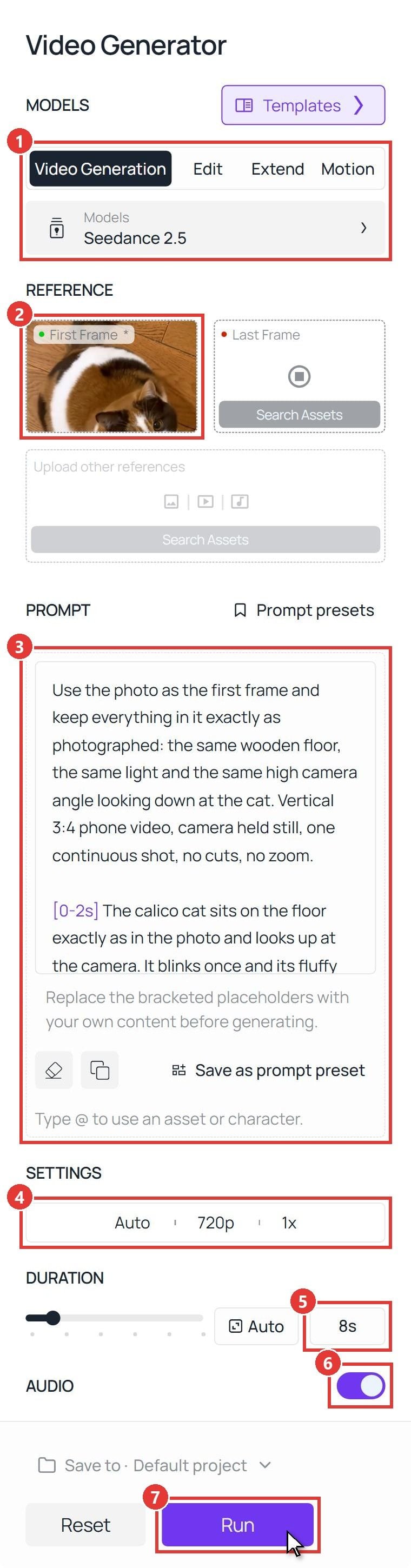
- Model: open Video Generation and keep Seedance 2.5.
- First Frame: upload your pet photo here. Leave Last Frame empty.
- Prompt: paste the prompt below.
- Settings: the ratio follows your photo once it is in the First Frame slot, so crop the photo first. Pick 720p and one output.
- Duration: type 8.
- Audio: leave it on.
- Run. The clip appears in the panel on the right.
The prompt for the calico cat above:
plaintext1Use the photo as the first frame and keep everything in it exactly as photographed: the same wooden floor, the same light and the same high camera angle looking down at the cat. Vertical 3:4 phone video, camera held still, one continuous shot, no cuts, no zoom. 2 3[0-2s] The calico cat sits on the floor exactly as in the photo and looks up at the camera. It blinks once and its fluffy tail sways a little. 4[2-4s] A thin, soft white vertical line slides across the frame from the left edge to the right edge, like a screen wipe. Behind the line the cat has already changed: everything below its head is now a plump, round seal body with no legs and no paws, two short front flippers resting on the floor and a seal's back flippers where the tail was. Ahead of the line the cat is still a normal cat. 5[4-8s] The cat is now a chubby seal that keeps its own head: the same face, round amber eyes, pink nose, dark brown ear patches, white muzzle and whiskers. The seal body keeps the cat's calico coat in short, sleek seal fur: white with large orange and dark brown patches in the same places as in the photo. It lies on the wooden floor, looks up at the camera, blinks slowly and wiggles its round body once. 6 7Photorealistic home video in soft daylight, not a cartoon, not CGI. Exactly one animal with one head. No cat legs, paws or tail on the seal body, no people, no hands, no water. 8Audio: quiet room tone, a soft whoosh while the line passes and one small happy chirp at the end. No music, no voice. 9No text, no captions, no logos, no watermark.
To use it on your own pet, change the [4-8s] paragraph: eye color, ear shape, coat colors and where the patches sit. Those details decide whether the seal still looks like your pet. For picking the photo itself, the same rules as any one-photo pet clip apply; our AI dog video guide covers them. The "Trying the seal filter" caption goes on afterward in any editor, so the letters stay sharp.
Method 2: Send the Seal Filter Prompt Through the Seedance 2.5 API
Running a pet account, or making a seal for every dog at the daycare? The API takes the same photo and the same prompt.
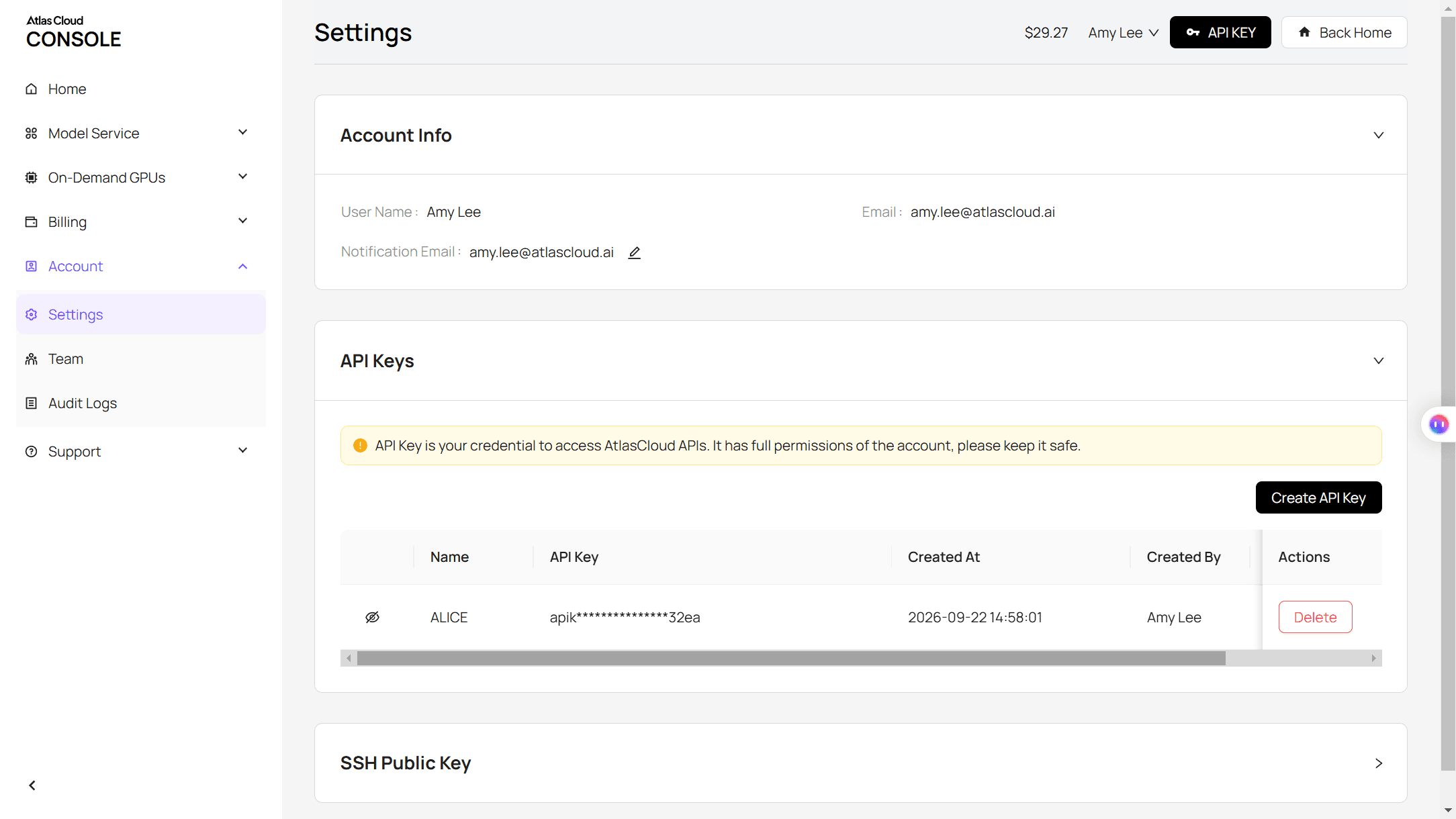
Step 1: Create an API key. In the console, open Settings and create a key under API Keys.
Step 2: Check the request format. The Atlas Cloud docs cover authentication, and the API tab on the Seedance 2.5 image-to-video model page lists every field. The ones this clip needs:
| Field | Value for the seal filter | Why |
|---|---|---|
| image | Public URL of your pet photo | Becomes the first frame |
| duration | 8 | Matches the trend's clip length |
| resolution | 720p | Plenty for a phone screen |
| generate_audio | true | Adds the whoosh and the final chirp or bark |
The clip follows the shape of your photo, so crop it to 9:16 before you upload.
Step 3: Send the request and poll.
plaintext1curl -X POST https://api.atlascloud.ai/api/v1/model/generateVideo \ 2 -H "Authorization: Bearer $ATLASCLOUD_API_KEY" \ 3 -H "Content-Type: application/json" \ 4 -d '{ 5 "model": "bytedance/seedance-2.5/image-to-video", 6 "prompt": "<paste the seal filter prompt here>", 7 "image": "https://your-cdn.com/your-pet.jpg", 8 "resolution": "720p", 9 "duration": 8, 10 "generate_audio": true 11 }'
Poll the returned prediction ID until the status reads completed, then download the clip from the outputs array:
plaintext1curl https://api.atlascloud.ai/api/v1/model/prediction/<prediction_id> \ 2 -H "Authorization: Bearer $ATLASCLOUD_API_KEY"
The endpoint and the key stay the same across every video model on Atlas Cloud. To try another one, change the model string.
Which Seal Filter CapCut Template Is in Your Feed?
Two templates sit behind almost every seal filter clip we traced on TikTok. You can tell them apart in the first three seconds: one sweeps a line across the frame, the other grows flippers in place.
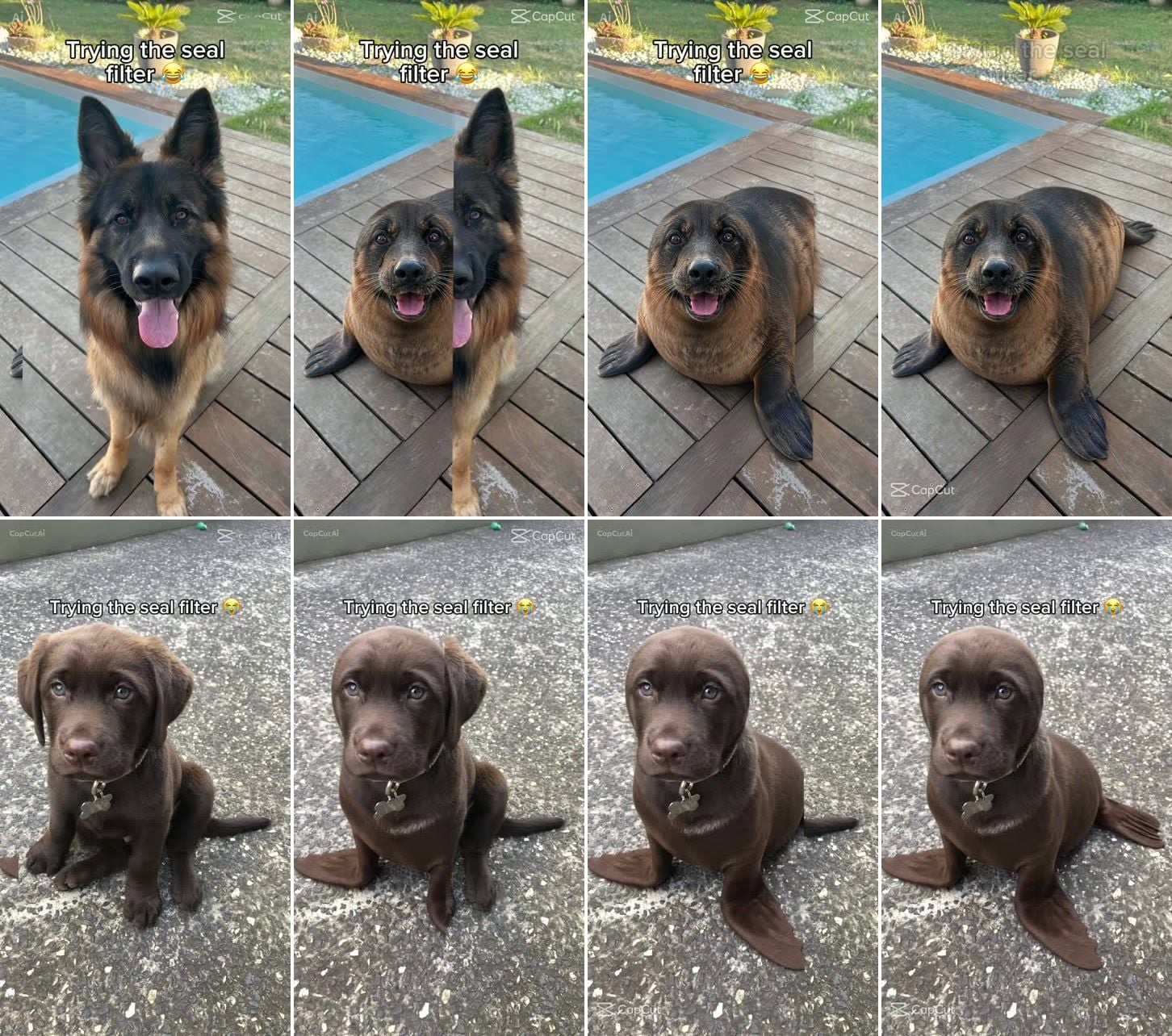
Preview frames from the CapCut templates "Seal Filter Ai" by JDCapcut (top) and "Pet into seal AI 🦭" by JYoung101 (bottom)
| Pet into seal AI 🦭 | Seal Filter Ai | |
|---|---|---|
| Creator | JYoung101 | JDCapcut |
| Live since | June 3, 2026 | August 17, 2026 |
| Uses (Nov 25, 2026) | 69,290 | 65,908 |
| Length | 10 seconds | 8.3 seconds |
| Caption | One line across the top | Two lines, centered |
| How the seal appears | Flippers grow on the still pet | A vertical line sweeps left to right and swaps the whole body |
| Peak | June to September, still in use | October to now |
Both templates use the same upbeat track, cut to different lengths. The newer one is the Seal Filter Ai template, and the November Instagram Reel we traced runs on it. Its line-sweep reveal is also the one the prompt above rebuilds, because a hard swap reads faster on a small screen than a slow grow.
A third template, "Pet into seal AI" by Duy Zeros, follows the June format (10 seconds, same track) and has about 21,000 uses. A seal clip with a whale, a plane or a full seal face is usually a parody or a separate edit.
Cat Seal Filter and Dog Seal Filter Versions
The cat seal filter and the dog seal filter need different prompt details. A cat's tail turns into the back flippers. A dog brings floppy ears, a muzzle and facial markings, and all three have to survive the swap.
Cat Seal Filter: Keep the Patches and the Whiskers
Cats are the easier case. Plenty of them already sit in a loaf shape, so the seal body barely changes the outline, and the joke lands on the face. The calico in our test is a good example: the prompt names the coat colors and asks for the patches to stay put, and the seal keeps them where the photo had them.
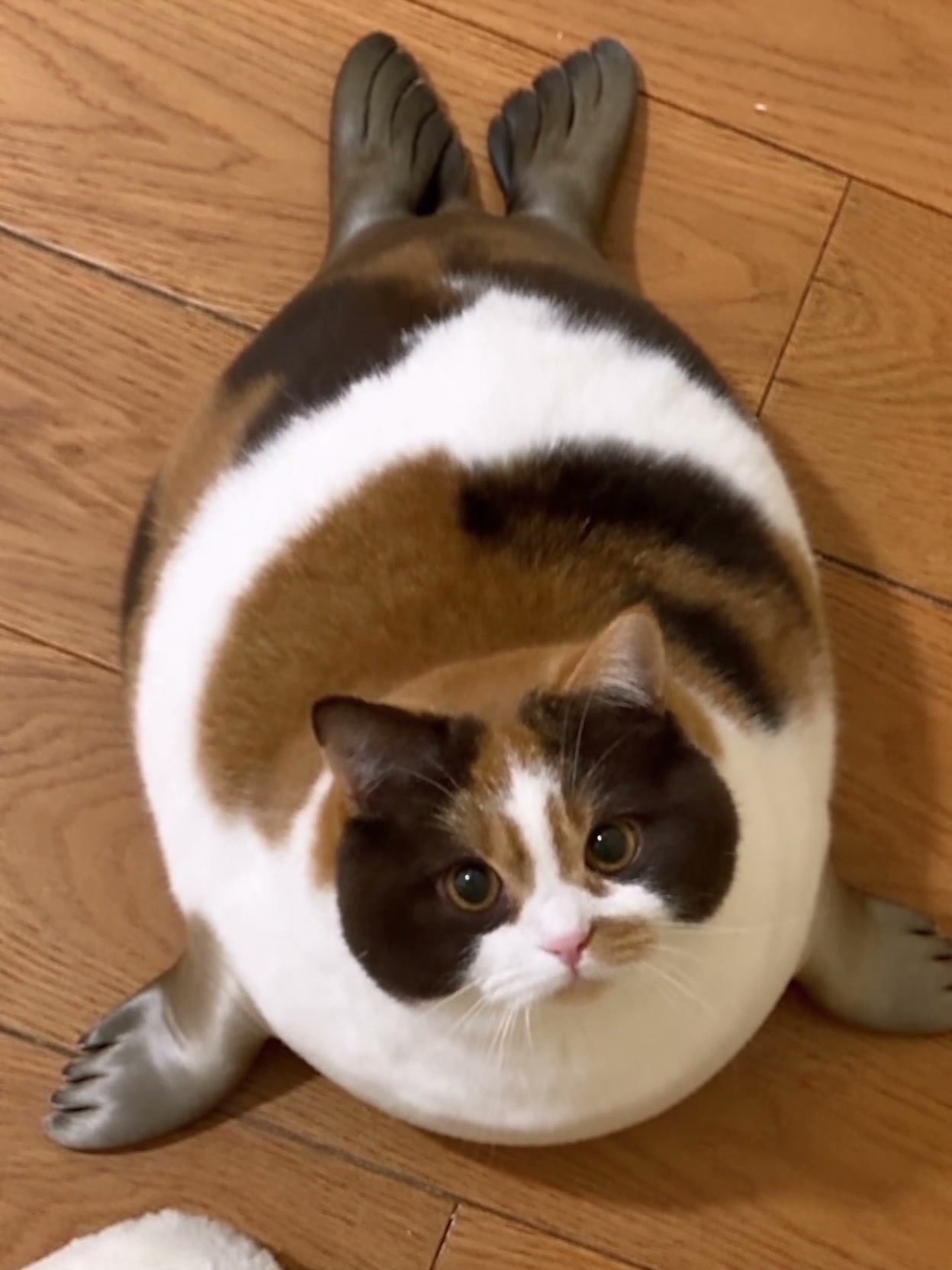
Shoot from above if you can. Our calico photo was taken top-down, which shows the whole body and leaves floor on both sides for the wider seal shape.
Dog Seal Filter: Floppy Ears and a White Bib
Dogs need one more instruction: map the markings onto the new body. A tricolor coat has a white blaze, tan eyebrows and a white bib, and the seal should keep all three in the same places. Our puppy was photographed sitting up and facing the camera, so the prompt turns its front legs into flippers and keeps the fluffy bib on the chest.
The dog version of the prompt:
plaintext1Use the photo as the first frame and keep everything in it exactly as photographed: the same grey carpet, the same indoor light and the same slightly high camera angle looking down at the puppy. Square phone video, camera held still, one continuous shot, no cuts, no zoom. 2 3[0-2s] The puppy sits on the carpet exactly as in the photo, looking up at the camera with big round eyes. It blinks once and tilts its head a little. 4[2-4s] A thin, soft white vertical line slides across the frame from the left edge to the right edge, like a screen wipe. Behind the line the puppy has already changed: everything below its head is now a plump, round seal body with no legs and no paws, two short front flippers resting on the carpet where the front legs were and a seal's back flippers behind it. Ahead of the line the puppy is still a normal puppy. 5[4-8s] The puppy is now a chubby seal that keeps its own head: the same fluffy floppy black ears, white blaze down the forehead, tan eyebrow spots, dark brown eyes, black nose and white muzzle. The seal body keeps the tricolor coat in short, sleek seal fur: black sides, a fluffy white bib on the chest and tan patches where the legs were. It rests on the carpet, looks up at the camera, blinks slowly and wiggles its round body once. 6 7Photorealistic home video in soft indoor light, not a cartoon, not CGI. Exactly one animal with one head. No dog legs, paws or tail on the seal body, no people, no hands, no water. 8Audio: quiet room tone, a soft whoosh while the line passes and one short happy bark at the end. No music, no voice. 9No text, no captions, no logos, no watermark.
Spotted and patchy coats suit the joke well, since harbor seals are spotted too. If you want the whole pet to swell instead of swapping bodies, that is a different trend; our AI fat filter guide covers it.
How to Post the Seal Filter on Instagram and TikTok
None of the seven seal filter Instagram Reels we checked was made with an Instagram effect. Each one carries the CapCut template's track or a creator's own edit, which means the clip was made outside Instagram and uploaded. The same goes for TikTok, where posts link back to the CapCut template.
So the last step happens in the app you post to:
| Step | TikTok | Instagram Reels |
|---|---|---|
| Caption on screen | Add "Trying the seal filter" with the text tool, top third of the frame | Same, with the Reels text tool |
| Trend sound | Open any seal filter post, tap the sound, then Use this sound | Tap the audio name on a seal filter Reel, then Use audio |
| Your own sound | Keep the generated whoosh and bark, or mute and add music | Same |
| AI label | Turn on AI-generated content in More options | Turn on the AI label in Advanced settings |
| Text caption | Name your pet and the joke, plus #sealfilter | Same, #sealfilter and #seal |
Turn the AI label on. The clip looks real enough to be mistaken for a real pet, and both platforms ask creators to label realistic AI video. It also saves you a comment section full of "where can I adopt this seal."
Frequently Asked Questions
Is the seal filter real or AI?
It is AI. The CapCut templates take one still photo and generate the seal body, and the line sweep hides the moment the image changes. TikTok marks many seal filter posts as AI-generated, though not all of them carry the label.
Is there a seal filter on Instagram?
We found no built-in Instagram effect behind it. The seal filter Reels we checked were made in CapCut or a video generator and uploaded as normal videos. To make one, generate the clip first, then post it as a Reel and add the caption and sound in Instagram's editor.
Why can't I find the seal filter template in CapCut?
CapCut templates are not available in every region, and search results change often. The quickest way in is through a TikTok seal filter post: tap its "CapCut · Try this template" link. If that fails too, the image-to-video method above gives the same reveal without CapCut.
Does it work on rabbits or other pets?
We tested a cat and a dog, but nothing in the prompt is specific to either. It only asks the model to keep the head and redraw what is below it, so a rabbit or a guinea pig photo can go through the same steps. Use a photo with one animal and a clear head and body, and name the animal and its coat colors in the prompt.
How much does a seal filter video cost on Atlas Cloud?
An 8-second Seedance 2.5 clip at 720p costs about $2.42 as of November 25, 2026, which is 20% off the $3.02 list price. The final charge settles on actual usage, so it can differ slightly. Going up to 1080p costs about $5.98 for the same 8 seconds.
Conclusion
The trend looks like magic, but the recipe is simple: one sharp photo of a pet sitting still, a line that sweeps across the frame, and a seal body that keeps the pet's face and coat. CapCut packages that into a template; a prompt in an image-to-video model gives you the same reveal and lets you choose the room, the pose and the sound.
Pick the roundest photo of your cat or dog, swap in its coat colors, and run it. The seal filter is at its best when your followers need a second look to be sure the pet in the video isn't real.







