


A barefoot girl steps through pale grass. Her eyes open in extreme close-up, a pale moth drifts past her hand, and an acoustic voice sings that she was a fairy. That 23-second clip from the artist AipaDi0 has passed 3.3 million plays and 218,000 saves on TikTok, and it was drawn by hand.
Search she was a fairy and the animation is hard to find. A 2023 meme sound and a 2025 single with the same hook crowd the results. This guide sorts out which sound is which, then shows how we made our own fairy music video with AI.
Key Takeaways
- "She was a fairy" can mean a 2023 TikTok meme or one of at least three later songs, so check the year first.
- The viral fairy animation uses John Michael Howell's "Fairy," released November 6, 2026 on The Poet.
- That animation is hand-drawn, and we found no CapCut template or TikTok effect behind it.
- The Seedance 2.5 video generator turned six stills and a song clip into five beat-matched shots.
- Use your own character and an original song, because anime clips and the original track are both copyrighted.
What Is "She Was a Fairy"? The Meme and the Songs Behind It
At least four sounds share the same four words.
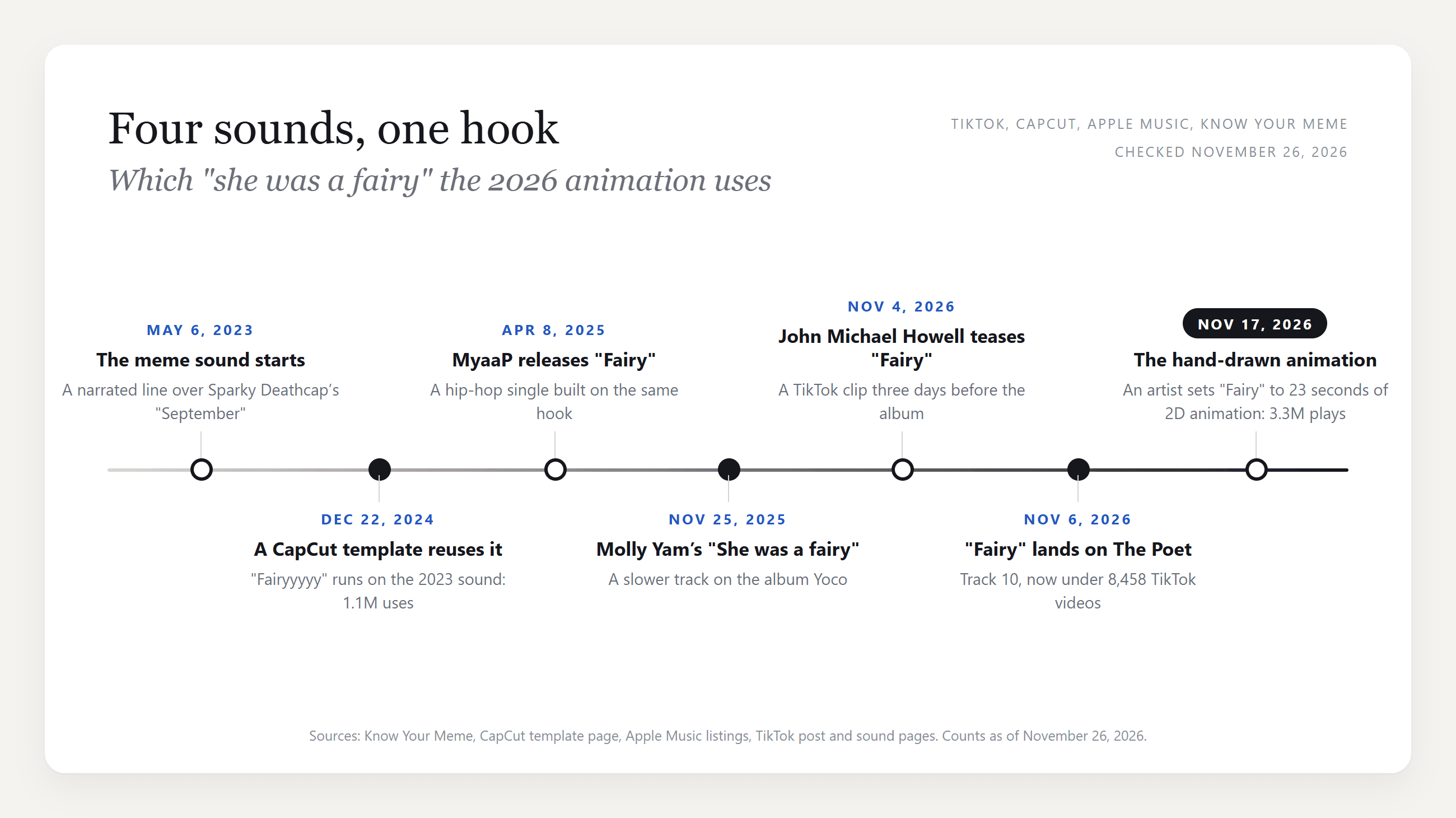
The trend started in May 2023. Know Your Meme traces it to a TikTok roleplay video that paired a woman saying "She was a fairy" with Sparky Deathcap's "September." The sound went on to carry DIY fairy crafts, many cursed on purpose, and now sits under 268,000 videos.
Two songs reused the hook. MyaaP's single "Fairy" (April 8, 2025) took seven of the first eight Google results for the she was a fairy song in our November 26 check, and Molly Yam released "She was a fairy" on her album Yoco in November 2025.
The animation uses a fourth: John Michael Howell's "Fairy," track 10 of The Poet, which he teased on TikTok on November 4, 2026 with the caption "3 DAYS TILL ALBUM." His sound now runs under 8,458 videos.
Quick test: tap the sound on any clip. If the title is just "she was a fairy," it's usually the 2023 meme. If it reads "original sound - JohnMichael howell," it's the 2026 song.
The Fairy Animation Everyone Is Saving Right Now
AipaDi0, an artist with about 320,000 followers who takes commissions, posted a 13-second preview on November 16 and the full fairy animation a day later. TikTok's page data shows no AI-generated label, no CapCut template and no effect. The singer commented "WOW WOW WOW!!", and that comment alone has more than 65,000 likes.
Three kinds of video took off under the song.
| What people post to "Fairy" | Biggest example we found | Plays (Nov 26, 2026) |
|---|---|---|
| Anime edits with big word-by-word lyrics | An Attack on Titan edit | 5.8M |
| The singer's own clips | His "Fairy out now" post | 5.2M |
| Hand-drawn animation | AipaDi0's fairy | 3.3M, with the most saves in our sample |
Across the 139 videos we sampled under the sound, none linked a template, carried TikTok's AI label or used an effect.
Make a She Was a Fairy Music Video on Atlas Cloud
Hand-drawn animation takes skills and hours most of us don't have, so we built our fairy on Atlas Cloud instead: a Chinese celestial fairy in the soft-focus look of a 1990s Hong Kong fantasy film, with Seedance 2.5 cutting five shots to an original song.
That's one 17-second generation, with captions added afterward. The song, "Wings of Glass," is a dream-pop track we wrote in Suno chirp-v6 on Atlas Cloud, and our AI music video guide covers the songwriting.
Step 1: Design an Original Fairy With Seedream 5.5
In Image Generator, on the Image Generation tab, pick Seedream v5.5 and set the size to 1584 × 2816 for a vertical frame. The portrait prompt:
plaintext1Cinematic film still in the style of a 1990s Hong Kong fantasy wuxia film, vertical frame, waist-up portrait. A beautiful young East Asian woman in her early twenties as a celestial fairy, with a small oval face and soft V-shaped jaw, large almond-shaped double-lidded eyes with pale grey-brown irises and a dreamy, slightly melancholic gaze, straight soft brows, a delicate small nose, full glossy rose-pink lips, porcelain skin with natural texture and a soft dewy glow, a few soft wavy strands framing her face. Long straight ink-black hair, the top gathered into a high loose bun crowned with an ornate gold filigree headdress of tiny flowers and leaves with dangling gold and pearl ornaments, the rest flowing past her waist, strands blown across her face by the wind. A small red flame-shaped mark between her brows. Robes of champagne and ivory silk with a pearly sheen, heavy gold embroidery of peonies and cranes on the shoulders, under a sheer gauze outer robe that lifts in the air. She turns her head toward the camera and looks into the lens. Behind her a misty moonlit river, a few pale petals drifting, soft moonbeams through the mist, cool silver-blue haze with warm golden glints on the embroidery. Shallow depth of field, dreamy bokeh, soft diffusion filter, gentle halation, 35mm film grain. Ethereal, weightless, otherworldly. No text, no watermark, no logo.
Then switch to the Image Edit tab, still on Seedream v5.5. If you have a face you're cleared to use, add it as a second reference. We did, then ran short passes for phoenix eyes, a slimmer frame and mist. The full-body still came from the finished portrait:
plaintext1Keep the woman from the reference image exactly the same: face, phoenix eyes, red flame mark, gold filigree headdress, long black hair, champagne silk robes with gold peony and crane embroidery, and sheer gauze outer robe. Full body, she floats in the air a little above a misty moonlit river, tall, very thin and willowy, head about one eighth of her height, narrow shoulders, a tiny waist and long slim arms, toes pointed downward, arms slightly open. Her sheer gauze outer robe, a long silver-white silk ribbon wrapped loosely around her arms, and her waist-length black hair all drift upward as if weightless. Soft white mist curls around her body and robes and rises from the river, a few pale petals in the air, moonbeams through the mist, her faint reflection on the water below. Same 1990s Hong Kong fantasy wuxia film style, soft diffusion, gentle halation, 35mm film grain. No text, no watermark.
One more pass stretched her proportions: "her head about one ninth of her total height, a longer slender neck, a longer torso and much longer legs."
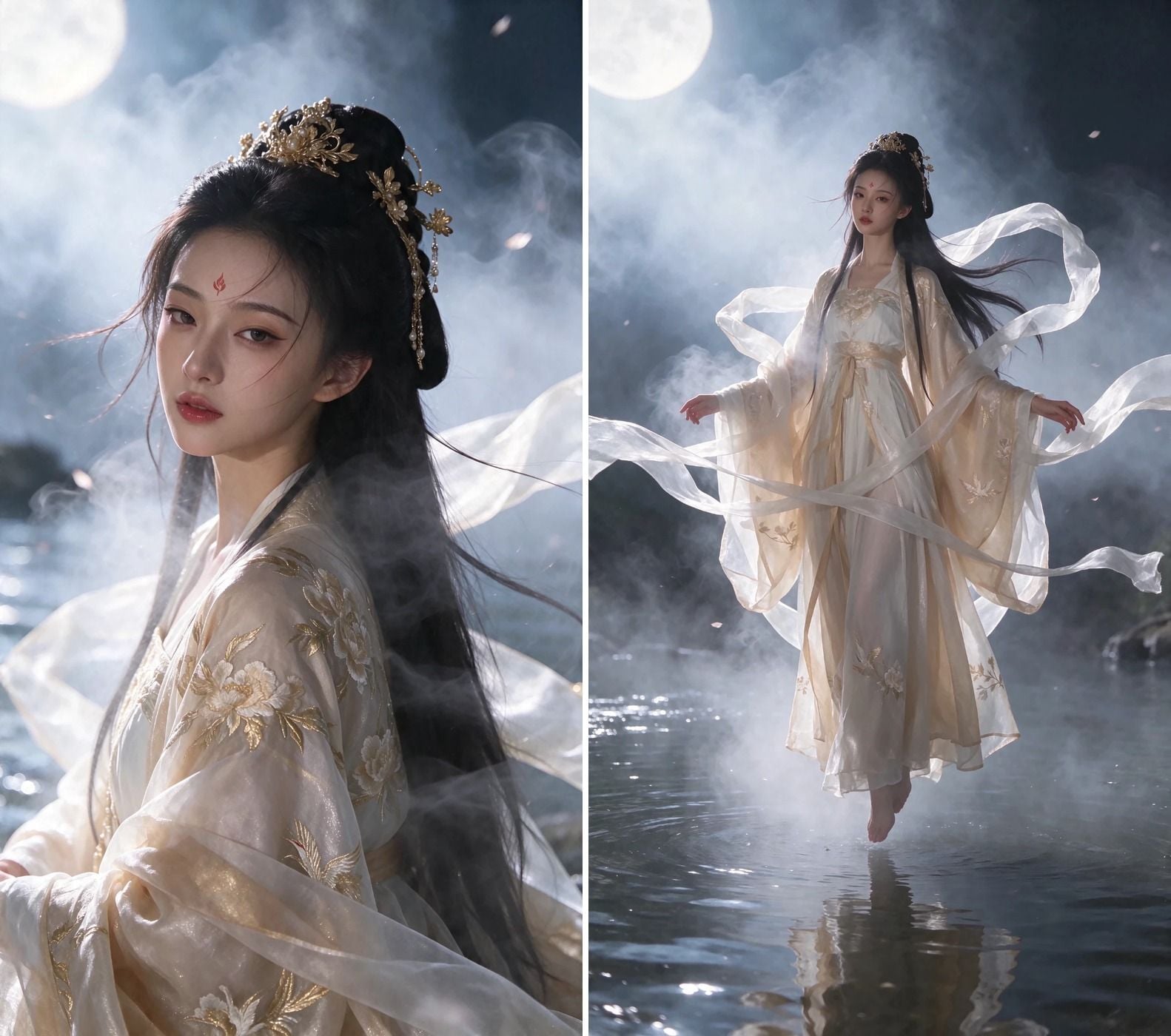
Every later shot points back to these two stills, so fix the face and costume now.
Method 1: Beat-Match Your Fairy Shots in the Seedance 2.5 Video Generator
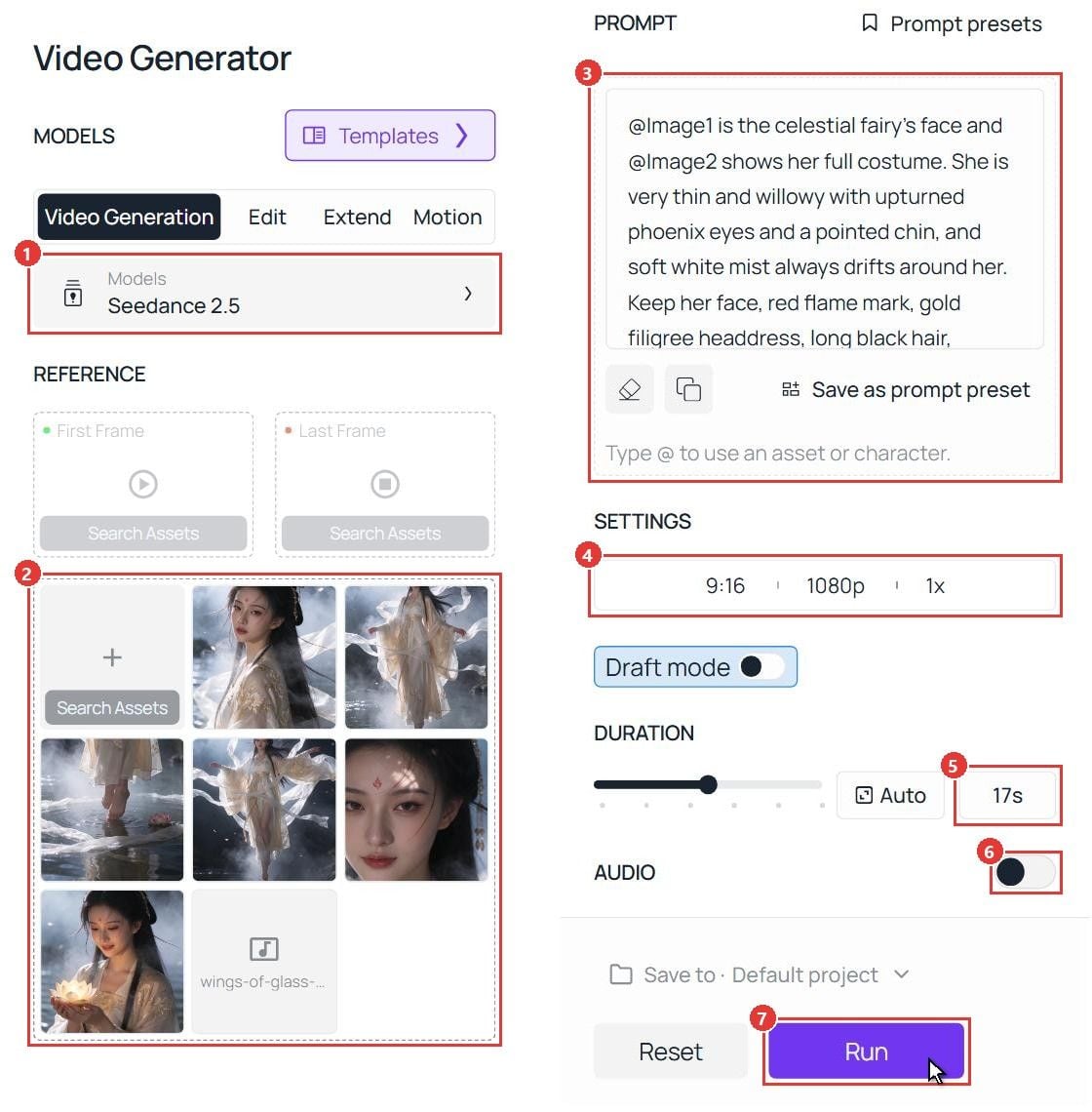
Seedance 2.5 takes an audio clip as a reference and times the cuts to it. Open the Atlas Cloud video generator and stay on the Video Generation tab.
- Make sure Seedance 2.5 is the selected model.
- Under Upload other references, add the portrait, the full-body still and the four shot keyframes from the next section, in that order, then a 17-second slice of your song. They become @Image1 to @Image6 and @Audio1.
- Paste the prompt below.
- Open Settings and choose 9:16 and 1080p.
- Set Duration to 17s so it matches the audio slice.
- Switch Audio off. The finished song goes on in the edit.
- Click Run.
plaintext1@Image1 is the celestial fairy's face and @Image2 shows her full costume. She is very thin and willowy with upturned phoenix eyes and a pointed chin, and soft white mist always drifts around her. Keep her face, red flame mark, gold filigree headdress, long black hair, champagne silk robes with gold embroidery, sheer gauze outer robe and silver-white ribbons exactly the same in every shot. Cinematic live-action look of a 1990s Hong Kong fantasy wuxia film, night, cool moonlight, soft diffusion, gentle halation, 35mm film grain, a few drifting petals, everything moves slowly and weightlessly, no lip movement, no dialogue, no text. Cut on the beat of @Audio1, one shot per lyric line. 2Shot 1 (0-4s): matches @Image3, water-level close-up, her bare toes touch the moonlit river and ripples spread, robes and ribbons trail over the water. 3Shot 2 (4-7s): matches @Image2, wide shot, she floats above the river without touching it, gauze, ribbons and hair drifting upward, the camera slowly tilts up with her. 4Shot 3 (7-10s): matches @Image4, she rises into the night sky and her ribbons and sleeves sweep open around her like glowing wings in the moonlight. 5Shot 4 (10-13s): matches @Image5, extreme close-up, she looks into the lens and a faint smile appears as a strand of hair drifts across her face. 6Shot 5 (13-17s): matches @Image6, she holds a glowing lotus lantern in her cupped hands, its warm light on her face, she smiles, and the camera slowly pulls back into the mist.
The five shots came back in order. The four cuts fall at 3.5, 7.0, 10.2 and 13.3 seconds, each in the breath between two sung lines, and we didn't trim a frame.
To check the timing first, turn on Draft mode. The generator hands you to the Seedance 2.5 playground for a 480p preview, which you can finish at 1080p within seven days.
Method 2: Generate the Fairy Music Video With the Seedance 2.5 API
The same request runs from a script, handy for five takes of one chorus.
Step 1: Create and copy an API key in the Settings page of the Atlas Cloud console.
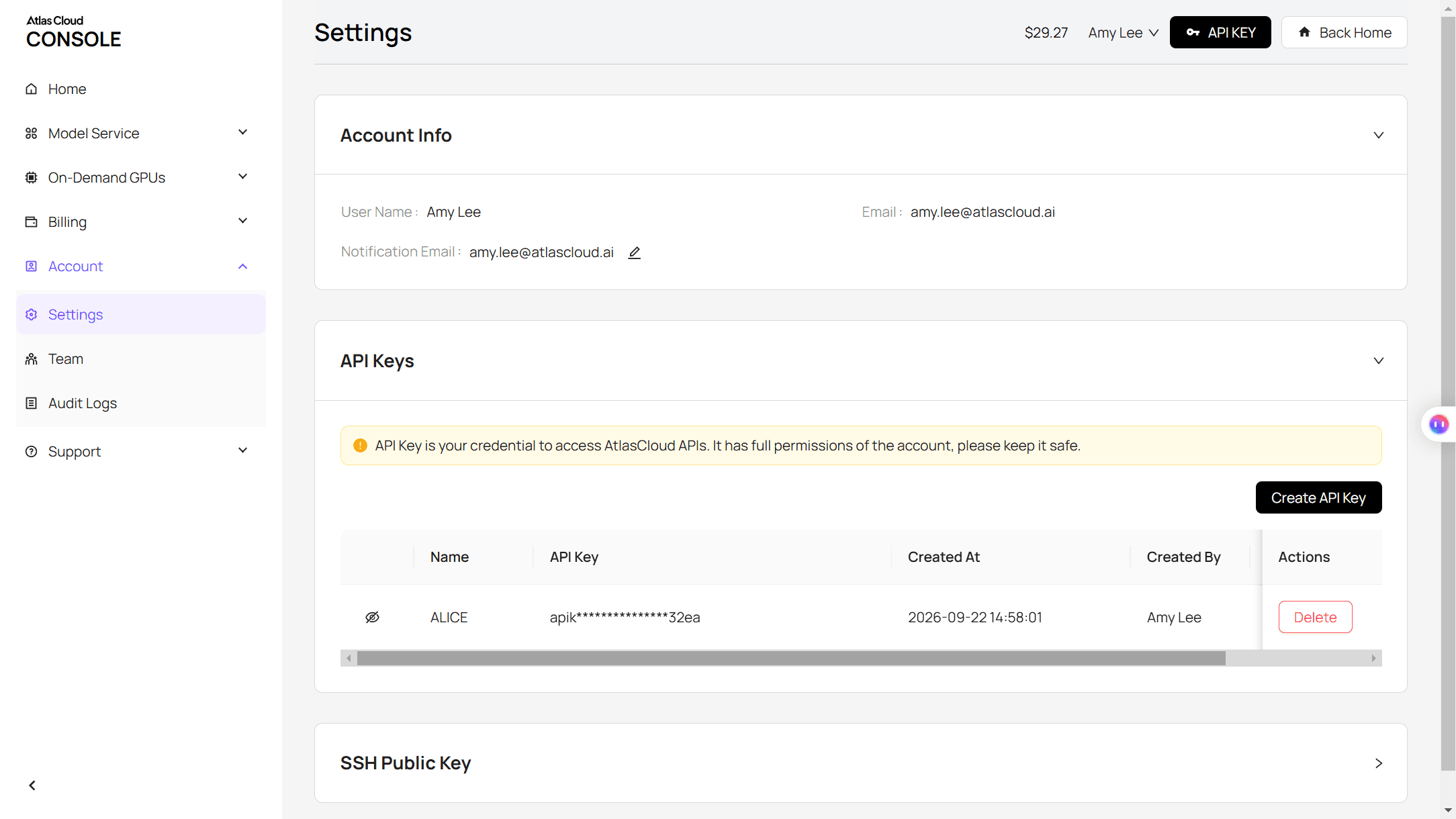
Step 2: Check the request format in the Atlas Cloud API docs. Seedance 2.5 reference-to-video takes reference_images and reference_audios as lists, and the prompt cites them as @Image1 and @Audio1 in list order. Each audio clip can run 2 to 30 seconds.
Step 3: Submit the clip, then poll for the file. The prompt is shortened here, so paste the full one from Method 1.
plaintext1curl -X POST https://api.atlascloud.ai/api/v1/model/generateVideo \ 2 -H "Authorization: Bearer $ATLASCLOUD_API_KEY" \ 3 -H "Content-Type: application/json" \ 4 -d '{ 5 "model": "bytedance/seedance-2.5/reference-to-video", 6 "prompt": "@Image1 is the celestial fairy'''s face and @Image2 shows her full costume. ... Cut on the beat of @Audio1, one shot per lyric line. Shot 1 (0-4s): ... Shot 5 (13-17s): ...", 7 "reference_images": [ 8 "https://your-cdn.com/fairy-face.png", 9 "https://your-cdn.com/fairy-full.png", 10 "https://your-cdn.com/kf1-feet.png", 11 "https://your-cdn.com/kf2-ribbons.png", 12 "https://your-cdn.com/kf3-eyes.png", 13 "https://your-cdn.com/kf4-lotus.png" 14 ], 15 "reference_audios": ["https://your-cdn.com/wings-of-glass-chorus.mp3"], 16 "duration": 17, 17 "resolution": "1080p", 18 "ratio": "9:16", 19 "generate_audio": false 20 }'
plaintext1curl https://api.atlascloud.ai/api/v1/model/prediction/<prediction_id> \ 2 -H "Authorization: Bearer $ATLASCLOUD_API_KEY"
Poll until the status reads completed, then download the video from outputs. The stills use the same key: send the Step 1 prompts to bytedance/seedream-v5.5/text-to-image and bytedance/seedream-v5.5/edit through the generateImage endpoint. One key covers every model, so switching models means changing the model string.
Fairy Animation Shots That Sell the Floating Look
AipaDi0's clip works because each shot shows one small thing: a foot on grass, an eye opening, a moth. We kept that idea and gave every lyric line its own reference still.
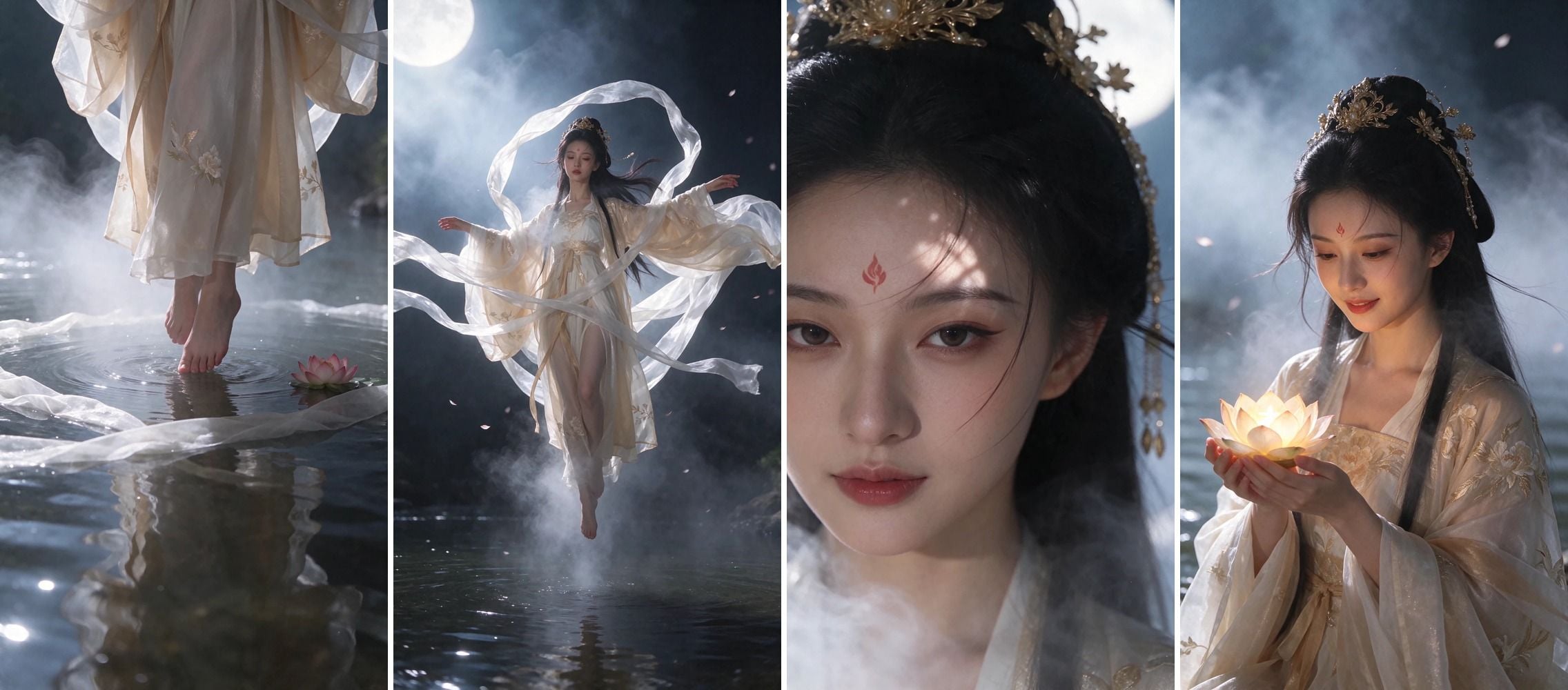
| Lyric line | Shot | What sells it |
|---|---|---|
| She walked on the water | Bare toes touch the river | A camera at water level, so the ripples carry the shot |
| Never touched the ground | Full body floating | Space under her feet and hair drifting upward |
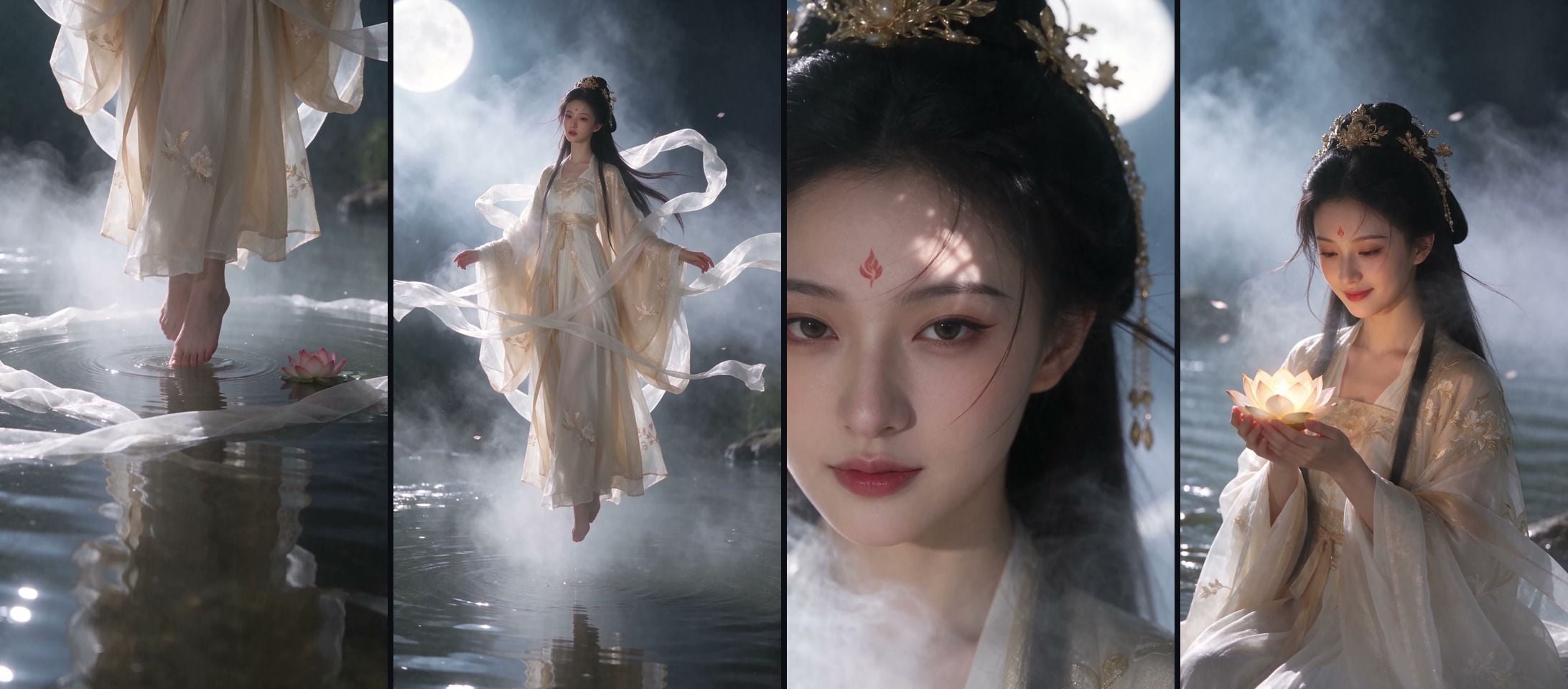
| Wings of glass and silver | Ribbons sweep open | Silk ribbons stand in for wings, which suits a Chinese fairy |
| Hardly made a sound | Face close-up | A direct look into the lens and a faint smile |
| Hold your breath, don't blink now | Lotus lantern in her hands | Warm light from below against the cool moonlight |
Each keyframe came from Seedream v5.5 in the Image Edit tab at 1584 × 2816, with the portrait, the full-body still or both as references:
plaintext1Keep her silk robes, gold embroidery, sheer gauze and silver-white ribbons exactly the same as the reference. Change the framing completely: the camera sits at water level and the frame shows only her lower legs and bare feet, from just below the knees down. Do not show her face, hands or upper body. Her slim bare toes barely touch the mirror-still river and rings of ripples spread outward, the hem of her robes and the ribbons trail over the water, one pink lotus floats beside her foot, mist curls across the surface, moonlight glints on the ripples. Same 1990s Hong Kong fantasy wuxia film style, soft diffusion, gentle halation, 35mm film grain. No text, no watermark.
plaintext1Keep the woman from the reference images exactly the same: face, phoenix eyes, red flame mark, gold filigree headdress, long black hair, champagne silk robes with gold embroidery, sheer gauze outer robe and silver-white ribbons. Full body, very thin and willowy with long legs, against a dark night sky: she rises high above the river with her arms spread wide, and her long silver-white ribbons and sheer gauze sleeves sweep open around her like glowing wings catching the moonlight, hair and headdress ornaments streaming, eyes half-closed, a few petals swirling around her. Soft white mist drifts around her. Same 1990s Hong Kong fantasy wuxia film style, soft diffusion, gentle halation, 35mm film grain. No text, no watermark.
plaintext1Keep her exact face from the reference image: the long, narrow, upturned phoenix eyes with lifted outer corners and upswept eyeliner, the slim face and pointed chin, the red flame mark, gold filigree headdress and long black hair. Extreme close-up of her face filling the vertical frame: she looks straight into the lens with a faint, distant smile, strands of black hair blown across one cheek, dangling gold ornaments at the edge of the frame, dappled moonlight on her skin, soft white mist at the bottom of the frame. Same 1990s Hong Kong fantasy wuxia film style, soft diffusion, 35mm film grain, natural skin texture. No text, no watermark.
plaintext1Keep the woman from the reference images exactly the same: face, phoenix eyes, red flame mark, gold filigree headdress, long black hair, champagne silk robes with gold embroidery and sheer gauze outer robe. Waist-up: she holds a small glowing lotus lantern in her slender cupped hands in front of her chest, its warm light lighting her face from below, she looks down at it and smiles softly, sheer sleeves falling around her thin wrists, the misty river and drifting petals behind her. Soft white mist drifts around her. Same 1990s Hong Kong fantasy wuxia film style, soft diffusion, gentle halation, 35mm film grain. No text, no watermark.
Two details mattered. For the feet, spell out the crop ("from just below the knees down") so the frame stays on her legs. For the close-up, give Image Edit only the portrait so it copies the eyes and chin exactly.
Prefer a 2D anime fairy? Our Seedance 2D animation guide covers those style anchors.
Add AI Lyric Video Captions Like the Anime Edits
The biggest "Fairy" videos are anime edits that flash the lyrics a word or two at a time in big type. Copying that only takes knowing when each word is sung.
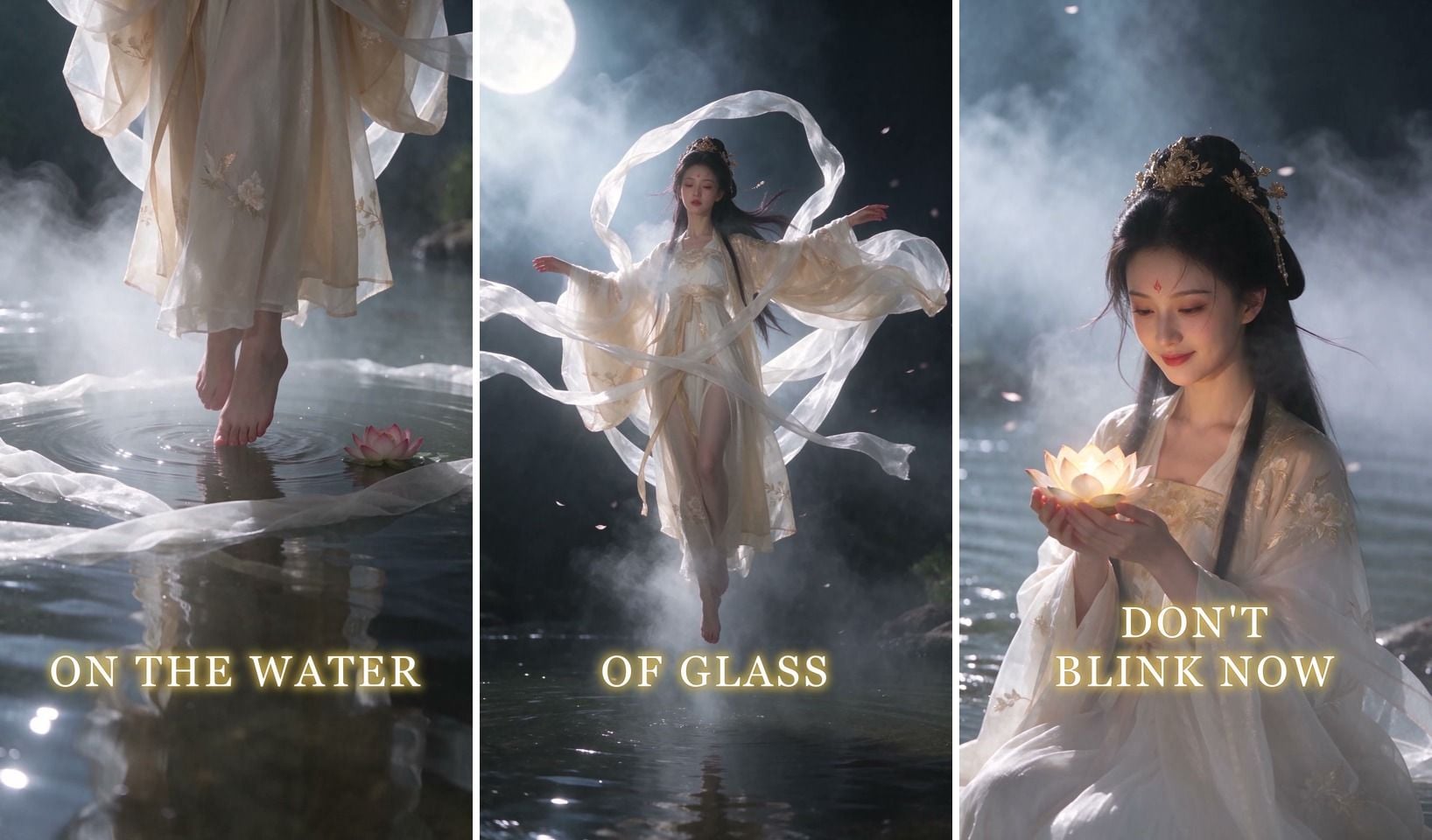
We sent the 17-second song slice to Seed ASR 2.0 on Atlas Cloud, and it returned start and end times for all 24 sung words. Transcribe the slice you actually use, so the timestamps already match your video's timeline.
| Caption chunk | On screen (seconds) |
|---|---|
| SHE / WALKED / ON THE WATER | 0.65 / 1.57 / 2.33 |
| NEVER / TOUCHED / THE GROUND | 4.69 / 5.25 / 5.81 |
| WINGS / OF GLASS / AND SILVER | 7.81 / 8.25 / 9.01 |
| HARDLY / MADE A SOUND | 11.05 / 11.85 |
| HOLD YOUR BREATH / DON'T BLINK NOW | 13.49 / 15.01 |
Group small words with the next one, so "the" never flashes alone, and hold each chunk until the next starts. We set white serif capitals with a soft gold glow in the lower third, clear of the face, and burned them in with an ASS subtitle file and ffmpeg. Any editor with a text track works too.
How to Make an AMV Without Borrowing Clips or Songs
A classic AMV, or anime music video, cuts scenes from a show to a song you love. wikiHow's guide warns about both halves: you need permission for the artwork, and the song has its own copyright. Fair use is decided case by case, so a hit edit can still be muted or removed.
| Classic AMV | Original AI fairy MV | |
|---|---|---|
| Footage | Clips from an anime you don't own | Characters and shots you generated |
| Music | A commercial song | An original song you wrote |
| Typical tool | A video editor and a clip library | An image model, a video model and an editor |
| Main risk | Takedowns or muted audio | Making the character look like someone you have no rights to |
The AI route answers how to make an AMV with a video you can post anywhere: design the character, write or license the song, then generate the footage. Any anime music video maker app can handle the final cut and captions. If you want the anime look, keep the character original and don't prompt a named show's characters.
Frequently Asked Questions
Who sings "She Was a Fairy"?
It depends on the video. The 2026 fairy animation trend uses "Fairy" by John Michael Howell, track 10 of The Poet. MyaaP released a different "Fairy" in April 2025, and Molly Yam put out "She was a fairy" in November 2025. The 2023 meme is a spoken line over Sparky Deathcap's "September."
Is the she was a fairy animation made with AI?
All signs say no. The viral clip is a 2D animation from the artist AipaDi0, who takes commissions, and its TikTok page data carries no AI-generated label. You can make a fairy video in a similar spirit with AI, as shown above.
Is there a CapCut template for the she was a fairy animation?
Not that we found. The popular CapCut template "Fairyyyyy," with about 1.1 million uses, runs on the 2023 meme sound. We compared its audio with both sounds, and it matches the meme.
What does "she was a fairy" mean?
In the 2023 meme, the line works as a deadpan caption for fantasy roleplay or a cursed-looking DIY fairy craft. In John Michael Howell's song, it opens a chorus about a woman whose love felt like something out of a storybook. The animation trend uses the song's version, so those clips lean dreamy rather than ironic.
Can Seedance 2.5 follow the beat of my song?
Yes. Add your song as an audio reference of 2 to 30 seconds, then write one shot per lyric line with a time range, like "Shot 1 (0-4s)." Seedance 2.5 places the cuts on the beat. Keep generated audio off and lay the clean song back on in your editor.
Conclusion
The barefoot fairy behind this wave was drawn by hand, and the song under it is a new single, not the 2023 meme that shares its words. That's why searches land on the wrong sound. Check the sound title and the right one turns up in seconds.
For your own take, start from two stills of an original character, give every lyric line its own still, and let a song slice set the cuts. Add word-by-word captions last, and your she was a fairy video reads like the edits people are saving.







