


Your espresso is cold, the croissant is half gone, and the reply still shows three grey dots. If you are asking why is ChatGPT so slow, the answer depends on where the wait happens: in your browser tab, on your network, or on OpenAI's servers. Each one has a different fix, and the popular advice (clear your cache) only helps with the first.
We timed a long ChatGPT conversation against a fresh one on the same laptop, checked OpenAI's own release notes for what changed in 2026, and put each fix next to the cause it actually solves.
Key Takeaways
- A slow ChatGPT reply usually stalls in one of three places: your browser, your network, or OpenAI's servers.
- In our test, a long chat answered as fast as a new one, but its open tab grew past 900 MB of memory.
- Since September 14, 2026, Plus and Pro stopped auto-switching from Instant to Thinking, so the mode you pick mostly sets the wait.
- An open ChatGPT incident on OpenAI's status page means the delay is on their side, so browser fixes won't help.
- For long documents, the OpenAI models on Atlas Cloud stream answers through an API that carries only what you send.
Why Is ChatGPT So Slow? The Three Places a Reply Gets Stuck
Every ChatGPT answer makes a round trip. Your question leaves the browser, crosses your network, gets processed by a model on OpenAI's servers, then streams back into a page that has to draw it. A delay at any stop feels the same from your chair: a blinking cursor and no words.
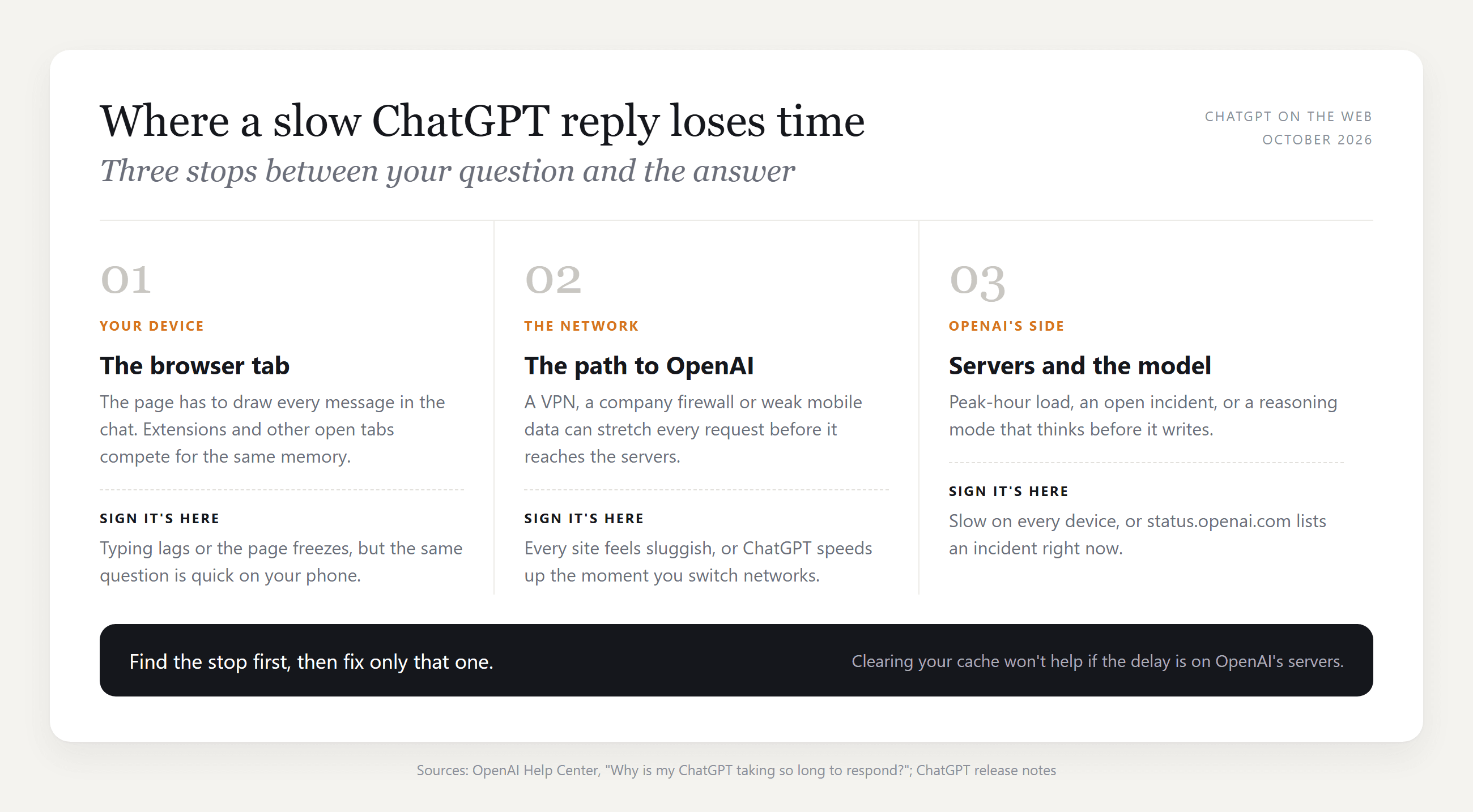
The quickest way to tell them apart is a two-device test. Ask the same short question on your laptop and on your phone over mobile data. Slow on both? The problem sits upstream of you. Fast on the phone? Look at your browser or your Wi-Fi.
Why Is ChatGPT So Slow Today?
When ChatGPT is slow today but was fine yesterday, check OpenAI's status page at status.openai.com before touching any setting. OpenAI's own troubleshooting article puts it plainly: users "during peak hours may notice a pattern of slowness at specific times of the day."
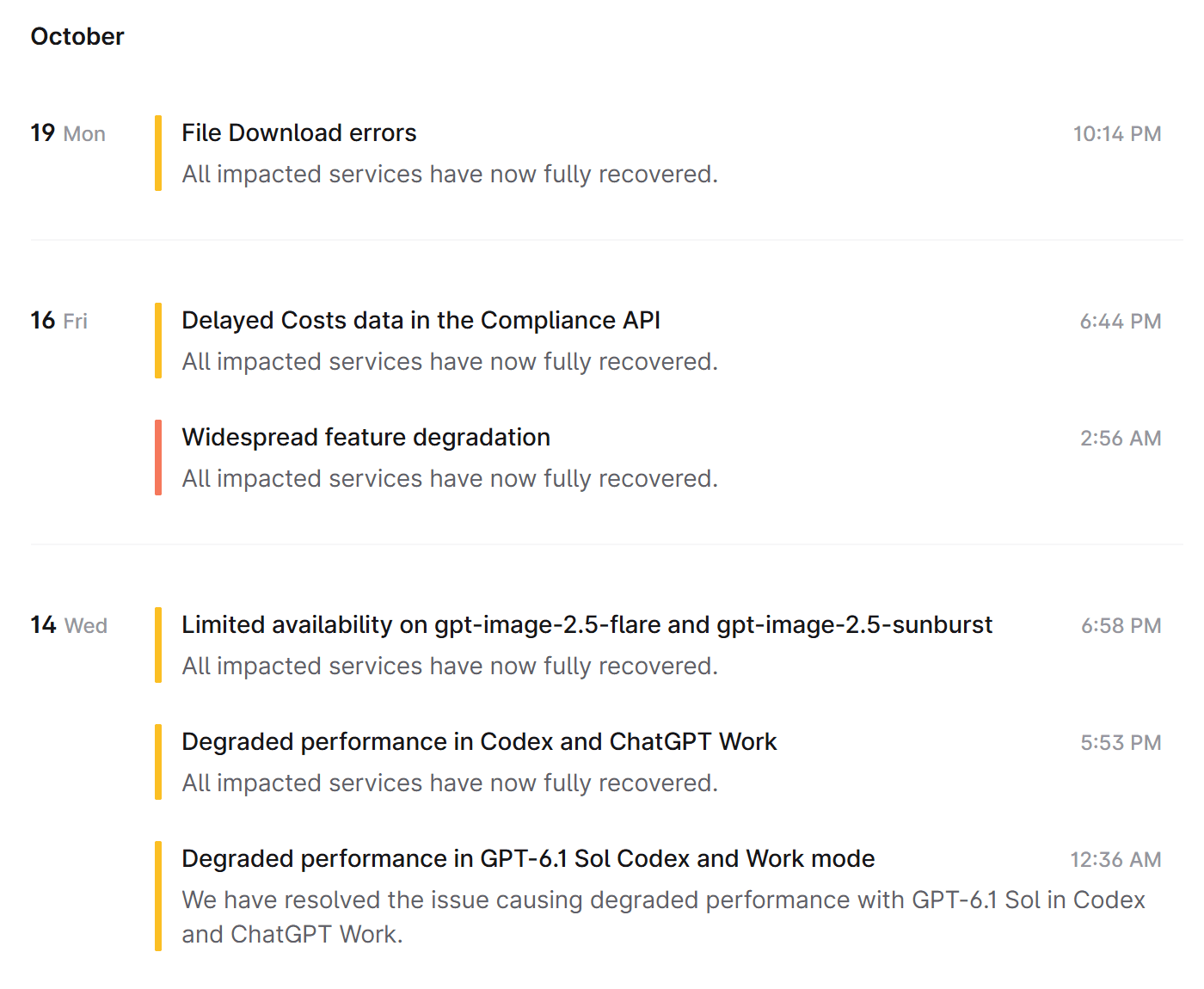
Source: OpenAI Status , captured October 20, 2026
Read the wording on each incident. "Degraded performance" and "elevated latency" mean the service works but slowly, which is exactly the slow-today feeling. "Elevated errors" means some requests fail outright, and that belongs to a different problem: ChatGPT not working at all. Also notice how specific the titles are. An incident for Codex and ChatGPT Work won't slow a normal chat, so match the product name before you blame the outage.
How to Fix ChatGPT Slow Responses by Calling GPT-6 Directly
Some slowdowns come from the chat page itself: a tab that has grown heavy over a long session, or extensions fighting over memory. An API call has no page to carry. You send exactly the context you choose, the model answers, and the words stream back as they are written.
Atlas Cloud serves GPT-6 Luna, the same model name ChatGPT gives its Free and Go users, behind one chat completions endpoint.
This route suits one job in particular: long documents you would otherwise paste into a chat that is already dozens of turns deep. Meeting notes, transcripts, a contract draft. Each request starts clean, so the next document gets the same blank slate as the first.
Method 1: Use the Atlas Cloud Playground
No code needed. Sign in and open the GPT-6 Luna playground, then:
- Paste your text and your instruction into the message box. We used a weekly meeting log and asked for five bullets plus action items with owners.
- Click the send arrow. The answer streams into the chat area, and you can type a follow-up in the same box.
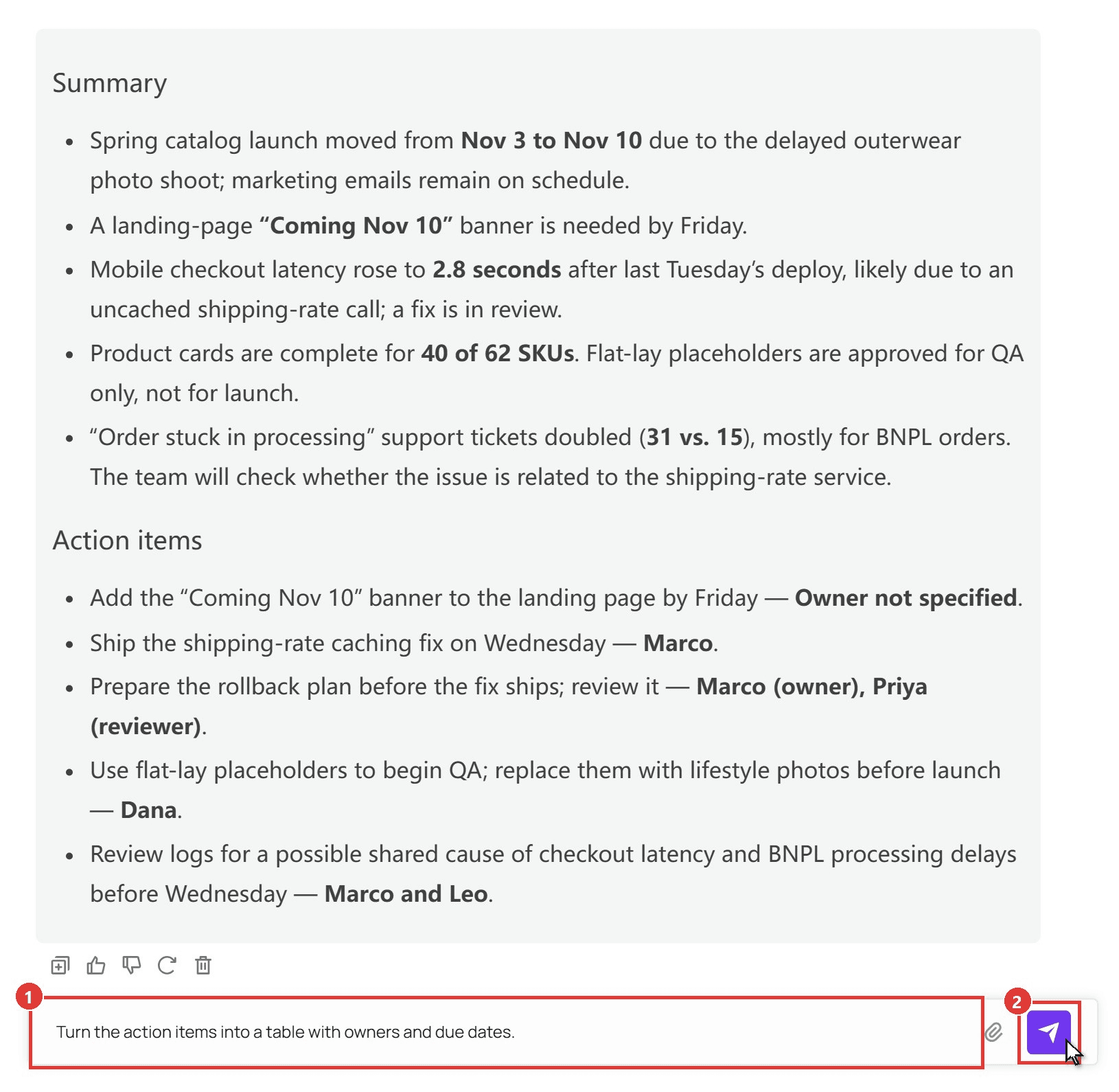
One detail worth noticing in the result: the notes never named an owner for the landing-page banner, and Luna wrote "Owner not specified" instead of guessing.
Method 2: Stream GPT-6 Luna Through the API
For anything you run every day, wire it into a script. Three steps.
Step 1: Create an API key. Open Settings in the console, go to API Keys, and click Create API Key. Keep it on the server side.
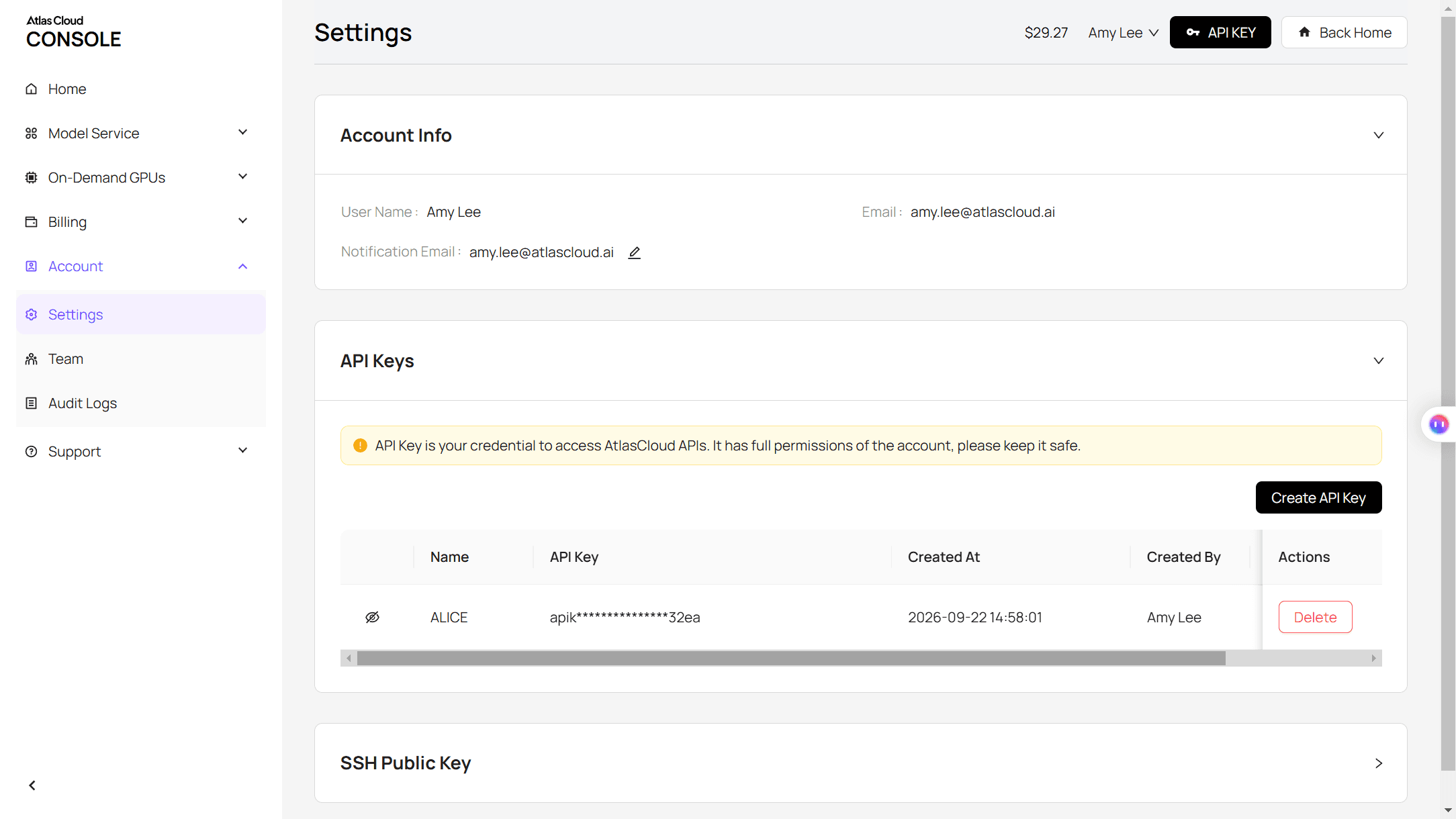
Step 2: Check the request format. The API docs cover the chat completions format, and the model page has an API tab with a ready-made example.
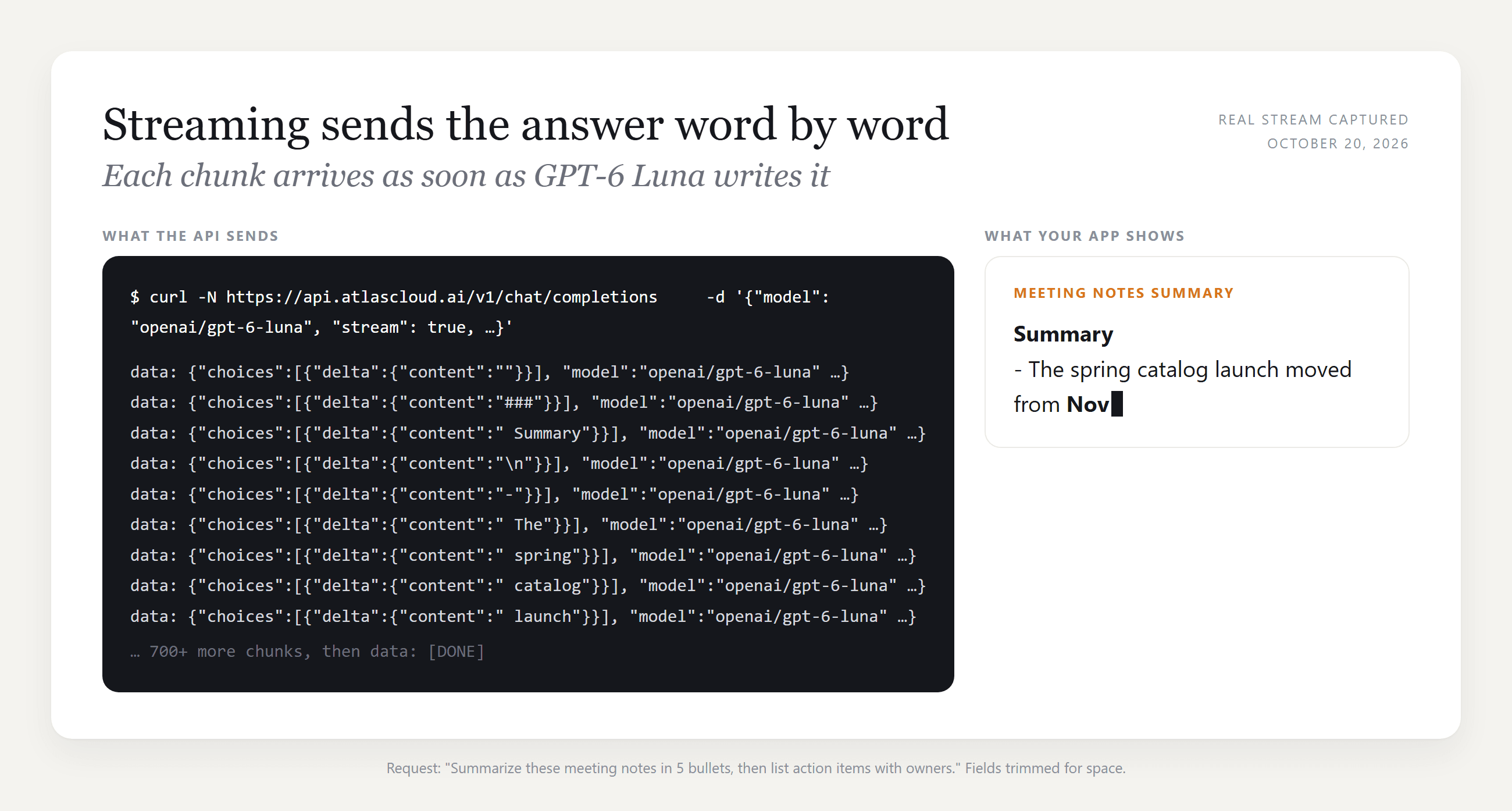
Step 3: Send a streaming request. Setting "stream" to true returns the answer in small chunks, so your app can show the first words while the rest is still being written.
plaintext1curl -N -X POST "https://api.atlascloud.ai/v1/chat/completions" \ 2 -H "Authorization: Bearer $ATLASCLOUD_API_KEY" \ 3 -H "Content-Type: application/json" \ 4 -d '{ 5 "model": "openai/gpt-6-luna", 6 "messages": [{"role": "user", "content": "Summarize these meeting notes in 5 bullets, then list action items with owners: ..."}], 7 "stream": true, 8 "max_tokens": 1500 9 }'
Each line that comes back starts with "data:" and carries the next piece of text in choices[0].delta.content, until a final "data: [DONE]". The same endpoint and key cover the rest of the OpenAI family and every other chat model on the platform, so moving to GPT-6 Sol for harder reasoning means changing only the model string.
Why Does ChatGPT Slow Down After a Long Conversation?
This is the slowdown people describe most precisely: a chat that started snappy and now drags. So we built one. On a free account, we asked ChatGPT for 18 handbook chapters in a single conversation, each about 6,300 characters with a table and a code block. Then we timed the same two-sentence question in that chat and in brand-new chats, three runs each, from the moment we clicked Send.
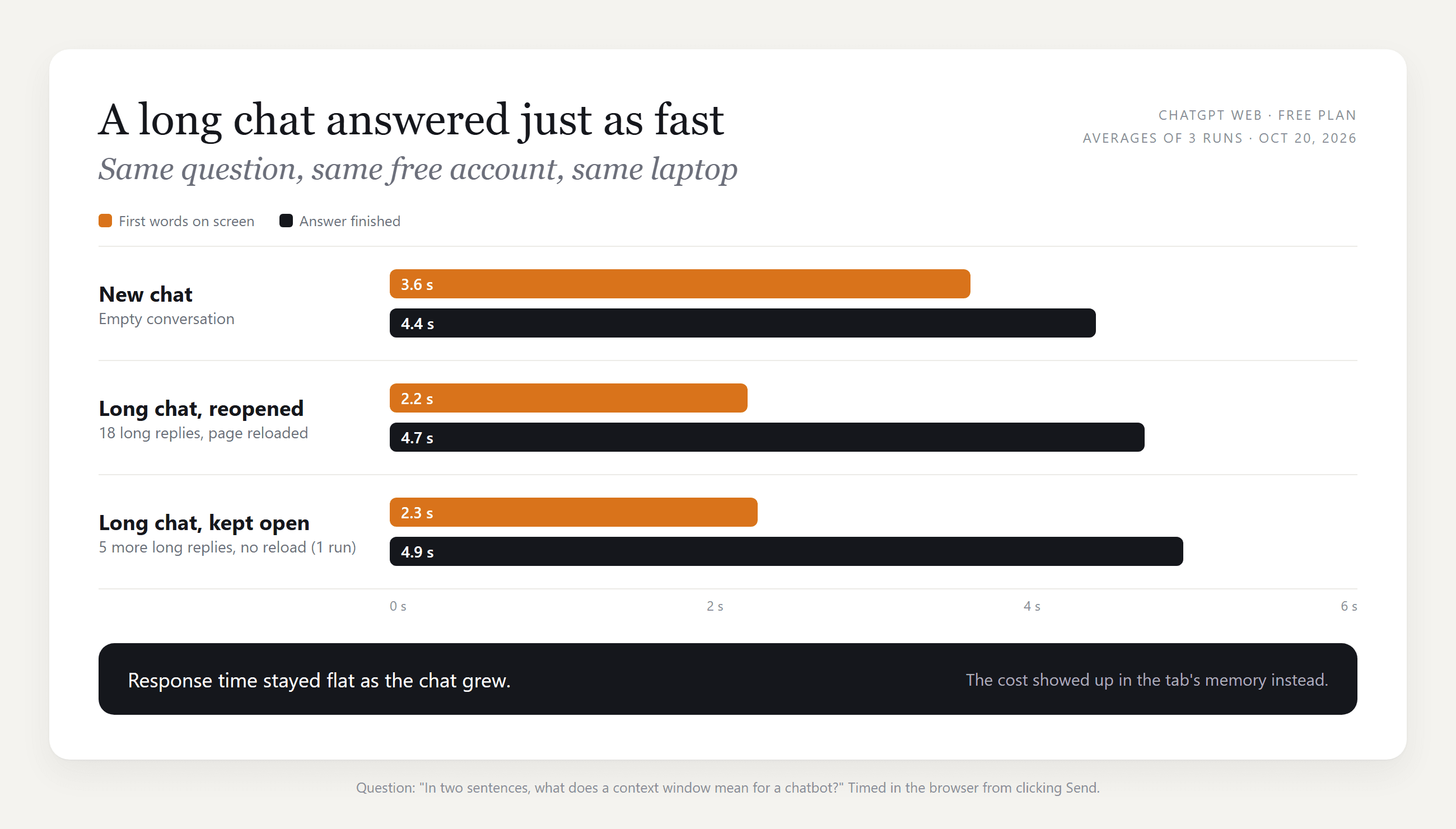
The long chat was not slower to answer. First words appeared in about 2.2 seconds, against 3.6 in a new chat, and both finished in under 5 seconds on average.
Part of the reason is an August 21, 2026 change: the ChatGPT release notes say the web app "loads messages in smaller sections instead of retrieving the entire conversation at once." In our tab, only about seven turns sat on the page at any moment, however long the chat got.
What did grow was the tab itself, and that is the lag you feel. The next section shows the numbers.
The context window is the other limit. ChatGPT's pricing page lists the total context window for Instant at 27K tokens on Free, 54K on Go and Plus, and 128K on Pro. Our 18 chapters added up to about 113,000 characters, roughly 28,000 tokens, which already tops the free Instant window, so the earliest chapters may fall outside what the model reads. A long chat costs you memory before it costs you speed.
OpenAI's error troubleshooting page gives the same advice in one line: "Start a new chat if the conversation is long or has many turns." To keep your progress, carry it over:
- Ask ChatGPT to "summarize this conversation so far, including decisions, open questions and any numbers we agreed on."
- Copy the summary, open a new chat, and paste it as your first message.
- Continue from there.
Why Is ChatGPT So Slow on My Computer?
Why is my ChatGPT so slow when the rest of the laptop feels fine? Compare it with your phone. Quick on the phone means the browser is doing the slow part. The lag usually shows up as delayed typing, a page that freezes while a reply streams in, or a fan spinning up on a plain text answer.
We watched it happen. After reopening our long chat, we kept the tab open and asked for five more long chapters without reloading, reading the tab's JavaScript memory after each reply.
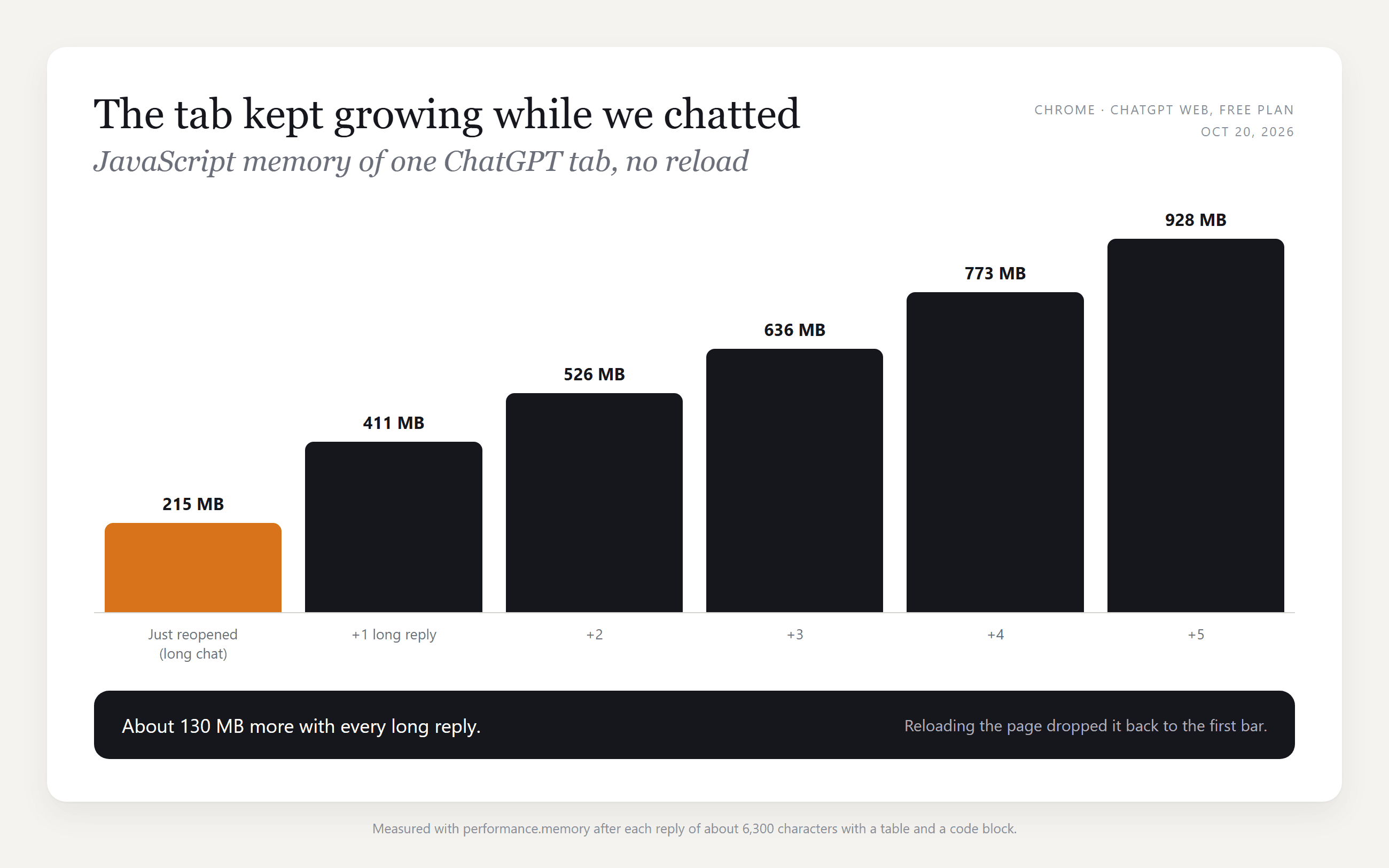
Memory climbed by roughly 130 MB per reply and passed 900 MB after five. During the session that built the chat, the page got heavy enough that our browser tool timed out twice just taking a screenshot. A reload brought the tab back to about 215 MB. So the cheapest fix for a sluggish long chat is the reload button: press F5, or close the tab and reopen the conversation from the sidebar.
Chrome has a built-in way to check. Press Shift+Esc to open its Task Manager and find the ChatGPT tab in the memory column.
ChatGPT Slow on Chrome: Extensions, Cache and a Hard Refresh
OpenAI's help center lists the browser-side fixes. Here they are in the order worth trying, cheapest first:
| What to try | What it rules out | OpenAI's wording |
|---|---|---|
| Open ChatGPT in an incognito window | Extensions and stored settings | Incognito "disables most extensions by default" |
| Disable extensions one by one | A script blocker or ad blocker interfering | "especially those that block scripts or ads" |
| Close other tabs and programs | Memory pressure on your computer | Frees "system resources" for ChatGPT |
| Hard refresh with Shift + Reload | A stuck page or stale script | Listed for a page "stuck loading" |
| Clear site data, then sign in again | Corrupted cache or cookies | "Clear the site data", "not just the cache" |
| Try another browser | A Chrome-specific problem | Helps "determine if the issue is specific" to the browser |
If none of these help, the delay is probably upstream of your browser.
Why Is ChatGPT 5 So Slow? Modes, Plans and Thinking Time
GPT-5 had a rough start. It arrived on August 7, 2025, and the release notes described it as "slowly rolling out." The next day Sam Altman wrote on X that the autoswitcher, the part that routes questions between fast and thinking models, was "out of commission for a chunk of the day," as VentureBeat reported on August 8, 2025.
ChatGPT runs different models now. The October 7, 2026 release notes state that "Plus, Pro, Business, and Enterprise use GPT-6 Sol; Free and Go use GPT-6 Luna." Besides server load, the biggest factor you control is the reasoning level you pick:
| Plan | Chat model | Instant context window | Reasoning context window |
|---|---|---|---|
| Free | GPT-6 Luna | 27K | Varies |
| Go | GPT-6 Luna | 54K | 256K |
| Plus | GPT-6 Sol | 54K | 256K |
| Pro | GPT-6 Sol, GPT-6 Astra for Pro reasoning | 128K | 400K |
Two 2026 changes matter for speed. On September 14, OpenAI retired automatic switching from Instant to Thinking for Plus and Pro, so a quick question no longer gets silently routed to a slower reasoning model (OpenAI keeps an exception for safety cases).
GPT-6 "can begin answering while it continues to think," so you can start reading before a reasoning answer is complete. OpenAI's GPT-6 announcement adds that for questions needing web search, GPT-6 Instant "starts answering 44% sooner, on average, than GPT-5.6 Instant."
If Plus feels slow today in particular, check the status page and the clock: OpenAI's help article ties slowness to peak hours, and that note doesn't separate free and paid plans. If your answers stall on "Thinking", switching the reasoning level down is a separate fix with its own trade-offs.
Why Is the ChatGPT Image Generator So Slow?
Image generation runs on its own track, and OpenAI sets expectations accordingly. Its Images in ChatGPT article says generation "may take a few minutes, depending on the complexity of your request," and that you can keep chatting while it works. ChatGPT Images 2.5, released September 8, 2026, promises "faster image generation" than the version before it.
We timed one on the same free account: a short prompt for a reading nook on a rainy evening.
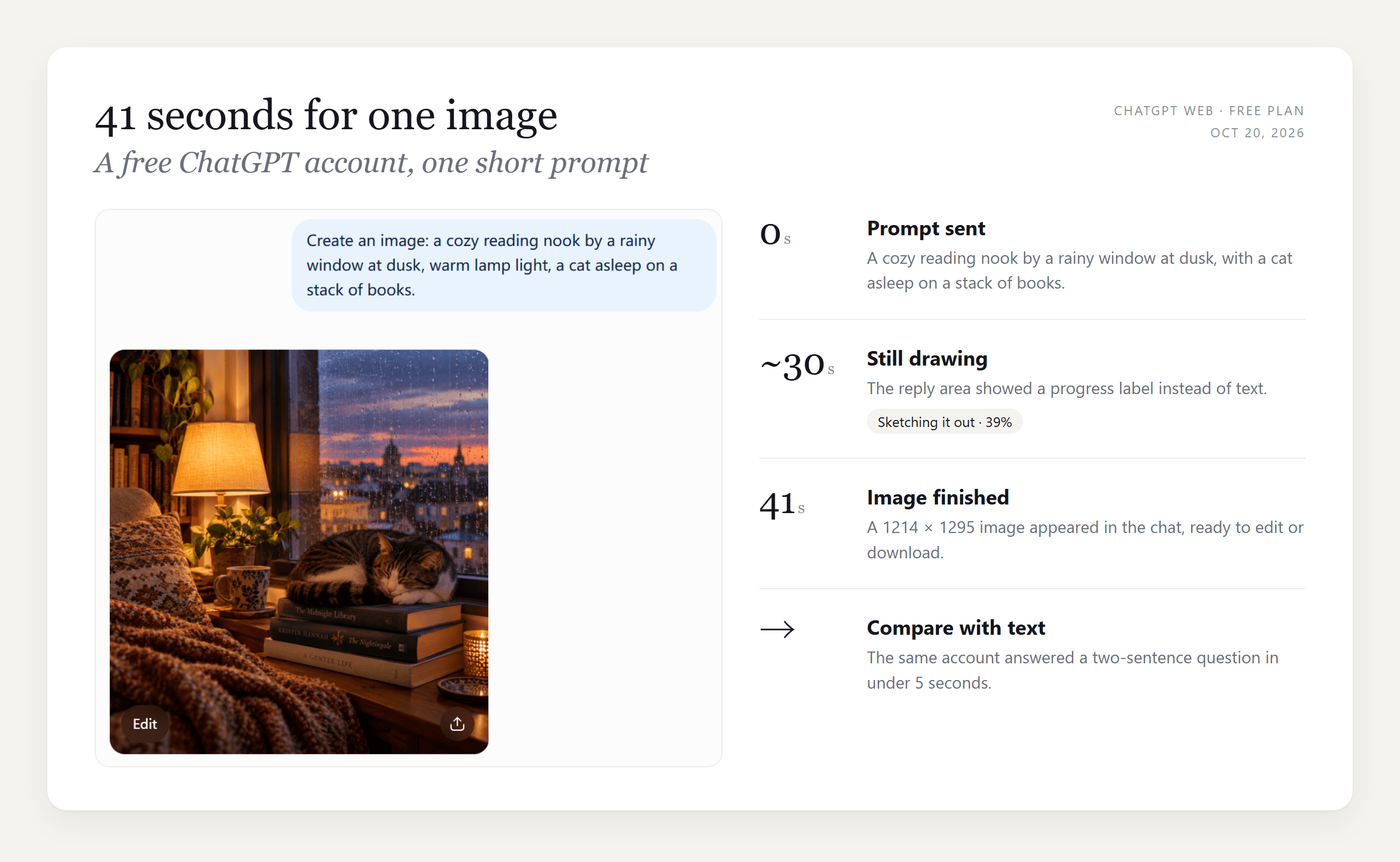
The finished image took 41 seconds, roughly ten times our text answers, and the chat showed a "Sketching it out" progress label instead of words for most of that time. That is normal.
A wait well past a few minutes is worth a look at the status page, where image generation has its own incident line. Image requests also draw on a separate allowance, and our ChatGPT image limit test shows how a free plan behaved across 22 requests. If you would rather choose the image model yourself, the Atlas Cloud plugin for ChatGPT generates images with other models from the same chat.
FAQ
Does ChatGPT slow down the more you use it?
Not in the way it feels. In our test, a chat with 18 long replies answered as fast as a new one. What grows is the open tab's memory, so a page that has been open all afternoon feels heavier. Reloading resets it, and a new chat per task keeps the context window clear.
Does a VPN make ChatGPT slower?
It can. OpenAI's help center lists company networks and VPNs among the causes, since requests can take a longer path. Turn the VPN off briefly and compare. If your workplace requires it, talk to your IT team, as OpenAI suggests.
Why does ChatGPT type out answers so slowly?
What you see is streaming: the model sends its answer in small chunks as it writes, and the page shows each one as it arrives. A slow drip of words usually means a long or reasoning-heavy answer. Asking for "a five-line answer" is one of the simplest ways to cut the total wait.
Is the ChatGPT desktop app faster than the browser?
OpenAI doesn't publish a speed comparison between the apps. The desktop app avoids browser extensions, which removes one common cause of lag, so it is a fair test if Chrome feels slow. A very long conversation will still be heavy in any app.
How much does GPT-6 Luna cost on Atlas Cloud?
GPT-6 Luna is billed per token: $0.10 per million input tokens and $0.50 per million output tokens on its model page, as of October 2026. Summarizing a 300-word meeting log with a full answer uses roughly a thousand tokens in total, a small fraction of a cent.
Conclusion
A slow ChatGPT session usually comes down to one of three spots, and the cheapest test is a phone on mobile data next to your laptop. If the phone is quick, fix the browser side: reload a tab that has been open for hours, try incognito, then start a fresh conversation from a summary. If both are slow, read the incident titles on the status page and wait it out.
For work that keeps returning long documents, calling GPT-6 Luna through an API gives you a clean context on every request and words on screen as soon as they are written. That is the most reliable answer we found to why is ChatGPT so slow in long, document-heavy sessions: the chat grows, and the request doesn't have to.





