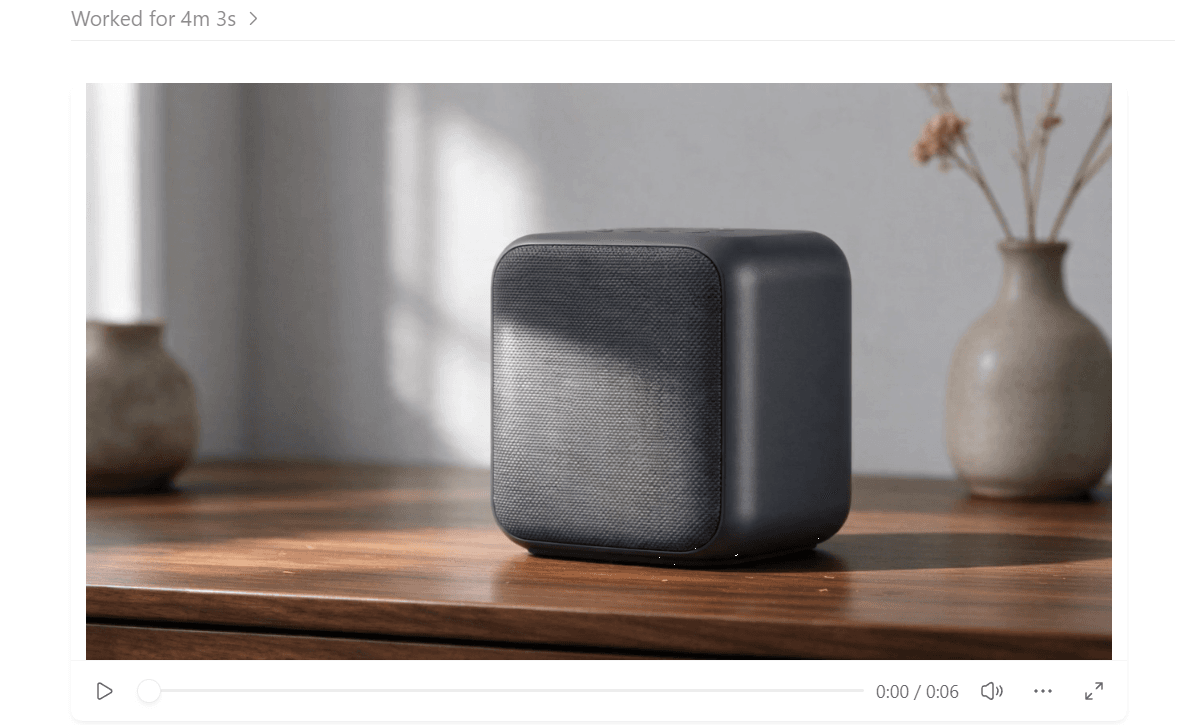
One chat. The right media model. A finished asset.
Need a short product clip in the middle of a ChatGPT thread? Until now that meant opening another tool. Atlas Cloud's ChatGPT AI video generation plugin keeps the job in the chat. Describe the clip, name a model if you like, and the video comes back in the same thread.
Atlas Cloud is now in the OpenAI Plugins Directory with 400+ models for video, images, audio and 3D. We tested it in the ChatGPT desktop app and the Codex CLI. Here is what it makes, how to install it, and who it suits.
Key Takeaways
- Atlas Cloud is now in the OpenAI Plugins Directory for ChatGPT and Codex.
- One plugin generates video, images, audio and 3D from a live catalog of 400+ models.
- You name the model, or ask the plugin to compare inputs and prices first.
- Sign in once in the browser; every job bills to your own Atlas balance.
- The bundled Seedance 2.5 skill turns a rough idea into a shot-level prompt.
What the Atlas Cloud Plugin Makes Inside ChatGPT and Codex
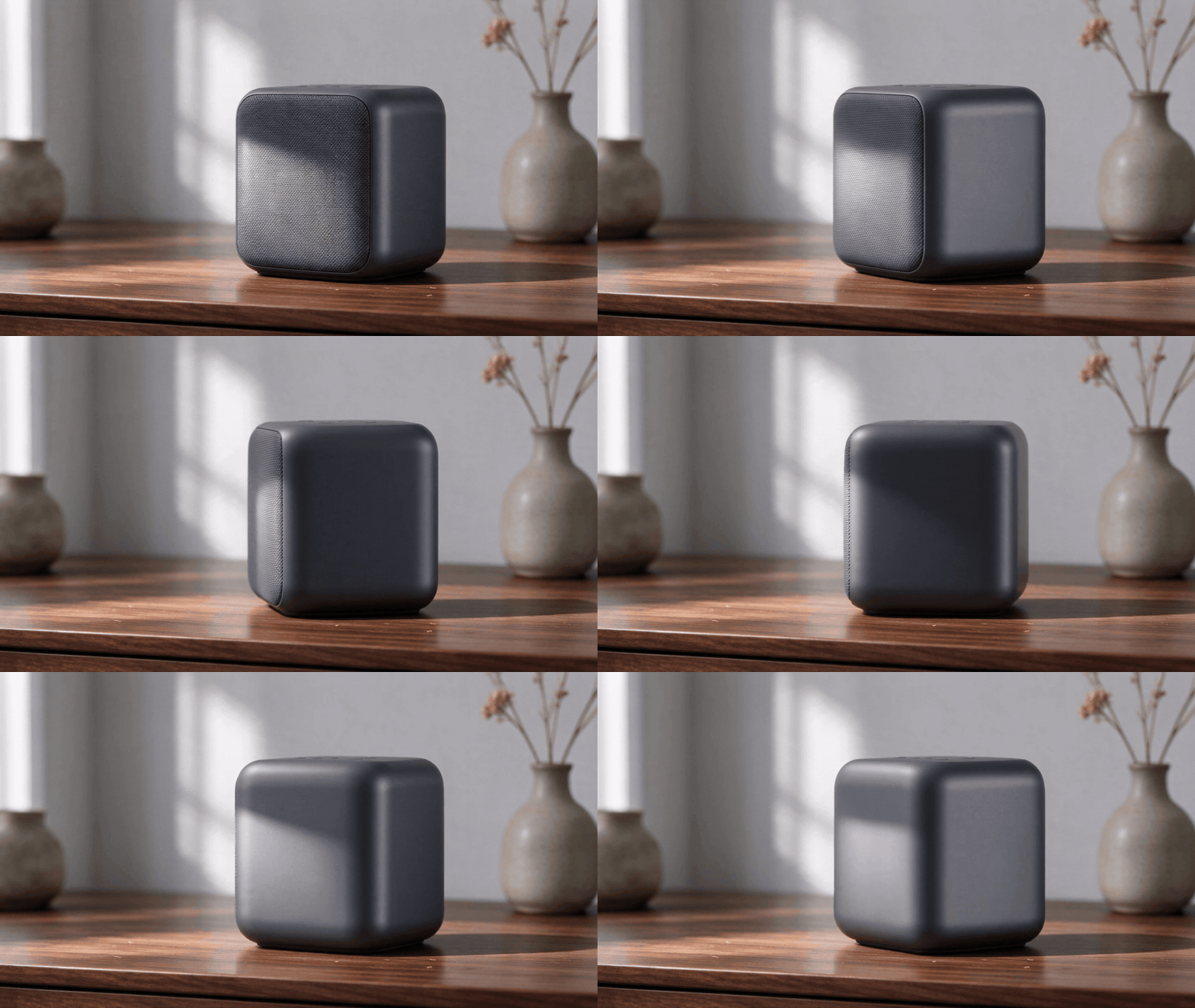
Three results from one afternoon say more than a feature list. A 16:9 studio photo of a charcoal wireless speaker, drafted from a single sentence. A six-second Seedance 2.5 clip of that same speaker turning on a walnut desk, made with the photo as its reference. A small textured robot toy as a 3D file, ready to drop into a game scene. All three came back in the same thread.
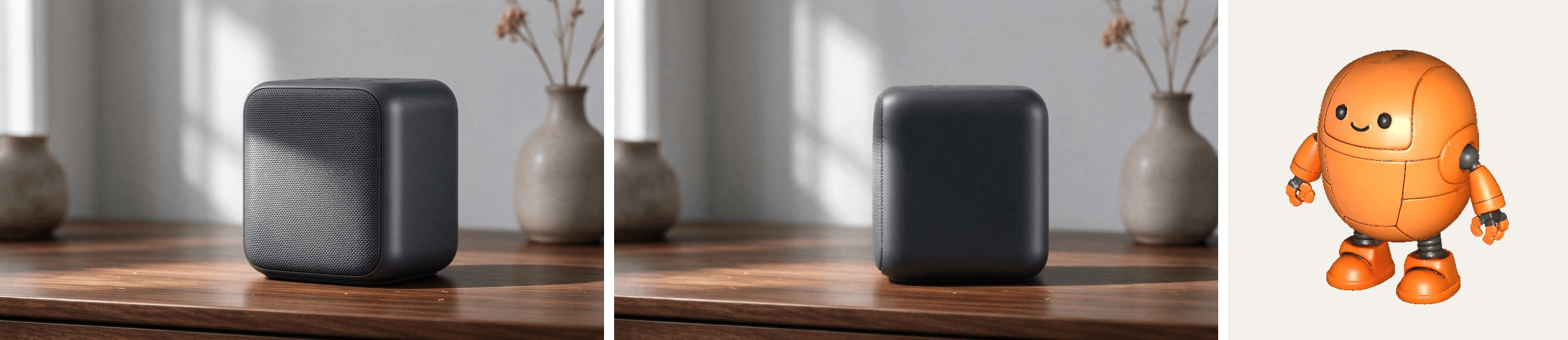
The plugin is one MCP server plus three skills. The server is the part that talks to Atlas. It searches the live catalog, uploads your source files, submits the job and checks on it until the file is ready.
The skills are the part that talks to you. One explains how Atlas works when you want to build it into your own project, one plans Seedance videos shot by shot, and one rewrites a loose idea into a prompt tuned for whichever video model you pick. Install Atlas Cloud from the Plugins Directory and the whole bundle arrives together.
| What you can make | How you ask for it |
|---|---|
| Video | A clip from text, from a still, or from a reference image, with Seedance, Veo, Kling, MiniMax or Wan. Video editing, avatar and motion-control workflows are there where the chosen model supports them. |
| Images | A new image from a sentence, or an edit of a photo you attach, with GPT Image, Nano Banana, Seedream, FLUX or Qwen. |
| Audio | Speech or music from Suno, ElevenLabs, MiniMax or Seed Audio, and a transcript from an audio file you upload. |
| 3D | A textured asset from a sentence or a reference image, through Hunyuan or Tripo. |
Which workflow a given model supports depends on that model, so the catalog answer is the one to trust over any list, including this one.
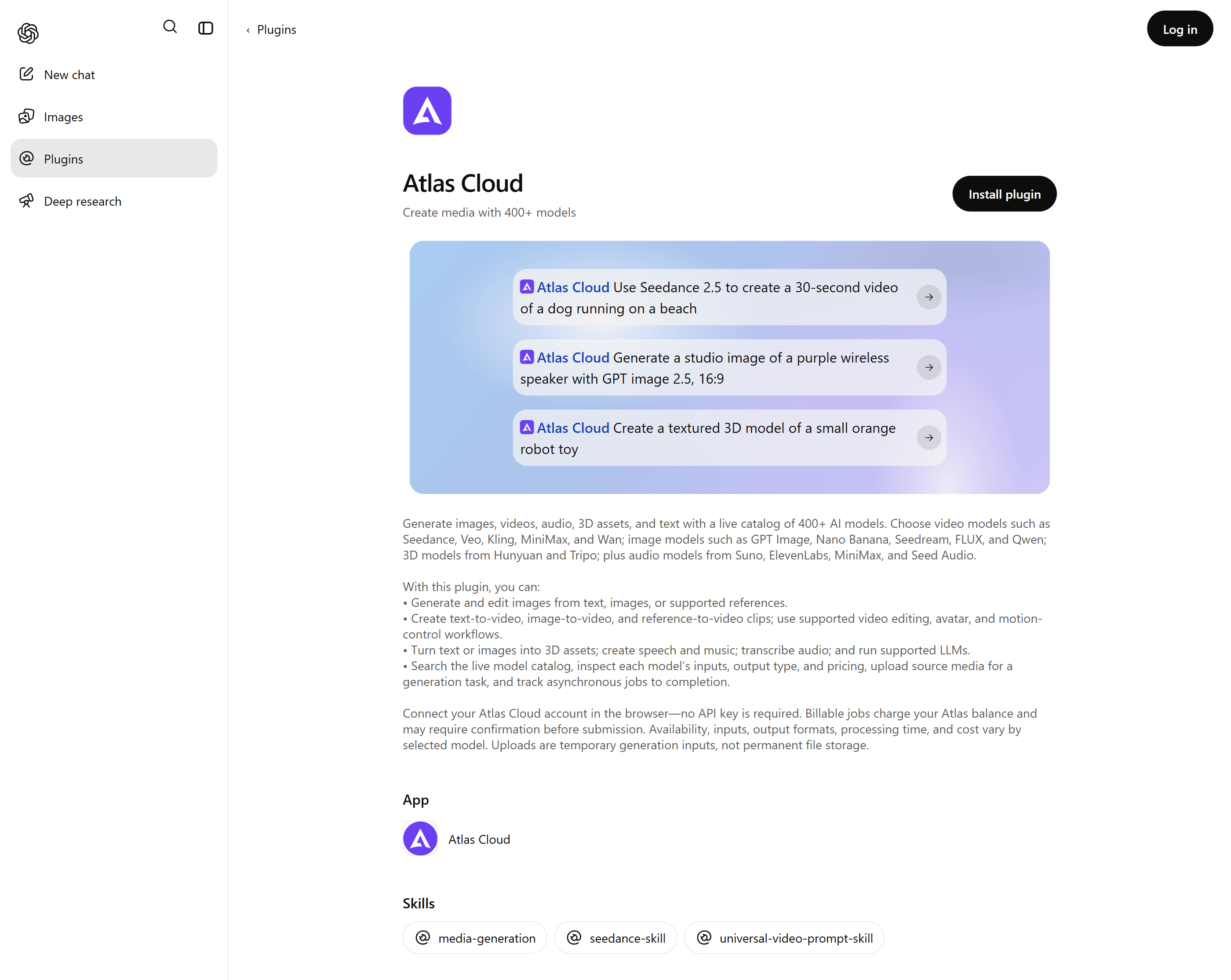
How to Install the Atlas Cloud Plugin
There are two routes, and both connect to the same Atlas account. Pick the one that matches where you work.
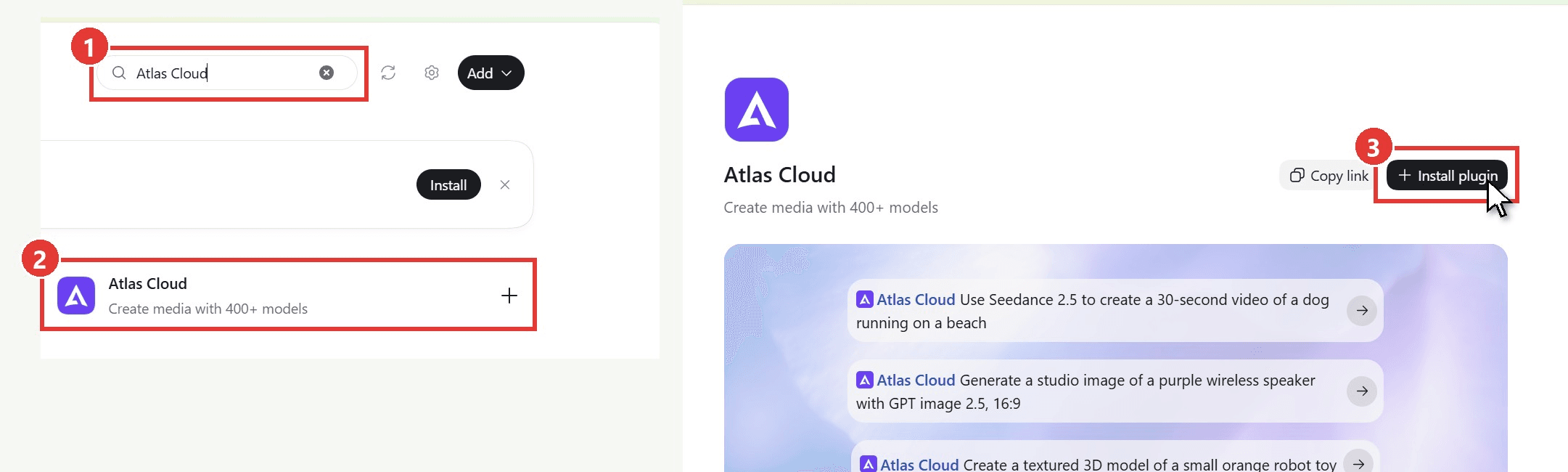
Method 1: From the Plugins Directory in the ChatGPT desktop app
- Open Plugins from the left rail of the ChatGPT desktop app and search for Atlas Cloud.
- Open the listing that reads "Create media with 400+ models".
- Click Install plugin.
A browser tab opens on the Atlas sign-in page as soon as the install starts. Sign in with your Atlas account and approve the connection, and the app confirms that the plugin is installed. There is no API key to copy. Click Try now, or start a new chat and ask for an image or a clip.
Method 2: From the Codex CLI
If you live in the terminal, add the Atlas Cloud plugin repository as a marketplace source and install the plugin from it.
plaintext1codex plugin marketplace add AtlasCloudAI/atlas-cloud-plugin 2codex plugin add atlas-cloud@atlas-cloud 3codex mcp login atlas-cloud
The last command opens the browser for the Atlas sign-in. Approve it, then check the connection.
plaintext1codex mcp list
One line in that output should read atlas-cloud, point at mcp.atlascloud.ai, and show enabled with OAuth as the auth method. If it does, the connection is ready.

Whichever route you take, every job bills your own Atlas balance. Ask the plugin for the balance at any point, or open the billing page of the console to see each charge.
Pick the Model for Each Job in the Same ChatGPT Plugin
The plugin sits on top of the whole Atlas catalog, so the model is your call. Use it as a ChatGPT plugin for image generation with Seedream or GPT Image, then name Kling or Seedance 2.5 when you want a clip. Say nothing about the model and ChatGPT picks one that fits the request, which is fine for a first pass and less fine when a budget is involved.
The better habit is to ask before you spend. We named three candidates, Seedance 2.5, Kling 3.0 and Wan 3.0, and asked what each accepts and what it costs. The plugin answered with a short table read from the live catalog at that moment. Pick one, and the next request goes to it.
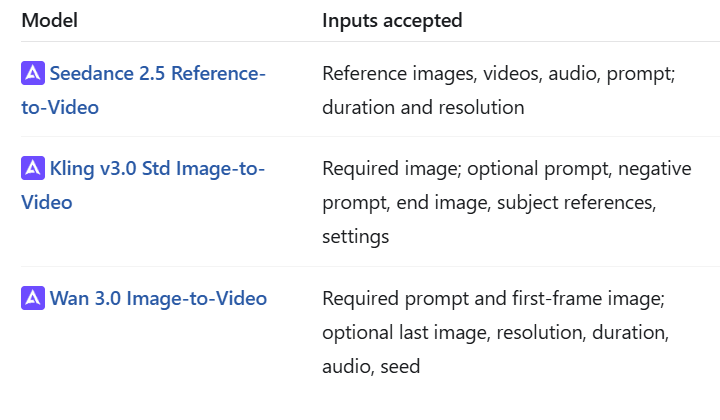
Every video example in this article ran on Seedance 2.5. It accepts a reference image for the product, it is sold on Atlas in text, image and reference modes, and the plugin ships a skill written for it. The other video models stay one word away.
How to Generate AI Video in ChatGPT From One Product Photo
The whole process fits in one thread. Here is the run behind the hero image, step by step. No product photo yet? Ours came from this one message to the plugin:
plaintext1Generate one image with Seedream 5.0 Flash text-to-image, 16:9: a studio product photo of a matte charcoal wireless speaker standing on a walnut desk, soft window light from the left, shallow depth of field, no text. Show me the image and tell me what it cost.
- Point it at the photo. Attach a product shot, or give the plugin its path on your machine, and say what you want. The plugin asks Atlas for an upload link, sends the file through it, and uses the returned address as the reference.
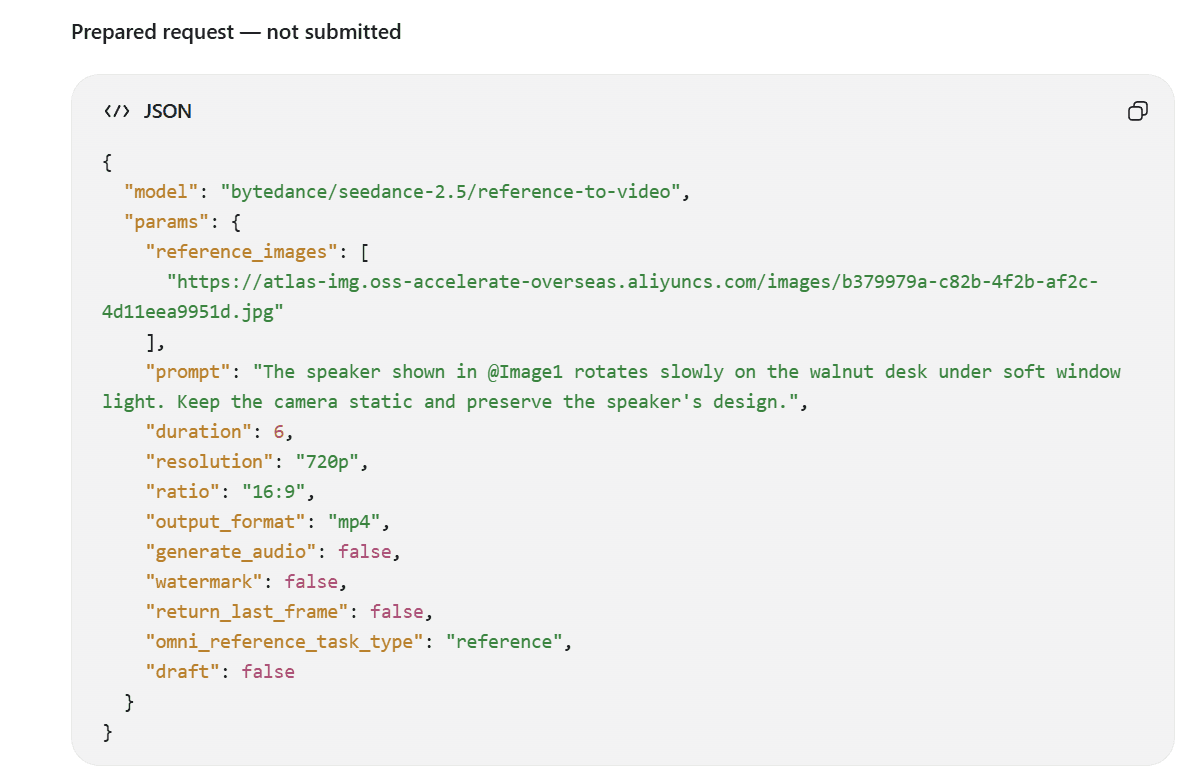
- Name the model and the length. Put the model, duration, aspect ratio and resolution in the same message as the scene. Our full request sits under these steps, ready to paste. The same job runs on the Seedance 2.5 reference-to-video page if you prefer a form to a chat.
- Check the request before it goes out. Ask the plugin to show what it is about to send and to hold until you confirm. Ours came back with the full request body: the model ID, the uploaded reference, a prompt that points at that image, and every setting from duration to watermark. Billable jobs can also pause for confirmation on their own.
- Let it poll. Video jobs are asynchronous. The plugin submits, checks progress on its own, and reports when the result is ready, so there is nothing to refresh.
- Take the file. The finished clip plays inline in the chat. We also asked for the MP4 in a local folder, and the plugin saved it there.
Here is the request behind steps 2 and 3. Attach your own photo and swap the scene line:
plaintext1Use the attached product photo as the reference image for a Seedance 2.5 reference-to-video job: 6 seconds, 16:9, 720p, the speaker rotating slowly on the walnut desk under soft window light, camera static. Upload the file through Atlas, then show me the exact parameters and the price and wait for my confirmation before submitting.
Turn a vague idea into a 30-second shot with the Seedance skill
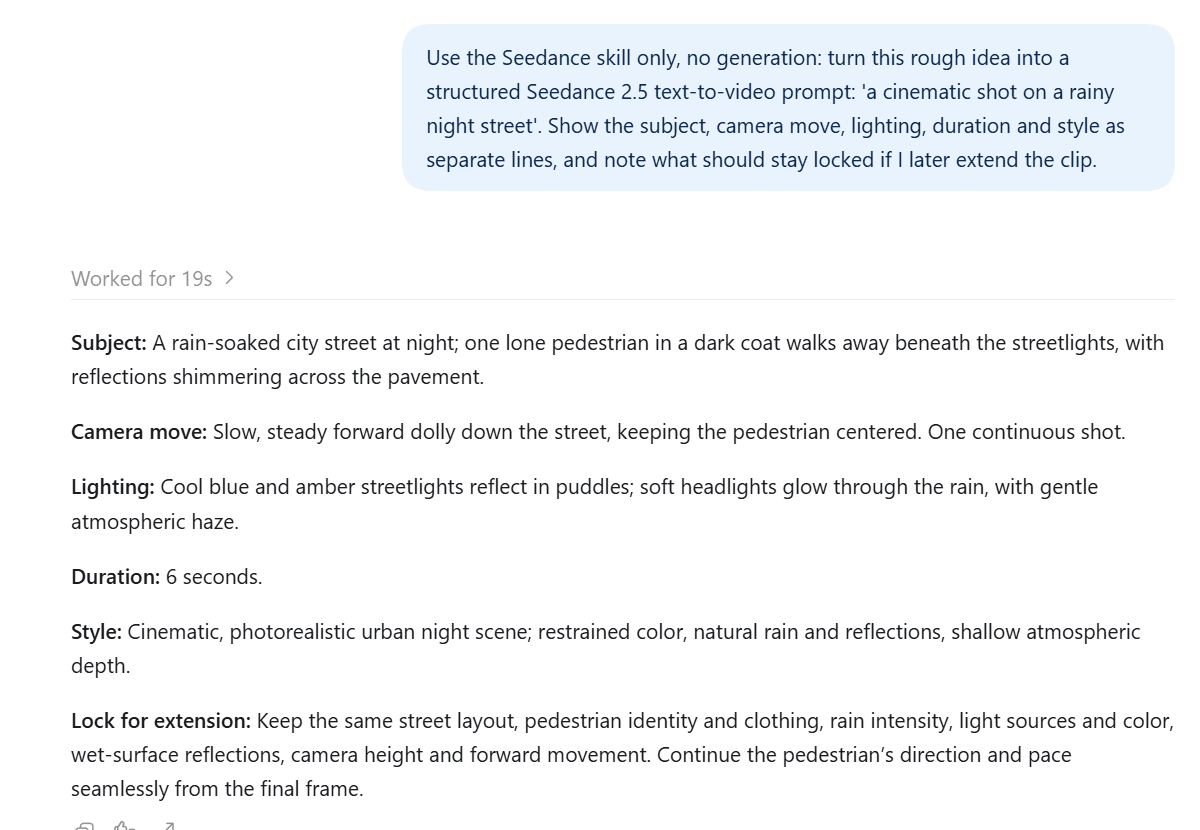
Type "a woman with a clear umbrella on a rainy night street, cinematic" and the Seedance skill does not pass that line straight to the model. It drafts a structured prompt first: the subject and what she does, the camera move, where the light comes from, how long the shot runs, and what has to stay fixed if you later extend the clip. The structure comes from the skill's own reference notes on cinematography, multi-reference setups and long-video chaining.
To get that draft, send the rough idea with a short instruction:
plaintext1Use the Atlas Cloud plugin's Seedance skill only, no generation yet: turn this rough idea into a structured Seedance 2.5 text-to-video prompt for a 30-second clip: 'a woman with a clear umbrella on a rainy night street, cinematic'. Show the subject, camera move, lighting, duration and style as separate lines, and note what should stay locked if I later extend the clip. Keep the light realistic: streetlights, shop windows and car headlights, no neon gradients.
This is what it returned, word for word. Edit any line before you generate:
plaintext1Subject: A woman in a dark, rain-soaked coat walks alone along a rainy city street at night, holding a clear umbrella. Reflections ripple across the wet pavement. 2Camera move: One continuous, slow tracking shot moving beside her at walking pace. Keep her in a medium-wide profile view as she walks; no cuts or sudden camera moves. 3Lighting: Realistic pools of warm streetlight, soft light from shop windows, and passing car headlights reflected on the wet street. Keep natural contrast and believable skin tones. No neon gradients or stylized colored glow. 4Duration: 30 seconds. 5Style: Cinematic, grounded live-action realism; restrained color, subtle film texture, natural rain and reflections. 6Extension locks: If extending later, continue from the final frame with the same woman, coat, clear umbrella, walking direction and pace, street layout, camera position and composition, rain, and realistic lighting. Keep her as one continuous subject; don't introduce a cut or make objects appear suddenly.
Then we sent that draft to Seedance 2.5 text-to-video in the same thread, again asking to see the request before it went out:
plaintext1Generate that prompt with Seedance 2.5 text-to-video: 30 seconds, 16:9, 720p, no audio. Show me the exact request and the price, and wait for my confirmation before submitting.
The clip came back as one 30-second tracking shot with no cuts. The woman, her coat and the clear umbrella stay the same from the first frame to the last, the camera holds her in profile at walking pace, and the shop windows keep their warm glow on the wet street the whole way. Here is the full clip as it came back.
Who This ChatGPT AI Video Generation Plugin Is For
The plugin fits anyone who wants finished media without leaving ChatGPT or Codex. If you would rather build Atlas into your own product, the bundled Media Generation skill walks through the API side instead. Here is where each kind of user usually starts, and what comes back.
| Who you are | What you send | What comes back |
|---|---|---|
| Ecommerce sellers and brand teams | One product photo and a line about the shot | A reference-to-video clip that keeps the product in frame, like the speaker clip above |
| Social media managers and content creators | A sentence about a cover or poster, or a one-line video idea | An image you can revise in the next message, or a shot-level prompt and the finished clip |
| Developers and indie game makers | A request for an illustration, a background or a 3D prop while the project is open in Codex | The asset saved into the project folder, with props as textured 3D files from Hunyuan or Tripo |
| Video and podcast producers | A script, a mood or an audio file | A voiceover, a music bed or a transcript |
| Anyone unsure which model to pick | A description of the task | Candidate models with their inputs, abilities and prices, then the job on the one you choose |
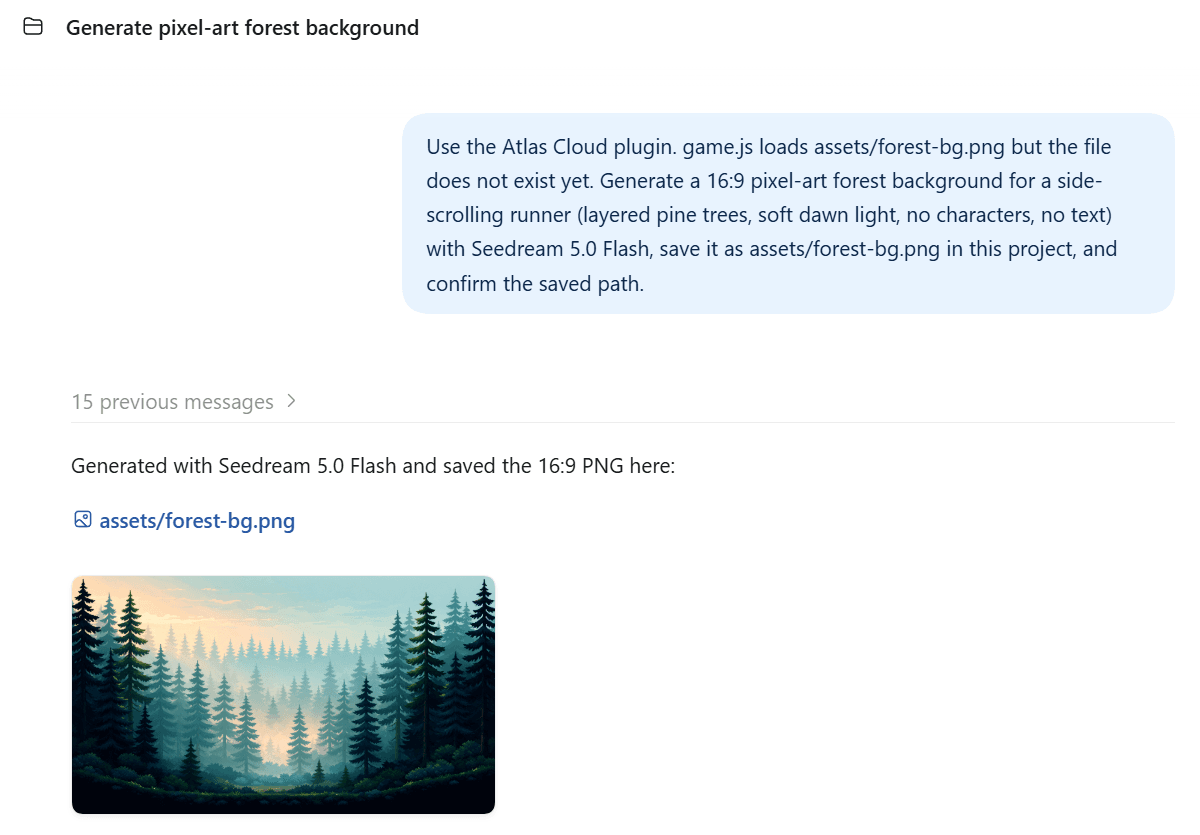
For developers, the Codex side deserves one more line. When a chat runs inside a project folder, the plugin can write straight into that folder. Our test game referenced a background image that did not exist yet, so we asked for one, and Seedream 5.0 Flash's pixel-art forest landed at the exact path the code was loading.
If that workflow is your main interest, the earlier guide on turning Markdown into a slide deck with a Codex skill shows the same pattern with a different output.
FAQ
Do I need an Atlas API key to use the plugin?
No. The plugin signs in through the browser with your Atlas account, and that one sign-in covers every later request. An API key only enters the picture when you want to call Atlas from your own code, which is what the bundled Media Generation skill walks you through. If you would rather run a self-hosted connection with your own key, the Atlas MCP server docs cover that route.
Do I need a paid ChatGPT plan to use it?
Every test in this article ran on a free ChatGPT account in the desktop app. OpenAI makes the plugin directory available across ChatGPT plans, while admins of Business and Enterprise workspaces decide which plugins their members may install. The generation itself is billed by Atlas, so your ChatGPT plan does not change what a clip costs.
How much does a 30-second Seedance 2.5 clip cost through the plugin?
Resolution sets the price. As of October 2026, Atlas quotes a 30-second Seedance 2.5 clip at about $4.20 at 480p, $9.03 at 720p and $17.77 at 1080p. Those figures include the 20% discount the model page currently shows, with no end date listed. Our 30-second 720p rainy street run settled at exactly $9.03, and the six-second speaker clip at $1.82, so ask for the price at your chosen resolution before you confirm a long render.
Can I upload my own product image or video as a reference?
Yes. Attach the file in the chat, or give the plugin its path on your machine, and it requests a temporary upload link, sends the file, and passes the resulting address to the model. Uploading is free, files up to 32 MB go through by default, and uploads are cleaned up after the job, so keep your own copy of the original.
Does the plugin work in the ChatGPT web app or on mobile?
We tested it in the ChatGPT desktop app. The same listing opens on chatgpt.com with an Install plugin button, and OpenAI's plugin documentation restricts only plugins marked desktop only to the desktop app. The same page says plugins are not available in the IDE extension, and project folders like our game demo need the desktop app.
Conclusion
Other plugins in the directory already let ChatGPT make a video, usually against a credit pack bought from one vendor. Atlas Cloud puts a 400+ model catalog behind the same chat, from Seedance 2.5 clips to Hunyuan 3D props. You can ask what a job costs before you choose, and the charge lands on a pay-as-you-go balance you control.
If you spend your day in ChatGPT or Codex and keep leaving it to make media, install Atlas Cloud from the Plugins Directory, sign in once, and send the request you were about to take elsewhere. That is the whole pitch for a ChatGPT AI video generation plugin, and the first clip is the only demo you need.





