
You open WorkBuddy's model menu to run a long job on DeepSeek V4 Pro, scroll through 20 entries, and it isn't there. A WorkBuddy API key fixes that: the desktop app lets you add your own provider's models. We set one up with an Atlas Cloud key, ran a real task and logged the errors we triggered.
Key Takeaways
- WorkBuddy's own access keys are for the CodeBuddy CLI;theapp's key field takes your model provider's key.
- Custom models live in the desktop app under Settings, Models;theweb app's menu has no entry for them.
- Any OpenAI-compatible endpoint works, so one Atlas Cloud key adds DeepSeek V4 Pro, which the built-in menu lacks.
- Custom models carried no Pro Only tag on our Free account and used no WorkBuddy credits.
- Keep Tool Calling on and use the exact model ID; Test Connection doesn't prove a model can run tools.
Does WorkBuddy Have Its Own API Key?
Yes, but probably not the one you mean. The workbuddy.ai account page has an API management tab whose access keys, it says, give the CodeBuddy CLI secure access.
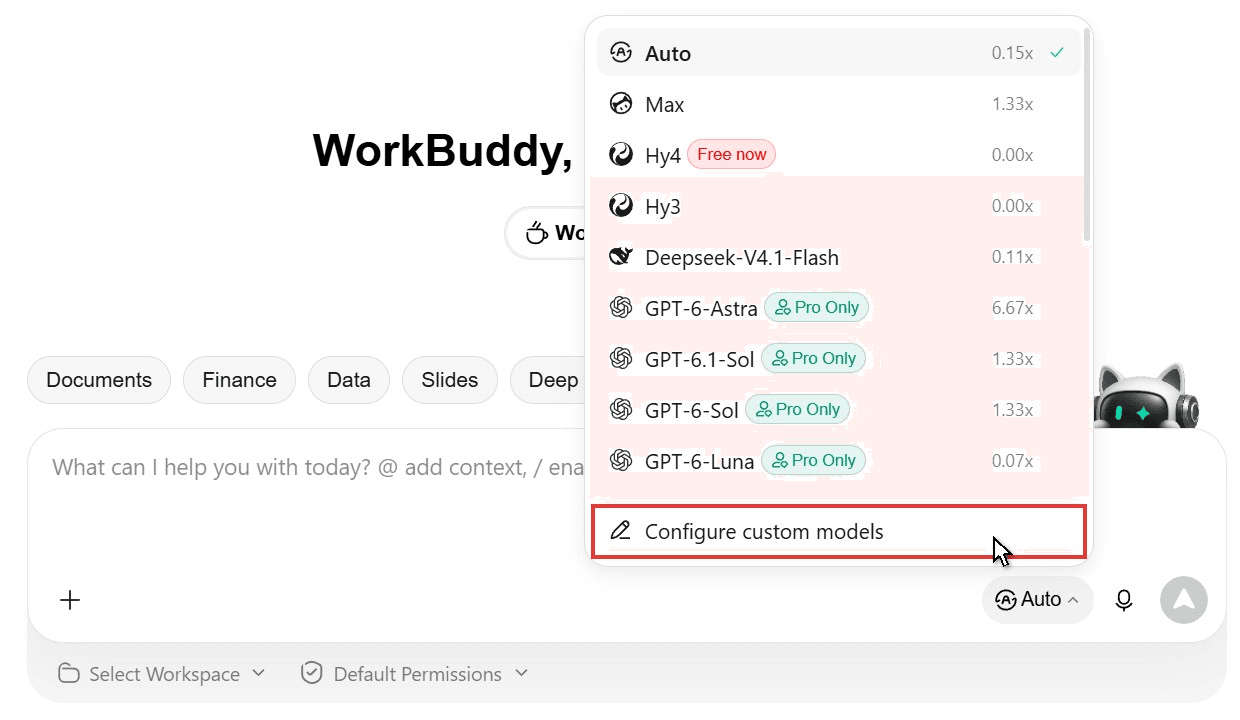
Inside the app, built-in models run on credits at the rate printed beside each, from 0x for Hy4 to 6.67x for GPT-6-Astra, and 11 of the 20 entries say Pro Only on the Free plan. Our WorkBuddy AI review covers the plans.
The app's own API key field is for custom models, linked at the bottom of the menu, and it's how you add DeepSeek V4 Pro.
Add an Atlas Cloud API Key as a WorkBuddy Custom Model
WorkBuddy accepts any provider that speaks the OpenAI-compatible Chat Completions format. Atlas Cloud puts 80+ language models behind one key, and DeepSeek V4 Pro, Kimi K3, Kimi K3.1 Pro, GPT-6 and Tencent's Hunyuan all answer in that format, billed to your Atlas balance rather than WorkBuddy credits.
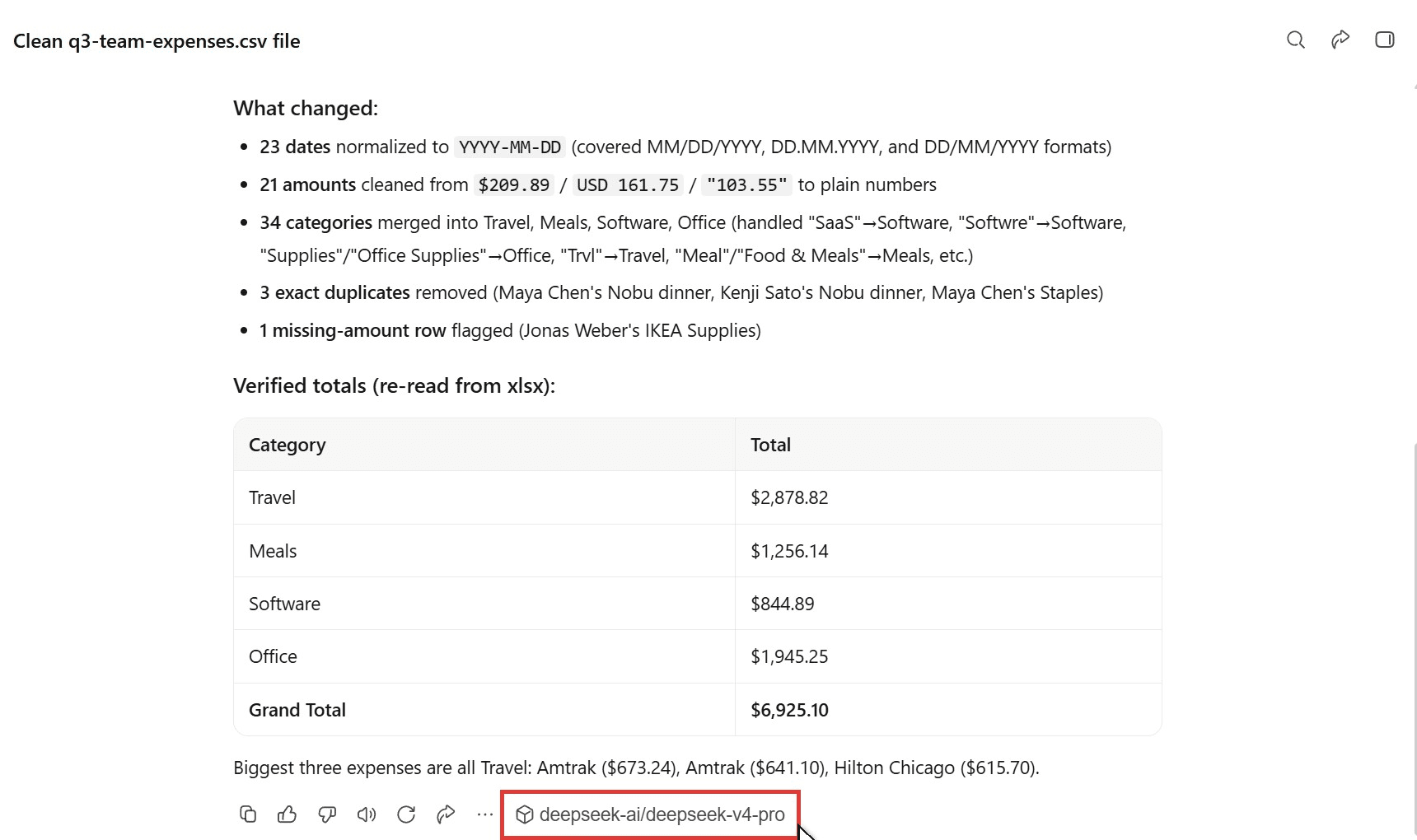
We gave DeepSeek V4 Pro a messy 47-row expense export with three date formats and 16 spellings of four categories. In about three minutes it wrote and ran a Python script, saved a clean spreadsheet and summary, and re-read the file to check its totals.
Method 1: Fill In the Desktop Model Form
We used WorkBuddy 5.9.4 on Windows; the web app has no custom model entry.
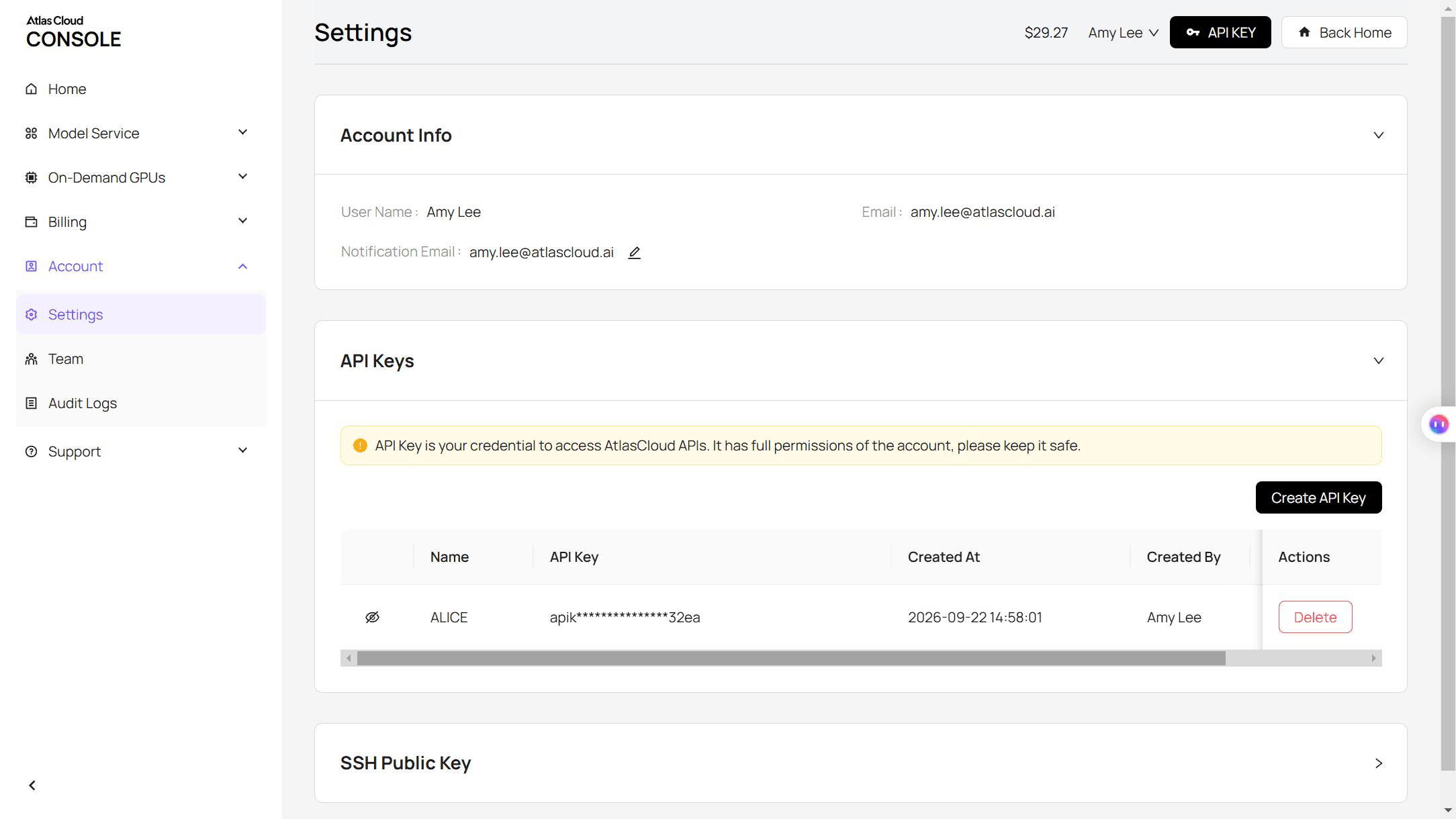
Step 1: Create an Atlas Cloud API key. In the Atlas console, open API Keys, click Create API Key and copy it.
Step 2: Open the form. In the model menu, choose Configure custom models, then click Add Model.
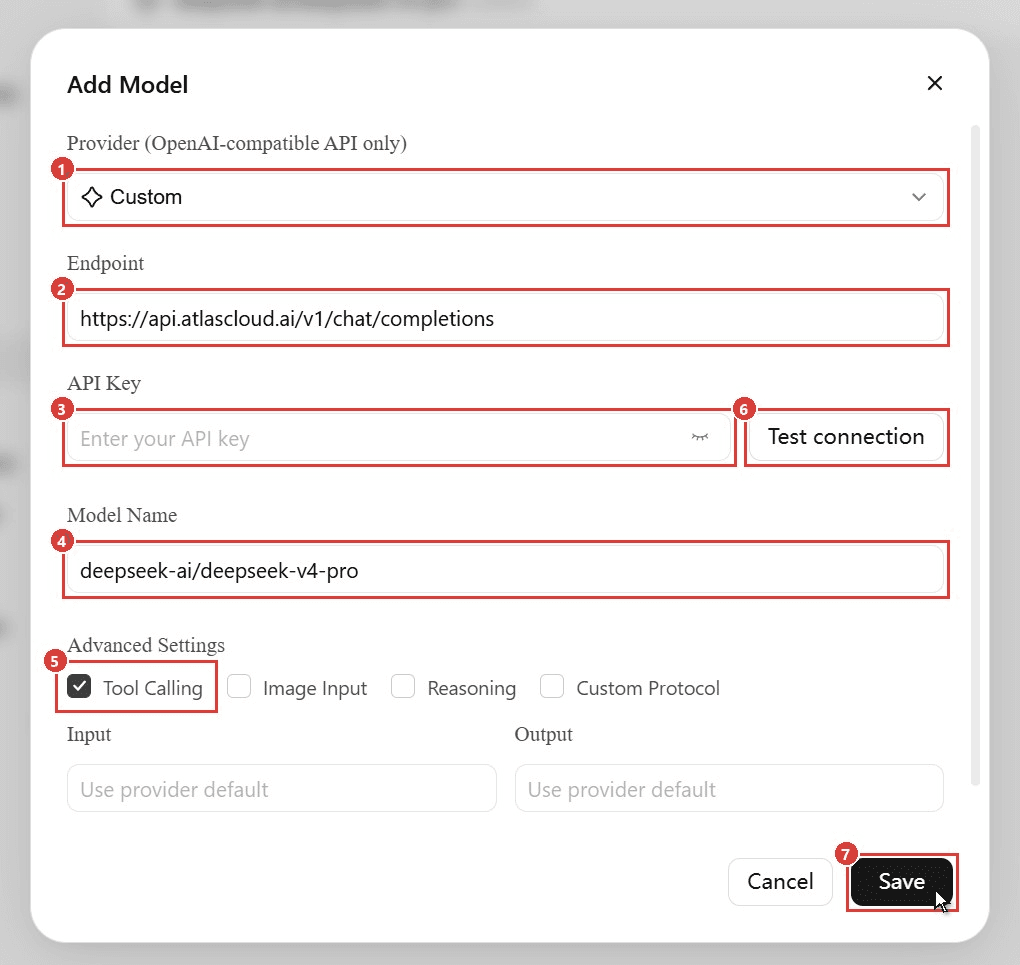
Step 3: Fill in the fields. Set Provider to Custom (1), the Endpoint to https://api.atlascloud.ai/v1/chat/completions (2), and paste your key (3). For Model Name (4), copy the ID from the DeepSeek V4 Pro model page: deepseek-ai/deepseek-v4-pro. Tool Calling (5) is on by default; leave Image Input off, since V4 Pro reads text only.
Step 4: Test, then save. Click Test connection (6). Ours returned "Connection succeeded", so we clicked Save (7).
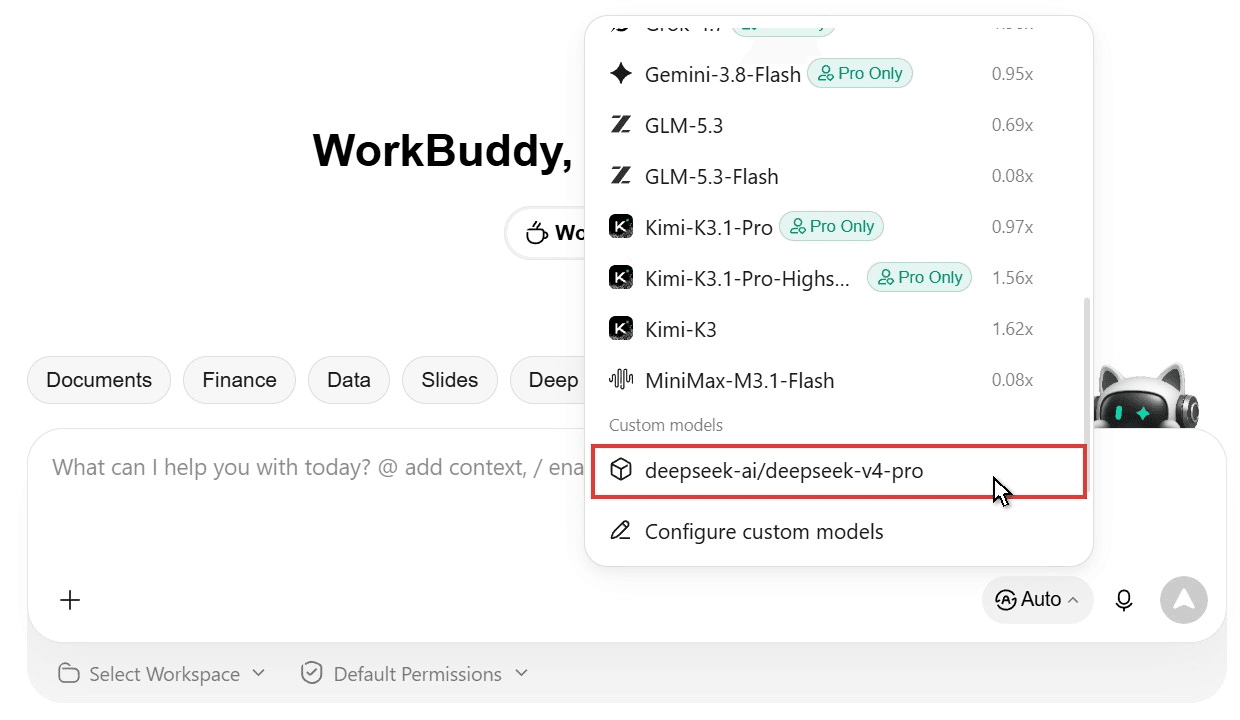
Step 5: Pick it for the task. The model now sits under Custom models at the bottom of the menu, with no credit rate. Select it by hand; Auto doesn't promise to route to it.
Method 2: Test the Key With the Atlas API First
Test Connection only proves the API answers. One request tells you whether the model can also call tools.
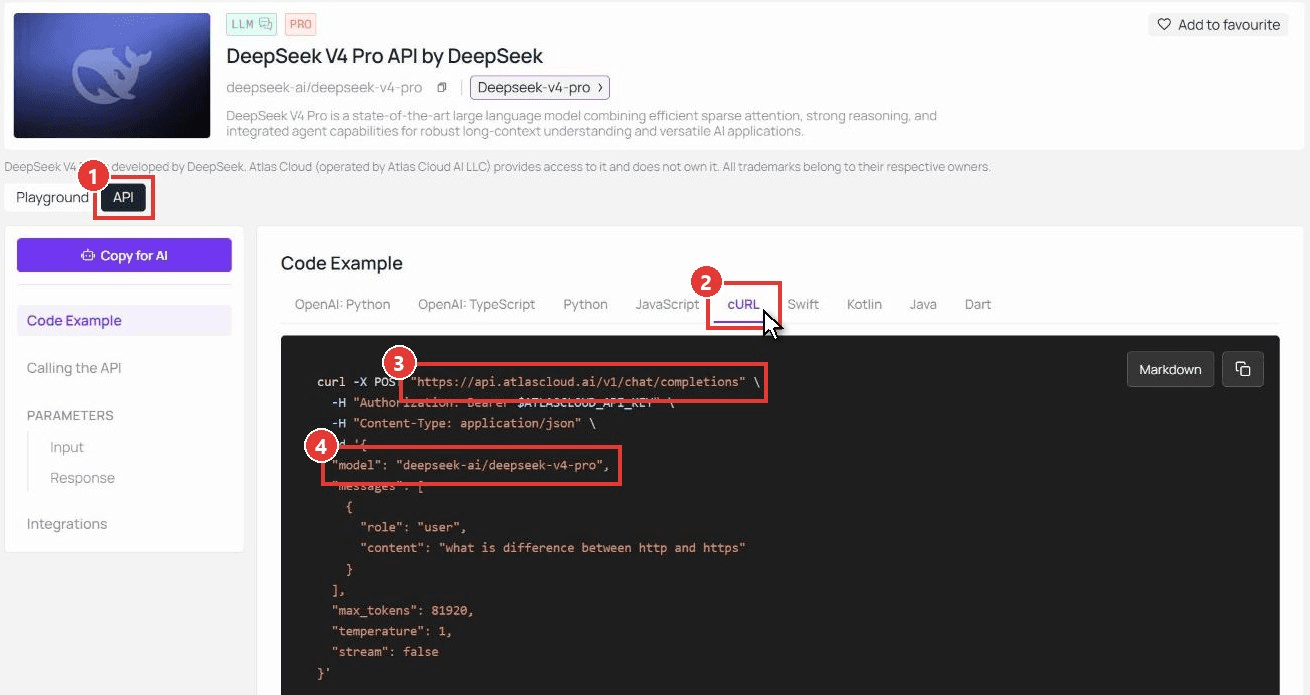
Step 1: Check the request format. The Atlas API docs cover the endpoint. On a model page, open the API tab (1) and pick cURL (2) to see the endpoint (3) and model ID (4).
Step 2: Send a request with a tool attached. Set ATLASCLOUD_API_KEY first.
plaintext1curl https://api.atlascloud.ai/v1/chat/completions \ 2 -H "Authorization: Bearer $ATLASCLOUD_API_KEY" \ 3 -H "Content-Type: application/json" \ 4 -d '{ 5 "model": "deepseek-ai/deepseek-v4-pro", 6 "messages": [{"role": "user", "content": "What is the weather in Paris? Use the tool."}], 7 "tools": [{ 8 "type": "function", 9 "function": { 10 "name": "get_weather", 11 "description": "Get the weather for a city", 12 "parameters": { 13 "type": "object", 14 "properties": {"city": {"type": "string"}}, 15 "required": ["city"] 16 } 17 } 18 }] 19 }'
Step 3: Read the finish reason. Chat replies arrive in one response, so there's nothing to poll. A "finish_reason" of "tool_calls" means the model can drive WorkBuddy's tools; all five models in the next table passed on November 4, 2026. Swap the model string to test others, or reuse the values from our custom API cheatsheet in other agents.
Which WorkBuddy Models to Run With Your Key: DeepSeek V4, Kimi K3 and More
A key pays off most on models the menu lacks or locks to Pro. All five below take 1M tokens of context. Tick Image Input only where the Input column lists images, since, as WorkBuddy's model configuration guide puts it, "Image input is not the same as image generation."
| Atlas model ID | In WorkBuddy's built-in menu | Input |
|---|---|---|
| deepseek-ai/deepseek-v4-pro | No | Text |
| moonshotai/kimi-k3.1-pro | Pro Only, at 0.97x | Text, image, video |
| deepseek-ai/deepseek-v4.1-flash | Yes, at 0.11x | Text, image |
| moonshotai/kimi-k3 | Yes, at 1.62x | Text, image, video |
| tencent/hy4-preview | Yes as Hy4, at 0x | Text |
WorkBuddy Token Plan, Coding Plan and Free Model Options
The Provider dropdown has four groups: Token Plan, Coding Plan, Custom API presets (DeepSeek, Google Gemini, OpenRouter and others) and plain Custom.
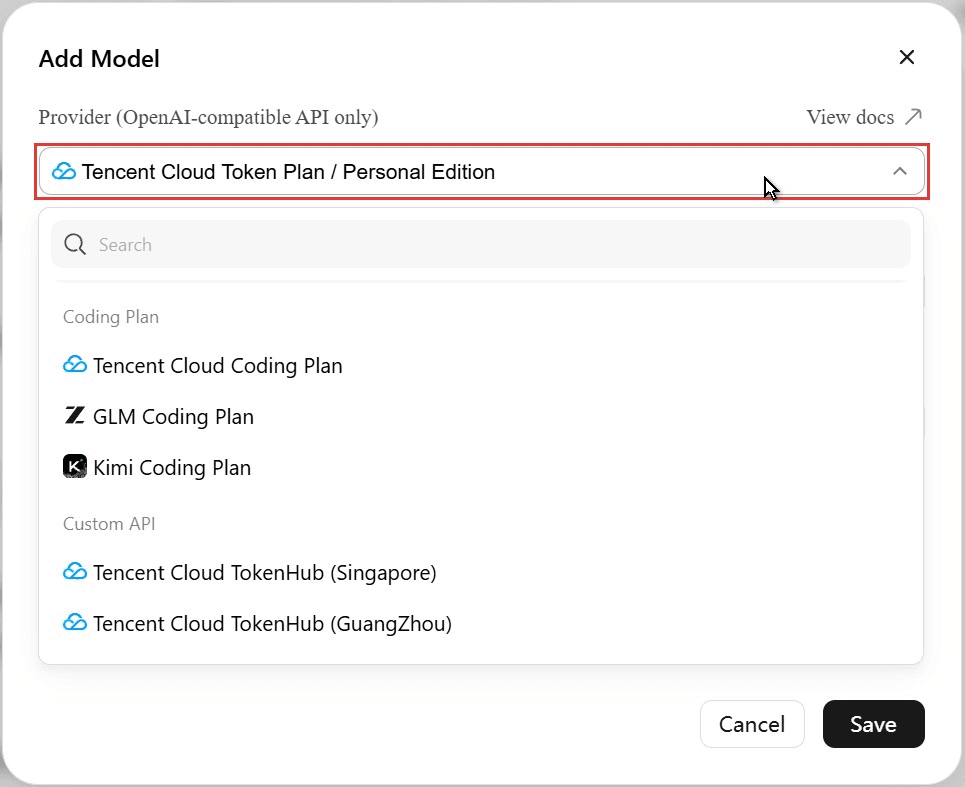
Token Plan. Five options cover Tencent Cloud's personal and enterprise token plans. Paste that plan's key; a WorkBuddy login doesn't unlock them.
Coding Plan. Presets cover the Tencent Cloud, GLM and Kimi coding subscriptions.
Free models. Hy4 and Hy3 were listed at 0x credits on our Free account in November 2026, and WorkBuddy's guide covers keyless local models through Ollama. One video's "free GPT-5.6 key" comes from a third-party free tier that may carry daily limits.
Fix WorkBuddy Custom Model Errors After Test Connection
We broke the form on purpose. The first three rows are what WorkBuddy 5.9.4 showed us; the last two are issues its docs warn about.
| What you see | Likely cause | Fix |
|---|---|---|
| "Connection failed. The endpoint URL or model name is incorrect." | Custom Protocol is ticked, so the address is used exactly as typed | Untick it; then even https://api.atlascloud.ai/v1 passes |
| "The model service rejected the test request." | A display name in Model Name | Paste deepseek-ai/deepseek-v4-pro |
| Test connection spins 20 seconds or more | A slow reply to the test | Wait; ours passed |
| Chats still run on Auto | Saving doesn't switch models | Pick it under Custom models |
| An attached image isn't read | Image Input off, or a text-only model | Tick Image Input on a model that reads images |
Frequently Asked Questions
Does a custom model use WorkBuddy credits?
Not in our test: the balance read 196.06 credits before and after two tasks on the custom entry. The provider bills the tokens instead. On Atlas Cloud, DeepSeek V4 Pro costs $1.68 per million input tokens and $3.38 per million output tokens as of November 2026.
Where does WorkBuddy store my API key?
In %USERPROFILE%\.workbuddy-ai\models.json on Windows, or ~/.workbuddy-ai/models.json per the docs, with the key in plain text. Keep that file out of shared folders and repositories.
Can I use a WorkBuddy API key in other AI agents?
WorkBuddy's own access keys are issued for the CodeBuddy CLI, and Tencent doesn't document the GitHub proxies that reroute them. Reuse your provider key instead, as in our OpenClaw custom API guide.
Conclusion
WorkBuddy's built-in menu is a cheap place to start, and the custom model form is the official way past it. Any OpenAI-compatible model can go in, but only those that return tool calls will do agent work.
So test first, then add. One WorkBuddy API key from a multi-model provider and one curl check are enough to put DeepSeek V4 Pro, or any other model on that key, in your menu.


