
AI coding tools still struggle with understanding large repositories.
CodeWiki helps developers analyze GitHub projects and generate structured documentation, making unfamiliar codebases easier to explore. Instead of asking an AI model to guess how a repository works from scattered files, CodeWiki builds a structured understanding of the project.
In this tutorial, we will use CodeWiki with Atlas Cloud to turn a GitHub repository into an AI-generated Wiki.
How CodeWiki Analyzes a GitHub Repository and Generates Documentation
CodeWiki uses hierarchical repository analysis
Instead of treating a repository as one large block of text, CodeWiki analyzes it through different levels of structure.
The workflow can be summarized as:
plaintext1Repository 2 ↓ 3Project Structure Analysis 4 ↓ 5Module Understanding 6 ↓ 7Component Analysis 8 ↓ 9Documentation Generation
This approach follows a workflow similar to how developers normally learn unfamiliar systems:
- Understand the overall architecture
- Identify major modules
- Explore important components
- Read detailed implementation
CodeWiki applies this idea through AI-assisted repository analysis.
CodeWiki generates more than code comments
Traditional documentation often focuses on individual functions or classes.
CodeWiki focuses on repository-level documentation.
The generated materials can include:
- project overview
- module explanations
- architecture information
- visual documentation
The goal is not only explaining what each file does.
It is creating a clearer map of how the project fits together.
Step-by-Step: Generate an AI Wiki for a GitHub Project with CodeWiki
The workflow has four main steps:
- Install CodeWiki
- Configure an LLM provider
- Run repository analysis
- Explore generated documentation
Step 1: Install CodeWiki
Install CodeWiki directly from GitHub:
plaintext1pip install git+https://github.com/FSoft-AI4Code/CodeWiki.git
After installation, the codewiki command becomes available.
You can verify that the CLI is available:
plaintext1codewiki --version
If you see cannot import name 'OpenAIModel', try this:
plaintext1python -m pip uninstall pydantic-ai pydantic-ai-slim -y 2python -m pip install "pydantic-ai>=1.0.6,<2"
Step 2: Get an Atlas Cloud API key
Go to the Atlas Cloud console, open the API Keys page, click Create API Key, then copy and store the key securely. Atlas Cloud notes that the key is only shown once, so save it somewhere safe when it is created.
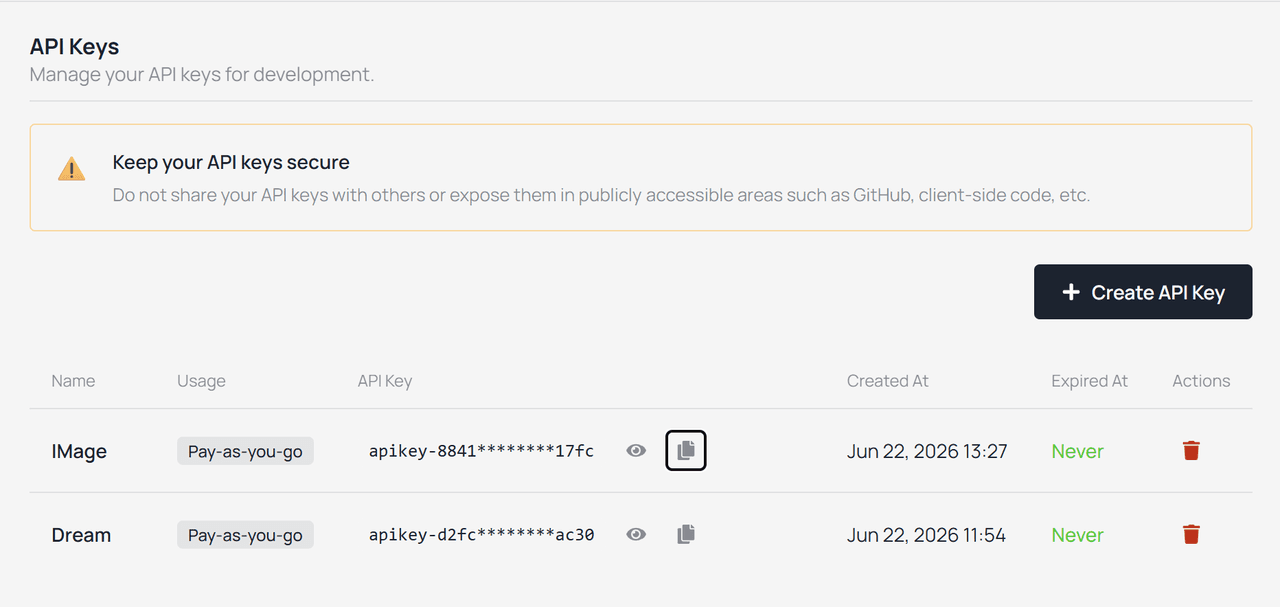
Keep the key private. Do not paste it into a public GitHub repo, public article draft, or screenshot.
The API key is passed as a Bearer token, and Atlas Cloud also recommends storing it in an environment variable rather than hard-coding it in projects.
On macOS or Linux:
plaintext1export ATLASCLOUD_API_KEY="your-atlas-cloud-api-key"
On Windows PowerShell:
plaintext1$env:ATLASCLOUD_API_KEY="your-atlas-cloud-api-key"
For long-term use on Windows, add ATLASCLOUD_API_KEY in System Properties → Environment Variables.
Step 3: Configure CodeWiki to use Atlas Cloud
CodeWiki already includes a dedicated atlas-cloud provider. That means you do not need to manually configure it as a generic OpenAI-compatible endpoint.
Run:
plaintext1# Atlas Cloud — base URL auto-set to https://api.atlascloud.ai/v1; 2# API key read from $ATLASCLOUD_API_KEY when --api-key is omitted. 3codewiki config set \ 4 --provider atlas-cloud \ 5 --main-model anthropic/claude-sonnet-4.8 \ 6 --cluster-model anthropic/claude-sonnet-4.8 \ 7 --fallback-model zai-org/GLM-5.2
In this mode, CodeWiki automatically uses Atlas Cloud’s base URL, https://api.atlascloud.ai/v1. If --api-key is omitted, CodeWiki reads the key from the ATLASCLOUD_API_KEY environment variable.
The model IDs above come from CodeWiki’s own Atlas Cloud example. Atlas Cloud model pages also show that model IDs are passed directly in API requests, for example anthropic/claude-sonnet-4.8 and zai-org/GLM-5.2.
Check the saved configuration:
plaintext1codewiki config show 2codewiki config validate
codewiki config show lets you inspect the current configuration, while codewiki config validate checks whether the setup is valid. Both commands are listed in the CodeWiki configuration section.
Step 4: Generate documentation for a project
Navigate to the repository you want to document:
plaintext1cd /path/to/your/project
Then run:
plaintext1codewiki generate
By default, CodeWiki writes the generated documentation into ./docs/. The output includes files such as overview.md, module-level documentation, module_tree.json, metadata.json, and, when the HTML viewer is enabled, index.html.
To generate an HTML viewer that can be used with GitHub Pages:
plaintext1codewiki generate --github-pages --create-branch
CodeWiki’s README describes this as the GitHub Pages workflow and notes that the generated documentation will be placed under ./docs/.
Usage Example
You can click Live Demo to see interactive demo and examples
Why CodeWiki works well with Atlas Cloud for repository documentation
CodeWiki’s built-in atlas-cloud provider is useful because repository documentation is usually not a one-model job. The workflow can use a main model, a clustering model, and a fallback model, so a unified OpenAI-compatible provider reduces the friction of testing and switching model IDs during setup.
Atlas Cloud is a platform that gives unified access to 300+ models through one API, one endpoint, and one billing account; its LLM endpoint is OpenAI-compatible at /v1, which matches the kind of integration CodeWiki needs for chat-completion models.
For developers, the practical advantage is simple. Instead of registering separate accounts and rewriting provider-specific settings while testing documentation quality, you can keep the CodeWiki command stable and change the model names as needed.
Why Future AI Coding Agents Need Better Repository Context
AI coding tools are improving quickly.
But generating code is only one part of software engineering.
Before modifying an existing system, an AI agent needs context:
- What does each module do?
- How do components interact?
- Which design decisions should remain unchanged?
A possible workflow looks like this:
plaintext1Repository 2 ↓ 3Knowledge Layer 4 ↓ 5AI Agent 6 ↓ 7Code Changes
The missing layer is not another code generator.
It is a system that helps AI understand existing software.
Tools like CodeWiki represent one approach toward building this repository knowledge layer.
FAQs
How can AI understand a GitHub repository?
AI can understand a GitHub repository better when the codebase is analyzed structurally instead of only processing individual files.
Repository-level tools help organize information about modules, components, and project structure.
Can CodeWiki generate architecture diagrams?
Yes. The official README lists system architecture diagrams, data-flow visualizations, dependency graphs, and sequence diagrams as visual artifacts.
Where does CodeWiki save generated documentation?
By default, the generated documentation is saved in ./docs/. The documented output structure includes overview.md, module documentation files, module tree JSON files, metadata, and an optional index.html viewer.
Can CodeWiki publish docs to GitHub Pages?
Yes. CodeWiki supports GitHub Pages output with commands such as codewiki generate --github-pages --create-branch.
Which model should I use for CodeWiki?
Use a strong coding or long-context model for the main documentation pass, and keep a fallback model configured. CodeWiki’s configuration supports separate main, cluster, and fallback models, which is helpful because module clustering and long-form documentation are not always the same kind of model task.
Is CodeWiki output fully reliable?
No. Treat the output as generated documentation that needs engineering review. CodeWiki can generate structured docs and diagrams, but you still need to verify architecture claims, module boundaries, and data-flow descriptions against the source code.
How is CodeWiki different from asking ChatGPT to explain a repository?
A chat prompt is useful for ad hoc explanations, but CodeWiki is designed as a repeatable repository-level workflow. It analyzes the codebase, decomposes it into modules, generates structured documentation, and can produce visual artifacts and a browsable viewer.
Final takeaway
CodeWiki is useful because it turns repository documentation into an engineering workflow. Install it, configure the provider, run it on a real repository, inspect the generated overview and module docs, then publish the viewer only after review.
For developers, the biggest win is not that AI writes Markdown faster. The win is that a large codebase becomes easier to navigate: modules, dependencies, diagrams, and architecture notes are gathered in one place, and the workflow can be rerun as the project changes.