GPT Image 2 能以每張圖片 USD0.008 的價格生成可用的素材。當提示詞(Prompt)結構清晰時,該模型效果最佳。模糊的輸入只會產生庫存照片般的輸出,而精確、具體的輸入則能產出可直接使用的成品。
本指南包含 50 多個可供複製貼上的提示詞,依據模型最擅長的三大工作進行分類:產品攝影、UI 設計模型和行銷視覺效果。每個提示詞都已透過 Atlas Cloud 上的 GPT Image 2 API 進行過測試。
若要瀏覽由社群提供、並配備「一鍵試用」按鈕的提示詞,請參見 Atlas Cloud GPT Image 2 提示詞中心。
*最後更新:2026 年 5 月 4 日*
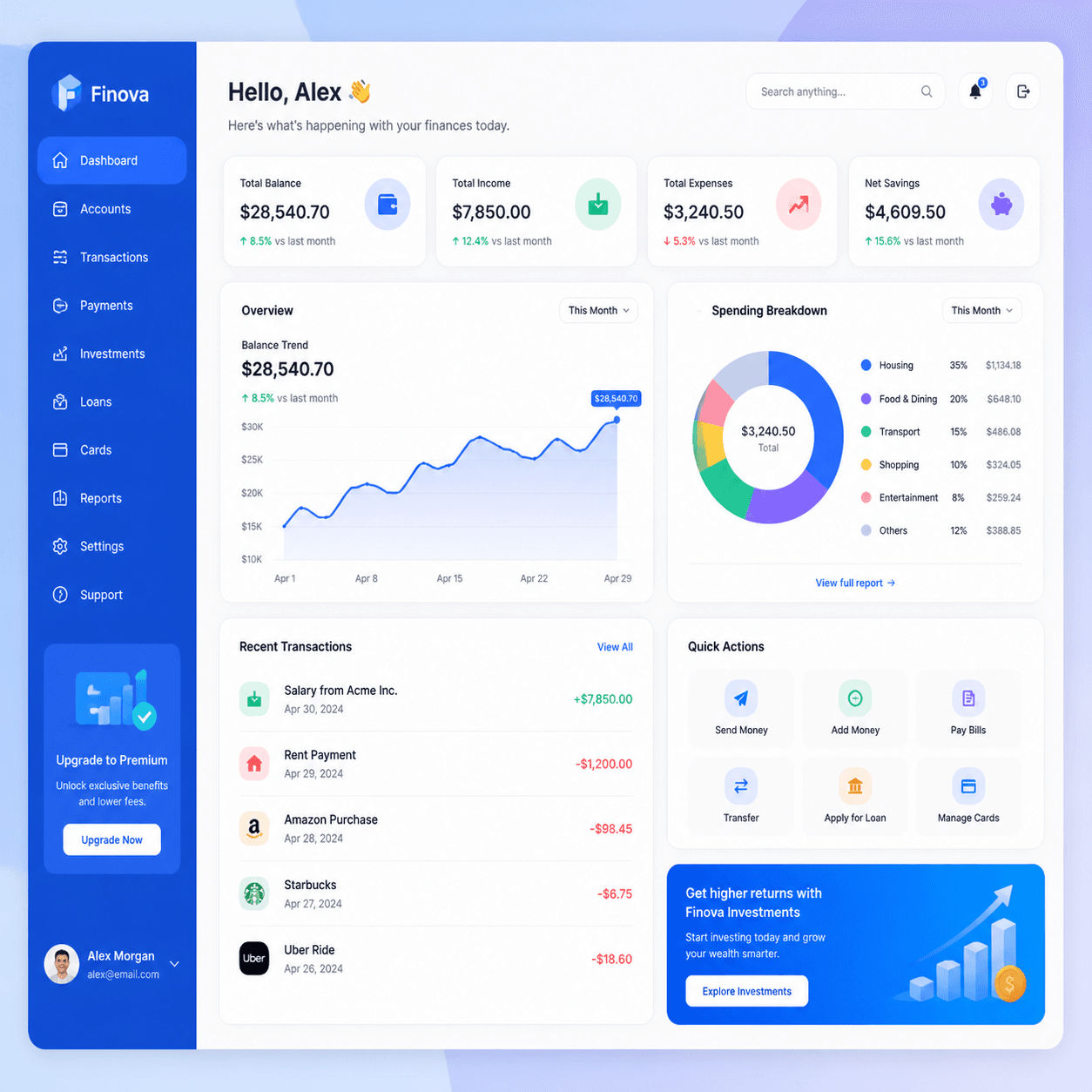
本指南提示詞產生的真實輸出範例:


GPT Image 2 提示詞公式
每個強大的 GPT Image 2 提示詞都包含以下五個部分:
plaintext1``` 2[主體] + [構圖] + [光影] + [色彩或氛圍] + [風格錨點] 3```
五個短句即可,單一句子也行。若場景包含多個元素,短段落效果更佳。
根據數百次測試總結出的關鍵原則:
- 以主體為先:「霧面黑色陶瓷咖啡杯」比「一張漂亮的咖啡杯圖片」更好。模型會優先解析名詞。
- 定義構圖:「特寫」、「廣角」、「俯拍(Flat lay)」、「四分之三視角」。一個詞就能改變整個框架。
- 定義光影:「柔和窗光」、「攝影棚柔光箱」、「黃金時刻」、「霓虹邊緣光」。光影比主體更能決定視覺質感。
- 結尾加上風格錨點:「專業產品攝影」、「Figma UI 模型」、「編輯類雜誌攝影」。這能鎖定渲染風格。
- **提示詞控制在 60 字以內:**長提示詞可行,但迭代速度較慢。費用皆相同。
GPT Image 2 得益於 GPT-5 基礎架構,能理解長提示詞,建議將其用於複雜佈局(如 UI 儀表板、多面板場景),其餘情況使用簡短提示詞即可。
品質與尺寸選擇
根據階段匹配 quality:
low:用於提示詞迭代。速度快,USD0.008,足以判斷構圖。medium:用於審閱及大多數生產輸出。細節更乾淨,價格相同。high:用於最終主視覺素材及任何包含文字的內容。速度較慢(約 30 秒),價格相同。
根據目標平台匹配 size:
1024x1024:用於產品照、社群媒體、應用程式內以及不確定的情況。1024x1536:用於人像、行動端模型及全身主體。1536x1024:用於桌面端橫幅、部落格頁首及寬版 UI 模型。
價格不隨尺寸與品質等級變動,選擇應基於需求,而非預算。
類別 1:產品攝影(17 個提示詞)
產品攝影是 GPT Image 2 最可靠的領域。該模型能很好地處理材質、光影和乾淨背景。適用於電商模型、品牌簡報、社群貼文及提案素材。
1. 極簡桌面產品照
plaintext1``` 2Modern minimalist product photo of a matte black ceramic coffee mug on a 3warm wooden tabletop, soft window light from the left, neutral cream 4background, shallow depth of field, professional product photography 5```
萬用提示詞,只需更換主體,其餘部分不變。
2. 攝影棚白底產品照
plaintext1``` 2Studio product photography of a wireless over-ear headphone in matte 3graphite finish, centered on a clean pure-white background, soft even 4lighting from above, subtle drop shadow, ecommerce listing photo 5```
適用於 Amazon 風格的商品頁及目錄。關鍵在於「subtle drop shadow(細微陰影)」,能區分專業質感與平面的去背圖。
3. 俯拍(Flat Lay)
plaintext1``` 2Overhead flat lay of skincare bottles, eucalyptus leaves, and a folded 3linen towel on a pale concrete surface, soft diffused daylight, muted 4sage green and warm beige palette, editorial product styling 5```
GPT Image 2 的俯拍效果始終很穩定。同樣的框架也適用於美食、文具、科技配件等產品。
4. 生活方式產品照
plaintext1``` 2Lifestyle product shot of a person in a cream knit sweater holding a 3ceramic mug of coffee in both hands, sitting by a window in a sunlit 4modern kitchen, warm morning light, shallow depth of field, lifestyle 5brand photography 6```
將焦點放在產品上,避免對人臉過多描繪,這能規避模型在處理人像時的弱點。
5. 高階飲品瓶身
plaintext1``` 2Photorealistic product photography of a tall amber glass beverage bottle 3with minimal craft branding, condensation droplets on the surface, deep 4shadow on a dark slate background, single dramatic side light, premium 5beverage marketing photography 6```
深色、有氛圍的飲品照是強項,適合精釀啤酒、咖啡、康普茶等健康飲品。
6. 大理石上的化妝品
plaintext1``` 2Macro product shot of a frosted glass perfume bottle on a polished white 3marble slab, soft pink rose petals scattered around, golden afternoon 4window light, luxury cosmetic photography, shallow depth of field 5```
適合美妝與保養品,「大理石加花瓣」組合能輕易營造奢華感。
7. 漸層背景上的懸浮產品
plaintext1``` 2Floating product photo of a sleek matte white wireless earbuds case 3suspended above a pale lavender to peach gradient background, clean 4soft shadow below, modern minimalist tech product photography 5```
適用於 App Store 圖示、主視覺橫幅和品牌官網,是現代 Apple 風格的美學呈現。
8. 包裝設計模型
plaintext1``` 2Product packaging mockup of a small kraft paper coffee bag standing 3upright on a wooden surface, custom label with bold serif brand name 4"NORTH ROAST" centered, mountain illustration in deep amber, soft 5window light, branding mockup style 6```
在發給設計師之前進行品牌探索。直接在提示詞中引用品牌名稱。
9. 盒裝產品主視覺
plaintext1``` 2Hero product photo of a premium gift box opened to reveal a leather 3journal and a fountain pen inside, cream silk lining, single warm 4overhead spotlight, dark walnut wood background, luxury retail 5photography 6```
適合節慶與禮贈行銷,構圖空間充裕,方便後續疊加文字。
10. 戶外生活方式產品
plaintext1``` 2Outdoor lifestyle product shot of a navy blue insulated water bottle 3sitting on a moss-covered rock beside a forest stream, dappled sunlight 4through trees, natural color grading, adventure brand photography 5```
適合戶外、健身與冒險品牌,自然環境的效果優於攝影棚。
11. 美食主視覺
plaintext1``` 2Top-down hero shot of a ceramic bowl of ramen with soft-boiled egg, 3green onions, and nori on a dark linen tablecloth, soft moody window 4light from one side, steam rising visible, editorial food photography 5```
美食類表現出色,熱食記得加上「steam rising visible(蒸氣可見)」。
12. 服飾俯拍
plaintext1``` 2Overhead flat lay of a folded white linen shirt, brown leather belt, 3worn denim jeans, and a pair of canvas sneakers on a pale oak floor, 4soft natural daylight, editorial menswear styling, neutral color palette 5```
適合時尚與服飾類,請指定地板或表面材質。
13. 科技產品草圖模型
plaintext1``` 2Premium tech product photography of a thin matte black laptop floating 3above a clean marble desk, soft pastel gradient background of cream and 4pale lavender, editorial product launch layout, wide cinematic framing 5```
適合 SaaS 和科技產品發表會橫幅,建議使用 1536x1024。
14. 珠寶特寫(Macro)
plaintext1``` 2Macro close-up product shot of a gold ring with a small emerald stone 3on black velvet, single dramatic top light creating sharp catchlights, 4soft falloff into shadow, luxury jewelry photography, ultra-shallow 5depth of field 6```
珠寶類需要微距構圖和深色表面,邊緣反光(catchlights)的強調至關重要。
15. 家具產品主視覺
plaintext1``` 2Wide product photo of a mid-century modern walnut armchair with cream 3linen upholstery, positioned on a soft beige rug in a sunlit minimalist 4living room, large window casting long shadows, editorial interior 5photography 6```
適合家具與居家商品,場景氛圍感有助於產品行銷。
16. 文具主視覺
plaintext1``` 2Overhead flat lay of a leather-bound notebook open to a blank page, a 3brass fountain pen, a small stack of postcards, and a steaming espresso 4cup on a worn wooden desk, warm afternoon light, editorial stationery 5photography 6```
適用於軟性商品、文具與工藝品牌。
17. 電商變體格線
plaintext1``` 2Product photography of a single matte ceramic vase in three colorways: 3sage green on the left, terracotta in the center, deep navy on the 4right, identical lighting and shadow, clean white background, ecommerce 5catalog grid layout 6```
適用於商店目錄與提案簡報的顏色變體展示。
類別 2:UI 與設計模型(17 個提示詞)
GPT Image 2 在圖片內渲染文字的能力比大多數模型更穩定。這對於需要「UI 圖片」而非「實際運作 UI」的設計探索非常實用。適用於登陸頁、簡報、提案模型與概念圖。
18. SaaS 儀表板
plaintext1``` 2Flat design illustration of a fintech dashboard mockup with line charts, 3KPI cards, and a sidebar navigation, soft gradient background, modern 4SaaS branding, vibrant blue and white color scheme, isometric perspective 5```
適合登陸頁與簡報。「等距視角(Isometric perspective)」呈現現代 SaaS 常用的傾斜螢幕美學。
19. 行動 App 概念螢幕
plaintext1``` 2Mobile app concept screen showing a clean meditation app interface, 3soft pastel gradient background, minimal sans-serif typography, floating 4cards with rounded corners, single iPhone mockup, soft shadow below 5```
適合在進入 Figma 製作前進行 App 概念構思。
20. 深色模式定價頁面
plaintext1``` 2Dark-mode SaaS pricing page mockup in a browser frame, three pricing 3cards labeled "Starter $0", "Pro $29", "Team $99", subtle blue and 4purple accent colors, clean sans-serif typography, modern landing page 5design, isometric desktop view 6```
靈感來自 Atlas Cloud 提示詞中心上的 深色模式 AI API 定價頁模型。
21. 淺色模式行銷頁面主視覺
plaintext1``` 2Light-mode SaaS marketing site hero section in a browser frame, large 3serif headline "Build calmer software" centered at top, subhead in 4sans-serif below, two CTA buttons, soft cream background with subtle 5gradient mesh, modern landing page mockup 6```
適用於簡報與品牌設計探索。
22. CRM 儀表板
plaintext1``` 2Modern CRM dashboard mockup, dark sidebar with navigation icons, main 3content showing a kanban board with three columns labeled "Lead", 4"Qualified", "Closed", colorful card tags, subtle drop shadows, clean 5flat design UI mockup 6```
適用於銷售與 CRM 工具概念設計。
23. 行動錢包 App
plaintext1``` 2Mobile fintech wallet app screen mockup, dark gradient background, 3large "$24,880" balance text, line chart of weekly spending, four 4quick-action icons in a row, recent transactions list with colored 5category tags, iPhone mockup with subtle shadow 6```
靈感來自 Atlas Cloud 提示詞中心 的社群範例。
24. 電子郵件簡訊模型
plaintext1``` 2AI newsletter page mockup in a desktop email client, header with 3publication name "PIXEL DIGEST" in bold serif, three story sections 4each with a thumbnail image and headline, soft cream background, clean 5editorial typography, subtle dividers between sections 6```
適合媒體品牌與電子報概念設計。
25. 設定面板 UI
plaintext1``` 2Modern app settings panel UI mockup, light mode, sidebar with grouped 3settings categories, main panel showing toggle switches, dropdowns, and 4a profile section, soft drop shadows, clean Material Design influence, 5desktop browser frame 6```
適用於各類產品的通用設定面板概念。
26. 搜尋結果頁面
plaintext1``` 2Modern search results page mockup, top search bar with query "best 3indoor plants", results list with title, URL, and snippet, sidebar 4showing related searches, clean typography, light background, desktop 5browser layout 6```
對 SEO 與內容行銷簡報很有幫助。
27. 上手引導流程
plaintext1``` 2Three-screen onboarding flow mockup for a habit-tracking mobile app, 3arranged side by side, each screen showing an illustration, headline, 4and CTA button, soft pastel color palette, rounded card aesthetic, 5iPhone mockups with light shadows 6```
常見於簡報中。並列的三螢幕設計能清楚表達流程。
28. 品牌風格磁磚(Style Tile)
plaintext1``` 2Brand style tile composition with three logo variations, color palette 3swatches in muted earth tones, sample typography pairings, and texture 4swatches, arranged on a clean white background, art-direction reference 5sheet 6```
適合品牌提案與設計指南說明。
29. 設計系統頁面
plaintext1``` 2Design system page mockup showing color tokens, typography scale, button 3variants, and form components, organized in clean grid sections, soft 4white background with subtle borders, modern Figma-style documentation 5layout 6```
適用於設計系統概覽與個案研究視覺圖。
30. 分析圖表 UI
plaintext1``` 2Analytics dashboard widget mockup featuring a large line chart showing 3weekly active users, three KPI cards above, dropdown filters at top, 4clean white card on a soft gray background, modern data visualization 5UI 6```
專注於單一圖表的模型通常比完整儀表板更有用。
31. iOS 小工具組
plaintext1``` 2iOS home screen widget set mockup showing four widgets in a 2x2 grid: 3weather, calendar, music player, and step counter, blurred lavender 4gradient background, clean Apple-style design language, subtle drop 5shadows 6```
適合 iOS App 功能頁面。
32. 管理後台表格視圖
plaintext1``` 2Admin panel table view mockup, dark mode, columns labeled "Name", 3"Email", "Status", "Last Active", colored status pills, search bar at 4top, pagination controls at bottom, clean SaaS interface design 5```
適合內部工具概念設計。
33. 日曆 App UI
plaintext1``` 2Calendar app interface mockup showing a week view with colored event 3blocks across seven days, sidebar with mini month picker and event list, 4soft pastel category colors, clean white background, modern productivity 5app design 6```
適合生產力與排程工具的概念設計。
34. 聊天介面模型
plaintext1``` 2Modern messaging app interface mockup, three-pane layout with 3conversation list on left, active chat in center showing message 4bubbles, profile panel on right, light mode with soft accent colors, 5desktop browser frame 6```
適合團隊通訊與客戶支援工具的概念設計。
類別 3:行銷視覺(16 個提示詞)
行銷視覺包含英雄區橫幅、社群貼文、海報、資訊圖表、廣告與編輯類插畫。GPT Image 2 強大的文字渲染能力和廣泛的風格範圍,適合大多數行銷應用場景。
35. 編輯類插畫
plaintext1``` 2Editorial vector illustration of a person working at a laptop with 3floating UI elements around them, muted pastel color palette, simple 4geometric shapes, modern flat design with subtle gradient shading, 5The New Yorker editorial style 6```
適合部落格頁首與文章主圖。指定特定出版物名稱能錨定風格。
36. 英雄區橫幅
plaintext1``` 2Wide cinematic shot of a sleek electric vehicle parked on a coastal 3cliff road at sunset, ocean horizon in the background, warm golden 4hour light, dramatic sky with low clouds, clean automotive marketing 5photography 6```
針對任何橫幅或主視覺,請使用 1536x1024。
37. 社群引言卡
plaintext1``` 2Social media quote card with the text "Build something small that 3actually ships" in clean sans-serif, centered on a soft cream 4background, subtle paper texture, minimal pastel sketch of a paper 5airplane in the corner, modern Instagram post layout 6```
適合 LinkedIn、Instagram 與 Twitter 的引言貼文。
38. 活動海報
plaintext1``` 2Minimal event poster design for a jazz festival, large serif title 3"AUTUMN JAZZ" centered at the top, smaller subtitle "OCTOBER 18-20" 4below, abstract trumpet illustration in deep burgundy and cream, 5clean editorial layout, vintage poster aesthetic 6```
標題與日期通常能清晰渲染。若字母有誤,請重新生成。
39. 雙面傳單模型
plaintext1``` 2Two-sided event flyer mockup arranged side by side on a wooden surface, 3front side shows a watercolor coffee cup illustration with event title 4"COFFEE PICNIC" in handwritten script, back side shows event details 5in clean sans-serif, soft natural light, casual stationery aesthetic 6```
靈感來自 Atlas Cloud 提示詞中心 的雙面水彩傳單模型。
40. 產品發表公告
plaintext1``` 2Product launch announcement graphic, large bold sans-serif headline 3"NOW SHIPPING" centered, smaller tagline below, hero shot of the 4product in three-quarter view on a soft gradient background, modern 5tech brand aesthetic, square 1:1 social post layout 6```
適用於 Twitter、LinkedIn 與媒體素材包。
41. 成效行銷廣告素材
plaintext1``` 2Static ad creative for a meditation app, bold headline "8 minutes a 3day, less anxious in two weeks" on the left, calming illustration of 4a person in a mountain landscape on the right, soft pastel palette, 5clean sans-serif typography, modern Facebook ad layout 6```
適合直接成效型的廣告。
42. 雜誌封面模型
plaintext1``` 2Magazine cover mockup for a tech publication, masthead "PIXEL 3QUARTERLY" at the top, large hero portrait of a person at a desk, 4cover headlines in a column on the left, clean editorial typography, 5glossy magazine aesthetic 6```
適合品牌簡報參考圖。
43. 資訊圖表海報
plaintext1``` 2Vertical infographic poster summarizing five key statistics about 3remote work, large bold numbers paired with one-line captions, clean 4icon for each stat, soft gradient background, editorial data 5visualization style, modern Bloomberg-influenced layout 6```
適合 LinkedIn 輪播貼文與內容行銷。
44. 編輯類數據圖表
plaintext1``` 2Editorial dual-axis line chart comparing two contrasting trends over 3ten years, clean newspaper-style layout with chart annotations and a 4short caption underneath, serif headline above, muted blue and orange 5data colors, white background, journalism-grade data visualization 6```
靈感來自 Atlas Cloud 提示詞中心 的雙軸線圖提示詞。
45. 品牌圖案
plaintext1``` 2Repeating brand pattern of small geometric icons (circles, triangles, 3plus signs) in a balanced grid, soft pastel color palette of cream, 4sage, and dusty rose, clean modern brand asset, ready for use as a 5website background or packaging texture 6```
適合品牌系統與產品包裝表面設計。
46. 會議簡報頁面
plaintext1``` 2Conference keynote slide mockup, large bold title "THE NEW INTERFACE" 3centered, smaller subtitle below, three-column body content with icons 4and short captions, soft dark gradient background, modern tech keynote 5aesthetic, 16:9 widescreen layout 6```
請使用 1536x1024,常見於 pitch deck 簡報中。
47. YouTube 影片縮圖
plaintext1``` 2YouTube thumbnail composition with a surprised expression face on the 3left, bold yellow text "I tried it for 30 days" on the right, dark 4gradient background, vibrant high-contrast color palette, click-worthy 5thumbnail design, 16:9 layout 6```
適合創作者行銷,誇張表情與大字體是該類型的核心。
48. 簡報章節分隔頁
plaintext1``` 2Pitch deck section divider slide, large serif chapter number "03" on 3the left, section title "MARKET" in bold sans-serif on the right, 4clean white background with a single thin accent line, minimal 5editorial layout, 16:9 widescreen 6```
適合簡報的大章節區隔。
49. App Store 螢幕截圖框架
plaintext1``` 2App Store promotional screenshot, iPhone mockup centered on a soft 3gradient background, large bold headline "Track every habit" above 4the phone, supporting tagline below, vibrant marketing aesthetic, 59:16 portrait layout 6```
請使用 1024x1536,用於 App Store 和 Google Play 的宣傳素材。
50. 電子郵件頁首橫幅
plaintext1``` 2Email newsletter header banner, brand logo on the left, simple line 3illustration of a coffee cup and notebook on the right, soft cream 4background, minimal sans-serif tagline below, clean modern email 5header design, wide horizontal layout 6```
適合 Substack 與 Mailchimp 模板。
51. 品牌故事主視覺
plaintext1``` 2Lifestyle brand storytelling hero shot, two friends laughing at a 3sunny outdoor cafe, warm golden hour light, shallow depth of field, 4muted earth tone color grading, editorial brand photography, wide 5cinematic framing 6```
「兩人 + 活動 + 溫暖光線」是 DTC 品牌行銷的萬用公式。請使用 1536x1024。
附錄:編輯提示詞
編輯模型使用與原提示詞相同的結構,並加上一張來源圖片,同樣是每輸出一次 USD0.008。
編輯提示詞:顏色替換
plaintext1``` 2Change the mug color to deep forest green and add a small spoon resting 3beside it 4```
簡短、具體、進行一兩個修改是效果最好的關鍵。
來源:

編輯後:

編輯提示詞:背景替換
plaintext1``` 2Replace the background with a soft out-of-focus garden scene with warm 3afternoon light, keep the subject and lighting on the subject unchanged 4```
「keep...unchanged(保持不變)」這一句很重要,否則模型往往會重新渲染整個主體。
編輯提示詞:增加細節
plaintext1``` 2Add a small black wireless headset around the person's neck, match the 3existing lighting and color grading, do not change anything else 4```
增加單一元素是編輯操作中最可靠的方式。
編輯提示詞:風格遷移
plaintext1``` 2Reinterpret this photo as a clean flat-design illustration with soft 3pastel colors and minimal geometric shapes, keep the composition and 4subject layout the same 5```
將照片轉為插畫時,請明確說明哪些內容需要保留。
編輯提示詞:文字編輯
plaintext1``` 2Replace the text on the bag from "ATLAS ROAST" to "MORNING BLEND", 3keep the same font style, color, and placement 4```
同時標註舊文字與新文字會更可靠。
編輯提示詞:禁忌事項
- 「Make it better.」 沒有風格錨點。
- 一次調五個地方。 每次呼叫僅限一到兩個修改。
- 模糊的位置描述。 說「把杯子移到右下角」,不要只說「把杯子移走」。
- 僅有否定指令。 請告訴模型「應該有什麼」,而不是「不應該有什麼」。
如何執行這些提示詞
前往 atlascloud.ai 註冊並建立 API 金鑰。
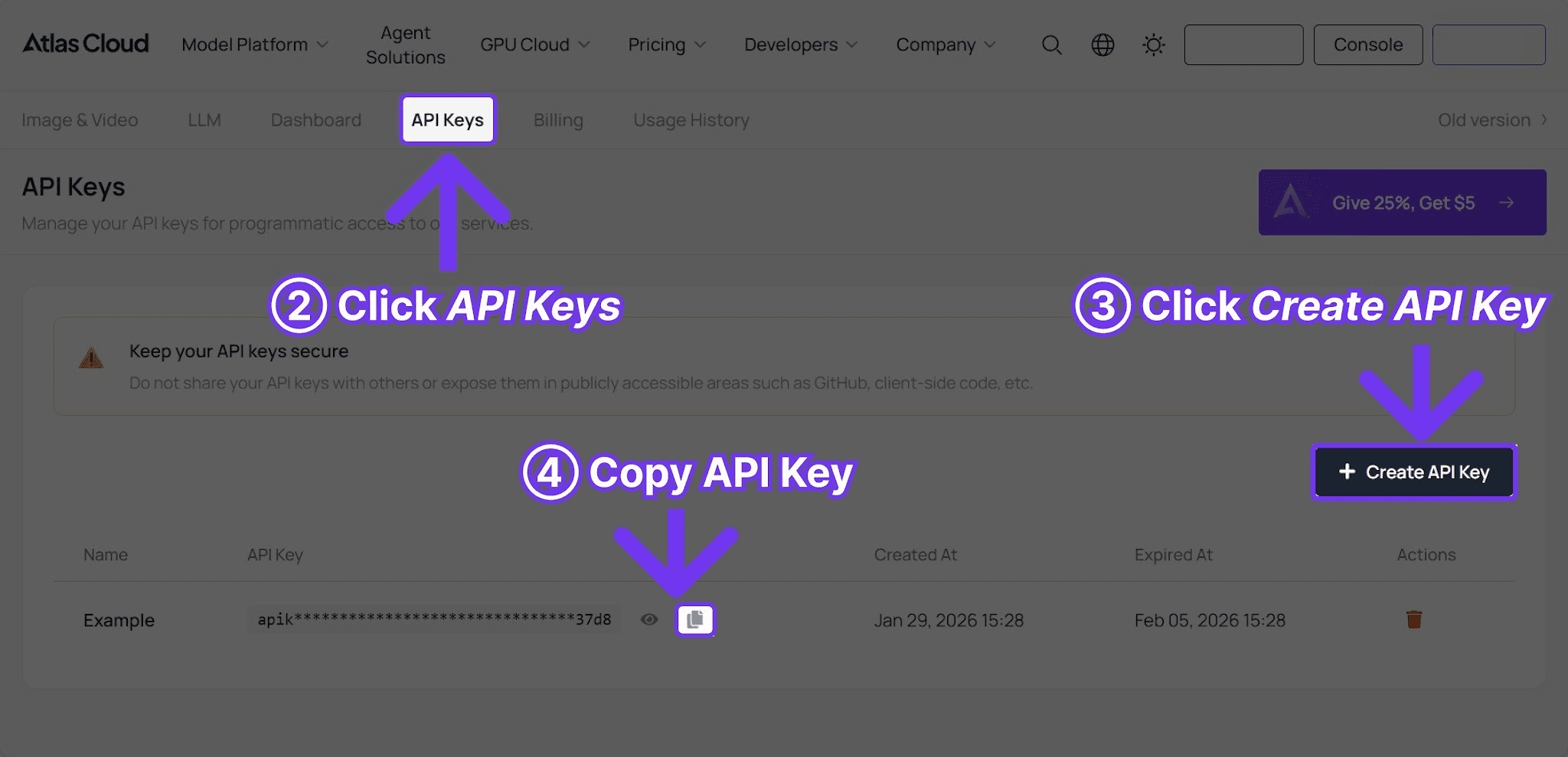
接著使用這個極簡的 Python 腳本:
plaintext1```python 2import requests, time 3 4API_KEY = "your-atlas-cloud-api-key" 5BASE_URL = "https://api.atlascloud.ai/api/v1" 6 7resp = requests.post( 8 f"{BASE_URL}/model/generateImage", 9 headers={"Authorization": f"Bearer {API_KEY}", "Content-Type": "application/json"}, 10 json={ 11 "model": "openai/gpt-image-2/text-to-image", 12 "prompt": "PASTE PROMPT FROM THIS GUIDE", 13 "size": "1024x1024", 14 "quality": "low", 15 }, 16) 17poll_url = resp.json()["data"]["urls"]["get"] 18 19while True: 20 time.sleep(3) 21 s = requests.get(poll_url, headers={"Authorization": f"Bearer {API_KEY}"}).json()["data"] 22 if s["status"] == "completed": 23 print(s["outputs"][0]) 24 break 25```
對於編輯提示詞,將模型更改為 openai/gpt-image-2/edit 並添加包含來源 URL 的 images 欄位。完整程式碼請參見 GPT Image 2 API 指南。
迭代模式
最穩定的工作流程:
- 以
low品質執行,成本:USD0.008。 - 調整提示詞,再次執行
low,成本:USD0.008。 - 確認構圖與光影正確後,切換為
high進行最終輸出,成本:USD0.008。
一套完整的迭代流程費用通常不到五美分。對於編輯操作,先用 low 確保模型理解需求,再用 high 進行最終輸出。
快速參考:有效的提示詞片段
光影條款:
soft window light from the left(左側柔和窗光)golden hour light, low sun angle(黃金時刻光,低角度太陽)studio softbox lighting on a clean white background(純白背景下的攝影棚柔光箱)dramatic rim light against a dark backdrop(深色背景下的戲劇性邊緣光)soft diffused daylight, no harsh shadows(柔和擴散日光,無強烈陰影)
構圖條款:
overhead flat lay(俯拍)wide cinematic shot(電影級廣角)close-up macro detail(微距特寫)three-quarter body portrait(四分之三全身人像)isometric perspective(等距視角)
風格錨點:
professional product photography(專業產品攝影)editorial magazine photography(編輯類雜誌攝影)flat design illustration(扁平化插畫)modern SaaS UI mockup(現代 SaaS UI 模型)lifestyle brand photography(生活方式品牌攝影)clean Scandinavian design aesthetic(北歐極簡設計美學)
盡情混搭。本指南中的大多數產品提示詞結構都是(主體+構圖+光影+配色+風格錨點),利用相同的公式即可產出大量可用素材。
瀏覽更多 Atlas Cloud 提示詞中心
Atlas Cloud 維護著一個社群策展的 GPT Image 2 提示詞中心,內含數百個提示詞,每個都附帶範例圖與「一鍵試用」按鈕。分類包括 UI 模型、資訊圖表、海報、動漫風、遊戲 UI 和雜誌排版。
使用本指南作為核心的 50 個提示詞,並在需要尋找社群變體或特定美學起點時參考該中心。
常見問題解答
GPT Image 2 的提示詞和 DALL-E 3 一樣嗎?
大部分是一樣的。GPT-5 基礎架構能理解相同的英語提示詞結構。主要區別在於:GPT Image 2 能更好地維持長提示詞的連貫性,且渲染短文字更可靠。
提示詞長度應該多少?
20 到 60 個字是黃金區間。太長沒太大幫助,太短容易遺漏光影或風格細節。
模型理解品牌名稱嗎?
它理解通用風格(如 Funko Pop style,New Yorker illustration style)與廣泛的參考資料,但會避免產生商標和知名角色。
GPT Image 2 支援否定提示詞(Negative Prompt)嗎?
沒有獨立的 negative_prompt 欄位。請直接在主提示詞中使用自然語言,例如 clean background, no text, no watermark。
如果生成的圖片看起來不對勁怎麼辦?
先重新執行相同的提示詞。種子碼(Seed)會變動,同樣的提示詞在同樣品質下,第二次或第三次嘗試通常能得到更好的結果。成本依然是 USD0.008。
我應該使用編輯模型還是直接重新生成?
當來源圖片有值得保留的地方(構圖、人物、品牌元素)時,使用編輯模型;當提示詞本身錯誤時,則重新生成。
去哪裡找更多社群提示詞?
Atlas Cloud GPT Image 2 提示詞中心 擁有數百個由社群貢獻的提示詞,且均附帶即時生成的範例圖。
結語
GPT Image 2 是目前最友善的影像模型之一。結構清晰的短提示詞就能產出高品質素材,長提示詞也同樣有效。編輯模型只要指令精確且具體,可靠度極高。
低廉的價格改變了提示詞設計的思維模式:執行十次變體並沒有成本懲罰。在 low 品質下快速迭代,最終確認後再切換至 high 完成成品。
────────────────────────────────────────────────────────────





