The queen in Snow White owned the one object every online shopper could use: a mirror that answers questions about appearance, honestly, before anything else happens. Hers was wasted on a single question. The version you can open today takes a better one, how would this look on me, and answers it while the item is still sitting in your cart.
Virtual try-on puts the clothes you are considering onto a photo of you: upload one picture, an image model redraws the outfit on your body, and the answer comes back in under a minute. This guide explains how the technology works, where to run a free clothes try on in a browser today, and how to move a garment straight from a store listing onto your own picture.

Key Takeaways
- Virtual try-on puts clothes on your own photo before you pay: the AI redraws the outfit and leaves your face, pose, and background alone.
- Free Change Clothes AI is a clothes try on you can run in a browser for free, with a slider to compare before and after.
- A product photo from a store listing can be transferred onto your picture with a reference-image model, turning any listing page into a virtual fitting room.
- Match the photo to the outfit you describe: if the look includes shoes, upload a shot that shows as much of your body as possible; changing only a top needs nothing more than an upper-body photo.
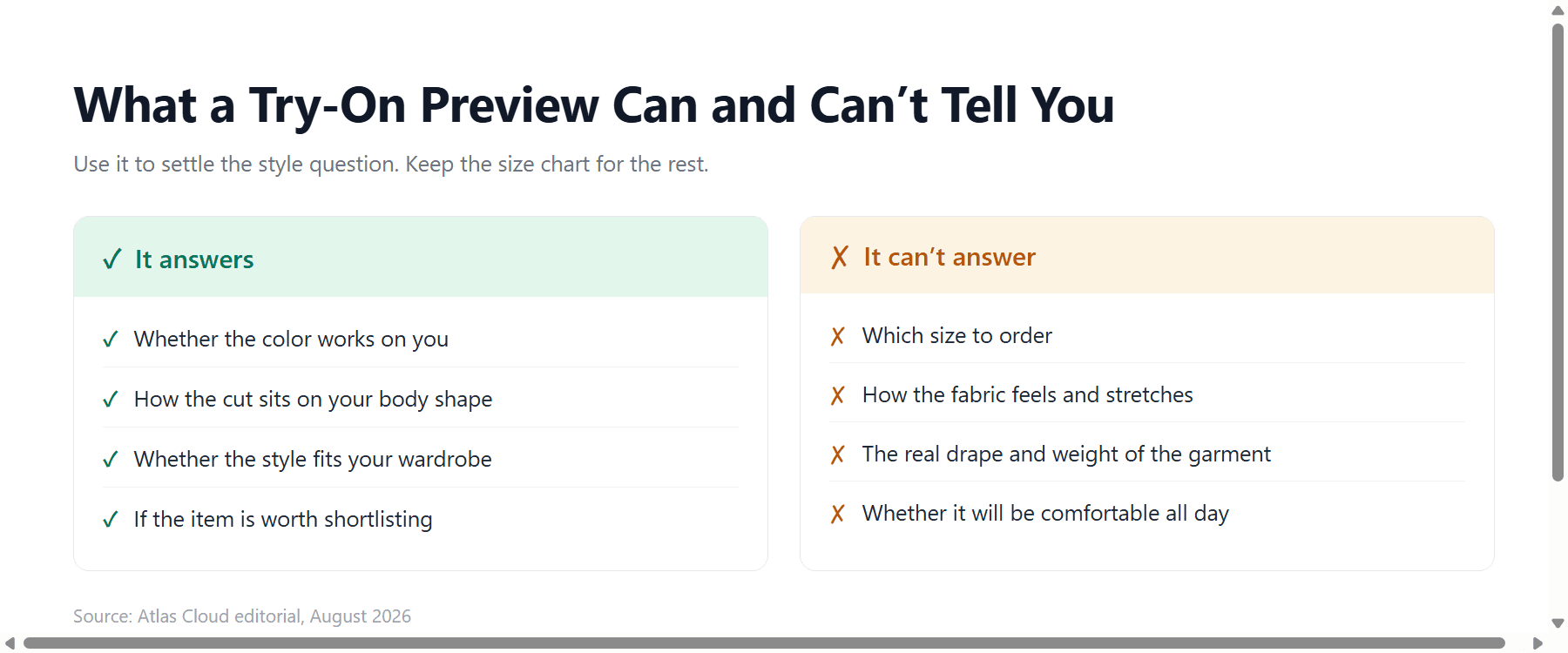
- Try-on answers how clothes look on you, not how they fit; sizing still comes from the size chart.
What Virtual Try-On Actually Means (and What It Doesn't)
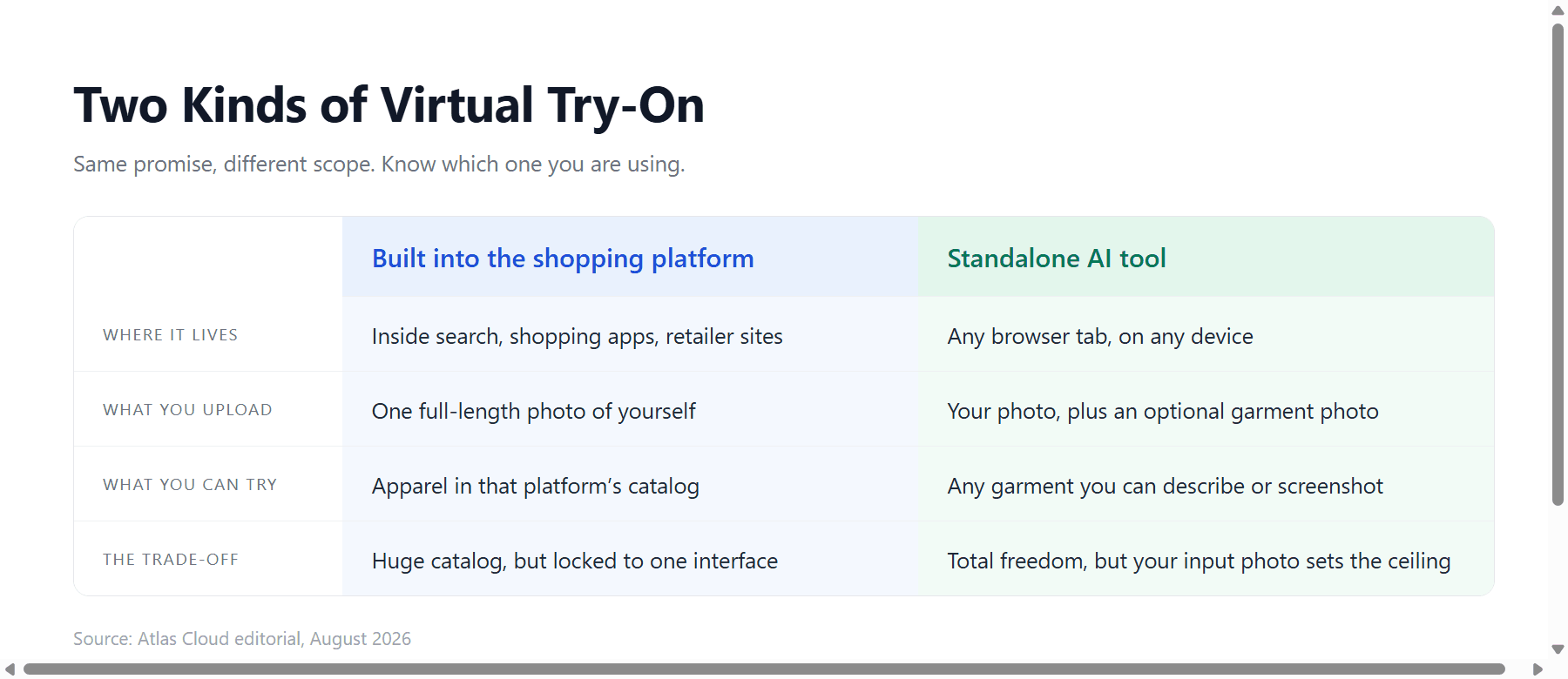
Two different products share this name, and knowing which one you are looking at saves confusion.
The first lives inside shopping platforms. Google rolled out a try-on feature in Search Labs in May 2025 that lets US users upload a full-length photo and, in Google's words, "virtually try on billions of apparel listings on yourself." It covers shirts, pants, skirts, and dresses from the retailer catalogs Google indexes. The strength is scale; the limit is that you can only try on what sits in that catalog, inside that interface.
The second kind is a standalone AI tool. You bring your own photo and any garment at all, described in a sentence or supplied as a second image, and the model redraws your clothing while keeping your face, pose, and background untouched. Some of these tools call themselves a virtual changing room; the mechanics are the same. This is the kind the rest of this guide focuses on, because it works for any item from any store, including the one in your cart right now.
One boundary applies to both, and it is worth stating early: try-on settles appearance, while fit remains a separate question. More on that near the end.
Virtual Try On Clothes for Free in Your Browser
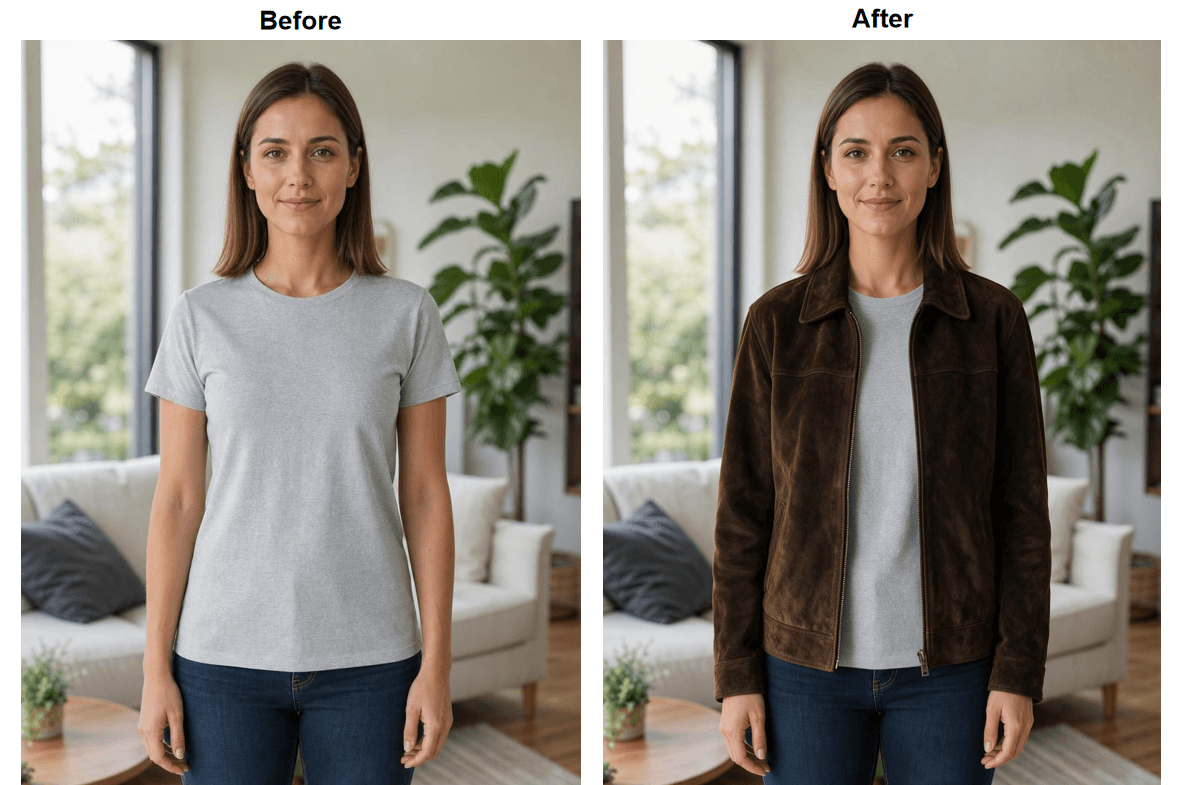
The fastest way to see whether this technology convinces you is to run a single clothes try on using a photo you already have. Atlas Cloud is a hosting platform for image and video models, and its Free Change Clothes AI page puts the whole workflow on one screen: upload a photo, describe the outfit you want to try, press Run Free.
Here is what that looks like. For a first test we asked for "a dark brown suede jacket over a plain white crew-neck t-shirt." No shoes involved, so an upper-body photo did the job.
How to Do an AI Clothes Try On in 4 Steps
- Match the photo to what you plan to try. This is the easiest step to get wrong. If the outfit includes shoes or anything below the waist, use a photo that shows as much of your body as possible, head to feet. If you are only trying a top, an upper-body shot is all you need. JPG, PNG, or WebP, up to 10MB.
- Upload it. Drag the file onto the page or click to browse.
- Describe the complete outfit. One sentence that covers every visible piece you want changed, with color, fabric, and cut. Vague inputs produce generic clothes.
- Check with the slider, then download. Sweep across the hairline, the hands, and the garment edges. If something looks off, a more specific description on a second attempt usually fixes it.
Turn a Store Listing Into a Virtual Outfit Try On
Describing clothes in words works well for exploring a style. Shopping is stricter: you do not want a jacket like the one on the listing; you want that exact jacket. For this, use a model that accepts reference images and transfers the actual garment.
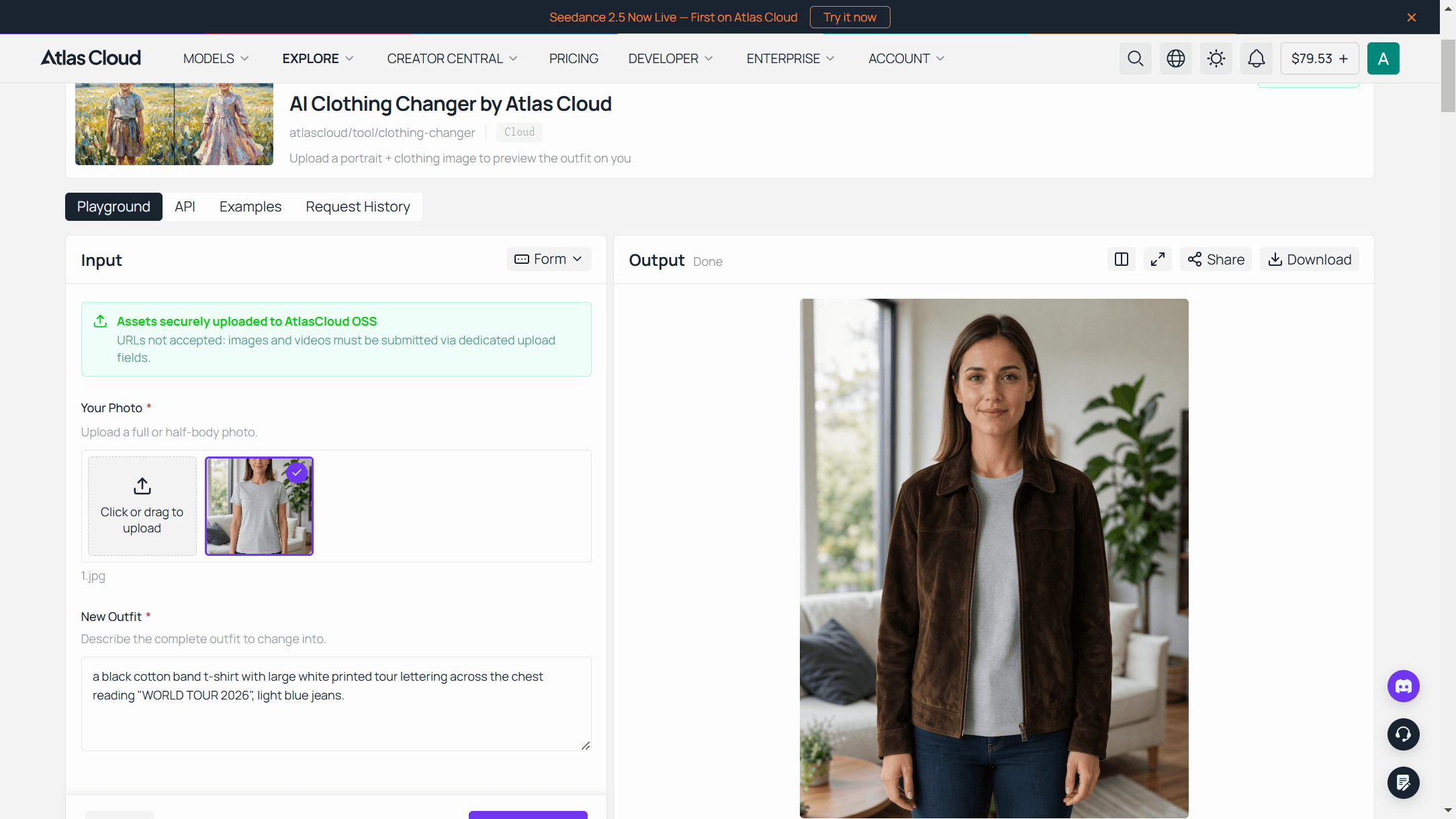
On Atlas Cloud, the strongest current fit for this job is Seedream 5.0 Pro Edit. Its model page doubles as a playground, so no code is involved: load your photo as the first image, save the product photo from the listing and load it as the second, and write the instruction the way you would brief a person. The template we use:
Put the garment from image 2 on the person in image 1, keeping its exact color, fabric texture, neckline, sleeve length, and hem length. Fit it naturally to the pose, with realistic folds. Keep the face, hair, skin tone, body proportions, pose, and background from image 1 completely unchanged, and match the lighting of image 1.
The model's documentation lists support for up to 10 reference images per request, which leaves room for a whole virtual outfit try on: person, top, and bottom in one instruction. Curious how it compares with its closest rival on editing work? Our Seedream 5 Pro vs Nano Banana 2 test covers exactly that.
The API Route for Store Catalogs
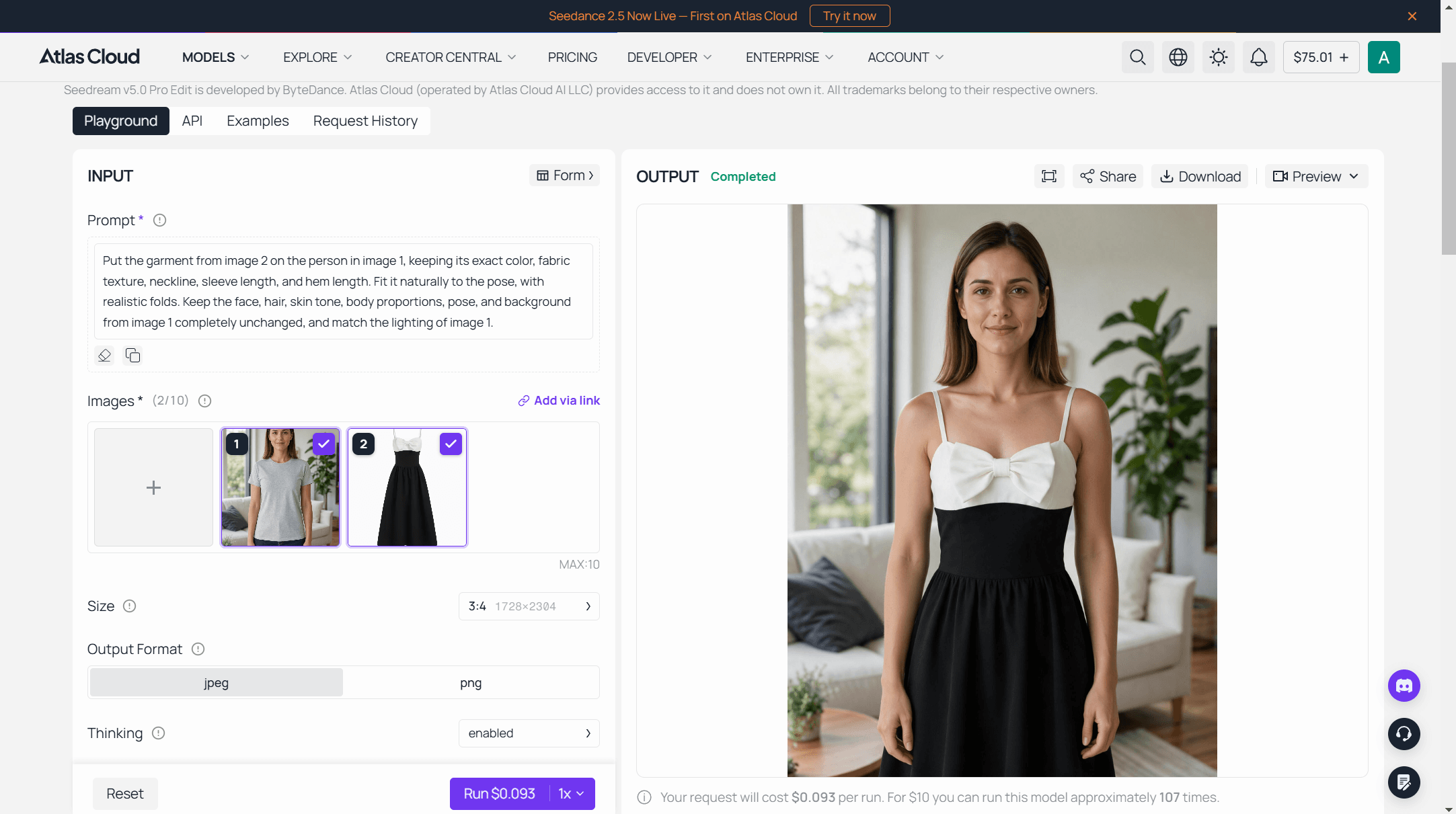
So far everything has been one shopper deciding on one item. Flip the direction and the same model serves the seller: put every garment in a catalog on the same model photo, or refresh a season of product pages without booking a studio. Each listing becomes one request to the same endpoint the playground uses, and production is three steps.
Step 1: Create an API key. Generate one in the Atlas Cloud console and keep it server-side. The same key reaches every model on the platform.

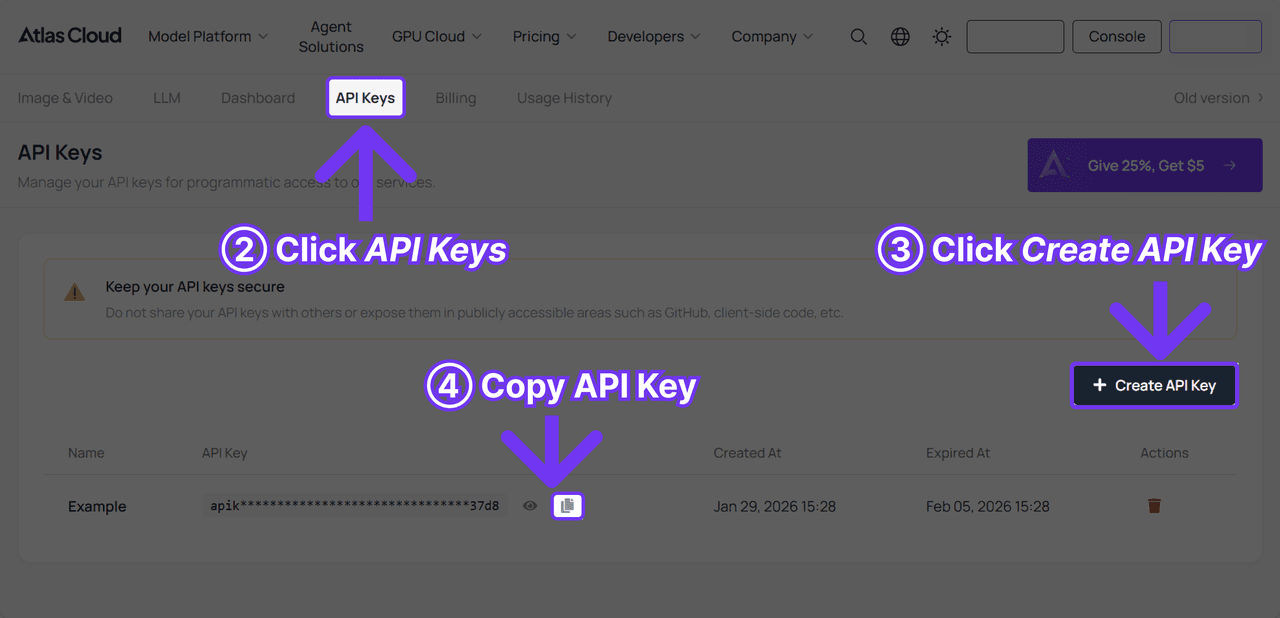
Step 2: Check the request shape. Authentication and the polling contract live in the API documentation, and the model page carries an API tab right next to the playground, so the request shape is one click from where you tested the transfer.
Step 3: Send the request and poll. Submission is asynchronous and hands back a prediction id.
plaintext1curl -X POST https://api.atlascloud.ai/api/v1/model/generateImage \ 2 -H "Content-Type: application/json" \ 3 -H "Authorization: Bearer $ATLASCLOUD_API_KEY" \ 4 -d '{ 5 "model": "bytedance/seedream-v5.0-pro/edit", 6 "prompt": "Put the dress from image 2 on the person in image 1, keeping its exact color, fabric, and hem length. Keep the face, hair, pose, and background unchanged.", 7 "images": [ 8 "https://your-cdn.com/model-photo.jpg", 9 "https://your-cdn.com/garment.jpg" 10 ], 11 "size": "1328*1776" 12 }'
Poll the prediction until status reads completed, at which point the hosted image URL appears in outputs.
Why a Virtual Fitting Room Beats Guessing
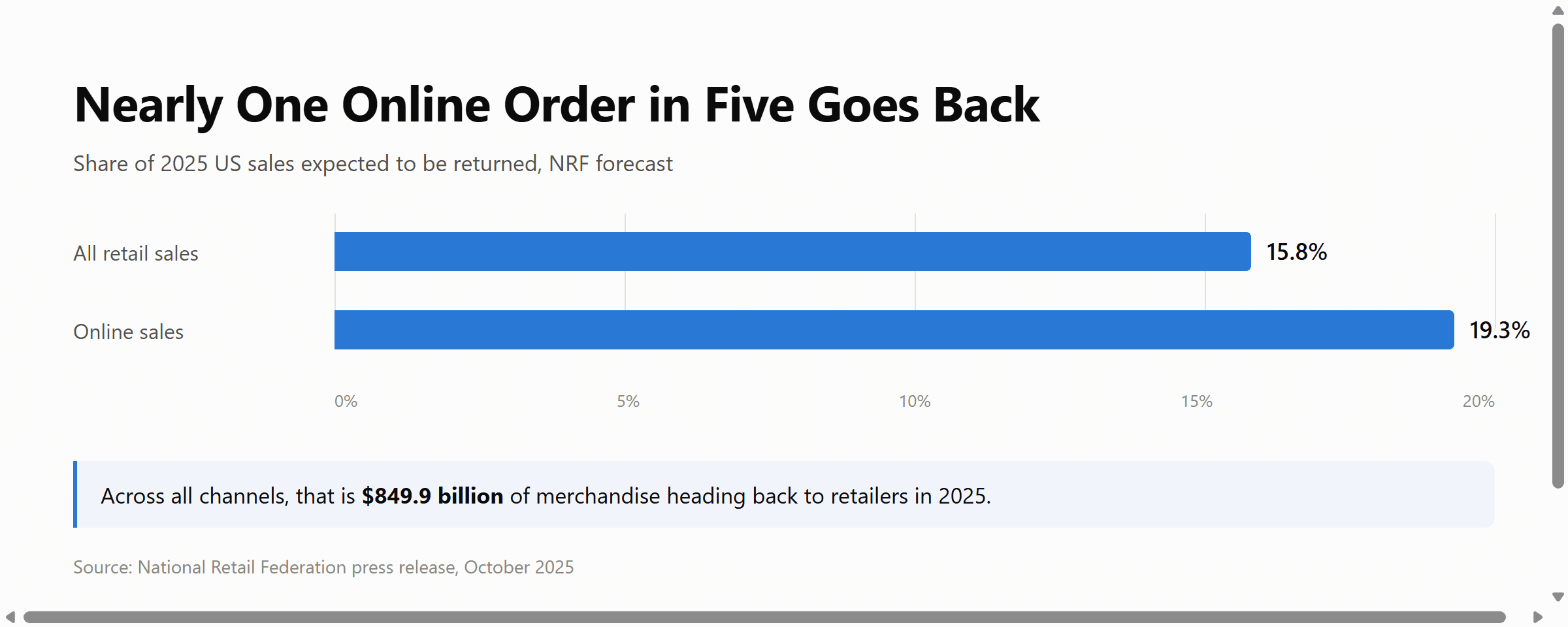
The National Retail Federation's returns forecast for 2025 expects 15.8% of US retail sales to come back, a total of $849.9 billion in merchandise. For online purchases the estimate climbs to 19.3%, nearly one order in five going back.
Quick math: a preview costs nothing on a free first run and cents in the playground, while a wrong guess costs packaging, a shipping label, and days of waiting for a refund. A virtual fitting room will not fix sizing, but it reliably filters out the purchase you would have rejected on sight, before any money moves.
Do You Need a Virtual Try On App?
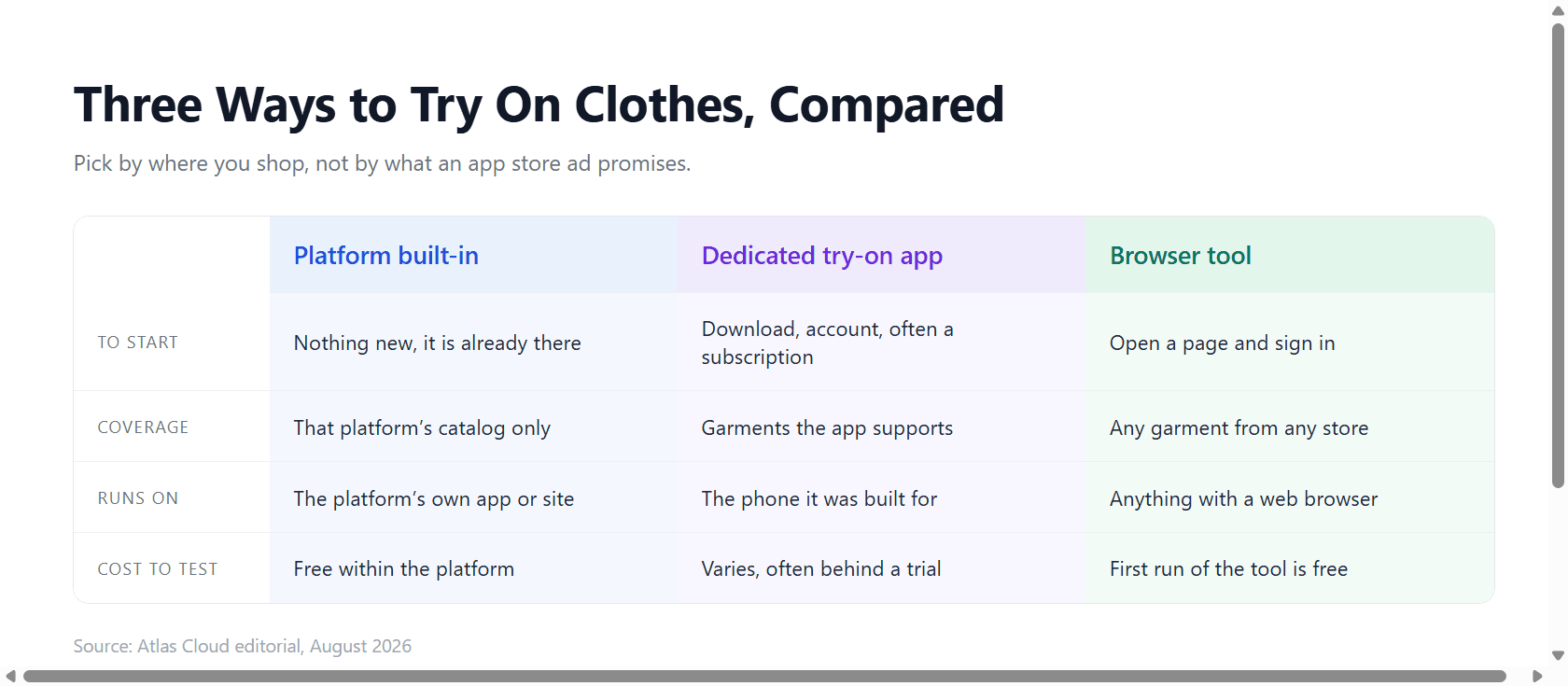
Usually not. Platform features cover only their own catalog, and dedicated fitting room apps ask for a download and often a subscription before the first result. A browser tool does the same job on any device, phones included, with nothing to install.
The sorting is simple: if you shop mostly in one place, use whatever try-on it builds in. If you shop everywhere, a browser page covers more ground than any single virtual try on app.
Try On a Dress Before You Buy It: Photo and Prompt Tips
Dresses are among the hardest garments for try-on models: hem length, waist placement, and fabric behavior all have to land at once. They are also where the photo rule from the walkthrough above stops being advice and starts deciding the outcome.
A dress with shoes is a full-look request, so the input photo must show as much of your body as possible; a cropped shot forces the model to invent legs and footwear, and invented anatomy is where results fall apart.
On the description side, precision pays. Name the length at a specific point: floor-length, midi, knee-length. Name the fabric, since satin, linen, and knit drape differently. Name the cut: A-line, wrap, slip. If the look includes shoes, say so explicitly, or the model will decide for you.
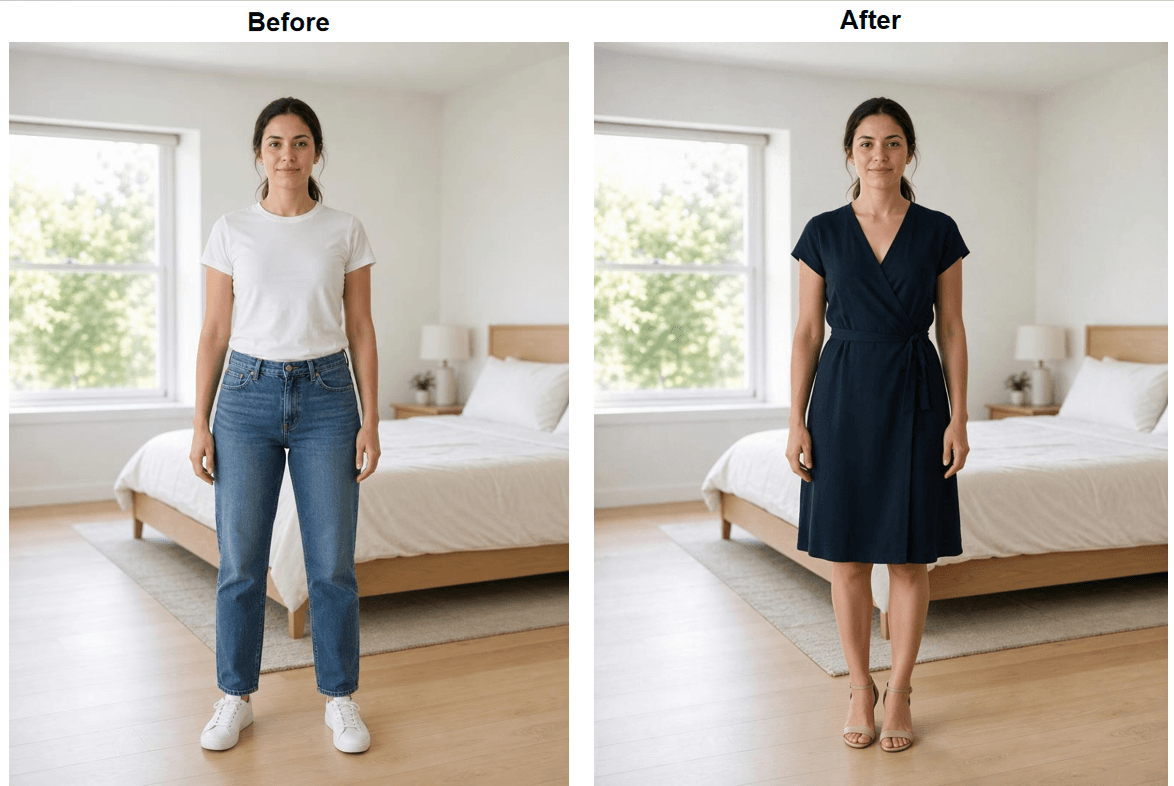
For the demo we put the question to the mirror properly: a full-body photo in, and "a knee-length navy wrap dress with heeled sandals" as the request.
Three failure patterns account for most bad results:
- Hands resting on the body block the garment and confuse the edit; choose a photo with arms visible and relaxed.
- Large logos or graphics on your current clothes sometimes bleed through; mention "plain, unbranded fabric" in the description.
- Busy prints on the requested dress can come out mushy; asking for "a clean, evenly repeating pattern" helps.
If your goal is editing an existing photo's outfit rather than previewing a purchase, that workflow has its own guide in our AI outfit swap article.
Where It Still Falls Short
A try-on image is a visual argument, not a fitting. The model shows you the style on your body shape as captured in one photo. It does not know whether the medium or the large would sit better on your shoulders, and it cannot show you the difference between the two. Stretch, stiffness, and weight of real fabric are approximated from how similar fabrics look in training data, so a rendered drape can flatter more than the real garment will.
There are also plain rendering limits. Tight, dark garments can lose edge definition against dark backgrounds. Layered outfits occasionally merge pieces. None of this makes the preview useless; it means the preview answers one question, and the size chart, the measurement tape, and the returns policy still answer the rest.
Frequently Asked Questions
Is there a virtual try on clothes AI free no sign up?
Not on Atlas Cloud: the free run requires a quick sign in with Google, GitHub, or email, which is what activates it. The terms are stated on the page itself: the first run of each tool is free at full output resolution, and continuing past that runs on a prepaid balance with top-ups starting at $19.
Can I try on clothes from any store?
Yes, if you use the reference-image route. Save the product photo from the listing, load it together with your own photo in the model playground, and instruct the model to transfer the garment. The description route is even simpler and needs no product photo at all.
Can I use virtual try-on on my phone?
Browser-based tools work in a phone browser the same way they do on a desktop: open the page, upload a photo, describe the outfit, run. No app install is involved.
Will a try-on tell me what size to order?
No. The preview shows how a style looks on your body, and it renders whatever size reads as natural. Order size still comes from the retailer's size chart and your measurements.
What kind of photo works best?
Even lighting, a simple background, your current clothing fully visible, and framing that covers everything you want changed: a head-to-feet shot when the look includes shoes or a skirt, an upper-body shot when it is only a top. Keep the file under 10MB in JPG, PNG, or WebP.
Conclusion
The fairy tale needed an enchanted mirror for one honest answer about appearance. The current version answers a more useful question, how would this look on me, from nothing more than an upload: the model redraws the outfit, protects your face and pose, and hands you a slider to judge the result.
The rules that decide quality are the ones this guide kept returning to. Frame the photo to cover everything you want changed, describe the garment down to length, fabric, and cut, and inspect the edges before trusting what you see.
So pick the item you have been hesitating on and run it against a photo of yourself this week: the free first run settles the style question, and the reference route settles it for the exact garment on the listing. A wrong purchase costs a return trip. A virtual try-on costs an upload. Ask the mirror first.