你脑海中那个画面,那个清晰可见的画面。为什么 AI 总是不肯把它拍出来?
很多时候,问题并不在于模型,而是你和模型之间少了一个东西:一个翻译官。
你一定见过这类 AI 视频:面部清晰、肢体没有穿模,光影处理得也还算得体。你看着它,唯一的反应就是平淡地“哦”一声,然后滑走。少了一点“灵魂”。你试图用“氛围感”、“电影感”、“质感”这些词去描述,但当你把它们输入提示词时,却发现它们失效了。经过几十次重写,你烧掉了无数积分,却依然在为随机结果赌博。
本指南将帮你实现两件事。第一,它会教你一种名为“Vibe Creating”(氛围营造)的方法,将你无法言说的感受转化为模型能够执行的语言。第二,它将提供一套零配置方案,让你在十分钟内亲自测试并生成一段真正拥有“那种感觉”的视频。
什么是 Vibe Creating,为什么它能拯救你的提示词?
Vibe Creating 是一种描述你想要的各种情绪效果,并通过特定的方法将其转化为电影拍摄技巧的实践。你负责决定“我想感受什么”,而它负责解决“如何拍摄出来”。
如果这个概念听起来很耳熟,那是因为它是有意为之。2025 年初,Andrej Karpathy 提出了“vibe coding”(氛围编程)这一概念,描述了一种不再逐行写代码,而是向模型描述意图并让其生成实现方案的工作流(Vibe coding, Wikipedia, 2025年2月)。这个词迅速走红,甚至被柯林斯词典评为年度词汇。Vibe Creating 将同样的思维范式应用到了视频领域。你不再微观管理焦距,而是开始描述体验。
这就是导致大多数提示词失败的陷阱。当你想要一个场景体现“危险”时,本能地会输入“危险氛围”。模型接收到五个抽象词,然后给你拼凑出危险的元素:机器人、枪、黑色的天空。所有原料都在,但你却毫无感觉。因为这个短语太抽象,无法指向任何具体的视觉机制。
Vibe Creating 不会急于生成。它首先会理清是什么产生了一种危险感,然后将提示词写成一个“有触感的画面”,而不是一份参数列表。这种区别就是整个方法的核心,因此本氛围营造教程的其余部分将通过五个真实案例来演示它是如何运作的。
Vibe Creating 教程案例 1:“危险”如何转化为运镜
从一部病毒式传播的 AI 短片开头看起:一个机器人牛仔在僵尸镇游荡。剧情只需一句话描述,但你的心跳会随着镜头加速。第一个镜头将枪管直接抵在镜头前,你的潜意识接收到一个明确的信号:你现在处于危险之中。
你试着重现这一场景。输入“危险氛围”,你得到的是一堆危险的道具,却没有那种恐怖感。
通过 Vibe Creating,它会同时考虑三个必须发生的要素:
- 将焦点锁定在枪管上,背景则模糊成一片。这是浅景深在发挥作用。
- 让你感觉自己像是在跪着向上仰望一支指向你的枪。这是低角度在发挥作用。
- 将枪管推向屏幕边缘,甚至怼到你脸上。这是轻微广角畸变在发挥作用。
这是关键的一步。最终输入提示词的不是“浅景深、低角度、广角畸变”,那些只是机械原理。真正写下的是这些原理所营造的“触感画面”。Vibe Creating 将专业技术转化为模型和人类都能瞬间理解的东西。这三种效果同步爆发,你的潜意识真实地感受到“你处于危险之中”,而你的意识只会觉得“这镜头真棒”。
这就是氛围的本质。信息通过潜意识通道传输,绕过了你的逻辑思维。Vibe Creating 就是构建这条通道的翻译官。你说出你想要的,它计算出如何拍摄。
Vibe Creating 教程案例 2:一个故意让人感到“不对劲”的花园
现在是一个更有挑战性的感受。这是我打开生成器时脑海中所有的画面:
一个留着银色长发的女孩,穿着水晶纱裙,站在一座北欧木屋前,天空是燃烧的夕阳。每一帧都很美,但又有一种无声的信号在提示:这里不安全。
我真的不知道该如何制造这种“不安全感”。Vibe Creating 将其表达为一种配方:美感 + 30% 恐怖谷效应 + 仪式感道具 + 窥视视角 + 不匹配的光源 = 童话外衣下的邪恶。
配方中的每一项都是一个参数,一旦进入提示词就能生效。唯一的问题是,当你坐下来创作时,你是否能回忆起、描述它,并让模型理解它。如果不能,那正是 Vibe Creating 代劳的工作。它捕捉到那句模糊的话,为你写下配方。输出效果如下:
注意镜头从不展示怪物的全貌,只展示眼睛、一只肢体和摇曳的阴影。这种克制是对“不安全感”的精准翻译。同时,比起渲染一个完整的生物,这让模型生成得更加干净。
Vibe Creating 教程案例 3:让 AI 视频拥有电影预告片的质感
把下一个案例发给一个学电影的朋友,隐去来源,他们很可能会猜这是某部芭蕾舞电影的预告片。这是一次成片,没有剪辑,没有调色。
意图是为后台一个忙碌、在演出前嗡嗡作响的年轻舞者赋予“预告片级的质感”。当你把“预告片质感”交给 Vibe Creating 时,它的逻辑是这样的:
后台开场不是为了炫技,而是一种叙事策略。从昏暗杂乱的后台推向光亮的舞台,这是一条《黑天鹅》和《红菱艳》都用过的路径。向舞台走去本身就是一种关于宿命的隐喻。模型不只是渲染图片,它在渲染调度。
有三个变量必须同时正确:地板反射的角度、阴影的方向以及动作中微妙的延迟。只要错一个,梦幻感就会塌缩成监控录像。
男女对视的那一帧使用了好莱坞经典的“爱情瞬间”模板:侧面背光勾勒轮廓,背景灯泡融化成光斑,浅焦将世界推开,只剩下两人。这证明了一件事:这些模型的能力上限已经达到了电影预告片的质量。阻碍你的从来不是模型,而是提示词。
Vibe Creating 教程案例 4:将“孤独”翻译成画面
这是一个单一的抽象词,观察它是如何被拆解的,是任何氛围营造教程中最有用的部分。这段视频是一个宇航员在未知星球上,回忆地球生活的快乐碎片。你感觉自己正与她站在一起。如何做到的?
Vibe Creating 拒绝仅仅渲染“孤独”这个词。它将抽象概念自动扩展为一系列具体的选择。这是翻译对照表:
| 你说的 | 它翻译成 |
|---|---|
| 孤独 | 剧烈的尺度对比:面对巨大的漂浮物体时渺小的人,你在巨大事物前的微不足道 |
| 孤独 | 灰蓝色、低饱和度的荒原,残酷而干净的地平线,一个本身就是“这里无人”的环境 |
| 孤独 | 手试图触碰光束,因为孤独者渴望与即使是光构成的虚幻事物建立连接 |
| 孤独 | 光中的每一个记忆都是人类的连接:母亲的手、奔跑的孩子、给花浇水的祖母 |
| 孤独 | 记忆呈现为温暖的金色,现实呈现为冰冷的灰色,色温作为情感的两端 |
| 孤独 | 最后一帧:她独自站在画面正中央,面对镜头 |
该方法理解了一个所有写作课都会教,但没人记得使用的道理。孤独不是空虚,孤独是依然记得温暖的样子。你给它一个词,它回馈给你一组真正承载这个词的画面结构。
Vibe Creating 教程案例 5:决定性的 A/B 测试
至此,一个合理的反对意见出现了:如果我只是写一个更专业的提示词,我还需要这个吗?这是一个对照测试,其结果是整个氛围营造教程中最有力的证据。
A 组输入:一份完全生产就绪的拍摄清单。标注了镜头尺寸、运镜方式、时间码、声音设计等。涵盖一个小女孩在雨巷中犹豫,跳进水洼,水花四溅,她爆发出笑声。在纸面上,故事完整,这份文件可以直接交给真正的摄制组。
镜头 1:潮湿记忆 (铺垫) (00:00 – 00:03) | 时长:3秒 镜头尺寸: 远景 -> 全景 摄像机运动: 静态框,固定对焦。 视觉: 雨刚停。冷色调的雾气在空气中漂浮。鹅卵石小路覆盖着水洼,倒映着两侧风化、剥落、覆盖着苔藓的古老墙壁。画面边缘,一双超大的亮黄色橡胶雨靴——对里面的脚来说太大了——慢慢进入视野。小女孩穿着亮黄色的雨靴,小心翼翼地走到最大的水洼边缘停下,垂下目光,盯着水面上的巨大倒影。 声音: 潮湿、空洞的雨后风声;屋瓦滴水的单调声音;橡胶雨靴在湿石板上发出的轻微吱吱声。 镜头 2:跃入前的对峙 (犹豫特写) (00:03 – 00:08) | 时长:5秒 (关键情感点) 镜头尺寸: 极特写 -> 特写 摄像机运动: 极慢推镜头(“缓慢呼吸”节奏),聚焦她的脸和眼睛。 视觉: 镜头锁在女孩的脸颊上。她的眉头紧锁,视线在巨大的水洼和超大的黄色雨靴之间来回移动。她轻轻咬着下唇,鼻子因为紧张期待的强度而轻微皱起。她深吸了一口气——整张脸是一幅精美生动的内心冲突肖像:“我想跳……但我不敢。” 镜头不紧不慢地拉长,仿佛时间静止了。 声音: 所有环境风声减弱至近乎静止(真空般的寂静),只剩下清脆、略显急促的呼吸声,以及她的舌头摩擦下唇的轻微声音。在第8秒末,一声沉重、压抑的心跳声突然响起——深沉的脉搏。 VFX 说明: 超细节面部纹理渲染(SSS皮肤着色器);皮肤下的微血管动态反应;眼睛捕捉水洼反射的光;雨滴从发丝滑落的物理模拟。 镜头 3:爆发与回响 (反应) (00:08 – 00:15) | 时长:7秒 镜头尺寸: 低角度全景 -> 静态中景 摄像机运动: 动作爆发的瞬间,镜头快速拉出并锁在固定框中。 视觉: (第8秒结束) 心跳响起——瞬间,女孩脸上的所有犹豫烟消云散。眼神坚定。她双脚合拢,跳入水洼。高速摄影下,水滴冲向空中,如同钻石般破碎。背景中,一直安静打瞌睡的姜猫被水花惊醒——毛发竖立,笨拙地跃上高墙。镜头切回中景:女孩站在石板路上散落的水迹中,抬头——那一刻,她的脸绽放出如此灿烂、纯粹、清澈的笑颜,眼中闪烁着泪光。 声音: 暴力、重低音的水花冲击声(慢动作水花音效);猫的惊慌声和嘶嘶声;女孩清脆、毫无拘束的笑声。 内心独白: (无) VFX 说明: 逼真的流体物理模拟;空中悬浮水滴的慢动作物理模拟;笑容释放的瞬间,色彩分级向更温暖、更饱和色调的细微转换。
A 组结果:潮湿的鹅卵石、雾气、水洼倒影都出现了。技术参数被执行了。但两件事崩溃了:
- “雨靴慢慢进入画面”被字面理解为一双空靴子独自站在巷子中间,身后雾中漂浮着一个身影。拍摄清单想要的是“温馨童趣”,输出结果却成了恐怖片开场。
- 情感弧线消散了。女孩的脸上只有泪水。犹豫、决心、爆发、笑声的递进过程完全消失了。
B 组输入:完全相同的拍摄清单,交给 Vibe Creating 改写。它不会增加东西,而是移除噪音。逻辑大致是:这份文档是用纯执行风格写的,但底层是一个完整的情感叙事,非常适合翻译。保留靠近水洼、短暂内心博弈、突然爆发的三段节奏。删除大部分低价值的技术术语、镜头尺寸和时间码。保留具有真实情感重量的细节:黄色雨靴、湿石板、跳跃、受惊的姜猫、笑声和湿润的眼睛。将声音设计转换为自然的体验语言。改写如下:
雨刚停。寒冷的雾气依然在古老的巷子里飘荡,水洼覆盖着鹅卵石小路,倒映着两侧风化剥落、覆满苔藓的墙壁。一双大大的亮黄色雨靴缓缓步入画面。小女孩小心翼翼地走到最大的水洼前停下,低下头,凝视着水面上颤动的倒影。空气中只有雨后潮湿空洞的风声,屋檐下间歇的滴水声,以及雨靴在湿石板上发出的轻柔吱吱声。她盯着水洼,又看了看自己的雨靴,眉头紧锁,嘴唇微抿——仿佛正与自己进行一场庄严而童稚的博弈。她明显想跳进去,却在最后一刻犹豫了。呼吸变得急促,周围的一切仿佛瞬间抽离,只剩下那种紧绷的、颤动的期待——那种离起跳只有一次呼吸、却还没鼓起勇气的微妙时刻。下一秒,决心涌上心头。她双脚合拢,猛地跳入水洼。水花冲向天空,破碎成闪亮的光片。旁边,一直昏昏欲睡的姜猫被惊醒,惊慌失措地窜上一堵高墙。水花散去,小女孩站在散落着水滴的石板路上,抬起头,爆发出笑声——清脆、灿烂、毫不设防——眼中闪烁着泪光,仿佛整个被雨洗过的世界刚刚被她亲手点亮。
没有一个技术术语。但你读完之后,场景已经在脑海中播放了。模型也以同样的方式阅读它。
B 组结果:一个穿着绿色雨衣和黄色雨靴的小女孩,停在水洼边,特写镜头下皱着眉头的犹豫,然后双脚猛地踩下,水花爆发,墙边的橘猫惊慌跃起,镜头向上转到她那张带着泪光大笑的脸。情感弧线完整保留。
对比表如下:
| 维度 | A 组:执行清单 | B 组:Vibe Creating 改写 |
|---|---|---|
| 提示词格式 | 塞满镜头尺寸、运镜、时间码 | 一段充满呼吸感的情感叙事 |
| 模型读取的内容 | 一半是噪音 | 全是画面和情感 |
| 典型失败 | 恐怖地站在巷子里的空靴子 | 无 |
| 情感弧线 | 坍缩为模糊的“悲伤” | 犹豫、爆发、释放,三者兼具 |
| 关键细节 | 丢失 | 惊慌的猫和湿润的眼睛均被保留 |
教训很深刻:更多的技术细节并没有帮助。它反而起到了负面作用,因为其中一半是模型必须努力过滤掉的噪音。
如何分三步开启你的第一个 Vibe Creating 项目
你不需要学习任何提示词工程。整个工作流只需三步,唯一的付费部分是最终渲染。
第一步:教会你的 AI 助手这项技能。 复制本文末尾的完整 Vibe Creating 技能(Skill),粘贴到你使用的任何 AI 助手(Claude Code、Codex、TRAE 等均可)中。如果只想快速测试,直接粘贴到任何 AI 对话框即可。无需安装、无需配置。它读一次就会了。
第二步:用朴素的语言描述感受。 任何形式都行。一个词,比如“自由”。一句话,比如“我想要《爱、死亡和机器人》开场那种能量”。或者模糊的情绪,比如“今天看到夕阳突然想拍点什么,但说不上来”。该技能会自动判断你的感受属于哪种氛围,并在必要时问你一两个问题,然后输出一个完整的提示词:镜头、光影、色温、节奏、道具、参考风格,全部为你写好。
第三步:在真正能运行的模型上渲染。 复制提示词,粘贴到 Seedance 2.0 视频模型中生成。
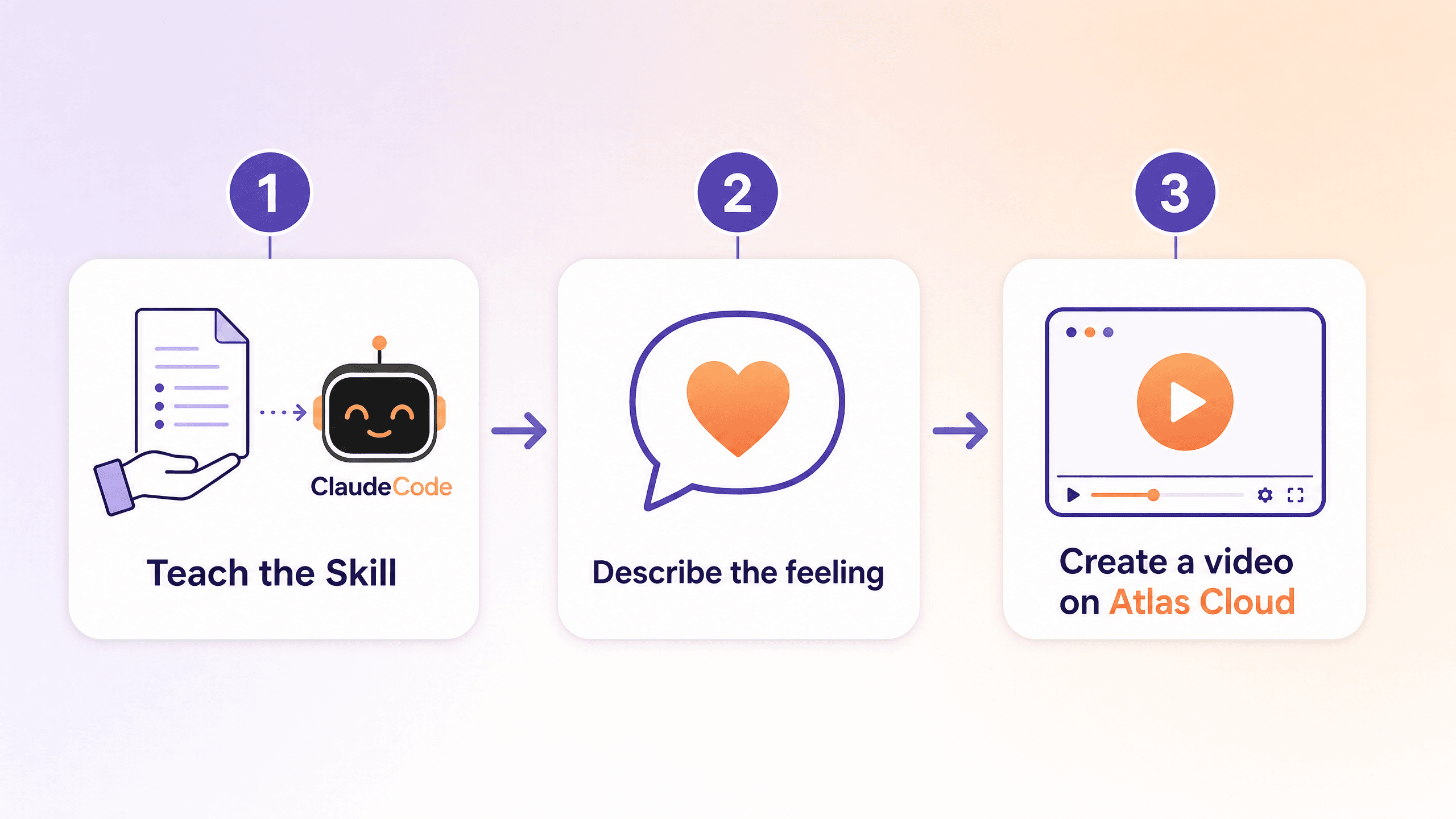
关于在哪里渲染的说明:本文中的示例视频是在 Atlas Cloud 上的 Seedance 2.0 上生成的。Seedance 2.0 是字节跳动的音视频模型,支持从文本和图像输入生成长达 15 秒的同步素材,也是剪映和即梦背后的引擎。它特别契合这一工作流的原因:
- 面部保持稳定,表情生动,而这正是“氛围感”视频成败的关键。一个伟大的氛围会在脸部变形的瞬间崩溃。
- 全球访问且无需排队,让你在产生感觉的瞬间就能行动。
- 单个 API 密钥背后拥有 300 多个模型,方便在不同模型间运行同一个提示词进行对比,或将其集成到现有工作流中。
一分钟后,那个只存在于你脑海中、那个你从没法向别人解释的画面,第一次出现在了屏幕上。
完整的 Vibe Creating 技能(复制并使用)
这是最有价值的部分。将下方的代码块粘贴到你的 AI 助手里,它将为你运行整个方法。它是作为技能规范编写的,无论你是将其放入编程助手还是普通对话框中,都能有效工作。
plaintext1--- 2name: vibe-creating-prompt 3description: Decide whether a user's input suits Vibe Creating. When it does, distill single-shot prompts, multi-shot descriptions, emotional scenes, or mixed input into prompts that generate better video, while preserving any user-specified dialogue, voiceover, music, sound effects, and other hard constraints. Not for long dialogue-synced narrative films, industrial execution shot lists, feature demos, or UI tutorials. 4--- 5 6# Vibe Creating Prompt Skill 7 8## Overview 9The goal is to distill what the user actually wants to express, so the model can grasp the visual center, emotional direction, and continuity of experience. Prioritize creative intent, emotional value, key imagery, and visual unity. De-emphasize low-value technical parameters and mechanical execution language. 10 11## Quick Start 12On receiving input, run three steps: 131. First judge whether it suits Vibe Creating (VC). 142. Then judge the best handling right now: pass through, light distill, full rewrite, ask first, keep as is, or offer an optional VC version. 153. When information is insufficient, ask. Only ask what is required to complete the current action. Do not interrogate for the sake of classification. 16 17## Scene and Expression Judgment 18First use Scene judgment (S) to decide if VC fits, then Expression judgment (E) to decide handling. Information-density check (I) takes priority over the specific action: whenever key information is missing, ask first, then proceed. 19 20### S1: Native fit for VC 21- E1 (close to VC expression): default full rewrite; if the text is already mature, switch to light distill or pass through. 22- E2 (mixed expression): default light distill then rewrite, preserving valid structure, narrative order, and emotional progression. 23- E3 (precise-control expression): treat as VC-translatable; do not reject just because it is written as execution. Remove low-value technical control and convert to natural visual language that generates better. 24 25### S2: Partial fit for VC 26- E1: default light distill; if already usable, pass through. 27- E2: default to offering an optional VC version and let the user decide. 28- E3: default keep the original meaning, and gently note that a VC rewrite is available if wanted. 29 30### S3: Low fit for VC 31- E1: stay close to the original, do not force VC; keep as is if necessary. 32- E2: prefer keep as is or very limited cleanup; only stylize locally when explicitly asked. 33- E3: default keep as is; explain that this need suits a traditional storyboard workflow rather than continued VC rewriting. 34 35Four hard rules during routing: 36- Insufficient info asks first: however well the scene fits, if the visual anchor, main action, or style direction is missing, ask before writing. 37- User hard constraints win: if the user explicitly requires keeping dialogue, music, shot numbers, parameters, paragraph structure, or delivery format, do not delete them; a VC version should be an extra version or provided after the user agrees. 38- Multi-shot preserves structure: when the user is already expressing one unified experience across shot segments, do not crush it into a single prose block; but do not default to numbered output unless the user explicitly asks to keep numbers or list format. 39- Precise-control writing is not the same as a low-fit scene: judge the scene goal first, then decide whether to translate. 40 41### Information-density check 42Even when the scene fits VC, do not force a rewrite when key information is missing. Ask first if: there is no clear visual anchor; only an abstract feeling with no character, object, or scene; a subject but no action or state; visual fragments but no main relationship or style direction; a very short input that has subject and event but lacks clear style direction, viewing method, or key moment; multi-shot content with obvious jumps where the reason they belong together is unclear. 43 44Under Vibe Creating, a prompt should satisfy these four layers; fill whichever is missing first, no need to mechanically ask for all in order: 451. Visual anchor: the core that most needs to be seen (person / object / named concept / the effect itself). 462. Action or state: what is happening (write only one: action / state / plot). 473. Local tone: how this beat feels (one mood word or adjective). 484. Video theme: the use case plus visual style. 49 - Use case: concept short, micro-narrative, film previz, emotional expression, explainer, effects clip. 50 - Visual style: hyperreal, cinematic, animation, claymation, Eastern ink, cyber, illustrative. 51 52Asking principle: the density check is not a gate separate from S and E, it runs in parallel as a stability check on whether the input can land directly on the routed action. Fill the minimum information needed to rewrite, usually one round. Only keep asking when a gap clearly blocks the image from landing. For very short, abstract, single-image input, prioritize converting the abstract word into the information a visible image needs; if the direction is mostly clear, give an initial judgment first, then ask about the 1 to 3 most critical gaps. 53 54## Interaction Policy 55Do not expose internal classification labels, but internally complete the three judgments: Scene (S), Expression (E), Information density (I). Initial judgments are allowed; do not force a class when info is insufficient. 56 57After judging, decide the action: pass through, light distill, full rewrite, ask first, keep as is, optional VC version. 58 59Handling principles: 60- Scene fits VC but info is short: fill the minimum info required for the current action. 61- When the input already has a clear subject, structure, time relationship, core imagery, and a clear emotional goal, and the text is already strongly generation-ready, default to pass through; only light-distill for clarity if needed, do not actively rewrite. 62- Scene fits VC but contains undeclared precise control: default to de-emphasize, delete, or translate it; if you did so, you must note it and tell the user they can specify what to keep. 63- Partial fit: do not push VC by default; preserve meaning or offer an optional VC version. 64- Low fit: explain it is a goal or workflow mismatch, not a rejection of the user's creativity. 65- User-specified dialogue, voiceover, music, sound effects, structure, and parameter requirements are preserved first. 66 67## Camera Language Policy 68Do not delete camera language wholesale. What to delete is the low-value technical parameters that tell the system how to shoot. What to keep or translate is the camera intent that tells the viewer how to feel. 69 70Default to de-emphasize or delete: focal length, millimeters, camera-position jargon, camera-move parameters, shot numbers, depth of field, aperture, exposure, shutter, equipment notes, A/B cam, coverage, pure editing instructions. 71 72When the user explicitly asks to keep parameters, follow the constraint first, then decide whether to also offer a VC version. 73 74When it is undeclared whether to keep precise control: do not treat technical control as a must-keep; still process as the more generation-friendly VC creative version; preserve the parts that contribute to emotion, narrative, or viewing experience; for purely technical camera control, delete or translate into a natural result; do not interrupt to confirm first, but if you de-emphasized, deleted, or translated technical control, you must note it briefly, and offer a constraint-preserving version if the user wants specific parameters, structure, or beats kept. 75 76## Sound and Constraint Priority Rules 77Dialogue, voiceover, music, sound effects, lyrics, narration, and other explicitly specified sound content rank above creative optimization. The Skill may reorder, but must not rewrite the wording, replace the content, or delete a user's explicit sound requirement. 78 79On conflict, execute in this order: 801. User-specified content and hard constraints (dialogue, voiceover, music, SFX, shot structure, parameter retention, format, style limits). 812. Creative optimization (distill story, emotion, memory, imagery, and unified experience without breaking constraints). 823. VC paradigm consistency (only after the first two, tighten language so the prompt is easier for the model to understand and generate). 83 84Supplementary: keep user-written dialogue, voiceover, music, or SFX verbatim. When visual description and sound requirements are mixed, you may reorder but not alter the sound content. If the visual part suits VC but the sound part does not, rewrite only the visual part. If the whole thing only holds together with long, strict, word-level dialogue sync, default to no VC rewrite. 85 86## Rewrite Modes 87Choose the mode by the dominant factor in the input: 88- Narrative rewrite: for story-, relationship-, or event-driven input. Output one continuous prompt or keep 2 to 5 segmented beats, preserving event order and emotional turns. 89- Emotional rewrite: for mood-, feeling-, or state-driven input. Concentrate on environment, pacing, texture, and viewing experience; do not force a causal chain to look like a story. 90- Memory rewrite: for recollection, flashback, oldness, fading, things being remembered. Preserve blur, bleaching, gaps, and fragility; strengthen recurring imagery and the sense of time passing. 91- Stream-of-consciousness rewrite: for association, fragments, subjective perception, nonlinear expression. Incompleteness is allowed, but the image must stay perceivable and the imagery internally unified. 92- Multi-shot experience rewrite: for multi-segment, multi-scene, multi-cut input that serves one experience. Segment naturally, or group by number only when explicitly asked, 1 to 3 sentences each; keep scene flow, emotional progression, and visual motifs, drop low-value execution jargon. 93- Mixed distill: for input mixing creative content with execution language. Keep the original structure and valid info as much as possible, remove only technical noise, repetition, and low-value control; do not over-rewrite or invent new beats. 94 95## Output Rules 96The goal is to help the user express more accurately, not to rewrite their work into a different piece. 97 98Length and form: 99- Default not significantly longer than the original, and do not balloon very short input into long prose. 100- Add nothing unsupported, especially no invented relationships, plot twists, scene details, or emotional changes. 101- For single-segment output, tighten to one prompt that can be used to generate directly. 102- Preserving structure is not preserving numbers; shot numbers, segment numbers, or list format in the input do not by themselves count as a request to keep numbering. Keep numbered output only when the user explicitly asks; otherwise default to natural segmentation. 103- With sufficient info and no extra constraints, a single segment or shot is usually 30 to 120 words; loosen when preserving structure, dialogue, or multi-segment progression. 104- When the user explicitly asks to keep the original structure, preserve structure over brevity. 105 106User-visible format: 107- Do not expose internal labels like S1 + E2 or Mode 5. 108- Default to a four-part output, fixed order: Judgment / Action / Result / Notes (if any). 109- Judgment: briefly state whether it suits VC, whether the original is already usable, whether info is sufficient. 110- Action: explicitly use one label: pass through / light distill / full rewrite / ask first / keep as is / optional VC version. 111- Result: the actual rewrite, the kept-as-is text, or the questions. 112- Notes (if any): technical control de-emphasized, deleted, or translated this time; hard constraints kept like dialogue, voiceover, music, SFX; or a prompt that the user can specify parameters, structure, or beats to keep. 113- Output should be natural, concise, and fit the user's original task context. 114- Omit the fourth part when no notes are needed.
关于 Vibe Creating 的常见问题
我需要学习提示词工程才能阅读这份氛围营造教程吗?
不需要。Vibe Creating 的全部意义在于你用朴素的语言描述感受,而该方法负责将其翻译为镜头、光影和节奏。配套的 Skill 可以复制粘贴到任何 AI 助手中使用,无需安装或配置。它更接近“vibe coding”,即描述意图并让工具生成实现方案(Simon Willison, "Not all AI-assisted programming is vibe coding", 2025年3月)。
为什么详细的拍摄清单在 A/B 测试中输给了更简单的提示词?
因为技术规格书的一半内容都是模型必须努力过滤掉的噪音。镜头尺寸、时间码和运镜方式本身不承载情感,而且可能被误解,比如“靴子入画”变成了一双空靴子独自站在那里。Vibe Creating 的改写保留了三段式的情感弧线和有意义的细节,因此模型接收到的是纯粹的图像和情感。
Vibe Creating 和 vibe coding 是一回事吗?
它们是表亲,但不是一回事。Andrej Karpathy 在 2025 年提出的 vibe coding 是关于通过描述意图来生成软件。Vibe Creating 将同样的“描述结果”哲学应用于视频,将感受翻译为产生该感受的拍摄技巧。两者都将你的精力从“怎么做”转移到了“我想要什么”上。
写好提示词后,我到底应该在哪个模型上渲染?
本文的案例使用的是字节跳动的音视频模型 Seedance 2.0,它支持输出长达 15 秒的同步视频。对于氛围感驱动的作品,稳定的面部和表情最重要,这也是它的优势所在。你可以直接通过 Atlas Cloud 使用,无需排队,并且可以使用同一个 API 密钥对比其他模型的效果。
整个 Vibe Creating 教程的工作流需要多长时间?
初次尝试大约需要十分钟。花一两分钟粘贴 Skill,一分钟描述你的感觉并获得成品提示词,再花一分钟渲染短片。大部分时间消耗在生成过程,而不是设置上。
结语
阻碍你的想象力和屏幕之间的一直都不是模型。正如舞蹈演员的案例所示,这些工具的能力上限已经触及电影预告片级别。阻止你的是你的感受与模型可执行的语言之间的鸿沟。
Vibe Creating 填补了这条鸿沟。你命名感受,它写下镜头。文中的五个案例——将危险化为运镜、故意让人“不对劲”的花园、预告片级的调度、将孤独拆解为影像、以及对拍摄清单的降维打击——最终都归结为同一个动作:写出观众应该感受到什么,而不是使用什么镜头。
粘贴该技能,描述一些你一直想拍的东西,并在 Atlas Cloud 上渲染它。折扣窗口将于 6 月 15 日关闭,这正是第一次亲眼看到脑海中那个画面呈现在屏幕上的好时机。







