“AI 中国风滤镜”通常会让人想到水墨、工笔绢本、汉服、香港霓虹或 TikTok 妆容。要让主体保持可识别,就需要把整体质感迁移与定向局部编辑分开。Seedream v5.5 的重新纹理化能把风景变成笔触,而不移动地平线;Seedream 5.0 Pro 则能替换服装与影棚光线,同时锁定面部骨骼结构。
哪种 AI 中国风滤镜风格适合你的照片?
按主体选择工作流。风景能承受厚重笔触,但如果面部几何或光线发生偏移,特写就会崩坏。请在下方选择与你的照片匹配的模型。
| 风格 | 推荐模型 | 视觉结果 | 编辑重点 |
| 水墨 | Seedream 5.5 Edit | 宣纸上的传统水墨画 | 笔触、墨染和留白 |
| 工笔绢本 | Seedream 5.0 Pro(相似度)/ Wan 2.7(色彩) | 细节丰富的绢本画,轮廓精细 | 面部细节、轮廓线和矿物颜料 |
| 唐代汉服影棚 | Wan 2.7(身份)/ Seedream 5.0(造型) | 唐代风格服饰与传统庭院场景 | 面部身份、时代服饰和发型 |
| 90 年代香港电影 | GPT Image 2.0 | 情绪化霓虹灯光和 35mm 胶片质感 | 色彩分离、光晕和背景运动模糊 |
| TikTok 玻璃肌人像 | Seedream 5.0 Pro | 冷调瓷肌妆容,带相机闪光高光 | 皮肤质感、面部比例和局部妆容 |
准备源照片,让滤镜保留你的脸和构图
糟糕的输入会毁掉好的风格迁移。一张局促、阴影重的自拍,在应用任何风格之前就已经会让五官变形。花 30 秒准备照片,省下积分。
- 选择一张面部光线均匀、中性的源照片。 强烈的侧影会抑制边缘检测。当暗部对比横切鼻梁时,水墨 和 工笔 滤镜会误读几何结构,把浓重墨块直接晕到皮肤上。
- 留出 30% 空白(留白)。 以胸部以上取景,并保留留白。中国水墨需要空间来晕染和淡出。
- 根据相机取景远近匹配编辑模式。 未锚定的风格迁移会使脸变形。特写人像要锁定面部特征;把完整重新纹理化留给风景和物体。
5 种经典 AI 中国风滤镜风格提示词与设置
通用标签很快就会失效。在提示框中输入两个词的风格标签,只会得到浑浊的老套效果。请在可控图像模型系列中运行下方特定的纸张纹理、颜料名称和光线约束,以锁定准确外观。
1. 水墨滤镜:最适合风景、建筑和宠物
为了避免看起来像廉价滤镜,请使用 Seedream 5.5 Edit,提示宣纸、飞白笔触和留白。
plaintext1Restyle the source image as a traditional Chinese Shuimo ink wash painting on raw absorbent Xuan rice paper. Keep the original composition and subject silhouette intact. Render edges with graded black sumi ink wash and dry-brush Feibai strokes, with subtle mineral indigo and burnt sienna accents. Preserve 30% open unpainted paper grain as Liubai negative space. Include one small blank cinnabar red square seal stamp in the lower corner, no text, no calligraphy characters.
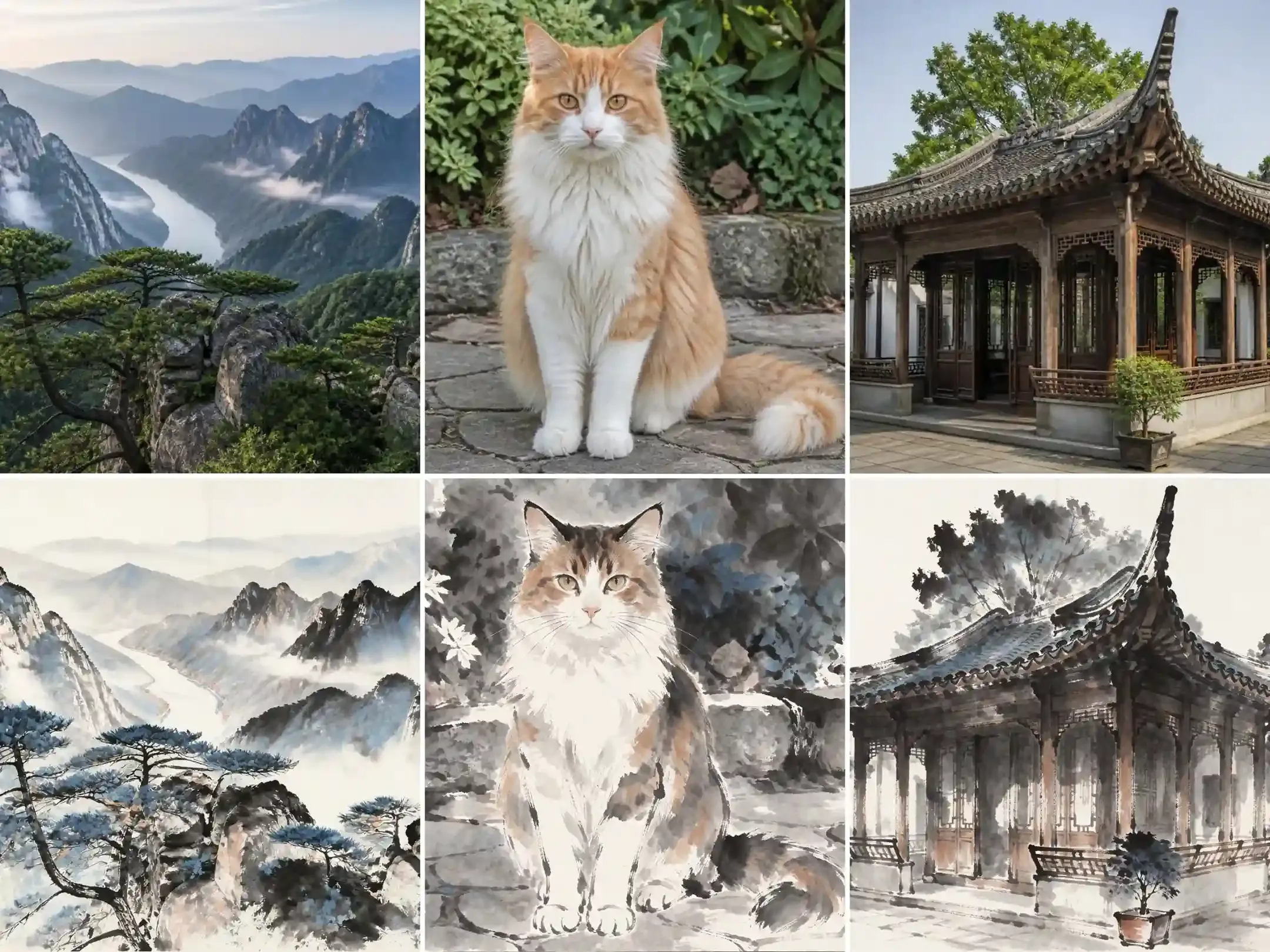
- 干笔 飞白 与生 宣 纸标记: 触发可见的纸纹和干笔飞白痕迹,而不是平坦的灰色晕染。
- 30% 留白 空白空间约束: 阻止深色墨渐变淹没天空或背景墙,保持主体轮廓可读。
- 带
no calligraphy characters的空白朱砂印章: 添加传统红色 印章 的视觉平衡,同时不让模型编造乱码般的伪中文文字。
2. 工笔细描绢本滤镜:最适合半身人像和植物
工笔要求极锐利的墨线。水墨晕染向外渗开,而宫廷风格绢本画则把颜料锁在精细边界内。
选择 Seedream 5.0 Pro 以保留面部相似度,或切换到 Wan 2.7 获得更醒目的袍服图案和色彩。
plaintext1Convert this photo into a meticulous Chinese Gongbi court painting on warm aged woven silk. Trace the subject, hair strands, and clothing folds with ultra-fine dark ink brush outlines. Fill the shapes using flat layered mineral pigments in malachite green, azurite blue, shell white, and muted cinnabar. Keep the exact facial bone structure, eye spacing, and gaze direction of the original subject. Soft flat lighting, visible fine silk weave texture, zero airbrushed 3D shading.
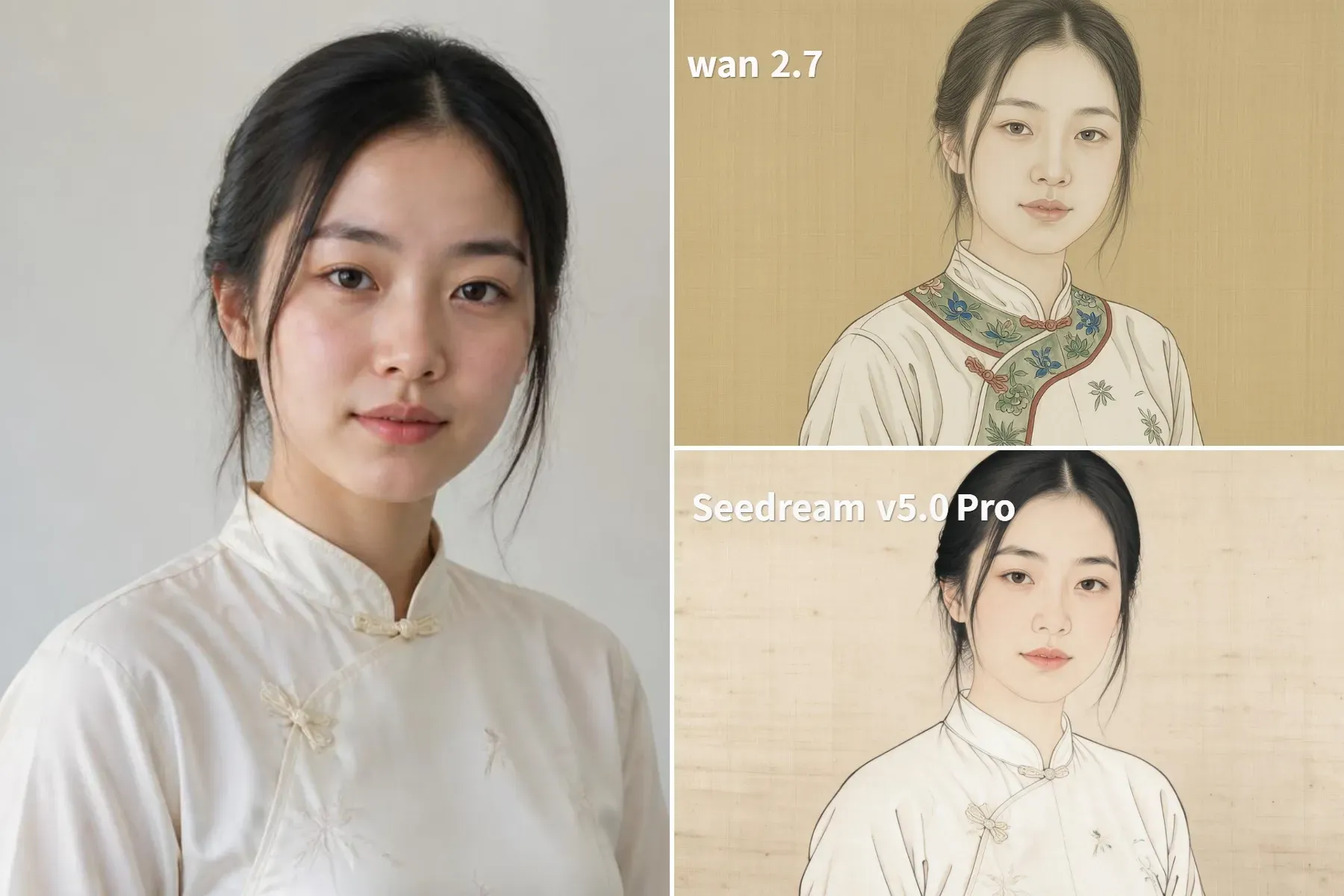
- 陈旧织造丝绸与
zero airbrushed 3D shading: 将现代相机的光泽压平为哑光矿物颜料层,嵌入丝绸纹理之中。 - 极细深色墨线轮廓: 告诉模型在施加色彩晕染前,围绕眼睛、嘴唇和衣领褶皱绘制清晰边界线。
- 矿物颜料命名(石绿、石青、蛤白): 用真实宫廷画配色取代霓虹般的数字饱和度。
实战提示:
Seedream 5.0 Pro 能精准保持脸型和丝绸纹理,但默认调色偏淡,几乎接近灰度。把颜色锚定到服装上,防止染料溢到皮肤。
Wan 2.7 擅长在服装上实现丰富、真实的矿物颜料填充,但会激进地把脸美化成程式化宫廷模板。如果必须保留主体的精确身份,优先选择 Seedream。
3. 汉服与唐代影棚人像滤镜:爆火的“Chinamaxxing”造型
换装常常会偏移。生成时代服饰时,不同的扩散过程会以截然不同的方式处理面部相似度和历史造型。把完全相同的提示词分别用在 Seedream 5.0、Wan 2.7, 和 Seedream 5.5 上,就能清楚看到每个引擎擅长什么、失败在哪里。
plaintext1Keep the exact face, eye shape, nose bridge, jawline, skin tone, and head angle from the source photo unchanged. Replace the modern clothing with an authentic Tang Dynasty embroidered silk Ruqun Hanfu in deep crimson and muted gold thread, showing woven brocade texture and wide flowing sleeves. Add a simple jade hairpin tucked into the existing hair texture. Replace the background with a softly blurred night courtyard lit by warm red paper lanterns, shallow 85mm depth of field, natural skin pores.
- 前置面部锁定条款: 对 Wan 和 Seedream 5.0 来说,这是保持原始骨骼结构稳定的必要项。
- 织锦纹理: 强制产生厚重织物垂坠感和金线光泽,防止出现扁平的万圣节服装式涤纶感。
- 85mm 灯笼虚化: 在衣领和肩部投下温暖轮廓光,让主体自然融入夜晚庭院。
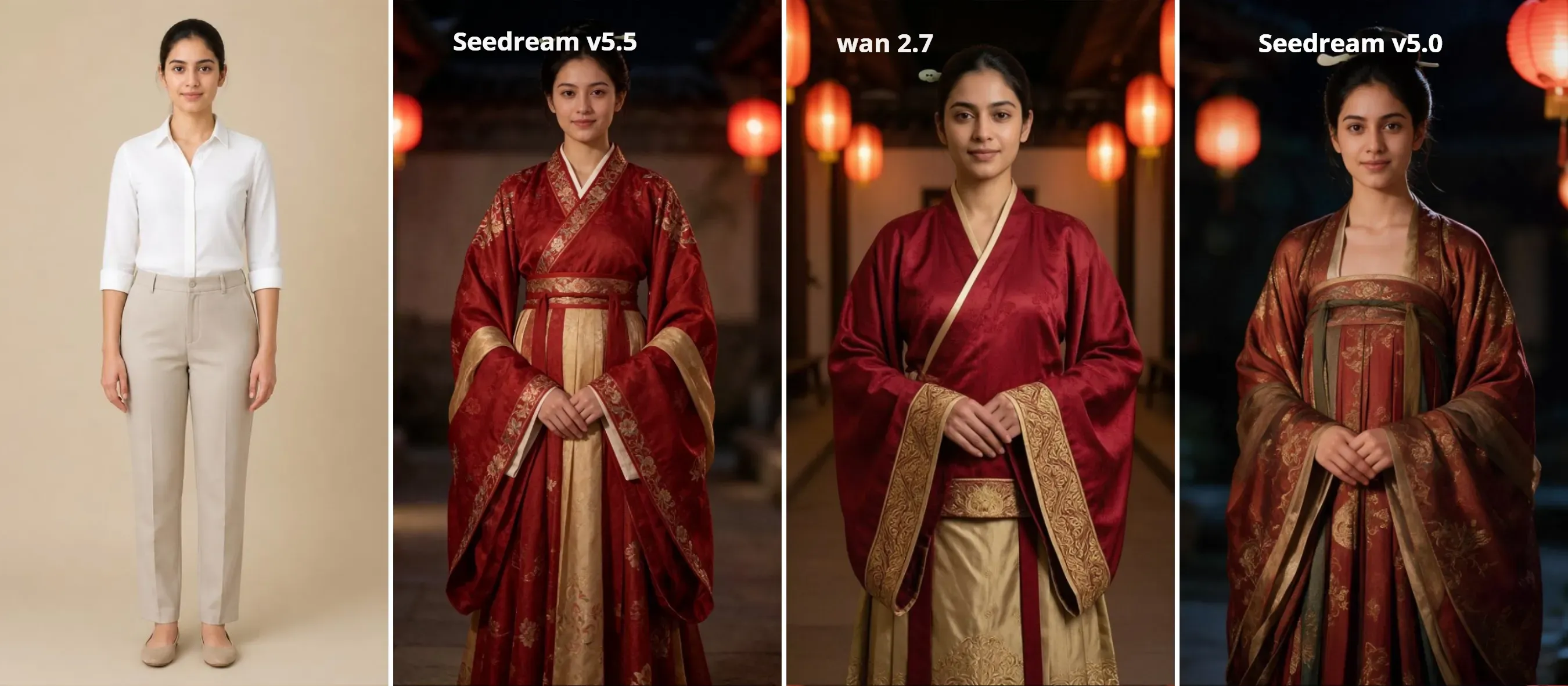
- Seedream 5.0 生成真实的唐代轮廓(齐胸襦裙、披帛、时代发髻),同时保持皮肤质感和相似度完整;
- Wan 2.7 提供近乎完美的面部保真度。它以零漂移锁定主体的精确鼻梁、深眼窝和原始族群特征。代价是:服装造型简单得多,默认是标准交领袍,没有复杂发髻造型;
- Seedream 5.5 虽然织锦刺绣看起来干净,但模型会激进地覆盖主体面部几何。它抹平原有的五官特征,强行套用东亚美颜滤镜模板,完全丢失身份相似度。
选择 Wan 2.7 来锁定精确骨骼结构和族群相似度,尤其是非东亚面孔。选择 Seedream 5.0 可获得开箱即用的历史准确唐代轮廓和时代发髻。选择 Seedream 5.5 则适合商业化瓷肌美化,此时严格面部保真度是次要的。
4. 90 年代香港霓虹电影滤镜:王家卫复古美学
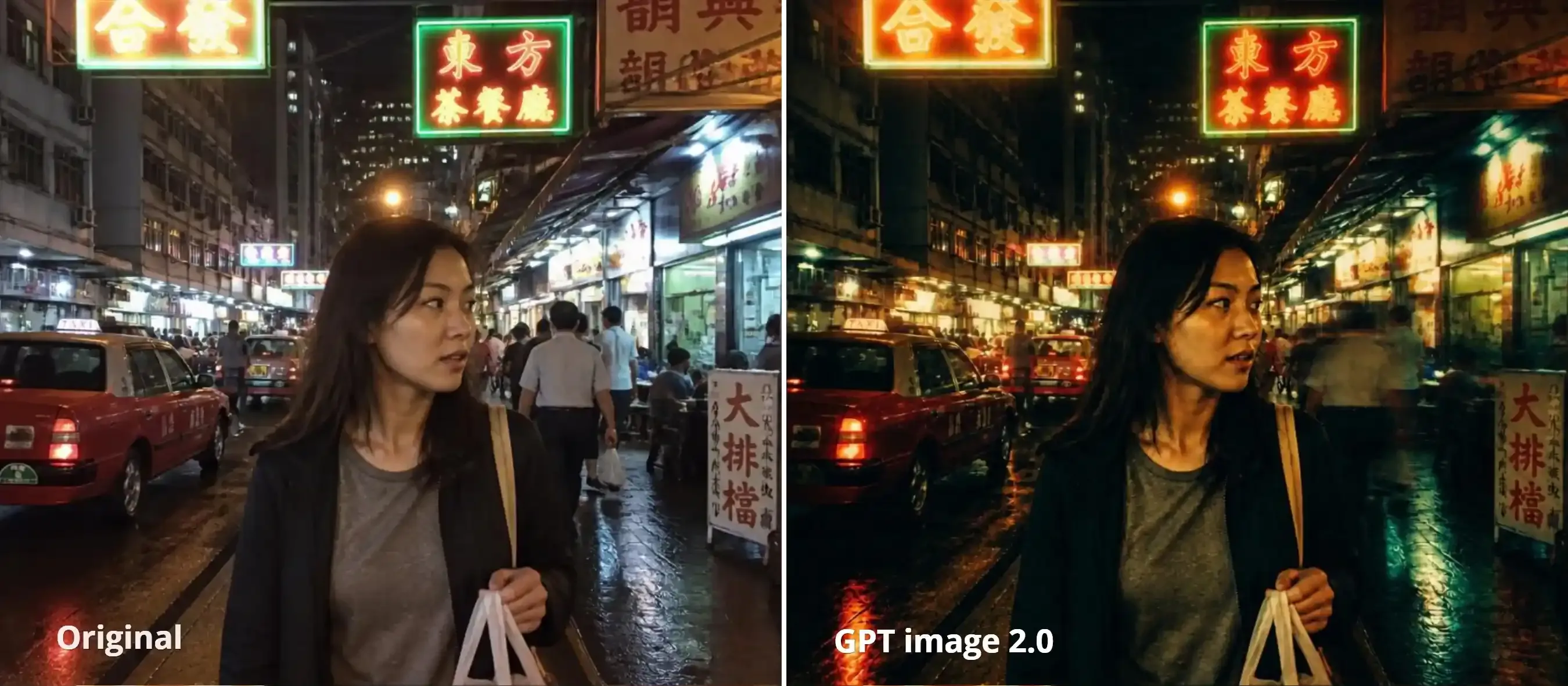
这里不用换装。这个滤镜依赖光学物理——色温偏移、光晕泛光和快门拖影。
GPT Image 2.0 原生复现 35mm 胶片素材和时间模糊机制。使用下方提示词,把夜间街拍输入 GPT 2.0。
plaintext1Apply a 1990s Hong Kong 35mm cinema color grade and high-contrast night aesthetics, while strictly keeping the woman's face, body, casual outfit, and the surrounding street geometry identical. 2Transform the shadows into moody tungsten emerald green and deep cyan, while applying warm amber, golden, and crimson halation (high-light blooming) around all the neon signs, street lamps, and shop interiors. Create rich, filmic contrast with humid, glinting reflections on the wet pavement, wet cars, and on her skin and hair. Include coarse, textured Kodak Vision3 500T film grain throughout, subtle lens flare, and soft step-printed motion blur on background pedestrians and passing vehicles on the right while keeping the woman's eyes and face sharp. Cinema still, film-like analog contrast, night-time atmospheric haze, directed by Wong Kar-wai, cinematography by Christopher Doyle.
- 隔离运动模糊: 将快门拖影限制在背景车流;锁定面部特征保持锐利。
- 分离色调: 把钨丝灯翠绿严格用于阴影,把暖色光晕用于霓虹高光。
- 锁定几何,放开光线: 冻结面部轮廓和场景布局,但让模型重绘霓虹对比。
- 瞄准物理光学: 用
Kodak 500T grain、halation bloom和Christopher Doyle替换“vintage”或“retro”这类词。
TikTok 玻璃肌与冷调瓷肌人像滤镜
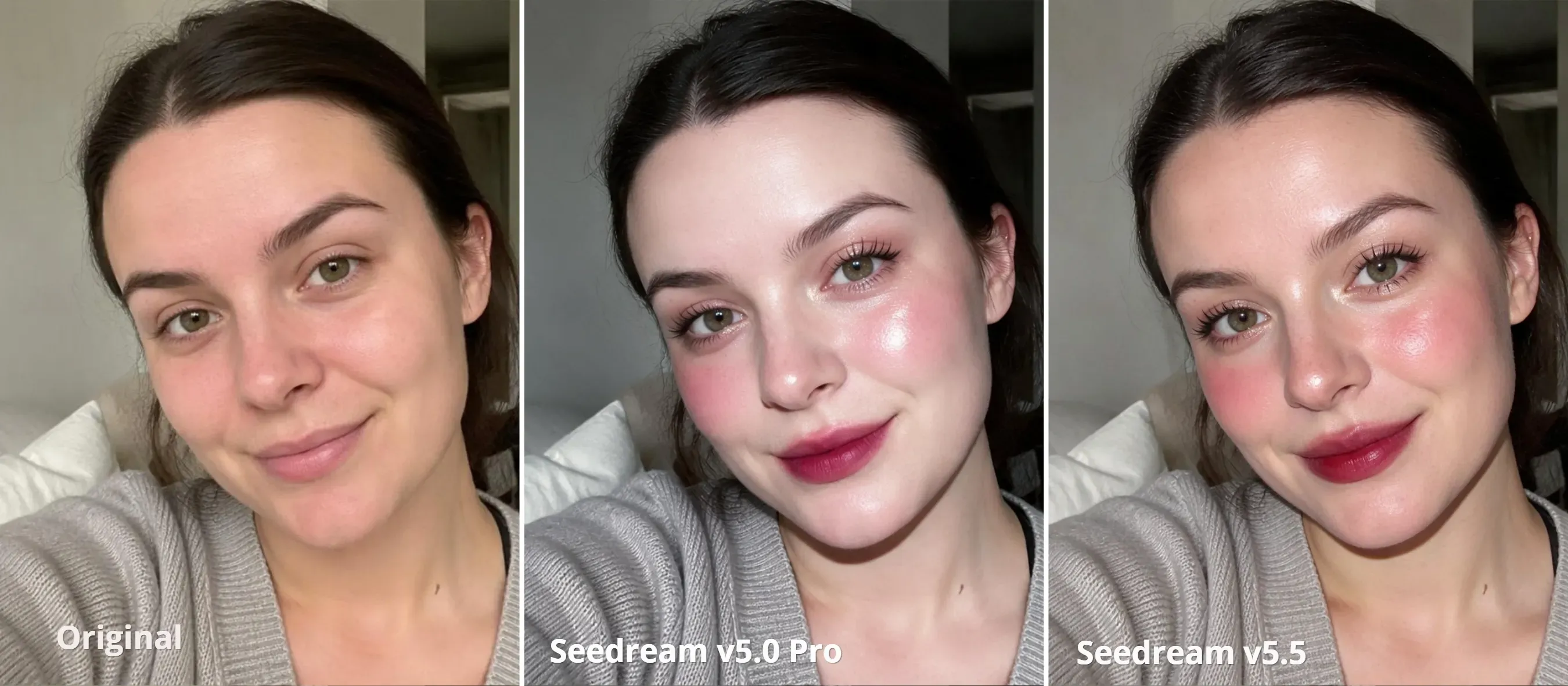
手机美颜应用常常把人脸弄坏。手机滑块把下巴缩成三角形,把皮肤磨成蜡。用 Seedream 5.0 Pro 或 Seedream v5.5 运行局部指令处理,并将几何变化限制在 0.25 以下;你就能获得高对比闪光妆容,同时保留真实皮肤毛孔。
plaintext1TikTok porcelain flash aesthetic. Strictly lock the original jawline, eye size, and facial proportions unchanged. Cool porcelain skin with visible natural pores, lit by hard direct CCD camera flash with crisp specular highlights on cheekbones and nose tip. Add champagne shimmer along the lower aegyo-sal, crisp separated manga lashes, soft rosy blush on mid-cheeks, and a diffused gradient berry lip tint.
- 严格锁定下颌线和眼睛大小: 阻止默认 V 脸瘦脸和动漫式大眼,这些会毁掉标准手机美颜滤镜。
- 直射相机闪光高光: 模拟 TikTok 人像中流行的清晰、高对比 CCD 数码相机闪光,而不是平坦影棚光。
- 定向 卧蚕 aegyo-sal, 睫毛和渐变唇标记: 将妆容变化限制在眼唇周围的精确着色位置,不磨掉脸颊纹理。
可选下一步:把你的重造型照片变成 3-30 秒动态片段
静态画面只完成一半。短视频信息流更奖励微妙的环境运动,而不是冻结的 JPEG。与其从零开始给原始自拍做动画,不如用两阶段图生视频流程,先把重造型后的 水墨 或 汉服 渲染锁定为起始关键帧,再添加物理效果。
-
以完整 2K 分辨率导出重造型后的静帧。 干净边缘给模型清晰边界,无论它是在追踪极细的水墨渐变,还是厚重刺绣丝绸接缝。
-
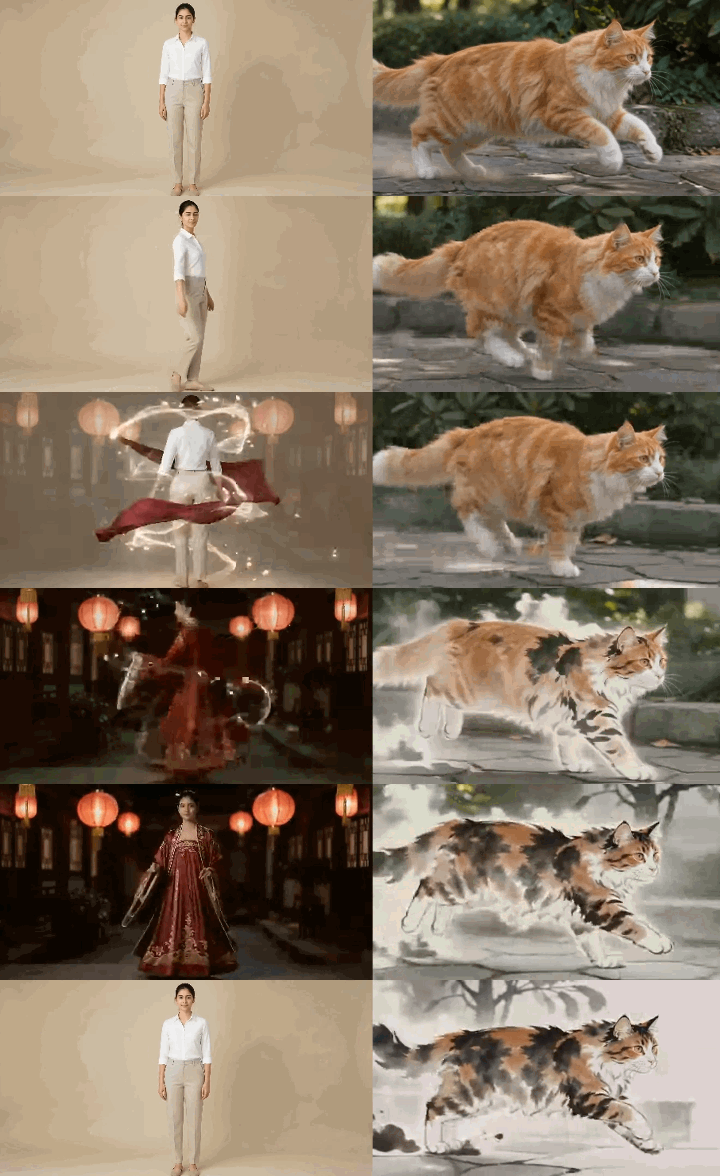
将图像上传到 Seedance 2.5 并选择 5 秒时长。 对于单图环境循环,把重造型照片作为基础帧上传。对于前后对比变换,同时上传原始照片(
@Image1)和重造型人像(@Image2)。 -
完全通过提示词语法控制运动速度。 由于 Seedance 2.5 没有手动运动强度滑块,请保持运动微妙,并通过严格锁定主体、只让次要纹理动起来,来防止扭曲:
- 对于汉服/唐代人像: 提示宽袖和飘动丝带间吹过慢风,或指导镜头后方流畅 360 度旋转,同时夹紧面部骨骼结构。
- 对于水墨画: 将运动引导到氛围效果中——轻微升起的雾气、缓缓漂移的干笔边缘,或慢慢扩散的湿墨晕染,同时保持中心人物锐利。
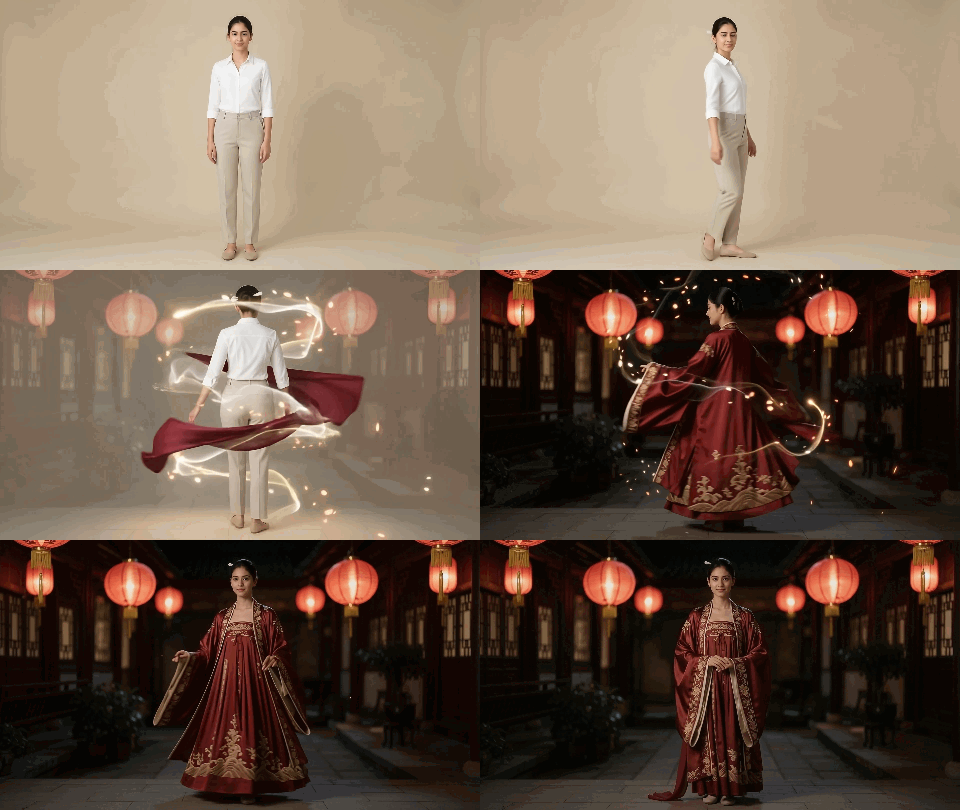
汉服或唐代 360° 变身提示词
plaintext1Cinematic 5-second fashion transformation clip, fixed full-length framing throughout with zero camera zoom. 2Starting from the full-body standing pose in @Image1, the woman initiates a fluid 360-degree spin to her right. As her back turns to the camera, the modern white shirt and trousers dissolve seamlessly into the crimson silk Tang Dynasty Ruqun from @Image2, naturally extending into a flowing, floor-length embroidered skirt. The beige studio background transitions in sync into a dark courtyard illuminated by glowing red lanterns. 3By the final second, she completes the 360-degree rotation and settles into a steady, full-length standing pose facing the camera. The floor-length hemline drapes naturally to the ground while strictly locking the exact facial identity, gaze, and hairstyle of @Image2. Realistic centrifugal fabric physics, zero face morphing glitch.
水墨蜕变提示词
plaintext110-second continuous transformation from @Image1 to @Image2, fixed side-view tracking strictly left-to-right. 2[Camera & Staging] 3Locked side-profile tracking moving rightwards. Zero camera pan, tilt, or zoom. The cat faces strictly right from frame 0 and sprints rightward with zero head-flipping or directional turning. 4[Timeline & Transformation] 5- 0-2s: The photorealistic cat from @Image1 bursts into an active forward sprint along the stone path, strictly facing right. 6- 2-6s: Mid-stride, all 3D lighting and photoreal fur strip away; the running body dissolves into 2D Chinese ink washes, adopting the exact calico brushwork, dry-brush outlines, and ink tones of @Image2. Environment flattens into raw Xuan paper grain. 7- 6-8s: The flat 2D sumi-e cat continues bounding across the paper scroll as dynamic calligraphic strokes with trailing ink splashes. 8- 8-10s: Forward momentum smoothly slides and settles into the exact seated pose and gaze of @Image2 as wet ink absorbs into the fiber. Seamless deceleration, zero cut-to-pose jump. 9[Negative Constraints] 10Single rightward vector. No 3D lighting, no photoreal fur textures after 3s, no abrupt pose snapping, no dual-head artifacts. 11[Audio Design] 12Brisk Guzheng and Pipa melodies building in tempo, layered with airy wind and fluid ink-splash whooshes, resolving into bamboo flute. Pure strings and woodwinds only; strictly no rhythmic tapping, footsteps, or percussive clattering.
专业提示: 明确命令模型在中途剥离 3D 光照和写实毛发,并在最终帧前加入短暂减速阶段,以防止姿势突然跳变。
修复常见 AI 中国风滤镜故障
盲目重跑会快速烧掉积分。当扩散过程出现裁切,或视频网格撕裂时,猜测提示词标签救不了这次生成。使用下方诊断表来隔离提示词冲突、剥离顽固的 3D 锚点,并在再花一个 token 前夹紧运动向量。
| 故障症状 | 可能原因 | 快速修复 |
| 人脸变化或看起来不熟悉 | 过度的结构编辑 | 优先保留面部身份;仅在模型支持时调整编辑强度。 |
| 水墨看起来像模糊的灰度照片 | 缺少纸张和笔触细节 | 指定宣纸纹理、飞白笔触和留白。 |
| 红印章包含乱码字符 | 不想要的文本生成 | 只添加空白朱砂印章,不加文字、不加书法;如有需要裁掉伪影。 |
| 汉服人像皮肤呈蜡感 | 过度磨皮 | 要求自然皮肤毛孔并保留原有肤色。 |
| 霓虹编辑看起来平淡或人脸变绿 | 色彩分离和光晕不佳 | 指定青绿色阴影、琥珀红色光晕和自然肤色。 |
| 运动模糊让主体看起来模糊 | 模糊影响整个画面 | 将运动模糊限制在背景边缘,并保持主体面部锐利。 |
| 背景变成水墨时仍保留 3D 毛发 | 主体原有 3D 外观被保留 | 在片段中途添加指令,移除写实毛发和 3D 光照,替换为匹配目标帧的 2D 墨线。 |
| 运动方向翻转或姿势突然跳变 | 运动方向未锁定或姿势过渡突兀 | 从第一帧起锁定运动方向,并加入短暂稳定过渡进入最终姿势。 |
| 意外出现马蹄声 | 奔跑画面触发不想要的音频效果 | 移除爪子、脚步声引用;指定古筝和环境风声,或生成无声视频后再添加音频。 |
从单次编辑到制作:构建你的中国美学工作流
一键预设无法实现正宗的中国艺术风格。
高端结果取决于分离处理流程。当你需要生宣纸晕染和留白,又不扭曲建筑线条或宠物轮廓时,使用 Seedream 5.5 Edit。当面部骨骼结构必须在厚重唐代织锦刺绣下保持锁定时,切换到 Seedream 5.0 Pro 或 Wan 2.7。对于动态运动,不要指望单条提示词奇迹;把验证过的静帧作为双关键帧输入 Seedance 2.5,在动画前夹紧运动向量。
先在单张静帧上测试光线。一旦提示词锚点稳定,就把流程扩展到 Atlas Cloud GPU 上,批量测试风格并渲染 2K 资产,而不会遇到 VRAM 瓶颈。


