


复古卡通很少因为提示词需要更多怀旧词汇而出问题。它出问题是在青绿色夹克变成蓝色、墨线变得油亮,以及一个餐馆动作变成不相关的切换时。Kling 4 Flash 用于复古卡通视频在你要求运动之前先锁定图像时效果最好。
Kling 4.0 已发布。请查看 Atlas Cloud 上的 Kling 4.0 模型家族,了解当前模型选项。
Kling 4.0 Flash 是一条有限的早期访问路线,不是普遍可用的生产端点。其公布限制为 3 到 20 秒、720p 和 8-bit SDR。对于稳定的反复出现角色,先制作一个已批准的首帧,然后一次只动画一个清晰节拍。如果 Flash 未为你的账户启用,同样的流程今天就可以用 Atlas Cloud 上可用的 Kling V3.0 Turbo 图生视频路线运行。
关键要点
- 使用图生视频来锁定服装、配色、线条处理和剪影。
- 生成 3 个独立的短镜头,而不是强行把完整迷你故事塞进一次生成。
- 将 Flash 访问权限、完整 Kling 4.0 访问权限和可用的 Atlas 工作流视为不同状态。
- 在每个基础帧中保持角色设定集不变。
Kling 4 Flash 现在能制作复古卡通视频吗?
可以,如果你的账户拥有有限的 Flash 推出权限。Kling 表示,Kling 4.0 Flash 于 9 月 28 日面向有限用户群进入早期访问,其列出的能力包括图生视频和文生视频。官方发布将 Flash 列为 3 到 20 秒、720p 和 8-bit SDR。这使它成为测试短风格化镜头的合理选择,而不是承诺 4K 或多关键帧工作流的理由。(Kling 官方发布,2026 年 9 月)
| 路线 | 当前状态 | 在此用于 | 重要限制 |
|---|---|---|---|
| Kling 4.0 Flash | 有限早期访问 | 如果你的账户开放它,可进行短风格化测试 | 3 到 20 秒、720p、8-bit SDR |
| Kling 4.0 完整版 | 另行公布 | 确认访问权限后的后续生产选项 | 不要将其控制项视为 Flash 功能 |
| Atlas Cloud 上的 Kling V3.0 Turbo I2V | 可用的备用方案 | 下方图像优先教程 | 每批前检查在线设置和价格 |
Kling 4 Flash 访问权限、分辨率和片段长度
打开你的 Kling 创作页面,并在围绕它做计划前确认 Flash 是可用的模型。完整 Kling 4.0 发布是单独的访问状态。除非存在可用的 Atlas 模型页面,否则不应将 Flash 描述为 Atlas Cloud 模型。
对于本文的 3 镜头测试,实用的备用方案是 Atlas Cloud:创建静帧、批准它,并分别对每个镜头进行动画制作。这样可将重拍限制在单个镜头内。
为什么 Kling 4 Flash 复古卡通视频需要先有图像
文生视频可以创造出吸引人的细节。它也可能创造出让一个系列无法使用的细节。图生视频在运动开始前给模型一份视觉契约。
在已批准的帧中锁定这 4 个锚点:
| 视觉锚点 | 为什么重要 | 它在提示词中出现的位置 |
|---|---|---|
| Mara 的剪影 | 她的波波头、夹克、鞋子和成年人比例用于识别她 | 角色身份 |
| 风格语法 | 墨线轮廓、赛璐璐上色和半调可防止油亮化偏移 | 视觉年代与线条处理 |
| 世界锚点 | 卡座、雨窗、铃、杯子和霓虹定位故事 | 固定地点和道具 |
| 镜头语法 | 明确命名的取景可避免意外蒙太奇 | 运动提示词,逐个节拍 |
Kling 的提示词指南将视频指导围绕主体、运动、场景、镜头和灯光来构建。对于此用例,将风格和角色细节放在首帧中,然后使用运动提示词在指导动作的同时保留这些细节。(Kling 提示词指南,2026)
Kling 4 Flash 复古卡通提示词:构建角色设定集
每个基础帧提示词都使用这个简洁公式:
[character identity] + [visual era and line treatment] + [limited color palette] + [fixed location] + [one prop] + [no-text constraints]
角色设定集保持逐字稳定。镜头之间只改变调度。这种纪律比在每个提示词里加入一批新的复古形容词更重要。
用一个角色制作 3 个 Kling 4 Flash 复古卡通镜头
使用原创迷你故事“Mara 的霓虹餐馆外送”。生成 3 个独立片段。当前 Atlas Cloud Turbo 文档提供 5 秒和 10 秒时长选项,因此这个 3 节拍的备用版本使用 10 秒。每个片段都有自己的匹配基础帧,所以一次效果不佳不会迫使你完全重来。
第 1 步:生成可复用的首帧
在 GPT Image 2 文生图 中生成 2 到 4 个候选。选择高质量、16:9 以及在线表单提供的最高分辨率。只批准 Mara 的珊瑚色发夹、青绿色夹克、珊瑚色袖章、黄色包、铃、咖啡杯和雨窗都清晰可见的帧。
plaintext1Create a wide 16:9 hand-drawn retro cartoon keyframe for an original animated short. The visual language is late-1980s Saturday-morning cel animation: uneven dark navy ink outlines, flat cel shading, restrained halftone print texture, tiny paint-registration imperfections, and a limited palette of teal, coral red, butter yellow, midnight blue, and warm cream. 2 3Main character: Mara, an original adult bicycle courier in her twenties, short black bob haircut with a single coral hair clip, oversized teal bomber jacket with a coral-red patch on the left sleeve, cream T-shirt, dark navy trousers, white high-top sneakers, and a small yellow messenger bag. Keep Mara’s face, clothing colors, proportions, and hair silhouette clear and repeatable. 4 5Scene: Mara sits alone in a warm retro roadside diner booth at night. A rain-streaked window fills the left side. A tiny red tabletop service bell, a steaming cream coffee cup, and a folded yellow delivery map sit on the table. Outside the window, a teal-and-coral neon diner sign reflects on wet pavement. Compose Mara on the right third of frame, with the bell and cup readable in the foreground. Hand-painted background details, no photorealism, no 3D rendering, no gradients, no glossy modern CGI, no words, no logo, no subtitles, no watermark.
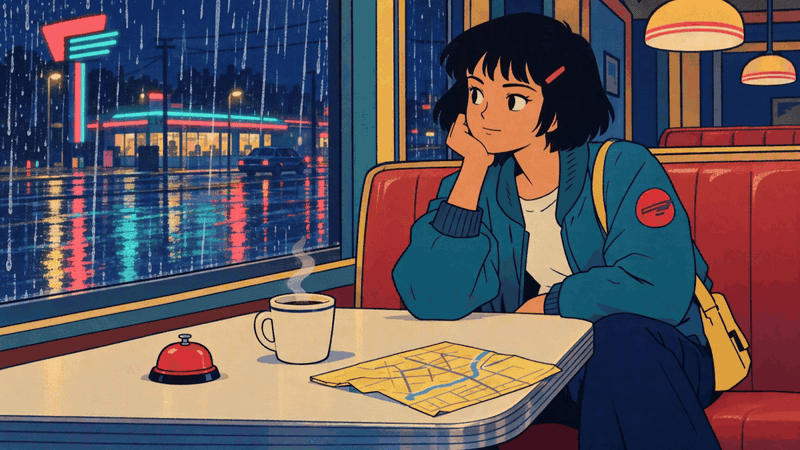
Mara 已批准的餐馆关键帧,带有雨窗、红色铃、咖啡杯和黄色地图
基础帧 1:餐馆道具、雨窗和 Mara 的青绿色夹克在动画前确立了外观。
镜头 1:铃与雨
将已批准的帧上传到 Kling V3.0 Turbo 图生视频。设置 16:9、10 秒、1080p,并为这个无声 GIF 示例关闭音频。动作有因有果:Mara 注意到雨,按下铃,然后伸手去拿地图。
plaintext1Use the supplied image as the exact visual source and preserve Mara’s face, short black bob, coral hair clip, teal bomber jacket, coral sleeve patch, yellow messenger bag, diner booth, red bell, cream coffee cup, rain-streaked window, limited teal-coral-cream palette, hand-inked outlines, flat cel shading, and halftone texture. 2 3Create a 10-second retro-cartoon sequence with three deliberate beats: 40 to 3 seconds: wide shot, Mara notices rain intensifying outside and presses the small red bell once; steam curls from the coffee. 53 to 7 seconds: medium side shot, Mara turns her head toward the window; the neon reflection shimmers across the wet glass. 67 to 10 seconds: close three-quarter shot, Mara gives a determined half-smile and reaches for the yellow delivery map. 7 8Keep the action smooth and readable. Preserve the hand-drawn 1980s cel-animation look. No extra characters, no costume changes, no text, no captions, no logos, no morphing, no sudden camera jumps, no photorealism.
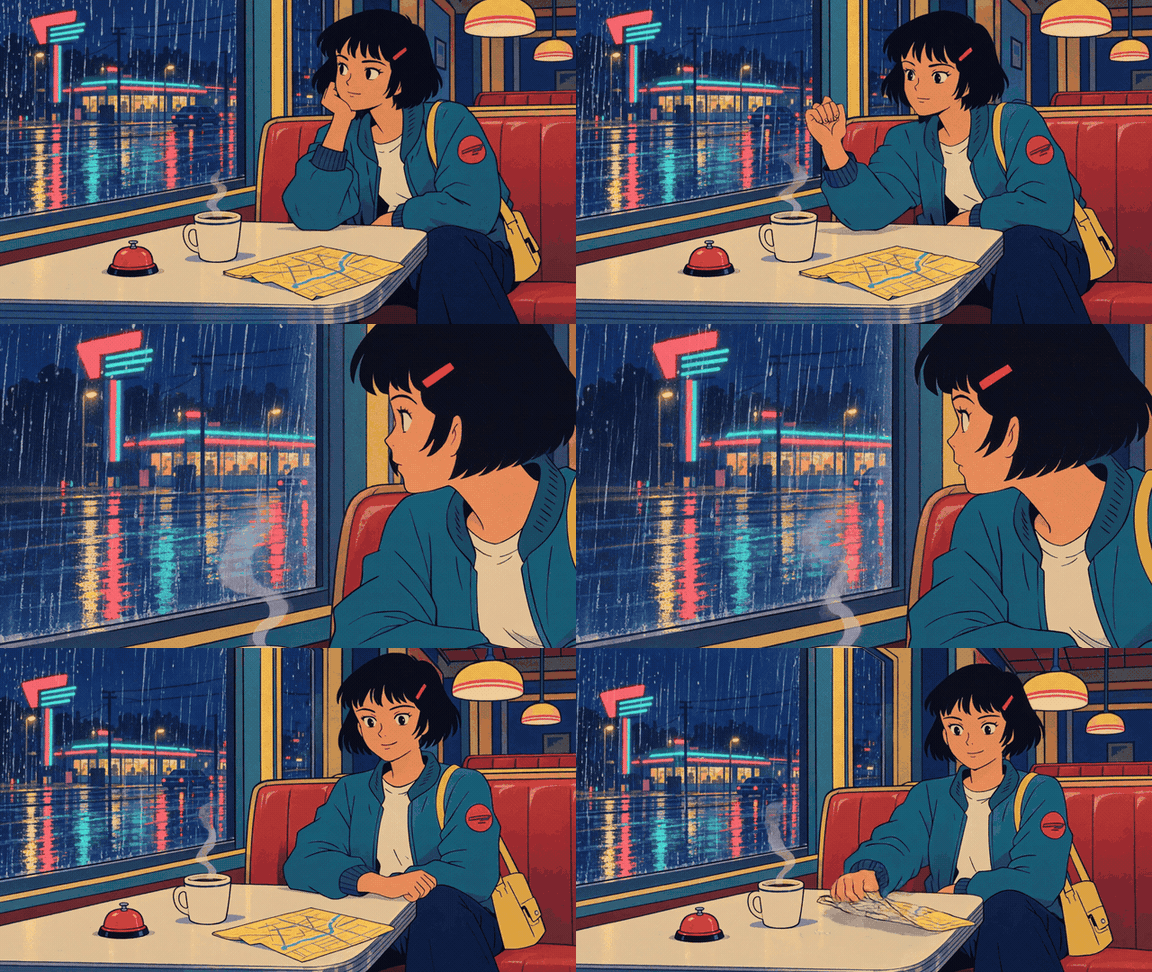
Mara 在餐馆桌旁,转向雨窗并伸手去拿地图
结果 1:Mara 从雨窗转向桌子并伸手去拿地图。铃始终可见,但完成后的片段没有清楚显示按铃动作。
镜头 2:窗户倒影
使用完整角色设定集制作一个新的匹配基础帧。只改变调度:Mara 站在餐馆门口,拿着黄色地图和包带,青绿色踏板摩托车在外面湿漉漉的路面上等候。
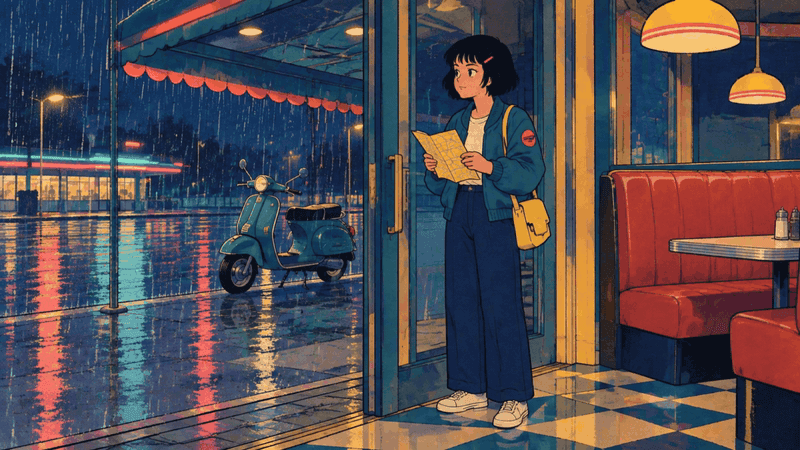
Mara 在餐馆门口,手持地图,青绿色踏板摩托车停在外面
基础帧 2:同样的夹克、袖章、包和雨天配色延续到新的调度中。
plaintext1Use the supplied image as the exact first frame. Preserve Mara’s short black bob, coral hair clip, teal jacket, coral sleeve patch, yellow bag, yellow map, diner doorway, teal scooter, wet pavement, retro hand-inked linework, flat cel shading, halftone texture, and limited teal-coral-cream palette. 2 3Create a 10-second sequence: 40 to 3 seconds: medium interior shot, Mara folds the map once and looks through the rain-streaked door glass. 53 to 7 seconds: exterior medium-wide shot, Mara steps out under the diner awning and places the folded map into her yellow bag. 67 to 10 seconds: low side shot, Mara swings one leg onto the teal scooter; rain ripples in a shallow puddle and neon reflections move across it. 7 8Keep Mara’s design stable. Make every action physically connected. No new characters, no text, no captions, no logos, no style change, no abrupt montage, no photorealism.
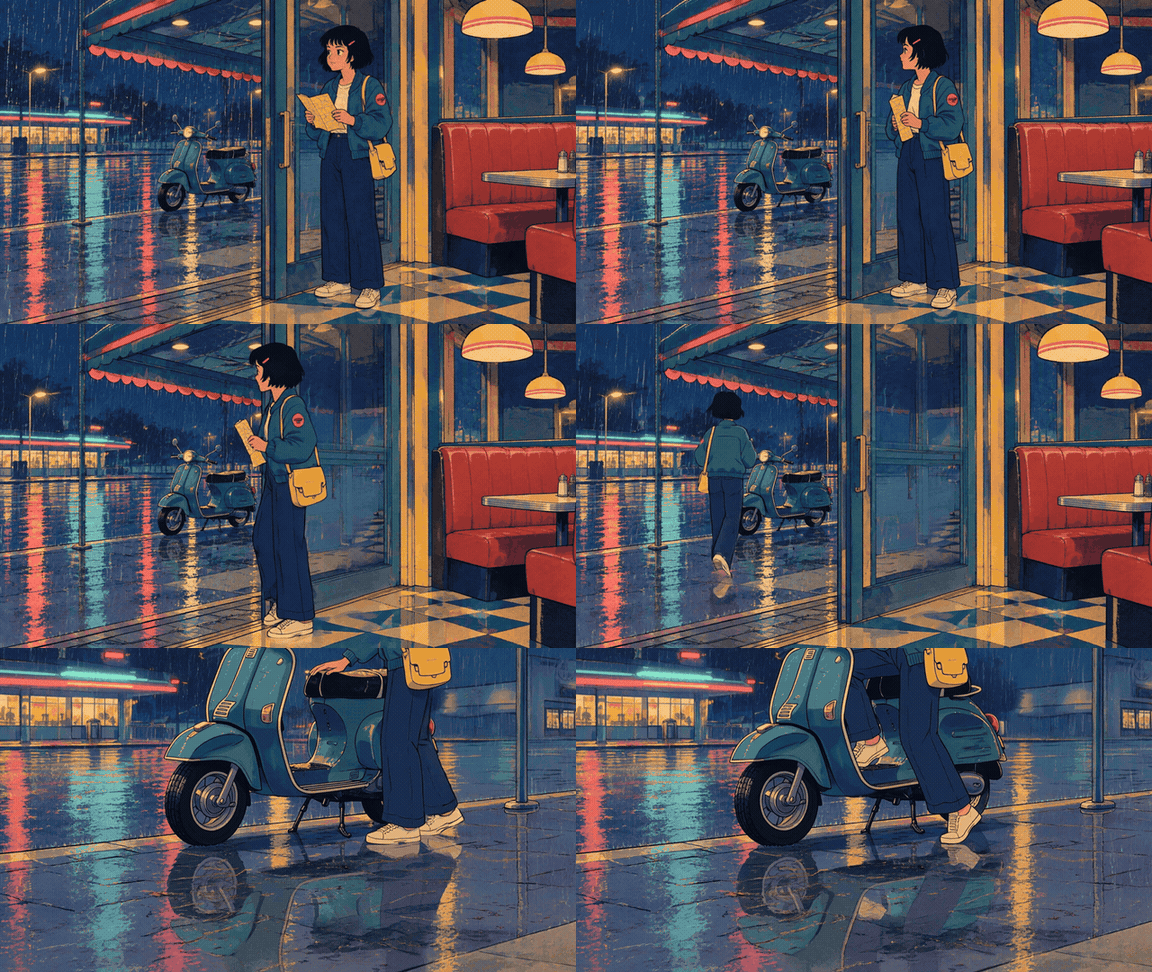
Mara 在雨中离开餐馆并骑上她的青绿色踏板摩托车
结果 2:Mara 走到踏板摩托车旁并骑上去。动作清晰可读;但完成后的片段中没有清楚看到所要求的地图折叠动作。
镜头 3:踏板摩托车出发
生成第三个匹配基础帧。保持 Mara 不变,在餐馆外的青绿色踏板摩托车上,地图塞进包里,路缘附近有一张纸质收据。在右侧留出横向空间。
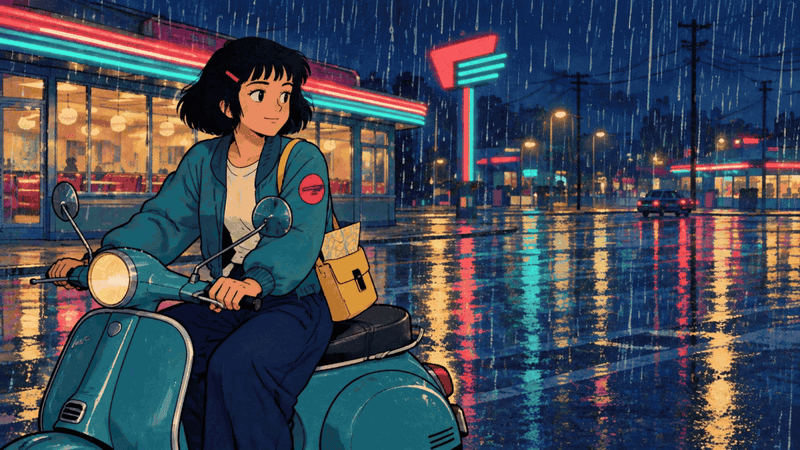
Mara 在雨中的霓虹餐馆外骑着青绿色踏板摩托车
基础帧 3:踏板摩托车和更宽的湿街道为出发镜头提供了运动空间。
plaintext1Use the supplied image as the exact first frame and preserve Mara, her teal jacket, coral patch, yellow bag, teal scooter, diner architecture, neon palette, wet pavement, hand-inked outlines, cel shading, and halftone texture. 2 3Create a 10-second retro-cartoon departure: 40 to 3 seconds: medium-wide shot, Mara starts the scooter and its headlight softly illuminates rain droplets. 53 to 7 seconds: side-tracking shot, Mara rides smoothly from left to right past the diner; the paper receipt lifts, circles once, and falls behind her. 67 to 10 seconds: wider rear three-quarter shot, the scooter turns gently down the rain-glossed street while the diner neon remains visible in the background. 7 8Keep the same character proportions and style from beginning to end. No extra riders, no text, no captions, no logos, no sudden camera jump, no morphing, no photorealism.
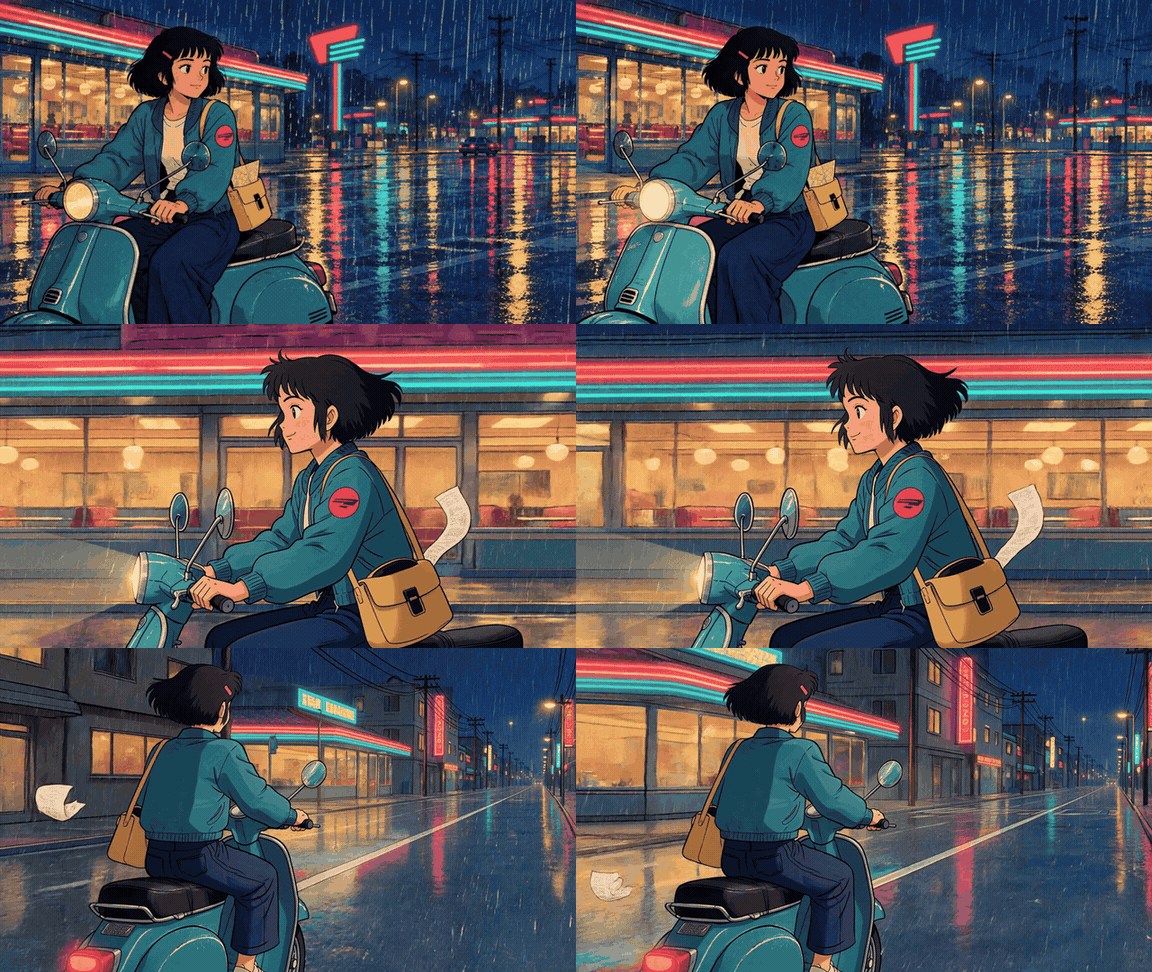
Mara 骑着青绿色踏板摩托车离开餐馆,一张收据在雨中扬起
结果 3:Mara 骑过餐馆,沿着湿街道远去,一张纸质收据在她旁边扬起。她的青绿色夹克、珊瑚色袖章和黄色包仍然可辨认。
Kling 4 Flash 对比可用的 Atlas 备用方案
使用适合任务的路线,而不是进行模型排名竞赛。
| 需求 | 推荐路线 |
|---|---|
| 已确认的 Flash 访问权限,以及快速的 720p 风格化测试 | 在 Flash 中复用同一个已批准的基础帧和 3 镜头提示词 |
| 今天就可复现的工作流 | GPT Image 2 基础帧加上 Kling V3.0 Turbo 图生视频 |
| 更强的首帧到末帧过渡控制 | 在投入前确认一条提供首帧/末帧控制的可用路线 |
| 4K 交付物 | 确认模型特定设置;Flash 不是默认 4K 的假设 |
可用的 Atlas 路线很有用,因为你可以在一个工作区中创建首帧和 Kling 片段,同时进行迭代。它是此工作流的备用方案,而不是 Atlas 上托管的 Kling 4 Flash。
Kling 4 Flash 价格与 10 秒预算快照
截至 2026 年 10 月,Atlas Cloud 的模型目录将 Kling V3.0 Turbo 图生视频列为 $0.095 每秒,显示为从 $0.112 每秒的 15% 折扣。因此按该标价,一次 10 秒测试为 $0.95。将此视为规划快照:在生产批次前确认在线模型页面、分辨率、时长和价格。(Atlas Cloud 模型,2026 年 10 月)
解决 Kling 4 Flash 复古卡通视频问题
角色在镜头之间发生变化
当地点允许时,复用已批准的基础图像。对于新地点,重复完整角色设定集。不要把“黑色短波波头、珊瑚色发夹、青绿色夹克、珊瑚色袖章、黄色包”压缩成“同一个女孩”,然后指望模型保留这些特征。
Kling 4 Flash 添加随机切换或风格偏移
明确命名 3 个节拍,为每个节拍指定取景,并移除相互冲突的镜头语言。“单次连续拍摄”“快速蒙太奇”和“多角度”不应出现在同一个提示词中。将赛璐璐上色、墨线粗细、半调纹理和配色保留写入基础帧和视频提示词。
运动看起来像缓慢变焦
给 Mara 一个带有可见效果的身体任务:按铃、折地图、跨上踏板摩托车、骑过餐馆。添加一个环境反应,例如蒸汽、雨滴涟漪或收据打转。这样就能把运动变成一个小故事,而不是镜头漂移。
Kling 4 Flash 值得用于复古卡通视频吗?
当你已经拥有访问权限,并且需要在其公布限制内制作一个简短风格化片段时,Kling 4 Flash 值得测试。可复现的优势来自图像优先的故事板和锁定角色设定集。你现在可以用可用的 Atlas 备用方案验证该流程,然后在 Flash 访问权限确认后运行同样的 Kling 4 Flash 用于复古卡通视频 镜头计划。
常见问题
Kling 4 Flash 能从一张图像创建复古卡通视频吗?
其官方发布列出了图生视频支持。对于反复出现的复古角色,设计好的首帧是更安全的路线,因为它固定了服装、配色、线条和场景。
对于一致的卡通角色,最好的 Kling 4 Flash 提示词是什么?
在每个基础帧中使用完整角色设定集,然后使用带有 3 个定时节拍的简短运动提示词。保留相同的具名服装、道具、场景、墨线处理、配色和镜头取景。
复古动画应该使用文生视频还是图生视频?
当连续性重要时使用图生视频。文生视频可以帮助探索想法,但它让模型在角色设计和风格上要做更多决定。
为什么我的 Kling 卡通视频会添加随机切换或改变角色服装?
提示词可能留了太多开放空间,或给出了相互矛盾的镜头指导。提供一个已批准的首帧,只描述预期动作,并为每个节拍指定取景。
如果我没有 Kling 4 Flash 访问权限,今天可以用什么?
使用与可用图生视频模型相同的图像优先流程。这里展示的实用路线是用 GPT Image 2 制作关键帧,并用 Kling V3.0 Turbo 图生视频制作每个 10 秒镜头。







