


镜头掠过海港,爬升越过悉尼歌剧院的白色贝壳,再倾斜飞向大桥。两个版本同时播放,彼此叠放在同一条飞行路径上。一个是three.js 3D 动画,由语言模型以代码编写。另一个来自从未看过其中一行代码的视频模型。
Artificial Analysis 于 2026 年 11 月 20 日发布的那个片段,提出了一个问题:语言模型能否制作出比视频模型更好的视频?我们把这个问题带到 Atlas Cloud,并在罗马斗兽场上亲自测试:GPT-6.2 Astra 编写场景,Seedance 2.5 渲染同一条路线。下面是提示词、代码和两种结果。
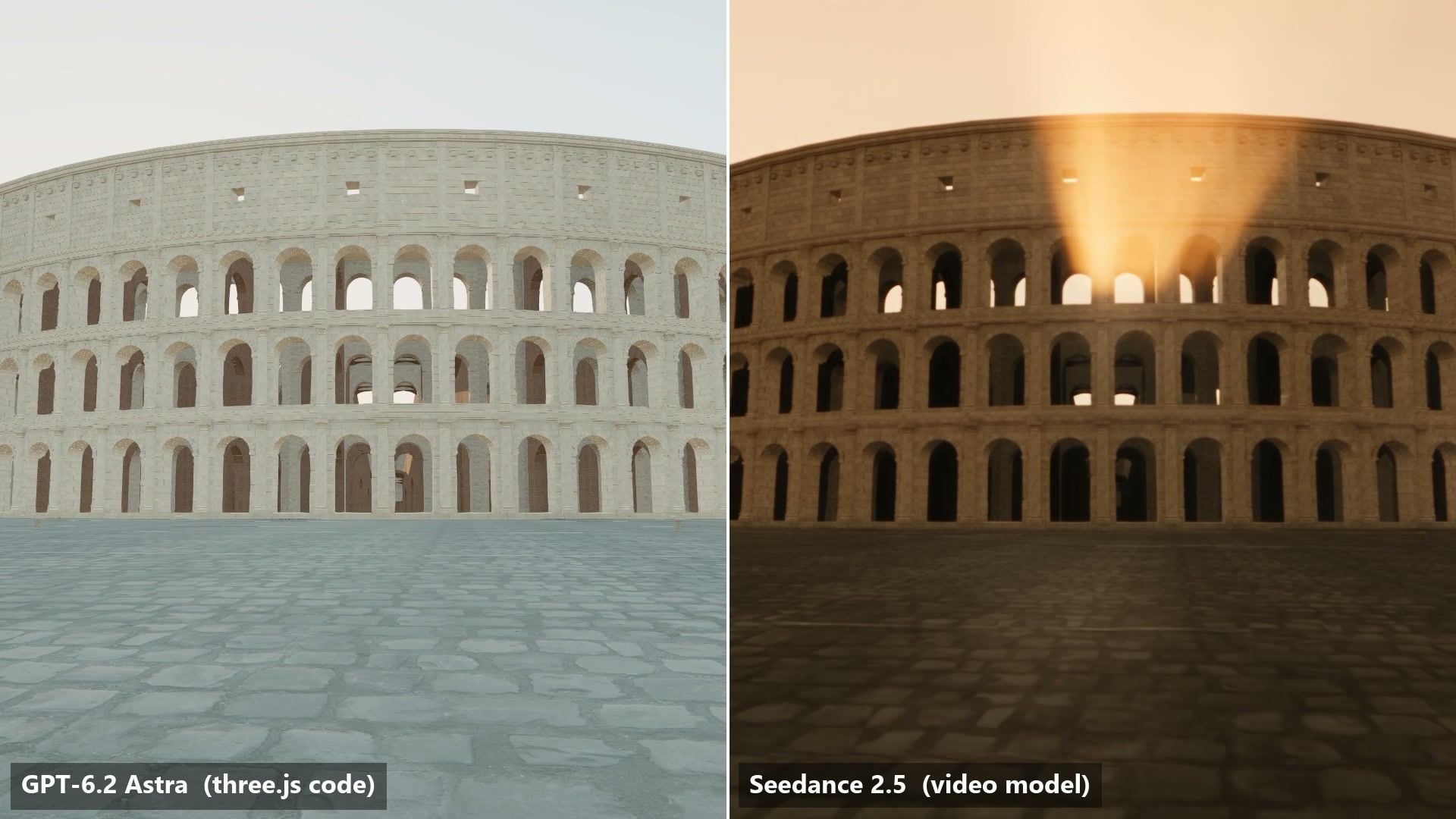
要点
- GPT-6.2 Astra 可以将完整的 three.js 3D 动画、场景和摄像机路径写成一个 HTML 文件。
- Artificial Analysis 让同一条 15 秒摄像机路径飞过三个 AA-3D 场景,分别交给 Astra 和 Seedance 2.5。
- 代码保留精确几何结构,就像把腕表机芯拆分成多层;Seedance 2.5 则加入真实世界的光照。
- 来自 three.js 摄像机路径的灰度关键帧把路线交给 Seedance 2.5,同时不传递 CG 观感。
- 两个模型都可在同一个 Atlas Cloud 密钥下运行,从 GPT-6.2 Astra 页面.
AI 能制作 three.js 3D 动画吗?Artificial Analysis 测试了什么
能,而且现在已有对应的排行榜。Artificial Analysis 于 2026 年 10 月 12 日推出 AA-3D:涵盖七个领域的 55 份书面简报,每份都由模型作为智能体在离线沙盒中转化为一个 three.js 网页。
智能体可以使用 Blender、物理引擎、无头浏览器和 CC0 素材库,并且最多有三个小时或 250 轮。随后,人类评审团在不了解场景由哪个模型构建的情况下,对成对场景进行投票。
GPT-6.2 Astra 以 1,318 Elo 领跑该榜单,领先 Claude Fable 5.2 的 1,271 和 GPT-6.2 Sol 的 1,259。
Astra 发布三天后,Artificial Analysis 让它与 Seedance 对决。Astra 以代码构建了三个 AA-3D 场景,脚本化摄像机在浏览器中以 15 秒、1080p 和 24 fps 飞过每个场景。Seedance 2.5 则收到同样的摄像机路径文本提示,以及该路线的参考图像,设置相同。帖子展示了结果,但没有指名赢家。
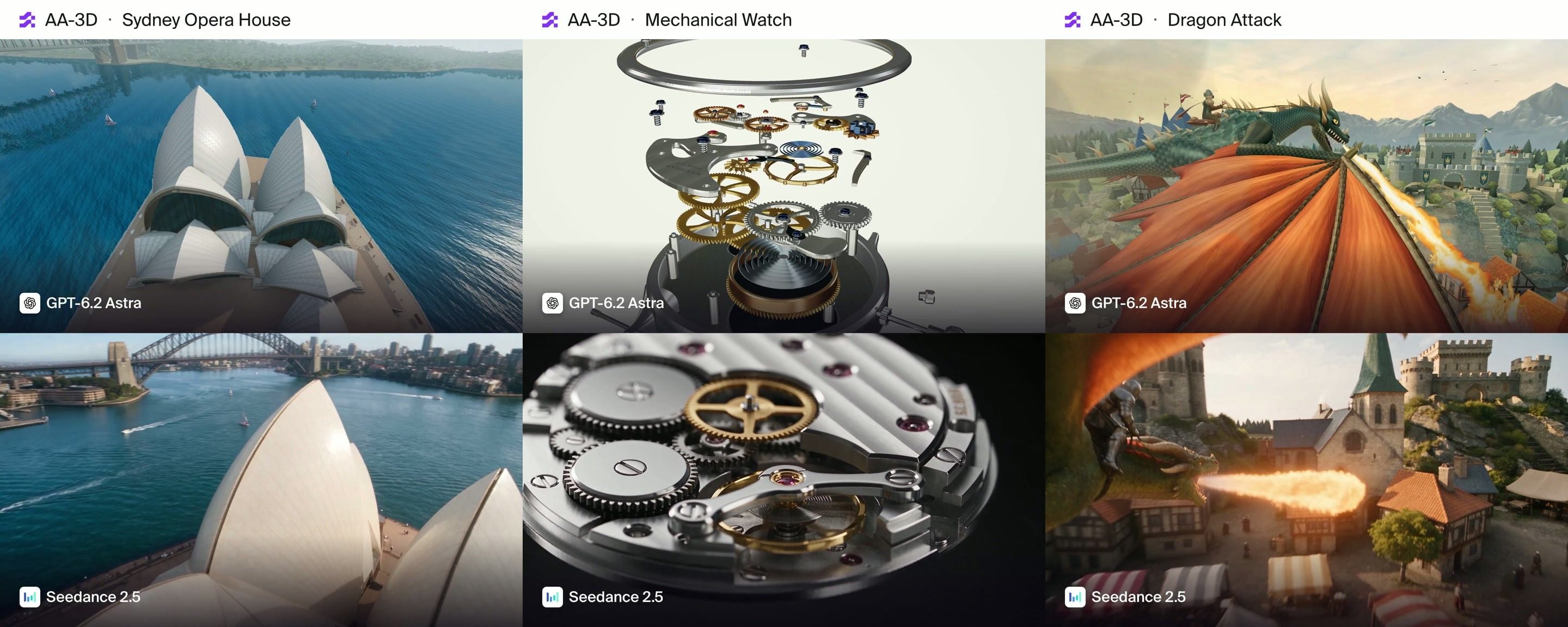
来源:Artificial Analysis 2026 年 11 月 20 日视频帖子的画面。上排为 GPT-6.2 Astra,下排为 Seedance 2.5。
每个场景都是真实的 AA-3D 简报,你可以在 AA-3D Explorer 中打开 Astra 为三者制作的可交互版本。下面是双方呈现在屏幕上的内容:
| 场景 | 简报要求 | GPT-6.2 Astra(three.js 代码) | Seedance 2.5(视频模型) |
|---|---|---|---|
| 悉尼歌剧院 | 建筑的几何结构和海港环境 | 干净的 CG 贝壳,下方是风格化蓝色水面和简单城市 | 航拍素材观感,密集的滨水细节和船只尾迹 |
| 机械腕表 | 带标注的机芯、爆炸视图、可运转的复杂功能 | 白色表盘,随后机芯抬起并拆分为漂浮层 | 深色钢质腕表,带有陀飞轮,随后是齿轮和宝石的微距镜头 |
| 中世纪城镇上空的龙 | 一座宫殿、一座堡垒和一条用户控制的龙 | 一条带骑手的橙色翅膀巨龙;城镇最终陷入火海 | 火焰击中城堡岩石的近距离镜头,随后是城镇的广角航拍 |
如何在 Atlas Cloud 上使用 GPT-6.2 Astra 制作 three.js 3D 动画
OpenAI 为 GPT-6.2 发布的文章列出了 罗马斗兽场的复刻,你可以在 GPT-6.2 的 3D 演示中从不同角度探索。我们要求用脚本化的 15 秒摄像机路径呈现同一地标,并在 Atlas Cloud 上运行,从它返回的 HTML 文件中得到了这个:
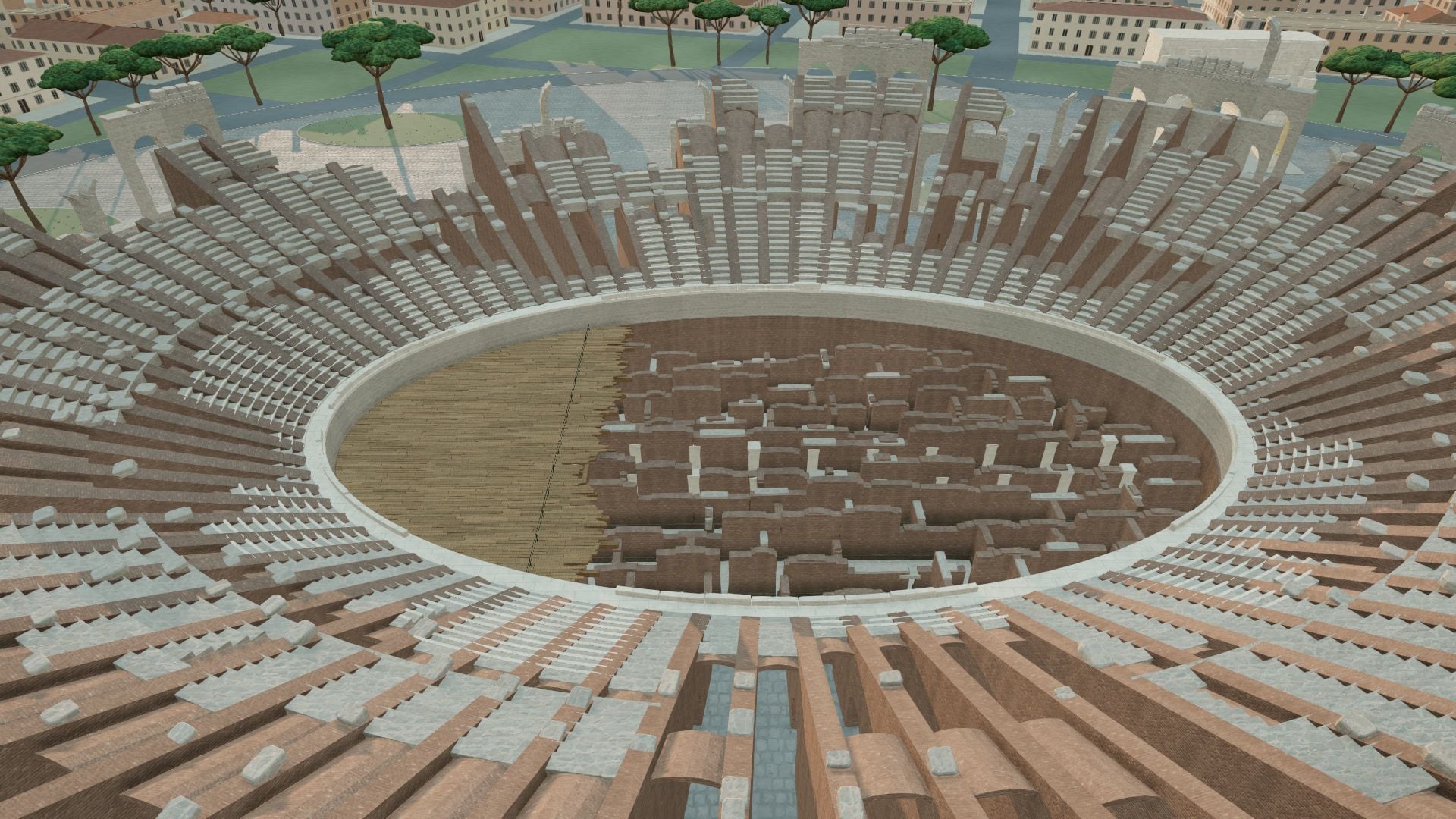
那个画面中的每一块石块、每一道拱门和每一个座位,都是 Astra 用 JavaScript 写出的几何体。两项输入塑造了它。我们给它来自 Poly Haven 的 CC0 纹理,就像 AA-3D 的沙盒所做的那样;在第二轮中,我们把其自身渲染的截图连同修改说明发送给它。
方法 1:在 Playground 中提示场景和 three.js 摄像机动画
登录并打开 GPT-6.2 Astra playground。点击 Settings,并将 Out Length 调到最大,因为这样的场景会超过 45,000 个字符。然后:
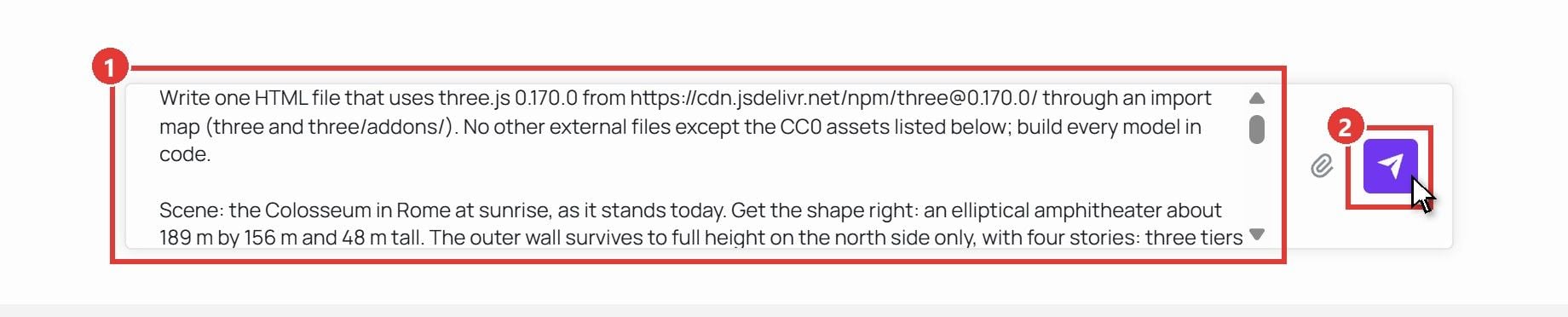
- 将下面的提示词粘贴到消息框中。
- 点击发送箭头,等待 HTML。
plaintext1Write one HTML file that uses three.js 0.170.0 from https://cdn.jsdelivr.net/npm/[email protected]/ through an import map (three and three/addons/). No other external files except the CC0 assets listed below; build every model in code. 2 3Scene: the Colosseum in Rome at sunrise, as it stands today. Get the shape right: an elliptical amphitheater about 189 m by 156 m and 48 m tall. The outer wall survives to full height on the north side only, with four stories: three tiers of 80 arches framed by Tuscan, Ionic and Corinthian half-columns, then a solid attic with small square windows. On the south side the outer ring is gone and the inner ring shows stepped, broken edges. Inside: ruined seating banks, a partial wooden arena floor at the east end, and the open hypogeum below it, a grid of stone corridors and chambers. Around it: a paved plaza, a few umbrella pines, the Arch of Constantine to the southwest, low city blocks in the distance. No people, no vehicles, no text or logos in the scene. 4 5Visual quality bar: this must read as a cinematic architectural visualization, not a low-poly mockup. 6- Geometry with real depth: piers, half-columns with bases and capitals, arch voussoirs, cornice bands between stories, attic pilasters and corbels, deep arch openings you can see through; the broken south edge as irregular stepped masonry with fallen blocks; seating vaults with radial walls; hypogeum walls of brick at varying heights. Use InstancedMesh and merged geometry so it stays fast at 1080p. 7- Materials: use the CC0 texture sets in the textures/ folder next to the HTML file (2048x2048 JPG, each with _diff, _nor (OpenGL normal) and _rough maps): travertine_* for the outer wall, piers and attic; weathered_stone_* for the inner ring, seating banks and broken edges; roman_brick_* for the hypogeum and inner vaults; plaza_cobble_* for the plaza; arena_wood_* for the partial arena floor. Load them with TextureLoader, set sRGB on _diff only, repeat them at a believable real-world scale with world-space or per-face UVs so blocks are not stretched, and break up tiling with a tint and dirt variation (darker weathering streaks under ledges, warmer stone in the sun). Wait for every texture before setting sceneReady. 8- Light: textures/sky_dawn_2k.hdr (CC0 dawn sky, load with RGBELoader) as the background and PMREM environment, plus a low sun about 8 degrees above the horizon behind the building as seen from the opening shot, so the facade is backlit and warm light rakes through the arches. One DirectionalLight with 4096 soft shadows covering the whole site, ACESFilmic tone mapping, sRGB output. 9- Post: EffectComposer with GTAOPass for contact shadows in the arches and vaults, subtle UnrealBloom on the sun, distance haze that thickens toward the horizon, SMAA or 4x MSAA antialiasing, a light vignette. 10- Surroundings: grass patches, umbrella pines with layered canopies, a recognizable three-arch Arch of Constantine, city blocks of varied heights with terracotta roofs that fade into the haze. 11 12Camera: one continuous 15-second flight at a steady speed. Build it as a THREE.CatmullRomCurve3 for the camera position and a second curve for the look-at target, both defined in one CAMERA_PATH array at the top of the script so the route is easy to edit: 13- 0-3 s: low on the plaza, 2 m above the ground, about 120 m from the north facade, the full facade ahead with the sun behind it. 14- 3-7 s: push slowly toward the arches while rising to the height of the third tier. 15- 7-10 s: crest over the top of the wall and tilt down into the arena; the hypogeum corridors are visible beneath the partial floor. 16- 10-13 s: glide across the arena at about 25 m height toward the far side. 17- 13-15 s: pull up and back to a high aerial about 250 m up, showing the whole oval and the city around it. 18 19Playback and capture: 20- Render at 1920x1080. Play the 15-second flight on load and loop it. Add a small play/pause button and a time scrubber, and enable OrbitControls while paused. 21- Support ?capture=1 in the URL: hide all UI, stop the animation loop, set the pixel ratio to 1, and expose window.renderAt(seconds), which places the camera at that point on the path and renders one full frame, post-processing included, synchronously. Drive everything that moves (birds, drifting haze, light flicker) from that time value, not from a clock, so the same second always renders the same frame. 22- Set window.sceneReady = true once all geometry and textures are built. 23 24Return only the HTML file, no explanation.
将回复保存为 colosseum.html。在旁边创建一个 textures 文件夹,把五个 Poly Haven 素材集按提示词中使用的名称保存:Large Sandstone Blocks 01 作为 travertine,Old Stone Wall 作为 weathered_stone,Castle Brick 02 Red 作为 roman_brick,Cobblestone Floor 01 作为 plaza_cobble,Medieval Wood 作为 arena_wood,另外把 Kiara 1 Dawn HDRI 保存为 sky_dawn_2k.hdr。浏览器会阻止 file:// 页面加载本地纹理,因此请为该文件夹启动服务并打开 http://localhost:8000/colosseum.html:
plaintext1python -m http.server 8000
方法 2:通过 API 以最大推理强度调用 GPT-6.2 Astra
Playground 以默认推理级别运行 Astra。Artificial Analysis 以最大级别测试了它,而 API 让你也能匹配这一设置。
第 1 步:创建 API 密钥。 在控制台中打开 Settings,进入 API Keys,然后点击 Create API Key。
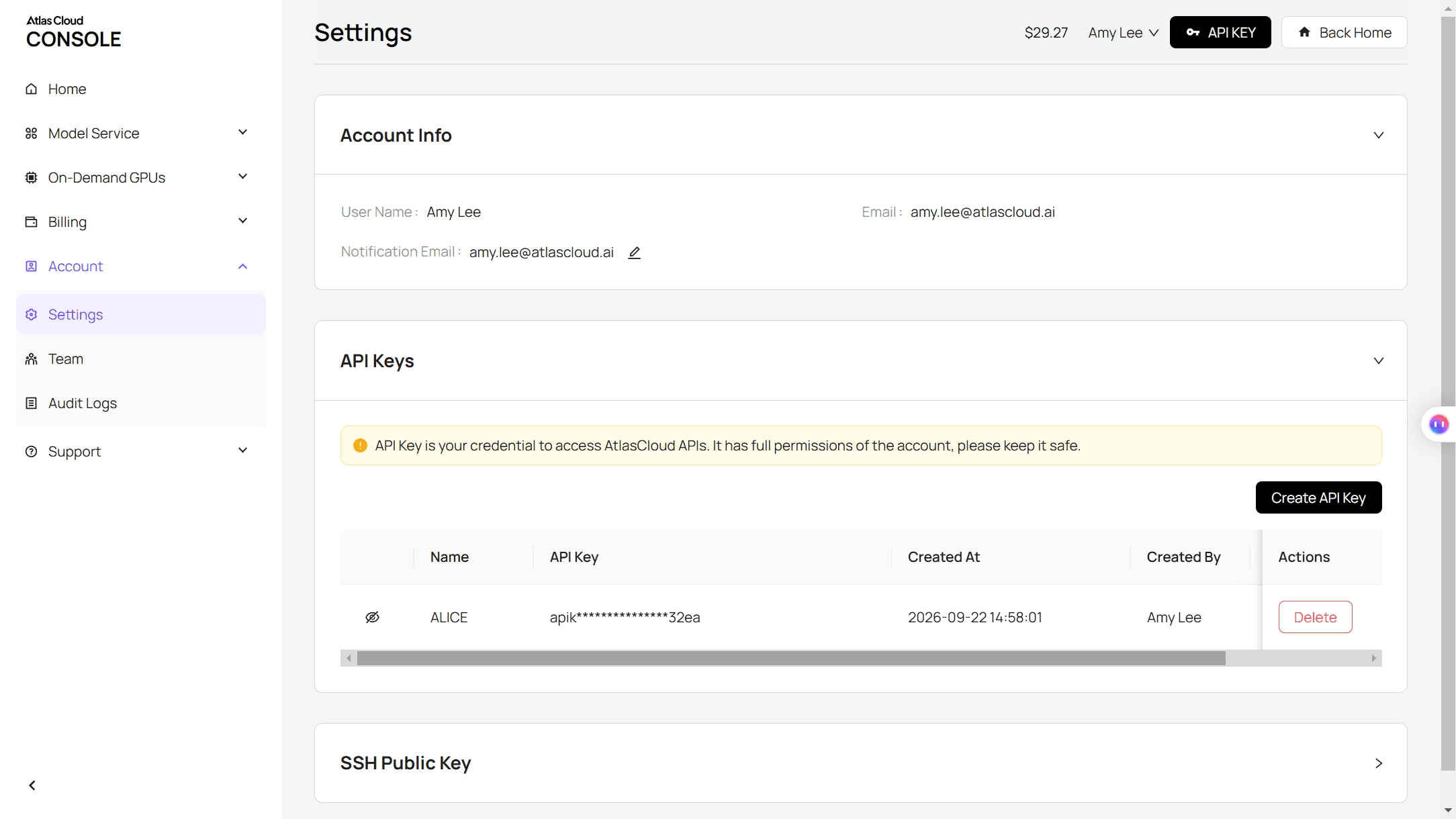
第 2 步:查看请求格式,见 Atlas Cloud API 文档。推理强度放在 Responses 端点的 reasoning 对象中。
第 3 步:发送请求。 将方法 1 中的提示词粘贴到 input 字段中。一次最大强度运行大约花了我们九分钟,因此请给 curl 设置较长的超时时间。HTML 位于 output[1].content[0].text 中,在 reasoning 项之后。
plaintext1curl -X POST "https://api.atlascloud.ai/v1/responses" \ 2 --max-time 1800 \ 3 -H "Authorization: Bearer $ATLASCLOUD_API_KEY" \ 4 -H "Content-Type: application/json" \ 5 -d '{ 6 "model": "openai/gpt-6.2-astra", 7 "input": "<paste the Colosseum prompt here>", 8 "reasoning": {"effort": "max"}, 9 "max_output_tokens": 128000 10 }'
进行第二轮时,把简报、当前 HTML 和几张渲染帧作为 input_image 部分发送,并附上一份简短的修改清单。我们的要求是更温暖的晨间色彩,以及外立面上更大的奶油色石灰华石块。
要将页面转为 MP4,请用 ?capture=1 打开它,在无头浏览器中对每一帧调用 window.renderAt(0、1/24、2/24,依此类推直到 15 秒),将每个 canvas 保存为 PNG,然后合并它们:
plaintext1ffmpeg -framerate 24 -i frames/%04d.png -c:v libx264 -pix_fmt yuv420p -crf 16 colosseum-15s.mp4
同一个端点和密钥也可用于 Seedance 2.5 以及 Atlas Cloud 的 600 多个其他模型,因此进入下一步只需更改模型字符串。
将 three.js 摄像机动画转为 Seedance 2.5 视频
这是 Artificial Analysis 测试中 Seedance 的那一半:路线以图片形式传递。从 three.js 动画的 0、5、9 和 15 秒处提取四帧,并将它们转换为灰度。Seedance 2.5 会密切读取参考图像,因此带纹理的渲染会连同布局一起把颜色和 CG 表面传递过去。灰度帧只传递摄像机和建筑,把观感留给模型。
打开 Seedance 2.5 Reference-to-Video,按顺序一次上传一张这四帧,并设置 1080p、16:9 和 15 秒。在提示词中,输入 @ 并从列表中选择每张图像,使其成为标签:
plaintext1Real 4K drone footage of the Colosseum in Rome at sunrise, shot on a cinema camera: photographic, live-action, true-to-life materials and light. One continuous 15-second flight, no cuts. 2The four reference images are gray, untextured previs renders of the camera route: @image1 at 0s, @image2 at 5s, @image3 at 9s, @image4 at 15s. Copy only their camera positions, framing and the building layout. Do not copy their gray color, flat lighting or CG look. 3[0-3s] Low over the cobbled plaza, matching @image1: the full north facade ahead, the sun just rising behind it, golden rim light through the arches. 4[3-7s] Push slowly toward the arches while rising to the third tier, passing the view in @image2: real weathered cream travertine, dark holes left by the old iron clamps, grass on the ledges. 5[7-10s] Crest over the top of the wall and tilt down into the arena, matching @image3: the stone corridors of the hypogeum below a partial wooden floor, long morning shadows. 6[10-13s] Glide across the arena at mid height toward the far wall. 7[13-15s] Pull up and back to a high aerial of the whole oval and Rome around it, warm haze over terracotta rooftops, ending on @image4. 8Steady camera speed. No people, no vehicles, no text, no logos.
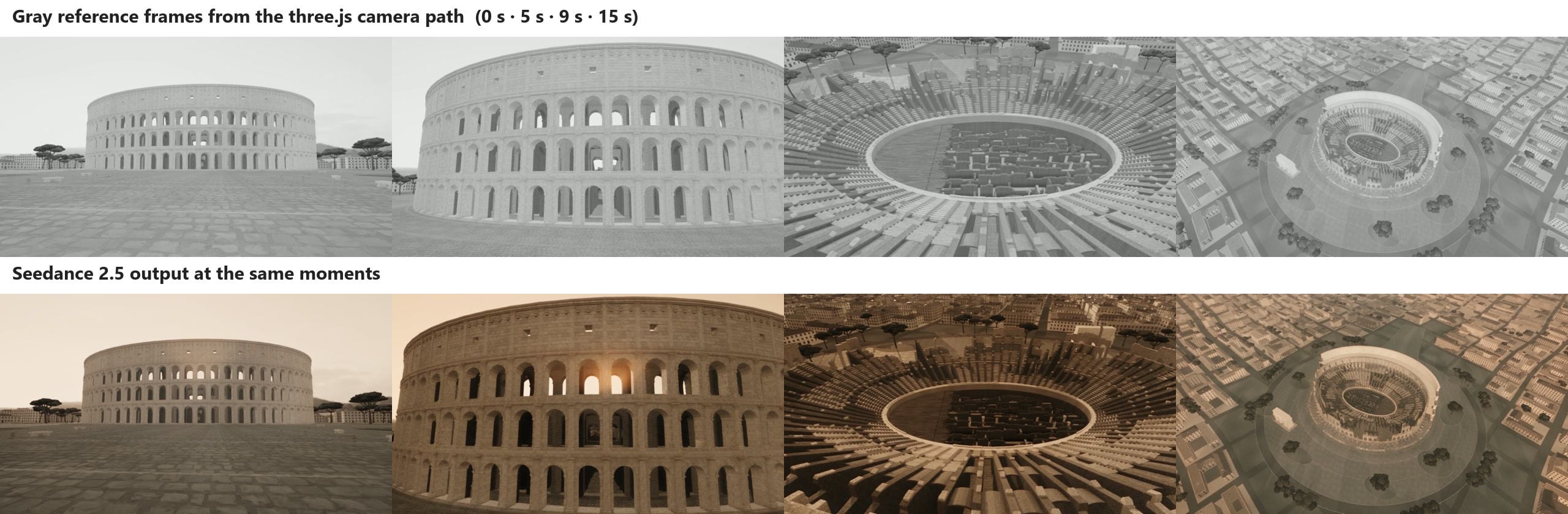
方括号中的时间戳让飞行的每一段保持自己的节奏。我们的 Seedance 2.5 摄像机控制指南 介绍了这种语法以及其他锁定运镜的方法。
我们的测试:一次 15 秒穿越,代码 vs 视频模型
布局与 Artificial Analysis 的帖子相同:Astra 在上,Seedance 2.5 在下,同一条摄像机路径,15 秒,1080p 和 24 fps。
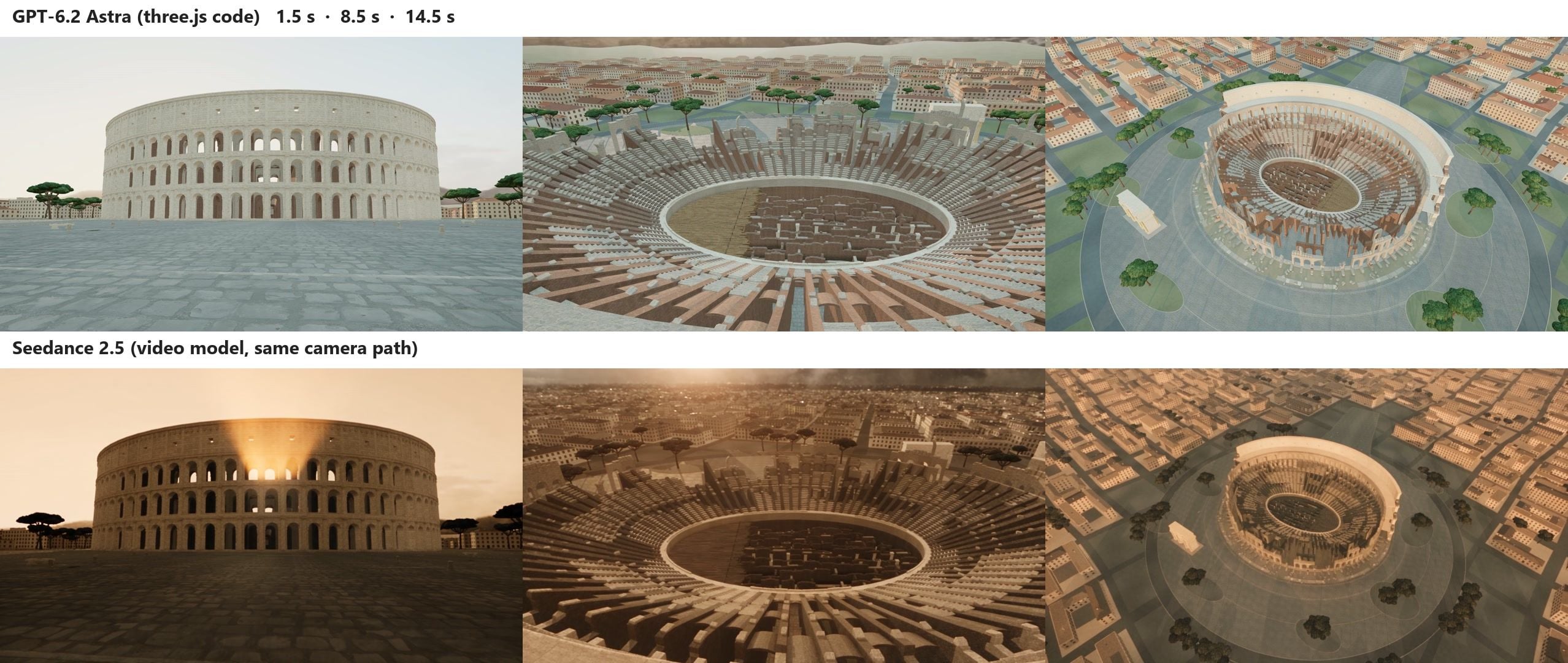
两半都逐帧保持了路线,从低处广场镜头到竞技场,再到高空航拍。Seedance 2.5 只拿到了四张静态帧,却在同一线路上补全了它们之间的每一秒。
差异在于光线。Astra 的那一半是清脆日光,每一排座位和地下室墙体都清晰可辨,君士坦丁凯旋门也矗立在提示词要求的广场上。
在两秒处,Seedance 2.5 让一束日出光穿过上层拱门。壁架上出现一簇簇草,温暖的薄雾在结尾航拍中笼罩屋顶。提示词要求日出、草和薄雾;光线落在每一帧的何处由模型决定,而代码那一侧则完全按照脚本描述绘制。
代码还是视频模型:哪一个适合你的 3D 动画?
Artificial Analysis 的场景和我们的运行都指向同一种分工。当几何结构必须精确或可编辑时,语言模型视频生成胜出。当镜头需要拍出实拍感时,视频模型胜出。
| 任务 | 路线 | 原因 |
|---|---|---|
| 产品爆炸视图动画 | Three.js 代码 | 部件位于设定位置并可携带标签,就像 Astra 的腕表那样 |
| 建筑漫游 | 用代码制作路径,然后用 Seedance 2.5 | 路线保持精确,最终处理加入光线和天气 |
| 交互式网页场景 | Three.js 代码 | 它在浏览器中运行,带有轨道控制和按钮 |
| 电影感广告或社交短片 | Seedance 2.5 | 光线、纹理和氛围随渲染一同呈现 |
| 奇幻动作镜头 | Seedance 2.5,由代码关键帧引导 | 火焰、烟雾和生物看起来像实拍 |
| 之后更改某个细节 | Three.js 代码 | 编辑 CAMERA_PATH 中的一个数字并重新渲染 |
常见问题
ChatGPT 能制作 three.js 动画吗?
能。只要要求输出单个 HTML 文件,任何较新的 GPT 模型都能编写带动态摄像机的 three.js 场景。GPT-6.2 Astra 是登顶 AA-3D 的版本,已在 Plus、Pro、Enterprise 和 Edu 计划的 ChatGPT Work 和 Codex 中提供。我们的 GPT-6.2 概览 说明了谁能使用它;上面的 API 路线则可用按量付费密钥。
什么是 AA-3D 基准?
AA-3D 是 Artificial Analysis 为构建交互式 3D 场景的模型设立的排行榜。每个模型都会收到一份书面简报和一个离线沙盒,编写一个 three.js 页面,并在此过程中检查自己的截图。人类评委在不看到模型名称的情况下比较来自同一简报的两个场景,投票结果转化为 Elo 分数。
两种方式制作 15 秒片段各需多少成本?
截至 2026 年 11 月 25 日,在 Atlas Cloud 上,GPT-6.2 Astra 的价格为每百万输入 token $8,每百万输出 token $40。我们的两轮最大强度运行分别约为 $1.38 和 $1.85,输出 token 大约为 34,000 和 41,000,而渲染这些帧除了笔记本电脑时间外没有额外成本。来自 Seedance 2.5 Reference-to-Video 的 15 秒 1080p 片段,在当天 20% 折扣下为 $11.19,原价为 $13.98。
可以将 three.js 动画导出为 MP4 吗?
可以。最干净的方法就是上面那种:暴露一个函数来渲染动画中的任意秒,在无头浏览器中以固定帧率捕获每一帧,再用 ffmpeg 合并 PNG。实时录制浏览器标签页也可以,但丢帧会表现为卡顿。
LLM 会取代视频生成模型吗?
根据这些证据,不会。在 Artificial Analysis 的片段和我们的测试中,代码那一侧负责布局和摄像机,视频模型负责光线和纹理。目前实用的做法是把它们串联起来:让语言模型规划镜头,然后把它的帧交给视频模型。
结论
Artificial Analysis 将其测试定义为代码对像素,画面也支持这一点。GPT-6.2 Astra 构建的场景可以编辑、穿越和拆分。Seedance 2.5 把同一条路径变成了看起来像在黎明拍摄的东西。
你不必二选一。用 Astra 编写 three.js 3D 动画,在代码中锁定摄像机路径,然后把灰度关键帧交给 Seedance 2.5 完成最终观感。两个步骤都可在同一个 Atlas Cloud 密钥下运行,上面的提示词为你提供了完整的罗马斗兽场流程作为起点。







