In a picture book, storyboard, or recurring campaign illustration, a small change to a character's face can break the sequence. A GPT Image 2.6 consistent character workflow starts with one clear character anchor. Save it, upload that same original image for each new scene, repeat the identifying traits, and change only the scene or action. If one frame drifts, edit that frame against the anchor before moving on. This guide shows Mara's anchor and two scenes, gives you the exact prompts, and offers a five-point check to decide whether the set is ready to use.
Key takeaways
- Save one clean, uncropped anchor showing the character's face, body, outfit, and style.
- Upload that original anchor for every new scene and repeat the identity details in each prompt.
- Change the setting or action one at a time, then check all frames side by side.
- Repair a specific error with a narrow edit; a reference image does not guarantee identical output.
What “Consistent Character” Actually Means
For an illustrated series, consistency means a reader can recognize the same person in every frame without relying on the caption. The face usually carries most of that recognition: its shape, eye color, nose, and distinctive marks. Hair and a signature item give the reader another cue. Body proportions, clothing, and rendering style support continuity, but they answer slightly different questions. A character can keep her coat while her face changes, or keep her face while the next page suddenly looks like a different book.
Set the identity rules before creating scenes. In this example, Mara has an oval face, dark brown eyes, a small rounded nose, five freckles across the bridge of her nose, short black curls, and one white curl above her left eyebrow. Her mustard raincoat and teal scarf belong to this particular sequence. The library shelf and garden path do not. This distinction tells the editor what to protect and gives you a fair way to judge each output.
OpenAI's image prompting guide recommends reusing a character reference and repeating appearance constraints across scenes. Its image generation guide also says recurring characters may lose visual consistency across generations. Treat the anchor as a strong instruction, then inspect the output. It is a working reference, not a promise that every freckle lands on the same pixel. A community discussion describes drift appearing as early as the second image; that experience explains the practical problem, though it is not a model benchmark.
For a picture book, define your tolerance before you generate ten pages. A slight change in watercolor pigment is usually harmless. A different nose, missing white curl, or altered face silhouette can make the character read as a new person. When the planned plot requires a wardrobe change, remove clothing from the identity lock and keep the facial cues stricter. Here, the two scenes hold the outfit fixed so the test isolates changes in setting and action.
Create One Reusable Character Anchor
Write an Identity Lock
A useful anchor is a reference image you can read at a glance. Show one person, with the whole body visible and a clear three-quarter view of the face. Give the subject enough space that hands, feet, coat, and hair are not cut off. A pale, plain background makes the character easy to inspect and keeps scene objects from becoming accidental parts of her identity. Save the original output rather than a cropped thumbnail.
Write down a compact identity lock before opening the model. Choose a few features that are both visible and distinctive. “Friendly young woman” is too broad to audit. “Five freckles across the nose and one white curl above the left eyebrow” gives you observable checks. Keep left and right descriptions anchored to the character as pictured, then inspect mirrored outputs carefully. For a long series, record the approved anchor filename and the exact text lock in your production notes so different editors start from the same source.
| Keep fixed in this three-frame set | Allowed to change |
|---|---|
| Oval face, dark brown eyes, rounded nose, five freckles, white curl | Location, background objects, and weather |
| Short black curls and natural body proportions | Pose, hand position, and gaze within a visible three-quarter view |
| Mustard raincoat, teal scarf, blue trousers, brown boots | What Mara is doing with the book |
| Soft ink outlines, warm muted watercolor, paper texture | Local lighting that still fits the shared palette |
This is a production rule for this example, not a claim that the model has a dedicated identity-lock switch. You supply the reference and the words on each run. Resist adding many tiny traits that will be invisible at storyboard size. The white curl and freckles are valuable here because you can check them in the final images.
Generate and Save the Anchor
Open Atlas Cloud's GPT Image 2.6 Sunburst text-to-image model for the first frame. Select high quality, high complexity, PNG output, one image, and a landscape 1536×864 canvas if those controls are available in your current playground. Check the committed settings before running; an entered value can revert in a dynamic form. Use this prompt verbatim:
plaintext1Create one original character for a children's picture-book storyboard, shown alone in a clear full-body three-quarter view. 2 3Identity: Mara is a young adult with an oval face, dark brown eyes, a small rounded nose, five light freckles across the bridge of her nose, short black curls, and one distinct white curl above her left eyebrow. Keep her facial proportions natural and easy to recognize. 4 5Outfit: mustard-yellow raincoat, teal scarf, dark blue trousers, brown ankle boots. No hat. 6 7Style: hand-painted watercolor illustration with soft ink outlines, warm muted colors, and visible paper texture. Plain pale-cream background. Center the full character with hands and feet visible. 8 9Output: one landscape 16:9 image. No other people, no text, no logo, no watermark.
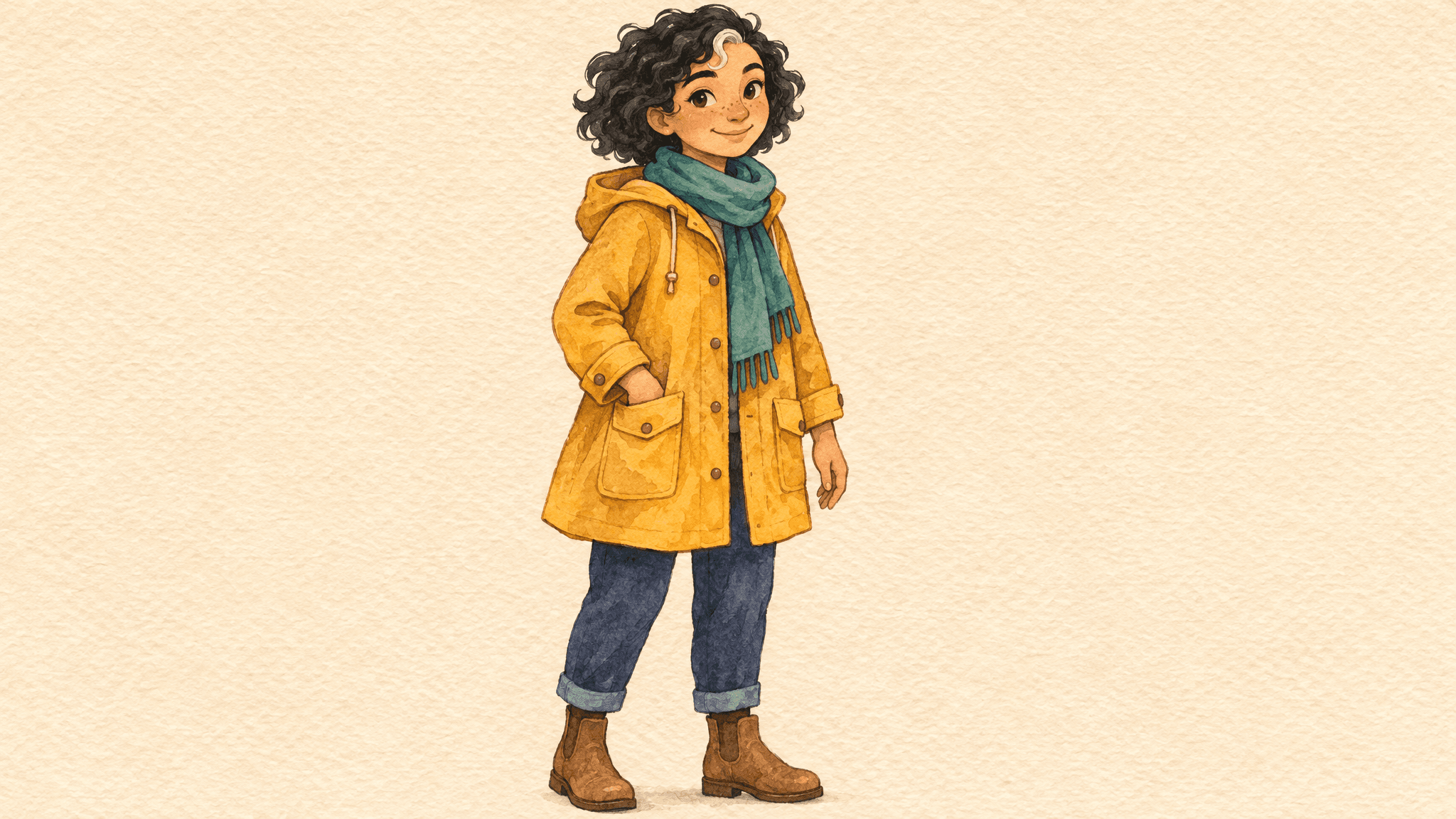
Character anchor: use this original image as the reference for each new scene.
Review the resulting image before approving it. If the five freckles are indistinct or the white curl sits on the wrong side, fix the anchor now. Every later page inherits ambiguity from this choice. Keep the unmodified PNG as your master reference and name it separately from the scene files. If you later change Mara's design, start a new series from a new approved anchor instead of mixing revisions.
Put the Same Character in Two New Scenes
Use the GPT Image 2.6 Sunburst edit playground for both scenes. The essential input is the saved anchor, not merely a text description of the character. Upload the original anchor on each run, select the same high quality and high complexity controls if offered, and request one PNG at 1536×864. If the interface only offers a different size, record the actual committed size and keep it the same for both scenes. Equal framing makes visual review easier.
The two prompts deliberately repeat most of the identity lock. That repetition is useful: each request should be self-contained, even if you create the frames hours apart or another person runs the second one. Do not assume the model remembers a previous independent generation. Save the exact prompt alongside each output so you can trace a drift to a changed instruction, a different reference, or the model's variation.
Scene 1: Change the Setting
Upload the original anchor and paste the library prompt. Mara stays in the same outfit and watercolor treatment. The new information is a location and an action at a low shelf. A low shelf helps keep her whole body in view, which makes this frame comparable with the anchor. The prompt also asks for a visible three-quarter face because a distant rear view would hide the very traits this exercise measures.
plaintext1Use the uploaded image as the identity, outfit, proportions, and watercolor-style reference for Mara. Create one new landscape 16:9 picture-book scene: Mara stands inside a small neighborhood library, reaching for a book on a low shelf. Show her full body and keep her face visible in a three-quarter view. 2 3Preserve her oval face, dark brown eyes, small rounded nose, five freckles, short black curls, white curl above her left eyebrow, mustard raincoat, teal scarf, dark blue trousers, and brown boots. Preserve the soft ink outlines, warm muted palette, and paper texture. 4 5Change the setting and pose only. Do not introduce another character, redesign Mara, add text, add a logo, or add a watermark.
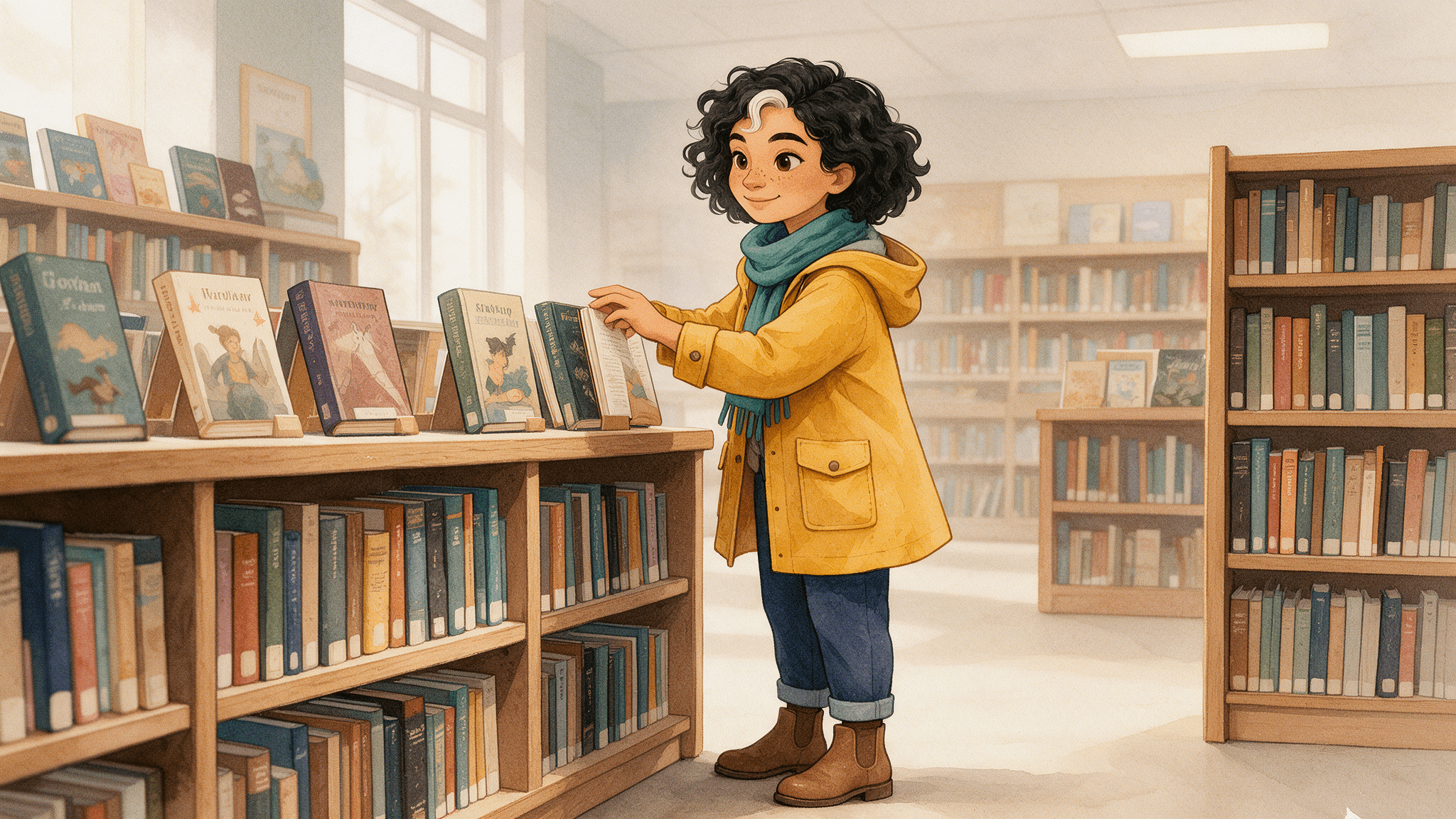
Library scene: compare Mara's face, white curl, scarf, and raincoat with the anchor above.
Inspect the library output at two sizes. At full size, count the freckles and check the direction of the white curl. At the size a reader will see in your book or storyboard, ask whether Mara still reads as the same person. Detail can be technically present yet too small to carry recognition. If the library becomes elaborate and shrinks Mara, ask for a simpler composition while keeping the anchor and identity text.
Scene 2: Change the Action
Start a fresh edit with the same original anchor. Do not upload the library result as the sole reference. Chaining scene one into scene two can carry a small mistake forward and make it harder to tell which image established the character. The garden prompt changes both the environment and the action, while holding her visible face, costume, and watercolor treatment in place.
plaintext1Use the uploaded anchor image as the identity, outfit, proportions, and watercolor-style reference for Mara. Create one new landscape 16:9 picture-book scene: Mara walks through a garden after light rain, holding a closed book against her chest. Show her full body and keep her face clearly visible in a three-quarter view. 2 3Preserve her oval face, dark brown eyes, small rounded nose, five freckles, short black curls, white curl above her left eyebrow, mustard raincoat, teal scarf, dark blue trousers, and brown boots. Preserve the soft ink outlines, warm muted palette, and paper texture. 4 5Change the setting and action only. Keep Mara recognizable as the exact same original character. No other people, no text, no logo, no watermark.
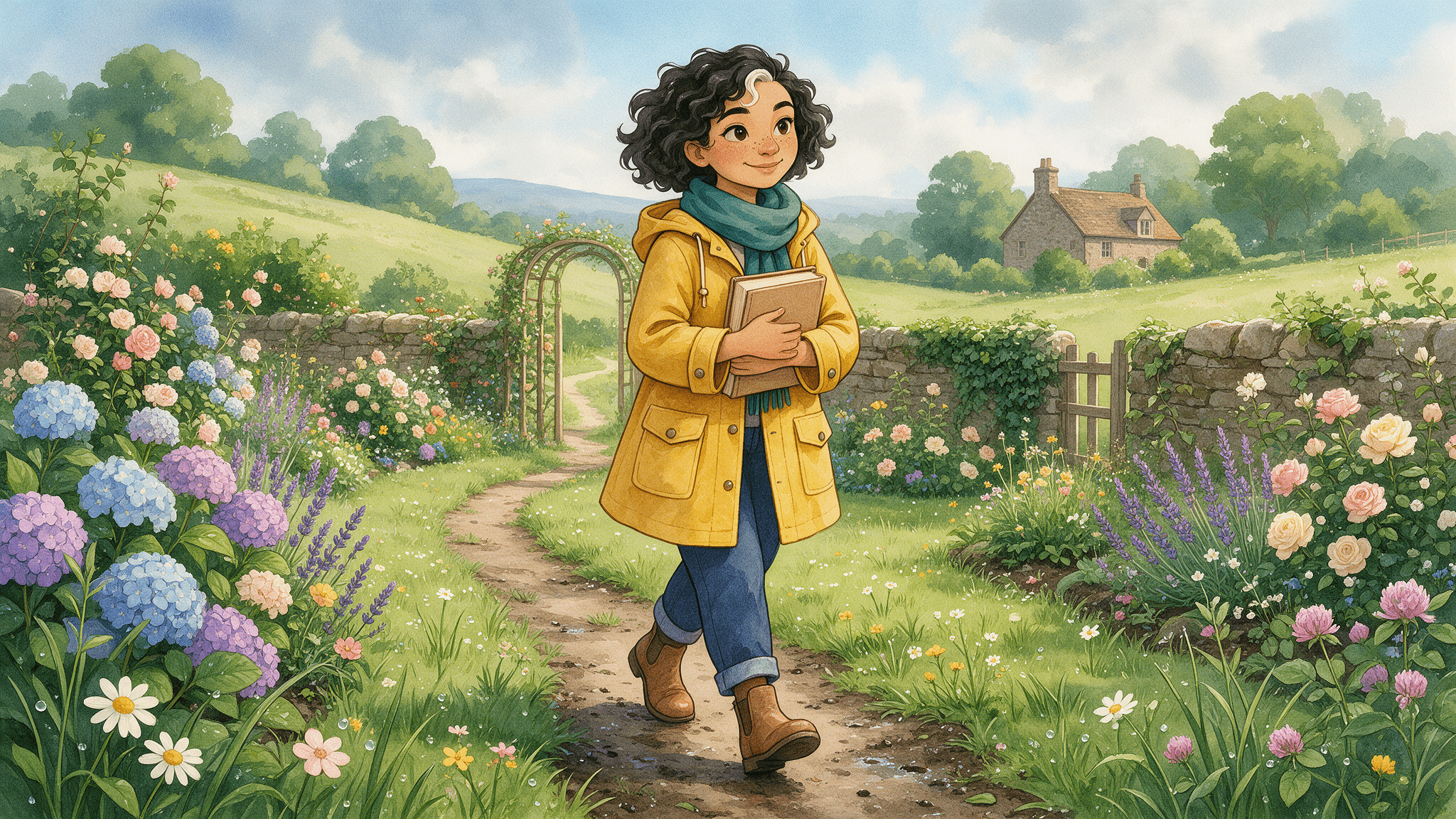
Garden scene: the setting and action change while Mara's main visual traits remain visible.
The closed book gives her hands a clear job without introducing a second person or a new design element. Compare the garden frame against the anchor immediately, then compare it with the library frame. Both comparisons matter. A garden image may look internally coherent yet still shift Mara's face or coat color. If the frame passes, save it as a separate output; keep the original anchor untouched for every later page.
For a longer series, this pattern scales page by page: original anchor in, one scene change, output reviewed. It does not require the story to use the same pose forever. Once the identity is stable, vary angle or clothing deliberately, with those changes named in the prompt and checked against the remaining fixed traits. Do that as a new controlled variation, not silently in the middle of a sequence that promised one outfit.
Three More Published Character-Consistency Cases
The following image pairs come from OpenAI's GPT Image 2.6 image-prompting guide. They are published examples, not additional runs of the Mara prompt or outputs generated for this article. Each right-hand image is labeled GPT Image 2.6 Sunburst in that guide; the guide lists medium quality and a 1024×1536 canvas. The prompt briefs below summarize the published requests rather than quote them verbatim. Use the linked guide for the exact source prompts and input images. These three cases test different changes, not a measured success rate.
Case 1: Continue a Forest Hero's Story
The first image establishes a green-hooded watercolor hero. For the second, the character reference is reused in a snowy rescue scene. Model: GPT Image 2.6 Sunburst for the reference and edit. Prompt brief: introduce an original forest helper with a green hood, brown boots, belt pouch, and soft watercolor treatment; then show that same hero helping a squirrel after a winter storm while retaining the face, proportions, clothing, and palette. The setting and action change, so compare the hood shape, hair, face, pouch, and boots across the pair.
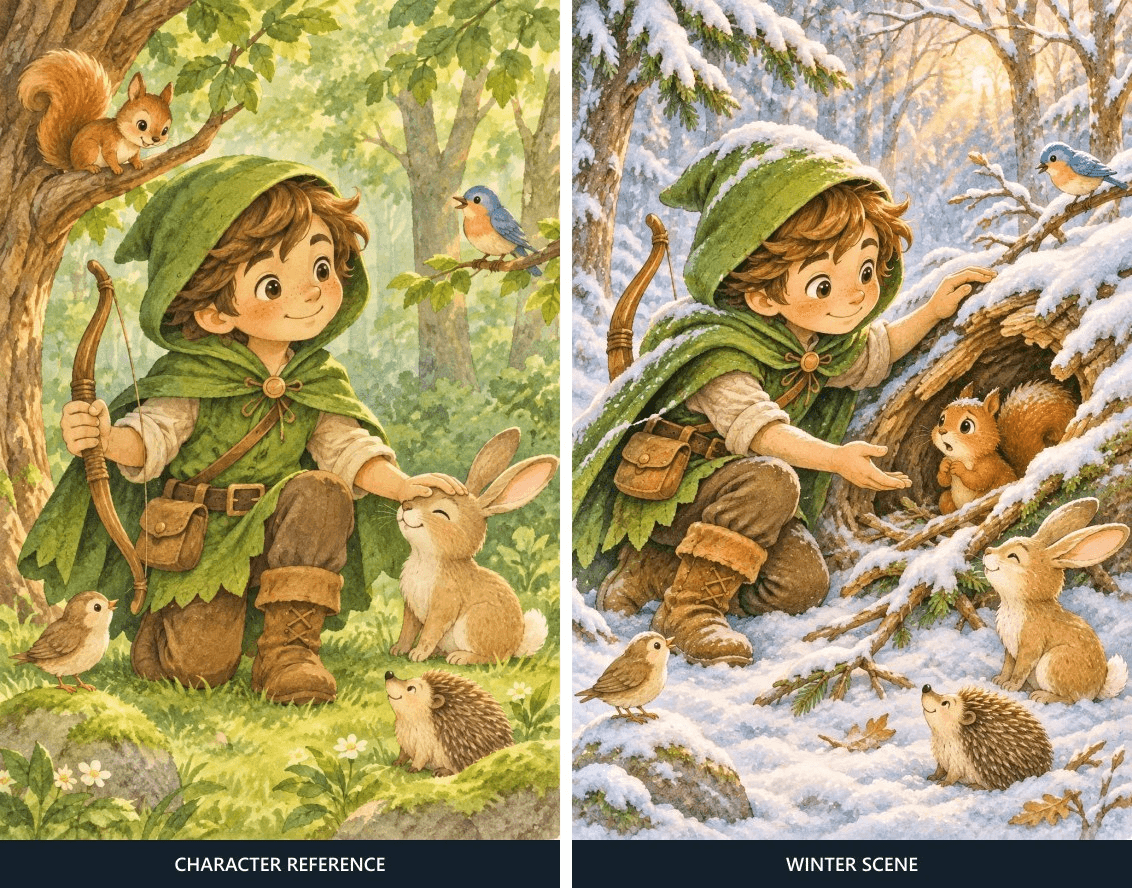
Source: OpenAI's forest-hero reference and continuation. Left: character reference. Right: the published GPT Image 2.6 Sunburst winter-scene edit.
Case 2: Change Clothes Without Changing the Person
This example uses a museum portrait as the identity input and separate garment images as clothing references. Model: GPT Image 2.6 Sunburst Edit. Prompt brief: fit the supplied jacket, top, and boots to the person while keeping her face, hair, body shape, pose, museum background, framing, and light consistent. The garment change is intentional; a changed face or camera angle would be drift. The published pair lets you inspect both kinds of detail side by side.
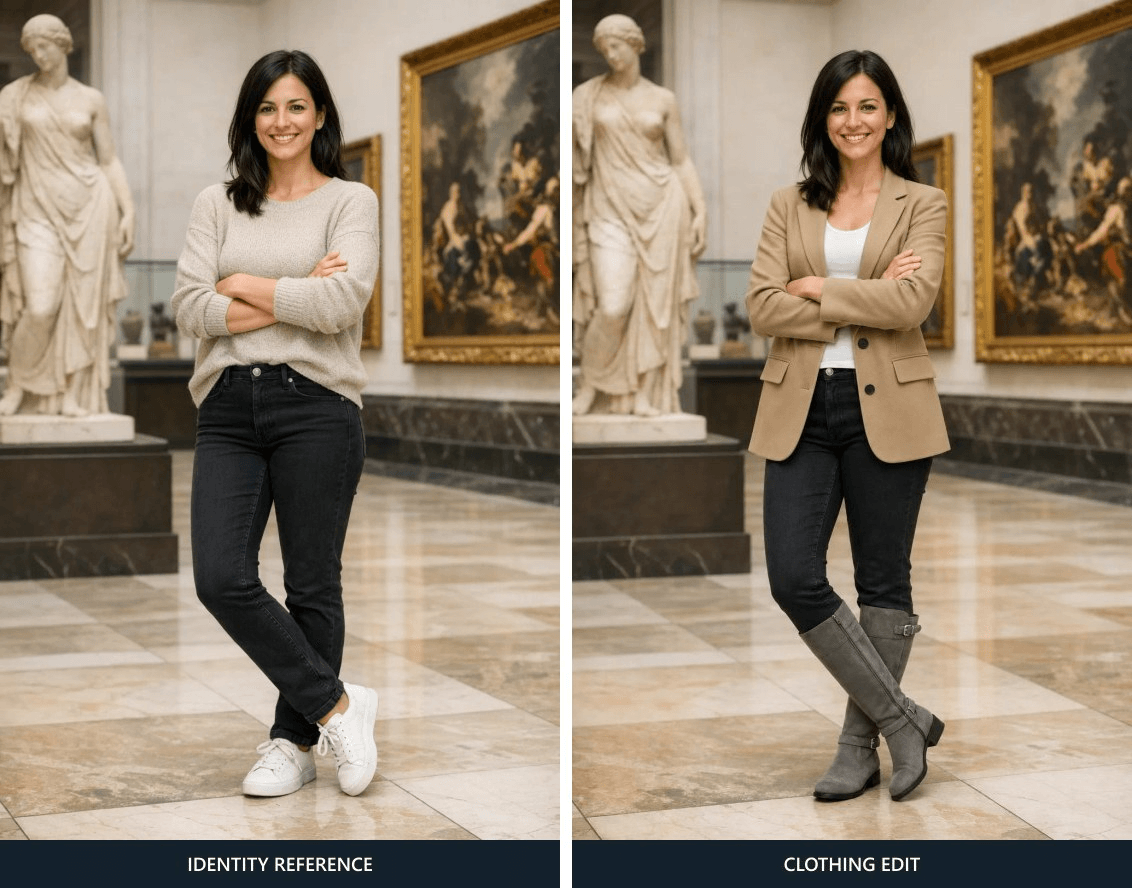
Source: OpenAI's identity-preserving clothing example. Left: identity reference. Right: the published GPT Image 2.6 Sunburst clothing edit.
Case 3: Move a Portrait Into an Action Scene
The same museum portrait becomes the identity reference for a woman running from a bear at a campsite near dusk. Model: GPT Image 2.6 Sunburst Edit. Prompt brief: place the referenced person in a believable outdoor escape scene with natural color and lighting, changing her activity, clothes, and expression to fit the situation. This is a harder identity check than the outfit edit because the face is redrawn under a different expression and viewpoint. Compare recognizable facial structure rather than expecting an unchanged smile.
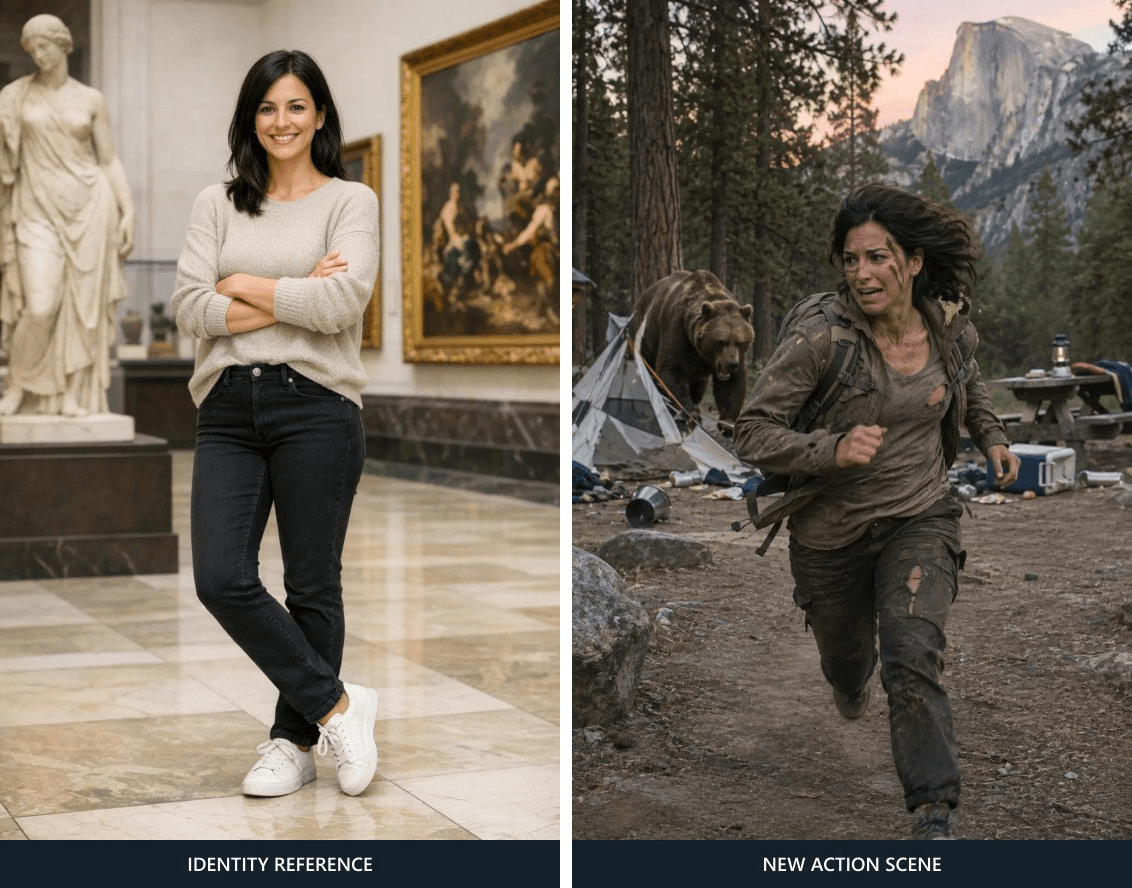
Source: OpenAI's person-in-a-new-scene example. Left: identity reference. Right: the published GPT Image 2.6 Sunburst campsite edit.
Repair Drift Without Redesigning the Scene
Drift often appears in a detail that seemed too small to mention: Mara's face grows rounder, the freckles disappear, her hairline moves, the white curl changes sides, or the teal scarf turns blue. Decide first whether the scene itself works. If the pose and setting are useful, a focused edit is a better first move than generating a whole new scene. If the character occupies only a few pixels or the composition hides her face, regenerate the scene with clearer framing because local edits have little visible evidence to work with.
For a narrow repair, upload the problem scene as Image 1 and the approved anchor as Image 2. Label their roles in the prompt. If the interface does not make upload order clear, verify the thumbnails and describe the roles explicitly before running. This example targets the face and hair, so it asks the model to preserve the hands, book, setting, lighting, and composition. Substitute “library” for “garden” as needed.
plaintext1Image 1 is the scene to repair. Image 2 is Mara's approved identity anchor. 2 3In Image 1, correct only Mara's face and hair so they match Image 2: oval face, dark brown eyes, small rounded nose, five freckles across the nose, short black curls, and the white curl above her left eyebrow. 4 5Preserve Image 1's pose, clothing, hands, book, garden or library setting, composition, lighting, watercolor texture, and all other details. Do not add or remove objects. No text or watermark.
A narrow instruction reduces the requested change; it does not force a perfectly local edit. Inspect the whole repaired frame, including the background and book. A repair can restore the face while changing a hand, object, or crop. If that happens, decide whether a second focused repair is worthwhile or whether a fresh scene run from the anchor is cleaner. Keep the rejected output in your working folder, but do not make it the next identity reference.
Check the Set Before You Publish
Place the anchor, library, and garden outputs at the same displayed size. Use the anchor as the standard, then scan the same feature across all three images before moving to the next feature. This row-by-row method catches drift more reliably than judging each picture in isolation. It also separates a tolerable change in lighting from a change in character identity.
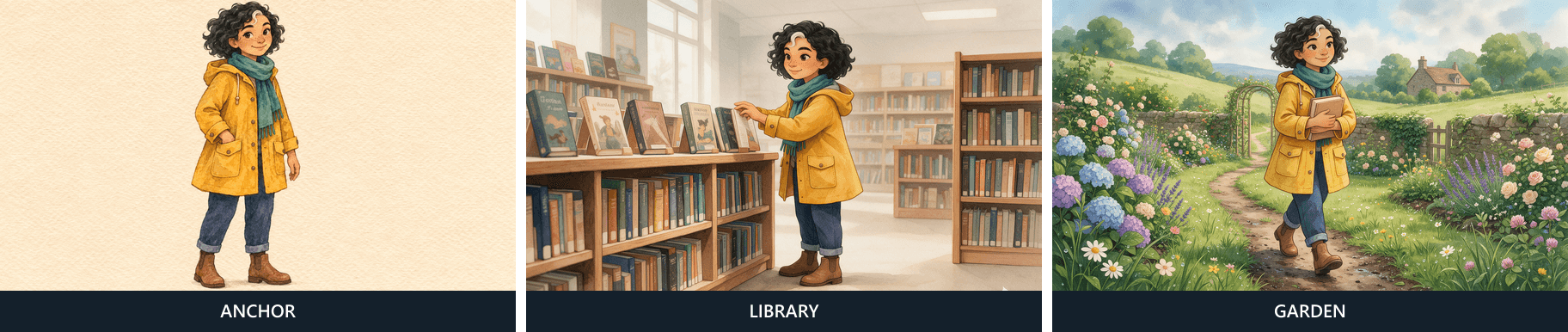
Compare the same facial landmarks, signature curl, clothing, proportions, and watercolor treatment across all three outputs; the images should be judged, not assumed perfect.
| Five-point check | Drift signal | Next action |
|---|---|---|
| Face: shape, eyes, nose, freckles | A different silhouette or missing identifying freckles | Repair the face against the anchor, then inspect the full frame |
| Hair and mark: short curls, white curl on the left | Curl disappears, moves sides, or changes hair length | Make a hair-only repair; reject a mirrored identity if it changes recognition |
| Proportions: head, torso, and limb scale | Character looks much older, younger, taller, or differently built | Regenerate with clearer full-body framing if the whole figure shifted |
| Outfit: coat, scarf, trousers, boots | Signature colors or garment shapes change | Edit only the garment if the face and scene pass |
| Style: ink lines, muted watercolor, paper texture | One frame reads as a different medium | Re-edit from the anchor or regenerate the scene with the style lock |
Accept natural differences caused by pose, expression, and local lighting if the character still reads as Mara at the final display size. Reject a swapped face, missing signature mark, or conspicuous costume change in this fixed-outfit sequence. Do not call a set “consistent” merely because the prompt requested consistency. Record what passed and what you repaired. That small audit trail helps when a later page makes you question the earlier anchor.
Choose a Model, Settings, and Budget
GPT Image 2.6 Sunburst or GPT Image 2.6 Flare?
OpenAI describes GPT Image 2.6 Flare as the smaller model for speed-sensitive work and GPT Image 2.6 Sunburst as the base model for more detail or precise edits. The character workflow here uses GPT Image 2.6 Sunburst for the anchor and both edits so the example does not mix model behavior with scene changes. GPT Image 2.6 Flare is a sensible model to test when turnaround matters, but do a like-for-like sample with the same anchor, prompt, settings, and five-point review before moving a series to it. The model name alone cannot tell you whether your particular character will pass.
Use the highest detail settings your time and budget permit, but verify what the playground actually accepted. A 1536×864 landscape canvas provides room for a full-body subject and background. PNG keeps the master anchor intact for repeated uploads. If the interface offers only a nearby landscape size, use the same committed dimensions throughout and update your production notes. Resolution helps readers see details, but a clear face and controlled framing matter more than a larger image where the person is tiny.
What Does a Run Cost?
Before starting, check the estimate in the playground and the current Atlas Cloud model pricing. The public pricing page bills GPT Image 2.6 Sunburst by image tokens, with different rates for text input, image input, and image output. A text-to-image anchor and a reference-image edit therefore need separate estimates. The page's published example at 1536×1024 is not a quote for this guide's proposed 1536×864 canvas, and actual usage can differ from a pre-run figure.
Budget for one anchor and two scene edits, plus a possible repair. Keep one output per request until the character works; multiple candidates can make the total harder to track. Record each completed request and its shown cost before writing a per-image figure in a production report. If the selected dimensions or controls are unavailable, use the actual committed settings and their estimate rather than carrying forward an unrelated price example. Recheck pricing before publication because model availability and rates can change.
The next useful action is to approve a single Mara anchor, then run the two scene prompts with that exact file. Put the three images beside the five-point table before expanding the storyboard. That turns GPT Image 2.6 consistent character from a hopeful prompt into a repeatable review process.
Frequently Asked Questions
Does GPT Image 2.6 remember a character between separate runs?
Do not rely on memory across independent runs. Upload the approved anchor and repeat the identifying details for every new scene. Keep the original file so you can reproduce later pages even if the previous scene changes.
Can I change the outfit without losing the character’s face?
Yes, you can request an outfit change while keeping the anchor's facial traits, but check the result. State which garment may change and which face, hair, proportions, and style cues must remain. Use the new outfit consistently in the pages where it belongs.
Should I use GPT Image 2.6 Flare or GPT Image 2.6 Sunburst for a long image series?
Start with the model that meets your deadline, then test the same character and two-scene prompt set on it. GPT Image 2.6 Sunburst is the detail and precise-edit choice in OpenAI's guide; GPT Image 2.6 Flare is the speed choice. Compare your own outputs with the same checklist rather than assuming one name guarantees continuity.
Can a reference image guarantee pixel-identical facial features?
No. A changed pose, expression, angle, or lighting naturally changes pixels, and generation may still alter identifying details. Use the reference to guide identity, then inspect and repair any drift that matters at the final display size.


