


A camera skims a harbor, climbs over the white shells of the Sydney Opera House and banks toward the bridge. Two versions play at once, stacked on top of each other, on the same flight path. One is a three.js 3D animation that a language model wrote as code. The other comes from a video model that never saw a line of it.
That clip, posted by Artificial Analysis on November 20, 2026, asked whether language models can make better videos than video models. We took the question to Atlas Cloud and ran it ourselves on the Colosseum: GPT-6.2 Astra wrote the scene, Seedance 2.5 rendered the same route. Below are the prompts, the code and both results.
Key Takeaways
- GPT-6.2 Astra can write a full three.js 3D animation, scene and camera path, as one HTML file.
- Artificial Analysis flew one 15-second camera path through three AA-3D scenes for Astra and Seedance 2.5.
- Code keeps exact geometry, like a watch movement split into layers; Seedance 2.5 adds real-world light.
- Gray keyframes from a three.js camera path hand Seedance 2.5 the route without passing on the CG look.
- Both models run under one Atlas Cloud key, starting from the GPT-6.2 Astra page.
Can AI Make a Three.js 3D Animation? What Artificial Analysis Tested
Yes, and there is now a leaderboard for it. Artificial Analysis launched AA-3D on October 12, 2026: 55 written briefs across seven domains, each turned into a three.js web page by a model working as an agent in an offline sandbox.
The agent gets Blender, a physics engine, a headless browser and a library of CC0 assets, plus up to three hours or 250 turns. A human panel then votes on pairs of scenes without knowing which model built which.
GPT-6.2 Astra leads that board at 1,318 Elo, ahead of Claude Fable 5.2 at 1,271 and GPT-6.2 Sol at 1,259.
Three days after Astra's release, Artificial Analysis put it against Seedance. Astra built three AA-3D scenes as code, and a scripted camera flew through each one in a browser at 15 seconds, 1080p and 24 fps. Seedance 2.5 got the same camera path as a text prompt with reference images of the route, at the same settings. The post shows the result and names no winner.
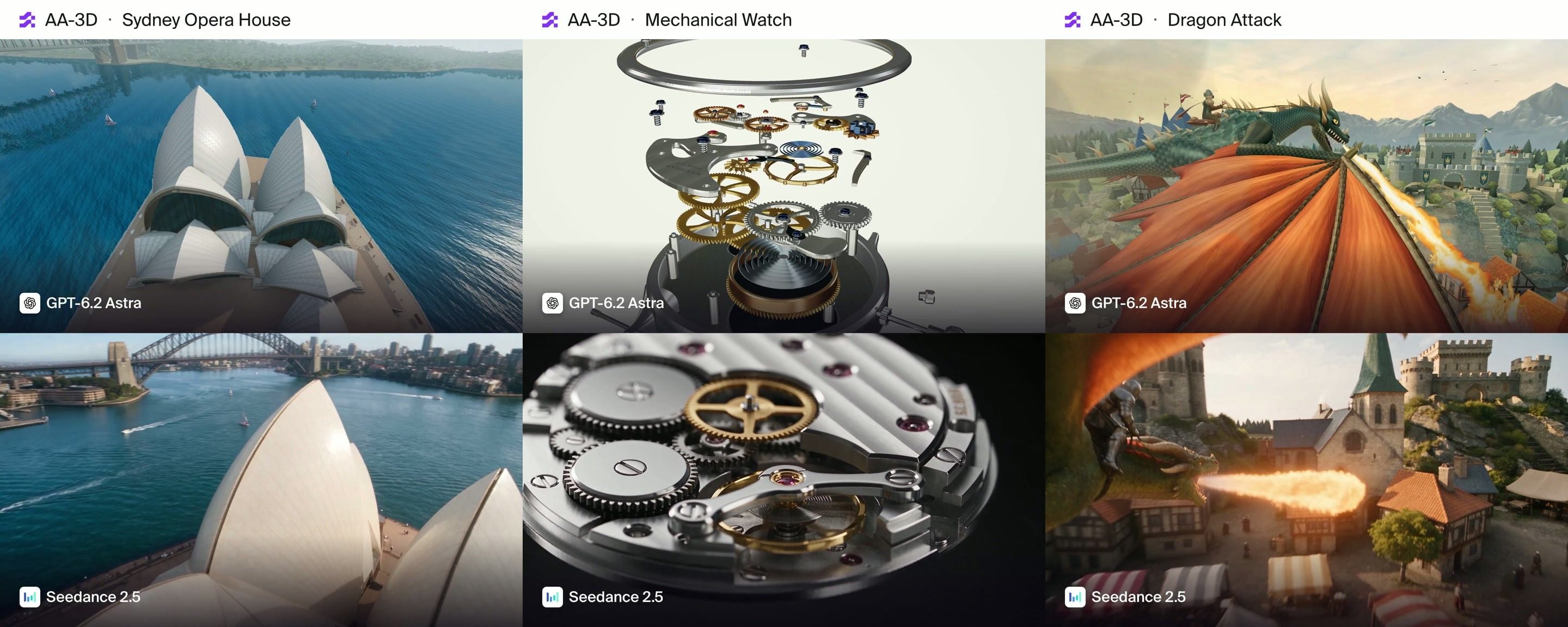
Source: frames from Artificial Analysis's video post, November 20, 2026. Top row GPT-6.2 Astra, bottom row Seedance 2.5.
Each scene is a real AA-3D brief, and you can open Astra's interactive version of all three in the AA-3D Explorer. Here is what each side put on screen:
| Scene | What the brief asks for | GPT-6.2 Astra (three.js code) | Seedance 2.5 (video model) |
|---|---|---|---|
| Sydney Opera House | The building's geometry and harbor setting | Clean CG shells over stylized blue water and a simple city | Aerial-footage look with dense waterfront detail and boat wakes |
| Mechanical watch | A labeled movement, an exploded view, working complications | White dial, then the movement lifts apart into floating layers | Dark steel watch with a tourbillon, then macro shots of gears and jewels |
| Dragon over a medieval town | A palace, a fort and a dragon the user controls | An orange-winged dragon with a rider; the town ends on fire | Close shots of fire striking the castle rock, then a wide aerial of the town |
How to Make a Three.js 3D Animation With GPT-6.2 Astra on Atlas Cloud
OpenAI's launch post for GPT-6.2 lists a recreation of the Colosseum you can explore from different angles among GPT-6.2's 3D demos. We asked for the same landmark with a scripted 15-second camera path, ran it on Atlas Cloud, and got this from the HTML file it returned:
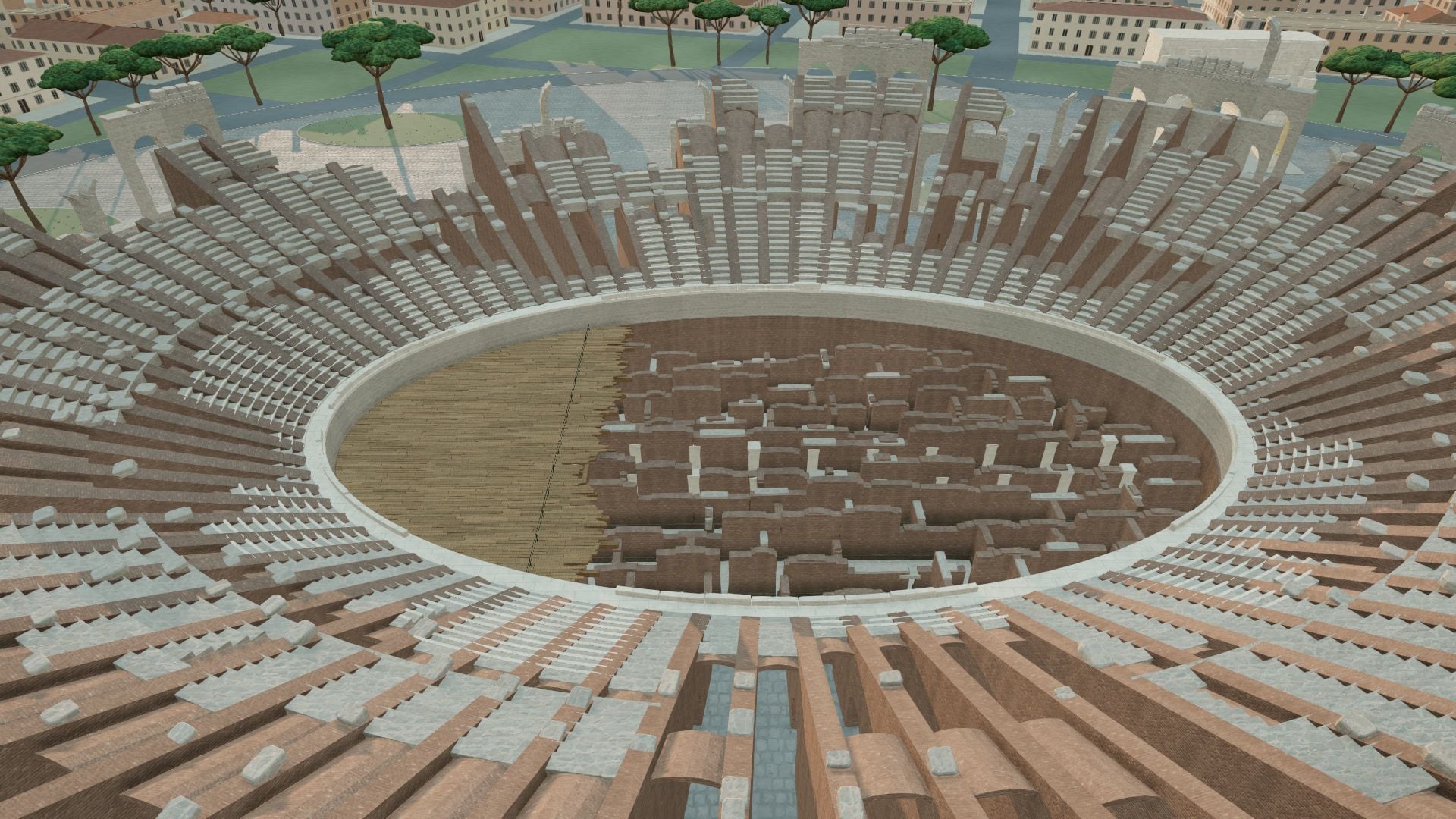
Every block, arch and seat in that frame is geometry Astra wrote as JavaScript. Two inputs shaped it. We gave it CC0 textures from Poly Haven, as AA-3D's sandbox does, and in a second round we sent it screenshots of its own render with notes on what to change.
Method 1: Prompt the Scene and Three.js Camera Animation in the Playground
Sign in and open the GPT-6.2 Astra playground. Click Settings and raise Out Length to the maximum, since a scene like this runs past 45,000 characters. Then:
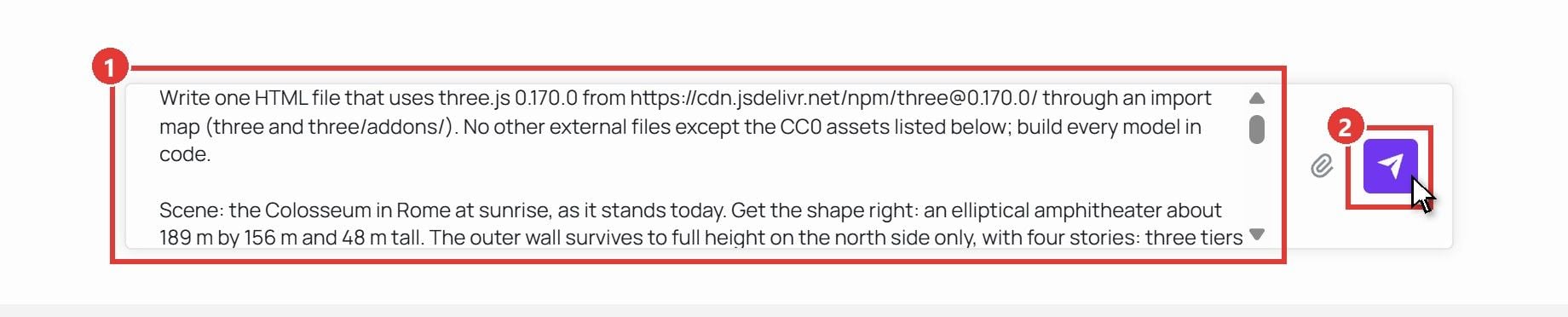
- Paste the prompt below into the message box.
- Click the send arrow and wait for the HTML.
plaintext1Write one HTML file that uses three.js 0.170.0 from https://cdn.jsdelivr.net/npm/[email protected]/ through an import map (three and three/addons/). No other external files except the CC0 assets listed below; build every model in code. 2 3Scene: the Colosseum in Rome at sunrise, as it stands today. Get the shape right: an elliptical amphitheater about 189 m by 156 m and 48 m tall. The outer wall survives to full height on the north side only, with four stories: three tiers of 80 arches framed by Tuscan, Ionic and Corinthian half-columns, then a solid attic with small square windows. On the south side the outer ring is gone and the inner ring shows stepped, broken edges. Inside: ruined seating banks, a partial wooden arena floor at the east end, and the open hypogeum below it, a grid of stone corridors and chambers. Around it: a paved plaza, a few umbrella pines, the Arch of Constantine to the southwest, low city blocks in the distance. No people, no vehicles, no text or logos in the scene. 4 5Visual quality bar: this must read as a cinematic architectural visualization, not a low-poly mockup. 6- Geometry with real depth: piers, half-columns with bases and capitals, arch voussoirs, cornice bands between stories, attic pilasters and corbels, deep arch openings you can see through; the broken south edge as irregular stepped masonry with fallen blocks; seating vaults with radial walls; hypogeum walls of brick at varying heights. Use InstancedMesh and merged geometry so it stays fast at 1080p. 7- Materials: use the CC0 texture sets in the textures/ folder next to the HTML file (2048x2048 JPG, each with _diff, _nor (OpenGL normal) and _rough maps): travertine_* for the outer wall, piers and attic; weathered_stone_* for the inner ring, seating banks and broken edges; roman_brick_* for the hypogeum and inner vaults; plaza_cobble_* for the plaza; arena_wood_* for the partial arena floor. Load them with TextureLoader, set sRGB on _diff only, repeat them at a believable real-world scale with world-space or per-face UVs so blocks are not stretched, and break up tiling with a tint and dirt variation (darker weathering streaks under ledges, warmer stone in the sun). Wait for every texture before setting sceneReady. 8- Light: textures/sky_dawn_2k.hdr (CC0 dawn sky, load with RGBELoader) as the background and PMREM environment, plus a low sun about 8 degrees above the horizon behind the building as seen from the opening shot, so the facade is backlit and warm light rakes through the arches. One DirectionalLight with 4096 soft shadows covering the whole site, ACESFilmic tone mapping, sRGB output. 9- Post: EffectComposer with GTAOPass for contact shadows in the arches and vaults, subtle UnrealBloom on the sun, distance haze that thickens toward the horizon, SMAA or 4x MSAA antialiasing, a light vignette. 10- Surroundings: grass patches, umbrella pines with layered canopies, a recognizable three-arch Arch of Constantine, city blocks of varied heights with terracotta roofs that fade into the haze. 11 12Camera: one continuous 15-second flight at a steady speed. Build it as a THREE.CatmullRomCurve3 for the camera position and a second curve for the look-at target, both defined in one CAMERA_PATH array at the top of the script so the route is easy to edit: 13- 0-3 s: low on the plaza, 2 m above the ground, about 120 m from the north facade, the full facade ahead with the sun behind it. 14- 3-7 s: push slowly toward the arches while rising to the height of the third tier. 15- 7-10 s: crest over the top of the wall and tilt down into the arena; the hypogeum corridors are visible beneath the partial floor. 16- 10-13 s: glide across the arena at about 25 m height toward the far side. 17- 13-15 s: pull up and back to a high aerial about 250 m up, showing the whole oval and the city around it. 18 19Playback and capture: 20- Render at 1920x1080. Play the 15-second flight on load and loop it. Add a small play/pause button and a time scrubber, and enable OrbitControls while paused. 21- Support ?capture=1 in the URL: hide all UI, stop the animation loop, set the pixel ratio to 1, and expose window.renderAt(seconds), which places the camera at that point on the path and renders one full frame, post-processing included, synchronously. Drive everything that moves (birds, drifting haze, light flicker) from that time value, not from a clock, so the same second always renders the same frame. 22- Set window.sceneReady = true once all geometry and textures are built. 23 24Return only the HTML file, no explanation.
Save the reply as colosseum.html. Next to it, make a textures folder with five Poly Haven sets saved under the names the prompt uses: Large Sandstone Blocks 01 as travertine, Old Stone Wall as weathered_stone, Castle Brick 02 Red as roman_brick, Cobblestone Floor 01 as plaza_cobble and Medieval Wood as arena_wood, plus the Kiara 1 Dawn HDRI as sky_dawn_2k.hdr. Browsers block local textures on a file:// page, so serve the folder and open http://localhost:8000/colosseum.html:
plaintext1python -m http.server 8000
Method 2: Call GPT-6.2 Astra at Max Effort Through the API
The playground runs Astra at its default reasoning level. Artificial Analysis tested it at max, and the API lets you match that.
Step 1: Create an API key. In the console, open Settings, go to API Keys and click Create API Key.
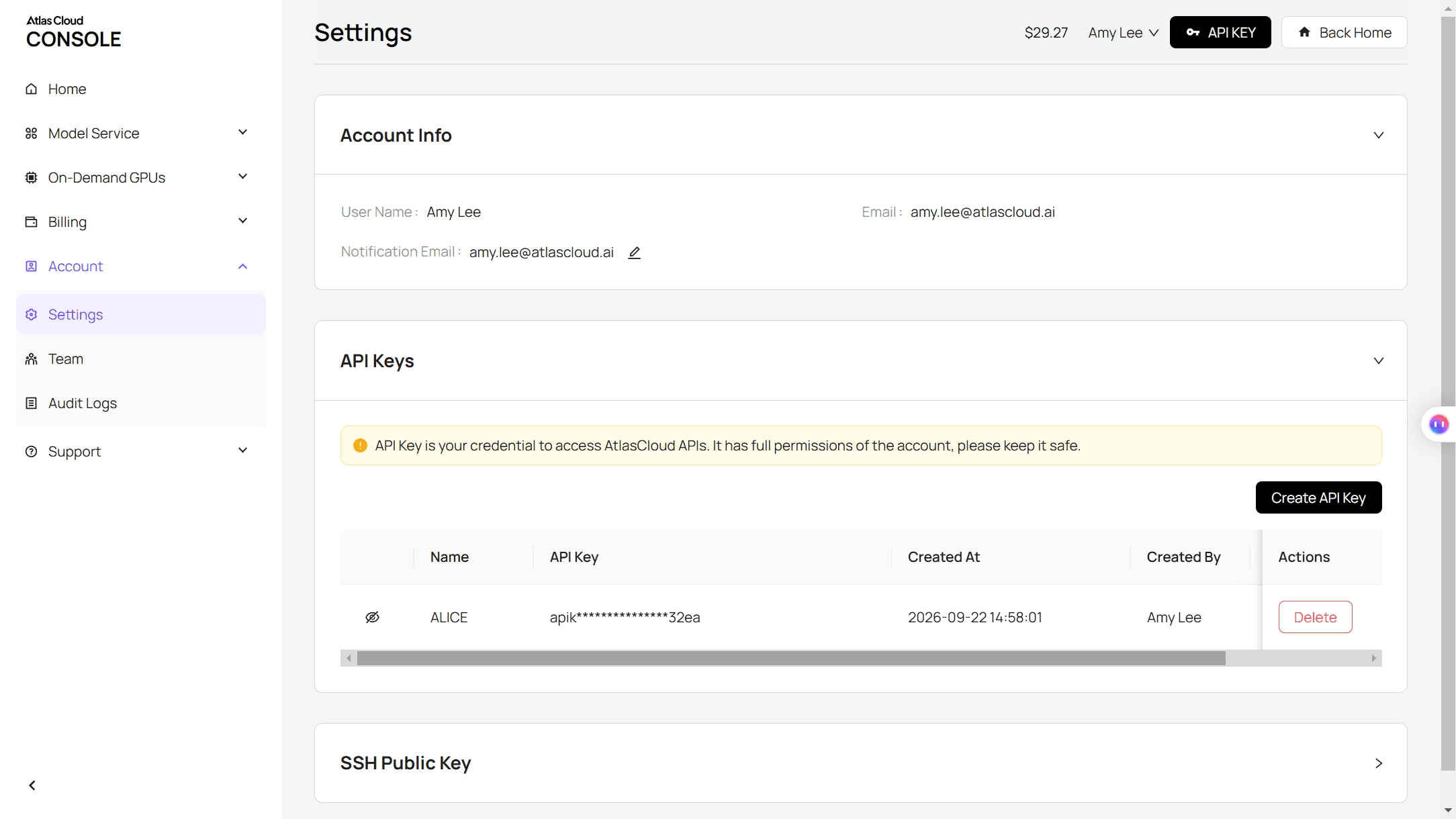
Step 2: Check the request format in the Atlas Cloud API docs. Reasoning effort goes in the reasoning object of the Responses endpoint.
Step 3: Send the request. Paste the prompt from Method 1 into the input field. A max-effort run took about nine minutes for us, so give curl a long timeout. The HTML sits in output[1].content[0].text, after the reasoning item.
plaintext1curl -X POST "https://api.atlascloud.ai/v1/responses" \ 2 --max-time 1800 \ 3 -H "Authorization: Bearer $ATLASCLOUD_API_KEY" \ 4 -H "Content-Type: application/json" \ 5 -d '{ 6 "model": "openai/gpt-6.2-astra", 7 "input": "<paste the Colosseum prompt here>", 8 "reasoning": {"effort": "max"}, 9 "max_output_tokens": 128000 10 }'
For a second round, send the brief, the current HTML and a few rendered frames as input_image parts with a short list of fixes. Ours asked for warmer morning color and larger cream travertine blocks on the facade.
To turn the page into an MP4, open it with ?capture=1, call window.renderAt for every frame (0, 1/24, 2/24 and so on to 15 seconds) in a headless browser, save each canvas as a PNG, then join them:
plaintext1ffmpeg -framerate 24 -i frames/%04d.png -c:v libx264 -pix_fmt yuv420p -crf 16 colosseum-15s.mp4
The same endpoint and key serve Seedance 2.5 and the rest of Atlas Cloud's 600+ models, so moving to the next step only changes the model string.
Turn the Three.js Camera Animation Into a Seedance 2.5 Video
This is the Seedance half of the Artificial Analysis test: the route travels as pictures. Pull four frames from the three.js animation at 0, 5, 9 and 15 seconds and convert them to gray. Seedance 2.5 reads reference images closely, so a textured render passes on its colors and CG surfaces along with its layout. Gray frames hand over the camera and the building and leave the look to the model.
Open Seedance 2.5 Reference-to-Video, upload the four frames one at a time in order, and set 1080p, 16:9 and 15 seconds. In the prompt, type @ and pick each image from the list so it becomes a tag:
plaintext1Real 4K drone footage of the Colosseum in Rome at sunrise, shot on a cinema camera: photographic, live-action, true-to-life materials and light. One continuous 15-second flight, no cuts. 2The four reference images are gray, untextured previs renders of the camera route: @image1 at 0s, @image2 at 5s, @image3 at 9s, @image4 at 15s. Copy only their camera positions, framing and the building layout. Do not copy their gray color, flat lighting or CG look. 3[0-3s] Low over the cobbled plaza, matching @image1: the full north facade ahead, the sun just rising behind it, golden rim light through the arches. 4[3-7s] Push slowly toward the arches while rising to the third tier, passing the view in @image2: real weathered cream travertine, dark holes left by the old iron clamps, grass on the ledges. 5[7-10s] Crest over the top of the wall and tilt down into the arena, matching @image3: the stone corridors of the hypogeum below a partial wooden floor, long morning shadows. 6[10-13s] Glide across the arena at mid height toward the far wall. 7[13-15s] Pull up and back to a high aerial of the whole oval and Rome around it, warm haze over terracotta rooftops, ending on @image4. 8Steady camera speed. No people, no vehicles, no text, no logos.
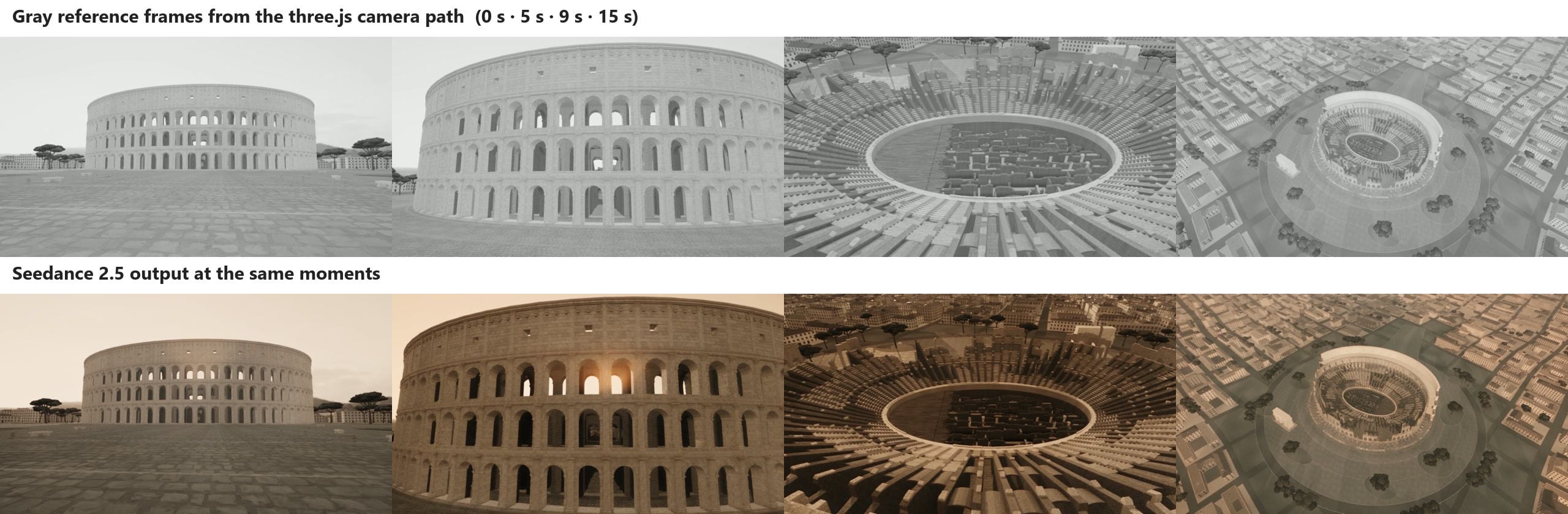
The timestamps in square brackets keep each stretch of the flight on its own beat. Our Seedance 2.5 camera control guide covers that syntax and other ways to lock a move.
Our Test: One 15-Second Flythrough, Code vs Video Model
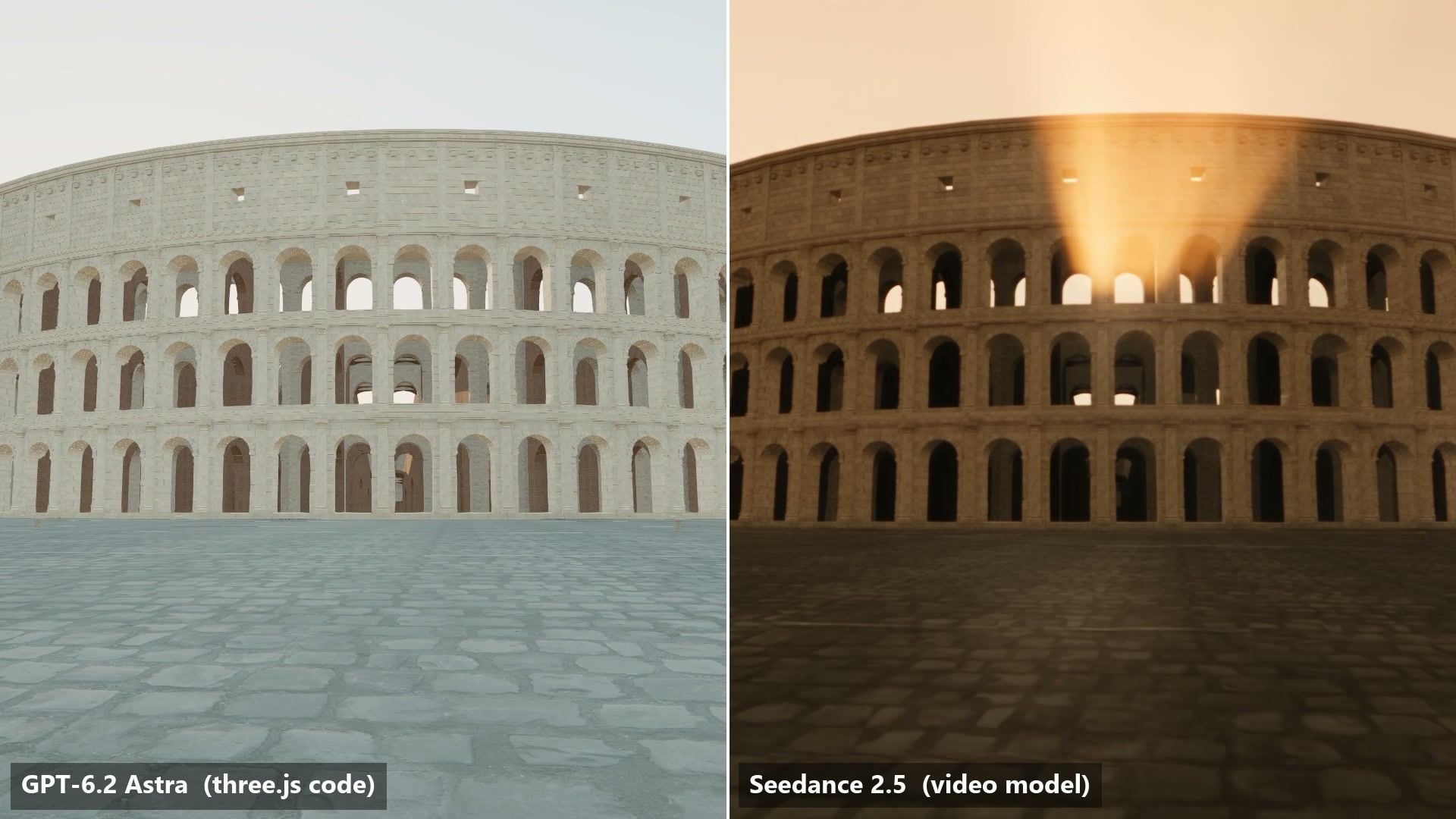
Same layout as the Artificial Analysis post: Astra on top, Seedance 2.5 below, one camera path, 15 seconds at 1080p and 24 fps.
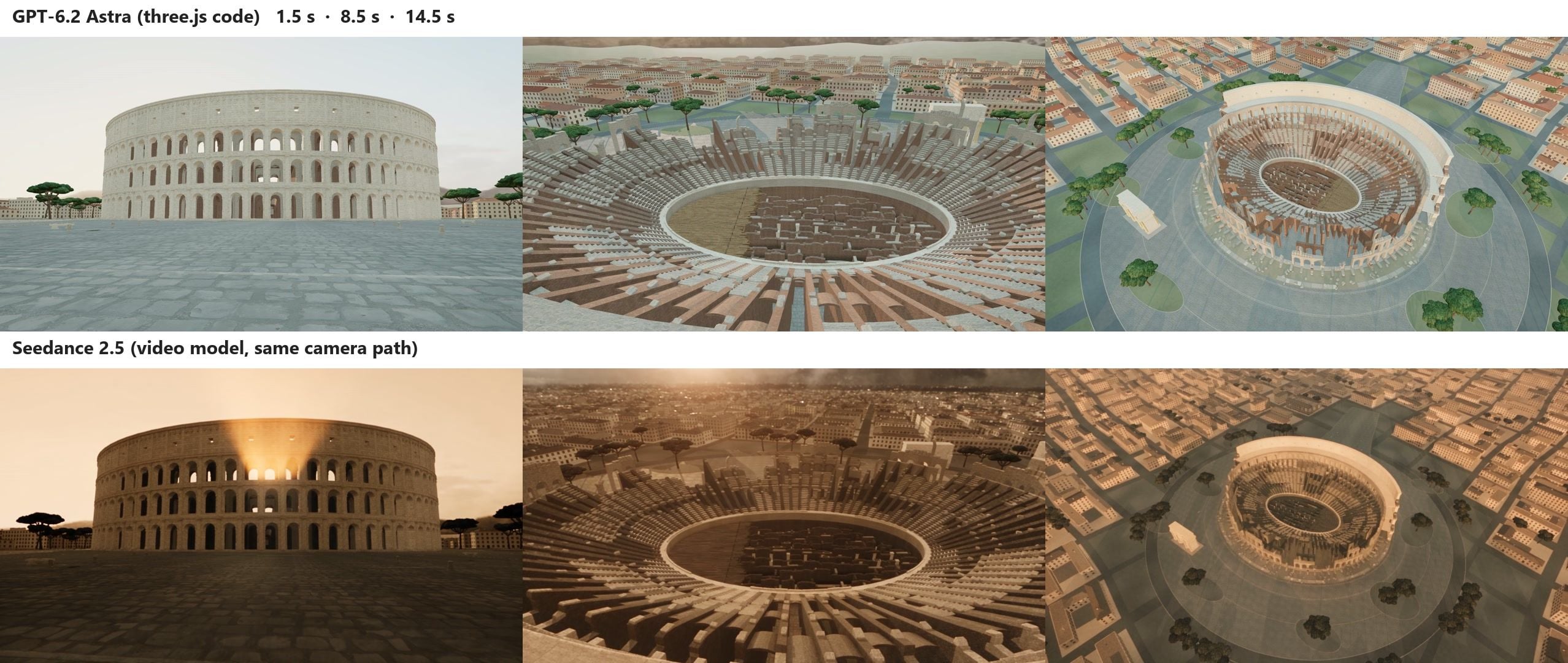
Both halves hold the route frame for frame, from the low plaza shot to the arena and out to the aerial. Seedance 2.5 got only four still frames and filled every second between them on the same line.
The difference is in the light. Astra's half is crisp daylight where every seat row and hypogeum wall stays readable, and the Arch of Constantine stands in the plaza where the prompt asked for it.
At two seconds Seedance 2.5 sends a shaft of sunrise through the upper arches. Tufts of grass appear on the ledges, and a warm haze settles over the rooftops for the closing aerial. The prompt asked for a sunrise, grass and haze; where the light lands in each frame was the model's call, while the code side drew exactly what its script described.
Code or Video Model: Which Fits Your 3D Animation?
The Artificial Analysis scenes and our run point to the same split. Language model video generation wins where geometry has to be exact or editable. A video model wins where the shot has to feel filmed.
| Job | Route | Why |
|---|---|---|
| Exploded view animation of a product | Three.js code | Parts sit at set positions and can carry labels, as Astra's watch did |
| Architecture walkthrough | Code for the path, then Seedance 2.5 | The route stays exact and the final pass adds light and weather |
| Interactive web scene | Three.js code | It runs in a browser with orbit controls and buttons |
| Cinematic ad or social clip | Seedance 2.5 | Light, texture and atmosphere come with the render |
| Fantasy action shot | Seedance 2.5, guided by code keyframes | Fire, smoke and creatures read as filmed |
| Changing one detail later | Three.js code | Edit a number in CAMERA_PATH and render again |
Frequently Asked Questions
Can ChatGPT make three.js animations?
Yes. Any recent GPT model can write a three.js scene with an animated camera if you ask for a single HTML file. GPT-6.2 Astra, the version that tops AA-3D, is available in ChatGPT Work and Codex on Plus, Pro, Enterprise and Edu plans. Our GPT-6.2 overview explains who gets it there; the API route above works with a pay-as-you-go key.
What is the AA-3D benchmark?
AA-3D is Artificial Analysis's leaderboard for models that build interactive 3D scenes. Each model gets a written brief and an offline sandbox, writes a three.js page, and checks its own screenshots as it goes. Human judges compare two scenes from the same brief without seeing the model names, and the votes become Elo scores.
How much does a 15-second clip cost each way?
As of November 25, 2026, GPT-6.2 Astra costs $8 per million input tokens and $40 per million output tokens on Atlas Cloud. Our two max-effort rounds came to about $1.38 and $1.85, with roughly 34,000 and 41,000 output tokens, and rendering the frames cost nothing beyond laptop time. A 15-second 1080p clip from Seedance 2.5 Reference-to-Video costs $11.19 at the 20% discount running that day, against a list price of $13.98.
Can you export a three.js animation as an MP4?
Yes. The cleanest way is the one above: expose a function that renders any second of the animation, capture each frame at a fixed rate in a headless browser, and join the PNGs with ffmpeg. Recording the browser tab in real time also works, but dropped frames show up as stutter.
Will LLMs replace video generation models?
Not on this evidence. In both the Artificial Analysis clip and ours, the code side owned layout and camera, while the video model owned light and texture. The practical move right now is to chain them: let the language model plan the shot, then hand its frames to the video model.
Conclusion
Artificial Analysis framed its test as code against pixels, and the frames back that up. GPT-6.2 Astra builds scenes you can edit, fly through and split apart. Seedance 2.5 turns the same path into something that looks shot at dawn.
You don't have to pick one. Write the three.js 3D animation with Astra, lock the camera path in code, then pass gray keyframes to Seedance 2.5 for the final look. Both steps run on one Atlas Cloud key, and the prompts above give you the full Colosseum run to start from.







