

The top Halloween image generator for your job depends on what you are starting with. A blank prompt needs text-to-image. A photo of yourself in a new costume needs an editor that accepts the photo as a reference. A portrait that should look like a handheld selfie needs a camera-angle change before you add elaborate Halloween effects. Pick the path first, and the prompt becomes much easier to write.
Key takeaways
- Start with text-to-image for original Halloween art; start with image editing to keep a real person or object.
- A selfie generator solves camera framing, while a general editor gives you more control over the scene.
- Check free-generation terms for the exact product and account; a free Playground attempt does not make every generator run free.
- Compare outputs against your brief, not a generic claim that one model wins every image task.
What should a Halloween image generator actually do for you?
People searching for a Halloween image generator may be trying to make very different assets: a party invitation with readable text, a spooky portrait of themselves, a phone wallpaper, a costume mockup, or a social post. Those tasks use different inputs. A model that creates a striking new castle from text has not proved it can preserve your face in an uploaded photo. A tool that turns a portrait into a natural selfie has not proved it can design a poster headline.
Start by naming your deliverable in one sentence. “I need a 4:5 portrait of me in a witch hat, with my face unchanged” gives you a source image, an aspect ratio, and a preservation requirement. “I need a square invitation with the exact words OCTOBER 31” calls for a new composition and a text check. “I need three Halloween wallpaper ideas” needs variation, not identity consistency.
| Your starting point | Choose this route | What to check before export |
|---|---|---|
| No source image; you want an original scene, poster, or illustration | Text-to-image | Subject count, composition, readable text, crop |
| A photo of a person, pet, product, or room must remain recognizable | Reference-based image editing | Identity or object details, hands, attachment points, background changes |
| A non-selfie portrait should become a casual phone selfie | Selfie reframing, then optional scene editing | Face, outfit, arm's-length perspective, whether the second edit changes the person |
This is a decision table, not a visual-quality ranking. The Atlas Cloud image generator and editor describes text generation, reference-image creation, and targeted editing in one workspace. It also exposes a choice of models, aspect ratio, and resolution. The public page establishes those available paths; it does not tell us which model will follow your particular Halloween brief most accurately.
Google's Halloween image ideas show the same difference in practice: a spooky scene, a costume idea, and a transformed personal photo are all Halloween images, yet each asks the tool to preserve different information. A good shortlist starts with the information your finished asset cannot afford to lose.
For new Halloween art, start with text-to-image
A text-to-image generator is the direct route when no real person or existing product has to survive the transformation. Give it a subject, a moment, a setting, a camera or illustration style, and the output shape. One specific interaction makes the scene easier to evaluate than a pile of mood words. “A child reaches for a porch lantern while a friendly paper ghost lifts in the breeze” has a visible action. “Spooky, cinematic, amazing Halloween” leaves the generator to invent almost everything.
The image below was generated from text alone: one fictional person in a handmade scarecrow costume steps through ribbons at a Halloween street fair. It shows how a prompt can control the subject, action, setting, and light. Because no source portrait was supplied, this result cannot demonstrate identity preservation. That distinction matters when you choose between an AI Halloween picture generator and a photo editor.
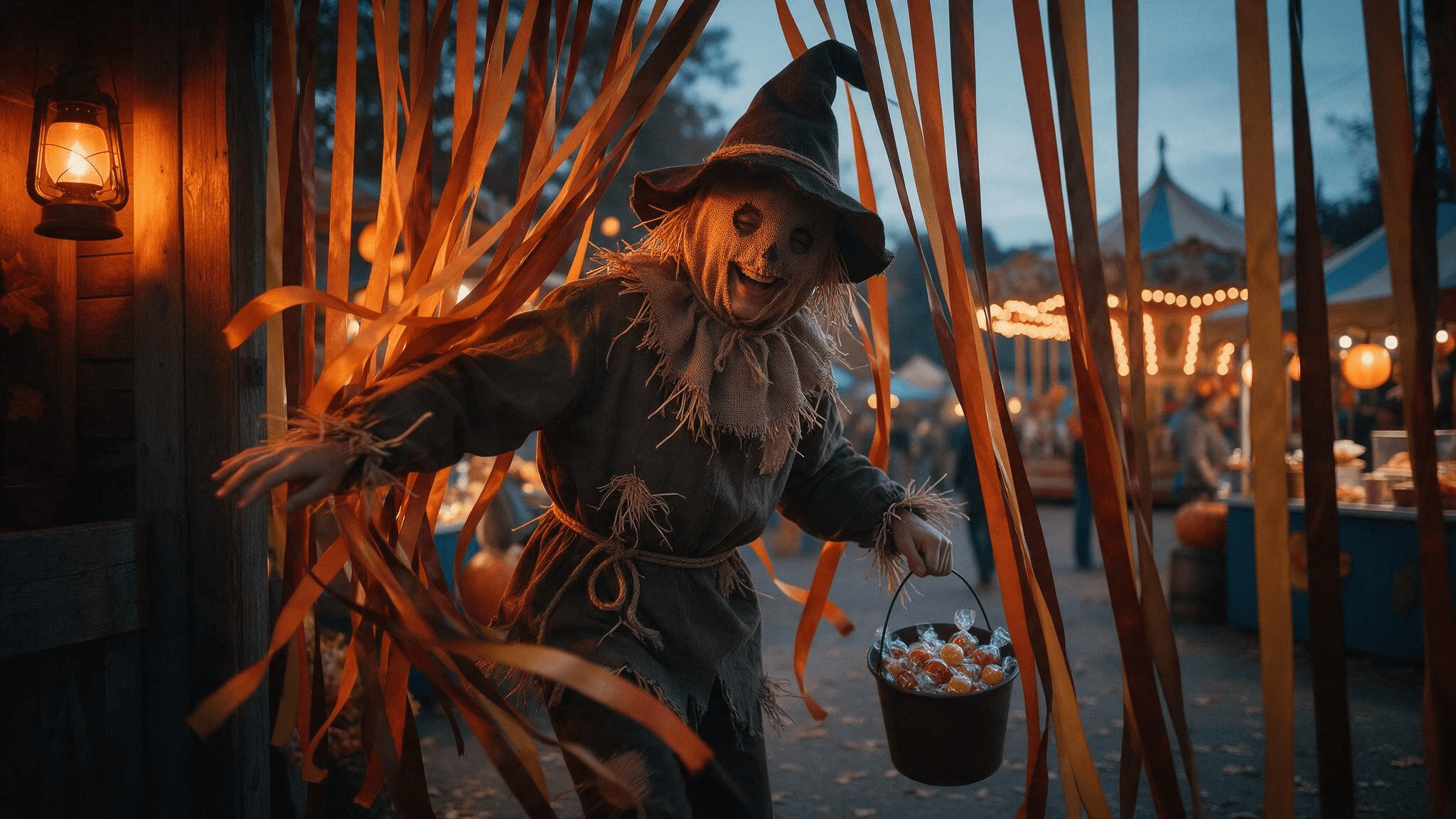
User-supplied generated result from Seedream 5.0 Pro Text-to-Image. The person and street fair came from a text prompt, with no reference photo.
For a party poster, separate the art direction from the required words. You can ask the model for a design with exact text, but inspect every letter. If the headline is critical and the output misspells it, use the generated art as a background and place verified text in a design editor. This is especially useful for dates, addresses, and safety information that should never depend on a model's spelling.
Here is the prompt used for the street-fair example. It asks for a fictional person and a visible action, without requesting anyone's real face or a copyrighted character:
plaintext1A candid editorial photograph at a small-town Halloween street fair. One young adult wearing a handmade scarecrow costume steps through a curtain of autumn-colored ribbons, laughing as a gust of wind lifts the loose fabric; a bucket of wrapped candy swings naturally from one hand. Food stalls and a carousel are softly visible in the distance. Directional amber lantern light from the left, cool blue-hour ambient light, restrained orange-and-blue palette. Wide 35mm documentary composition with a little foreground blur and generous uncluttered space in the upper right for a headline to be added later. Real fabric weave, worn wood, natural skin texture, slight motion in the ribbons. Exactly one prominent person, believable hands, no lettering, no logos, no watermark. Horizontal 16:9.
The request for headline space did not produce a completely clear area in this result: ribbons and fair tents cross the upper right. For an invitation, add the verified words in a separate text panel or revise the composition before export. If you need a wallpaper instead, change the canvas to your device's ratio and move the main subject away from the clock or app icons. Those are output decisions, not reasons to rewrite the whole visual concept.
The invitation example below takes the second route. A new Halloween scene leaves a plain wall on the left; the words “HALLOWEEN NIGHT” and “OCTOBER 31” were typeset afterward as verified text. The image model supplied the scene, not the lettering.
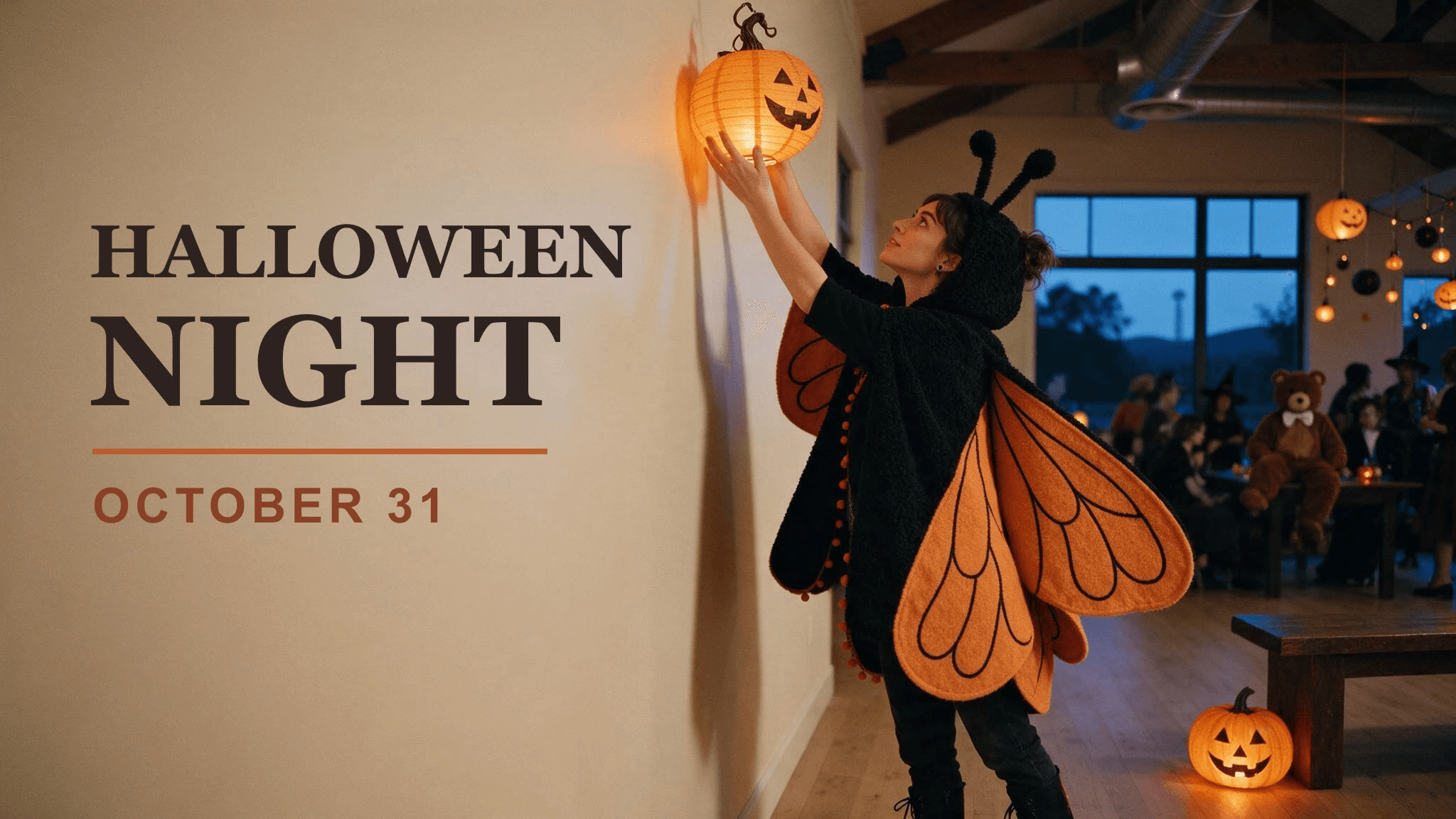
User-supplied scene generated with Seedream 5.0 Pro Text-to-Image; the sample invitation words were added separately. This is an example layout, not an event announcement.
When comparing two models, run the same prompt and settings where both support them. Save the exact prompt, resolution, aspect ratio, and each result. If one model gets the subject count right and the other makes a more appealing color palette, you have a meaningful tradeoff to judge. A one-image showcase with different prompts cannot establish which generator is better for your task.
For a Halloween photo of yourself, choose editing
An AI Halloween photo generator should accept your source photo when the finished image is supposed to show you. Look for a reference upload and an editing mode, not merely a style preset with a spooky thumbnail. Start with a clear photo where the eyes, hairline, and outfit are visible. If you want a ghost in the background, give the model actual background room to use. If you want a costume change, show enough of the upper body to make the accessory or clothing plausible.
Write the prompt as an edit, with an explicit preservation instruction and one localized change. A face-preserving request does not guarantee the outcome; you still need to compare it with the original. The paired example below starts with a newly generated bookshop portrait, then adds a felt witch hat while retaining the person, jacket, and setting. It demonstrates an editing workflow with a fictional person, not verification against a real person's identity.
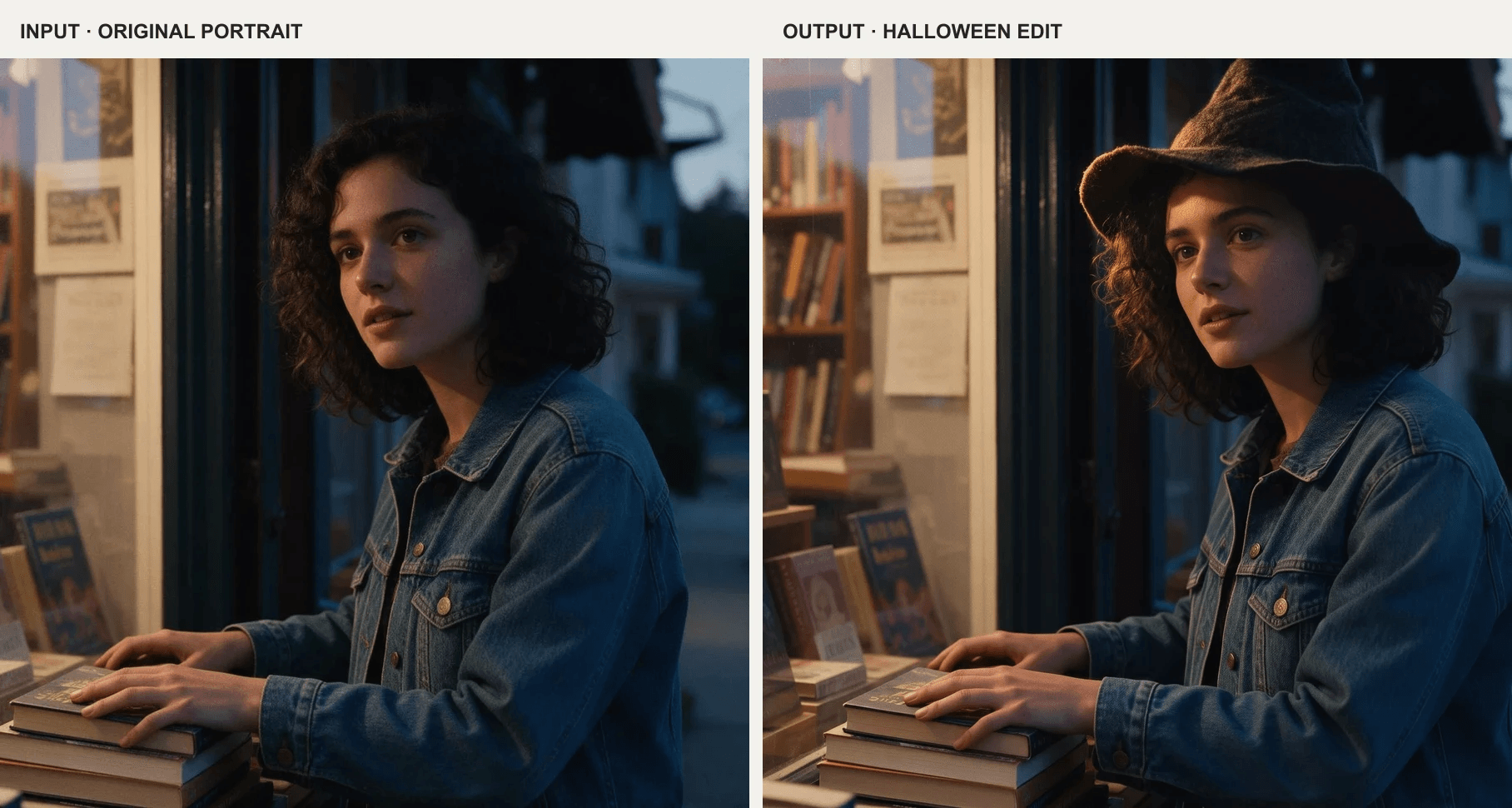
User-supplied source portrait generated with Seedream 5.0 Pro Text-to-Image; user-supplied edit made with Nano Banana 2 Edit. The hat is the requested change.
The edit instruction was:
plaintext1Edit the uploaded photograph of the same woman. Preserve her recognizable face, dark curly hair, expression, body proportions, blue denim jacket, bookshop window, camera angle, and the original direction of light. Add one modest Halloween change: a handmade black felt witch hat resting naturally on her hair, with a believable contact shadow. Keep the moment candid and photographic; do not redesign the shop or change her identity. No mask, floating hat, extra fingers, altered face, text, or watermark. Keep the original horizontal 16:9 framing.
Why keep the jacket and camera angle? Every extra change gives the editor another chance to drift away from the input. If you first need a costume concept, generate it as a separate image. When you have chosen the detail you actually want, edit the real photo with that one change. A good Halloween photo generator lets you make a targeted follow-up, such as “lower the hat onto the hair; keep the face and jacket unchanged,” instead of forcing a complete reroll.
Photo editing is also the right route for pets or rooms that need to stay recognizable. Name the features you want to keep: the dog's coat pattern, the carved pumpkin's actual face, the room's window position, or the product label. Avoid a vague “same image but Halloween.” Specific anchors let you see whether the result genuinely edited the source or replaced it with a lookalike scene.
When is a selfie generator the better first step?
Sometimes the source photo is a portrait taken by someone else, but the desired result should look as if you took it yourself. That is a camera-geometry problem before it is a Halloween problem. A front-camera selfie has arm's-length perspective, a plausible holding arm, and usually no phone visible in the frame. A mirror selfie usually shows the phone and a physically consistent reflection. Mixing those instructions can create an extra hand or a duplicate device.
The Atlas Cloud free AI selfie generator is built around one uploaded portrait and an optional short mood description. That makes it relevant when the source looks too posed for a social Halloween post. The tool's main job is selfie framing; a complex costume, ghost, or poster layout may need a separate image edit afterward.
The example below uses a newly generated portrait as its source and a separate reference-based edit to demonstrate the camera change. It is not output from the consumer selfie tool.
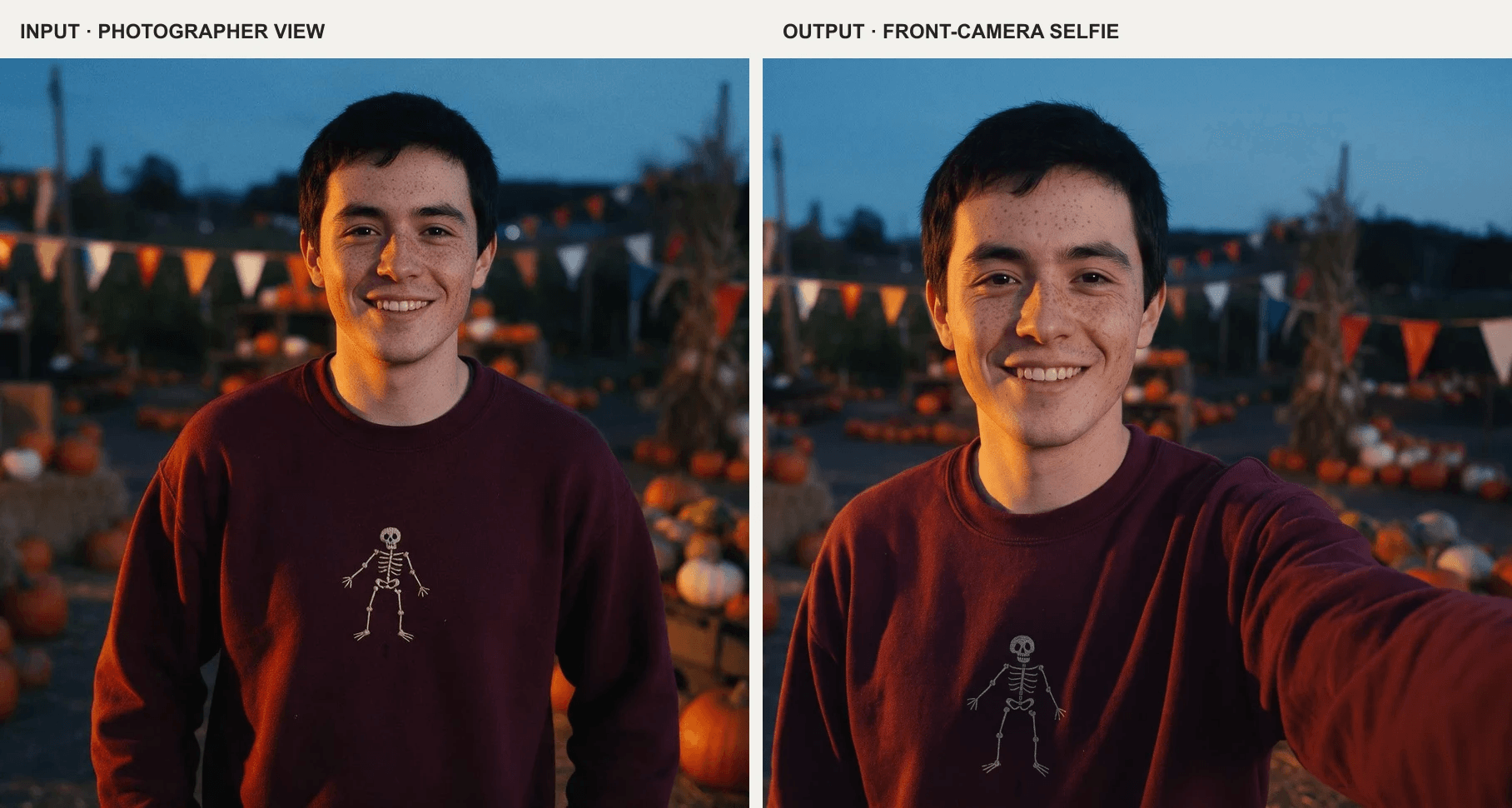
User-supplied source portrait generated with Seedream 5.0 Pro Text-to-Image; user-supplied selfie reframe made with Nano Banana 2 Edit. The extended arm and closer viewpoint are the visible changes.
Use the original portrait for this first step. Check whether the face and clothing survive the reframe, then save the result. In this example, the pumpkin-patch setting and skeleton sweatshirt already carry the Halloween theme, so a second edit is unnecessary. If you do add a new costume or prop afterward, compare that final image with the original portrait because each additional edit creates another opportunity for identity drift.
If you already have a good selfie, skip the reframe. A Halloween image editor can work directly from the photo you took. The extra tool is useful only when it solves a real framing problem. This keeps the workflow shorter and makes it easier to identify which step introduced a mistake.
Is a free AI Halloween image generator enough?
A free attempt can answer an early question: does this tool understand the brief well enough to continue? It should not be treated as proof that every route is free. Atlas Cloud's Free GPT Image 2.5 Playground page currently says participating models share five free generation attempts, and that these apply to Playground. The same page says Generator, Model Explorer, and API runs are billed separately. Check the current allowance in your account before running, since eligibility and remaining attempts can change.
Use the first eligible attempt as a controlled test. Paste one concrete prompt, keep the requested size modest, and inspect the result at full resolution. If you are testing a poster, check exact letters and spacing. If you are testing an edited photo, check likeness and whether the changed part touches the scene naturally. Save the prompt and output before deciding whether to spend more attempts.
A free AI Halloween generator with a narrow preset may be convenient for a quick social post, but the preset can hide decisions you care about: where the subject stands, whether a second person appears, or how much of the source survives. A general editor takes a little more writing and offers clearer control over those details. Choose based on the image you need, not the word free alone.
A fair test before you commit
You do not need a laboratory benchmark to find the right tool for one Halloween asset. You need a repeatable brief and a short list of failure checks. Use the same source photo or the same text prompt wherever the routes allow it, and keep the output target fixed. Record a result only after the generation completes; a gallery sample on a landing page was made from someone else's input and prompt.
Here are two user-supplied results for the same requested scene: one person tying a bat-patterned bandana on one dog beside a spilled candy bucket. In this pair, the left result places the bandana high behind the dog's head and leaves the dog's face dark; the right result makes the neck placement and face easier to inspect. The source exports have different pixel dimensions, so this is a check of two actual outputs, not a matched-resolution benchmark or a general model ranking.
User-supplied outputs labeled Seedream 5.0 Pro Text-to-Image (left) and GPT Image 2 Text-to-Image (right). Compare the named bandana placement, subject count, and visibility in these results.
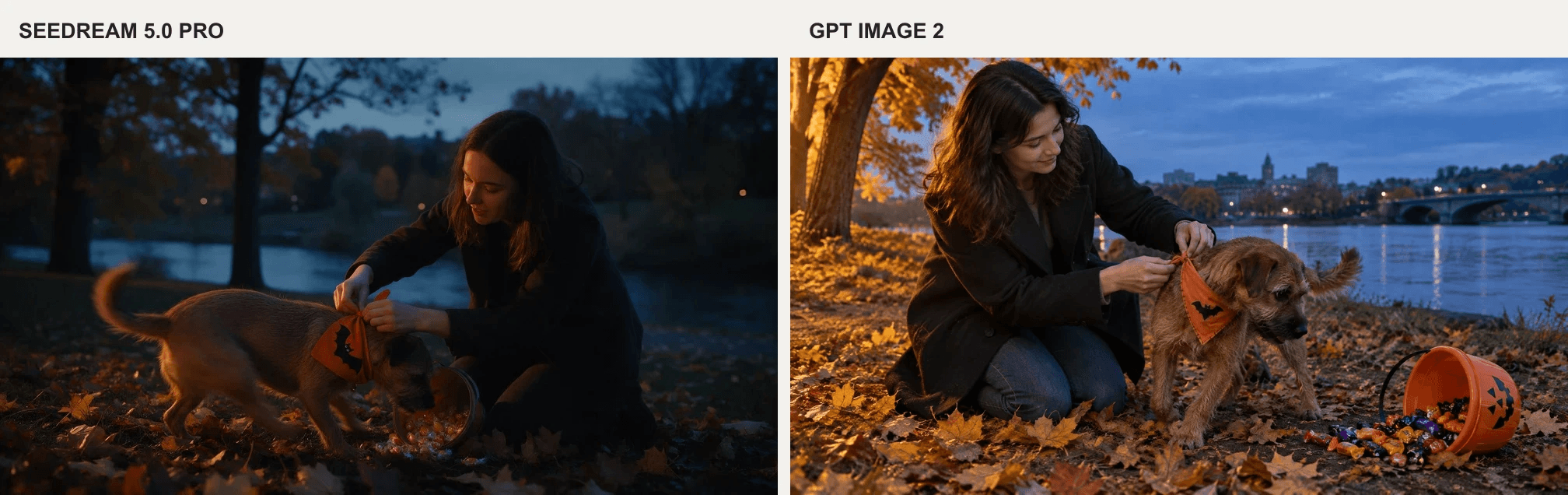
The shared prompt was:
plaintext1A candid Halloween photograph in an autumn riverside park at blue hour. Exactly one young adult woman in a simple dark coat kneels to tie a small orange bandana with a stitched black bat motif around the neck of exactly one brown terrier. The dog twists toward a tipped bucket of wrapped candy, while both of the woman's hands visibly and plausibly attach the bandana. No other people or animals. Directional amber light from the left against cool blue shadows, restrained orange-and-blue palette, 35mm documentary photography, foreground leaves, natural skin, fur and fabric texture, slight movement in the dog. Keep both faces, the woman's hands, and the bandana clearly visible with room around them for a horizontal crop. No lettering, logos, or watermark. Horizontal 16:9.
Make the target concrete before you run the test. A profile picture needs a face that reads at thumbnail size. A story image needs room for interface overlays near its edges. A printed invitation needs a file with enough detail for its final physical size. Those requirements can make a generator with a convenient preset less useful than one with a suitable aspect ratio and editable result. Check the downloaded file, not just the preview in the tool.
For a text-to-image brief, score four things: correct subject count, readable action, space for your eventual crop, and any required words. For a photo edit, replace the text check with likeness or source-object continuity. For a selfie, inspect the arm, phone position, face, and whether the outfit stayed plausible. These checks are simple enough to apply to a single result and specific enough to show where to revise.
| Check | Pass looks like | Targeted repair |
|---|---|---|
| Subject and identity | Correct number of people; required face or object matches the source | Re-upload the original and ask to preserve the named features |
| Camera geometry | One believable viewpoint, arm, and phone position | Specify direct selfie, mirror selfie, or photographer viewpoint |
| Halloween placement | Costume touches the body; ghost or prop sits in the named area | Move only the misplaced element; keep the rest fixed |
| Export fit | Important features survive the intended crop | Add negative space or change aspect ratio in the tool settings |
Google's image prompting guidance recommends naming subject, composition, action, setting, style, and edit instructions. The checklist above turns those prompt ingredients into things you can verify on the finished file. A repair request should name one observed defect, not a new mood board.
For example, if a generator puts the pumpkin in front of the face, the next instruction is “move the pumpkin to the lower right background; preserve the face and lighting.” If the hat floats above the hair, ask it to rest on the hair with a natural shadow. If a poster date is misspelled twice, stop asking the image model to typeset it and add verified text afterward. Each decision should move the asset closer to its intended use.
The top Halloween image generator for your project is the one that passes these checks with the fewest costly revisions. Start with the route your input requires, run a small controlled test, and inspect the export before you use it in a post, invitation, or campaign.
Frequently asked questions
What is the best Halloween image generator for my own photo?
Choose a reference-based image editor that lets you upload the original and describe a targeted change. Check the final face, clothing, and background against the source. A text-only generator can make a Halloween portrait, but it cannot verify that the new person is you.
Can I use an AI Halloween picture generator for a party invitation?
Yes. Text-to-image is useful for the scene or illustrated background. If the invitation includes a date, address, or exact headline, inspect every character and consider adding the final text in a design editor after generating the art.
Is the Atlas Cloud image generator free?
Do not assume a free offer on one Atlas Cloud page applies to every product. The GPT Image 2.5 page currently describes shared free attempts for participating Playground models and says Generator, Model Explorer, and API runs are billed separately. Check your logged-in account for the current allowance before generating.
What kind of Halloween art generator should I use for a wallpaper?
Use text-to-image if you want a new scene, then set the canvas to your device's shape where the tool allows it. Keep the focal subject away from the clock and app icons, and inspect the final crop. If the wallpaper must include your actual pet or room, switch to a reference-based edit.
How do I keep a Halloween selfie looking like me?
Begin with a clear portrait or selfie that shows both eyes and your usual hairstyle. Request preservation of those features, change one Halloween element at a time, and compare every output with the original. If the photo is already a selfie, go straight to image editing; reframing it again adds an unnecessary step.





