
 أصبحت Atlas Cloud الآن مُعيد بيع معتمدًا في الولايات المتحدة لـ Dreamina Seedance 2.5 وSeedream 5.0 Pro.أصبحت Atlas Cloud الآن مُعيد بيع معتمدًا في الولايات المتحدة لـ Dreamina Seedance 2.5 وSeedream 5.0 Pro.
Gemini Omni هي عائلة فيديو متعددة الوسائط أصليًا من Google DeepMind، مخصصة للإنشاء والتحرير الموجّهين بالمطالبات. أنشئ مقاطع من النصوص، أو حرّك الصور الثابتة، أو عدّل اللقطات الموجودة باستخدام مراجع بصرية اختيارية مع الحفاظ على المحتوى غير المتأثر. تدعم عناصر التحكم المرنة في الدقة ونسبة العرض إلى الارتفاع والمدة مجموعة متنوعة من مهام الإنتاج. توحّد Atlas Cloud إمكانية الوصول من خلال تسعير شفاف حسب الاستخدام. ابدأ البناء اليوم.
Gemini Omni Flash من تطوير Google. توفّر Atlas Cloud (التي تُشغّلها Atlas Cloud AI LLC) إمكانية الوصول إليه ولا تملكه. جميع العلامات التجارية ملك لأصحابها المعنيين.
يوفر لك Atlas Cloud أحدث النماذج الإبداعية الرائدة في الصناعة.
قارن بين مسارات الإدخال وإمكانات الإخراج والاستخدامات الإنتاجية لـ Gemini Omni عبر سبع نقاط نهاية متخصصة للفيديو.
| النمط | الوصف |
|---|---|
| Gemini Omni Flash R2V API (Reference To Video) | اجمع بين مطالبة نصية وصورة مرجعية واحدة إلى خمس صور مرجعية لإنشاء فيديو سينمائي بصوت أصلي. ويجعل اتساق العناصر والمشاهد والأنماط نقطة النهاية هذه مناسبة للتسلسلات ذات العلامة التجارية والشخصيات المتكررة وسرد القصص المرئية المنسّق. |
| Gemini Omni Flash I2V API (Image To Video) | بدءًا من صورة ثابتة ومطالبة نصية، تنشئ نقطة النهاية هذه فيديو سينمائيًا مزودًا بالصوت مع الحفاظ على العنصر المصدر والتكوين. وهي مناسبة لتحريك المنتجات، وتحريك الصور الشخصية، وتطوير المفاهيم المرئية. |
| Gemini Omni Flash Video Edit API | أرسل فيديو موجودًا وتعليمات نصية وصورًا مرجعية اختيارية لتطبيق تغييرات متسقة مع المشهد وبصوت أصلي. وبما أن اللقطات غير المعدّلة تظل محفوظة، يمكن للمحررين إجراء تعديلات مركّزة دون إعادة بناء المشهد بأكمله. |
| Gemini Omni Flash T2V API (Text To Video) | تتحول المطالبة النصية وحدها إلى فيديو سينمائي بصوت أصلي متزامن وحركة تستند إلى فيزياء العالم الحقيقي. ويدعم التوليد القابل للتحكم وعالي السرعة تصوّر المفاهيم وتطوير القصص والنمذجة الأولية السريعة للفيديو. |
| Gemini Omni Flash R2V Developer API | لإجراء تحويلات موجّهة، اجمع بين مقطع فيديو موجود وصور مرجعية ومطالبات نصية. وتدعم نقطة النهاية نقل نمط الفيديو وتحرير المشاهد وإدراج الشخصيات للتطبيقات الإبداعية التي تنشئ تنويعات موجّهة انطلاقًا من اللقطات المقدّمة. |
| Gemini Omni Flash I2V Developer API | يمكن لما يصل إلى 7 صور مرجعية توجيه فيديو يستند إلى مطالبة نصية مع الحفاظ على الهوية المرئية طوال النتيجة. اختر هذا المسار للشخصيات المتكررة أو صور المنتجات المتسقة أو الأصول المتجانسة عبر الحملة. |
| Gemini Omni Flash T2V Developer API | اختر مطالبة نصية مع الدقة ونسبة العرض إلى الارتفاع والمدة المطلوبة لإنتاج فيديو سينمائي قابل للتحكم. وتساعد إعدادات الإخراج المرنة المطورين على إنشاء محتوى مخصص للمنصات، وأتمتة سير عمل التوليد، واختبار توجهات إبداعية متعددة. |
يمكن لكل طلب إلى Gemini Omni Flash API أن يتضمن أي مزيج من النصوص والصور والفيديو والصوت، وأن يولّد صوتًا متزامنًا، ويحاكي فيزياء العالم الحقيقي، وينقّح النتيجة من خلال المحادثة.
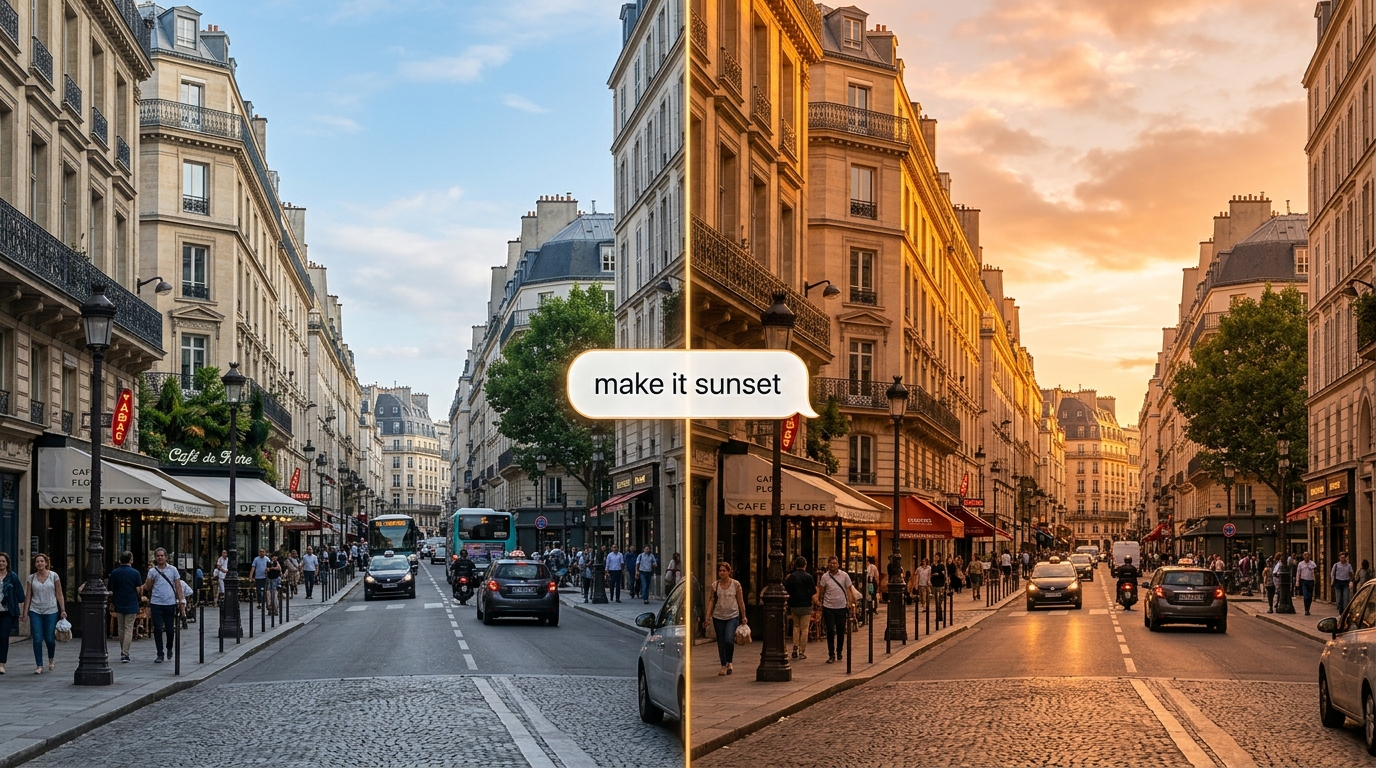
نقّح مقطعًا باستخدام اللغة الطبيعية، وسيطبّق Gemini Omni Flash API التغيير مع الحفاظ على بقية المشهد. تتذكر Interactions API، ذات الحالة، كل جولة، لذا تتراكم التعديلات وتبني إحداها على الأخرى.
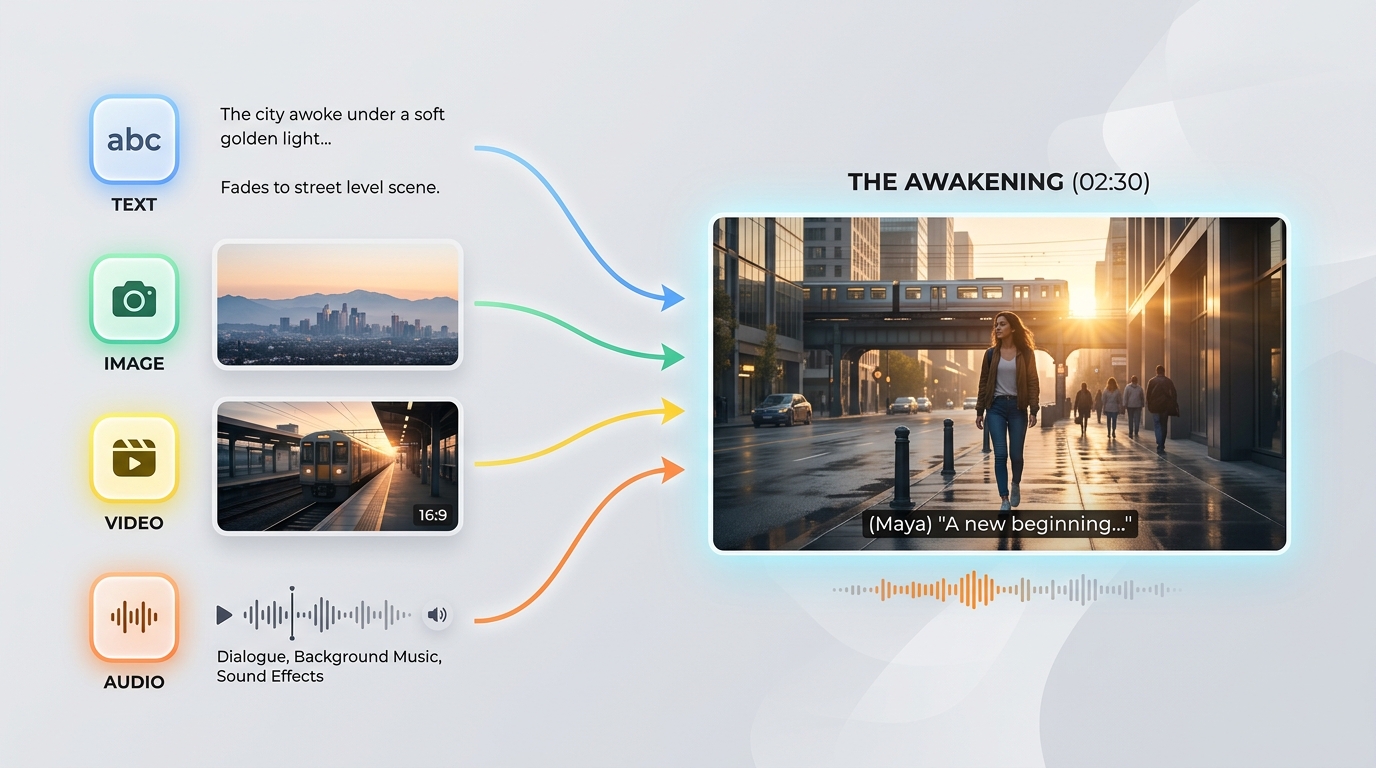
يقبل Gemini Omni Flash API أي مزيج من النصوص والصور والفيديو والصوت في طلب واحد. يتيح لك هذا الإدخال المرن من أي مصدر بدء عملية التوليد من أي مواد مصدر متاحة لديك.
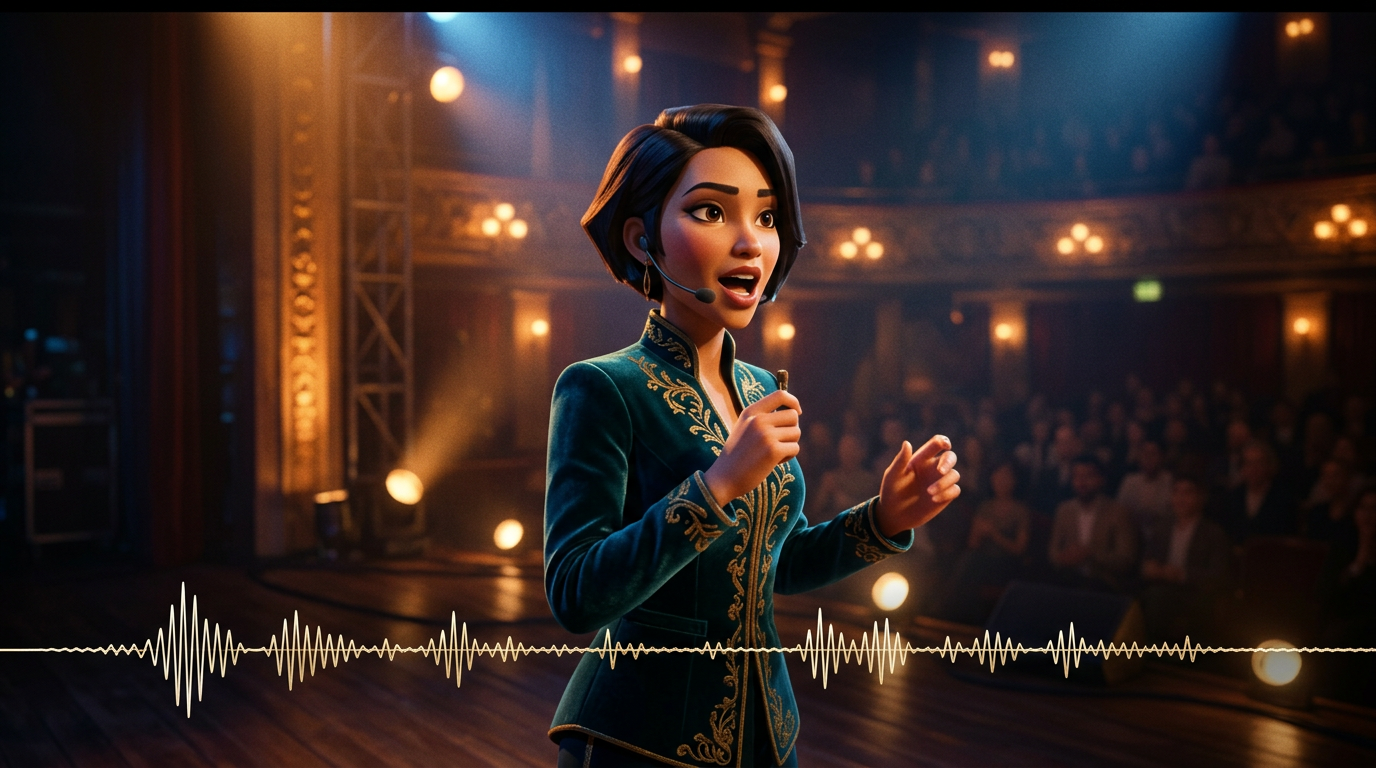
يُولَّد الصوت مع الصورة في تمريرة استدلال واحدة، لذلك يظل الحوار والمؤثرات والأجواء متزامنة تمامًا مع الأحداث. لا يحتاج Gemini Omni Flash API إلى خطوة صوتية منفصلة بعد ذلك.

استنادًا إلى نموذج لفيزياء العالم الحقيقي، يعرض Gemini Omni Flash API انعكاسات وجاذبية وإضاءة وطقسًا مقنعًا. تبقى المشاهد متماسكة بصريًا بدلًا من التحول إلى تشوهات، حتى في اللقطات الديناميكية.
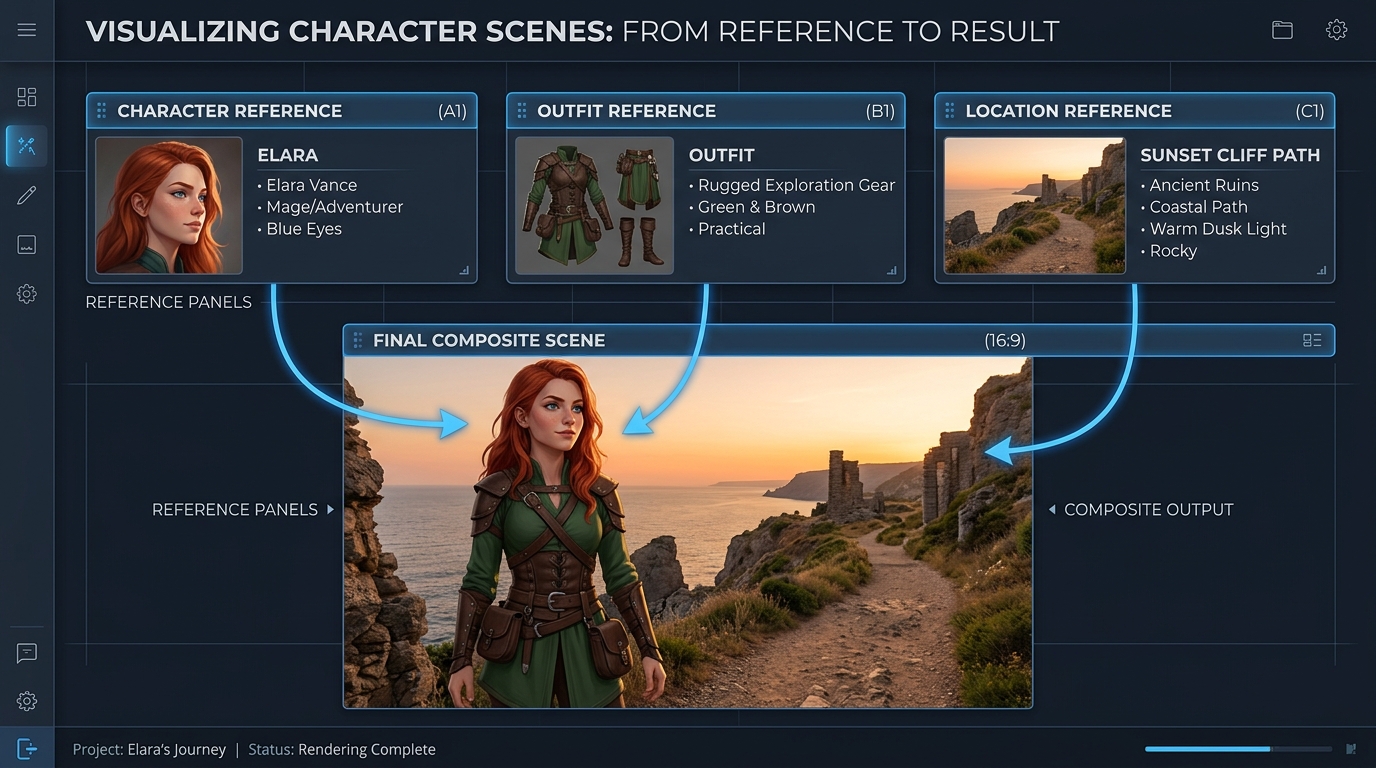
وجّه عملية التوليد باستخدام ما يصل إلى 7 صور مرجعية و3 مقاطع فيديو قصيرة، وسيحافظ Gemini Omni Flash API على اتساق العناصر والأسلوب والمشهد. يضمن ذلك ثبات الهوية عبر التعديلات واللقطات.
المطالبة نفسها، تم إنشاؤها بواسطة Gemini Omni ونماذج الفيديو الرائدة الأخرى: لقطات متعددة وفيلم تجاري عالي الجودة
أنشئ فيديو متواصلاً من 3 مشاهد: المشهد 1: تقف المرأة تحت أضواء النيون في شارع ممطر في طوكيو. انعكاسات على الأرض المبللة، وعمق ميدان سينمائي، وحركة كاميرا محمولة باليد. المشهد 2: تنتقل الكاميرا ببطء إلى لقطة أقرب. تتحدث بهدوء متزامنةً مع الصوت المُقدَّم، مع تطابق مثالي بين حركات شفتيها والصوت. وتستمر حركة المرور في الخلفية بسلاسة. المشهد 3: تدخل محطة مترو. تظل البيئة متسقة من حيث الإضاءة والطقس والأجواء. تتبعها الكاميرا من الخلف مع الحفاظ على اتساق هويتها. القيود: - الحفاظ على هوية الوجه نفسها تماماً في جميع المشاهد - الحفاظ على استمرارية الإضاءة (المطر وانعكاسات النيون) - ضمان الواقعية الفيزيائية (تفاعل المطر والأسطح المبللة) - ضمان التزامن بين الصوت والصورة مع إدخال الصوت - عدم إعادة ضبط المشهد بين الانتقالات؛ الحفاظ على حالة العالم بشكل متواصل الأسلوب: واقعية سينمائية عالية الجودة، تحبّب الفيلم، عدسة أنامورفية، عمق ميدان ضحل، مظهر فيلم بدقة 4K
Gemini Omni
Wan 2.7
Kling v3.0
أنشئ فيديو متواصلاً من 4 مشاهد: المشهد 1: يجلس روبوت أبيض صغير بلا حراك على مكتب خشبي في شقة معتمة عند منتصف الليل. يدخل ضوء القمر عبر النافذة. تضيء عينا الروبوت ببطء، ويبدأ طنين ميكانيكي خافت. المشهد 2: ينزل الروبوت بحذر من المكتب. تُصدر قدماه المعدنيتان الصغيرتان أصوات نقر خفيفة على الأرضية الخشبية. تتبعه الكاميرا من زاوية منخفضة، مع الحفاظ على اتساق حجم الروبوت وشكله. المشهد 3: يمشي الروبوت إلى المطبخ. تستجيب الانعكاسات على باب الثلاجة والأرضية المبلطة لحركته بشكل طبيعي. ويستمر ضوء القمر نفسه والأجواء الليلية الهادئة من المشهد السابق. المشهد 4: يتوقف الروبوت بالقرب من نافذة وينظر إلى أضواء المدينة في الخارج. تتحرك الكاميرا ببطء إلى الأمام من خلفه، مع الحفاظ على هوية الروبوت وخامته ومقياسه وإضاءته واستمرارية صوته. المتطلبات: - الحفاظ على تصميم الروبوت نفسه تماماً في جميع المشاهد - الحفاظ على تصميم متواصل واحد للشقة، من دون إعادة ضبط المشهد - الحفاظ على اتساق الإضاءة من غرفة إلى أخرى - مزامنة خطوات الروبوت وطنينه الميكانيكي مع حركته - استخدام انعكاسات وظلال وتفاعلات واقعية فيزيائياً مع العناصر - انتقالات سلسة بين المشاهد، كما لو كان العالم المتواصل نفسه قيد التصوير الأسلوب: واقعية سينمائية، أجواء خيال علمي هادئة، ضوء قمر ناعم، خامات مفصلة، حركة كاميرا واقعية، عمق ميدان ضحل، مظهر فيلم تجاري عالي الجودة
Gemini Omni
Kling V3.0
Pixverse v6
ينقل Gemini Omni إنتاج الحملات، والمراجعة الحوارية، والتصور المسبق، والتعلّم المرئي، واستمرارية العلامة التجارية، وأدوات المبدعين المضمّنة عبر سير عمل تحرير النصوص والصور والمراجع والفيديو، مع صوت أصلي متزامن.

حوّل صورة ثابتة معتمدة للمنتج إلى حركة سينمائية مع الحفاظ على موضوعها وتكوينها. يمكن لفرق التسويق إنتاج إعلانات تشويقية للإطلاق، وإعلانات لوسائل التواصل الاجتماعي، وكشوفات مصقولة للمنتج مع صوت أصلي متزامن.

صِف تغييرًا محددًا، وسيحرّر Gemini Omni اللقطات الحالية مع الحفاظ على المحتوى غير المتأثر كما هو. يمكن للمحررين إنشاء معالجات بديلة، ونسخ محلية، ومراجعات للعملاء من دون إعادة بناء مشهد معتمد.

وجّه عملية التوليد باستخدام صور مرجعية للحفاظ على اتساق المنتجات والشخصيات والأسلوب البصري طوال المقطع. يمكن للاستوديوهات تطوير أصول حملات منسقة، وعوالم متكررة للعلامة التجارية، ومحتوى حلقي مميز عبر القنوات.

ابدأ من مطالبة نصية وأنشئ فيديو سينمائيًا بصوت متزامن وحركة تستند إلى فيزياء العالم الحقيقي. يمكن للمخرجين والمصممين استكشاف إيقاعات القصة، وأفكار الكاميرا، والتنسيقات الخاصة بالمنصات قبل الإنتاج.

حوّل المفاهيم المجردة إلى شروحات مرئية قصيرة من خلال وصف المشهد والإجراء وتسلسل التعلّم المقصود. يمكن لفرق التعليم إنشاء عروض توضيحية علمية، وشروحات للعمليات، ووحدات تدريبية بصوت أصلي.

اجمع بين توليد النصوص، وتحريك الصور الثابتة، والإنشاء الموجّه بالمراجع، وتحرير الفيديو ضمن تكامل واحد مع Gemini Omni. يمكن لمنصات المبدعين تقديم أدوات إنتاج مترابطة من دون تجميع مسارات منفصلة للصور والصوت.
قارن نماذج الفيديو المرجعية في Gemini Omni API، بما في ذلك Gemini Omni 1.1 Flash، مع البدائل الرائدة من حيث المدخلات المدعومة، وسعة المراجع، وتوليد الصوت، والتسعير القياسي.
| النموذج | المدخلات المقبولة | سعة المراجع | توليد الصوت | السعر القياسي | Standard Base Price |
|---|---|---|---|---|---|
| Gemini Omni 1.1 Flash Reference-to-Video | Text, source video, reference images | Conversational additions, removals, replacements, and restyling | 360p, 720p, upscaled 1080p, upscaled 4K | Native synchronized audio | $0.041 |
| Gemini Omni Flash Reference-to-Video | Text, source video, up to 5 reference images | Scene-consistent edits that preserve untouched footage | 720p | Native audio editing | $0.14 |
| Seedance 2.0 Reference-to-Video | Text, source video, up to 5 reference images | Instruction-guided video changes with visual references | 720p, 1080p | Automatic audio or original audio retention | $0.14 |
| Wan-2.7 Reference-to-video | Text, source video, reference images, optional driving audio | Style transfer, scene changes, and element replacement | 720p, 1080p | Original audio retention, regeneration, or driving audio | $0.10 |
Get started in minutes — follow these simple steps to integrate and deploy models through Atlas Cloud’s platform.
سجّل في atlascloud.ai وأكمل التحقق. يحصل المستخدمون الجدد على رصيد مجاني لاستكشاف المنصة واختبار النماذج.
دمج نماذج Gemini Omni Flash المتقدمة مع منصة Atlas Cloud المسرّعة بـ GPU يوفر أداءً لا مثيل له وقابلية للتوسع وتجربة مطور استثنائية.
زمن انتقال منخفض:
استدلال محسّن لـ GPU للاستجابة في الوقت الفعلي.
API موحد:
قم بتشغيل Gemini Omni Flash و GPT و Gemini و DeepSeek من خلال تكامل واحد.
تسعير شفاف:
فواتير يمكن التنبؤ بها لكل رمز مع خيارات بدون خادم.
تجربة المطور:
SDKs والتحليلات وأدوات الضبط الدقيق والقوالب.
الموثوقية:
وقت تشغيل 99.99%، RBAC، وتسجيل جاهز للامتثال.
الأمان والامتثال:
SOC 2 Type II، توافق HIPAA، سيادة البيانات في الولايات المتحدة.
يتيح Gemini Omni API للمطوّرين الوصول إلى عائلة Google DeepMind الأصلية لتوليد الفيديو وتحريره متعدد الوسائط عبر Atlas Cloud. وبحسب نقطة النهاية المحددة، يمكنه توليد فيديوهات من النصوص أو الصور، واستخدام الوسائط المرجعية، وتحرير اللقطات الحالية، وإنتاج صوت أصلي متزامن.
يضيف Gemini Omni 1.1 Flash تمديد الفيديو، والاستيفاء بين الإطارين الأول والأخير، ودقّات إخراج تتراوح من 360p إلى 4K، وإرشادات موسّعة للوسائط المرجعية. ويضيف متغيّر التمديد من 3 إلى 10 ثوانٍ لكل طلب، ويمكن ربط الطلبات لإنشاء فيديو متّسق تصل مدته إلى 40 ثانية.
أنشئ حسابًا على Atlas Cloud، واحتفظ بمفتاح API على الخادم، ثم حدّد نقطة نهاية النموذج التي تتوافق مع سير عملك. يوفّر Atlas Cloud مفتاحًا واحدًا متوافقًا مع OpenAI، بينما يحدّد المخطط المنشور لكل نقطة نهاية المطالبة المطلوبة ومدخلات الوسائط وإعدادات التوليد.
اختر text to video عند البدء من مطالبة نصية، أو image to video عند تحريك صورة ثابتة، أو reference to video عندما تكون إرشادات الهوية والأسلوب مهمة. استخدم video edit لتعديل اللقطات الحالية، ونقطة نهاية Gemini Omni 1.1 Flash video extend لمواصلة مشهد.
تختلف حدود الوسائط المرجعية بحسب نقطة النهاية وإصدار النموذج. تقبل Gemini Omni 1.1 Flash Reference to Video ما يصل إلى 10 صور مرجعية و3 مقاطع فيديو مرجعية، بينما تدعم نقاط النهاية الأقدم حدودًا مختلفة؛ لذا تحقّق من مخطط نقطة النهاية المحددة قبل إرسال الوسائط.
يدعم Gemini Omni 1.1 Flash مخرجات مدتها من 3 إلى 10 ثوانٍ بمعدّل 24 FPS، مع خيارات دقّة 360p و720p و1080p المحسّنة و4K المحسّنة. ونِسَب العرض إلى الارتفاع المدعومة هي 16:9 و9:16، مع أن عناصر التحكم المتاحة قد تختلف بحسب نقطة نهاية Atlas Cloud.
نعم. يتّبع متغيّر video edit التعليمات النصية لإضافة العناصر أو إزالتها أو استبدالها أو إعادة تصميم أسلوبها، مع الحفاظ على اللقطات التي لا تذكرها المطالبة. لإجراء تغييرات متكررة، استخدم تعليمات مركّزة وسياق التفاعل الذي يدعمه سير العمل المحدد.
لمواصلة مشهد، قدّم مقطعًا موجودًا إلى نقطة نهاية Gemini Omni 1.1 Flash video extend واطلب إضافة من 3 إلى 10 ثوانٍ. يمكن ربط عمليات التمديد لتصل المدة الإجمالية إلى 40 ثانية، بينما يستطيع متغيّر image to video إجراء استيفاء بين الإطارين الأول والأخير المزوّدين.
يبلغ سعر Atlas Cloud القياسي لـ Gemini Omni 1.1 Flash مقدار $0.041 لكل ثانية لخدمات text to video وreference to video وتحرير الفيديو وتمديد الفيديو، بينما تبلغ تكلفة image to video مقدار $0.043 لكل ثانية. وتبدأ تكلفة نقاط نهاية Gemini Omni Flash الأقدم من $0.112 لكل ثانية، مع فوترة حسب الاستخدام ودون الحاجة إلى اشتراك.
يتضمن كل فيديو مولّد علامة مائية غير مرئية من SynthID يمكن اكتشافها برمجيًا. وتُطبَّق فلاتر الأمان على المطالبات والمخرجات المولّدة معًا، بينما يختلف وقت المعالجة بحسب المدة والدقّة وحِمل الخدمة. ولا يتم دعم عناصر التحكم المخصصة في negative prompt وsystem instruction وtemperature وtop_p وstop sequence؛ لذا أدرج الاستثناءات في المطالبة الرئيسية.
واجهة برمجة تطبيقات Seedance 2.5 متاحة الآن على Atlas Cloud! توفر للمطورين أحدث نموذج فيديو من ByteDance. يمكن للنموذج إنشاء ما يصل إلى 30 ثانية من الفيديو الأصلي في مسار واحد من نص، أو صورة واحدة، أو ما يصل إلى 50 مرجعاً متعدد الوسائط، مع صوت متزامن ونص متعدد اللغات داخل الإطار. على Atlas Cloud، يمكنك الوصول إليه من خلال مفتاح واحد، مع الحفاظ على تناسق الموضوع والفيزياء المحسنة التي تحافظ على تماسك اللقطات الطويلة.

تعد واجهة برمجة تطبيقات Wan 3.0 الجيل التالي من عائلة فيديو Wan التابعة لشركة Alibaba، وقد تم تصميمها لدفع التوليد طويل التنسيق والتحكم متعدد المراجع والجودة السمعية والبصرية إلى آفاق جديدة. تستضيف Atlas Cloud بالفعل Wan 2.7 و 2.6 و 2.5، ويعمل Wan 3.0 على نفس المفتاح الموحد دون أي إعداد منفصل. ابدأ البناء اليوم. قم بالتمرير لأسفل إلى قسم العرض لترى ما يمكن أن ينشئه Wan 3.0.
MiniMax H3 هي عائلة MiniMax متعددة الوسائط للفيديو، وتدعم الإنشاء الموجّه بالنصوص والصور والمراجع. وعبر المسارات المدعومة، تحافظ على العناصر من الوسائط المرجعية، وتوفر نسب أبعاد مرنة، وتقرن الصوت المُولّد بالمشاهد من خلال H3 Developer، مع تحديد ملفات الإخراج وفقًا لنقطة النهاية. توحّد Atlas Cloud هذه العائلة خلف مفتاح واحد متوافق مع OpenAI، مع تسعير شفاف حسب الاستخدام يبدأ من السعر القياسي البالغ $0.038 لكل ثانية. ابدأ البناء اليوم.
تمنح عائلة gpt-image-2.5 من OpenAI المطورين خيار استخدام Flare وSunburst في عمليات إنتاج الصور. نفّذ التصيير بدقة عشوائية تصل إلى 3840x2160، واختر من بين خمس درجات للجودة، بما في ذلك xhigh وmax، لتلبية متطلبات الإخراج المحددة. توفر Atlas Cloud استدلال REST جاهزًا للاستخدام من دون بدء تشغيل بارد، وبسعر قياسي يبدأ من $0.004 لكل عملية توليد. ابدأ البناء اليوم.
يوفر واجهة برمجة التطبيقات Seedream 5.0 Pro API للمطورين نموذج تحرير الصور القابل للتحكم من ByteDance على Atlas Cloud. وهو يضع التعديلات بدقة باستخدام نقاط الإرساء والإحداثيات، ويفصل الصور إلى طبقات قابلة للتحرير، ويدمج مراجع متعددة، ويطابق الألوان والمواد الدقيقة، مع نص متعدد اللغات بدقة 2K و 3K. على Atlas Cloud، يمكنك الوصول إليه من خلال مفتاح واحد!
Seedance 2.0 هو نموذج الفيديو المخصص للإنتاج من ByteDance لإنشاء اللقطات بدقة. حوّل المطالبات إلى فيديو، أو حرّك صورة الإطار الأول مع إمكانية توجيه اختيارية عبر الإطار الأخير، أو شكّل النتائج باستخدام الوسائط المرجعية والبحث الاختياري على الويب. يضم Atlas Cloud هذه التدفقات في API موحّد واحد، مع تسعير شفاف حسب الاستخدام ومفتاح واحد متوافق مع OpenAI. ابدأ البناء اليوم.
تجلب Kling 3.0 API مجموعة الفيديو الرائدة من Kuaishou إلى Atlas Cloud من خلال مفتاح واحد متوافق مع OpenAI. وتتضمن نموذجين: Kling 3.0 لسرد القصص عبر AI Director، ومزامنة الشفاه متعددة اللغات، والنصوص الدقيقة على الشاشة، و Kling 3.0 Omni (O3) لاستنساخ الموضوعات والصوت من مقطع فيديو قصير أو صورة. يولد كلا النموذجين صوتاً أصلياً في نفس المسار، مع دقة إخراج تصل إلى 4K. قم ببناء سرديات سينمائية، وتسويق عالمي، وإعلانات متعددة اللغات، ومحتوى شخصيات متسلسل على بنية تحتية موثوقة.
يمنح Grok Imagine Video المطورين إمكانية الوصول إلى عائلة الفيديو من xAI لإنشاء المقاطع وتحريكها وتمديدها وتحريرها. أنشئ مقاطع فيديو تتراوح مدتها بين 1 و15 ثانية انطلاقًا من المطالبات، ووجّه الأشخاص أو الكائنات أو الأنماط باستخدام ما يصل إلى سبع صور مرجعية، واعمل بدقة 480p أو 720p. تجمع Atlas Cloud هذه الإمكانات عبر نقاط نهاية متوافقة مع OpenAI، مع تسعير شفاف حسب الاستخدام. ابدأ البناء اليوم.
Vidu Q4 هو أحدث نموذج فيديو رائد من Vidu، ومصمم لتوليد الفيديو من الصور ومن المراجع. يمكنه تحريك صورة ثابتة واحدة وإنشاء انتقالات تلقائية بين المشاهد، ما يتيح للمطورين مساري إدخال مختلفين لملاءمة سير عمل المنتجات المتنوعة. توفر Atlas Cloud نقاط نهاية API مخصصة مع مخططات معلنة للمعلمات، بسعر قياسي موثّق قدره $0.04 لكل ثانية. ابدأ التطوير اليوم.
Gemini Omni 1.1 Flash هي عائلة فيديو متعددة الوسائط أصيلة التصميم من Google DeepMind، مصممة لسير عمل إنتاج مرن. حرّر اللقطات الموجودة باستخدام تعليمات نصية، وحافظ على الاتساق البصري باستخدام ما يصل إلى 10 صور مرجعية و3 مقاطع فيديو، أو مدّد اللقطة إلى أجزاء متسلسلة قابلة للربط بطول يصل إلى 40 ثانية. يمكنك الوصول إلى جميع سير العمل على Atlas Cloud باستخدام مفتاح API واحد متوافق مع OpenAI، وتسعير حسب الاستخدام، وإتاحة من اليوم الأول. ابدأ البناء اليوم.
Nano Banana 2.1 is Google's image model family built on Gemini 3.6 Flash. It delivers Pro-level generation and editing at Flash-level speed, supports natural-language edits and merges across 1 to 14 input images, and maintains consistency for up to 4 characters and 10 objects. Through Atlas Cloud, developers can access the family with one OpenAI-compatible key, reliable uptime, and Day-0 availability. Start building today.
قم بالبناء باستخدام واجهة برمجة تطبيقات Nano Banana 2، والمدعومة بنموذج Gemini 3.1 Flash Image من Google. حيث تقوم بإنشاء صور بدقة 4K أصلية تصل إلى 4096x2304 مع عرض دقيق للنصوص وشخصيات متسقة عبر ما يصل إلى 14 صورة مرجعية لكل من التوليد والتحرير. على Atlas Cloud، يمكنك الوصول إليها من خلال واجهة برمجة تطبيقات موحدة إلى جانب أكثر من 300 نموذج، بأسعار تبدأ من 0.04 دولار لكل صورة، ووقت تشغيل بنسبة 99.99٪، وأرصدة مجانية للبدء.
أدلة وشروحات وتحديثات المنتج لمساعدتك على تحقيق أقصى استفادة من Atlas Cloud.



