On May 19, 2026, at Google I/O, DeepMind released Gemini Omni. The same day, the Gemini Omni prompt guide went up on DeepMind's documentation site, tucked between the Omni Flash model card and the API notes. Most people watched the keynote demos. The doc went mostly unread.
Quick facts first. Gemini Omni is DeepMind's new multimodal generation model. The first product, Gemini Omni Flash, generates up to 10-second videos from any combination of text, image, audio, or video inputs. Every output carries a SynthID watermark. AI Plus, AI Pro, AI Ultra subscribers got immediate access; YouTube Shorts and YouTube Create app users get free access starting this launch week (Gagadget reporting). API access is "coming in weeks" per Google.
Back to the prompt guide. Google DeepMind's prompt guide spells out the shift directly, under the "World understanding" section:
With Veo, you need to share precise instructions to get the best results. But with Gemini Omni, you don't have to be as prescriptive with your prompt. Instead, tell Omni what you want to create – and watch the model's reasoning and world knowledge bring the details to life.
The translation: write less.
Read this alongside the prompt guides ByteDance and Kuaishou publish for their own video models. The frames differ but point the same way.
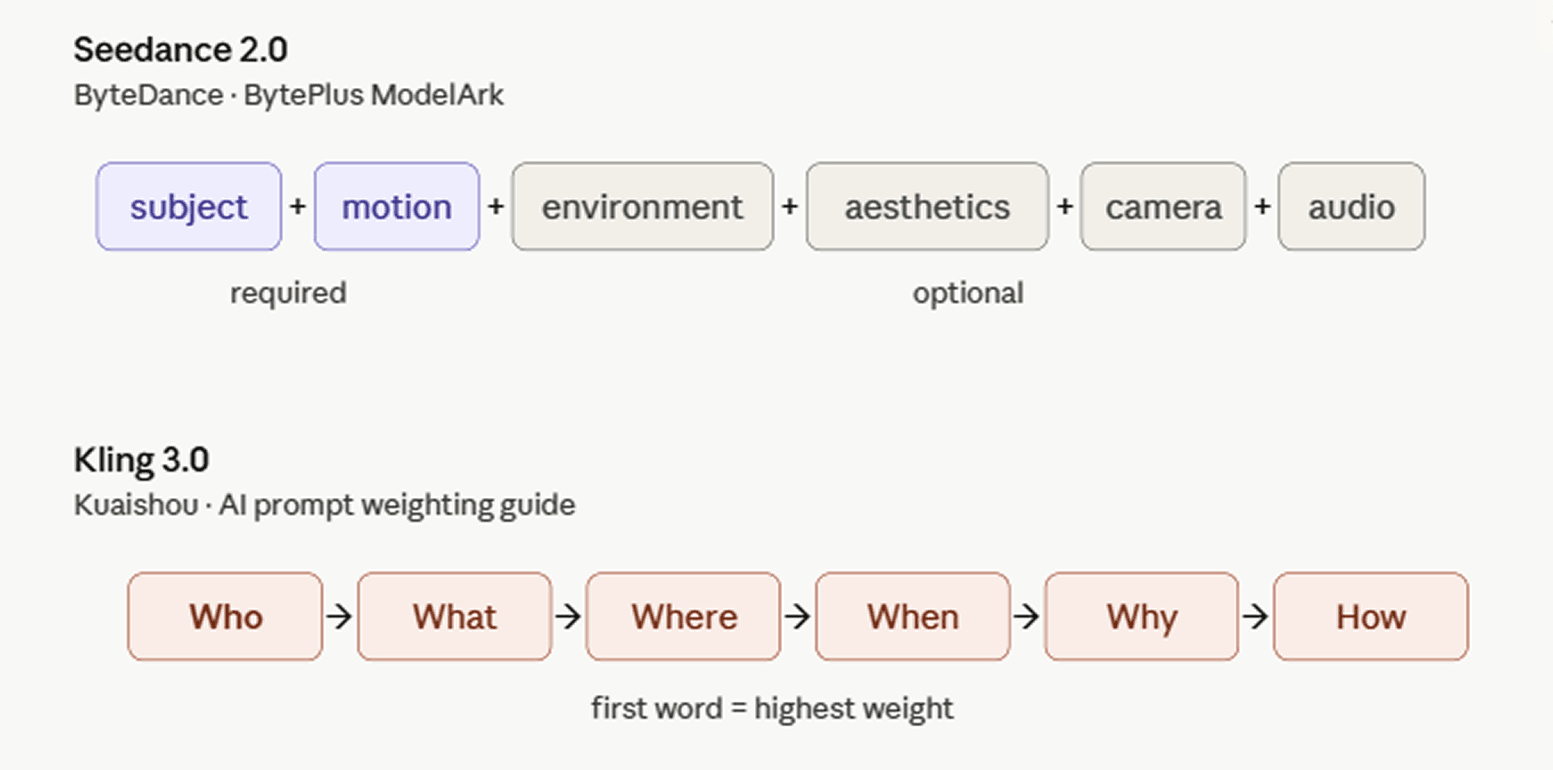
ByteDance documents Seedance 2.0 on its international developer platform with the BytePlus ModelArk prompt guide. The recommended structure: subject + motion (+ environment + aesthetics + camera movement/cut + audio). Not every component is required, you pick what fits the shot.
Kuaishou's AI Prompt Weighting guide frames it through a 5W1H formula: Who + What + Where + When + Why + How. The Who — the subject — usually carries the highest priority and leads the prompt, since word position determines weight in Kling 3.0: whatever comes first gets the most computational attention. Stylistic choices like medium or perspective work best at the end, acting as a filter over the already-established scene. The guide warns against blindly stacking elements; too many conflicting keywords degrade quality.
Three companies arrived at this advice independently, which suggests their models reached a similar capability level around the same time. Google tells you to write less, ByteDance flags most components as optional, and Kuaishou emphasizes word order over sheer volume. The specific framings differ, but all three labs point creators toward looser, more natural prompts.
Now to how the Gemini Omni prompt guide plays out in practice.
Gemini Omni Prompt Structure: 5 Dimensions Google DeepMind Uses
The guide opens with a complete example:
A wide-angle tracking shot glides gently across a serene lake, revealing a colossal, reflective, chrome-like bean-shaped object levitating effortlessly above, rotating slowly to reveal its distorted reflections of majestic cliffs and a smaller, similar object partially submerged in the clear azure water below, as a brilliant sun crests behind the floating anomaly, bathing the entire scene in crisp, ethereal daylight with vibrant blue and green tones, creating a cinematic and awe-inspiring ambiance underscored by a majestic and otherworldly orchestral score that emphasizes the vastness and mystery of the alien landscape, with faint, deep hums emanating from the levitating object.
Over 90 words. Break it apart and you get 5 dimensions.
- Shot framing and motion. Wide-angle, medium, or close-up? Should the camera glide gently or rush suddenly? The two verbs produce noticeably different output, so a few rounds of trial pays off when you're hunting for the right motion feel.
- Style. Realistic, cinematic, ethereal, majestic? This dimension doesn't need details. Tell the model the emotional tone and that's enough.
- Lighting. Where does the light come from? The sun, a streetlamp, on-camera or off-screen? Should it feel crisp, warm, or ethereal?
- Scene. One line in the guide is worth highlighting: "you don't need to describe every single little detail, as Omni will work with your overall intention." This matches what Seedance and Kling say in their official docs.
- Action and interaction. Who and what is in the scene, how they move, how they interact.
Gemini Omni Conversational Editing vs Veo Prompt Rewriting
Omni and Veo produce comparable generation quality. The real gap is what you can do after the video is generated.
Previously, changing one detail meant rewriting the entire prompt, regenerating, and hoping the frame-to-frame consistency held. Omni replaces this step with a conversation.
The official guide gives a few examples.
A stop-motion-style video of a small boy. First edit: "change the butterfly to a bee." Next: "change the bee into a small swarm of fireflies." One element shifts per turn; other frames are preserved automatically.
The camera works the same way. A video of a violinist gets three commands in sequence: "transport the violinist to the image environment," "make the violin invisible," "change the camera angle to be over the violinist's shoulder." Environment swap, object removal, camera repositioning, all through natural language.
There's a gotcha worth flagging. Third-party reviewers note that if your editing instruction is too vague, Omni tends to over-edit, changing elements you wanted to keep. Google's recommendation: change one variable per turn, and explicitly state what should stay the same.
The cross-modal sync example is more interesting. Take a nighttime video of an apartment building, add the instruction "the lights of the apartments start turning on in sync with the music." The model analyzes beats in the soundtrack and aligns window lights to them. Doing this in After Effects requires a timeline, a metronome, and frame-by-frame manual keying.
Gemini Omni's 4 Advanced Capabilities: World Knowledge, Text Rendering, Action Reference, Multi-Input
The back half of the guide breaks out 4 capabilities.
Applied world knowledge
The example prompt: Explain the difference between regular computing and quantum computing. Visualize this sentence using a contemporary flat-media style that blends minimalist vector shapes with rich organic textures. The aesthetic is defined by a high-contrast, "electric" color palette of neon pinks, cyans, and limes set against a deep navy background. A hallmark of this style is the use of stipple shading and grainy gradients, which adds a tactile, risograph-like quality to the otherwise simple geometric forms. By combining sharp edges with these softened, speckled transitions, the illustration achieves a playful, editorial feel.
The model already knows what quantum superposition is and how to convey it through a comparative set of shots. The user doesn't have to explain quantum mechanics, only the visual tone.
This works because Omni runs on a frontier reasoning model, which generation-only video models can't match. Demis Hassabis, in a post-I/O Semafor interview, framed Omni as one step in the project of building AI that better understands the real world. He pointed out that Waymo, Alphabet's self-driving division, is already testing similar world models to give autonomous cars a kind of "imagination" for handling unpredictable situations. Video generation is just the most visible application of that architecture.
Text rendering
The example prompt: word by word, one word on the screen at a time, each word with a different animated style, perfect pacing to a rhythm, sizzle reel.
Complex action reference
Prompt example: edit this keeping everything the same, add animated motion effects coming out of the skateboard.
Multi-input reference
Prompt example: The birds from video loosely form the imperfect shape of a bird based on image. They move to the music from audio and dissipate as they fly.
Style transfer
Prompt example: Create a four-part stylistic progression of the video reference that begins with a vibrant colored crayon aesthetic, featuring rich, waxy, textured strokes and playful, hand-drawn character designs against a backdrop of heavily granulated paper. Transition seamlessly into a graphite pencil sketch on textured paper, utilizing cross-hatching, varying line weights, and a 12fps "line boiling" effect to emphasize a hand-drawn feel. Next, morph into a hyper-realistic 3D translucent glass style, characterized by complex light refractions, caustic patterns, and soft internal glows within a minimalist studio setting. Conclude the sequence with a tactile risograph print look, applying a limited three-color palette, grainy halftone textures, and intentional registration overlays for a retro, mechanical finish.
Storyboard reference
Prompt: Show me in this story. Follow the story exactly in order starting top left. Entire story in 10 seconds. Cinematic
Cross-shot consistency
Why Gemini Omni, ByteDance Seedance, Kuaishou Kling Prompt Advice Is Converging
Back to the earlier observation. The similarity in prompt advice from Seedance, Kling, Omni isn't a result of mutual borrowing. More plausibly, this generation of models hit a similar capability level on their own.
Once a model can handle natural language at the scene level, supplement details with world knowledge, and infer what the user actually means, over-prescribing becomes the bottleneck. The three labs disagree on how much structure to add back in, but agree the answer isn't to keep writing more.
This is the result of two years of diffusion models trained jointly with large language models. Omni pushes the result to a relatively complete state.
Calling Gemini Omni Through Atlas Cloud: Unified API for Seedance, Kling, Veo
Gemini Omni is coming to Atlas Cloud. Atlas Cloud aggregates 300+ AI models across text, image, video, audio. The main video models already run on the platform: Seedance 2.0, Kling 3.0, Wan 2.7, Veo, others. For side-by-side comparison, see Atlas Cloud's Wan 2.7 vs Seedance 2.0 vs Kling 3.0 deep dive.
One account runs the whole pipeline. No need to register, pay, maintain API keys across multiple regional platforms. The Playground supports interactive debugging. A unified OpenAI-compatible API plugs into existing workflows.
Atlas Cloud's prompt library has over twenty categories of ready-to-use prompts covering anime, sci-fi, mystery, food, vlog formats. Each prompt comes with an example video and parameter notes. Copy, swap a few words, run.
One Unified API for Production Video Generation
While Google rolls out Gemini Omni Flash inside the Gemini app and Google Flow for end-users, developers and product teams who want to embed the same multimodal video engine into their own workflows need a stable, predictable API layer.
Atlas Cloud serves Gemini Omni Flash through a unified, OpenAI-compatible API, alongside 300+ other image, video, and LLM models — so you can integrate Google's native multimodal model without juggling separate vendor accounts, billing portals, or SDKs.
Both Gemini Omni Flash variants are live on Atlas Cloud:
td {white-space:nowrap;border:0.5pt solid #dee0e3;font-size:10pt;font-style:normal;font-weight:normal;vertical-align:middle;word-break:normal;word-wrap:normal;}
| Variant | Best For | Inputs | Resolution | Duration | Starting Price |
|---|---|---|---|---|---|
| Gemini Omni Flash Text-to-Video (Developer) | Pure prompt-driven cinematic generation | Text (up to 20,000 chars) | 720p / 1080p / 4K | 4, 6, 8, 10 s | $0.2 + $0.1/sec |
| Gemini Omni Flash Image-to-Video (Developer) | Subject-consistent video from real references | Text + up to 7 reference images | 720p / 1080p / 4K | 4, 6, 8, 10 s | $0.2 + $0.1/sec |
Quick Start — Generate a Gemini Omni Flash video in 5 lines:
plaintext1curl -X POST https://api.atlascloud.ai/api/v1/model/generateVideo \ 2 -H "Authorization: Bearer $ATLASCLOUD_API_KEY" \ 3 -H "Content-Type: application/json" \ 4 -d '{ 5 "model": "google/gemini-omni-flash/text-to-video-developer", 6 "input": { 7 "prompt": "A misty forest at golden hour, cinematic dolly shot", 8 "resolution": "1080p", 9 "duration": 8, 10 "aspect_ratio": "16:9" 11 } 12 }'
The API returns a prediction ID immediately — poll /api/v1/model/prediction/{id} for the rendered MP4 URL. Full schema, code samples in 7 languages, and a no-code Playground are available on the model pages linked above.





