GPT Image 2 generates usable assets at $0.008 per image. The model is most useful when the prompt is structured. Vague input produces stock-photo output. Tight, specific input produces images you can ship.
This guide is 50+ prompts you can copy and paste, organized by the three jobs the model is best at: product photography, UI design mockups, and marketing visuals. Each prompt was tested through the GPT Image 2 API on Atlas Cloud.
For browseable, community-contributed prompts with one-click "try it" buttons, see the Atlas Cloud GPT Image 2 Prompt Hub.
*Last Updated: May 4, 2026*
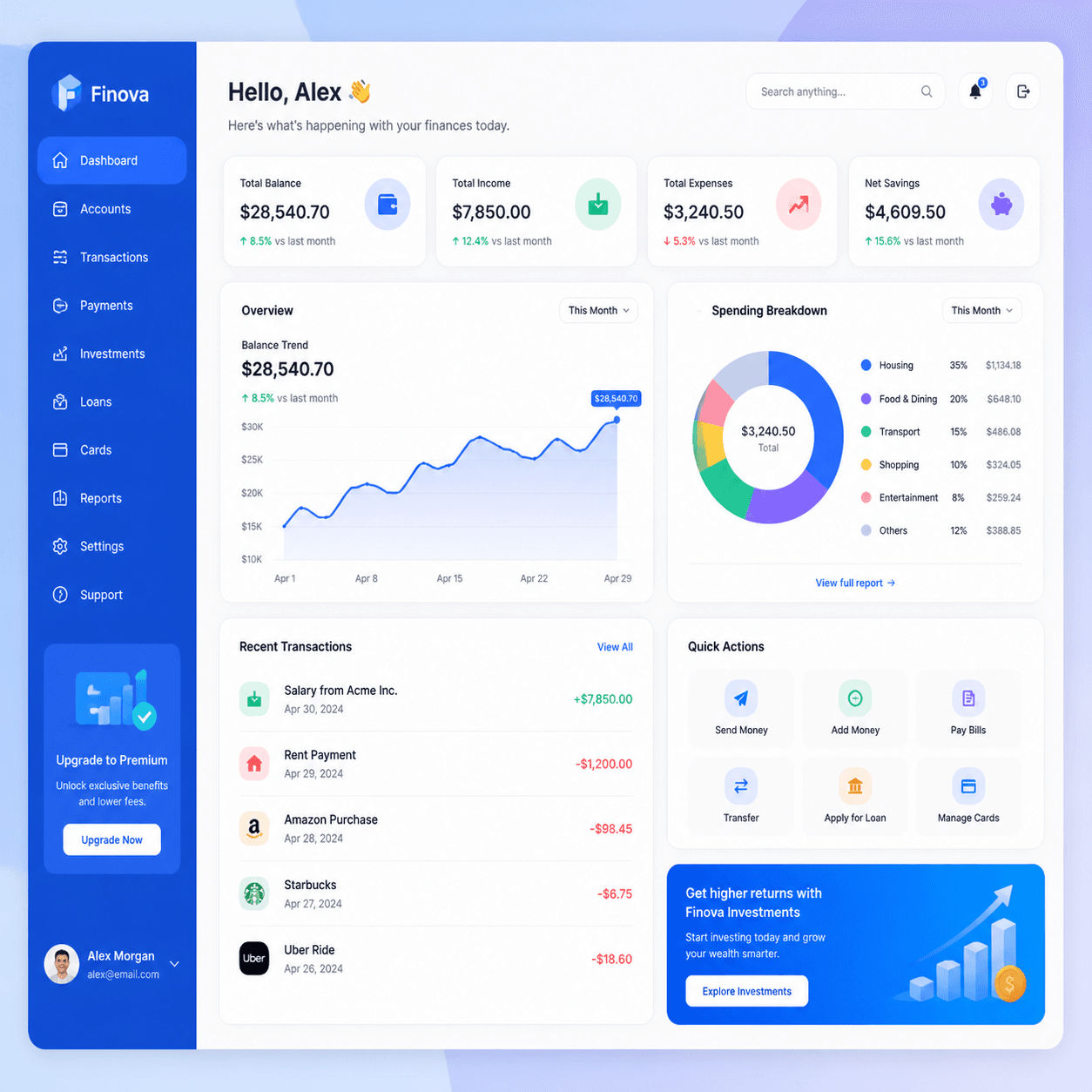
Real outputs from prompts in this guide:


The GPT Image 2 Prompt Formula
Every strong GPT Image 2 prompt has the same five parts:
plaintext1``` 2[Subject] + [Composition] + [Lighting] + [Color or Mood] + [Style anchor] 3```
Five short clauses. One sentence is fine. A short paragraph works better when the scene has many elements.
Key principles, learned from running hundreds of prompts:
- Lead with the subject. "Matte black ceramic coffee mug" beats "a beautiful image of a coffee mug." The model parses the noun first.
- Name the composition. "Close-up," "wide shot," "flat lay," "three-quarter view." One word changes the whole framing.
- Name the lighting. "Soft window light," "studio softbox," "golden hour," "neon rim light." Lighting carries the look more than the subject does.
- Add a style anchor at the end. "Professional product photography," "Figma UI mockup," "editorial magazine photography." This locks the render style.
- Keep prompts under 60 words. Long prompts work but iterate slower. The price is the same either way.
GPT Image 2 understands long prompts thanks to the GPT-5 base. Use that for complex layouts (UI dashboards, multi-panel scenes). Use short prompts for everything else.
Quality and Size Choices
Match `quality` to the stage:
- `low` for prompt iteration. Fast, $0.008, good enough to judge composition.
- `medium` for review and most production output. Cleaner detail, same price.
- `high` for final hero assets and anything with text. Slower (~30s), same price.
Match `size` to the destination:
- `1024x1024` for product shots, social, in-app, and any unsure case.
- `1024x1536` for portraits, mobile mockups, and full-body subjects.
- `1536x1024` for desktop banners, blog headers, and wide UI mockups.
Price is flat across sizes and quality tiers. The choice is fit, not budget.
Category 1: Product Photography (17 Prompts)
Product photography is GPT Image 2's most reliable category. The model handles materials, lighting, and clean backgrounds well. Use these for ecommerce mockups, brand decks, social posts, and pitch materials.
1. Minimalist Tabletop Product Shot
plaintext1``` 2Modern minimalist product photo of a matte black ceramic coffee mug on a 3warm wooden tabletop, soft window light from the left, neutral cream 4background, shallow depth of field, professional product photography 5```
The workhorse prompt. Swap the subject and keep everything else.
2. Studio White-Background Product
plaintext1``` 2Studio product photography of a wireless over-ear headphone in matte 3graphite finish, centered on a clean pure-white background, soft even 4lighting from above, subtle drop shadow, ecommerce listing photo 5```
For Amazon-style listings and catalog work. The "subtle drop shadow" is what separates a clean shot from a flat cut-out.
3. Overhead Flat Lay
plaintext1``` 2Overhead flat lay of skincare bottles, eucalyptus leaves, and a folded 3linen towel on a pale concrete surface, soft diffused daylight, muted 4sage green and warm beige palette, editorial product styling 5```
GPT Image 2's flat-lay output is consistently strong. Use the same skeleton for food, stationery, tech accessories, or any product set.
4. Lifestyle Product Shot
plaintext1``` 2Lifestyle product shot of a person in a cream knit sweater holding a 3ceramic mug of coffee in both hands, sitting by a window in a sunlit 4modern kitchen, warm morning light, shallow depth of field, lifestyle 5brand photography 6```
Face is rarely the focus. That keeps GPT Image 2's portrait weaknesses out of the frame.
5. Premium Beverage Bottle
plaintext1``` 2Photorealistic product photography of a tall amber glass beverage bottle 3with minimal craft branding, condensation droplets on the surface, deep 4shadow on a dark slate background, single dramatic side light, premium 5beverage marketing photography 6```
Dark, moody beverage shots are a strength. Use for craft beer, coffee, kombucha, wellness drinks.
6. Cosmetic Product on Marble
plaintext1``` 2Macro product shot of a frosted glass perfume bottle on a polished white 3marble slab, soft pink rose petals scattered around, golden afternoon 4window light, luxury cosmetic photography, shallow depth of field 5```
Cosmetic and beauty work. The "marble + petals" combo reads as luxury without effort.
7. Floating Product on Gradient
plaintext1``` 2Floating product photo of a sleek matte white wireless earbuds case 3suspended above a pale lavender to peach gradient background, clean 4soft shadow below, modern minimalist tech product photography 5```
For app store icons, hero banners, and brand sites. The "floating + gradient" template is the modern Apple-style aesthetic.
8. Packaging Mockup
plaintext1``` 2Product packaging mockup of a small kraft paper coffee bag standing 3upright on a wooden surface, custom label with bold serif brand name 4"NORTH ROAST" centered, mountain illustration in deep amber, soft 5window light, branding mockup style 6```
Brand exploration before sending to a designer. Quote the brand text in the prompt.
9. Boxed Product Hero
plaintext1``` 2Hero product photo of a premium gift box opened to reveal a leather 3journal and a fountain pen inside, cream silk lining, single warm 4overhead spotlight, dark walnut wood background, luxury retail 5photography 6```
Holiday and gifting marketing. Wide enough composition to layer text on the side later.
10. Outdoor Lifestyle Product
plaintext1``` 2Outdoor lifestyle product shot of a navy blue insulated water bottle 3sitting on a moss-covered rock beside a forest stream, dappled sunlight 4through trees, natural color grading, adventure brand photography 5```
For outdoor, fitness, and adventure brands. Natural setting beats studio for these.
11. Food Product Hero
plaintext1``` 2Top-down hero shot of a ceramic bowl of ramen with soft-boiled egg, 3green onions, and nori on a dark linen tablecloth, soft moody window 4light from one side, steam rising visible, editorial food photography 5```
Food category is strong. Always specify "steam rising visible" for hot dishes.
12. Apparel Flat Lay
plaintext1``` 2Overhead flat lay of a folded white linen shirt, brown leather belt, 3worn denim jeans, and a pair of canvas sneakers on a pale oak floor, 4soft natural daylight, editorial menswear styling, neutral color palette 5```
Fashion and apparel category. Specify the floor or surface material.
13. Tech Product Sketch Mockup
plaintext1``` 2Premium tech product photography of a thin matte black laptop floating 3above a clean marble desk, soft pastel gradient background of cream and 4pale lavender, editorial product launch layout, wide cinematic framing 5```
For SaaS and tech launch banners. Use `1536x1024`.
14. Jewelry Macro
plaintext1``` 2Macro close-up product shot of a gold ring with a small emerald stone 3on black velvet, single dramatic top light creating sharp catchlights, 4soft falloff into shadow, luxury jewelry photography, ultra-shallow 5depth of field 6```
Jewelry needs macro framing and a dark surface. The catchlight callout matters.
15. Furniture Product Hero
plaintext1``` 2Wide product photo of a mid-century modern walnut armchair with cream 3linen upholstery, positioned on a soft beige rug in a sunlit minimalist 4living room, large window casting long shadows, editorial interior 5photography 6```
For furniture and home goods. The room context sells the product.
16. Stationery Hero
plaintext1``` 2Overhead flat lay of a leather-bound notebook open to a blank page, a 3brass fountain pen, a small stack of postcards, and a steaming espresso 4cup on a worn wooden desk, warm afternoon light, editorial stationery 5photography 6```
Soft-goods, stationery, and craft brands.
17. E-commerce Variant Grid
plaintext1``` 2Product photography of a single matte ceramic vase in three colorways: 3sage green on the left, terracotta in the center, deep navy on the 4right, identical lighting and shadow, clean white background, ecommerce 5catalog grid layout 6```
For variant displays in storefronts and pitch decks.
Category 2: UI and Design Mockups (17 Prompts)
GPT Image 2 renders text inside images more reliably than most image models. That makes it useful for design exploration when you need an image of a UI, not the working UI itself. Use these for landing pages, pitch decks, proposal mockups, and concept art.
18. SaaS Dashboard
plaintext1``` 2Flat design illustration of a fintech dashboard mockup with line charts, 3KPI cards, and a sidebar navigation, soft gradient background, modern 4SaaS branding, vibrant blue and white color scheme, isometric perspective 5```
Use for landing pages and proposal decks. "Isometric perspective" pushes toward the angled-screen aesthetic that reads as "modern SaaS."
19. Mobile App Concept Screen
plaintext1``` 2Mobile app concept screen showing a clean meditation app interface, 3soft pastel gradient background, minimal sans-serif typography, floating 4cards with rounded corners, single iPhone mockup, soft shadow below 5```
For app concept exploration before going to Figma.
20. Dark-Mode Pricing Page
plaintext1``` 2Dark-mode SaaS pricing page mockup in a browser frame, three pricing 3cards labeled "Starter $0", "Pro $29", "Team $99", subtle blue and 4purple accent colors, clean sans-serif typography, modern landing page 5design, isometric desktop view 6```
Inspired by the Dark Mode AI API Pricing Page Mockup on the Atlas Cloud Prompt Hub.
21. Light-Mode Marketing Site Hero
plaintext1``` 2Light-mode SaaS marketing site hero section in a browser frame, large 3serif headline "Build calmer software" centered at top, subhead in 4sans-serif below, two CTA buttons, soft cream background with subtle 5gradient mesh, modern landing page mockup 6```
For pitch decks and brand exploration.
22. CRM Dashboard
plaintext1``` 2Modern CRM dashboard mockup, dark sidebar with navigation icons, main 3content showing a kanban board with three columns labeled "Lead", 4"Qualified", "Closed", colorful card tags, subtle drop shadows, clean 5flat design UI mockup 6```
Sales and CRM tool concepts.
23. Mobile Wallet App
plaintext1``` 2Mobile fintech wallet app screen mockup, dark gradient background, 3large "$24,880" balance text, line chart of weekly spending, four 4quick-action icons in a row, recent transactions list with colored 5category tags, iPhone mockup with subtle shadow 6```
Inspired by community examples on the Atlas Cloud Prompt Hub.
24. Email Newsletter Mockup
plaintext1``` 2AI newsletter page mockup in a desktop email client, header with 3publication name "PIXEL DIGEST" in bold serif, three story sections 4each with a thumbnail image and headline, soft cream background, clean 5editorial typography, subtle dividers between sections 6```
For media brand and newsletter concept work.
25. Settings Panel UI
plaintext1``` 2Modern app settings panel UI mockup, light mode, sidebar with grouped 3settings categories, main panel showing toggle switches, dropdowns, and 4a profile section, soft drop shadows, clean Material Design influence, 5desktop browser frame 6```
Generic settings concept that works across categories.
26. Search Results Page
plaintext1``` 2Modern search results page mockup, top search bar with query "best 3indoor plants", results list with title, URL, and snippet, sidebar 4showing related searches, clean typography, light background, desktop 5browser layout 6```
Useful for SEO and content marketing decks.
27. Onboarding Flow
plaintext1``` 2Three-screen onboarding flow mockup for a habit-tracking mobile app, 3arranged side by side, each screen showing an illustration, headline, 4and CTA button, soft pastel color palette, rounded card aesthetic, 5iPhone mockups with light shadows 6```
Common in pitch decks. Three-up arrangement reads as a flow.
28. Brand Style Tile
plaintext1``` 2Brand style tile composition with three logo variations, color palette 3swatches in muted earth tones, sample typography pairings, and texture 4swatches, arranged on a clean white background, art-direction reference 5sheet 6```
For pitches and brand decks.
29. Design System Page
plaintext1``` 2Design system page mockup showing color tokens, typography scale, button 3variants, and form components, organized in clean grid sections, soft 4white background with subtle borders, modern Figma-style documentation 5layout 6```
For design system overviews and case study visuals.
30. Analytics Chart UI
plaintext1``` 2Analytics dashboard widget mockup featuring a large line chart showing 3weekly active users, three KPI cards above, dropdown filters at top, 4clean white card on a soft gray background, modern data visualization 5UI 6```
A focused chart-only mockup is often more useful than a full dashboard.
31. iOS Widget Set
plaintext1``` 2iOS home screen widget set mockup showing four widgets in a 2x2 grid: 3weather, calendar, music player, and step counter, blurred lavender 4gradient background, clean Apple-style design language, subtle drop 5shadows 6```
For iOS app feature pages.
32. Admin Table View
plaintext1``` 2Admin panel table view mockup, dark mode, columns labeled "Name", 3"Email", "Status", "Last Active", colored status pills, search bar at 4top, pagination controls at bottom, clean SaaS interface design 5```
Internal-tool concept work.
33. Calendar App UI
plaintext1``` 2Calendar app interface mockup showing a week view with colored event 3blocks across seven days, sidebar with mini month picker and event list, 4soft pastel category colors, clean white background, modern productivity 5app design 6```
Productivity and scheduling app concepts.
34. Chat Interface Mockup
plaintext1``` 2Modern messaging app interface mockup, three-pane layout with 3conversation list on left, active chat in center showing message 4bubbles, profile panel on right, light mode with soft accent colors, 5desktop browser frame 6```
For team-chat and customer-support tool concepts.
Category 3: Marketing Visuals (16 Prompts)
Marketing visuals span hero banners, social posts, posters, infographics, ads, and editorial illustration. GPT Image 2's strong text rendering and broad style range fit most marketing surfaces.
35. Editorial Illustration
plaintext1``` 2Editorial vector illustration of a person working at a laptop with 3floating UI elements around them, muted pastel color palette, simple 4geometric shapes, modern flat design with subtle gradient shading, 5The New Yorker editorial style 6```
For blog headers and article hero images. Naming a publication anchors the style.
36. Hero Banner
plaintext1``` 2Wide cinematic shot of a sleek electric vehicle parked on a coastal 3cliff road at sunset, ocean horizon in the background, warm golden 4hour light, dramatic sky with low clouds, clean automotive marketing 5photography 6```
Use `1536x1024` for any hero or banner.
37. Social Quote Card
plaintext1``` 2Social media quote card with the text "Build something small that 3actually ships" in clean sans-serif, centered on a soft cream 4background, subtle paper texture, minimal pastel sketch of a paper 5airplane in the corner, modern Instagram post layout 6```
For LinkedIn, Instagram, and Twitter quote posts.
38. Event Poster
plaintext1``` 2Minimal event poster design for a jazz festival, large serif title 3"AUTUMN JAZZ" centered at the top, smaller subtitle "OCTOBER 18-20" 4below, abstract trumpet illustration in deep burgundy and cream, 5clean editorial layout, vintage poster aesthetic 6```
The title and date will render clearly most of the time. Re-roll if a letter is wrong.
39. Two-Sided Flyer Mockup
plaintext1``` 2Two-sided event flyer mockup arranged side by side on a wooden surface, 3front side shows a watercolor coffee cup illustration with event title 4"COFFEE PICNIC" in handwritten script, back side shows event details 5in clean sans-serif, soft natural light, casual stationery aesthetic 6```
Inspired by the Two-Sided Watercolor Event Flyer Mockup on the Atlas Cloud Prompt Hub.
40. Product Launch Announcement
plaintext1``` 2Product launch announcement graphic, large bold sans-serif headline 3"NOW SHIPPING" centered, smaller tagline below, hero shot of the 4product in three-quarter view on a soft gradient background, modern 5tech brand aesthetic, square 1:1 social post layout 6```
For Twitter, LinkedIn, and press kit visuals.
41. Ad Creative for Performance Marketing
plaintext1``` 2Static ad creative for a meditation app, bold headline "8 minutes a 3day, less anxious in two weeks" on the left, calming illustration of 4a person in a mountain landscape on the right, soft pastel palette, 5clean sans-serif typography, modern Facebook ad layout 6```
Direct-response performance ads.
42. Magazine Cover Mockup
plaintext1``` 2Magazine cover mockup for a tech publication, masthead "PIXEL 3QUARTERLY" at the top, large hero portrait of a person at a desk, 4cover headlines in a column on the left, clean editorial typography, 5glossy magazine aesthetic 6```
For brand deck reference shots.
43. Infographic Poster
plaintext1``` 2Vertical infographic poster summarizing five key statistics about 3remote work, large bold numbers paired with one-line captions, clean 4icon for each stat, soft gradient background, editorial data 5visualization style, modern Bloomberg-influenced layout 6```
For LinkedIn carousels and content marketing.
44. Editorial Data Chart
plaintext1``` 2Editorial dual-axis line chart comparing two contrasting trends over 3ten years, clean newspaper-style layout with chart annotations and a 4short caption underneath, serif headline above, muted blue and orange 5data colors, white background, journalism-grade data visualization 6```
Inspired by the Editorial Dual-Axis Line Chart prompt on the Atlas Cloud Prompt Hub.
45. Brand Pattern
plaintext1``` 2Repeating brand pattern of small geometric icons (circles, triangles, 3plus signs) in a balanced grid, soft pastel color palette of cream, 4sage, and dusty rose, clean modern brand asset, ready for use as a 5website background or packaging texture 6```
For brand systems and product surfaces.
46. Conference Stage Slide
plaintext1``` 2Conference keynote slide mockup, large bold title "THE NEW INTERFACE" 3centered, smaller subtitle below, three-column body content with icons 4and short captions, soft dark gradient background, modern tech keynote 5aesthetic, 16:9 widescreen layout 6```
Use `1536x1024`. Common in pitch decks.
47. YouTube Video Thumbnail
plaintext1``` 2YouTube thumbnail composition with a surprised expression face on the 3left, bold yellow text "I tried it for 30 days" on the right, dark 4gradient background, vibrant high-contrast color palette, click-worthy 5thumbnail design, 16:9 layout 6```
For creator marketing. Faces and bold text are the genre.
48. Pitch Deck Section Divider
plaintext1``` 2Pitch deck section divider slide, large serif chapter number "03" on 3the left, section title "MARKET" in bold sans-serif on the right, 4clean white background with a single thin accent line, minimal 5editorial layout, 16:9 widescreen 6```
Use these between major sections in a deck.
49. App Store Screenshot Frame
plaintext1``` 2App Store promotional screenshot, iPhone mockup centered on a soft 3gradient background, large bold headline "Track every habit" above 4the phone, supporting tagline below, vibrant marketing aesthetic, 59:16 portrait layout 6```
Use `1024x1536`. For App Store and Google Play visuals.
50. Email Header Banner
plaintext1``` 2Email newsletter header banner, brand logo on the left, simple line 3illustration of a coffee cup and notebook on the right, soft cream 4background, minimal sans-serif tagline below, clean modern email 5header design, wide horizontal layout 6```
For Substack and Mailchimp templates.
51. Brand Storytelling Hero
plaintext1``` 2Lifestyle brand storytelling hero shot, two friends laughing at a 3sunny outdoor cafe, warm golden hour light, shallow depth of field, 4muted earth tone color grading, editorial brand photography, wide 5cinematic framing 6```
The "two people + activity + warm light" formula is the entire DTC brand category. Use `1536x1024`.
Bonus: Edit Prompts
The edit model takes the same prompt structure plus a source image. It costs the same $0.008 per output.
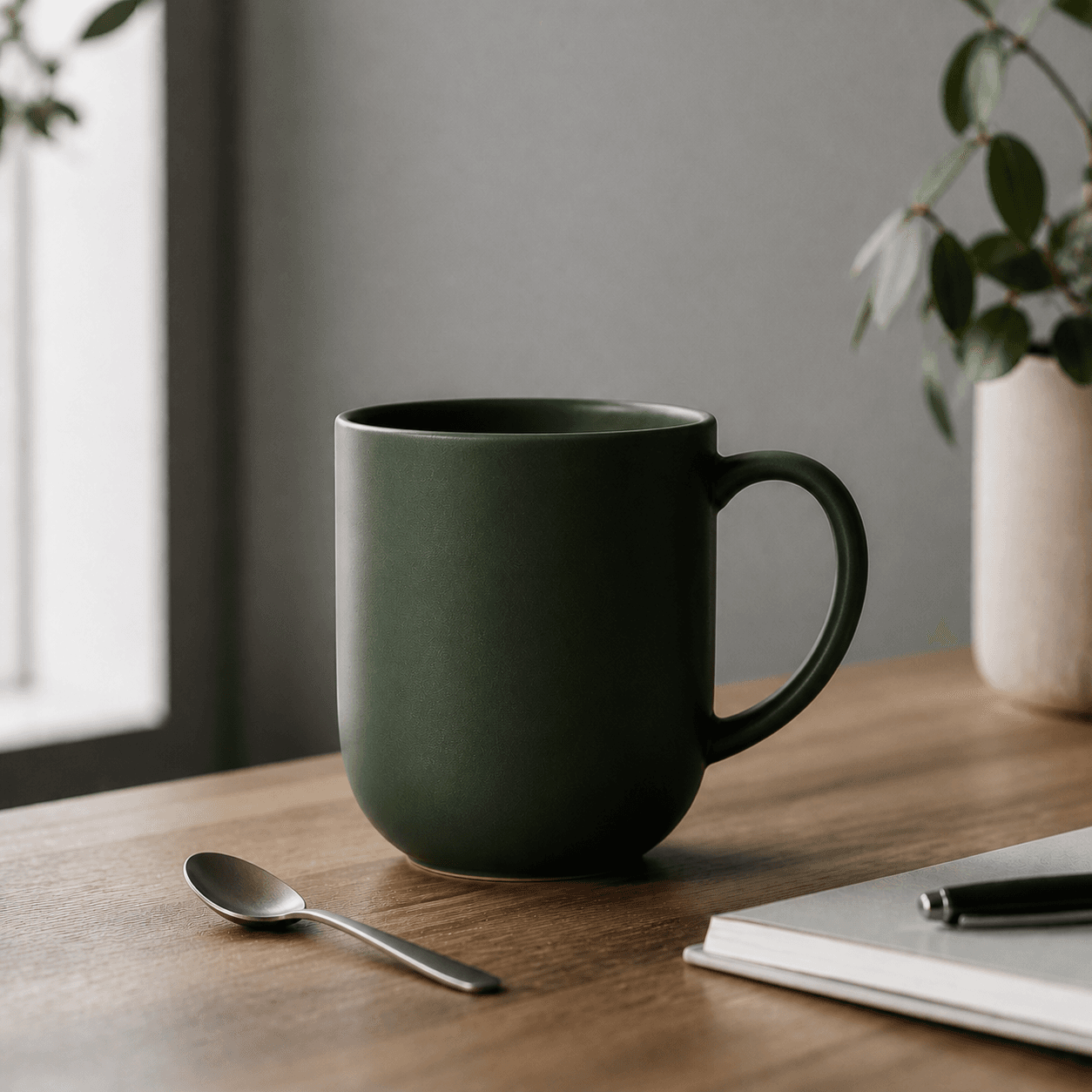
Edit Prompt: Color Swap
plaintext1``` 2Change the mug color to deep forest green and add a small spoon resting 3beside it 4```
Short, specific, one or two changes. The sweet spot.
Source:

After edit:
Edit Prompt: Background Swap
plaintext1``` 2Replace the background with a soft out-of-focus garden scene with warm 3afternoon light, keep the subject and lighting on the subject unchanged 4```
The "keep ... unchanged" clause matters. Without it, the model often re-renders the subject.
Edit Prompt: Add a Detail
plaintext1``` 2Add a small black wireless headset around the person's neck, match the 3existing lighting and color grading, do not change anything else 4```
Single-element additions are the most reliable edits.
Edit Prompt: Style Transfer
plaintext1``` 2Reinterpret this photo as a clean flat-design illustration with soft 3pastel colors and minimal geometric shapes, keep the composition and 4subject layout the same 5```
For converting photos to illustration. Spell out what to keep.
Edit Prompt: Text Edit
plaintext1``` 2Replace the text on the bag from "ATLAS ROAST" to "MORNING BLEND", 3keep the same font style, color, and placement 4```
Quote both the old and new text. More reliable than describing the change abstractly.
Edit Prompts: What Not to Do
- "Make it better." No anchor.
- Five edits in one prompt. Pick one or two per call.
- Vague locations. "Move the cup to the bottom-right corner," not "move the cup."
- Negative-only instructions. Say what should be there, not what should not.
How to Run These Prompts
Sign up on atlascloud.ai. Create an API key.
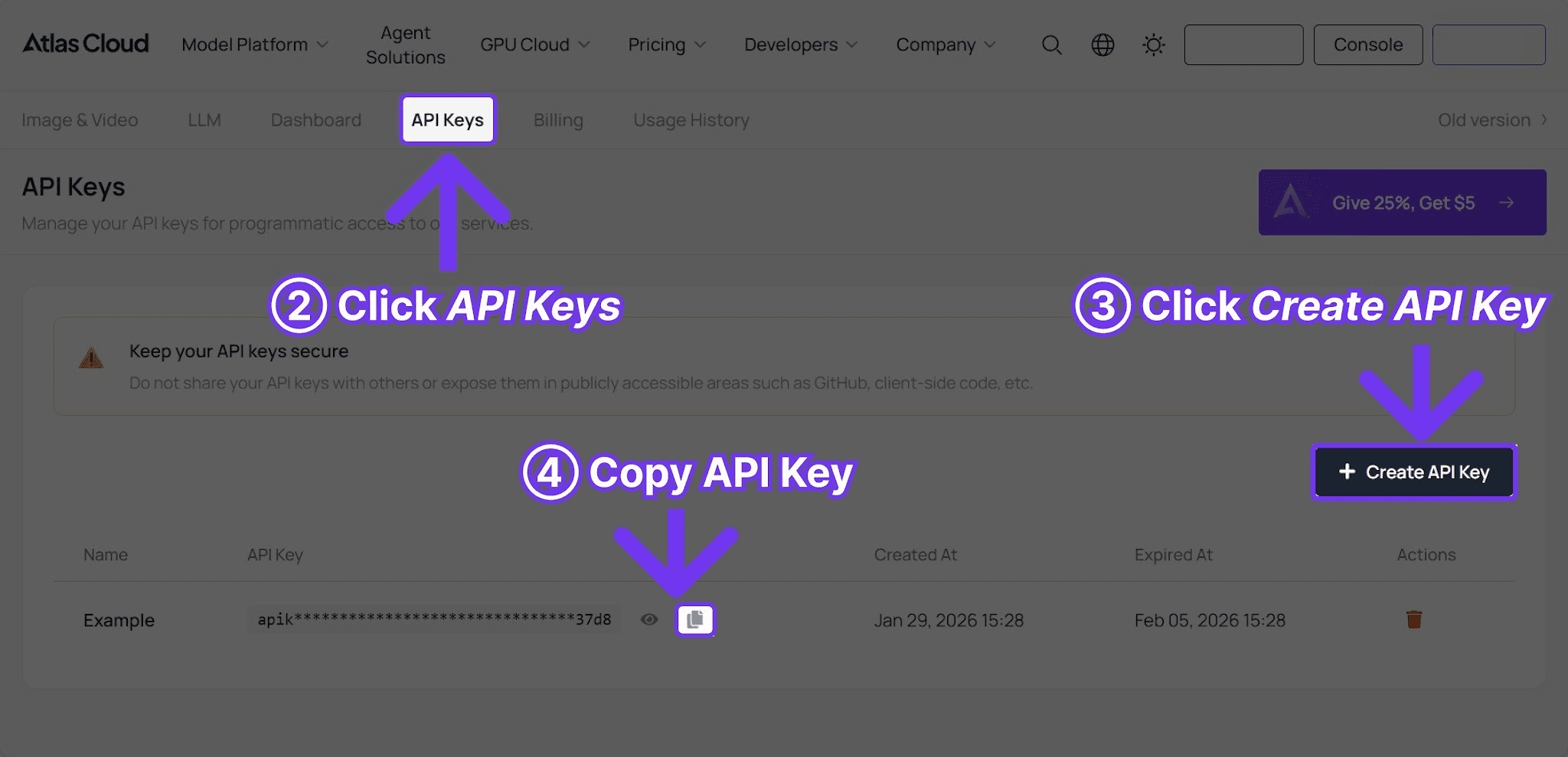
Then use this minimal Python script. Swap in any prompt from this guide.
plaintext1```python 2import requests, time 3 4API_KEY = "your-atlas-cloud-api-key" 5BASE_URL = "https://api.atlascloud.ai/api/v1" 6 7resp = requests.post( 8 f"{BASE_URL}/model/generateImage", 9 headers={"Authorization": f"Bearer {API_KEY}", "Content-Type": "application/json"}, 10 json={ 11 "model": "openai/gpt-image-2/text-to-image", 12 "prompt": "PASTE PROMPT FROM THIS GUIDE", 13 "size": "1024x1024", 14 "quality": "low", 15 }, 16) 17poll_url = resp.json()["data"]["urls"]["get"] 18 19while True: 20 time.sleep(3) 21 s = requests.get(poll_url, headers={"Authorization": f"Bearer {API_KEY}"}).json()["data"] 22 if s["status"] == "completed": 23 print(s["outputs"][0]) 24 break 25```
For edit prompts, swap the model to `openai/gpt-image-2/edit` and add an `images` field with the source URL. Full code in the GPT Image 2 API guide.
Iteration Pattern
The most reliable workflow:
- Run at `low` quality. Cost: USD0.008.
- Adjust the prompt. Run again at `low`. Cost: USD0.008.
- Once composition and lighting look right, switch to `high` for the final. Cost: USD0.008.
A full iteration set rarely costs more than five cents. For edits, run the first edit at `low` to confirm the model understood the change. Re-run at `high` for the final.
Quick Reference: Prompt Snippets That Work
Lighting clauses:
- `soft window light from the left`
- `golden hour light, low sun angle`
- `studio softbox lighting on a clean white background`
- `dramatic rim light against a dark backdrop`
- `soft diffused daylight, no harsh shadows`
Composition clauses:
- `overhead flat lay`
- `wide cinematic shot`
- `close-up macro detail`
- `three-quarter body portrait`
- `isometric perspective`
Style anchors:
- `professional product photography`
- `editorial magazine photography`
- `flat design illustration`
- `modern SaaS UI mockup`
- `lifestyle brand photography`
- `clean Scandinavian design aesthetic`
Mix and match. Most product prompts in this guide are just (subject + composition + lighting + color palette + style anchor). The same skeleton produces dozens of usable assets.
Browse More on the Atlas Cloud Prompt Hub
Atlas Cloud maintains a community-curated GPT Image 2 Prompt Hub with hundreds of additional prompts, each with sample images and a one-click "try it" button. Categories on the hub include UI mockups, infographics, posters, anime style, gaming UI, and editorial layouts.
Use this guide for the core 50 prompts. Use the hub when you want to browse community variations or pull a fresh starting point for a specific aesthetic.
Frequently Asked Questions
Do GPT Image 2 prompts work the same as DALL-E 3 prompts?
Mostly yes. The GPT-5 base understands the same English prompt structure. The main differences: GPT Image 2 holds long prompts together better, and it renders short text more reliably.
How long should a prompt be?
20 to 60 words is the sweet spot. Longer is fine but adds little. Shorter often misses lighting or style.
Does the model understand brand names?
It understands generic styles (`Funko Pop style`, `New Yorker illustration style`) and broad references. It avoids reproducing trademarked logos and named characters.
Does GPT Image 2 follow negative prompts?
There is no separate `negative_prompt` field. Use natural language inside the main prompt: `clean background, no text, no watermark`.
What if a generation looks wrong?
Re-run the same prompt first. The seed varies. The same prompt at the same quality often produces a noticeably better result on attempt two or three. Cost stays at $0.008.
Should I use the edit model or just regenerate?
Use the edit model when the source has something worth keeping (composition, person, brand element). Regenerate when only the prompt was wrong.
Where can I find more community prompts?
The Atlas Cloud GPT Image 2 Prompt Hub hosts hundreds of community-contributed prompts with live sample images. Each prompt has a one-click "try it" button that runs the prompt with your account.
Verdict
GPT Image 2 is one of the most prompt-friendly image models. Short, structured prompts produce usable output. Long prompts also work. Edit prompts are reliable as long as they are specific and limited in scope.
The cheap price changes how to think about prompting. There is no penalty for running ten variations. Iterate fast at `low`, commit to `high` for the final.
────────────────────────────────────────────────────────────
Related Articles
- GPT Image 2 API Guide: Pricing and Code Examples
- Atlas Cloud GPT Image 2 Prompt Hub
- Best AI Image Generation Models 2026
- Best AI Image Editing Models 2026
- Best Nano Banana 2 Prompts Guide
- How to Generate AI Product Photography
- How to Generate AI Headshots and Avatars
- Cheapest AI Image Generation API 2026





