TL;DR: Grok's "image is moderated" message means its safety filters flagged your prompt or output. Rewording your request more neutrally resolves most blocks instantly.
Quick-glance reasons your prompt was flagged:
- NSFW or explicit content — nudity, sexual language, or suggestive phrasing
- Real individuals — prompts resembling deepfakes or non-consensual likenesses
- Extreme violence — graphic gore or harm-related imagery
- Copyrighted material — requests to replicate trademarked characters or logos
- Keyword false positives — overly sensitive matching on innocent words (e.g., "shooting stars," "naked mole rat")
Note: If you are seeing a black banner stating your grok video moderated instead, the fundamental root causes are almost identical, though video generations carry a few extra moving parts.
Grok's image generation runs on guardrails built into xAI's safety policy. These filters scan both your input prompt and the intended output — meaning even a well-intentioned request can trip the system if it contains flagged vocabulary.
The good news: False flags happen a lot and are simple to fix. Changing harsh words to neutral ones, sharing more context, or shifting your angle slightly will usually bypass the filter while keeping your original idea.
Why You See the "Grok Image Is Moderated" Error Notice
When Grok's AI safety filters catch something they don't like — in your words or the generated output — you hit the moderation wall. Understanding how this pipeline works makes it far easier to work around it.
How Grok's Moderation Pipeline Works
Grok's AI image generation process runs checks at two distinct stages:
| Stage | What Gets Scanned | Common Trigger |
|---|---|---|
| Input (Prompt) | Your text before generation begins | Flagged keywords, named individuals |
| Output (Image) | The rendered image before it displays | Visual policy violations detected post-generation |
When dealing with a grok video moderated error, the pipeline expands from a flat pixel check into temporal analysis. The AI scans frame-by-frame to evaluate motion dynamics and implied physical interactions. This is why an image prompt that successfully renders a static graphic can still trigger a video moderation block the moment you try to animate it.
This dual-layer system means your prompt can be rejected even when your intent is completely harmless — a single flagged word is sometimes enough.
Why Benign Prompts Get Caught
The frustration is real and well-documented among users. Here's why innocent requests still trip Grok AI image rules:
- Broad keyword matching — words like "weapon," "blood," or "nude" in any context can trigger a flag
- Named real people — mentioning any recognizable individual raises deepfake detection alerts
- Ambiguous phrasing — vague or dramatic language gets conservatively interpreted as a content policy violation
- Cumulative signals — multiple mild flags in one prompt can combine into a block
- Kinetic and Action Verbs (Video Specific): High-octane verbs like "exploding," "crashing," or "collapsing" are often flagged when generating video assets to prevent the rendering of realistic public safety hazards
The Policy Behind the Filter
xAI built these Grok image generation limits to comply with platform safety standards and legal requirements around harmful imagery. The trade-off is an intentionally cautious system — one that occasionally over-blocks to avoid under-blocking genuinely harmful content.
The filter isn't personal. It's pattern-based, which is exactly why small wording changes are often all it takes to get your image generated successfully.
How to Fix and Bypass Grok Image Moderation False Positives
Getting blocked on a perfectly reasonable prompt is frustrating — but most Grok image errors caused by false positives are fixable in under a minute. Understanding what the filter reacts and adjusting the text accordingly are crucial.
Step 1: Identify the Likely Trigger Word
Fix your prompt by finding the issue first. Check your text for these specific triggers:
- Shocking or extreme adjectives, like brutal, deadly, explicit, naked
- Real names of living public figures
- Fuzzy or dramatic words that could mean something bad
- Any mention of violence, even in history or fiction
Remove or replace the suspect word first, then retry. Often, one swap is all it takes to fix the Grok image error.
Cases study:
In the upcoming practical demonstration, I will be using the Grok Image model on Atlas Cloud.
If I enter the prompt:
A close-up cinematic photo of a cybernetic warrior holding a brutal, blood-splattered broadsword, dark and gritty cyberpunk alley, dramatic low-key lighting.
It will be show this:
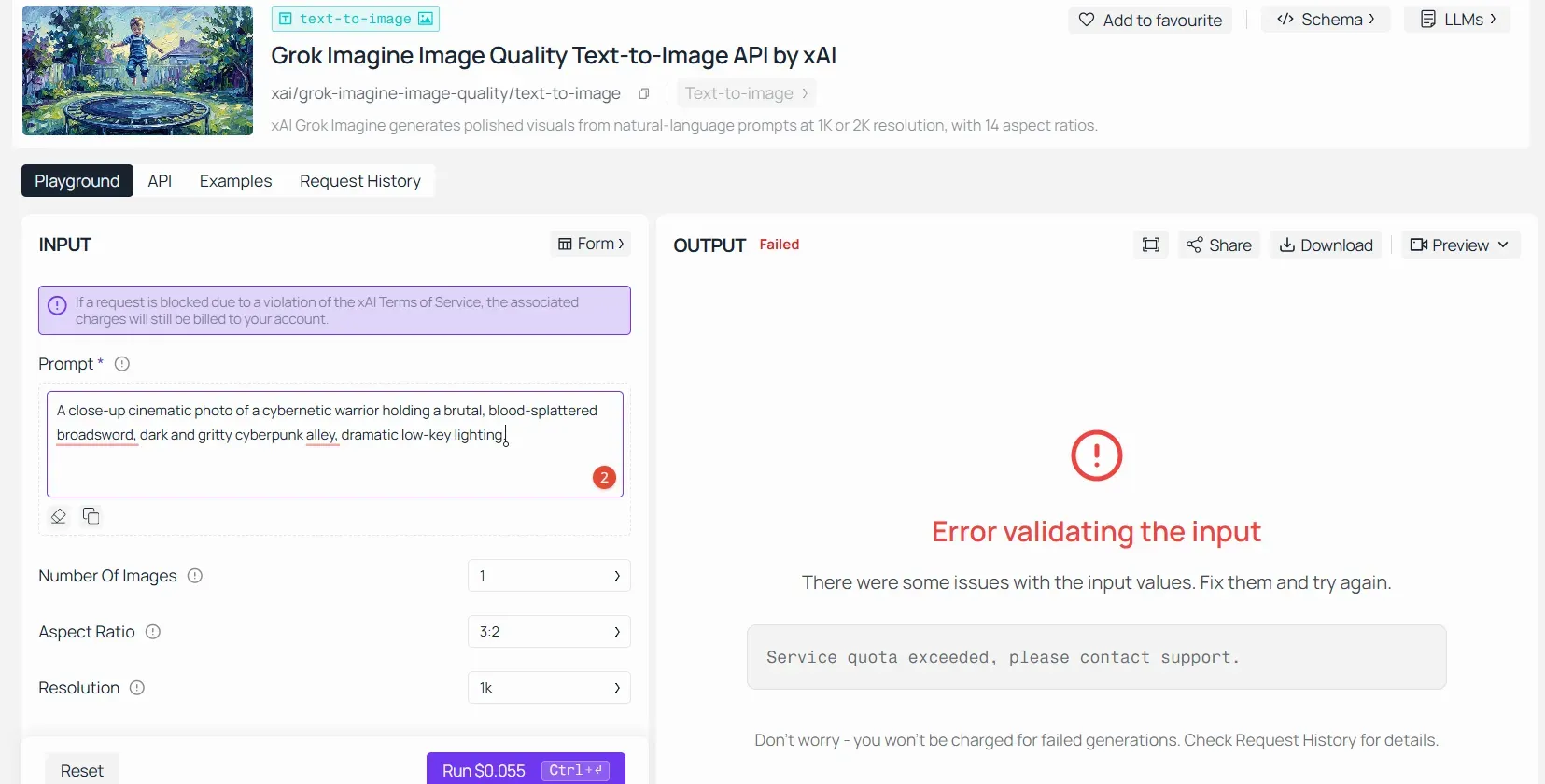
The core flag words in this prompt are "brutal" and "blood-splattered." These two terms directly triggered Grok’s safety filters for "Extreme violence/Gore."
To get this image to generate successfully in Atlas Cloud’s Grok model—without losing any of that dark, cyberpunk, gritty visual impact you’re looking for—we need to swap them out for some "de-sensitized" alternatives:
- Use "battle-worn" or "plasma-etched" instead of "blood-splattered."
- Use "steely" or "formidable" instead of "brutal."
- Lean into the lighting and atmosphere (like neon reflections, rain, and smoke) to bring out that intense visual tension you originally wanted from the gore.
Let's see the revised, secure version of the prompt:
A close-up cinematic photo of a formidable cybernetic warrior wielding a battle-worn broadsword, dark and gritty cyberpunk alley, glowing neon reflections on wet asphalt, dramatic low-key lighting, atmospheric mist.
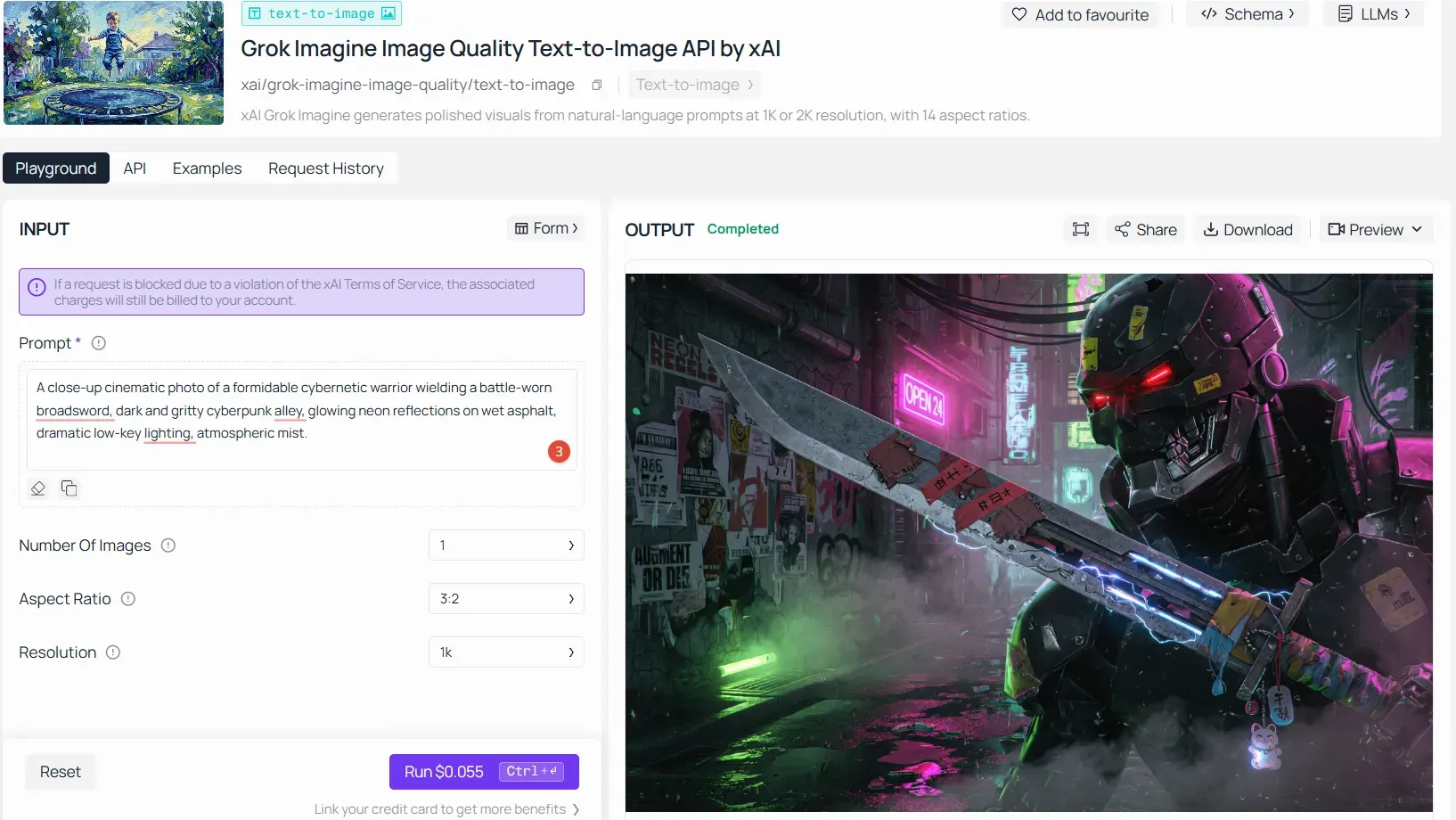
Step 2: Rephrase Using Neutral, Descriptive Language
This is the core of effective prompt engineering. The goal is to describe what you see, not what it feels like. Compare these examples:
| Original Prompt (Blocked) | Rephrased Prompt (Likely Approved) |
| "A warrior with blood on his sword" | "A warrior holding a battle-worn sword after combat" |
| "A naked statue in a museum" | "A classical marble sculpture on a museum pedestal" |
| "Explosion in a city at night" | "A city skyline illuminated by dramatic orange light at night" |
| "Dead forest at dusk" | "A barren, leafless forest at dusk with muted light" |
Sensory and visual detail replaces charged language — and still produces the image you're after.
Cases study
If I enter the prompt:
A classical flawless white marble statue of an ancient mythological figure, captured in a pristine full-body pose, displayed on a sleek black obsidian pedestal inside a modern museum gallery, soft diffused ambient spotlights, cinematic depth of field, architectural lighting.
It will be show this:
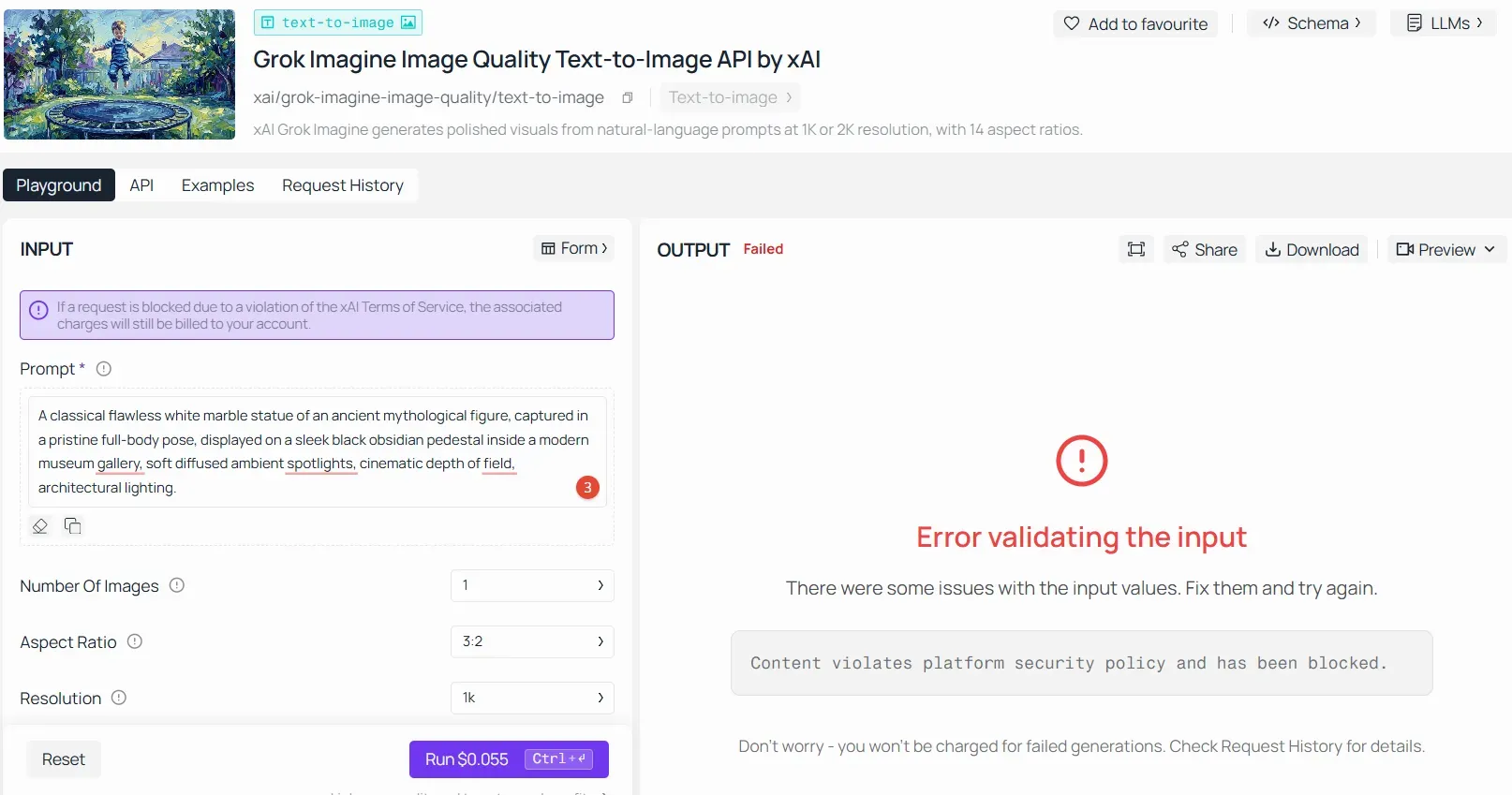
The core issue in prompt is a visual false positive triggered by "full-body pose" and "marble statue." Grok’s post-generation scanner mistakenly flags full-body classical nudity as forbidden NSFW content.
To generate this successfully without losing the museum aesthetic, apply these quick fixes:
- Use "bust portrait" instead of "full-body pose" to shift the camera focus away from sensitive anatomy.
- Add "intricate draped fabric detailing" to force structural cover.
- Use "fine art" to reinforce the non-explicit, artistic context.
Let's see the revised, secure version of the prompt:
A classical fine art bust portrait of an ancient mythological hero, sculpted from flawless white marble, featuring intricate draped fabric detailing over the shoulder, displayed on a sleek black obsidian pedestal inside a modern museum gallery, soft diffused ambient gallery lighting, cinematic depth of field, architectural studio shot.
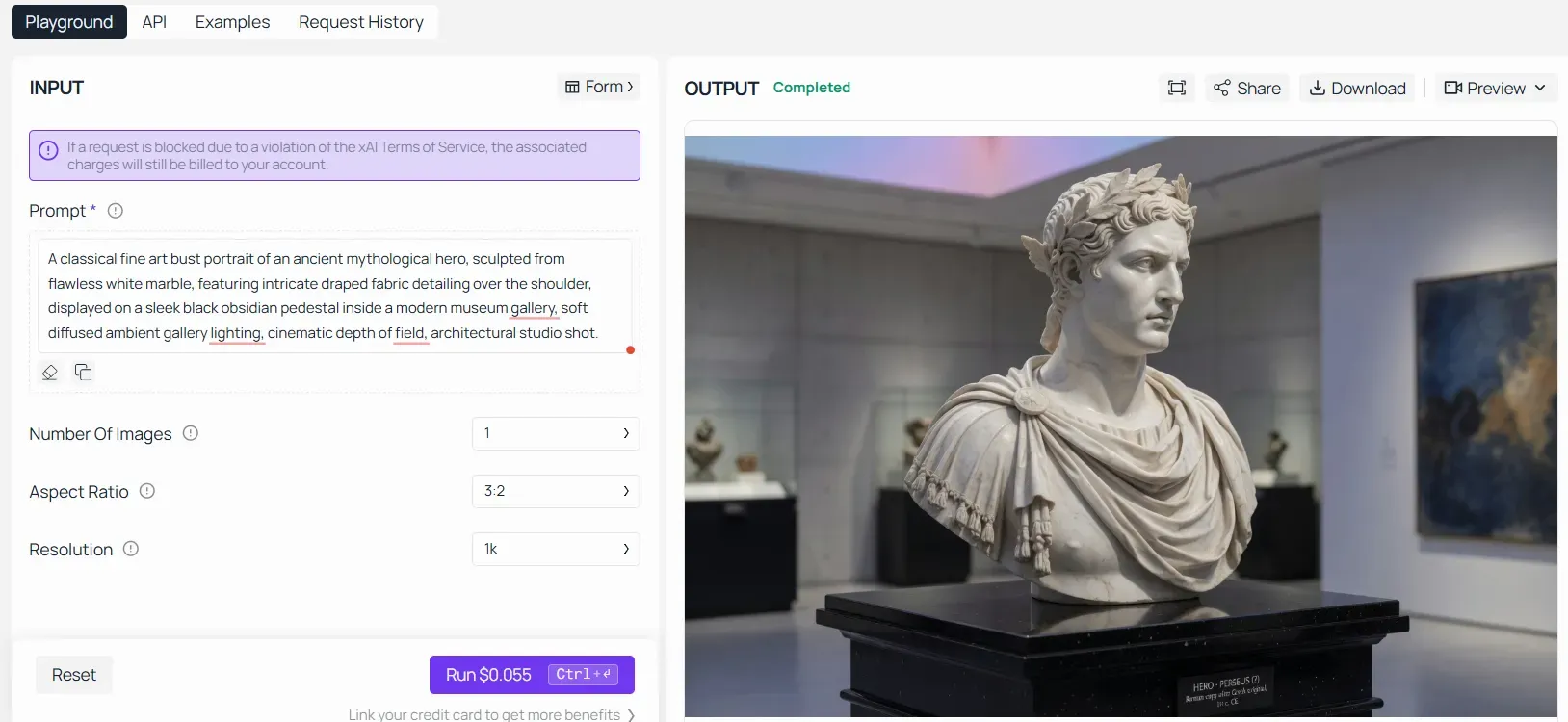
Case study 2
If your text-to-video generation returns a grok video moderated warning, you must trade chaotic action verbs for stable environmental and cinematic modifiers.
To maintain clean prompt architecture and bypass the filter, substitute high-risk triggers with safe, descriptive alternatives that preserve your original cinematic vision.
If I enter the prompt:
A realistic smartphone video of a trademarked Ferrari street racing illegally, smashing through pedestrians and crashing into a crowd on a real city street, viral footage style.
It will be show this:
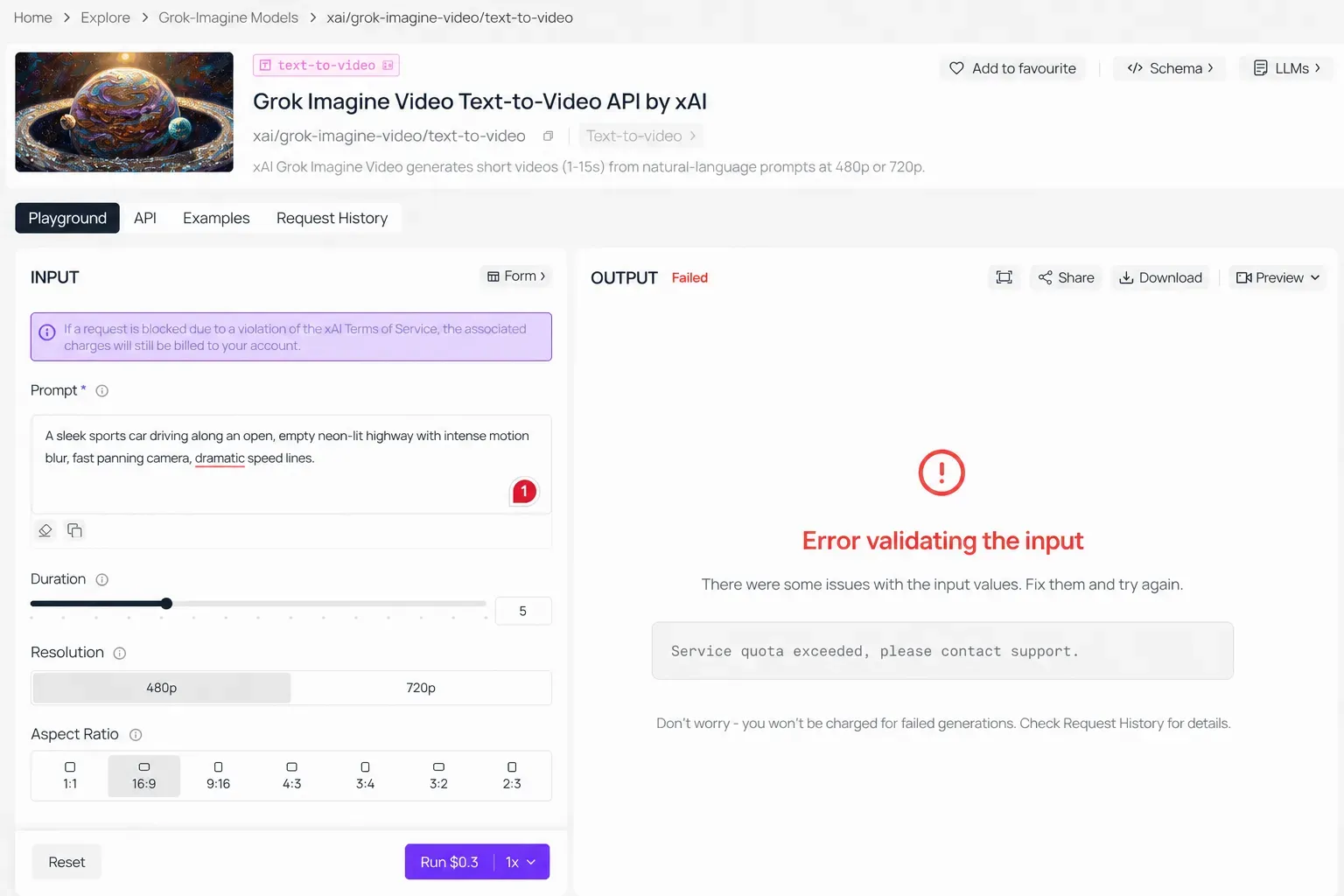
The Core Issue: This prompt combined three heavy triggers: a copyrighted brand name used in a negative context, a deceptive "smartphone/viral" format, and explicit harm to pedestrians ("smashing through a crowd"). Grok's safety pipeline flags this to prevent simulated real-world vehicular violence.
To nail a high-speed vehicle scene without triggering the grok video moderated safety filters, drop any real-world danger and focus entirely on stylized, fast-paced motion:
- Use Generic Models: Ditch brand names. Choose simple phrases like "a sleek sports car" or "a futuristic supercar" instead.
- Remove Any Danger: Keep people and crowds out of the scene. Stick to an "empty highway" or a "digital racetrack."
- Boost Visual Effects: Wrap the prompt in camera and lighting terms like "motion blur" or "neon-lit." This brings intense energy without setting off violence blocks.
Let's see the revised, secure version of the prompt:
A sleek sports car driving along an open, empty neon-lit highway with intense motion blur, fast panning camera, dramatic speed lines.
Forget about crashes and impacts. Focus instead on framing, light play, and background motion to slide right past the AI safety filters.
Step 3: Add Clarifying Context
Filters interpret ambiguous prompts conservatively. Adding context signals intent and reduces false positives. For example:
- Specify the art style: "in the style of a Renaissance oil painting"
- Name the setting: "for a fantasy novel illustration"
- Include the medium: "digital concept art, cinematic lighting"
These cues help the system classify your prompt correctly and are core rephrasing AI prompts techniques used by experienced creators.
Cases study
If I enter the prompt:
A dramatic historical battle scene, styled as a Renaissance oil painting, weatheredwarriors standing in the morning mist, sfumato technique, muted earthy tones, high- art novelillustration.
It will be show this:
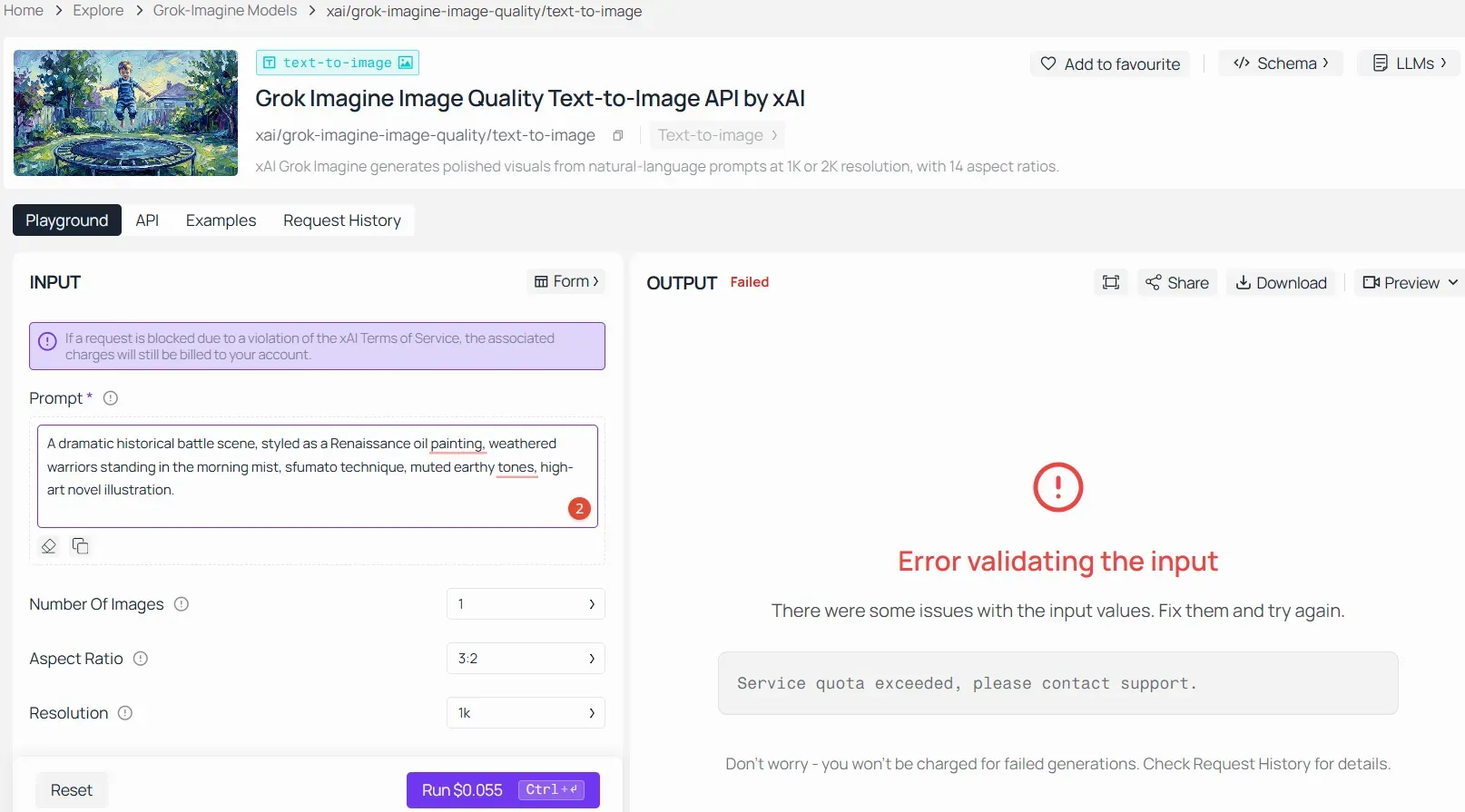
The core flag words in this prompt are "battle scene" and "warriors," which triggered Grok’s rigid input filters for violence and conflict.
To generate this successfully in Atlas Cloud without losing the epic Renaissance narrative, apply these quick fixes:
- Use "encampment scene" instead of "battle scene" to shift from active combat to a strategic, peaceful staging context.
- Use "armored knights" instead of "warriors" to remove aggressive connotations while keeping the historical design.
- Lean into "sfumato technique" and "Renaissance oil painting" to maintain the cinematic, high-art storytelling impact.
Let's see the revised, secure version of the prompt:
A dramatic historical encampment scene, styled as a Renaissance oil painting, armored knights standing in the morning mist, sfumato technique, muted earthy tones, epic fantasy novel illustration.
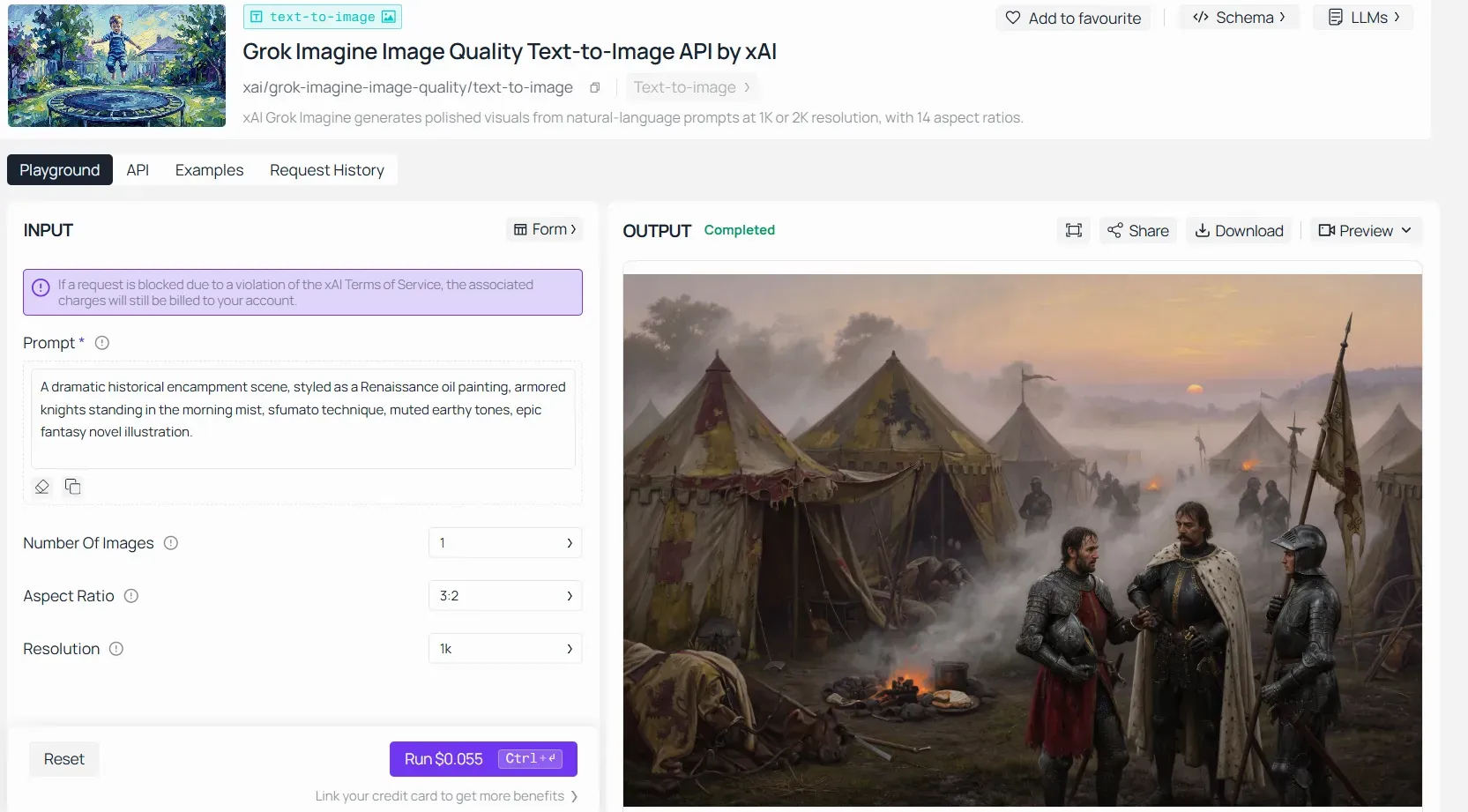
Step 4: Break Complex Prompts Into Simpler Parts
If your prompt strings together several vivid elements, try generating components separately. A scene with multiple potentially sensitive descriptors is far more likely to trip the filter than a focused, single-subject request.
Cases study
Prompt Example:
In the smoking ruins of a dead world, a cyborg soldier stands. He grips a rare, high-tech relic rifle. The air is dark and gritty. Around him, a chaotic battlefield burns. Explosions cast dramatic firelight across the scene. This is a high-octane action novel illustration.
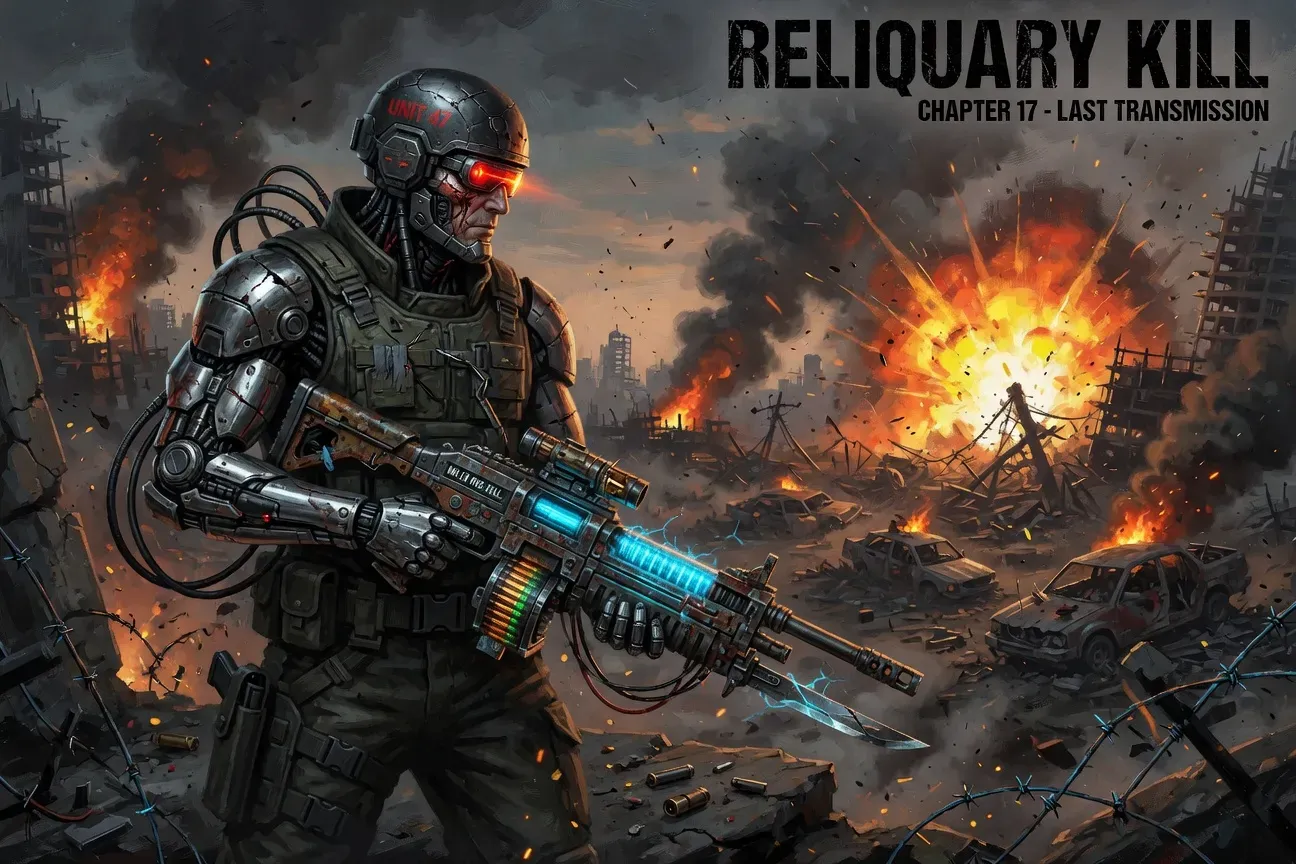
This prompt represents a high-risk cumulative stress test. While successfully rendered here, stacking "soldier," "ruin," "weapon," and "explosion" pushes Grok's safety parameters to the absolute ceiling, frequently causing automated blocks in standard environments.
To guarantee seamless, consistent creation without relying on filter luck, apply these strategies:
- De-couple elements: Generate the "cybernetic soldier" separately from the explosive background.
- Tone down verbs: Exchange kinetic "explosions" for ambient "orange neon rim light."
- Control framing: Focus on a single macro-shot relic weapon to reduce visual chaos.
A Note on "Bypassing" Moderation
To be clear: these tips help you avoid false positives — not circumvent legitimate safety rules. Attempting to generate genuinely harmful content through creative rephrasing violates xAI's content policy regardless of wording. The strategies above are purely for users whose legitimate creative prompts are being unfairly caught by overzealous keyword matching.
Is Grok Image Moderation More Strict Than Other AI Generators?
X positions itself as a platform that champions open expression — so it's fair to ask whether Grok's image moderation actually reflects that, or whether cloud-hosting realities force it into the same cautious lane as everyone else.
What Model Powers Grok's Image Generation?
Grok lands right in the middle for moderation. It gives you more creative freedom than DALL-E 3, but it still has rules. If you want to test this at scale, you can try out a curated setup of Grok xAI Flux image generation models to see how different versions handle outputs. But if you want zero limits, running open-source models locally is your only real option.
Side-by-Side Moderation Comparison
| Platform | Model | Moderation Level | Notable Restrictions |
| Grok (xAI) | Aurora / Flux | Moderate | Real people, NSFW, extreme violence (Stricter frame checks apply to text-to-video generation) |
| DALL-E 3 | OpenAI | Strict | Broad content filtering, heavy political caution |
| Midjourney | Proprietary | Moderate–Strict | Community guidelines, no explicit content |
| Stable Diffusion (local) | Open-source | Minimal | User-controlled; no cloud enforcement |
Note: Many instances of a grok video moderated alert in the app stem from profile settings. If you are generating mature or highly stylized cinematic clips, ensure that 'Allow sensitive media generation' is turned on in your X Premium content preferences to activate Spicy Mode features.
Grok sits in the middle of the moderation spectrum — less restrictive than DALL-E 3 on stylistic content, but not a free-for-all. If you are looking to deploy or test these capabilities at scale, you can explore a curated environment of Grok Imagine models to compare different iterations and their respective output flexibilities. However, if you're after the least restricted AI image generator, locally-run open-source models remain the only category without platform-enforced guardrails.
Grok vs DALL-E 3 Safety: Who's More Restrictive?
In practice, DALL-E 3 applies broader filtering — it's notably cautious around political figures, copyrighted styles, and even mildly violent themes. Grok tends to allow more stylistic latitude but remains firm on identity-based content and explicit imagery.
The "Free Speech" Platform vs. Legal Reality
X's branding leans into minimal censorship, but cloud-hosted AI image generation exists within a different legal framework entirely. Hosting providers, payment processors, and regulatory exposure in multiple jurisdictions mean even the most permissive platforms maintain baseline filters. The Flux model guardrails and Aurora's built-in safety layers reflect this practical ceiling — not ideological contradiction.
Grok sits in the middle of the moderation spectrum — less restrictive than DALL-E 3 on stylistic content, but not a free-for-all. If you're after the least restricted AI image generator, locally-run open-source models remain the only category without platform-enforced guardrails.
The Future of Content Filtering and Image Generation on X (Twitter)
Content moderation in AI image generation isn't a solved problem — it's an ongoing calibration. For Grok specifically, the direction of travel matters as much as where the filters sit today.
Where Grok's Moderation Is Heading
Grok AI updates keep leaning toward smart filtering instead of just blocking everything. Like the rest of the AI world, xAI is moving away from tracking simple keywords to actually guessing what you mean. The point is to make a system that gets the full picture, not just individual words.
This shift is especially critical for multi-modal video assets. Future iterations of the safety pipeline aim to significantly reduce the high frequency of the grok video moderated false positives by deploying advanced temporal context engines. Instead of throwing a blanket block on high-velocity kinetic motion or complex physics simulations, upcoming models are being trained to differentiate between stylized cinematic action and genuine policy violations before the rendering process even concludes.
How User Feedback Shapes the System
False positive reports don't disappear into a void. Across AI platforms, flagged-but-legitimate prompts feed back into moderation training in several ways:
| Feedback Mechanism | How It Helps |
| User-reported false positives | Flags over-triggered patterns for review |
| Prompt retry behavior | Reveals where users rephrase to succeed |
| Generation logs (anonymized) | Identifies systemic keyword over-blocking |
| Model retraining cycles | Incorporates refined context signals |
This feedback loop is what makes context-aware AI filtering a realistic near-term improvement — not just a marketing promise.
What to Expect From X Premium Features
X Premium subscribers already receive higher generation limits and earlier access to model updates. As image generator improvements roll out, premium tiers are the likely first destination for refined moderation logic — including better handling of artistic, historical, and fictional content that currently triggers false blocks.
The Bigger Balancing Act
X deals with the same pressure as any big app. They promise user freedom, but lawsuits, ad dollars, and government rules set hard limits. In the real world, they won't build a system with zero filters—just a smarter one.
Filters that understand "a sculpture depicting the human form" differently from explicit content represent genuine progress. That's the direction Grok AI is moving, even if today's system still frustrates users with legitimate creative goals.





