

Grok xAI image generation daily limits vary significantly by tier — and following the massive quota scale-backs in mid-2026, they are tighter than ever.
| Subscription Tier | Actual Daily Image Limits | Actual Video Rendering Limits | Quota Reset Window |
|---|---|---|---|
| Grok Free | ❌ Completely Disabled (0/day) | ❌ Completely Disabled | None (Paid upgrade required) |
| SuperGrok Lite ($10/mo) | Highly Restricted (~5–7 images/day) | ⚠️ Trial Only (Negligible volume) | Fixed 24-hour rigid reset cycle |
| SuperGrok ($30/mo) | ~10–15 images / day (Significantly lower in Agent/Canvas Mode) | ~15–20 videos (480p fallback); Elite 720p HD capped at ~0–3/day | Complex 6h 15m to 24h rolling window (Now shows a live countdown timer) |
| SuperGrok Heavy | Relatively Generous (Priority queue) | ~30–50 videos / day(Dynamically throttled by server load) | Rolling 12-hour fluid window |
As shown above, access is strictly prioritized. The current grok xai video generation feature status 2026 highlights a clear operational divide: while image tools have stabilized, video rendering remains highly volatile. Encountering a sudden grok video limit is now a common standard behavior, as rendering is frequently scaled back or downgraded to 480p to protect core LLM functionalities during peak traffic hours. Also, xAI Grok does NOT allow free users to generate images or videos. The Free tier on X.com is strictly limited to text-based queries using lighter models like Grok 4 Mini. Access to the Grok Imagine suite remains a hard-gated feature reserved exclusively for paid subscribers.
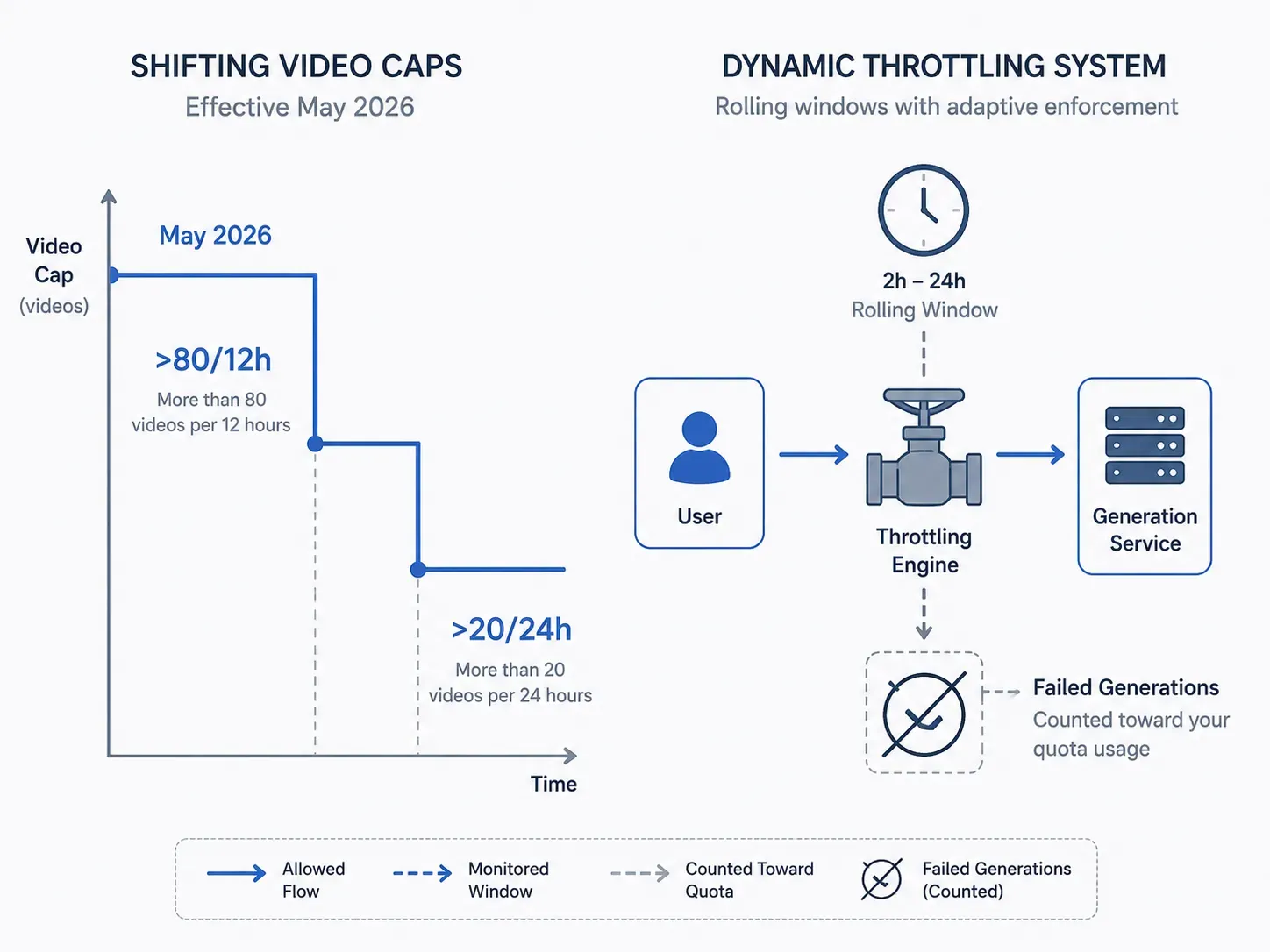
What makes xAI image limits especially frustrating is how quietly they shift — a May 2026 support email revised SuperGrok Heavy video caps to ">80 per 12 hours," down from earlier figures, while standard SuperGrok dropped to ">20 videos" per 24 hours.
Grok Imagine caps aren't purely quota-based either. xAI applies a "fair use algorithm" that throttles heavy users during peak hours, with reset windows ranging from 2 to 24 hours depending on the feature — and critically, failed generations still count against your limit.
The bottom line: no SuperGrok tier limit is truly static. As xAI scales its infrastructure on the Colossus GPU cluster, processing quotas are constantly shifting. In fact, many users monitoring the grok xai video generation feature status 2026 have discovered that recent multi-modal updates directly impact standard text-to-image capacity, making strict daily caps a operational necessity for the platform.
The Official Grok xAI Image Generation Daily Limit Across Subscription Tiers
While SuperGrok officially advertises 200 images per day, real-world delivery doesn't always match that figure. Each prompt can trigger 12–20 internal image renders that users can't directly control, meaning the effective output may actually exceed 200 images in count — but the stated prompt-based quota is still reached faster than most users expect.
Official xAI API Rate Limit Tiers & Thresholds
According to the official xAI developer documentation, API rate limits are governed by two strict dimensions: Requests Per Minute (RPM) and Tokens Per Minute (TPM). Rather than a flat subscription, your programmatic concurrency scales dynamically across 5 strict infrastructure tiers based entirely on your team's cumulative billing spend:
| API Tier Level | Cumulative Spend Threshold | Token & Request Cap Controls | Image Access (Grok Imagine API) |
|---|---|---|---|
| Tier 0 (Default) | $0 (Free Sandbox Tier) | Baseline restrictive limits | Restricted burst testing only |
| Tier 1 | $50 | Mid-tier RPM/TPM scaling | Unlocks low-concurrency pipelines |
| Tier 2 | $250 | Enhanced token throughput | Standard automated rendering |
| Tier 3 | $1,000 | High-volume operational limits | Multi-threaded team projects |
| Tier 4 | $5,000 | Maximum standard bandwidth | Enterprise production-ready |
| Enterprise | Available upon custom request | Provisioned Throughput scaling | Direct sales integration required |
Note: Spend qualification is tracked via cumulative prepaid credit purchases or fulfilled invoices. Once a team unlocks a higher API tier, the qualification remains permanent—tiers never downgrade.
How the Reset Schedule Works
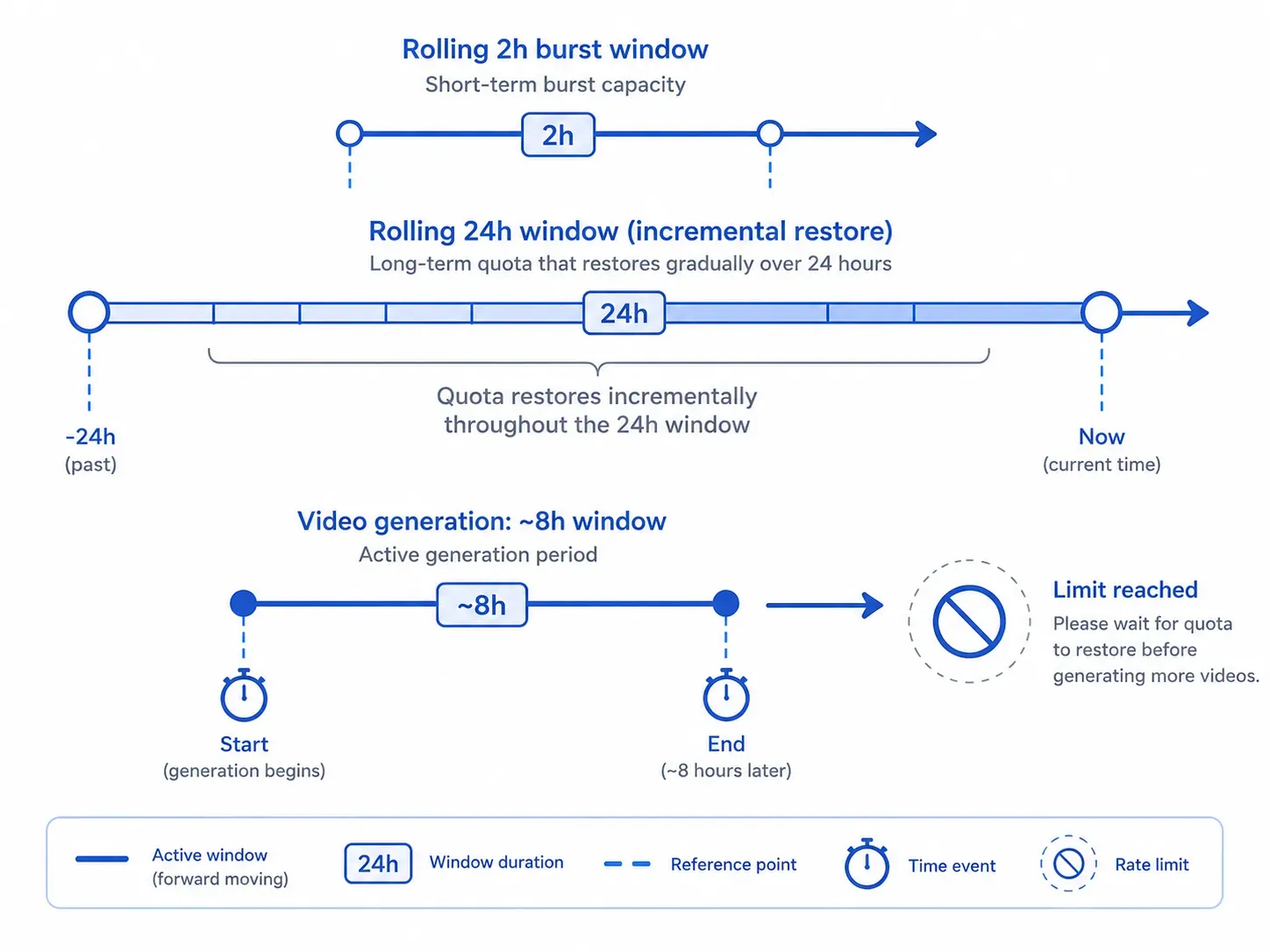
SuperGrok's image generation quota operates on rolling 24-hour windows rather than fixed midnight resets, with a secondary rolling 2-hour window that governs shorter burst capacity. This means quota doesn't suddenly refresh at a set time — it restores incrementally based on when you last generated.
For standard Grok Imagine image generation, the commonly reported reset pattern follows a rolling 2-hour window. When looking at the current grok xai video generation feature status 2026, however, that infrastructure window stretches closer to 8 hours due to high core loads.
The Hidden Cost of Multi-Turn Rendering (TPM Accounting)
A critical detail often overlooked by developers navigating their console rate-limits is what actually counts toward your Limits. Under the xAI developer runtime, image generation via grok-imagine-image-quality isn't counted as a flat 1-to-1 prompt query. The official TPM budget strictly aggregates:
- Prompt tokens (including raw text and input image URLs for image edits)
- Internal reasoning tokens (highly active during multi-turn Agent Mode or Canvas sessions)
- Sub-render completion assets (where a single prompt often generates 12–20 internal image iterations)
Because every design modification, background expansion, or resolution switch to max 2K resolution ($0.07 per output token equivalent) aggressively drains your concurrent TPM cap, developers on lower API tiers (Tier 0 to Tier 2) frequently run into immediate HTTP 429 Too Many Requests errors—even when they haven't exceeded their overall monthly financial budget.
Does a Failed Generation Still Count?
Yes. xAI has confirmed via support email that failed generation quota consumption applies — moderated or failed generations still count toward the cap. Additionally, once a video limit is hit, output quality can drop from 720p to 480p.
The Token Burn: Stated vs. Real-World Delivery
Many users reference early xAI announcements stating a high-volume ceiling of roughly 200 image generations per day for top-tier plans. However, real-world creation workflows rarely deliver that textbook figure anymore.
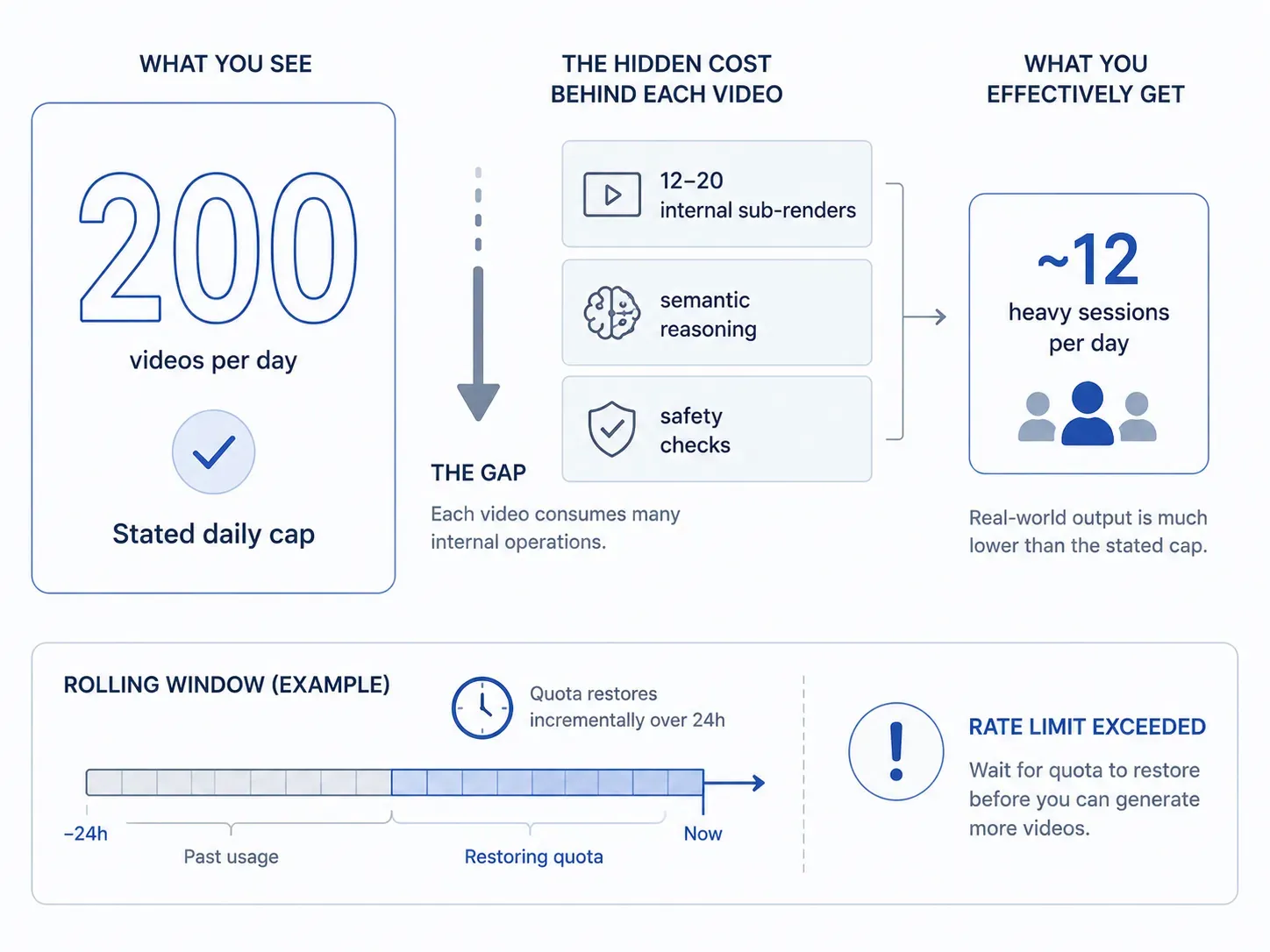
This gap exists because Grok Imagine caps aren't calculated via simple, surface-level prompt counts. With the 2026 introduction of the multi-turn Agent Mode and the collaborative Canvas workspace, a single text prompt no longer triggers just a isolated static output. Instead, the backend system often runs 12 to 20 internal sub-renders, semantic reasoning steps, and safety alignment checks to compile the final image.
💡 The Enterprise Reality: Because every modification request or dynamic re-prompt burns massive computational tokens behind the scenes, the effective daily allowance is reached significantly faster than expected. For creators utilizing the platform at scale, these hidden technical cycles are what cause standard accounts to hit the "rate limit exceeded" wall after just a dozen heavy, iterative prompting sessions.
The core takeaway: no tier operates on a clean 24-hour reset cycle. Rolling windows mean your effective limit depends heavily on when and how fast you generate — not just how many.
Why Is Your Grok xAI Image Generation Daily Limit Changing or Fluctuating?
If you've hit a rate limit exceeded error after generating only 10–20 images — well below your tier's stated allowance — you haven't made a mistake. The limit itself moved.
The Infrastructure Behind the Instability
Grok relies on xAI's massive Colossus server cluster capacity and additional cloud infrastructure, which must simultaneously handle regular chat queries, compute-intensive image generation, real-time reasoning, and active training workloads. When external integrations or internal model rollouts pull significant GPU resources away, standard user interactions bear the cost.
xAI's aggressive expansion compounds the issue further — ongoing model training alongside potential compute sharing for projects like Cursor can temporarily reduce resources available for Grok, making available generation capacity unpredictable even on paid tiers.
The Enterprise Alternative: For creators and developers who cannot afford mid-session throttling or unpredictable downtime, shifting from a volatile consumer subscription to dedicated API endpoints is becoming the industry standard. Utilizing specialized developer platforms allows you to bypass xAI's web-app queues entirely, ensuring stable uptime and predictable cost-per-render by tapping into unthrottled Grok Imagine Models cloud infrastructure.
What Creates "Fluid" Limits in Practice
Fluid generation limits don't come from a single cause. Several overlapping factors contribute:
| Cause | Effect on Your Limit |
|---|---|
| Peak-hour concurrent API load | Effective cap drops below stated quota |
| GPU reallocation to video processing | Image generation throttled mid-session |
| X platform reply-loop automation | Shared API budget consumed faster |
| New model rollout or training runs | Colossus resources temporarily reduced |
| Rapid burst usage within short window | Short-term rate limit triggered independently |
Grok xai video generation feature status often a direct symptom of the macro in 2026. Whenever xAI rolls out a public update or tests higher frame-rate video loops on the X platform, massive GPU blocks are reallocated away from image generation to handle the video rendering load.
Rolling Windows vs. Fixed Resets: Why the Confusion
Most users assume their quota resets at midnight. It doesn't. The system operates on rolling 24-hour windows rather than fixed midnight resets, with a secondary two-hour rolling window that governs burst capacity. This means a user who generated 40 images between 9–11 PM won't regain that full quota at midnight — they'll recover it gradually across the next day.
Why Are You Rate Limited When You Haven't Used Grok Today?
It can be incredibly frustrating to see a "rate limit exceeded" error on your first prompt of the day. According to statements from xAI insiders, this happens because Grok’s dynamic throttling system adapts to real-time global server demand. If xAI's Colossus cluster is under heavy load from training or viral Twitter/X trends, your local queue is squeezed—regardless of your personal usage history.
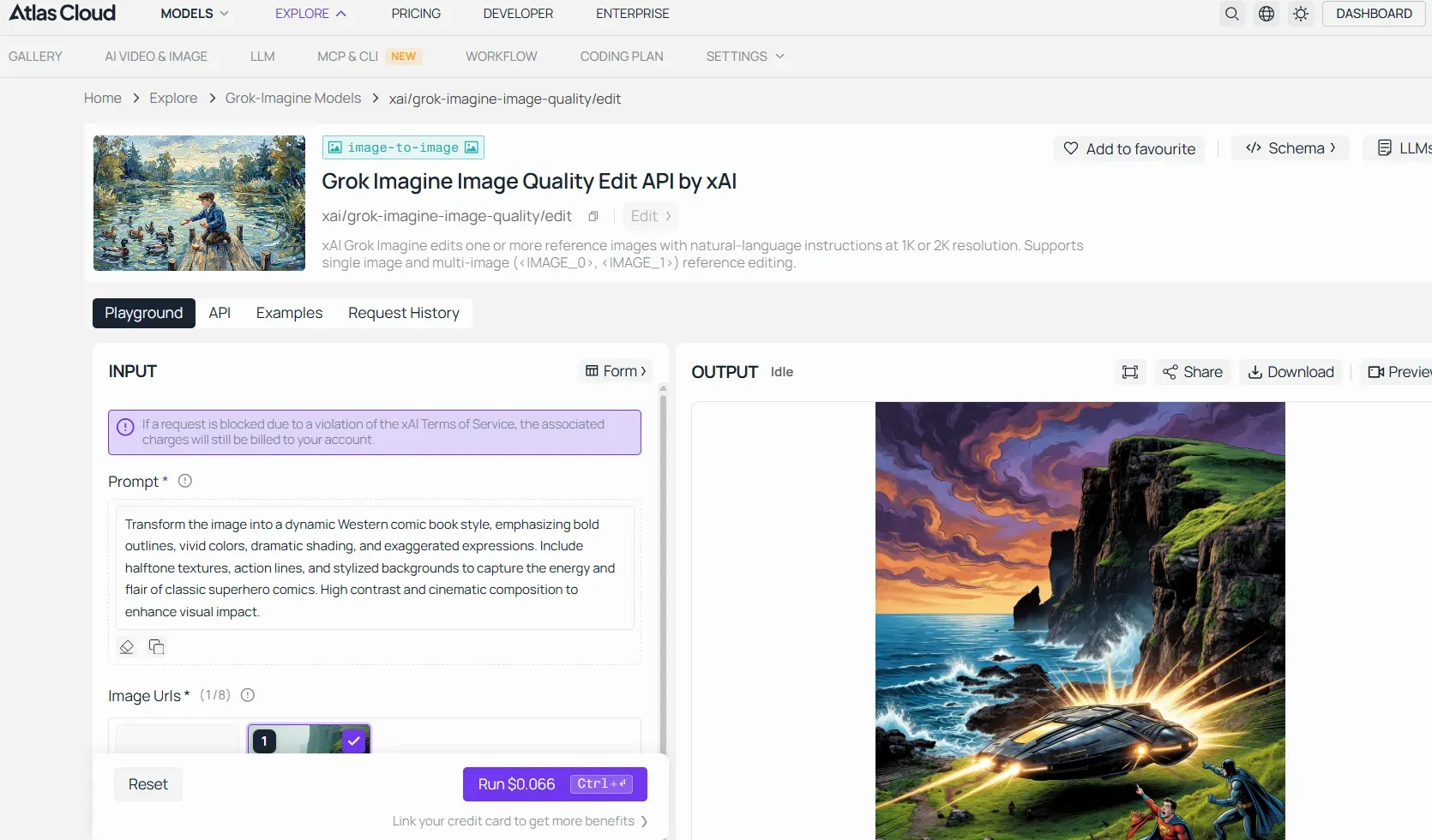
This means under heavy global server load, the web interface might quietly downgrade your image fidelity or block you entirely to save bandwidth. If you require consistent, pixel-perfect output without the headache of ghost rate-limits, routing your prompts through an API aggregator guarantees unthrottled access to maximum resolution. You can review the exact benchmark metrics and pricing breakdowns for Grok Imagine Image Quality Edit API to see how an enterprise API setup maintains premium rendering standards regardless of peak-hour traffic.
Differences Between Image Generation and Video Rendering Limits
Image generation and video rendering in Grok Imagine are governed by entirely separate quota systems — and confusing the two is one of the most common reasons users burn through their allowance faster than expected.
Current Grok xAI Video Generation Feature Status 2026
The reason xAI’s image quotas feel like a moving target is largely due to the current grok xai video generation feature status 2026. Video generation requires exponentially more compute tokens than static image diffusion. Because both media types pull from the exact same cluster architecture, video rendering spikes directly trigger the dreaded "rate limit exceeded" warnings on your image dashboard.
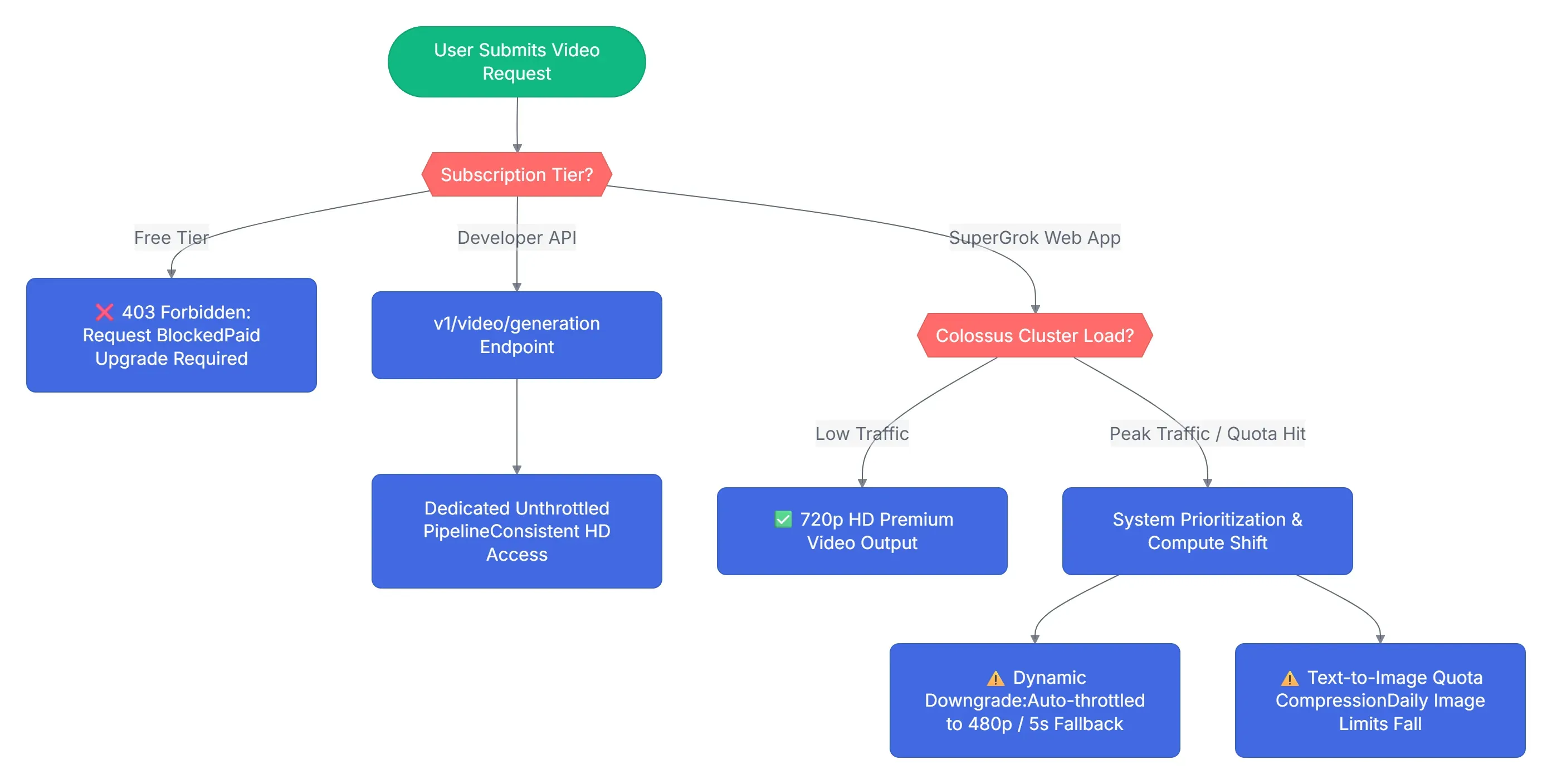
The feature ecosystem is divided into two operating tracks as of mid-2026:
- SuperGrok Web App Access: Functional but highly gated. Users are allocated a soft cap of premium high-definition video generations per rolling 24-hour window.
- The Throttling Mechanism: To manage server strain without throwing hard errors, xAI relies on an automated quality-stepdown system. The system limits video output to 5-second clips at a maximum resolution of 480p once your priority allocation is used up, stepping down from the native 6-to-12 second clips generated at 720p.
- Developer API Access (v1/video/generation): Available via public pay-as-you-go access. While the mature grok-imagine API tiers are widely available, developers can also access native video endpoints on a pay-as-you-go basis, though it remains subject to dynamic rate-limiting based on intense GPU cluster prioritization.
The Architectural Bottleneck: Creating just one 5-second video at 30fps text-to-video generation takes a lot of power. In fact, it uses about the same computing bandwidth as rendering 40 separate high-resolution images. When xAI experiences peak traffic on its video features, image limits across all lower subscription plans are temporarily compressed to keep the video queues from stalling.
How the Two Quotas Differ
While image limits are heavily influenced by algorithmic soft caps and dynamic token throttling, video rendering limits operate on rigid, high-compute hard gates. The table below outlines how xAI's infrastructure treats these two formats differently under peak server loads:
| Architectural Metric | Text-to-Image Quota System | Video Rendering Quota System |
| Quota Allocation Type | Token-Based Soft Caps (Fluctuates dynamically based on server load) | Strict Rigid Hard Gates (Tied strictly to subscription tier levels) |
| Typical Daily Ceiling (SuperGrok) | ~10–15 premium prompt cycles before encountering rate limits | ~15–20 total clips (Highly volatile under 720p HD configurations) |
| System Behavior at Limit | Triggers a red-text lockout error with a rolling countdown timer | Dynamic Downgrade: Auto-throttles output resolution from 720p down to 480p |
| Failed/Moderated Prompts | Counts against your limit. Policy blocks still consume rendering credits | Counts against your limit. Server-side processing failures still exhaust quota |
| Primary Compute Consumer | Multi-turn internal sub-renders and reasoning tokens (Agent Mode) | Raw bandwidth token consumption per-second of generated footage |
But in practice, users report the effective limit is significantly lower at higher quality settings.
Why Video Consumes Far More Compute
The gap between image and video quotas isn't arbitrary. Following the February 2026 introduction of 720p resolution and 10-second video options, the actual grok imagine video generation limits supergrok subscribers experience day-to-day began consuming compute token consumption at a dramatically faster rate. Users who previously generated 40–60 videos per day now report hitting limits after roughly 10–15 videos in 720p.
As a result, Elon Musk's early theoretical targets, such as 50 or 100 unthrottled videos per day, are rarely achieved in production-level environments. Creators who previously maintained fluid video pipelines now report hitting severe resolution degradation or complete rate-limiting screens after just a brief sequence of high-definition prompt iterations.
Does Generating a Video Drain Your Text-to-Image Quota?
Yes — and this is where many users get caught off guard. The official limit pools text-to-image quota vs video quota together on the standard SuperGrok tier, meaning 200 image or video generations are shared across both formats per 24 hours. Since 720p video renders consume significantly more quota than static images, a short video session can wipe out the bulk of your daily allowance.
Quality vs. Quantity Trade-off
Once a user hits their 720p video cap, the system automatically downgrades output to 480p rather than blocking generation entirely — a soft fallback that preserves access but visibly reduces quality. For creators who need consistent resolution, this behavior makes the video rendering limits feel even more restrictive than the headline numbers suggest.
Pro Tips to Maximize Your xAI Image Generation Quota and Avoid Throttling
Working smarter with Grok Imagine starts with understanding when and how quota gets spent — then adjusting your workflow accordingly.
✅ Master Checklist for Avoiding Grok Rate Limits
| Strategy | Why It Works |
| Generate during off-peak hours (early AM or late night) | Reduces exposure to peak server demand times and fair-use throttling |
| Use grok.com directly instead of X platform replies | Different quota pools; web console often less congested |
| Batch prompts — one detailed prompt over multiple short ones | Fewer prompt cycles = slower quota burn |
| Disable auto-video generation when generating images only | Prevents video quota from silently draining alongside image quota |
| Avoid prompt retries after near-misses | Prompt retries burn usage faster than new prompts — rephrase instead |
| Save images without editing them | Saving does not appear to count against quota; "Edit this image" triggers new generations and may consume additional credits |
Timing: When to Generate to Bypass Dynamic Throttling
Peak server demand times hit hardest for paying subscribers too — even SuperGrok users report hitting soft caps after 50–100 rapid generations during high-traffic periods. The safest generation windows are early morning UTC or late night in US time zones, when concurrent API load across the platform is lowest.
Optimizing Image Prompts to Reduce Failed Outputs
Optimizing grok image prompts directly protects your quota. Since failed generations count against your limit if Grok rejects your prompt for policy violations, writing cleaner, specific, policy-compliant prompts from the first attempt avoids costly waste.
Prompt structure that reduces moderation risk:
- Be descriptive about style, setting, and subject — vague prompts increase interpretation errors
- Avoid ambiguous phrasing around real people, violence, or sensitive subjects
- Test new prompt styles with lower-stakes images before committing to a batch
Does Switching Between Entry Points Help?
The "high demand" error behaves differently across surfaces — if grok.com is throttled, the Grok integration inside the X app often still functions, as X Premium users operate under a separate priority quota on the social platform. Switching between the two is a legitimate and low-effort workaround.
There is no dedicated xAI console rate limits page that displays live quota status. The most reliable method is checking the error message itself — if Grok returns a countdown timer, that figure is more accurate than any general estimate. Changing between Fun Mode and Expert Mode does not alter the underlying asset cost or quota consumed per generation.
Final Verdict: Is Paid Grok Image Generation Still Worth It?
The grok xAI image generation daily limit value proposition is increasingly split: it remains strong for casual creators, but is becoming highly problematic for production-level professionals who demand workflow stability.
Cost-Per-Image: Grok Subscription vs. Pay-As-You-Go APIs
For developers who need programmatic xAI image generation without the headache of "rate limit exceeded" web errors, migrating to an API infrastructure offers granular, predictable consumption.
While pay-as-you-go API pricing across providers closely mirrors native costs, the true value of utilizing a developer platform lies in advanced parameter control and unthrottled concurrent pipeline execution.
Below are the complete technical specifications for deploying the Grok Imagine API via Atlas Cloud, designed to handle multi-threaded enterprise workflows seamlessly:
Atlas Cloud's Grok Imagine API specifications:
| Parameter | Text-to-Image | Edit |
|---|---|---|
| Required inputs | prompt | prompt, image_urls |
| num_images | 1–4 | 1–4 |
| aspect_ratio | 13 options (2:1 to 1:2) | Defaults to auto |
| resolution | 1k / 2k | 1k / 2k |
| Typical latency | ~4 s | ~13 s |
Who Should Stay on Grok's Paid Tiers?
The subscription still delivers value if your workflow combines chat, DeepSearch, and image creation — the bundled utility justifies the monthly cost. SuperGrok at $30/month remains the best-fit plan for individuals who need both Grok 4 access and regular image generation without building on the API directly.
For pure-volume image pipelines, however, paid AI subscription comparison data clearly favors API aggregators like Atlas Cloud. The combination of unpredictable soft caps and dynamic throttling makes Grok Imagine a difficult choice as a primary production dependency — but a compelling secondary tool for creators already in the xAI ecosystem.
If you are tired of guessing when your rolling 2-hour window resets, testing your pipeline with specialized cloud infrastructure is the most logical next step.





