اطلب ملخصًا من الذكاء الاصطناعي
Your edit is ready for a client: a 3840 × 2160 MP4. The client asks whether Seedance 2.5 generated those pixels directly or enlarged a 1080p result. The file dimensions cannot settle that question. Seedance 2.5 native 4K output requires evidence of the generation path, not just a 4K export label.
As of November 13, 2026, Atlas Cloud lists a separate 4k setting on its Seedance 2.5 text-to-video model page, yet its endpoint documentation lists 4k-esr and describes that option as an enhancement of native 1080p. BytePlus's current Seedance 2.5 tutorial lists native output through 1080p. A recent native-4K announcement elsewhere adds to the confusion, but does not prove what an Atlas task produces. This guide shows how to use the selected setting, completed task, original download, and picture detail as one evidence chain. It also shows what to record when an advertised option is unavailable.
Key takeaways
- A 3840 × 2160 file proves frame dimensions, not native generation.
- On Atlas,
4k-esris documented as enhanced from native 1080p; treat4kas a separate path whose provenance still needs confirmation.- Save the selected setting, completed task, original file, and inspection notes together.
- Compare the current price for each setting before rendering, since the model's listed starting rate is not a 4K quote.
Does Seedance 2.5 Actually Offer Native 4K in 2026?
The most defensible answer depends on the route you use. On November 13, BytePlus's Dreamina Seedance 2.5 tutorial listed 480p, 720p, and 1080p for that model. Its comparison table lists 4K for Dreamina Seedance 2.0. The Atlas Cloud homepage leads to a Seedance 2.5 listing whose model-page parameters include a distinct 4k value. Atlas's endpoint documentation, however, omits that value from its accepted-resolution list. These pages may reflect different release stages or product routes. The discrepancy deserves a dated check, not a confident guess.
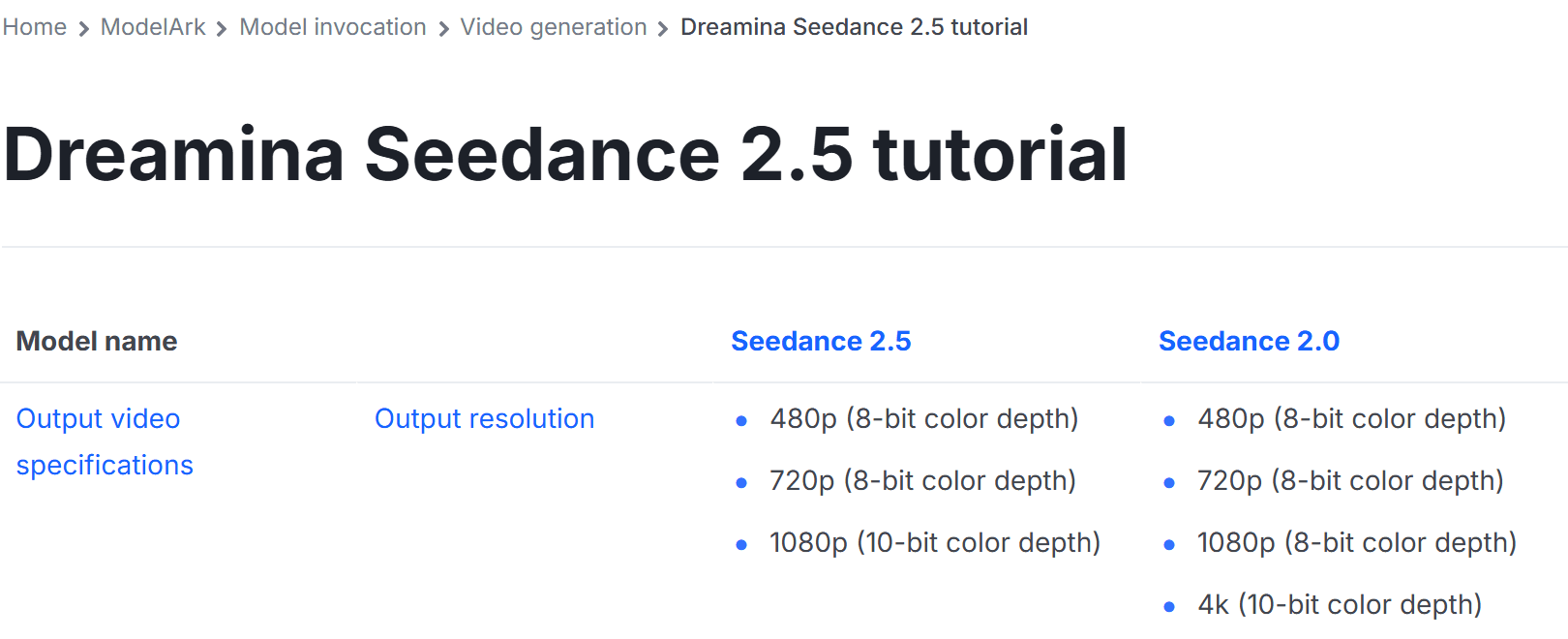
Excerpt from BytePlus's Dreamina Seedance 2.5 tutorial, showing the page heading and the full output-resolution row for Seedance 2.5 and Seedance 2.0. Captured November 13, 2026; check the source date when comparing newer routes.
Three statements need separate evidence. A page may list 4k; your signed-in account may or may not offer it; and a completed 4k task may or may not provide a documented native generation path. A resolution dropdown proves only the first two. An actual task and source file prove that a particular setting finished and yielded a particular frame size. To describe the source as native, retain the task's exact resolution value and an authoritative, current explanation of what that value means.
A recent announcement claims native 4K availability in early access on another route (Reddit native-4K announcement, November 2026). It explains why creators are asking the question now; it does not certify the Atlas path. If your Atlas account exposes only 1080p and 4k-esr, record that result. A valid 4K ESR deliverable can still meet a client's pixel specification, provided you label its origin honestly.
Native 4K, 4K ESR, and 1080p: What Changes?
The resolution name describes a workflow choice. Atlas's Seedance 2.5 endpoint documentation says its 4k-esr route first generates a native 1080p source and enhances it to a 2160-pixel short edge. At 16:9, that means a 3840 × 2160 output. The separate 4k value appears on the model page, but the page does not explain its internal rendering path in the same detail. That leaves a provenance question even if the control is visible.
| Selected setting | Documented processing path | Expected 16:9 frame | Can the setting alone support a native 4K claim? | Check next |
|---|---|---|---|---|
1080p | Native Seedance 2.5 output in Atlas documentation | 1920 × 1080 | No, this is native 1080p | Confirm completed task and downloaded file |
4k | Separate option on the Atlas model page; source process is not explained there | Likely 3840 × 2160 if the task completes as labeled | No | Confirm availability, completion, file dimensions, and current product definition |
4k-esr | Native 1080p followed by enhancement | 3840 × 2160 | No, Atlas expressly calls this an enhanced route | Preserve the ESR task setting in the handoff |
The 4K frame contains four times as many pixels as a 1920 × 1080 frame. That arithmetic says nothing about four times the visible detail. Enhancement may create plausible high-frequency texture, and compression may discard texture from either route. An editor should inspect the original files at the same display scale, then judge the intended deliverable after its normal export chain. A client asking for a 4K container may accept ESR; a client requiring native source generation needs a more explicit record.
Which Resolution Should You Choose for the Final Deliverable?
Start with the delivery requirement, not the largest menu option. An un-cropped social post viewed mainly on phones often needs clean motion and stable subjects more than a 4K source. A 1080p master may meet that brief. A client who will crop a landscape clip into several formats gains more room from a 4K file, although enlargement cannot restore details that the first generation never created.
| Deliverable | Sensible first test | Move to 4K when |
|---|---|---|
| Social or internal review cut | 1080p | The platform specification or visible crop requires it |
| Client-approved landscape master | 1080p for action approval | The contract calls for 3840 × 2160 delivery |
| Master for reframing or fine-detail review | Compare 4k and 4k-esr if available | The source path, detail, and cost survive inspection |
For a controlled editorial check, use 16:9 and 8 seconds. The ratio has an unambiguous 1920 × 1080 versus 3840 × 2160 comparison, and 8 seconds is long enough to see a hand, liquid, and camera-angle changes without making each trial unnecessarily expensive. Use another ratio only if the intended delivery is vertical or square; record its actual pixel dimensions rather than assuming a landscape 4K frame. A longer motion trial follows only after you know which setting works.
Decide acceptance criteria before rendering. Write down the required frame size, whether enhanced output is permitted, the intended crop, and the features that must remain stable. Those criteria let you reject an attractive frame that fails the production brief. They also prevent an unnecessary native-4K claim when the real requirement is simply a 4K delivery file.
How to Generate and Check Seedance 2.5 4K on Atlas Cloud
Open the Seedance 2.5 text-to-video model page. Confirm that the signed-in playground offers the setting you intend to run, and read the live quote associated with that exact setting. Do not substitute the model card's starting price for a resolution-specific quote. Save a dated capture of the available values, especially if 4k appears in one part of the product and not another.
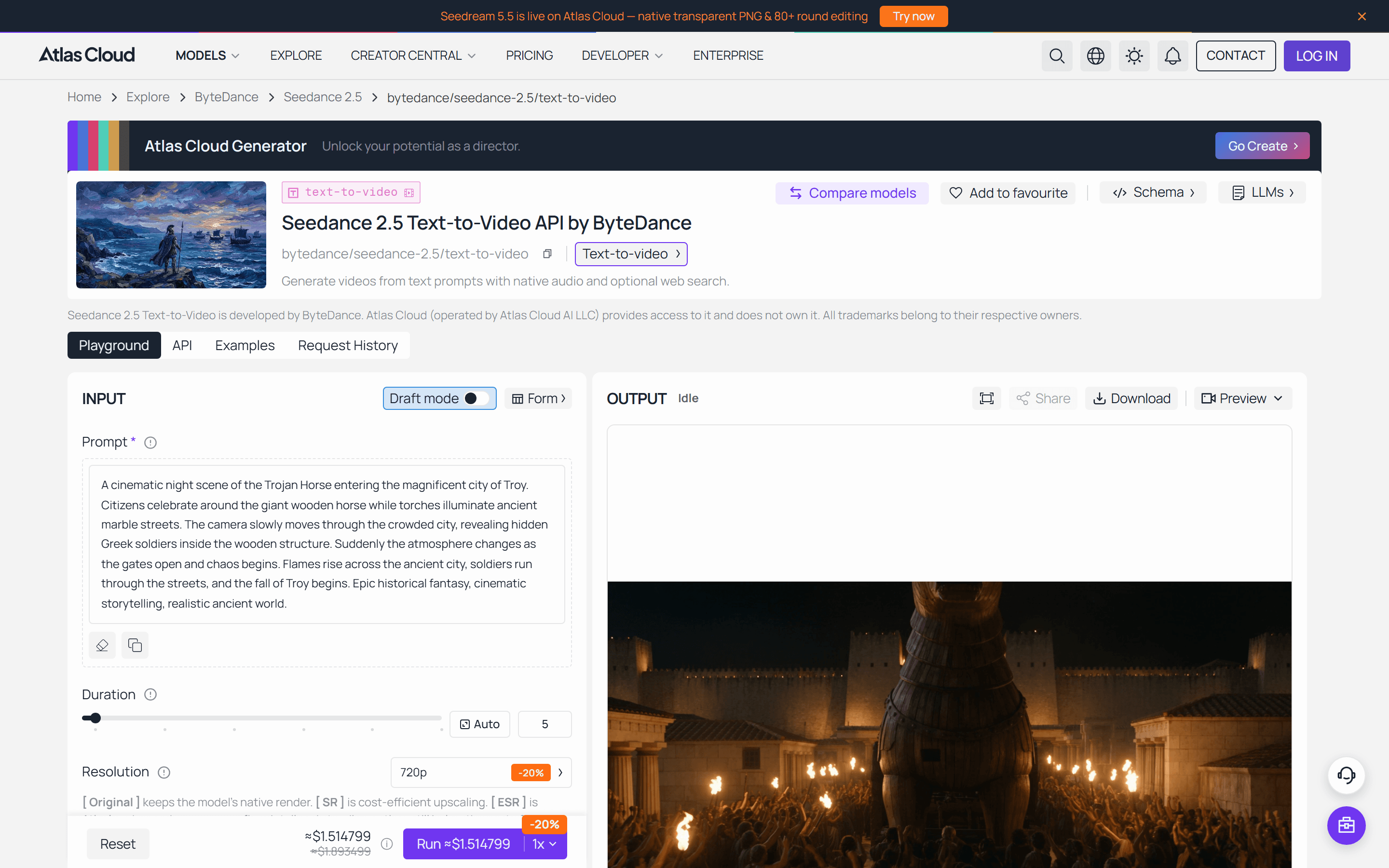 The public playground showed a 5-second 720p quote of about $1.515 on November 13, 2026. Its OUTPUT was idle; the sample image is not a result from this article.
- Select 16:9, 8 seconds, MP4, and disable optional audio. Paste the detail prompt below without changing the subject between trials.
- Run one task at native
1080p. Wait for a completed status, then save the task ID, chosen settings, result, and original download. - If offered, run a separate task at
4kwith the same prompt and controls. Repeat at4k-esr. Keep the three IDs distinct. If a value is absent or a task fails, save the menu or error and the time. Never relabel an ESR file as the4krun. - Read the real duration and frame size from each downloaded file. If a control reverted before submission, label the run with the setting the task actually used and decide whether to retry.
plaintext1An eight-second realistic tabletop video of a clear glass of sparkling water being placed on a wooden kitchen counter. Begin at counter height as a hand sets down the glass, then move to a close side angle showing individual bubbles rising, and finish at a slightly higher three-quarter angle as light catches the rim and water droplets. Natural window light, stable glass shape, consistent wood grain, physically plausible liquid motion. No logos, captions, lettering, or camera push-in only.
The prompt deliberately gives the model three viewpoints and visible physical events. Bubbles and droplets offer small-scale detail; the glass rim, hand, and wood grain expose shape or texture drift. Do not use the scene as a universal image-quality benchmark. Separate generations can choose different compositions, lighting, and timing even when the text matches. Compare the same kinds of features and keep each source label attached to its clip.
For motion continuity, use the same model page for one 12-second MP4 run at the highest native setting that a real completed task supports. Keep the task settings and original file. This test asks for an independently moving background, a consistent bicycle, and actual changes in view. If the highest native path remains uncertain, run the documented 1080p path and state that choice.
plaintext1A twelve-second realistic city-street scene at dusk. A cyclist crosses the foreground while pedestrians move independently in the background. Follow the cyclist from a street-level side view, cut to a wider corner view showing the same bicycle and clothing, then end with a rear three-quarter view as the cyclist turns. Keep the bicycle frame, wheels, street markings, and subject direction consistent across shots. Visible action and camera-angle changes; no captions, logos, or slow zoom-only motion.
A completed status is a necessary step, not an editorial pass. Download the original output before resizing, GIF conversion, or editing. That copy is the only clean basis for the file checks below. No Atlas generation was completed for this article, so the images shown are documentation and an idle interface, not measured video results.
What Does 4K Reveal in Real Motion?
Inspect the tabletop runs at 100% on a display capable of showing the frame, then inspect the final viewing size. Freeze a frame where the hand touches the glass and another where the camera reaches the side angle. Look for coherent bubble edges, a continuous rim, stable wood grain, and water droplets that move with the glass. Compare the same action phase where possible, but note any difference in framing or focus.
If you make GIF viewing copies, their reduced size and palette cannot establish the source file's true resolution or bit depth. Use the original MP4 files for detailed inspection. If the three generations place the hand or droplets differently, do not turn a sharper-looking crop into a strict quality ranking. Note what each clip actually shows and whether the difference matters at delivery size.
A street test addresses a separate failure mode: temporal consistency. Track the bicycle frame, wheel count and shape, clothing, street markings, and travel direction through each view. Watch whether pedestrians move independently and whether a cut preserves the subject's identity. A 4K frame can make a warped wheel or flickering distant line more visible. When the action fails, rerun only if the shot is necessary; a lower-resolution version with coherent motion may serve the edit better than a larger flawed file.
Three 4K-Focused Seedance 2.5 Cases: What Do They Prove?
The label "4K" describes different evidence in these examples. BytePlus identifies the first two as Dreamina Seedance 2.5 4K demonstrations, while the third creator explicitly describes a 720p Seedance 2.5 render enlarged to a 4K final film. Each case has a playable video, but none publishes the generation task ID, full settings, original master, and prompt together. The embedded files are smaller viewing copies; the source publications and evidence limits are identified below.
Case 1: BytePlus's Dreamina Seedance 2.5 4K short film, Otter is Nobody 2
BytePlus identifies this short film as a Dreamina Seedance 2.5 4K production in its October 2026 product article and published the three-minute film with its launch post. Its changing locations and close character shots make this a finished-film example, not a single prompt-to-video take. The one-minute excerpt below selects the film's middle action sequence, from 1:03 to 2:03. Watch the small character, food textures, a human face, and wide city shots as the scale and setting change. BytePlus also describes a general 480p Draft-to-4K workflow, but does not publish this film's prompts, individual task settings, or an unedited 4K master. The public 3840 × 2160 social rendition establishes the size of that distributed file, not the resolution of every source generation.
One-minute excerpt from BytePlus's short film (1:03–2:03). This embedded viewing copy is 960 × 540; BytePlus's public social rendition is 3840 × 2160.
Case 2: BytePlus's Dreamina Seedance 2.5 4K detail reel
In a separate official Dreamina Seedance 2.5 4K detail demonstration, the camera moves from sewing and a coat button to fabric, a face, and a walking figure. The 23-second reel gives a more specific inspection target than the film: trace the weave, seams, button edges, facial contours, and tonal changes between dark cloth and bright stone. BytePlus attributes finer detail and 10-bit colour to the Dreamina Seedance 2.5 4K model in its product explanation. The public 3840 × 2160 social rendition and this compressed copy cannot verify the generation bit depth or native render path. No prompt or reference set is published with the reel.
BytePlus's 23-second detail reel. This embedded viewing copy is 960 × 540; inspect BytePlus's public rendition for its delivered frame size.
Case 3: A 4K film made from 720p Seedance 2.5 action shots
An independent creator documented the production of a 1975 New York raid sequence in a Reddit post and shared the finished 4K, 21:9 film on YouTube. The creator says the action footage used Seedance 2.5 with character and location reference images; an initial brief requested a dynamic 15–20-second raid montage. The published account describes a story bible, many planned keyframes, and later editing, but does not provide the exact final prompt. It also says the Seedance 2.5 clips were rendered at 720p, then enlarged to 4K with Super Scale before grading and stabilization. The excerpt below covers only the raid footage, before the film moves into quieter scenes the creator says were made with other tools. It is a concrete 4K delivery case, not evidence of native 4K Seedance 2.5 generation. Look for changes in faces, car edges, and street detail across action cuts, then remember that the final 4K file contains an upscale and post-production work.
A 28-second excerpt from the creator's film, starting around 4:05. This embedded copy is 960 × 400; the creator describes the final film as 4K after upscaling 720p Seedance 2.5 clips.
How Much Does Seedance 2.5 4K Cost?
The Atlas model catalog displayed Seedance 2.5 text-to-video from $0.134 per second on November 13, 2026, down from $0.167 per second with a listed 20% discount. The model detail page also displayed $0.134 per second. Those are starting figures; neither identifies the exact 4k or 4k-esr quote for an 8-second task. Check the live price at the selected resolution before running it, and record the displayed terms because rates and discounts can change.
| Budget item | Calculation | What to record |
|---|---|---|
| One detail trial | Current setting-specific rate × actual billable seconds | Resolution, quote, and final charge |
| Three-path comparison | Sum of the three separate task charges | Failed or unavailable paths separately |
| Usable final | Total charges for attempts ÷ accepted clips | Rejected takes and reason for rejection |
The public playground showed an estimated $1.514799 for its default 5-second 720p setting on November 13, about $0.303 per second. This is an observed quote, not a completed charge and not a 4K price. It demonstrates why multiplying the $0.134 starting rate by your duration can understate a real setting-specific quote. Record the selected resolution and quoted total before each run, then keep the final charge and any rejected attempts.
If the client must approve action before final delivery, test the motion at a lower-cost setting first. Once the action works, render the chosen deliverable path and check the final quote. If only a 4K-size file is required, 4k-esr may be a valid option; if the brief explicitly requires native generation, hold that claim until the route's documentation and task evidence agree.
How to Verify a 4K Export Before Delivery
Preserve the untouched download and its task record. Name the file with the task ID or keep a manifest that maps each task ID to its exact file hash. Include the model ID, selected resolution, ratio, requested duration, completion status, and downloaded filename. A screenshot of the menu without a finished task is incomplete evidence; a 4K MP4 without a task record is incomplete provenance.
Use ffprobe on the original file to inspect the actual video stream. The official documentation describes the stream and format fields the tool can print (FFmpeg ffprobe documentation, accessed November 2026). This command reports width, height, frame rate, codec, pixel format, and duration in a compact JSON result:
plaintext1ffprobe -v error -select_streams v:0 -show_entries stream=width,height,r_frame_rate,codec_name,pix_fmt -show_entries format=duration -of json original.mp4
A 3840 × 2160 report verifies the dimensions in the file you hold. It cannot reveal whether the model generated at 4K or enhanced a 1080p source. Compare the recorded task setting with the current definition of that setting. Then inspect representative frames at 100% and play the whole source for motion defects. Keep the findings with the task ID so another editor can reach the same conclusion.
BytePlus describes Dreamina Seedance 2.5's 1080p output as 10-bit H.265/HEVC. Do not assume every Atlas resolution and download has that combination; let ffprobe report the actual codec and pixel format. If your delivered file uses 10-bit H.265, test it in the client's target player or transcode a separate viewing copy while preserving the original. Do not mistake a viewing copy's properties for those of the source.
Before delivery, describe the result with the narrowest accurate phrase: “3840 × 2160 file from 4k-esr,” “completed 4k task with 3840 × 2160 output, native source path pending confirmation,” or “native 1080p source.” That language gives the client a file they can use and a record they can audit. For any future Seedance 2.5 native 4K output claim, repeat the route check on the day you render; a November 2026 option list cannot certify a later job.
Frequently Asked Questions
Does a 3840 × 2160 Seedance 2.5 file prove native 4K generation?
No. Those dimensions describe the delivered file, not how its pixels were generated. Keep the completed task's resolution setting and the current documentation for that route alongside the original download before calling it native 4K.
What does 4k-esr mean on Atlas Cloud?
Atlas's endpoint documentation describes 4k-esr as a native 1080p generation enhanced to a 2160-pixel short edge. At 16:9, the output is 3840 × 2160, but its documented source path is not native 4K.
Why might the Atlas model page show 4k when the endpoint documentation does not?
The pages list different resolution values, and the article's November 13, 2026 check does not establish why. Verify the option in your signed-in route, save a dated capture, and confirm what a completed task actually used. Do not infer the internal rendering path from the menu label alone.
Can ffprobe tell whether a Seedance 2.5 clip was upscaled?
No. ffprobe can report the downloaded file's frame size, codec, frame rate, pixel format, and duration. To assess provenance, pair those properties with the task record and the provider's definition of the selected resolution.
How should I estimate the cost of an 8-second 4K trial?
Select the exact resolution and duration in the live playground, then record its displayed quote before running the task. A model page's starting per-second rate or a quote for default 720p does not establish the price of 4k or 4k-esr. Keep the final charge and any failed attempts in your budget record.