

TL;DR: Seedance 2.0 en 30 segundos
Seedance 2.0, el modelo multimodal de generación de vídeo más reciente de ByteDance, ya está disponible a través de la API unificada de Atlas Cloud. Acepta entradas de imagen, vídeo, audio y texto simultáneamente para generar vídeos de 4 a 15 segundos con un control preciso sobre la consistencia de los personajes, el movimiento de cámara y la continuidad de las escenas. El precio comienza en USD 0.081 por segundo para el modo Fast y USD 0.1 por segundo para la calidad estándar.
¿Qué es Seedance 2.0?
Seedance 2.0 es el avance más reciente de ByteDance en IA generativa de vídeo.
- Admite cuatro modalidades distintas: texto, imágenes, videoclips (hasta 15 segundos) y audio (también hasta 15 segundos).
- Admite una duración de entre 4 y 15 segundos. Al establecer la duración = -1, Seedance 2.0 puede determinar automáticamente la duración óptima.
Resumen de precios
Seedance 2.0 está disponible en dos niveles de calidad en Atlas Cloud:
| Modelo | Tipo de tarea | Precio por segundo | Notas |
|---|---|---|---|
| Seedance 2.0 Fast | Texto/Imagen/Referencia a vídeo | USD 0.081 | Menor latencia para iteraciones rápidas |
| Seedance 2.0 | Texto/Imagen/Referencia a vídeo | USD 0.1 | Calidad completa, mejor resultado |
Comparativa con otras alternativas:
| Característica | Seedance 2.0 | Wan-2.7 | Veo 3.1 Lite |
|---|---|---|---|
| Texto a vídeo | ✅ | ✅ | ✅ |
| Imagen a vídeo | ✅ | ✅ | ✅ |
| Entrada de vídeo de referencia | ✅ (3 archivos, hasta 15s total) | ✅ (3 archivos, hasta 30s c/u) | ❌ |
| Entrada de audio | ✅ | ✅ | ❌ |
| Extensión de vídeo | ✅ | ✅ | ❌ (solo inicio-fin) |
| Precio por segundo | USD 0.081-0.1 | USD 0.1 | USD 0.05 |
| Duración máxima | 15s | 15s | 8s |
Cuándo elegir cada uno:
- Veo 3.1 Lite: Proyectos con presupuesto ajustado, clips más cortos.
- Wan-2.7: Edición de vídeo con control preciso de tramas y tomas de cámara.
- Seedance 2.0: Creación de vídeo con control preciso de estilo/movimiento, sincronización de audio y flujos de trabajo multimodales complejos.
Características clave de Seedance 2.0
Calidad de generación mejorada
Seedance 2.0 ofrece capacidades base significativamente mejoradas con físicas más realistas, movimiento natural y un seguimiento preciso de los prompts. El modelo maneja acciones complejas y movimientos continuos con estabilidad, produciendo una salida de vídeo más fluida y auténtica.
Control de consistencia superior
Mantiene la apariencia de los personajes, detalles de productos, tipografía y la consistencia de la escena a través de los fotogramas. Desde rasgos faciales hasta patrones de ropa, pasando por texturas de empaques y claridad de fuentes, los elementos permanecen estables y precisos durante todo el vídeo sin degradarse.
Movimiento cinemático y replicación de efectos
Replica con precisión movimientos de cámara sofisticados, incluidos dolly zooms, seguimientos y movimientos multiángulo. Admite la recreación exacta de plantillas creativas, transiciones complejas y efectos visuales de metraje de referencia sin necesidad de terminología profesional en los prompts.
Casos de uso de Seedance 2.0: Comercial, Redes Sociales y Cine
Uso comercial: Vídeos de productos y contenido de marca
De estático a dinámico: dando vida a las imágenes. ¿Tienes una toma de producto o un boceto de personaje que está ahí parado? Despiértalo. Ya sea el tejido de una tela o la curva de un logotipo, Seedance 2.0 conserva esos pequeños detalles mientras añade el movimiento que merecen. Se trata de mantener el alma de tu marca mientras permites que por fin se mueva.
-
Especificaciones rápidas:
- Ref2Video: Hasta 9 fotos (30 MB c/u)
- Image2Video: Máximo 2 fotos (30 MB c/u)
Uso en redes sociales: Clonación de movimiento y sincronización de audio
Roba la escena: Clonación de movimiento. ¿Alguna vez viste un movimiento de cámara que desearías poder pedir prestado? Introduce un clip de referencia. Seedance 2.0 no solo lo copia; digiere los paneos, las inclinaciones e incluso la "vibra" específica del personaje, para luego injertar esa energía exacta en tu nuevo metraje. Es cinematografía profesional, sin necesidad de fotogramas clave manuales.
-
Detalles técnicos:
- Clips: Hasta 3 archivos (50 MB c/u; 15s total)
- Aceptados: MP4, MOV
Sincronización de pulso: Audio a visuales. Deja que la pista marque el ritmo. Esto no trata de visuales aleatorios; es precisión quirúrgica. Agrega una voz en off o un ritmo con graves potentes, y el motor ajustará cada corte y zoom de cámara al alma misma del audio. Es la forma más rápida de convertir el sonido en una narrativa que realmente se siente bien.
-
Detalles técnicos:
- Audio: Máximo 3 archivos (límite de 15 MB; 15s en total)
- Aceptados: MP3, WAV
Uso cinematográfico: Extensión y edición de vídeo
Fotogramas infinitos: El estiramiento temporal. Quedarse sin metraje es una pesadilla. Ahora puedes estirar el tiempo. Avanza o retrocede tu vídeo manteniendo los personajes, la iluminación y el "look" perfectamente consistentes. Es la solución definitiva cuando necesitas que una escena respire unos segundos más.
-
La letra pequeña:
- Entrada: 1 vídeo fuente
- Salida: 4–15s de metraje nuevo y fluido
El intercambio digital: Control a nivel de píxel. Control total de la escena sin necesidad de volver a grabar. ¿Necesitas cambiar la cara de un actor, actualizar la etiqueta de un producto sobre la marcha o eliminar un objeto distractor del fondo? Esta herramienta hace el trabajo pesado dejando intactos el trabajo de cámara y la iluminación originales.
-
La letra pequeña:
- Fuente: El vídeo que quieres arreglar
- Activos: Hasta 9 imágenes de referencia para el nuevo aspecto
¿Por qué usar Seedance 2.0 en Atlas Cloud?
¿Qué es Atlas Cloud?
Es una plataforma que simplifica la IA dándote acceso a más de 300 modelos de primer nivel en un solo lugar: texto, imágenes, vídeo y más.
¿Para quién es?
- Desarrolladores que buscan un acceso fácil y asequible a la IA.
- Equipos que gestionan proyectos que requieren IA en múltiples áreas.
- Empresas que necesitan IA fiable para trabajo importante.
- Usuarios de herramientas como ComfyUI y n8n.
¿Por qué elegirla?
- Una sola API te permite usar todo: solo una clave.
- Precios claros, sin sorpresas y bajos costes.
- Creada para empresas: estable, segura y respaldada por expertos.
- Funciona con las herramientas que ya usas.
- Tus datos permanecen seguros y cumplen con los requisitos de cumplimiento.
¿Cómo se compara?
- Fal.ai: Atlas tiene más modelos y mejores precios.
- Wavespeed: Atlas cuesta menos e incluye soporte empresarial.
- Kie.ai: Atlas es más transparente con los precios y ofrece una mayor selección.
- Replicate: Biblioteca más pequeña y costes más altos.
- Otros proveedores (como OpenAI): Atlas combina todo en una plataforma sencilla.
Cómo usar Seedance 2.0 en Atlas Cloud
Atlas Cloud te permite usar modelos lado a lado: primero en un área de pruebas (playground) y luego a través de una API única.
Método 1: Usar directamente en el área de pruebas de Atlas Cloud
Haz clic 👇 para usar Seedance 2.0 en el área de pruebas.
Método 2: Acceder vía API
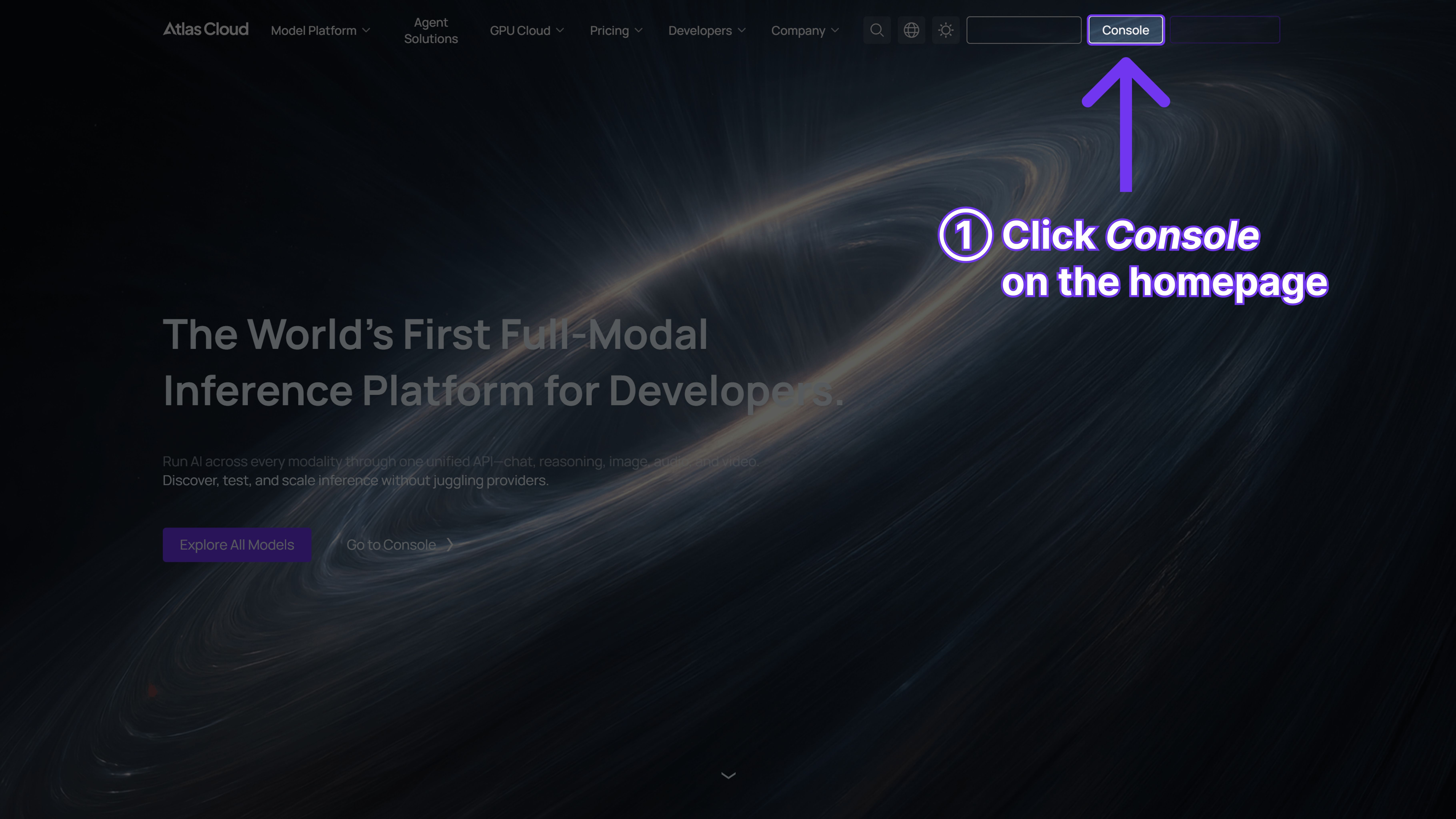
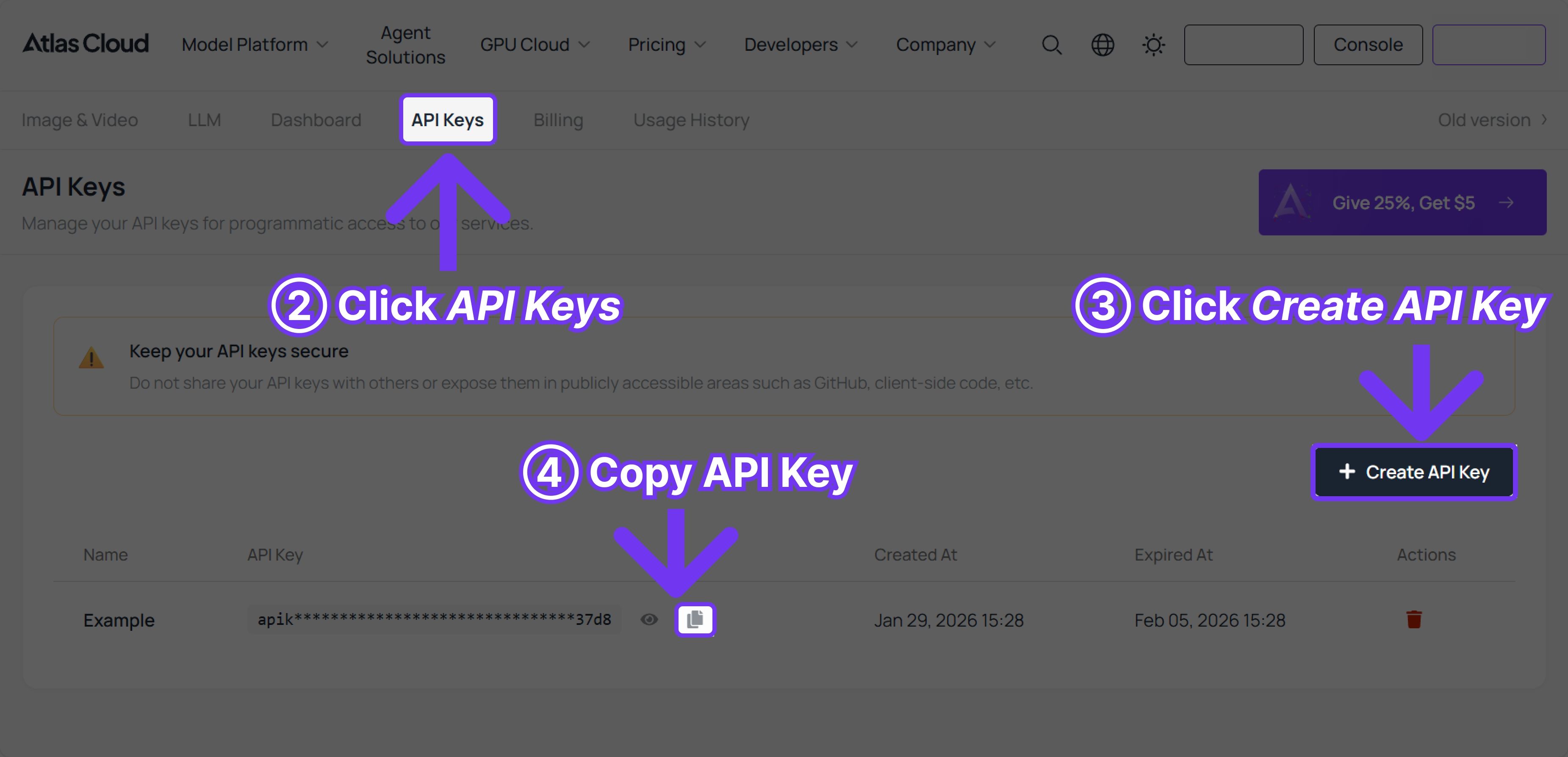
Paso 1: Obtén tu clave API
Crea una clave API en tu consola y cópiala para usarla después.
Paso 2: Revisa la documentación de la API
Consulta el endpoint, los parámetros de solicitud y el método de autenticación en nuestra documentación de API.
Paso 3: Haz tu primera solicitud (ejemplo en Python)
Ejemplo: generar un vídeo con Seedance 2.0 (Texto a vídeo)
plaintext1import requests 2import time 3 4# Paso 1: Iniciar la generación de vídeo 5generate_url = "https://api.atlascloud.ai/api/v1/model/generateVideo" 6headers = { 7 "Content-Type": "application/json", 8 "Authorization": "Bearer $ATLASCLOUD_API_KEY" 9} 10data = { 11 "model": "bytedance/seedance-2.0/text-to-video", # Requerido. Nombre del modelo 12 "prompt": "Una vista cinematográfica del océano infinito al amanecer, luz solar dorada extendiéndose sobre el mar azul profundo, olas poderosas elevándose y rompiendo con espuma blanca. La cámara vuela bajo sobre la superficie del agua, gotas de agua y bruma brillando bajo la luz. Nubes masivas se extienden por el cielo mientras las aves marinas se deslizan a través del viento. El océano se siente vasto, poderoso y majestuoso, iluminación dramática, rayos de luz volumétricos, simulación de agua ultra detallada, atmósfera cinematográfica épica, 4K.", 13 "duration": 5, # Duración del vídeo en segundos (4-15), o -1 para que el modelo elija automáticamente 14 "resolution": "720p", # Resolución del vídeo. opciones: 480p | 720p 15 "ratio": "adaptive", # Relación de aspecto 16 "generate_audio": True, # Generar audio sincronizado (voz, efectos de sonido, música de fondo) 17 "web_search": False, # Habilitar búsqueda web para mejorar la precisión con referencias del mundo real 18 "watermark": False, # Agregar marca de agua 19 "return_last_frame": False, # Devolver el último fotograma como una imagen separada 20} 21 22generate_response = requests.post(generate_url, headers=headers, json=data) 23generate_result = generate_response.json() 24prediction_id = generate_result["data"]["id"] 25 26# Paso 2: Consultar el estado del resultado 27poll_url = f"https://api.atlascloud.ai/api/v1/model/prediction/{prediction_id}" 28 29def check_status(): 30 while True: 31 response = requests.get(poll_url, headers={"Authorization": "Bearer $ATLASCLOUD_API_KEY"}) 32 result = response.json() 33 34 if result["data"]["status"] in ["completed", "succeeded"]: 35 print("Vídeo generado:", result["data"]["outputs"][0]) 36 return result["data"]["outputs"][0] 37 elif result["data"]["status"] == "failed": 38 raise Exception(result["data"]["error"] or "La generación falló") 39 else: 40 # Procesando, esperar 2 segundos 41 time.sleep(2) 42 43video_url = check_status()
Preguntas frecuentes sobre Seedance 2.0: Precios, límites y cómo empezar
¿Existe alguna restricción sobre quién puede acceder a Seedance 2.0?
No. Tanto si eres un usuario nuevo como un cliente existente, creador individual o equipo empresarial, obtienes acceso instantáneo tanto a Seedance 2.0 como a los niveles de Seedance 2.0 Fast.
¿Cuál es la duración máxima de vídeo que puede generar Seedance 2.0?
Hasta 15 segundos por generación. Puedes extender vídeos existentes usándolos como entrada y solicitando una duración adicional.
¿Seedance 2.0 en Atlas Cloud admite rostros humanos?
Sí, la versión de Seedance 2.0 de Atlas Cloud admite rostros humanos realistas. La plataforma original Jimeng (即梦) tiene restricciones, pero la versión de API de Atlas Cloud no tiene esta limitación.
¿Cuál es la diferencia entre Seedance 2.0 Fast y la estándar?
El modo Fast (USD 0.081/s) prioriza la velocidad de generación y es ideal para iteraciones rápidas. El modo estándar (USD 0.10/s) ofrece la mayor calidad de salida con un movimiento más refinado y mejor conservación de los detalles.
¿Puedo combinar varios vídeos de referencia?
Sí, puedes subir hasta 3 vídeos de referencia (duración total hasta 15 segundos) y referenciarlos individualmente en tu prompt para combinar diferentes elementos de movimiento.
¿Atlas Cloud cobra por las subidas de archivos de referencia?
No, solo pagas por la salida del vídeo generado según su duración. Las subidas de archivos de referencia no se contabilizan.
¿Cómo se compara Seedance 2.0 con Kling v3.0?
Kling v3.0 (USD 0.153/s) destaca en la generación cinematográfica de alta fidelidad con una fuerte simulación de físicas. Seedance 2.0 ofrece un control más granular a través de referencias multimodales a un precio más bajo, lo que lo hace mejor para flujos de trabajo que requieren una coincidencia precisa de estilo y movimiento.
¿Hay un nivel gratuito para probar?
Atlas Cloud ofrece créditos de prueba para cuentas nuevas. Revisa la consola para ver las promociones actuales.
¿Puedo usar Seedance 2.0 para proyectos comerciales?
Sí, los términos estándar de Atlas Cloud permiten el uso comercial del contenido generado. Revisa los términos de servicio de Atlas Cloud para obtener todos los detalles.





