

Subes a la fundadora, la chaqueta y la cafetería. El resultado te da un desconocido de la cafetería vistiendo algo vagamente con forma de chaqueta. Qwen Image 3.0 Pro con múltiples imágenes de referencia puede resolver ese tipo de brief, pero solo cuando cada imagen tiene una función clara.
La respuesta práctica es simple: sube hasta 3 imágenes en un orden deliberado. Convierte la Imagen 1 en el ancla de identidad, la Imagen 2 en el ancla de producto o vestuario, y la Imagen 3 en el ancla de escena o estilo. Luego di lo mismo en el prompt. Esto le da a un creador, a un operador de marca o a un pequeño equipo de ecommerce un brief creativo compacto en lugar de un montón de pistas visuales en competencia.
Esta guía muestra ese método con una campaña de una fundadora de café, el lanzamiento de una línea de cuidado de la piel y el re-pose de un personaje original de un videojuego. Se trata de crear una composición nueva y guiada por referencias. No promete una copia píxel a píxel de las fotos de origen.
Puedes probar el flujo de trabajo en una sola pestaña del navegador en Atlas Cloud, donde el playground de Pro Edit acepta las entradas y el prompt juntos.
Puntos clave
- Asigna a cada una de las 3 referencias un rol sin solapamientos.
- Prioriza la identidad y nombra la Imagen 1 en el prompt.
- Deja que solo una imagen controle la iluminación y el ambiente general.
- Empieza con 1 resultado en alta resolución y luego corrige un error por reintento.
Película del flujo de trabajo de tres roles en 30 segundos
Este cortometraje convierte los tres casos del artículo en una única secuencia visual. Comienza con la fundadora de café y su producto en la cafetería, sigue con una transición de luz cálida hacia la fundadora de cuidado de la piel y el frasco verde salvia en el tocador de travertino, y luego usa el reflejo frío del espejo para llegar al paisaje de roca roja del explorador. Cada capítulo cambia el punto de vista en lugar de depender de un único acercamiento: los ángulos de establecimiento, lateral, cenital, de seguimiento y amplios de paisaje sirven a un sujeto, producto o señal de entorno específicos.
Vídeo de 30 segundos en 16:9 generado con Gemini Omni Flash como una extensión continua de tres capítulos. Lleva el ambiente de la cafetería al estudio de cuidado de la piel y luego a un paisaje sonoro suave de viento y baliza, manteniendo a personas, objetos y escenas diferenciados en múltiples ángulos de cámara.
Por qué suelen fallar las múltiples imágenes de referencia en Qwen Image 3.0 Pro
La edición con múltiples referencias se vuelve popular cuando un equipo tiene recursos reales pero no tiene tiempo para organizar una sesión de fotos. Un retrato de la fundadora, un packshot y una foto de localización pueden parecer material suficiente para un anuncio. Sin embargo, tres imágenes suelen crear un tira y afloja si el prompt solo dice “combínalas”.
El modelo admite la edición con entre 1 y 3 referencias, y el orden de disposición importa. Su documentación oficial de la API también sitúa la salida de imagen a imagen en un rango de 512×512 a 2048×2048. Eso convierte el orden y la prioridad escrita en parte de la dirección creativa, no en un detalle menor de implementación (Referencia de la API de Qwen Image 3.0 de Alibaba Cloud, septiembre de 2026).
| Síntoma de fallo | Causa probable | Acción correctiva |
|---|---|---|
| El resultado se parece a la persona de la referencia de pose | No se nombró un ancla de identidad | Coloca la imagen de identidad primero y escribe “conserva la identidad de la Imagen 1”. |
| Un frasco o envase se convierte en un objeto similar pero incorrecto | La imagen de producto también cumple funciones de escena o estilo | Recórtala limpiamente y asígnala solo a la estructura del producto. |
| Las 3 entradas se promedian en un collage | El prompt solo dice “combina” | Nombra la Imagen 1, 2 y 3 con funciones separadas. |
| La iluminación y el color resultan inconsistentes | Más de una entrada dicta el aspecto | Deja que la imagen de escena/estilo defina la atmósfera. |
| La pose es correcta pero el personaje ha desaparecido | La fuente de pose tiene un rostro o vestuario muy marcado | Recorta hasta el contorno del cuerpo o usa una referencia de pose simplificada. |
Ese último problema no es teórico. En una discusión comunitaria, un usuario describió que una referencia de personaje se vio superada por una referencia de pose low-poly. Trátalo como un informe de fallo útil, no como un veredicto sobre el rendimiento general del modelo: las señales visuales potentes pueden superar a una instrucción poco especificada (discusión sobre fallos con múltiples referencias en Reddit, enero de 2026).
Si tienes más de 3 imágenes relevantes, no asumas que una cuarta o quinta imagen hará que el modelo sea más fiel. Crea una hoja de contactos limpia con varias vistas de la misma persona o personaje, con espacio amplio entre las vistas, y luego combina esa hoja con el producto y la escena. Otra opción segura es un proceso de dos pasadas: establece primero la identidad y el producto, y luego edita el resultado aprobado hacia el entorno.
Flujo de trabajo y precios de Qwen Image 3.0 Pro con múltiples imágenes de referencia
Para el flujo de trabajo de este artículo, usa solo Qwen Image 3.0 Pro Edit. Mantiene la decisión creativa en un solo lugar: sube las 3 referencias, pega el prompt con los roles definidos, elige la configuración de salida e inspecciona el resultado. La documentación del modelo de Qwen describe la serie Pro como adecuada para diseños complejos, texto fino, detalle fotográfico y edición con múltiples referencias (documentación de modelos de imagen de QwenCloud, consultada en septiembre de 2026).
| Síntoma de fallo | Causa probable | Acción correctiva |
| El resultado se parece a la persona de la referencia de pose | No se nombró un ancla de identidad | Coloca la imagen de identidad primero y escribe “conserva la identidad de la Imagen 1”. |
| Un frasco o envase se convierte en un objeto similar pero incorrecto | La imagen de producto también cumple funciones de escena o estilo | Recórtala limpiamente y asígnala solo a la estructura del producto. |
| Las 3 entradas se promedian en un collage | El prompt solo dice “combina” | Nombra la Imagen 1, 2 y 3 con funciones separadas. |
| La iluminación y el color resultan inconsistentes | Más de una entrada dicta el aspecto | Deja que la imagen de escena/estilo defina la atmósfera. |
| La pose es correcta pero el personaje ha desaparecido | La fuente de pose tiene un rostro o vestuario muy marcado | Recorta hasta el contorno del cuerpo o usa una referencia de pose simplificada. |
Al momento de escribir esto, el catálogo público lista Qwen Image 3.0 Pro Edit desde $0.04 por imagen. El catálogo no muestra en su listado un desglose público separado de 1K frente a 2K ni por entrada de referencia, así que no presupuestes a partir de un desglose de precio asumido. Revisa la cotización que se muestra antes de Run, especialmente si aparece un descuento. Una base de 3 casos de imagen única al precio inicial indicado es de $0.12 antes de cualquier repetición o cambio de precio.
Los siguientes 3 pasos forman un único procedimiento operativo estándar (SOP). Todos usan la misma lógica de orden. Mantén las referencias limpias, escribe el rol de cada una y haz explícita la solicitud de composición final.
Tutorial de Qwen Image 3.0 Pro con múltiples imágenes de referencia: el método de los 3 roles
Paso 1: crea la campaña de la fundadora de café
Empieza con el retrato de identidad más claro. La Imagen 2 debe mostrar el delantal de lino y el envase de café sin una ubicación que distraiga. La Imagen 3 debe ser el interior de la cafetería que aporta la madera cálida, la luz de la mañana y la profundidad. El resultado debe ser una imagen de campaña nueva en la que la fundadora siga siendo el punto focal visual.
plaintext1Create a premium 4:5 editorial campaign photograph. 2 3Image 1 is the identity anchor. Preserve this adult founder’s recognizable face, hairstyle, skin tone, and relaxed expression. 4Image 2 is the wardrobe and product anchor. Preserve the natural linen apron, the dark coffee bag shape, and the muted terracotta-and-cream packaging palette. 5Image 3 is the location and lighting anchor. Place the founder behind a warm independent coffee-shop counter with soft morning window light, wood texture, and a gently blurred café background. 6 7Show the founder holding the coffee bag naturally at chest height. Create a new composition, not a collage. Keep the product proportion believable and the person as the visual focal point. Authentic editorial product photography, 50mm lens look, shallow depth of field, realistic skin texture, no visible extra hands, no duplicated product, no unreadable labels.
Usa esta tira de referencias combinada como panel de brief del Paso 1. Léela de izquierda a derecha: Referencia 1, identidad aporta el rostro y la expresión de la fundadora; Referencia 2, detalle de producto aporta el objeto de café y la textura de la mesa; Referencia 3, escena y luz aporta la atmósfera de la cafetería y la luz de la ventana. Mantiene el orden copiable y hace explícita la función de cada fuente.
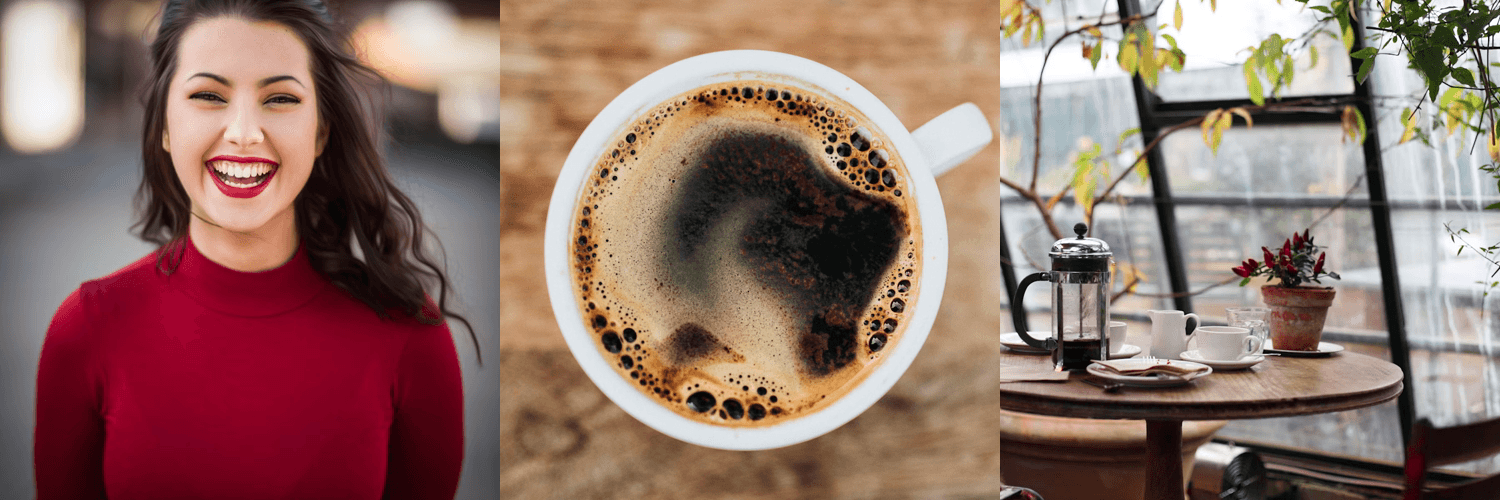
Tira de referencias de café en tres partes: identidad de la fundadora a la izquierda, detalle del producto de café en el centro y escena de cafetería con luz de ventana a la derecha
Tira de referencias del Paso 1: identidad, detalle de producto y luego escena y luz. Mantén esa secuencia al subir las imágenes y al escribir el prompt.
Elige Qwen Image 3.0 Pro Edit, sube las referencias en ese orden exacto, selecciona 4:5 y la resolución más alta disponible, solicita 1 resultado y fija la semilla 20260903. Antes de volver a ejecutar, comprueba si la persona, el delantal/el envase y la luz de la cafetería cumplieron cada uno su función asignada.
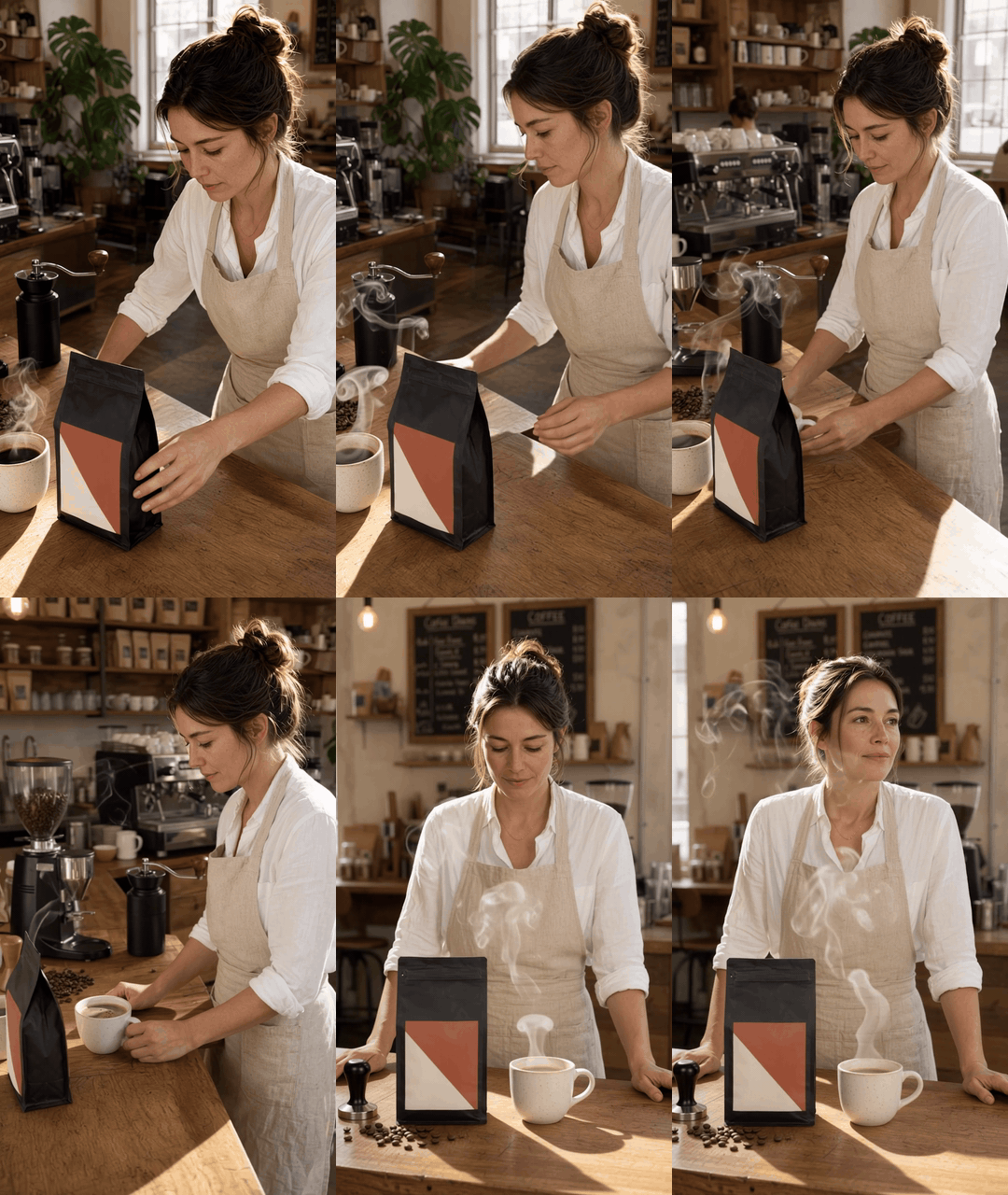
Estudio animado de campaña de café: la fundadora coloca el envase junto a una taza humeante mientras la cámara pasa de una vista alta de tres cuartos a una órbita lateral y a una vista a nivel de ojos del mostrador
Estudio de movimiento multiángulo del Paso 1: Gemini Omni Flash anima el fotograma de café aprobado en una sola acción continua de cafetería, pasando de un encuadre alto de tres cuartos a una órbita lateral y a una vista a nivel de ojos del mostrador. Úsalo para revisar si la fundadora, el envase, el equipo, el vapor y el entorno de la cafetería siguen siendo legibles mientras cambia el punto de vista.
Paso 2: reutiliza Qwen Image 3.0 Pro con múltiples imágenes de referencia para un lanzamiento de cuidado de la piel
Esta versión pone a prueba la restricción que más importa a un pequeño equipo de producto: la fundadora y el frasco real deben seguir siendo reconocibles. Usa una imagen de producto limpia y de frente. Evita una imagen de producto con un entorno de estilo de vida porque competiría con la referencia del baño de piedra.
plaintext1Create a refined 4:5 skincare launch image for a small founder-led brand. 2 3Image 1 is the identity anchor. Keep the founder’s face, hair, natural skin tone, and calm confident expression recognizable. 4Image 2 is the product anchor. Preserve the exact bottle silhouette, cap shape, label placement, and pale sage product color. Do not invent a second product. 5Image 3 is the environment anchor. Use its warm travertine surface, soft window light, and understated bathroom atmosphere. 6 7Show the founder holding the product with one hand near a stone vanity. The bottle must be fully visible and proportionate. Make a newly composed, high-end but believable lifestyle product photograph. Soft 85mm portrait lens look, realistic hands, subtle shadows, no duplicate fingers, no warped cap, no extra bottles, no invented logos or text.
Elige Qwen Image 3.0 Pro Edit con 3 referencias, 4:5, la resolución más alta disponible, 1 resultado y la semilla 20260904. Inspecciona la tapa, la silueta, la colocación de la etiqueta y la mano antes de juzgar la estética general. Esos detalles conllevan más riesgo comercial que una sombra de fondo ligeramente distinta.
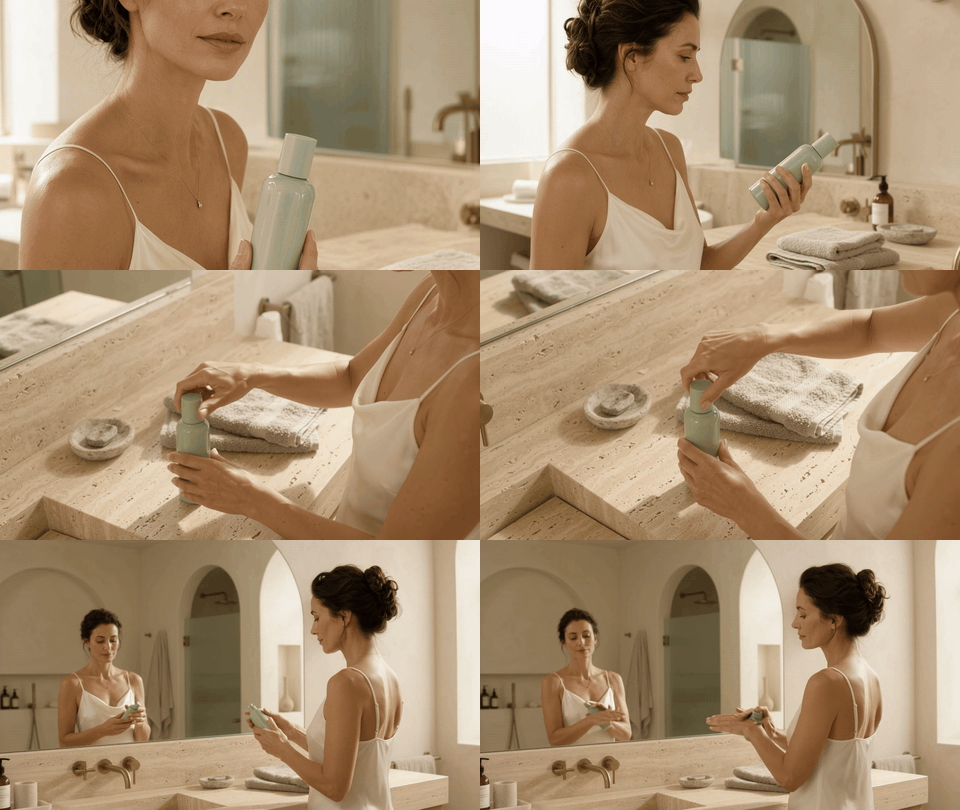
Estudio animado de la fundadora de cuidado de la piel: gira un frasco verde salvia con luz de ventana mientras la cámara pasa de una vista lateral a un ángulo alto del producto y a una vista más amplia del tocador
Estudio de movimiento del Caso 2: Gemini Omni Flash convierte el fotograma de cuidado de la piel seleccionado en una acción continua de producto, pasando de una vista lateral de la fundadora a un detalle alto del producto y luego a una composición más amplia del tocador. El frasco verde salvia pálido, la toalla de lino y el entorno cálido de travertino siguen siendo legibles por separado a través del cambio de punto de vista.
Paso 3: usa Qwen Image 3.0 Pro con múltiples imágenes de referencia para el re-pose de un personaje original
El caso del personaje marca la distinción más fuerte entre identidad y pose. La Imagen 2 solo necesita comunicar movimiento. Si contiene un rostro memorable, recorta ese rostro antes de subirla. Ese pequeño paso de preparación reduce la probabilidad de que la fuente de pose aporte su identidad en lugar de su geometría corporal.
plaintext1Create a cinematic 16:9 key art image for an original science-fiction adventure. 2 3Image 1 is the character identity anchor. Preserve the explorer’s original face, haircut, white-and-rust exploration suit, chest patch placement, and backpack silhouette. 4Image 2 controls body pose only. Use its stepping-forward body pose and head direction, but do not copy its face, clothing, or identity. 5Image 3 controls environment, palette, and light. Use its coral dust, blue dawn shadows, and distant rocky horizon. 6 7Show the original explorer stepping over a low red-rock ridge at dawn, looking toward a distant research beacon. Cinematic wide shot, crisp foreground character, layered atmospheric depth, physically believable suit seams and hands. New original composition. No extra limbs, no duplicated helmet, no text, no watermark.
Elige Qwen Image 3.0 Pro Edit, 3 referencias, 16:9, la resolución más alta disponible, 1 resultado y la semilla 20260905. Compara primero el resultado con la Imagen 1. El parche del pecho, el corte de pelo y la silueta del traje deben leerse como el personaje original. Luego comprueba si la Imagen 2 aportó solo la pose de paso hacia adelante.

Estudio animado del explorador: un explorador ficticio camina por una cresta de roca roja, escanea una baliza lejana con un dispositivo de campo y se revela en un amplio paisaje de amanecer
Estudio de movimiento del Caso 3: Gemini Omni Flash anima el fotograma del explorador con un travelling bajo que acompaña la caminata, un ángulo opuesto para el escaneo con el dispositivo de campo y una revelación amplia y elevada. El explorador ficticio, el traje blanco y óxido, el instrumento de campo, el terreno escalonado de roca roja, el amanecer azul y la baliza de investigación lejana permanecen conectados como una sola escena.
Variaciones de Qwen Image 3.0 Pro con múltiples imágenes de referencia que ahorran reintentos
Una vez que puedes asignar 3 roles, puedes cambiar qué rol tiene mayor peso. El método se mantiene estable. Solo cambian el orden de entrada y la declaración de prioridad.
| Variación | Prioridad de la Imagen 1 | Imagen 2 | Imagen 3 | Mejor uso |
| Prioridad a la identidad | Persona o personaje original | Vestuario o producto | Escena o luz | Campañas de fundadores y trabajo con personajes |
| Prioridad al producto | Packshot del producto | Persona sosteniéndolo | Escena o dirección de color | Páginas de producto donde lo más importante es la forma del frasco |
| Prioridad al estilo | Sujeto protagonista | Producto/detalle | Paleta, iluminación, medio | Series que necesitan una dirección de arte coherente |
| Rescate de pose | Identidad del personaje | Fuente de pose recortada al cuerpo | Entorno | Re-posar sin heredar el rostro del modelo de pose |
Para la prioridad al producto, coloca el packshot en la Imagen 1 y escribe “la Imagen 1 es el ancla de producto no negociable”. Para la prioridad al estilo, haz que la tercera imagen sea solo una referencia visual de luz, paleta y medio. No pongas a otra persona dominante en esa posición.
Cuando tengas demasiadas imágenes de referencia, crea una hoja de contactos deliberada. Úsala para varios ángulos del mismo personaje o producto, dejando suficiente espacio en blanco para que cada vista siga siendo distinta. Luego usa las 2 posiciones restantes para las otras funciones. Más entradas pueden generar más conflicto, así que dale al modelo un brief más pequeño y claro.
Coste, derechos y control de calidad antes de publicar
Trata cada generación como un borrador para una breve revisión de producción. Una inspección de 2 minutos evita el error habitual de publicar una imagen atractiva con un frasco incorrecto, una etiqueta alterada o una identidad de pose prestada.
- Haz zoom al 100% e inspecciona el rostro, las manos, los bordes del producto, la tapa y cualquier texto visible.
- Compara el resultado con las 3 entradas. Confirma que cada responsabilidad asignada aparece en el resultado.
- Si solo 1 elemento está mal, cambia solo esa instrucción en la siguiente ejecución. No reescribas todo el prompt y pierdas un resultado útil.
Usa solo imágenes que poseas, para las que tengas licencia o cuyo permiso de subida tengas. No des a entender que una persona real, el titular de una marca o un personaje protegido ha respaldado la imagen final. Atlas Cloud es simplemente un lugar directo para probar este flujo de edición Pro; no puede garantizar una fidelidad absoluta de identidad, producto o texto en cada resultado.
Para una campaña real, registra la configuración, la semilla, la cotización del resultado y los archivos de entrada exactos junto a la versión aprobada. Eso convierte el método de Qwen Image 3.0 Pro con múltiples imágenes de referencia de una solución puntual e inteligente en un proceso de equipo repetible.
Preguntas frecuentes
¿Cuántas imágenes de referencia puede usar Qwen Image 3.0 Pro?
El flujo de trabajo de edición Pro admite de 1 a 3 imágenes de referencia. Tres funcionan mejor cuando las imágenes tienen responsabilidades separadas: identidad, producto o vestuario, y escena o estilo.
¿Qué imagen debo subir primero en un flujo de trabajo con múltiples referencias de Qwen Image 3.0 Pro?
Coloca en la Imagen 1 aquello que no puedes permitirte perder. Para la mayoría de los trabajos con fundadores y personajes, esa es la imagen de identidad. Para un packshot estricto de ecommerce, haz que el producto sea la Imagen 1.
¿Por qué Qwen Image 3.0 Pro copia la referencia de pose en lugar de mi personaje?
La fuente de pose puede incluir señales de rostro, vestuario o silueta más fuertes de las que separa el prompt. Recórtala al cuerpo, escribe que solo controla la pose y conserva explícitamente la identidad de la Imagen 1.
¿Puedo combinar una persona, un producto y un fondo en un solo prompt?
Sí. Ese es el uso más claro del método de los 3 roles: una persona en la Imagen 1, el producto en la Imagen 2 y el fondo o la iluminación en la Imagen 3. Solicita una composición nueva en lugar de un collage.
¿Vale la pena pagar más por una resolución más alta en Qwen Image 3.0 Pro?
Usa la opción más alta cuando necesites inspeccionar los bordes del envase, las manos, el detalle del rostro o recortar la imagen para redes sociales de pago. Revisa la cotización en vivo antes de Run porque el precio inicial del catálogo público no ofrece un desglose público separado por resolución.
¿Qué hago si tengo más de 3 imágenes de referencia?
Combina las vistas relacionadas en una hoja de contactos limpia o usa 2 pasadas. No fuerces todas las imágenes en una sola instrucción. Una jerarquía clara produce resultados más útiles que una pila más grande de referencias.





