In the old story, putting a girl in rags into the best dress at the ball took a fairy godmother. The 2026 version takes an upload button. An AI outfit swap runs the same change on ordinary photos: you upload a picture, describe what the person should be wearing, and an image editing model redraws the clothing while leaving the face, pose, and background alone. The shot where everything works except the clothes, the hoodie where a blazer should be, stops being a loss.
This guide covers how outfit swap AI works under the hood, a free tool you can test in a browser today, the API route when one photo at a time stops being enough, and the photo habits that separate a clean swap from an obvious one. And the demo running through it takes the story literally: a patched work dress in, a ball gown out.

Key Takeaways
- AI outfit swap tools replace the clothing in a photo from a text description or a reference image, with no manual cutting or masking.
- Free Change Clothes AI is a free way to swap outfits in a photo, straight from the browser with no software install.
- Heavier jobs like batch product photos or exact garment transfers can run through Atlas Cloud's image editing models via API.
- Input quality decides output quality: a front-facing pose, minimal occlusion, and a specific head-to-toe clothing description go a long way.
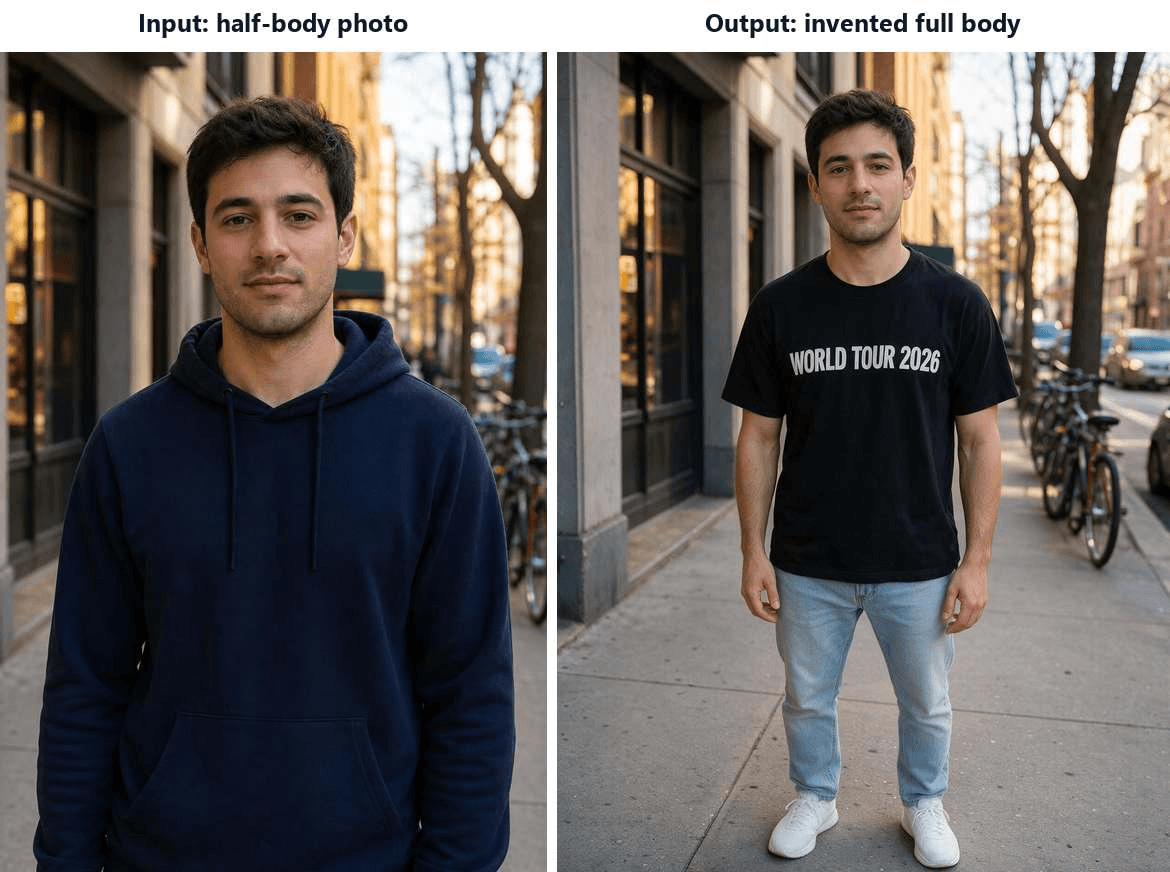
- The riskiest requests are hands overlapping fabric and clothing the photo does not show: in our test, a half-body input plus a full-outfit description made the model invent a lower body with off proportions.
What Outfit Swap AI Actually Does
Strip away the branding and nearly every outfit swap AI on the market does the same job. It treats clothing as a region to regenerate and everything else as a region to protect. You hand the model a photo and an instruction; it locates the garment, renders new clothing to match, and blends the result back so lighting and shadows still agree with the scene.
Two input styles dominate. Description-based tools take a sentence, something like "a navy double-breasted suit over a light blue shirt," and invent the garment from text. Reference-based swaps take a second image and transfer the actual garment from it onto your subject. The first is faster to use. The second is what e-commerce teams reach for, because the exact product has to survive the trip.
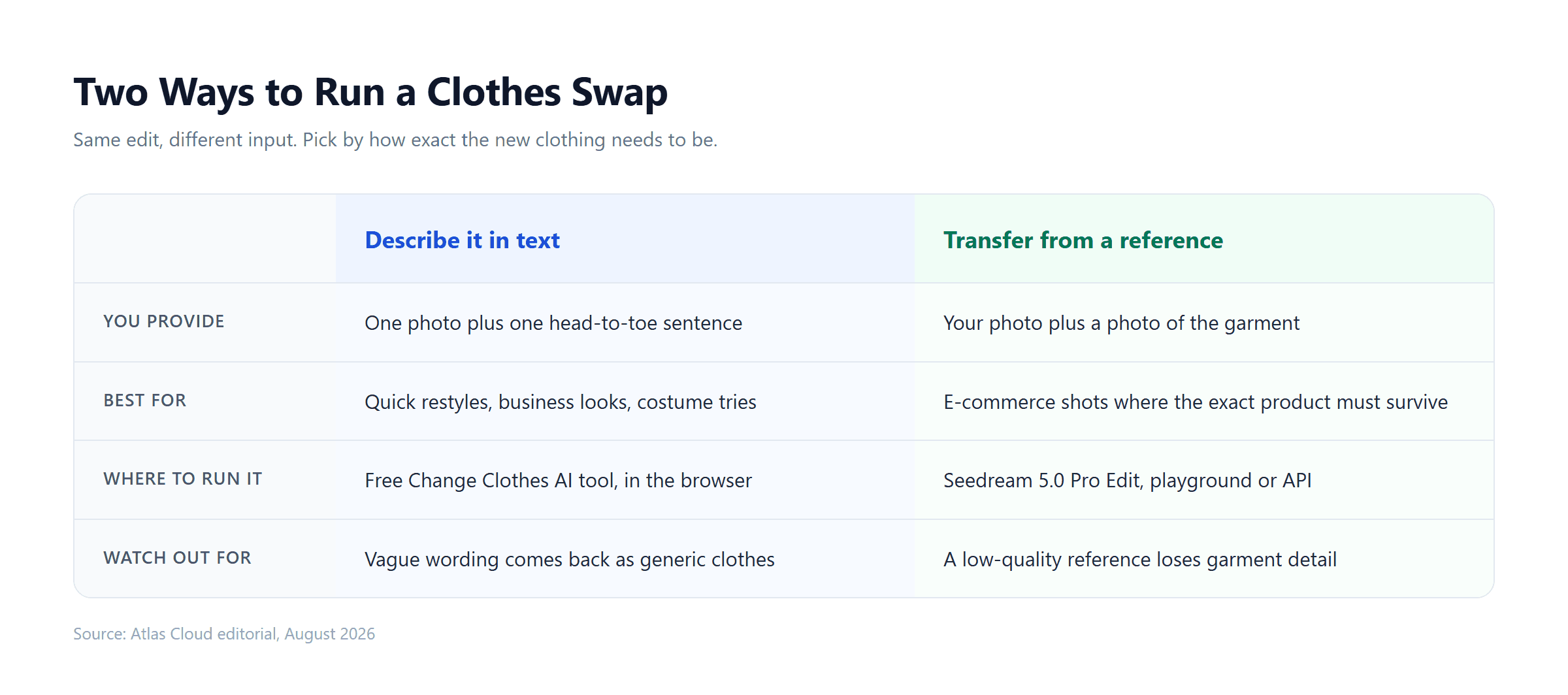
One naming mix-up worth clearing before going further: face swap tools run the opposite edit, changing the face and keeping the clothes. Everything in this guide is about the other direction: an outfit swapper keeps the person and rewrites the clothing.
Try an AI Outfit Swap Free, Straight From the Browser
Before spending anything on credits or an API key, run one AI outfit swap free and judge the output with your own eyes. Atlas Cloud is a hosting platform for image and video models, and its Free Change Clothes AI tool packages the whole workflow into a single page: upload a photo, type the outfit, press Run Free.
The scope is stated plainly on the page: "Clothing is the only thing redrawn, so your features and hairstyle stay put." A run takes around 40 seconds by the tool's own figure, and the result comes back at 1328 by 1776 pixels with no watermark.
That makes it a low-stakes way to answer the only question that actually matters here: does the output look like clothing that was photographed, or clothing that was pasted on?
How to Swap an Outfit in a Photo, Step by Step
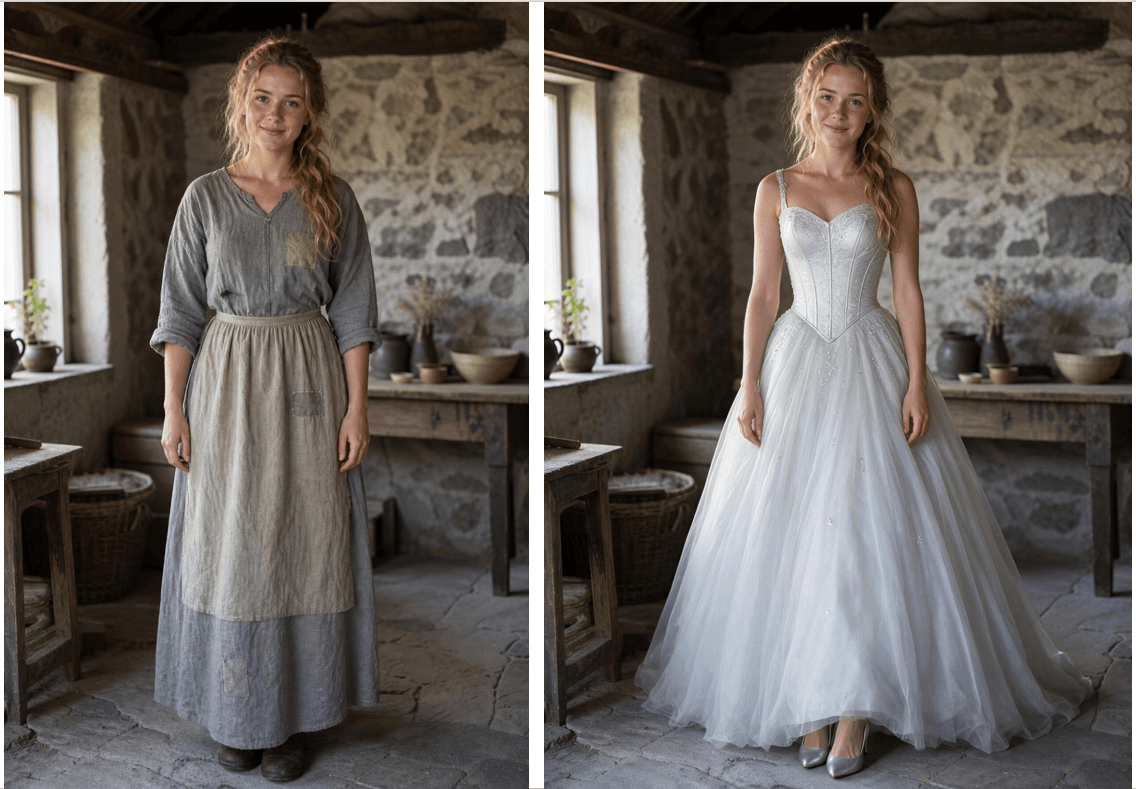
The worked example below is the one the headline promised, Cinderella's dress change. The whole outfit swap flow takes about two minutes end to end:
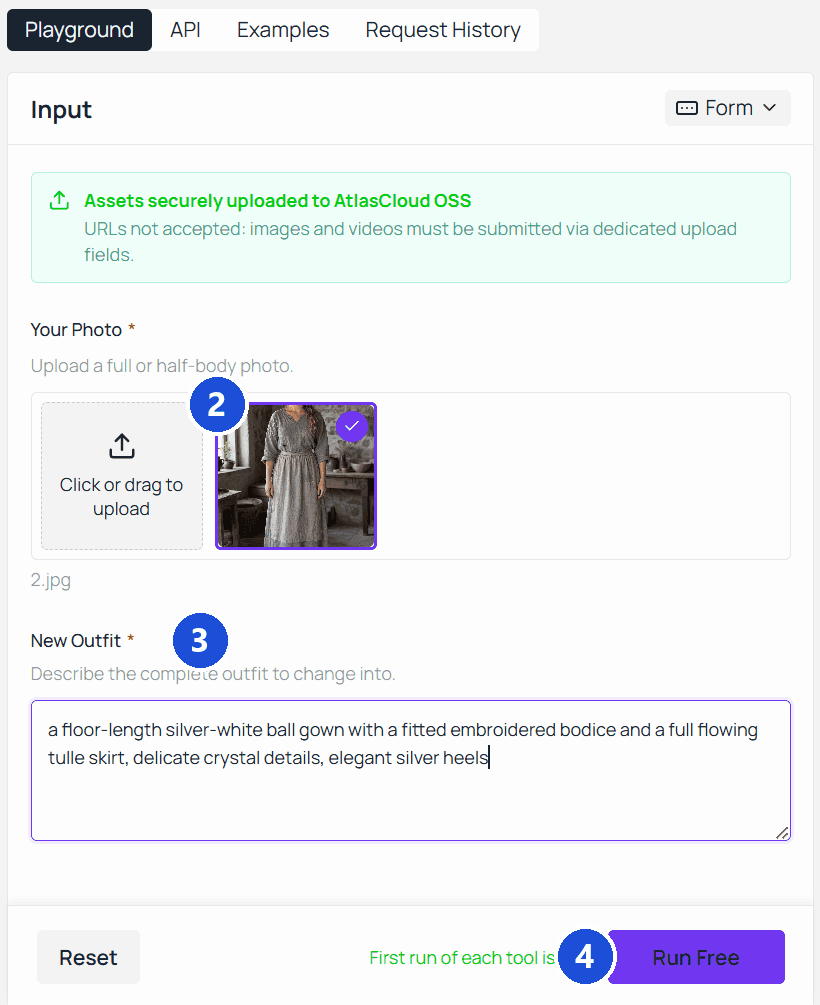
- Pick the right photo. A clear half-body or full-body shot, facing the camera, with the current clothing fully visible. JPG, PNG, or WebP, up to 10MB.
- Upload it. Drag the file onto the page or click to browse.
- Describe the outfit head to toe. One complete sentence covering every visible piece. For our test: "a floor-length silver-white ball gown with a fitted embroidered bodice and a full flowing tulle skirt, delicate crystal details, elegant silver heels."
- Run and compare. A slider lets you sweep between the original and the swap to check edges, hands, and hairline.
- Download. The file saves without a watermark at full resolution.
If the first result misses, the fix is almost always in step 3.
Need Batch Output or an API? Go Straight to the Model
The browser tool covers the single-photo case. The moment you need fifty product shots restyled, a fixed output size, or an exact garment moved from a reference photo onto a model, you want the model underneath. Atlas Cloud's AI tools sit on the same stack as its model catalog, and for clothing edits the strongest current fit is Seedream 5.0 Pro Edit.
Two capabilities make it the pick for this job. It accepts up to 10 reference images per request and resolves instructions across them; the dress-from-image-2 pattern quoted in the playground walkthrough below comes straight from the model's own documentation. And it is tuned to hold identity, lighting, and color tone steady while making the edit, which is precisely the requirement an outfit change lives or dies by. For how it compares with its closest rival on general editing work, see our Seedream 5 Pro vs Nano Banana 2 test.
Pricing is tiered by output resolution. Checked against the platform's own price calculation endpoint on August 21, 2026, with no promotion running: $0.045 per image up to about 2.36 million output pixels, the tier that covers 1328 by 1776, and $0.09 per image above that, up to 2048 by 2048. The first reference image is included in the base price; each additional one adds $0.003. A two-reference garment transfer at full 2K therefore lands at $0.093.
Test the Swap in the Seedream 5.0 Pro Playground
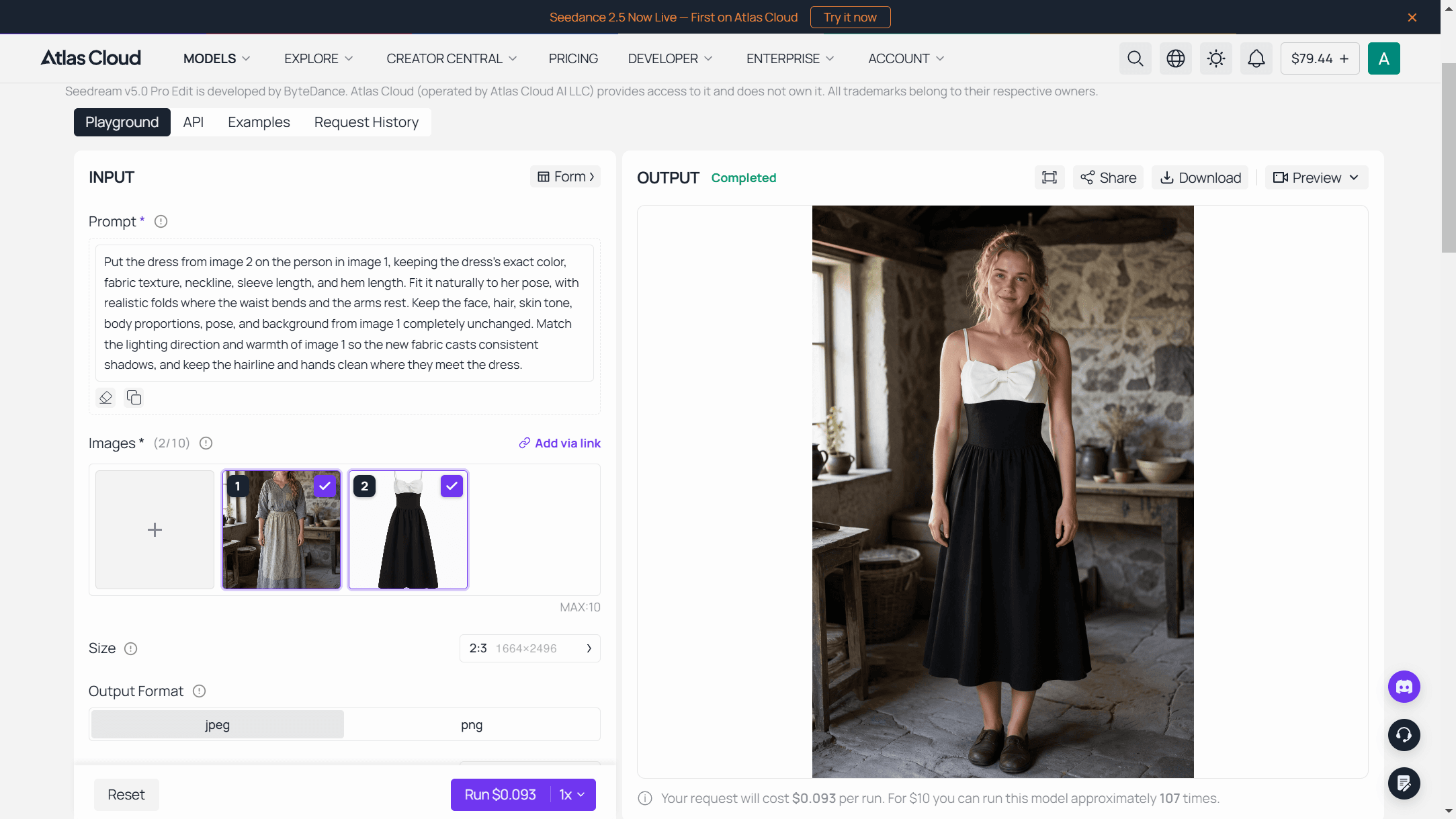
The model page linked above doubles as a no-code lane. Open its playground, load two references, your photo and the garment photo, and write the instruction the way you would brief a person. The one we use for transfers:
Put the dress from image 2 on the person in image 1, keeping the dress's exact color, fabric texture, neckline, sleeve length, and hem length. Fit it naturally to her pose, with realistic folds where the waist bends and the arms rest. Keep the face, hair, skin tone, body proportions, pose, and background from image 1 completely unchanged. Match the lighting direction and warmth of image 1 so the new fabric casts consistent shadows, and keep the hairline and hands clean where they meet the dress.
Pick an output size, and the metered price for that exact request shows next to the Run button before you commit anything. That makes the playground the right place to validate a transfer on a handful of shots before any code gets written.
Call the Outfit Swap API From Your Own Code
Once the playground result holds up, production is three steps.
Step 1: Create an API key. Generate one in the Atlas Cloud console and keep it server-side. The same key reaches every model on the platform.

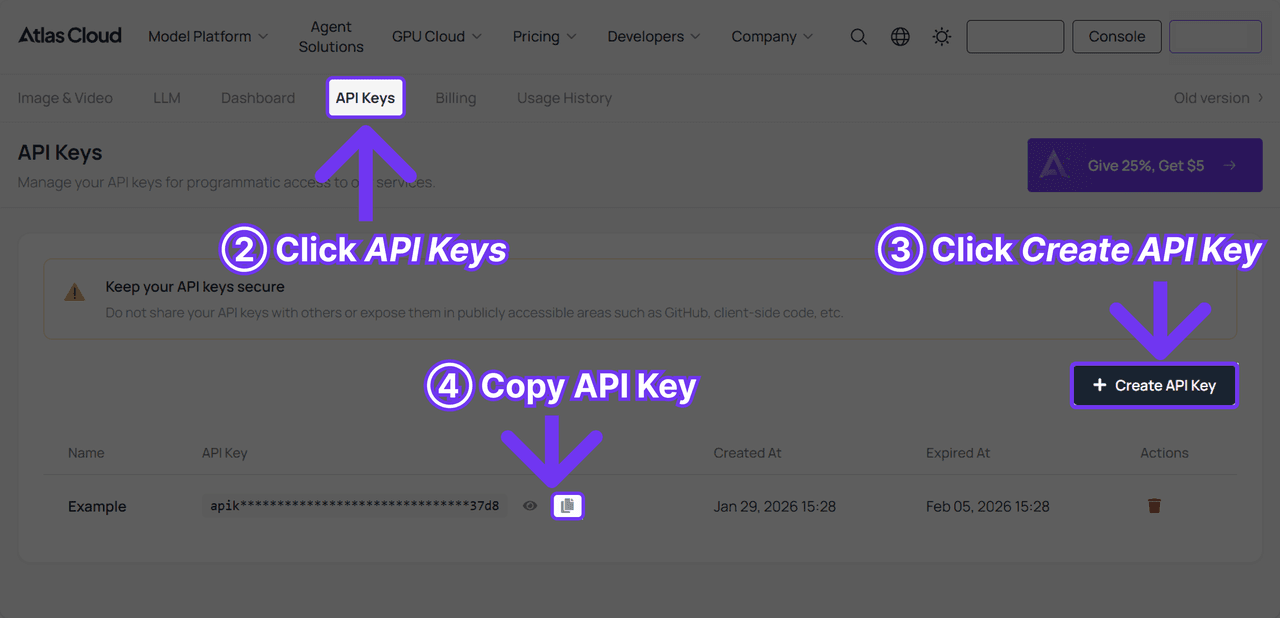
Step 2: Check the request shape. Authentication and the polling contract live in the API documentation. The model page also carries an API tab next to the playground, so the request shape is one click from where you tested it.
Step 3: Send the request and poll. Submission is asynchronous and hands back a prediction id.
plaintext1curl -X POST https://api.atlascloud.ai/api/v1/model/generateImage \ 2 -H "Content-Type: application/json" \ 3 -H "Authorization: Bearer $ATLASCLOUD_API_KEY" \ 4 -d '{ 5 "model": "bytedance/seedream-v5.0-pro/edit", 6 "prompt": "Put the jacket from image 2 on the person in image 1. Keep the face, hair, pose, and background unchanged.", 7 "images": [ 8 "https://your-cdn.com/model-shot.jpg", 9 "https://your-cdn.com/garment.jpg" 10 ], 11 "size": "1328*1776" 12 }'
Poll the prediction until status reads completed, at which point the hosted image URL appears in outputs.
What an AI Outfit Swapper Handles Well (and Where It Slips)
Solid fabrics and standard silhouettes are the safe territory. A shirt change into a plain oxford, a dress change into a cocktail dress or a full ball gown, a swap uniform request into scrubs or a chef's whites: requests like these come back with correct drape and lighting that agrees with the scene. Business restyles are dependable enough to power a whole adjacent product category; selfie to headshot converters run this same clothing rewrite with a fixed prompt, plus a backdrop change on top.
The slips cluster in predictable places, though our own test run added a twist:
- Asking for clothing the photo does not show. We uploaded a half-body shot and described a full outfit, t-shirt, jeans, and sneakers. The model obliged by inventing an entire lower body, and the proportions came back visibly off: short legs under a full-size torso. Describe only what the frame contains, or start from a full-body photo.
- Hands overlapping clothing. Fingers resting on a lapel or tucked into a pocket sit in the regeneration zone, and they can come back merged with the fabric.
- Complex patterns across seams. Plaids and stripes may not line up where panels of the garment meet.
- Printed text and logos. The classic image-model weakness, and still worth checking on every run. Honest report from the same test, though: the lettering we requested, WORLD TOUR 2026, came back sharp and legible. Treat text as a spot check, not a guaranteed failure.
Quick reality check: none of these are fixed limits. They are the spots to inspect with the comparison slider before you download, and most respond to a cleaner input photo or a description scoped to what the photo shows.
Tips for a Cleaner Outfit Swap
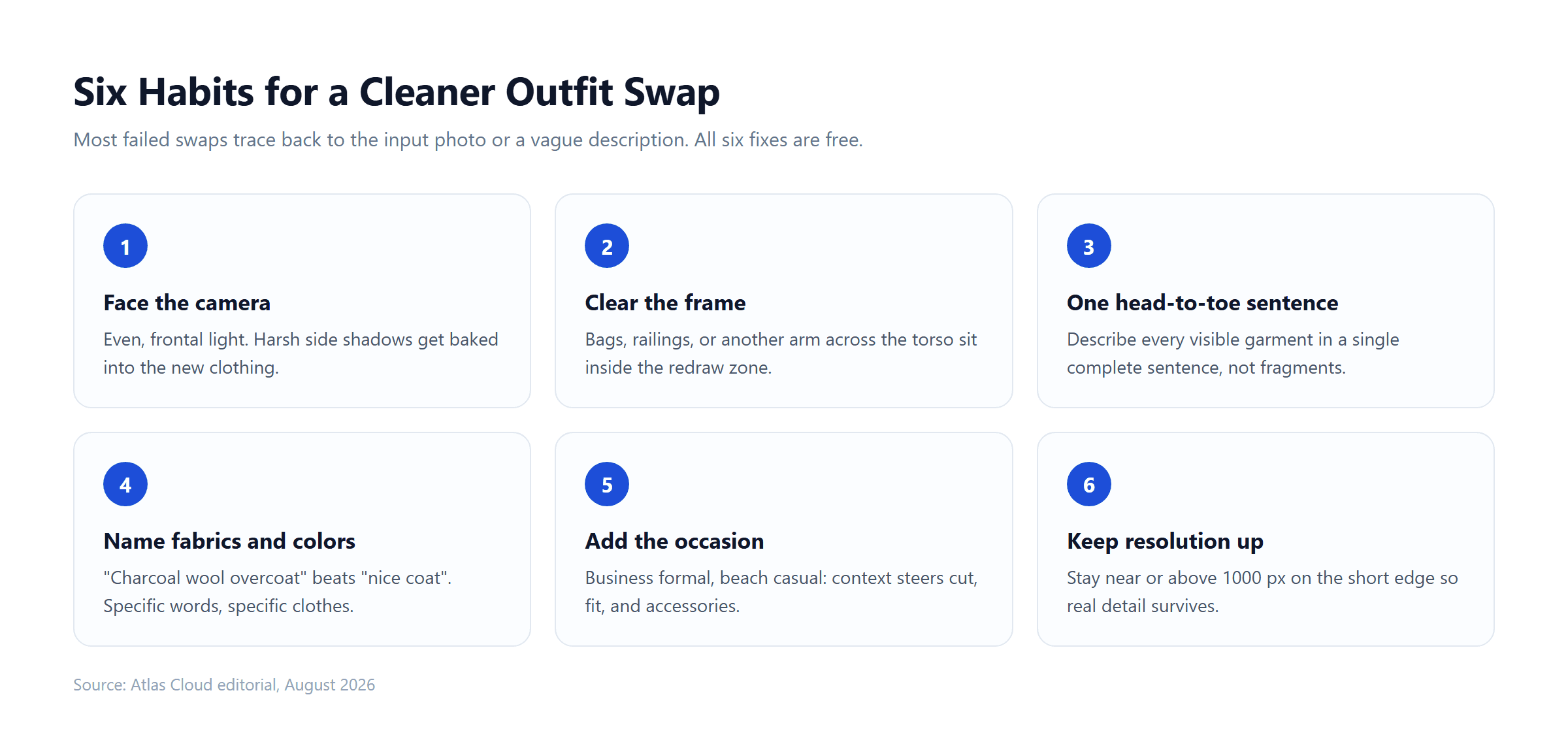
Most disappointing results trace back to the input, and the input is the one thing fully in your control. Six habits raise the hit rate of any outfit swap, on the free tool and through the API alike:
- Face the camera in even light. Harsh side shadows get baked into the new clothing and rarely look right.
- Clear the frame. Bags, railings, or another person's arm crossing the torso all sit inside the region the model redraws.
- Write one head-to-toe sentence. Anything you leave undescribed gets invented, so cover every visible garment in a single pass.
- Name fabrics and colors. "Charcoal wool overcoat" beats "nice coat"; specific words come back as specific clothes.
- Add the occasion. Words like business formal or beach casual push cut, fit, and accessories in a consistent direction.
- Keep resolution up. Stay near or above 1000 pixels on the short edge so the model has real detail to work from.
Frequently Asked Questions
Is there a free AI outfit swapper online?
Yes. The Free Change Clothes AI tool on Atlas Cloud runs an outfit swap in the browser at no cost and returns a full-resolution 1328 by 1776 image with no watermark. Nothing to install, and by the tool page's own wording the free output comes at the same full resolution as any paid run, so what you see is what the platform's editing models actually produce.
Does AI outfit swap work for men's clothing?
Yes. The workflow has no gender setting; the model renders whatever the description asks for, so suits, streetwear, traditional dress, and workwear are all reachable from the same input box. Reference-based transfers through the API are equally indifferent to whose wardrobe the garment comes from.
Is there an outfit swapper app to download?
The tools covered in this guide are web-based, so a phone browser gets you the same result as a desktop one. That works in your favor: no installation, no storage cost, and updates land server-side without you doing anything.
Can an outfit swap change just the shirt and keep everything else?
Yes, and the trick is to scope the instruction. Ask for "replace only the t-shirt with a white oxford shirt, keep the jeans and shoes unchanged" and the edit region shrinks accordingly. A narrower request leaves less surface area for errors, which is why a targeted shirt change often looks cleaner than a full costume change.
What kind of photo works best for an outfit switch?
A sharp, front-facing, evenly lit shot where the current outfit is fully visible and nothing crosses in front of it. Keep hands away from the clothing if you can, and start from the highest-resolution file you have rather than a compressed re-save.
Conclusion
The story this article opened with needed magic to change one dress. Ten years ago the photo version still meant an afternoon of pen-tool paths and cloned shadows. Today the same result is a forty-second browser run. The mechanics are worth keeping in mind because they tell you where to look: the model redraws clothing and protects everything else, so judge any result at the boundaries, the hairline, the hands, and wherever a pattern meets a seam.
Start with the free run on a photo you already like, and write the outfit as one specific head-to-toe sentence. If the output holds up and your needs outgrow single photos, the same edit is one POST away through Seedream 5.0 Pro Edit at a metered price per image. Either way, the deciding input of an ai outfit swap is the sentence you type: describe the clothes precisely, check the seams honestly, and keep the download that passes.