Most Kling videos fail at the prompt, not the model. As one creator put it in a r/generativeAI thread, "The prompt guide I wish existed when I started making AI videos", Kling "handles camera movement well, but it needs explicit instruction," and vague direction like "cinematic movement" produces inconsistent results. This Kling AI video prompt guide gives you the official formula, copy-paste examples, the exact character limit, and the camera language that turns guesswork into repeatable shots.
Key Takeaways
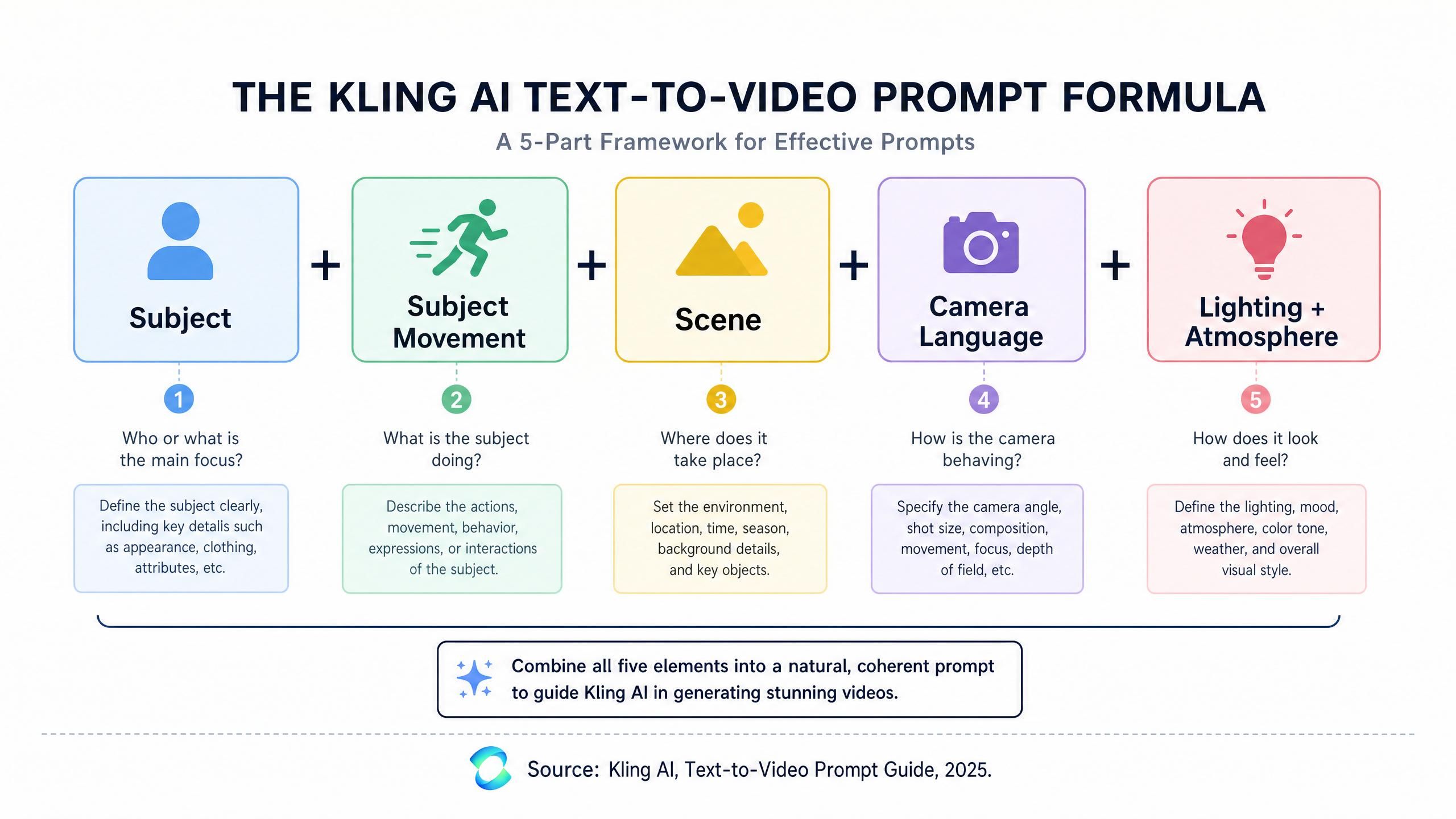
- Kling's official prompt formula is Subject + Subject Movement + Scene + (Camera Language + Lighting + Atmosphere) (Kling AI, 2025).
- The Kling API caps both the prompt and negative prompt at 2,500 characters each (Kling API documentation, 2026).
- Vague camera direction is the top cause of inconsistent output; explicit terms like "slow dolly-in" fix it.
- Developers can templatize this formula and call it per second through the Atlas Cloud API.
Kling AI Video Prompt Guide: The Core Formula
Kling's official Text-to-Video prompt guide defines the prompt formula as Subject + Subject Movement + Scene + (Camera Language + Lighting + Atmosphere). Nail those five parts and most consistency problems disappear before you ever touch the model.
Here's where this guide goes beyond the official one. Kling's page gives you the formula and stops there. This article adds the parts creators actually get stuck on: the precise character limit, the explicit camera language that fixes vague prompts, a copy-paste example library, and how to automate the whole thing through an API. The formula is the foundation; the rest is what makes it repeatable.
Kling AI Video Generation Prompt Guidelines: The 5 Building Blocks
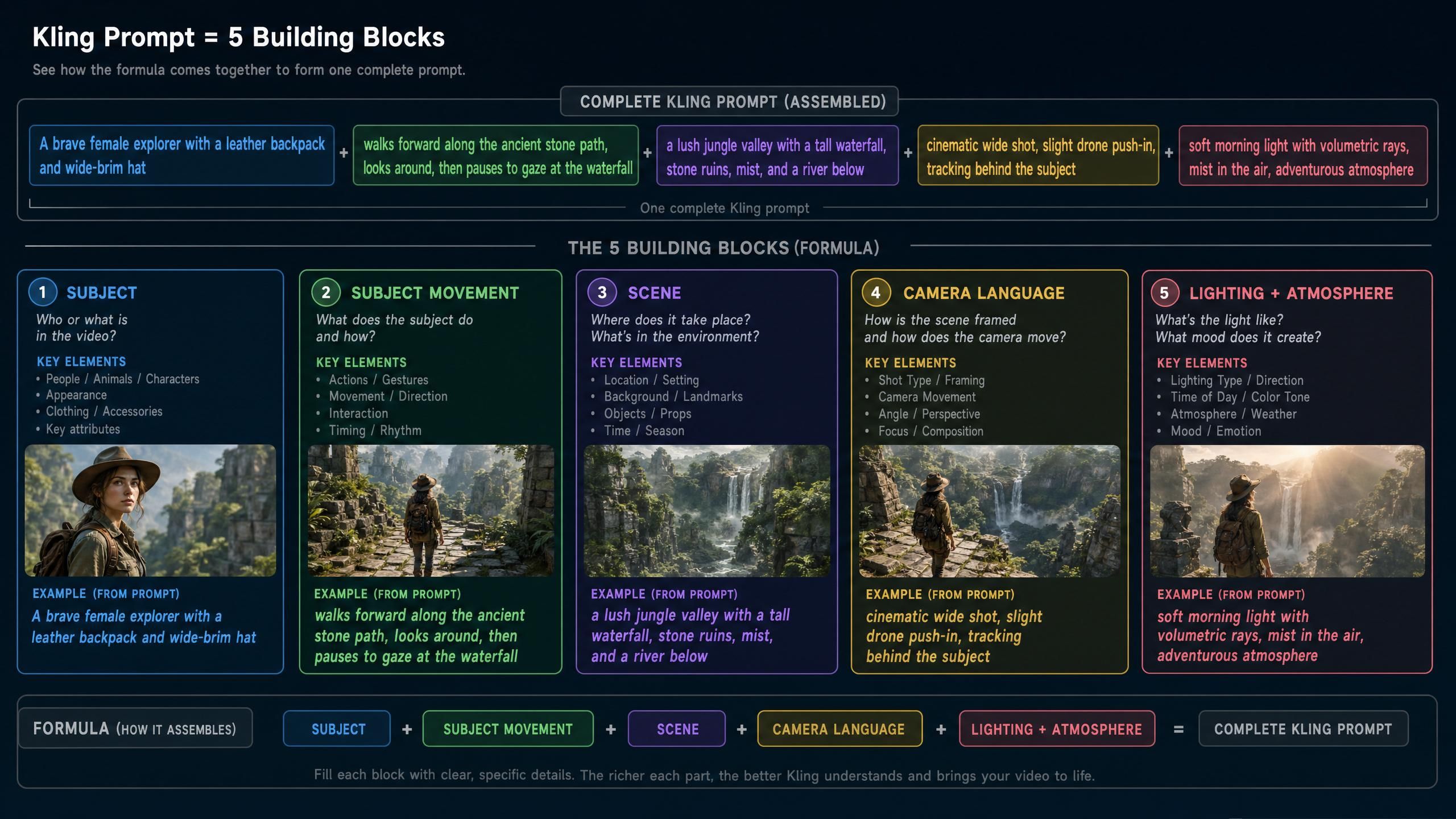
The Kling AI video generation prompt guidelines come down to five building blocks, each answering one question about the shot (Kling AI, Text-to-Video Prompt Guide, 2025). Kling describes Camera Language as "the various applications of the camera lens" and Lighting as the "light and shadow" that imbue a shot with mood. Fill all five and the model has nothing left to guess. To see these five blocks drive a full generation from scratch, our Kling AI text to video guide walks through building a cinematic clip prompt by prompt.
| Building block | What it answers | Example fragment |
|---|---|---|
| Subject | Who or what is on screen | A weathered fisherman in a yellow raincoat |
| Subject Movement | What the subject does | hauls a net over the boat's edge |
| Scene | Where and when | on a storm-lit pier at dawn |
| Camera Language | How the camera moves | slow dolly-in, low angle |
| Lighting + Atmosphere | Mood and light | cold backlight, heavy rain, cinematic |
Kling's own example takes a bare line, "A giant panda is reading a book in a café," and enriches it with movement, scene, camera, and light until it reads like a shot list (Kling AI, Text-to-Video Prompt Guide, 2025). That enrichment is the whole job.
What Is the Kling AI Prompt Character Limit?
According to the Kling API documentation, the Kling AI prompt character limit is 2,500 characters for the prompt, with a separate 2,500 characters for the negative prompt. That is generous, roughly 400 to 500 words, so the limit is rarely the real constraint. Clarity is.
Watch the limit: If a request fails or truncates, check that neither field exceeds 2,500 characters. Longer is not better, a focused 60-to-100-word prompt built on the formula almost always beats a 2,000-character wall of adjectives the model cannot prioritize.
So treat 2,500 as a ceiling, not a target. Spend your characters on the five building blocks and explicit camera language, then stop. Different Kling versions also handle long prompts and clip length differently, so it helps to know the Kling AI video length limit → per-version clip and extend caps before planning a sequence.
Kling AI Image to Video Prompt Guide
An effective Kling AI image to video prompt guide starts with one rule: describe the action and the camera, not the picture. With image-to-video, the model already sees your starting frame, so repeating "a woman in a red dress" wastes characters. Spend them on what moves and how the camera behaves instead.
For image-to-video, drop the Subject and Scene description that the image already supplies, and lead with Subject Movement plus Camera Language. A prompt like "she turns toward the window, slow push-in, hair lifting in the breeze" gives Kling exactly the new information it needs. Keep the same formula discipline, just shift the weight toward motion. If your goal is to keep one character identical across many of these shots, our Kling 3.0 character consistency guide → reference images and Character ID covers the reference workflow in depth. For the full animation workflow around these prompts, our Kling AI image to video guide covers uploading your base asset and directing the camera from a single photo.
Fixing Vague Prompts With Explicit Camera Language
The single biggest fix, echoing the Reddit complaint, is replacing vague direction with explicit camera language. "Cinematic movement" means nothing to the model; "slow dolly-in" means something specific. The table below translates the fuzzy phrases creators reach for into terms Kling can actually execute.
| Vague phrase | Explicit camera language |
|---|---|
| Cinematic movement | Slow dolly-in, shallow depth of field |
| Make it dynamic | Fast whip-pan following the subject |
| Nice angle | Low-angle tracking shot, 35mm |
| Zoom around it | Orbit left, smooth 180-degree arc |
| Add some motion | Handheld push-in with subtle shake |
Why does this work? Camera language maps to real cinematography the training data understands, while mood words do not. Pair it with a negative prompt to remove what you do not want, for example "blurry, distorted face, warped hands, sudden cut, flicker." Precision in, precision out. When you need movement that matches a real performance rather than a described one, our Kling AI motion control guide explains how to transfer motion and expressions from a reference video.
Kling AI Video Generation Prompt Examples: Cinematic and Dynamic
These Kling AI video generation prompt examples are built on the formula and ready to paste, then swap in your own subject. The set below covers the kling ai prompt examples cinematic dynamic searchers want most, plus a few other common shot types.
Cinematic
A lone astronaut walks slowly across a red desert, vast dunes stretching to the horizon at golden hour, slow dolly-in, low angle, warm backlight, shallow depth of field, cinematic, 35mm film grain.
Dynamic / action
A motorcyclist races down a rain-soaked neon street, weaving between cars, fast tracking shot following from the side, splashing water, reflections, high shutter speed, energetic, night.
Portrait
A young woman laughs and brushes hair from her face, cozy sunlit cafe behind her, slow push-in to a close-up, soft window light, warm tones, gentle bokeh, intimate.
Landscape / nature
Morning mist rolls over a pine valley as the sun crests the ridge, a slow aerial drone push forward, cool-to-warm light transition, volumetric god rays, serene, wide establishing shot.
Product
A glass perfume bottle rotates slowly on a reflective surface, studio seamless background, smooth 180-degree orbit, soft key light with rim highlight, clean, premium, macro detail.
Stylized / anime
A swordsman leaps from a rooftop under a full moon, cape billowing, dramatic tilt-up following the jump, cel-shaded anime style, rim lighting, dynamic, high contrast.
Slow-motion / macro
A single water droplet falls into a still black pool, extreme macro, ultra slow motion, concentric ripples spreading, soft top light with specular highlights, minimal, high detail.
Vlog / talking-head
A friendly chef speaks to the camera while plating a dish, modern kitchen behind, locked-off medium shot with a subtle push-in, soft natural window light, warm, approachable.
Fantasy / establishing
A floating castle drifts above a sea of clouds at sunset, slow aerial orbit revealing its towers, volumetric light, epic scale, warm rim light, cinematic wide establishing shot.
To turn examples like these into a finished film grade sequence, our cinematic Kling 3 video tutorial shows how to chain shots into a polished narrative.
Automating Kling AI Video Prompts With the API
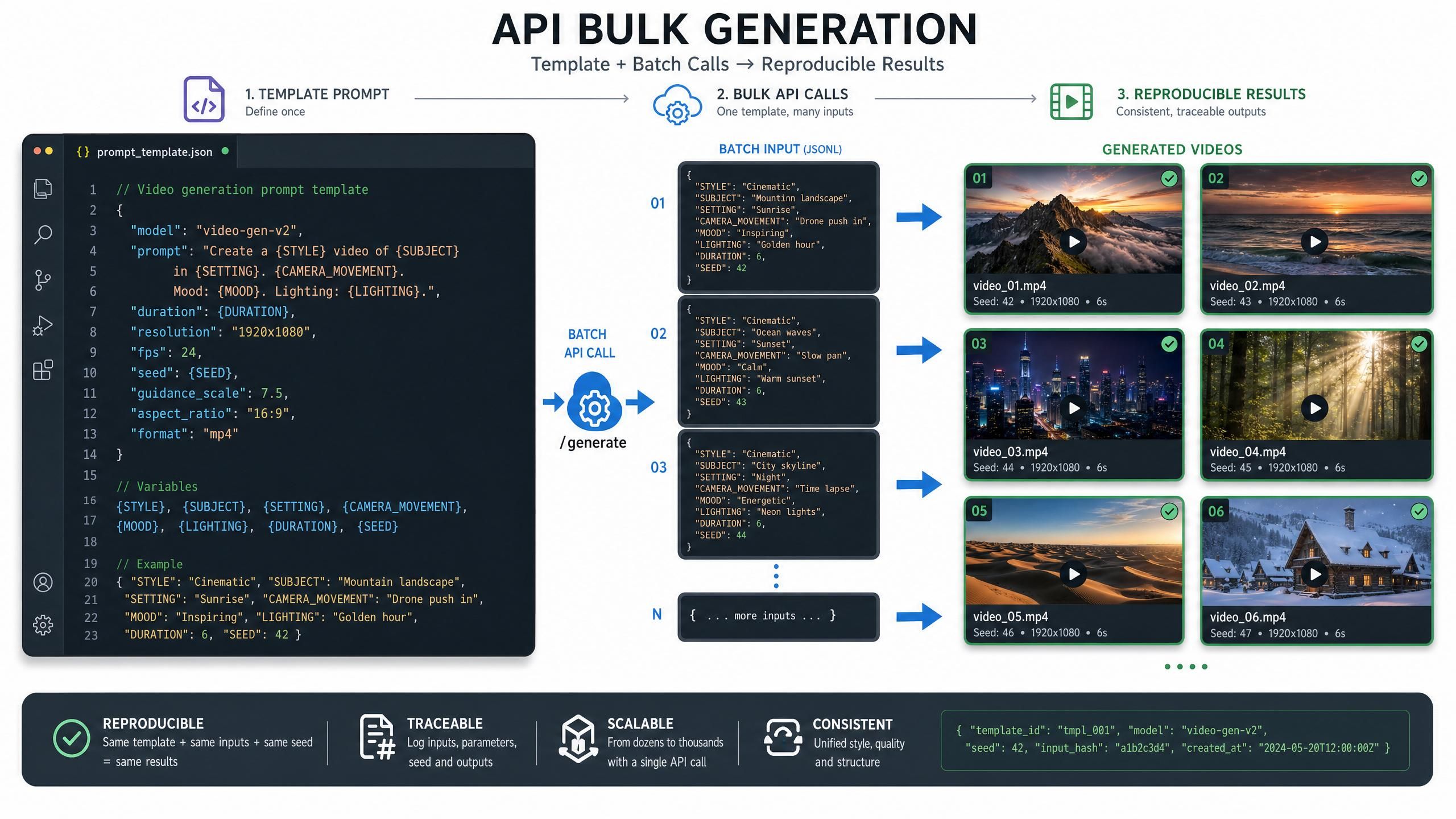
Once your prompts follow a formula, they become templates you can fill and fire programmatically. That is where an API beats clicking the web app shot by shot. Atlas Cloud's catalog includes Kling 3.0 among 300-plus models you can call with per-second billing, so a formula-driven batch costs the same at any hour.
The video API takes the same formula prompt you would type by hand. Build the string, send it, and poll for the result:
plaintext1curl -X POST https://api.atlascloud.ai/api/v1/model/generateVideo \ 2 -H "Authorization: Bearer $ATLAS_API_KEY" \ 3 -H "Content-Type: application/json" \ 4 -d '{ 5 "model": "kling-v2.0", 6 "prompt": "A lone astronaut walks across a red desert, slow dolly-in, golden hour backlight, shallow depth of field, cinematic" 7 }' 8# Add an "image_url" field to make it image-to-video. Swap "model" for any catalog video model. 9 10# Poll for the finished video 11curl https://api.atlascloud.ai/api/v1/model/prediction/PREDICTION_ID \ 12 -H "Authorization: Bearer $ATLAS_API_KEY"
Because the prompt is a filled template, every call in a batch stays consistent, which is exactly what hand-typing struggles to do. Teams running many renders can compare cost and quality across the video model lineup on Atlas Cloud and wire the formula into their own pipeline.
Frequently Asked Questions
How do I write good prompts for Kling AI?
Follow Kling's formula: Subject + Subject Movement + Scene + Camera Language + Lighting and Atmosphere (Kling AI, Text-to-Video Prompt Guide, 2025). Replace vague words like "cinematic" with explicit camera terms such as "slow dolly-in," and add a negative prompt to remove artifacts.
What is the Kling AI prompt character limit?
Kling's API limits the prompt to 2,500 characters and the negative prompt to a separate 2,500 characters (Kling API documentation, 2026). That is around 400 to 500 words, so focus on clarity, a tight 60-to-100-word prompt usually outperforms a maxed-out one.
What are the 5 P's of prompting?
The "5 P's of prompting" is a popular mnemonic, but it is not standardized and the exact words vary by source, so it is not something to rely on for video. For Kling specifically, use its own verified five-part structure instead: Subject, Subject Movement, Scene, Camera Language, and Lighting with Atmosphere.
How is an image to video prompt different?
In a Kling AI image to video prompt guide the rule is to describe motion and camera, not the picture. The model already has your starting frame, so lead with what moves ("she turns, slow push-in") instead of restating the subject and scene the image already shows.
Why are my Kling videos inconsistent?
Usually the prompt is too vague. As creators note on Reddit, Kling needs explicit instruction; "cinematic movement" produces inconsistent results while "slow dolly-in, low angle" does not. Use precise camera language, keep prompts focused, and reuse a fixed formula across shots.
Conclusion
A good Kling prompt is engineering, not poetry. Start with the formula, Subject, Subject Movement, Scene, Camera Language, and Lighting, stay inside the 2,500-character limit, and trade vague mood words for explicit camera language. Steal the examples above, adapt them to your subject, and you'll cut the trial-and-error that frustrates most creators. For teams generating at volume, per-second access to Kling and other video models on Atlas Cloud's model pricing lets you turn this formula into an automated, repeatable pipeline. If you want to see where prompting fits within the wider platform, our complete Kling AI guide covers every feature and model from start to finish.







