

Kling AI is a text-to-video and image-to-video generator built by Kuaishou, the Chinese short-video company. It creates short, high-motion video clips from written prompts or still photos, with strong physics simulation and character consistency. In 2026, Kling sits among the most capable consumer video models, competing directly with Runway, Luma, and Google Veo.
This guide is the hub for everything Kling. Below you'll find how the models evolved, what each one costs, how to actually make a video, and where the content limits sit. Whether you're picking a plan or choosing between Kling 3.0 Turbo and the full Omni engine, start here and follow the links into the deeper guides.
Key Takeaways
- Kling AI generates video from text or images, with a free tier and paid plans reaching roughly $130 per month.
- Kling 3.0 Turbo and Omni launched on June 17, 2026, adding 4K editing, longer clips, and the Omni One engine.
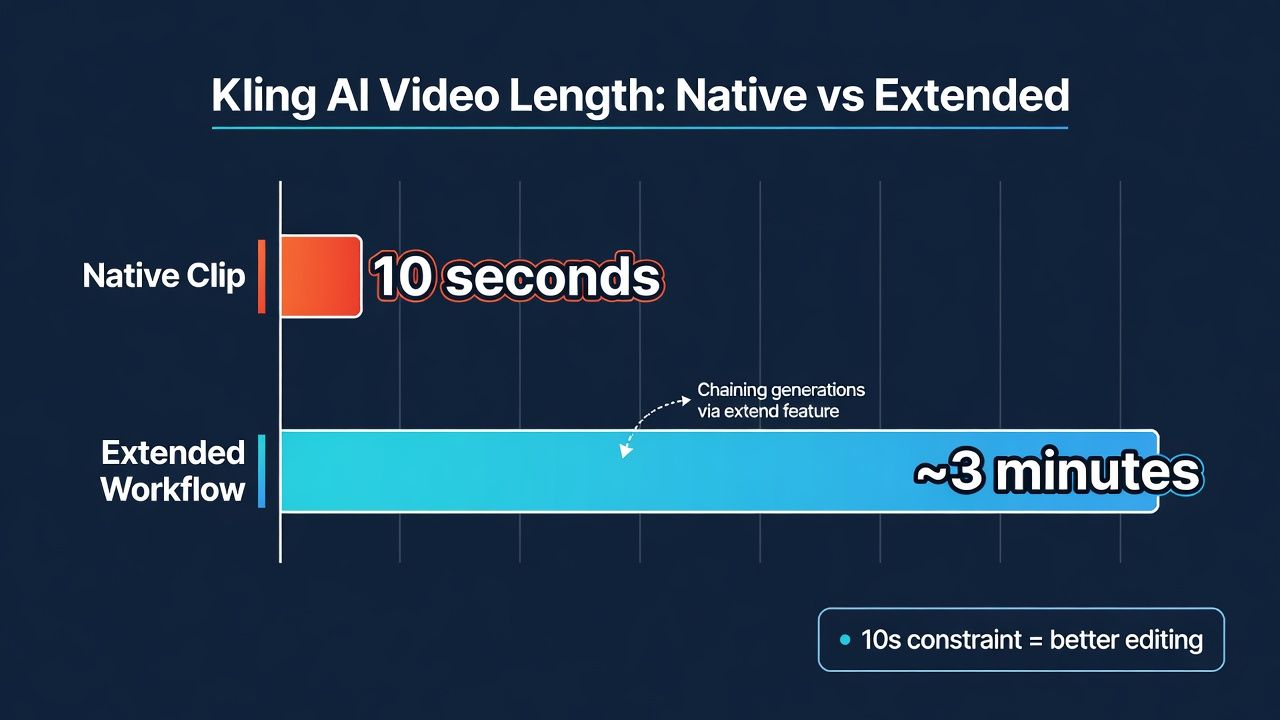
- The platform enforces a no-NSFW policy through three-layer moderation, and clips cap at 10 seconds natively (up to about 3 minutes via extend).
- New users can claim 66 free credits each month, enough to test the tool before paying.
- For developers, Kling is available through the Atlas Cloud API with prepaid, per-clip pricing.
What Is Kling AI and How Does It Work?
Kling AI is a generative video model that produces clips up to 10 seconds long from a text prompt or a reference image. Released by Kuaishou in 2024 and refined through several major versions, it uses a diffusion-transformer architecture to simulate realistic motion, lighting, and physics inside each generated scene.
Here's the short version of how it runs. You type a prompt, or upload a photo, then pick a model and a duration. Kling encodes your input, generates frames, and returns a downloadable clip. The better your prompt, the better the result, so camera language and scene detail matter a lot.
Under the hood, Kling separates itself with two strengths: motion coherence and subject consistency. Objects move the way real objects would, and faces stay recognizable across a clip. That's why creators reach for it when they need believable action rather than a slideshow of pretty stills.
Citation capsule: In 2026, Kling AI, the video model from Kuaishou, generates clips of up to 10 seconds natively and extends them toward roughly 3 minutes through its extend feature. It supports both text-to-video and image-to-video workflows, per the official Kling documentation and Atlas Cloud's guide summaries.
In our testing, Kling handled fast motion, like a running dog or a car turn, more cleanly than most rivals, though very long prompts sometimes confused the scene layout. Shorter, structured prompts won almost every time.
Kling AI Pricing and Free Access
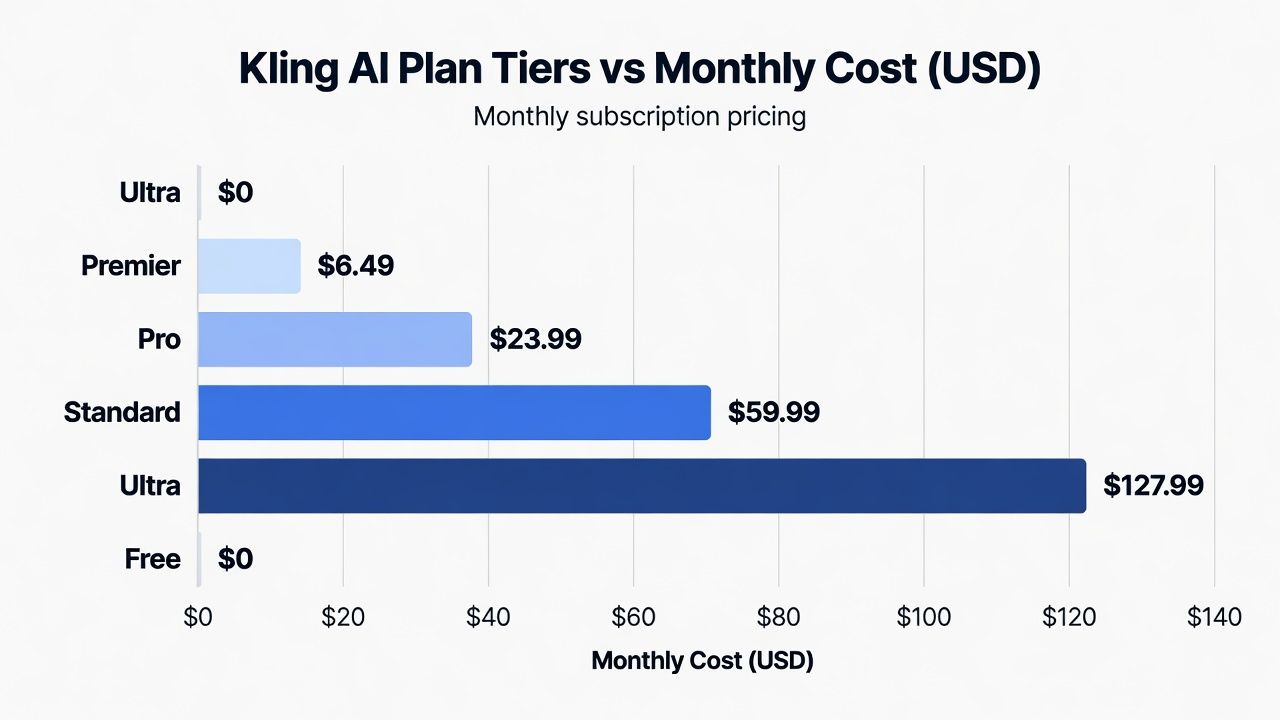
In 2026, Kling AI uses a credit-based pricing model that starts free and climbs to roughly $130 per month at the top tier, according to Atlas Cloud's pricing breakdown. Credits are consumed per generation, and the cost of each clip depends on the model, resolution, and duration you choose. Higher tiers unlock faster queues and premium models.
The free path is real, not a trap. New and returning users can claim a monthly allotment of free credits to test generations before committing to a subscription. That's usually enough for a handful of short clips per month.
Consumer subscription tiers
Kling's consumer plans scale by creditscredit and speed. Cheaper tiers give you slower generation and fewer premium-model runs, while the top plan removes most limits. For a full tier-by-tier breakdown of what each plan includes, see the dedicated Kling AI pricing guide, which walks through the credit math from free up to $130 per month.
If you're just trying Kling out, start with the free credits. You can claim 66 monthly free credits, enough for several test clips, as explained in the Kling AI free credits walkthrough. It covers how to claim them and what resets each month.
API pricing for developers
Building Kling into an app changes the math. Instead of a monthly subscription, API access typically runs on prepaid packages with a per-clip cost, which suits variable or high-volume workloads. Our Kling AI API pricing guide breaks down the prepaid packages and the real per-clip costcost, so you can forecast spend before you integrate.
Citation capsule: In 2026, Kling AI pricing spans a free credit tier up to paid plans near $130 per month, with API access billed via prepaid packages on a per-clip basis, according to Atlas Cloud's pricing and API pricing guides. New users receive 66 free credits monthly.
Kling AI Models and Version History
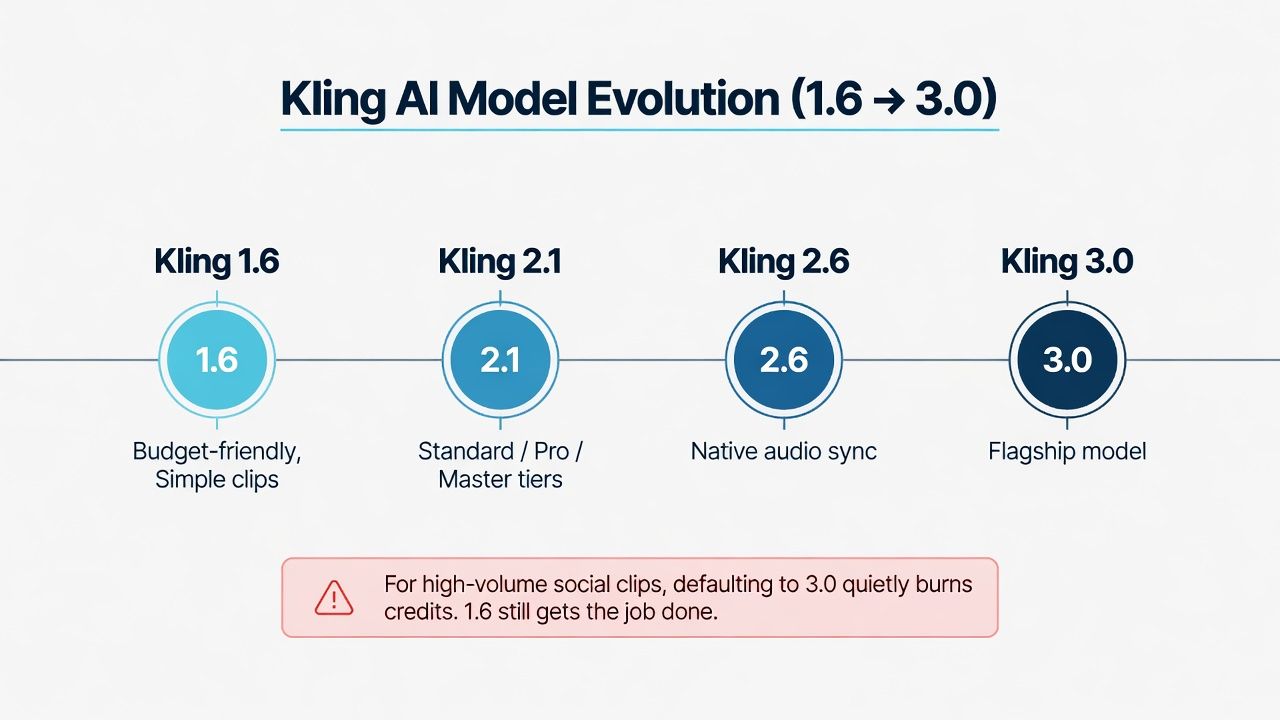
In 2026, Kling AI has shipped a fast-moving line of models, with Kling 3.0 as the current flagship and versions 1.6 through 2.6 still available for specific needs, per Atlas Cloud's version reviews. Each release improved motion, resolution, or audio, and older versions often stay cheaper and faster for simple jobs. Knowing the differences saves both creditscredit and frustration.
Why keep older models around? Because newer isn't always better for your use case. A quick social clip rarely needs the top engine, and lighter versions generate faster.
Kling 2.6 and native audio
Kling 2.6 added native audio sync, so generated video arrives with matching sound rather than silent frames. That's a meaningful jump for talking-head and ambient scenes. The Kling 2.6 review digs into how the audio sync holds up in practice and where it still slips.
Kling 2.1 and 2.0
Kling 2.1 introduced Standard, Pro, and Master tiers and became a common benchmark against Google's Veo 3.1. Our Kling 2.1 review compares those tiers head-to-head with Veo. The earlier Kling 2.0 review covers the Master engine and its more cinematic look, which set the stage for everything after it.
Is Kling 1.6 still worth it?
Older doesn't mean useless. Kling 1.6 remains a budget-friendly option for straightforward clips, and the Kling AI 1.6 review answers whether it still earns a spot in your workflow in 2026. Short answer: for simple, cost-sensitive jobs, sometimes yes.
Citation capsule: In 2026, Kling AI's model lineup runs from version 1.6 through the flagship Kling 3.0, with Kling 2.6 adding native audio sync and Kling 2.1 splitting into Standard, Pro, and Master tiers, according to Atlas Cloud's Kling version reviews.
Most guides push readers to the newest model by default. In our experience, that's backward for high-volume creators: a large share of social clips look identical whether rendered on 1.6 or 3.0, so defaulting to the flagship quietly burns credits with no visible payoff.
Kling 3.0: The Latest Generation
In 2026, Kling 3.0 is the newest generation, with Kling 3.0 Turbo and the Omni engine launching on June 17, 2026, according to Atlas Cloud's launch coverage. This release brought 4K editing, longer clips, and the Omni One engine for cinematic control. It's the version most new projects should build around unless cost is the priority.
The generation splits into two paths. Turbo prioritizes speed and lower cost, while the full Omni build targets quality, resolution, and fine creative control. Picking wrong wastes time or money. For a deeper look at what changed and why it matters, our detailed writeup on the Kling 3.0 Omni upgrade covers the new engine, its 4K editing, and the longer clip support in full.
Kling 3.0 Turbo and Omni
The June 17, 2026 launch introduced both the faster Turbo variant and the more capable Omni engine together. The Kling 3.0 Turbo and Omni overview explains what shipped and who each variant is for. If you care mostly about resolution and clip length, the Kling 3.0 Omni upgrade guide details the 4K editing and longer-clip improvements.
Turbo vs full quality
Speed or fidelity? That's the core trade-off. For a direct look at generation time and credit cost between the two, the Kling 3.0 Turbo vs Kling 3.0 comparison lays out when each one wins. Turbo tends to make sense for drafts and iterationiterations; the full model for finals.
Cinematic control and character consistency
Kling 3.0's Omni One engine is where advanced creators spend their time. Our Kling 3.0 cinematic video tutorial walks through mastering that engine for film-style shots. For multi-shot projects where a character must stay identical, the Kling 3.0 character consistency guide covers reference images, Character ID, and AI Multi-Shot.
Citation capsule: In 2026, Kling 3.0 launched its Turbo and Omni variants on June 17, adding 4K editing, longer clip durations, and the Omni One engine for cinematic control and character consistency, per Atlas Cloud's Kling 3.0 launch and upgrade guides.
How to Create Videos with Kling AI?
Making a good Kling video comes down to two inputs and one skill: text-to-video, image-to-video, and prompt craft. In 2026, Kling's guides consistently point to a structured prompt formula as the single biggest quality lever, according to Atlas Cloud's how-to content. Nail the prompt, and mediocre models still look great. If you want to master that skill, our Kling AI video prompt guide breaks down the exact phrasing and structure that consistently produce clean, usable clips.
Let's break the workflow into its real steps. Pick your starting point, write a scene-first prompt, add camera and motion cues, then refine. Most first-timers skip the camera language and wonder why results feel flat.
Text-to-video and image-to-video
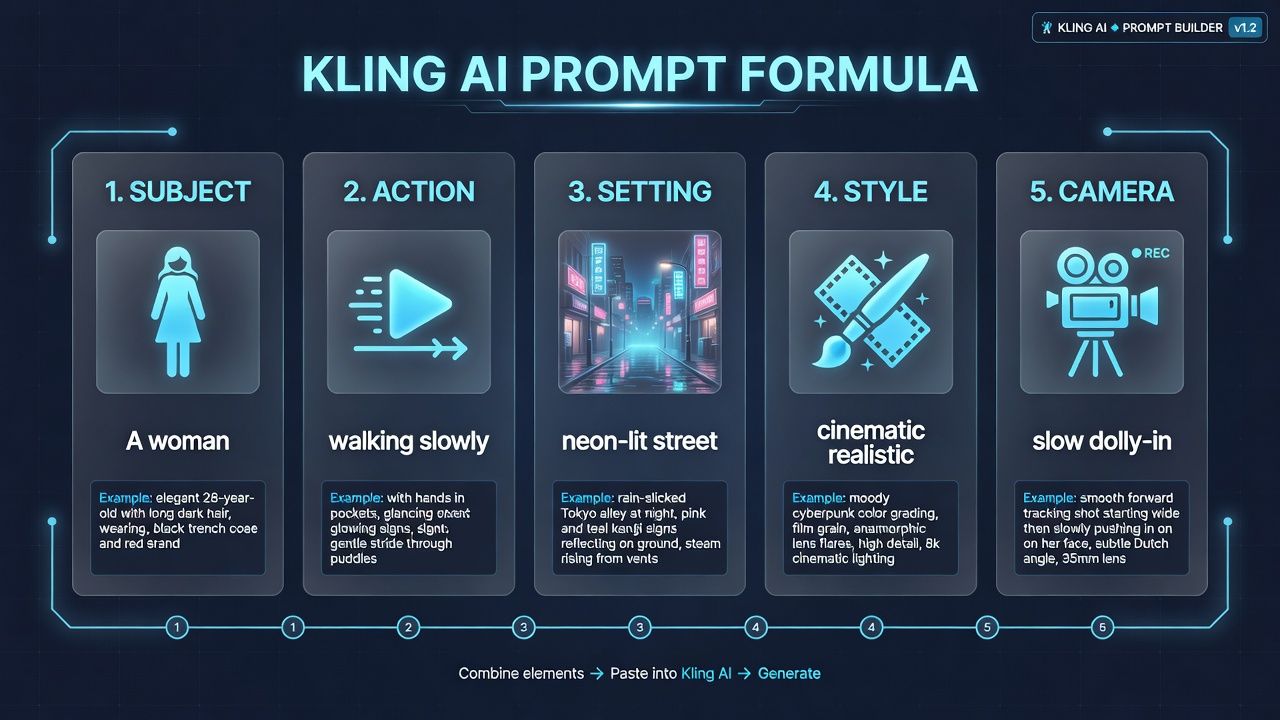
The two front doors into Kling are a written prompt or a starting image. For prompts, the Kling AI text to video guide teaches a 5-part prompt formula that structures subject, action, setting, style, and camera. If you'd rather animate an existing photo, the Kling AI image to video guide shows how to turn a still into a shareable clip. For a start to finish walkthrough of that written path, our dedicated Kling AI text to video guide shows how to turn a single line of text into a polished clip.
Directing motion and camera
Kling gives you real directorial control. Using Motion Brush and motion strength, you can steer exactly what moves and how much, as covered in the Kling AI motion control guide. To sharpen the words themselves, the Kling AI video prompt guide breaks down the prompt formula and the camera language that pros lean on.
Talking-head and lip sync
Want a character that speaks? Kling's lip-sync feature matches mouth movement to audio for talking-head videos, and the Kling AI lip sync guide walks through the setup. It pairs well with the native audio in newer versions.
Citation capsule: In 2026, Kling AI supports text-to-video via a five-part prompt formula, image-to-video from a single photo, Motion Brush for directed movement, and lip sync for talking-head clips, according to Atlas Cloud's Kling how-to guides.
We've found that adding one clear camera instruction, like "slow dolly-in," lifts perceived quality more than piling on adjectives. Prompts that read like a shot list beat prompts that read like poetry, almost every time.
Content Policy and Video Limits
In 2026, Kling AI enforces a strict no-NSFW policy through three layers of moderation and caps native clips at 10 seconds, according to Atlas Cloud's policy guides. Both constraints shape what you can realistically produce, so it's worth understanding them before you plan a project. Neither is a minor footnote.
Two questions come up constantly. What's blocked, and how long can a clip actually be? The answers are firmer than many creators expect.
What does the content policy block?
Kling does not allow NSFW content, and it screens submissions with a three-layer moderation system covering prompts, generation, and output. The Kling AI NSFW policy guide explains exactly what triggers a block and how the layers work, so you can avoid wasted credits on rejected prompts.
How long can a Kling video be?
Native clips are short by design. The base cap sits at 10 seconds, though the extended feature stretches videos toward roughly 3 minutes by chaining generations. The Kling AI video length limit guide details the 10-second cap and how the extended workflow reaches longer runtimes without breaking continuity.
The 10-second native cap isn't just a limitation, it's a creative constraint that pushes better editing. In our experience, creators who plan in 10-second beats and stitch clips produce tighter, more watchable videos than those chasing one long uninterrupted take.
Kling AI vs Other Video Generators
In 2026, Kling AI competes closely with Runway and Luma, with its edge concentrated in character consistency, motion realism, and cost per clip, according to Atlas Cloud's comparison analysis. No single tool wins every category, so the right pick depends on whether you prioritize motion, editing features, or budget. The gaps are narrower than marketing suggests. To see exactly where each platform pulls ahead, our head to head comparison of Kling AI vs Runway vs Luma rates them across quality, consistency, and cost so you can pick with confidence.
So how do they actually stack up? Kling tends to lead on believable motion and keeping characters consistent, while rivals sometimes offer smoother editing suites or different pricing structures. The full Kling AI vs Runway vs Luma comparison scores them on character consistency, motion, and costcost, so you can match a tool to your project rather than to the hype.
Citation capsule: In 2026, Kling AI's strengths against Runway and Luma center on character consistency, motion realism, and per-clip cost, while competitors trade blows on editing features and pricing, according to Atlas Cloud's Kling comparison guide.
Which Kling Model Should You Use?
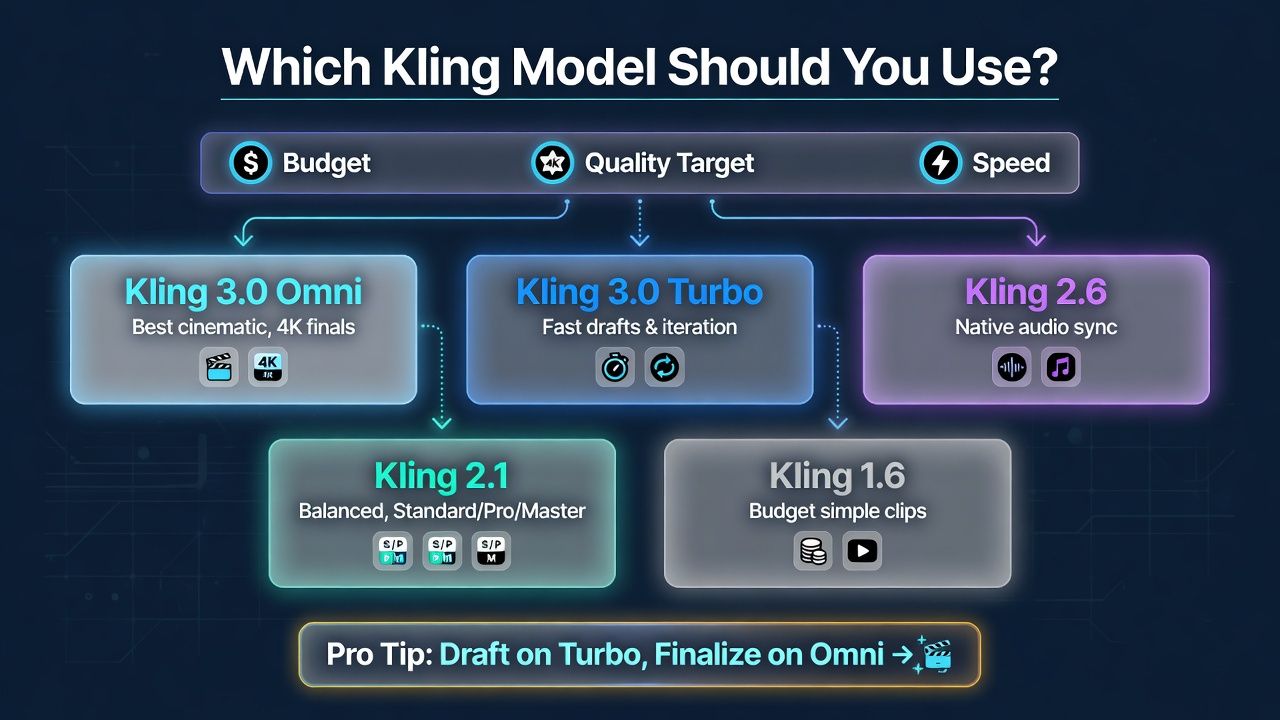
Choosing a Kling model comes down to three questions: budget, quality target, and speed. In 2026, the flagship Kling 3.0 leads onto quality while older versions stay cheaper and faster for simple work, per Atlas Cloud's version reviews. There's no universal "best," only the best fit for your specific job.
Use this quick decision path:
- Highest quality, cinematic finals: Kling 3.0 Omni with the Omni One engine. Reach for it on hero shots and 4K work.
- Fast drafts and iteration: Kling 3.0 Turbo. Same generation, lower cost and quicker turnaround.
- Videos that need sound: Kling 2.6 for native audio sync.
- Balanced quality with tier flexibility: Kling 2.1's Standard, Pro, and Master tiers.
- Budget or simple social clips: Kling 1.6, still capable for straightforward jobs.
A practical rule we use: draft on Turbo, finalize on Omni. Generating three or four Turbo passes to lock the prompt, then a single Omni render for the final, usually costs less than trial-and-error on the full engine from the start.
Frequently Asked Questions
Is Kling AI free to use?
Yes, partly. In 2026, Kling AI offers a free tier, and new users can claim 66 free credits each month, according to Atlas Cloud's free-credits guide. That covers several short test clips. Paid plans, which run up to roughly $130 per month, add more credits, faster queues, and premium models for heavier use. For a complete playbook on stretching those monthly credits, our guide to using Kling AI for free shows how to plan each generation so nothing goes to waste.
What is the newest Kling AI model?
Kling 3.0 is the newest generation. Its Turbo and Omni variants launched on June 17, 2026, per Atlas Cloud's launch coverage, adding 4K editing, longer clips, and the Omni One engine. Turbo focuses on speed and lower cost, while the full Omni build targets top quality and fine cinematic control.
How long can Kling AI videos be?
Kling AI caps native clips at 10 seconds. Using the extend feature, you can chain generations to reach roughly 3 minutes, according to Atlas Cloud's video-length guide. For most social and marketing use, the 10-second base clip is enough, and extending helps when you need continuous longer sequences.
Can I use Kling AI through an API?
Yes. Kling is available programmatically, including through the Atlas Cloud API, which uses prepaid packages billed on a per-clip basis, according to Atlas Cloud's API pricing guide. That structure suits developers with variable or high-volume workloads better than a fixed monthly consumer subscription. To weigh each package against the monthly plans before you commit, our full breakdown of Kling AI pricing walks through every tier and credit rate in plain terms.
How does Kling AI compare to Runway and Luma?
In 2026, Kling AI generally leads on character consistency, motion realism, and cost per clip, while Runway and Luma trade advantages in editing features and pricing, according to Atlas Cloud's comparison analysis. The best choice depends on your priority, so match the tool to your specific project rather than to a single overall ranking.
Conclusion
Kling AI has grown from a promising newcomer into a serious video generator, and in 2026 it competes at the top of the field on motion and character consistency. The path is clear: start with the 66 free monthly credits, learn the five-part prompt formula, and pick a model that matches your budget and quality target. Kling 3.0 Turbo for drafts, Omni for finals, and older versions when cost matters most.





