Vraag AI om een samenvatting
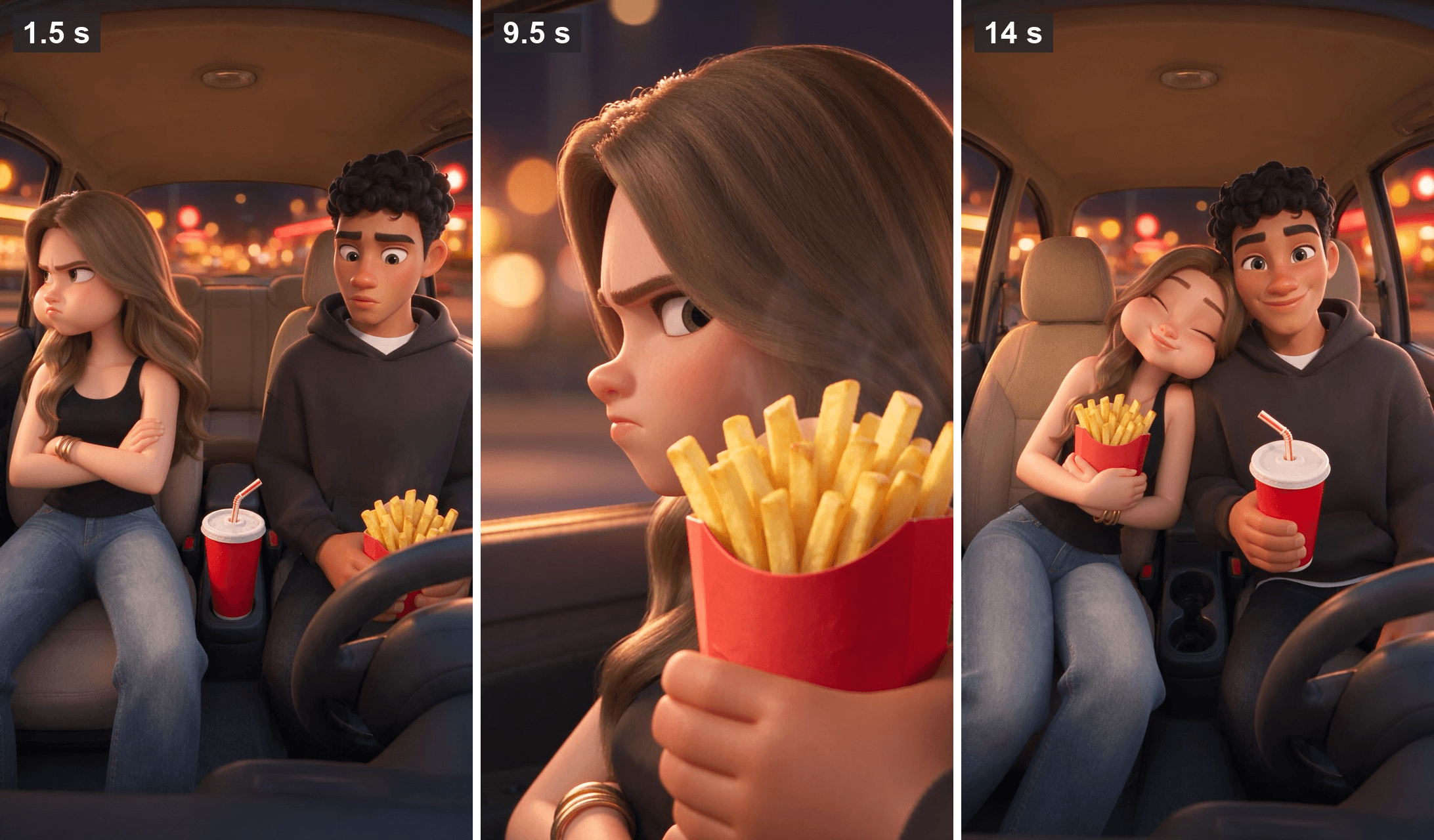
She won't look at him. Arms crossed, cheeks puffed, eyes on the parking lot. He says sorry, she says she's not talking to him, and then a carton of fries arrives beside her cheek. Fourteen seconds in, her head is on his shoulder.
That is an AI cartoon couple skit, the 3D relationship comedy that keeps showing up on TikTok. We traced where the format comes from, looked at what the template apps offer, then made our own from two photos, four reference stills and one video prompt. The same couple came back for a second episode.
Key Takeaways
- The AI cartoon couple skits we checked are 15-second 3D relationship comedies;onerecurring couple's sofa clip has 8.9 million TikTok views.
- The template apps we checked offer one to three preset skits; your own script calls for a reference-to-video model.
- One clean full-body still per character kept our couple on model across two episodes.
- Seedance 2.5 in the Atlas Cloud video generator takes up to 30 reference images andreturnedour 15-second skit with spoken lines.
- Bring the product in at the turning point of the fight and face it toward the camera last.
What Is the AI Cartoon Couple Trend on TikTok?
An AI cartoon couple clip is a short 3D comedy about relationship friction. He holds a door for another girl. She bites his hand on the sofa.
The format sits inside a bigger wave of AI 3D comedy shorts. The largest reel we found, an airport passport-control compilation from a channel called Funny Things Around Us.AI, swaps in a new cast for every skit and has no couple in it. The couple branch works differently: one account keeps bringing back the same boyfriend and girlfriend, so the audience follows the characters.
| Clip | Posted | Views on Nov 12, 2026 | Cast |
|---|---|---|---|
| Airport passport-control reel, 79 seconds | Aug 30, 2026 | 47.3M | New characters in every skit |
| Couple on the sofa, 15 seconds | Jul 17, 2026 | 8.9M | One recurring couple |
| Couple at a door, 15 seconds | Oct 1, 2026 | 4.0M | The same couple |
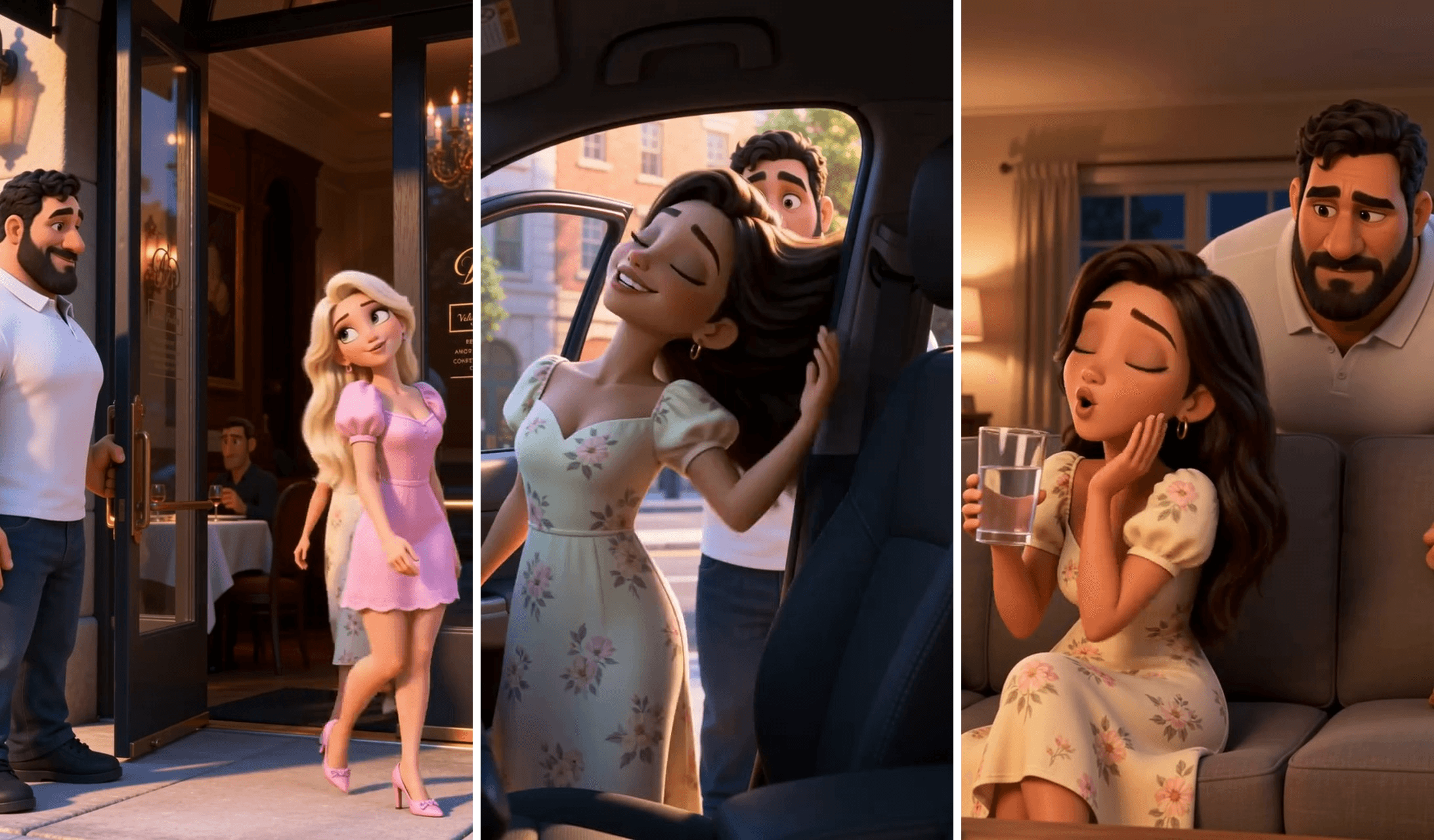
Frames from this TikTok video by aimations.tv, posted October 1, 2026.
In that door clip he holds a restaurant door for a stranger, and his girlfriend makes him pay for it in the car and again on the sofa. The faces match the sofa clip posted about eleven weeks earlier: his beard, her green eyes and dark wavy hair.
AI Couple Cartoon Templates vs Writing Your Own Skit
Search for an AI couple video generator and the results lean toward tools that turn one photo of two people into a kiss or a hug, the kind of clip covered in our AI kissing video guide. Skit templates are a different product. This is what we found on November 11, 2026:
| Route | You upload | What you get |
|---|---|---|
| MakeViral, AI Cartoon Couple Video template | Two photos | Three preset skits (a shop stance, a surprise kiss, a Halloween ghost), 10 to 15 seconds each |
| Vismuse, AI Cartoon Couple | Two portraits | One preset shop skit |
| CapCut, AI couple cartoon templates | Your photos | Photo-to-cartoon filter templates, no skit |
| Seedream v5.5 plus Seedance 2.5 on Atlas Cloud | Two photos, plus any set or prop | Your own script in any setting, with the same characters reusable |
MakeViral's page names Seedance 2.5 as the model under its template, the same model we use below. Neither skit app listed a scene in a car, so a fries-in-the-car plot means writing it yourself.
How to Make an AI Cartoon Couple Video With Atlas Cloud
On Atlas Cloud, Seedream v5.5 turns each photo into a character still, and Seedance 2.5 plays out your script with voices, music and sound effects. Both run in the browser: stills in the image generator, the skit in the AI video generator.
Our first episode:
That is one 15-second generation at 1080p, with a half-second trim between two shots. Leo's apology and Mia's reply were voiced by the model from two quoted lines in the prompt.
Step 1: Turn Two Photos Into the Cartoon Couple
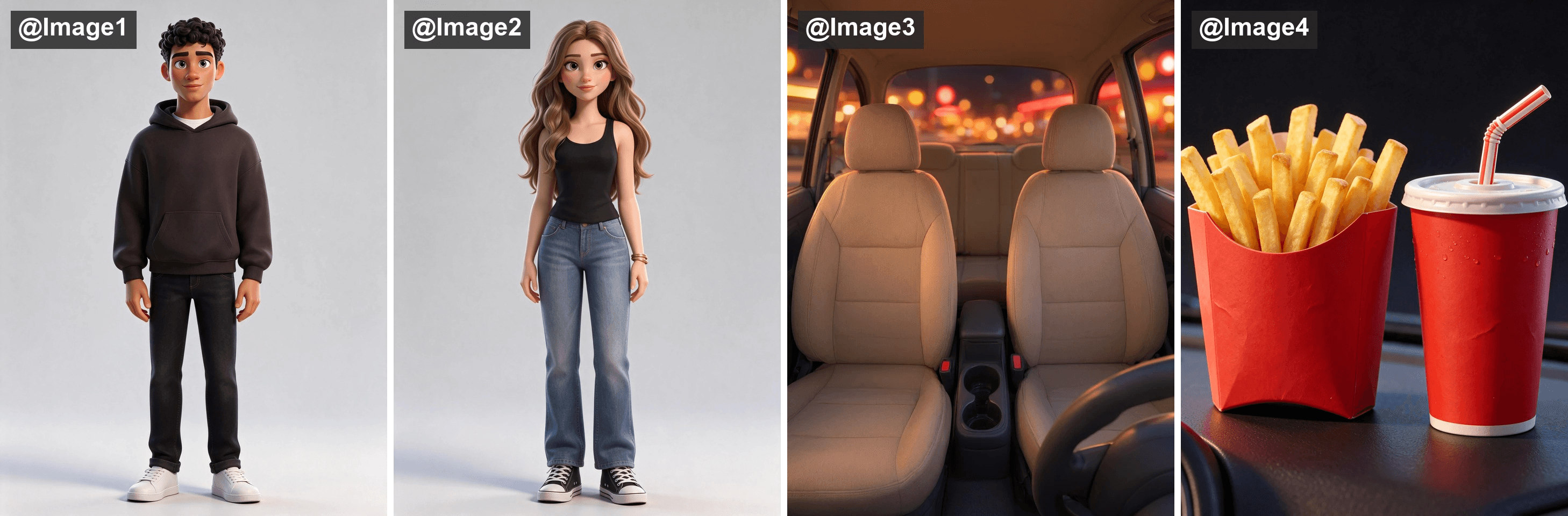
Each character starts as a photo of a real person, so use your own or ask first. In the image generator, open the Edit tab, choose Seedream v5.5, upload one photo and pick a 3:4 size. This is the prompt we ran for Leo:
plaintext1Turn the young man in this photo into a full-body 3D animated feature-film style character that his friends would recognize at once. Keep his face shape, light hazel-green eyes, thick dark eyebrows, nose, full lips, warm light-brown skin tone and short dark curly hair exactly as in the photo, rendered with big expressive eyes and glossy stylized skin. He is an adult man in his mid-twenties, tall and lean. Keep his dark brown oversized hoodie with the white crew-neck T-shirt underneath, and add black slim jeans and white sneakers. Standing straight, front view, arms relaxed at his sides, looking at the camera, plain light grey background, soft studio lighting. One single character only, an original cartoon character, not any existing film or cartoon character. No text, no logos, no watermark.
Mia's version swaps in her hair, her outfit and her gold bangles. The set and the props came from two text prompts on the Image Generation tab: an empty car interior seen from the dashboard, and a plain red fries carton next to a red cup, with clean seats, no readable signs and no logos.
Method 1: Generate the Car Skit in the AI Couple Video Generator
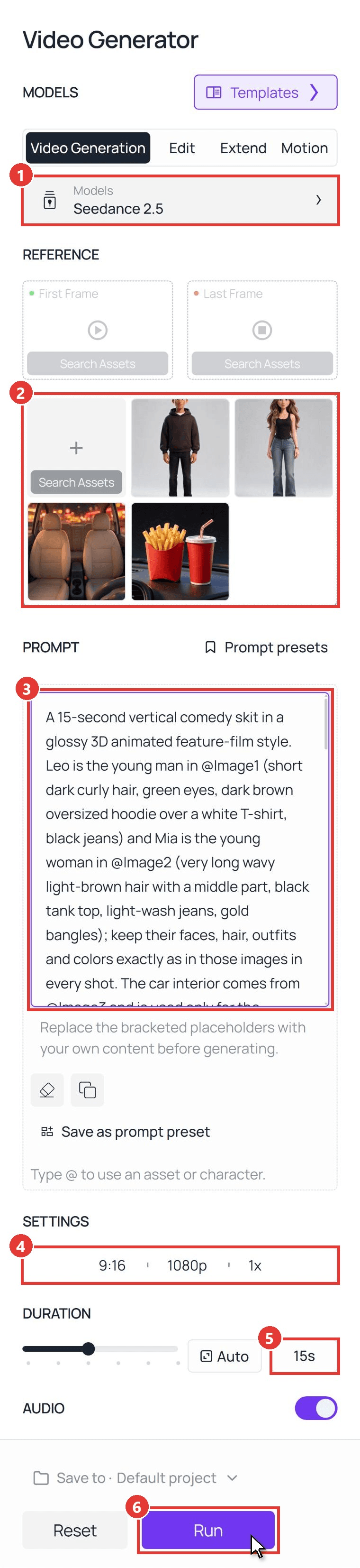
Open the video generator and follow the numbers in the screenshot:
- On the Video Generation tab, choose Seedance 2.5 under Models.
- Upload the four stills into the reference area below First Frame and Last Frame, in this order: him, her, car, fries. Leave both frame slots empty.
- Paste the prompt below into Prompt. @Image1 to @Image4 follow the upload order.
- Open Settings and pick 9:16 and 1080p.
- Type 15s into Duration, and leave Audio on.
- Press Run.
The prompt we ran:
plaintext1A 15-second vertical comedy skit in a glossy 3D animated feature-film style. Leo is the young man in @Image1 (short dark curly hair, green eyes, dark brown oversized hoodie over a white T-shirt, black jeans) and Mia is the young woman in @Image2 (very long wavy light-brown hair with a middle part, black tank top, light-wash jeans, gold bangles); keep their faces, hair, outfits and colors exactly as in those images in every shot. The car interior comes from @Image3 and is used only for the setting. The fries carton and the soda cup come from @Image4; keep their shape and colors the same in every shot. Night, the car is parked in a fast-food parking lot, Leo in the driver's seat, Mia in the passenger seat. There is no paper bag in this scene. 2[0-3s] Medium two-shot from the dashboard: Mia sits with her arms crossed and her face turned to the window, cheeks puffed in a pout. Leo glances at her nervously; he holds the red fries carton low on his lap, his fingers wrapped around it, and the soda cup stands in the center cup holder. 3[3-5s] Close-up on Leo, he says softly: "Babe... I'm sorry." Mia, still facing the window: "I'm not talking to you." 4[5-8s] Close-up on Leo: with his fingers wrapped firmly around the red carton, he raises the full carton of fries to shoulder height and slowly moves it toward Mia, a thin wisp of steam rising from the fries, a hopeful little smile on his face. 5[8-10s] Close-up on Mia: the carton, held in Leo's hand, comes into frame beside her cheek. Her nose twitches, her eyes slide sideways to the fries, she bites her lip trying to stay mad, then her arms uncross and both her hands reach toward the carton. 6[10-12s] Close-up on Mia: she is already chewing with her mouth closed and her cheeks puffed, hugging the full carton against her chest with both hands. Leo's hand holds the soda cup up to her and she takes a sip through the straw. 7[12-15s] Medium two-shot from the dashboard: Mia leans her head on Leo's shoulder, eyes closed, still chewing and smiling, holding the fries carton with both hands in front of her chest, the front of the carton facing the camera. Leo holds the soda cup, looks straight into the camera and raises his eyebrows with a proud little grin; then both laugh. 8Props: the carton stays full in every shot, and the fries are always whole, separate, long golden sticks. No bitten, cut or broken fries, and nothing white inside the carton. The carton and the cup are always gripped by a hand or standing on a surface; nothing floats, and nobody picks up a single fry. 9Audio: a light, playful comedic tune that starts quiet and swells at the end, a crunchy bite, a straw slurp, and their two short lines of dialogue in English. Only these two characters, nobody else in or around the car. No text, no subtitles, no captions, no watermark. Five fingers on each hand.
Three habits in that prompt carry over to any skit. Each character's look is spelled out next to its @Image tag. Hands get stage directions: fingers wrapped around the carton, the cup standing in the cup holder. And the eating happens between shots, so the clip cuts from Mia eyeing the fries to Mia already chewing.
It also works as a small AI product placement video. The fries are on screen from the first second, do their job at the turning point 8 seconds in, and face the lens in the last shot.
Method 2: Send the Same References Through the Seedance 2.5 API
To turn out episodes in bulk, or to put a skit maker inside your own app, send the same job as one request.
Step 1: Create and copy an API key in the Settings page of the Atlas Cloud console.
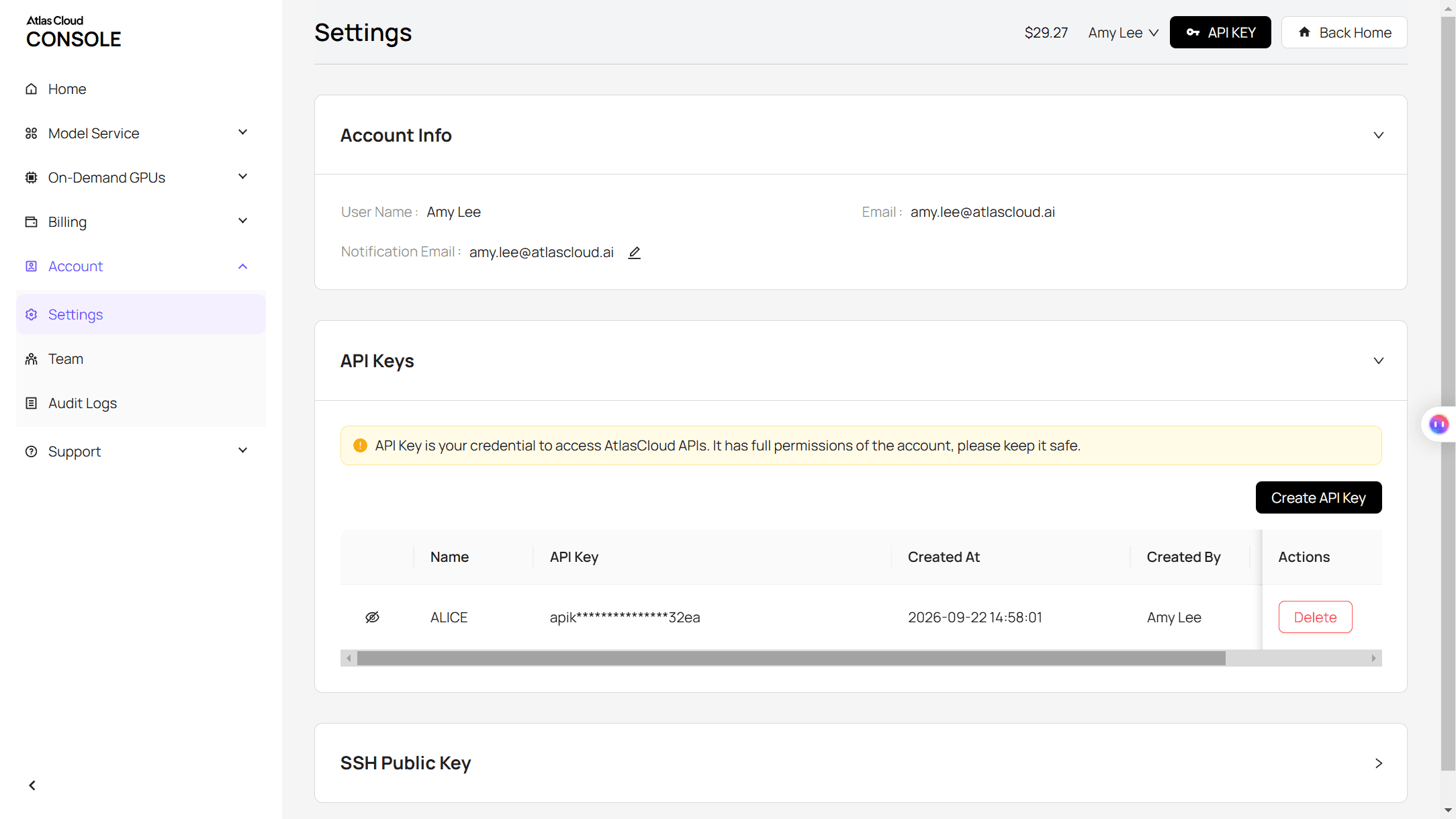
Step 2: Check the request format on the API tab of the Seedance 2.5 reference-to-video page, or in the Atlas Cloud API docs. The stills go in as a list, and the prompt cites them as @Image1, @Image2 and so on, in list order.
Step 3: Submit the clip, then poll for the file. The prompt is abridged here; paste the full one from Method 1.
plaintext1curl -X POST https://api.atlascloud.ai/api/v1/model/generateVideo \ 2 -H "Authorization: Bearer $ATLASCLOUD_API_KEY" \ 3 -H "Content-Type: application/json" \ 4 -d '{ 5 "model": "bytedance/seedance-2.5/reference-to-video", 6 "prompt": "A 15-second vertical comedy skit in a glossy 3D animated feature-film style. Leo is the young man in @Image1 and Mia is the young woman in @Image2; keep their faces, hair, outfits and colors exactly as in those images in every shot. The car interior comes from @Image3. The fries carton and the soda cup come from @Image4. [0-3s] Mia pouts with her arms crossed; Leo holds the fries carton on his lap. [3-5s] Leo says softly: "Babe, I am sorry." Mia: "I am not talking to you." [5-10s] Leo raises the carton beside her cheek; her eyes slide to the fries. [10-12s] Mia is already chewing, hugging the carton, and sips the soda. [12-15s] Mia leans on his shoulder; Leo grins at the camera. Audio: a playful tune, a crunchy bite, a straw slurp, two lines of dialogue. No text, no subtitles.", 7 "reference_images": [ 8 "https://your-cdn.com/leo.webp", 9 "https://your-cdn.com/mia.webp", 10 "https://your-cdn.com/car-interior.webp", 11 "https://your-cdn.com/fries-and-cup.webp" 12 ], 13 "duration": 15, 14 "resolution": "1080p", 15 "ratio": "9:16", 16 "generate_audio": true 17 }'
plaintext1curl https://api.atlascloud.ai/api/v1/model/prediction/<prediction_id> \ 2 -H "Authorization: Bearer $ATLASCLOUD_API_KEY"
Poll until the status reads completed, then download the video from outputs. The same endpoint and key reach the other video models on Atlas Cloud, so trying the skit on another model means changing one string.
Consistent Character AI Video: The Same Couple in Episode Two
A series only works if the audience recognizes the couple next week. For episode two we changed everything except the cast: a sunny kitchen, a pancake, no dialogue. Only the two character stills went in as references, and the sentence that ties Leo and Mia to @Image1 and @Image2 moved over word for word.
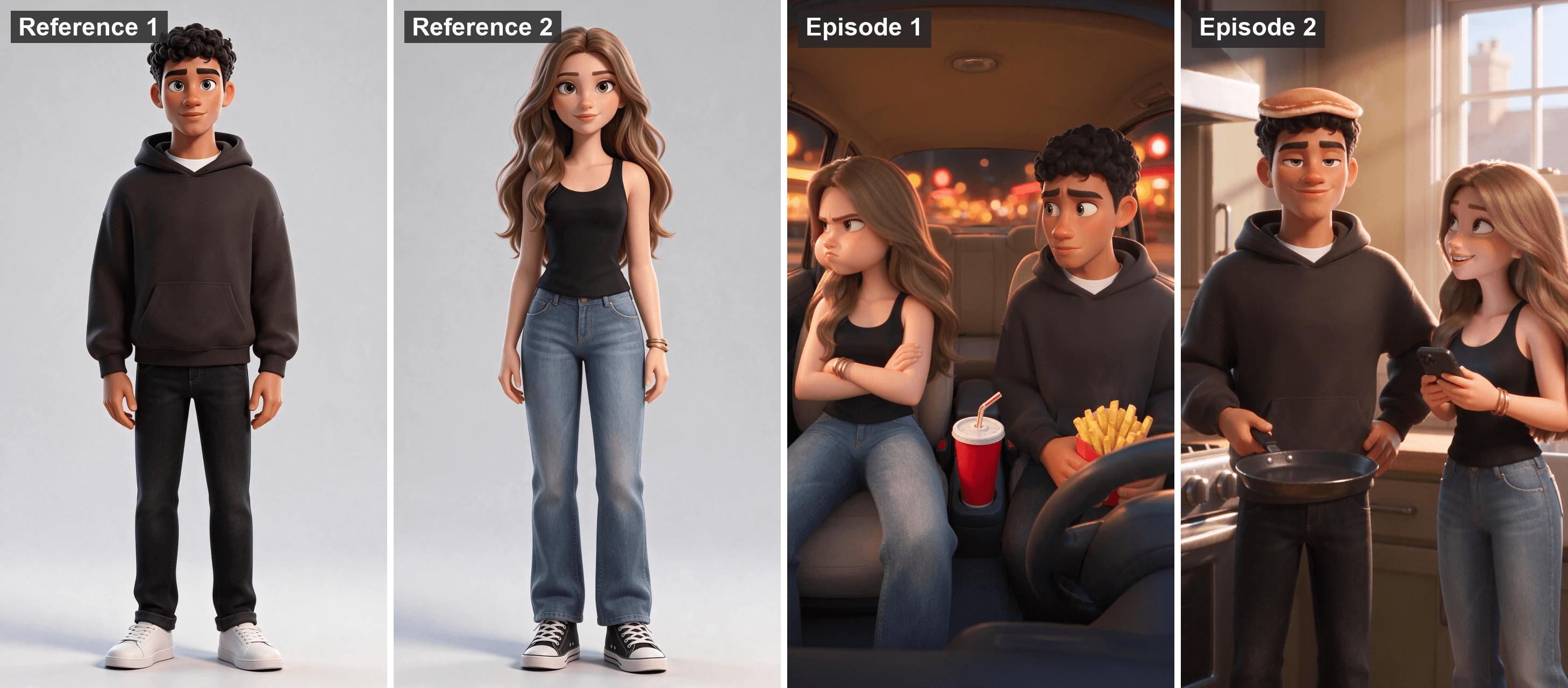
His curls and dark hoodie held from the reference stills through both episodes. So did her middle part, black tank top and gold bangles.
The stills were never regenerated, so there was nothing to drift. The photo gag is framed from Leo's side of the room, which puts the back of Mia's phone toward the viewer, where a phone taking a picture belongs.
For a bigger cast, the character sheet workflow in our Seedance 2.0 Pixar guide picks up from here.
Cartoon Couple AI Prompts: Four More Fights Settled by Food
The car skit is a three-beat shape: a sulk, an offering, a truce. Swap the setting and the snack and it still plays. We have not run these four, so treat them as starting points.
| Fight | Setting | The offering |
|---|---|---|
| She said left, he turned right | Gas station forecourt at dusk | He walks back from the shop with two iced coffees |
| He forgot the movie tickets | Sofa, rain on the window | A pizza box slides onto her lap |
| He ate her leftovers | Kitchen at midnight, fridge light | A tub of ice cream and two spoons |
| She beat him at a video game | Living room floor | He hands over the last donut in the box |
Write each one the way the car prompt is written: the cast sentence first, then timed shots, one line for props and one for audio. When the product is the whole point of the story, the short-drama ad format in our Higgsfield Drama Ads breakdown goes further.
Frequently Asked Questions
Is there a free AI cartoon couple video generator?
Not one we found for full skits. MakeViral's template lists 126 to 228 credits per skit, and Atlas Cloud bills each generation. The cheap way to test is a draft: as of November 12, 2026, a 5-second 480p clip from the two character stills is estimated at $0.67 after the current 20% discount, enough to check that both faces hold before you pay for 1080p.
Do I need to write dialogue for an AI couple skit?
No. Our kitchen episode has none: the prompt asks for a sizzling pan, laughter and a camera shutter, and states No dialogue. When you do want lines, put each one in quotation marks inside the shot where it is spoken. Both of ours fit into a two-second shot.
How long can an AI cartoon couple video be?
Seedance 2.5 generates 4 to 30 seconds per clip. Ours ran 15 and 10 seconds, close to the couple clips in the table above. For a longer story, write it as separate scenes, feed every scene the same character stills, and join the clips in an editor.
Can I put McDonald's or Coca-Cola in my AI skit?
We left the logos out. A real wordmark in a post that looks like an ad suggests a partnership you don't have. Even a brand's own AI work can backfire: in December 2025, McDonald's Netherlands pulled its own AI-generated Christmas ad after viewers pushed back. A plain red carton, a red cup and a striped straw say fast food without a trademark.
How much does a 15-second AI cartoon couple video cost on Atlas Cloud?
As of November 12, 2026, with the 20% discount shown on the model pages, Seedance 2.5 reference-to-video is estimated at $8.90 for 15 seconds at 1080p with audio, or $4.52 at 720p. A 10-second episode at 1080p is estimated at $5.94. Each Seedream v5.5 still costs $0.034 from a photo or $0.028 from text, so four stills come to about $0.12. The pages list no end date for the discount.
Conclusion
The AI cartoon couple skits worth copying are the ones with characters people recognize. The biggest couple clips we found come from an account that keeps one boyfriend and one girlfriend and hands them a new 15-second problem each time. Template apps will drop your faces into a preset skit. A plot of your own, like fries in a parked car, is one you write.
Your own series takes two photos turned into two stills, one prompt with timed shots, and the same stills again next week. Our AI cartoon couple needed a carton of fries to make up. Yours can fight about anything.


