Googleで「AIキス動画ジェネレーター」と検索すると、ほとんどの検索結果は同じことを約束します。写真をアップロードすれば動画が手に入る、それだけです。いくつかを開いてみると、代わりに静止画を静かに返してくるものもあります。この不一致は偶然ではありません。
本物のAIキス動画ジェネレーターは通常、1つのランディングページに縫い合わされた2つの別々のツールです。2枚の写真をキスに合成するものと、写真を動きに変えるものです。このガイドでは両者を切り分け、どちらもAtlas Cloudで実行し、無料版がどこで役に立たなくなるのかを正確に示します。
主なポイント
- AIキス動画ジェネレーターとして販売されているツールのほとんどは、実際には1つのラベルでまとめられた2つの異なる作業です。キス写真のステップと、写真から動画へのステップです。この2つを混同することが、結果に失望する最も簡単な道です。
- Atlas Cloudの無料AIキス生成ツールは、静止したキス写真を作成します。そこから動きを得るには、その写真を別のimage-to-videoモデルに通す必要があります。
- PixVerse V6 image-to-videoは、PixVerseのKissKissテンプレートの背後にある同じエンジンで、生成ごとの定額クレジットではなく、調整可能な長さと解像度で秒単位の課金です。
- キス動画が自然に見えるか歪んで見えるかを決める最大の要因は、元の写真です。1フレーム、両方の顔が見える、照明が一致していること。
- 同じ生成は2通りに使えます。プレイグラウンドでポイント&クリックするか、製品に組み込む人向けの3ステップAPI呼び出しです。
「AIキス動画ジェネレーター」は実際には1つではなく2つのツールです
今日この用語を検索すると、ランディングページが認めていようといまいと、結果は2つのカテゴリーに分かれます。1つは2枚のポートレートを1枚のキス写真に合成します。もう1つは1枚の写真から始めて、動き、音、数秒間の再生時間を加えます。いくつかのページは両方を約束しながら、片方しか提供しません。
| 作成されるもの | 仕組み | 通常のコスト |
|---|---|---|
| キス写真 | 2枚のポートレートを1枚の静止画像に合成 | 無料、または画像ごとの低い定額料金 |
| キス動画 | 1枚の写真を短いクリップにアニメーション化 | クリップごとの定額クレジット、または秒単位の課金 |
ツールがどちらのカテゴリーに入るかを知っていれば、無駄なアップロードを避けられます。ランディングページは、動画を提供するよりも宣伝することのほうがよくあります。動画はトラフィックのある検索語だからです。確実に確認する方法は、見出しの文言ではなく、実際の出力パネルを見ることです。
ステップ1:2枚のポートレートをAIキス写真に変える
Atlas Cloudの無料AIキス生成ツールに必要なのは、同意した成人それぞれの鮮明なポートレート写真、ちょうど2枚だけです。
このツールは2つの顔を約30秒で1枚のキス写真に合成します。設定するものはほかにありません。
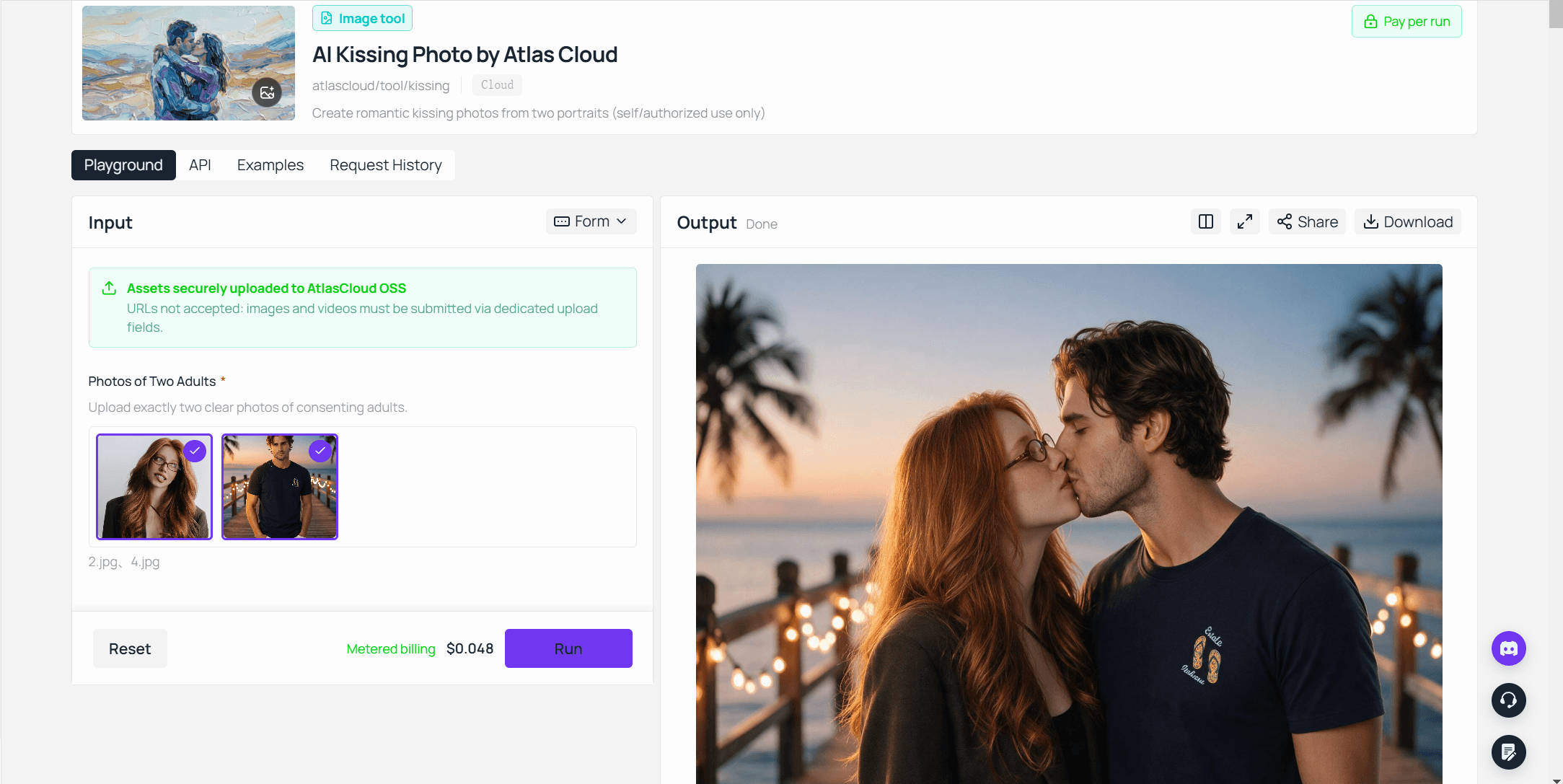
出力パネルは、ツール自身の3ステップの流れが説明するとおりであることを確認します。完成したキス写真がダウンロード可能です。目標が動くクリップなら、そのダウンロードがステップ2の入力になります。
これはAtlas CloudのAIツールコレクション内にあるいくつかの無料ツールの1つで、画像アップスケーラー、背景リムーバー、オブジェクト消しゴムなどがあります。
ステップ2:写真をAIキス動画に変える
静止したキス写真を動きに変えるには、image-to-videoモデルが必要です。Atlas Cloudは、他に何百ものモデルとともにPixVerseのimage-to-videoモデルをホストしています。
まさにこのユースケースですでに実証済みなのはPixVerse V6 image-to-videoで、PixVerse自身のKissKissテンプレートの背後にある同じエンジンであり、そのテンプレートはキス動画をいくつかの言語でTikTok全体に広めました。
私たちの[KissKissテンプレートガイド](pixverse-ai-kiss.md?utm_source=blog&utm_medium=article&utm_campaign=ai-kissing-video-generator)では、そのトレンドがどこから来たのか、PixVerseがどこで同意の線を引いているのかを説明しています。このセクションでは、自分で操作するバージョンを扱います。
PixVerse V6 image-to-videoをAtlas Cloud上で使用し、ステップ1のキス写真から生成したデモ。5秒、音声付き。
方法1:プレイグラウンドでキス動画を作る
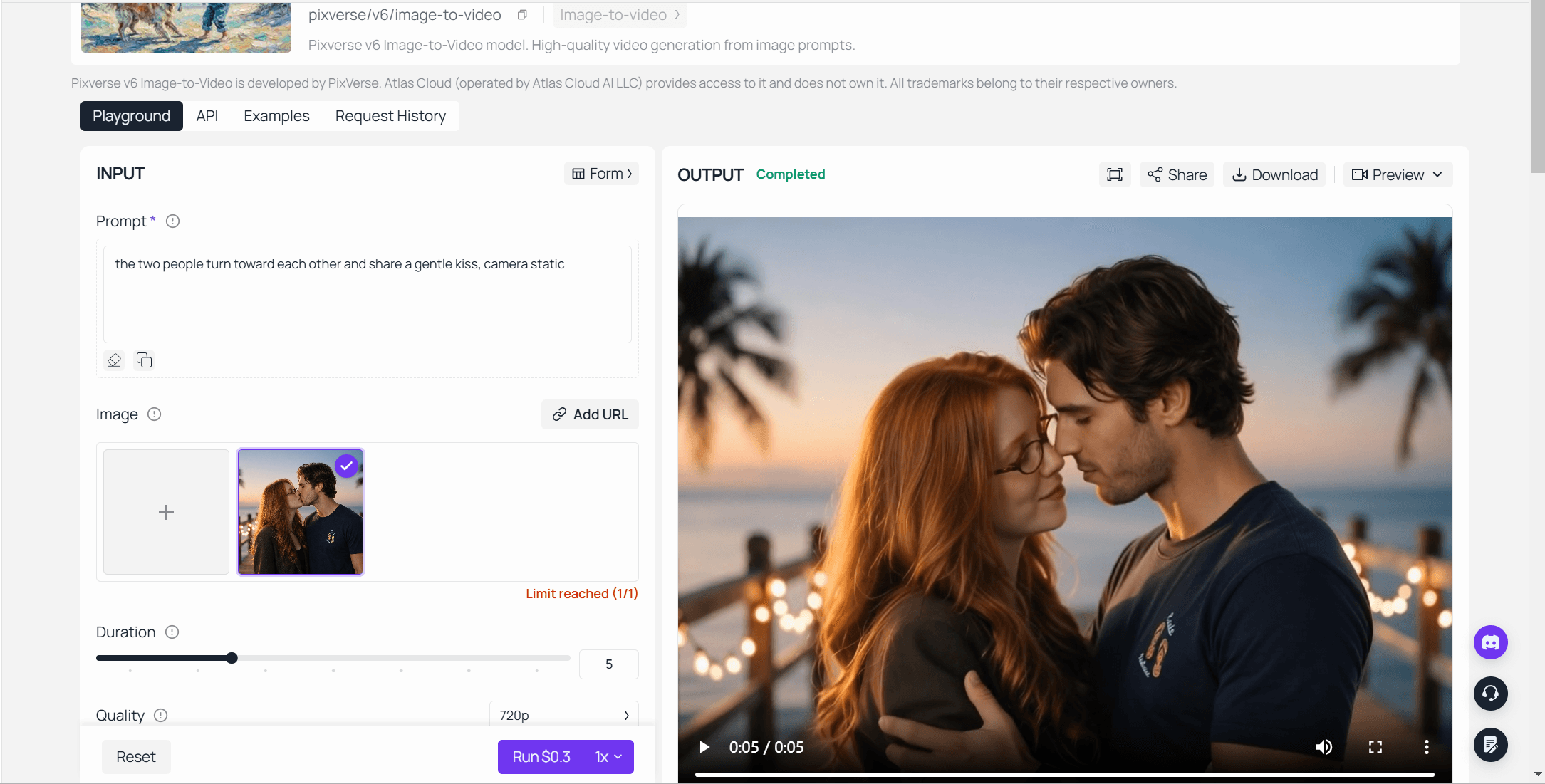
- PixVerse V6 image-to-videoプレイグラウンドを開き、ステップ1のキス写真をアップロードします。
- 動きを説明します。「2人が互いのほうへ向き合い、やさしくキスをする、カメラは固定」。
- 長さを1〜15秒、解像度を360p〜1080pから選びます。
- 音声をオンまたはオフにして実行します。パネルは実行前に正確な価格を表示します。
方法2:3ステップでAPIを呼び出す
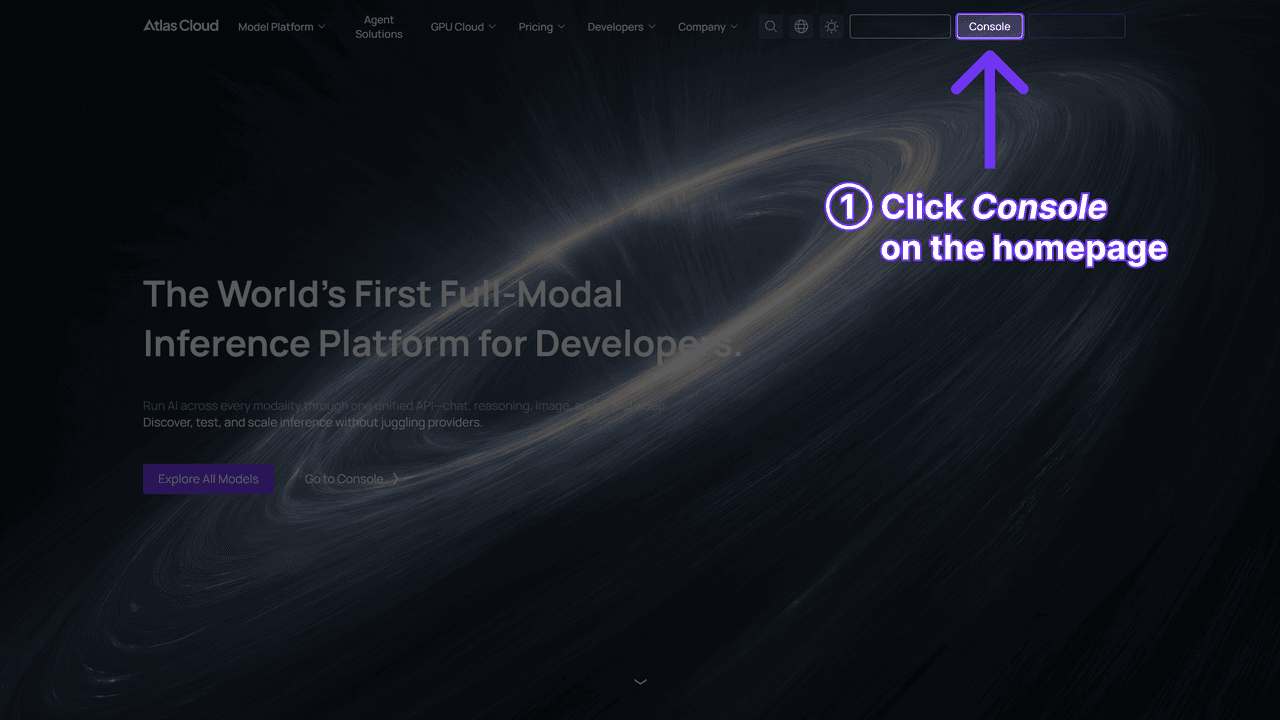
ステップ1:APIキーを取得します。 Atlas Cloudコンソールのダッシュボードで作成してコピーします。
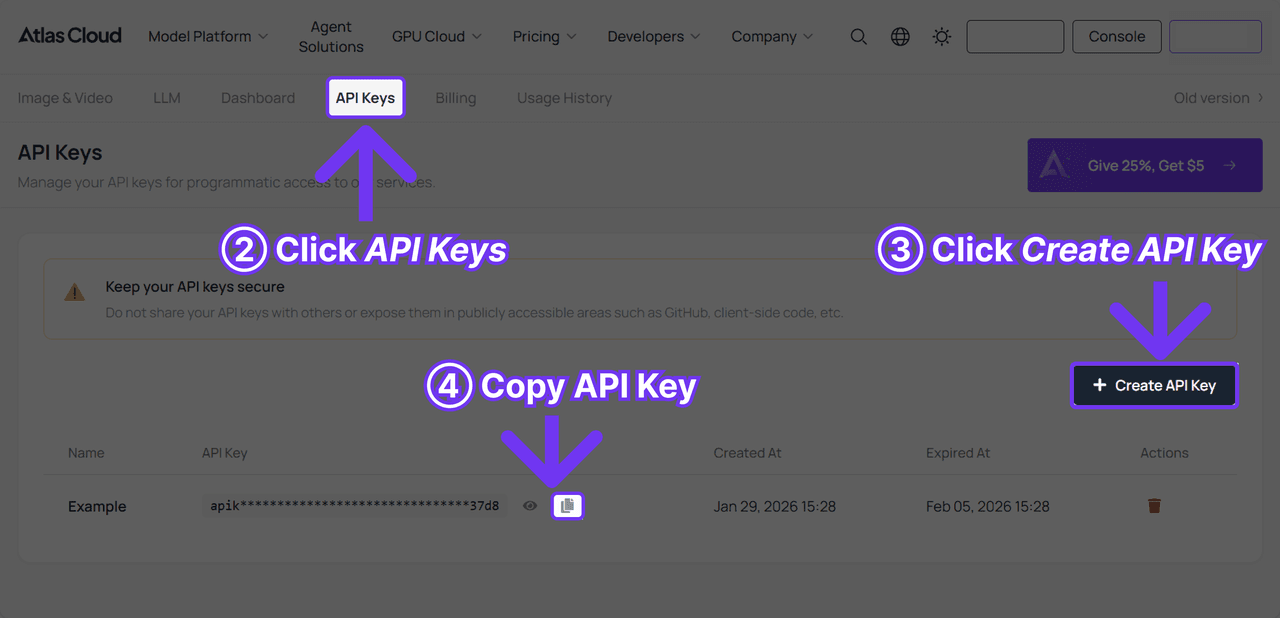
ステップ2:APIドキュメントを確認します。 エンドポイント、パラメータ、認証はAPIドキュメントにあります。
ステップ3:最初のリクエストを送信します。 ジョブを送信します:
plaintext1curl -X POST https://api.atlascloud.ai/api/v1/model/generateVideo \ 2 -H "Content-Type: application/json" \ 3 -H "Authorization: Bearer $ATLASCLOUD_API_KEY" \ 4 -d '{ 5 "model": "pixverse/v6/image-to-video", 6 "image": "<your_kiss_photo_url>", 7 "prompt": "The two people turn toward each other and share a gentle kiss, soft window light, camera static", 8 "duration": 5, 9 "quality": "720p", 10 "sound": true 11 }'
予測が完了するまでポーリングします:
plaintext1curl https://api.atlascloud.ai/api/v1/model/prediction/<prediction_id> \ 2 -H "Authorization: Bearer $ATLASCLOUD_API_KEY"
Atlas Cloudはプラットフォーム全体で1つのAPIを実行するため、同じキーと同じ送信・ポーリングのループが、ホストするすべてのモデルで機能します。後でモデル文字列を差し替えても、統合の残りの部分はそのままです。
キス動画を歪んで見せるのではなくリアルに見せるもの
PixVerseを含むすべてのimage-to-videoモデルは、元の写真が与えるものをそのまま引き継ぎます。ぼやけたクロップは、その上にモーションブラーが重なったぼやけたクリップになります。
| 元の写真 | 動画は通常どう見えるか | より良い入力 |
|---|---|---|
| 2人が並んでいて、顔が見え、照明が似ている | きれいな前傾の動き、安定した顔 | すでに使用可能 |
| 2枚の別々の写真をつなぎ合わせたもの | 継ぎ目に歪んだ顔 | ステップ1の前に合成し、明るさを合わせる |
| 顔だけをタイトにクロップ | 硬い動き、切り取られた肩 | 肩まで余白を残す |
| 2つの顔で照明が混在または暗い | 動きの間に肌の色がちらつく、または変わる | 再撮影するか、アップロード前に均等に明るくする |
残りの作業はプロンプトが担います。「彼らはキスをする」では、モデルが行動するには情報が少なすぎます。「彼女が先に身を寄せ、ゆっくり2秒間のキスをする。暖かな午後の光、カメラは固定」と書けば、モデルが実際に追従できる順序、ペース、雰囲気を与えられます。
フレンチキス、ほほへのキス、シネマティック:キスのスタイルを選ぶ
PixVerse V6にはキス用のスタイルドロップダウンがありません。スタイルは完全にプロンプト行にあり、数語でクリップ全体が変わります。
| スタイル | 使用するプロンプト表現 | 最適な用途 |
|---|---|---|
| クラシック | 「やさしく短いキス、カメラは固定」 | 記念日の投稿、セーブ・ザ・デートカード |
| フレンチキス | 「ゆっくりでロマンチックなフレンチキス、カメラは固定」 | 成熟した視聴者向けのカップルコンテンツ |
| ほほへのキス | 「ほほへの温かいキス、1人が微笑んでいる」 | 家族や友人のコンテンツ、強度低め |
| シネマティック | 「スローモーションのキス、ゆっくりしたカメラのプッシュイン、暖かなリムライト」 | セーブ・ザ・デート動画、結婚式のティーザー |
これらはいずれも新しいモデルや隠し設定を必要とせず、同じプロンプト欄に別の文を入れるだけです。より長いプロンプト、ネガティブプロンプト、英語以外の表現については、私たちの[PixVerseプロンプトガイド](pixverse-prompts-guide.md?utm_source=blog&utm_medium=article&utm_campaign=ai-kissing-video-generator)に、PixVerse自身のテストが好む形式があります。
AIキス動画を無料で作る方法はありますか?
ステップ1はほぼ無料です。Atlas Cloudのキス写真ジェネレーターは試すのに費用がかからず、ページには明確な数字は示されていません。試すのは無料で、もっと使いたくなったらAtlas Cloudクレジットが引き継ぎます。
ステップ2は、無料が難しくなる場所です。Atlas CloudのPixVerse V6 image-to-videoには無料枠がなく、最初のリクエストから秒単位で課金されます。
代わりに、より無料に近いルートはPixVerse自身のコンシューマーアプリです。サインインし、KissKissエフェクトまたは現在棚に並んでいるキステンプレートを使うと、アプリが独自のクレジットを差し引き、無料エクスポートにはウォーターマークが付きます。上でリンクしたKissKissテンプレートガイドに、現在のクレジット数とそのウォーターマークがどのようなものかがあります。
| ステップ | 無料の仕組み | 無料でなくなる地点 |
|---|---|---|
| キス写真(Atlasツール) | ツール自身のページによると無料で試用可能 | その後はプレイグラウンドによると1生成あたり$0.048の従量課金 |
| キス動画(Atlas API) | 無料枠なし | 最初のリクエストから秒単位で課金 |
| キス動画(PixVerseアプリ) | 限られた無料クレジット、エクスポートにウォーターマーク | クレジットがなくなったとき、またはウォーターマークなしを望むとき |
よくある質問
AIキスジェネレーターが動画ではなく写真を返したのはなぜですか?
ページのどこかに「動画」という言葉があっても、それが動画生成ツールではなく写真生成ツールだからです。見出しではなく出力パネルを確認してください。静止画ならステップ1が完了したということです。次にそれをimage-to-videoモデルに通して動きを得ます。
すでに作成したキス写真を動画にできますか?
はい。鮮明な写真なら何でもimage-to-videoモデルの入力として機能します。別の場所で作成したものも含みます。自分のポートレートの代わりにアップロードし、プロンプトでキスの動きを説明してください。
AIキス動画の作成にはいくらかかりますか?
Atlas Cloudでは、キス写真ジェネレーターはプレイグラウンドで1生成あたり$0.048の従量課金を表示しており、2026年9月に確認済みです。その写真を動画に変えるにはさらに費用がかかります。PixVerse V6 image-to-videoは、解像度と音声に応じて毎秒$0.025〜$0.115を課金し、2026年9月にモデルページで確認済みで、有効な割引はありません。音声付き5秒の720pクリップは$0.30、同じ長さの1080pは$0.575です。
他人のAIキス動画を作ってもよいですか?
同意がある場合に限ります。PixVerse自身の利用規約は、許可なく作成された実在人物の性的示唆を含むコンテンツを禁止しており、どのプラットフォームを使っても同じ期待が当てはまるべきです。上でリンクしたKissKissテンプレートガイドに、正確なポリシー文言と、生成がフラグ付けされたときに何が起こるかがあります。
結論
機能するAIキス動画ジェネレーターは、実際には2つの別々の作業です。1つは2枚の写真をキスに変えます。もう1つはそのキスを動きに変えます。1つのツールが両方を行うと期待すると、なぜ動画ジェネレーターが写真を返し続けるのか不思議に思い続けるでしょう。
どちらの作業も今日Atlas Cloudで実行できます。写真ステップは無料で試せて、動画ステップはウォーターマークなし、1日のクレジット上限なしで秒単位課金です。一方をもう一方に渡し、実際に望むキススタイルに合わせてプロンプトを調整すれば、ダウンロードフォルダーにあるクリップこそ、AIキス動画ジェネレーターに作ってほしかったものです。





