The xAI Grok API image generation feature lets developers build text-to-image API pipelines using xAI's hosted Grok Imagine models, powered by a deeply optimized Flux-based diffusion architecture, delivering state-of-the-art prompt fidelity and high-quality image synthesis. To initialize it, you can now leverage the latest grok-imagine-image-quality endpoint for production-grade rendering.
This matters most to teams that want a single API vendor for both language and vision tasks. Key advantages at a glance:
| Capability | Detail |
| Underlying model | Grok Imagine (Powered by a deeply optimized, Flux-based diffusion architecture) |
| Current SDK Model ID | grok-imagine-image-quality (Note: Legacy flux-1.1 fields are deprecated) |
| Access method | REST & xAI SDK via xAI API key |
| Primary use case | Production-grade image generation, multi-image editing, and creative pipelines |
| Integration style | Drop-in text-to-image API call (OpenAI-compatible environment) |
Whether you are wiring up a product mockup generator or stress-testing creative pipelines, xAI Grok API image generation offers a straightforward on-ramp without switching providers mid-stack.
Understanding xAI Grok API Image Generation Capabilities and Models
Rather than building from scratch, xAI leverages a deeply optimized Flux-based diffusion architecture. xAI has unified these capabilities under the Grok Imagine API brand, replacing legacy flux-1.1 endpoints with more robust, multimodal-native models.
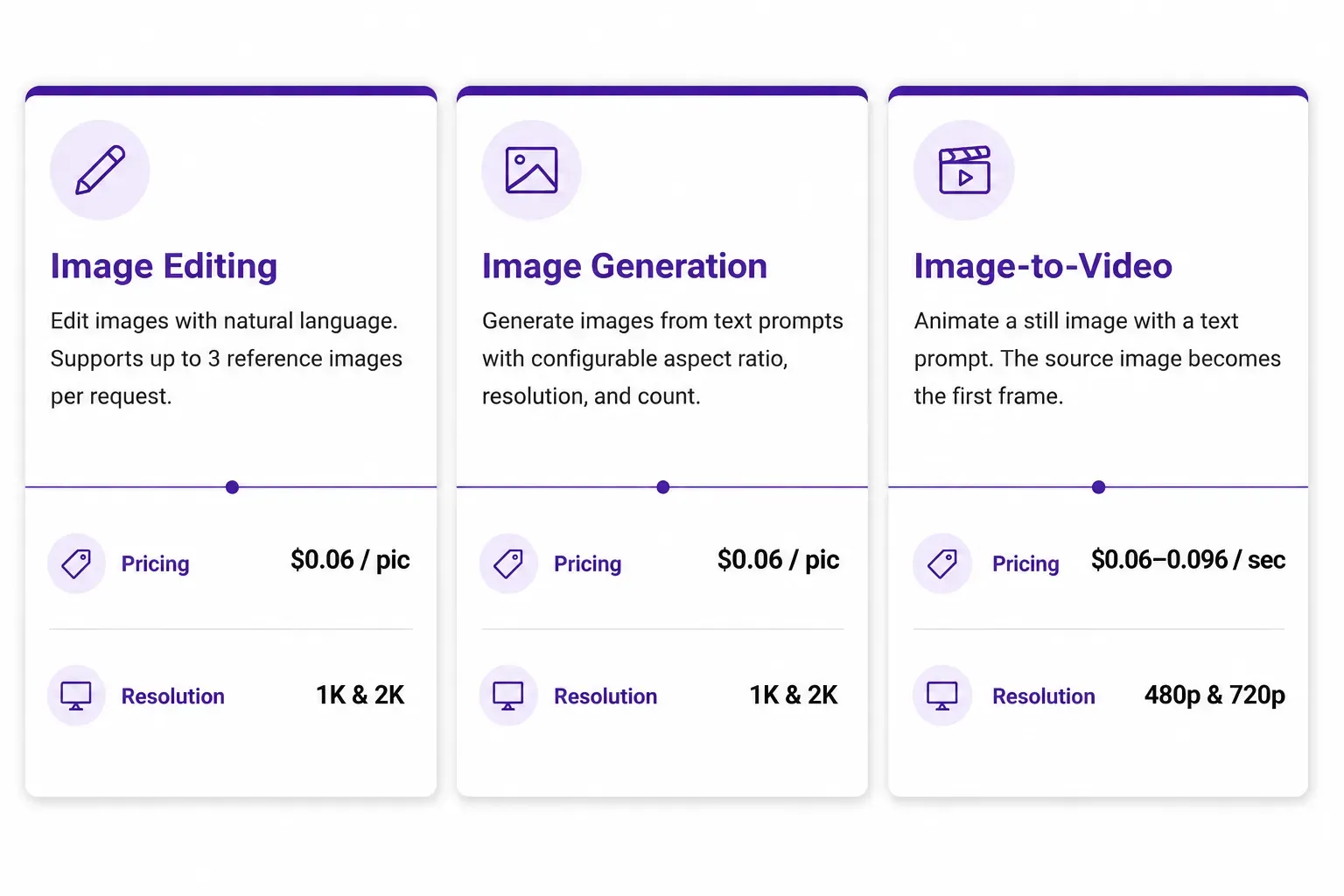
Note: The prices referenced above are for Atlas Cloud's grok imagine API price.
How Flux Architecture Powers the Grok Stack
Grok’s image engine is built upon a deeply optimized Flux-based transformer diffusion architecture. This foundation is renowned for its industry-leading prompt fidelity, ensuring that complex, multi-clause descriptions are rendered with pinpoint accuracy.
While xAI originally launched with legacy Flux-branded endpoints, the ecosystem has now unified under the Grok Imagine API. This transition ensures tighter multimodal integration and faster inference speeds across the xAI stack.
Two variants are available through the API:
| Model ID (API Parameter) | Best For | Technical Highlight | Rate limits | Pricing |
| grok-imagine-image-quality | Production-grade assets & 2K HD | Enhanced textural detail & photorealism | 300RPM, 5rps | $0.05 Per image output |
| grok-imagine-image | Rapid prototyping & social previews | Sub-2-second generation latency | 300RPM, 5rps | $0.02 Per image output |
Grok Image Generation Capabilities: What to Expect
The Grok image generation capabilities cover a practical range of use cases:
- Image size: Based on the model and shape, you can get up to 2048 × 2048 pixels.
- Style styles: Your text prompt controls if it looks like a photo, drawing, or abstract art. No extra buttons needed.
- Shape choices: You can set standard shapes like 1:1, 16:9, or 4:3 right in your request code.
- Text following: Flux.1 models are great at listening to details. They easily handle long, complex prompts and multi-step ideas.
- Video upgrades: You can turn an image into a video easily using the exact same API setup.
As a key piece of xAI's tech roadmap, this tool puts image creation, text, and visual chat all into one API. That means you can build one setup to handle prompts, look at images, and talk to users. It saves you from dealing with three different tech companies just to build one app.
Step-by-Step Guide: How to Generate Images with the Grok API
This xAI Grok API image generation tutorial walks through every required step in order, from console access to a working image output.
Step 1: Get Your xAI API Key
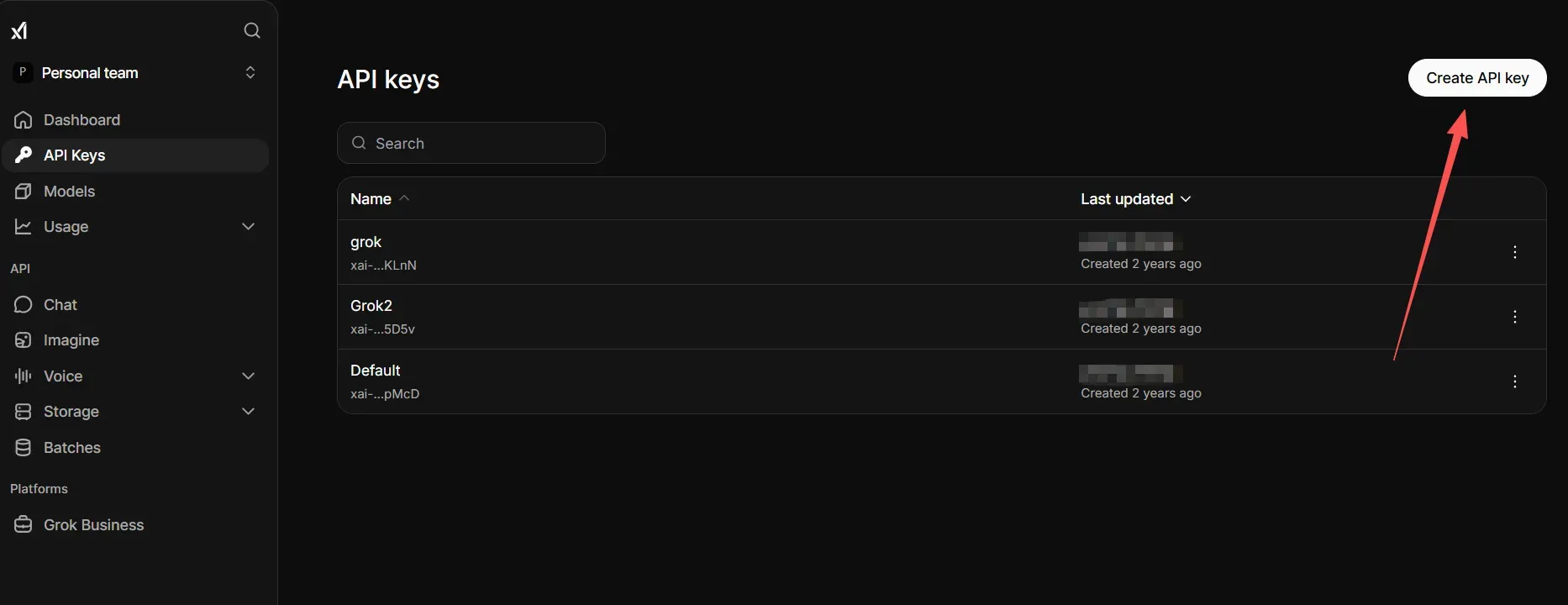
Go to console.x.ai and log into your account to get your xAI API key. Next, click on the API Keys menu. Click the button to make a new key, and copy it to a safe place. You need this key to run every single request.
Step 2: Configure the Base URL and Authentication Headers
The image generation endpoint is:
plaintext1https://api.x.ai/v1/images/generations
Your authentication headers must include:
| Header | Value |
| Content-Type | application/json |
| Authorization | Bearer YOUR_XAI_API_KEY |
Step 3: Structure the API Request Body
The xAI image generation payload processes four core fields:
- Model: Specify either grok-imagine-image (performance tier) or grok-imagine-image-quality (high-fidelity tier).
- Prompt: Your descriptive text instruction of the desired image scene.
- n: How many pictures you want per request. This is usually set to 1.
- Aspect Ratio/Resolution: The size shape you want, like "1:1" , "2K".
Step 4: Run Your Python Text-to-Image Script
Below is the verified, minimal working Python implementation using the current xAI specifications:
plaintext1import requests 2 3# Official production endpoint 4url = "https://api.x.ai/v1/images/generations" 5 6headers = { 7 "Content-Type": "application/json", 8 "Authorization": "Bearer YOUR_XAI_API_KEY" 9} 10 11# Payload utilizing the standard cost-effective model 12payload = { 13 "model": "grok-imagine-image", 14 "prompt": "Your Prompt", 15 "n": 1, 16 "aspect_ratio": "1:1", 17 "resolution"= "2k" 18} 19 20response = requests.post(url, headers=headers, json=payload) 21 22# Best practice: catch and log HTTP errors immediately 23if response.status_code == 200: 24 data = response.json() 25 image_url = data["data"][0]["url"] 26 print("Generated image URL:", image_url) 27else: 28 print(f"API Error {response.status_code}: {response.text}")
Step 5: Handle the Response
A successful response returns a JSON object containing a data array. Each item includes a url field pointing to the generated image, which is typically hosted temporarily. Download or cache the image promptly, as URLs may expire after a short window.
Optimizing Your Image Prompts and Parameters for Grok API
Getting a working request running is step one. Getting consistent, high-quality output is where Grok API prompt engineering becomes the real skill.
Writing Prompts That Perform
Flux.1 responds well to structured, descriptive prompts. A reliable format is:
Main Idea + Setting + Vibe + Camera settings
Like this: "A close-up shot of a plant expert inside a greenhouse, soft sun rays, lifelike, clean focus, 4K crisp"
How to make images look real:
- Write out the exact light, like sunset glow, studio bulbs, or cloudy weather.
- Call out the look directly, like real life, movie style, or magazine photo.
- Do not use filler words like "nice" or "perfect" because they give zero direction.
- Choose the camera angle clearly, like a wide view, top-down shot, or close zoom.
Controlling Image Generation Parameters
Beyond the text prompt alone, the Grok Imagine API accepts structured parameters within the JSON request body to give you precise control over the output composition, format, and scaling.
| Parameter | Type | Purpose | Example Value |
| prompt | String (Required) | Core textual description of the scene, style, and mood. | Aerial city view at dusk, tilt-shift photography |
| n | Integer (Optional) | Number of images to generate (Min: 1, Max: 10). | 1 or 3, 4, 5 |
| response_format | String (Optional) | The format of the returned assets. Supports url or b64_json. | "url" |
| aspect_ratio | String (Optional) | Sets the canvas proportions. Supports 1:1, 16:9, 4:3, 9:16, etc. | "16:9" |
| resolution | String (Optional) | Controls output fidelity tier. Supports 1k or 2k. | "2k" |
Aspect Ratio Control
Grok Imagine dynamically scales the output matrix based on whether you are querying the standard (grok-imagine-image) or premium (grok-imagine-image-quality) model tier. The most common enterprise configurations include:
- 1:1: Optimized for social media feeds, profile avatars, and e-commerce product tiles.
- 16:9: Best for website hero sections, presentation slides, and landscape digital banners.
- 4:3: Ideal for editorial blog headers and content marketing platforms.
- 9:16 : Tailored for mobile apps, stories, and social video overlays.
Understanding Architectural Determinism: The "Seed" Nuance
In traditional self-hosted diffusion pipelines, developers pass a fixed seed value to maintain compositional consistency across multiple prompt edits. However, it is important to note that the production-facing xAI API abstract away raw seed parameters to optimize inference speeds.
When building text-to-image workflows on the Grok stack:
- Dynamic Generation: Each individual API call uses a server-side randomized seed to ensure creative variety and organic rendering layout.
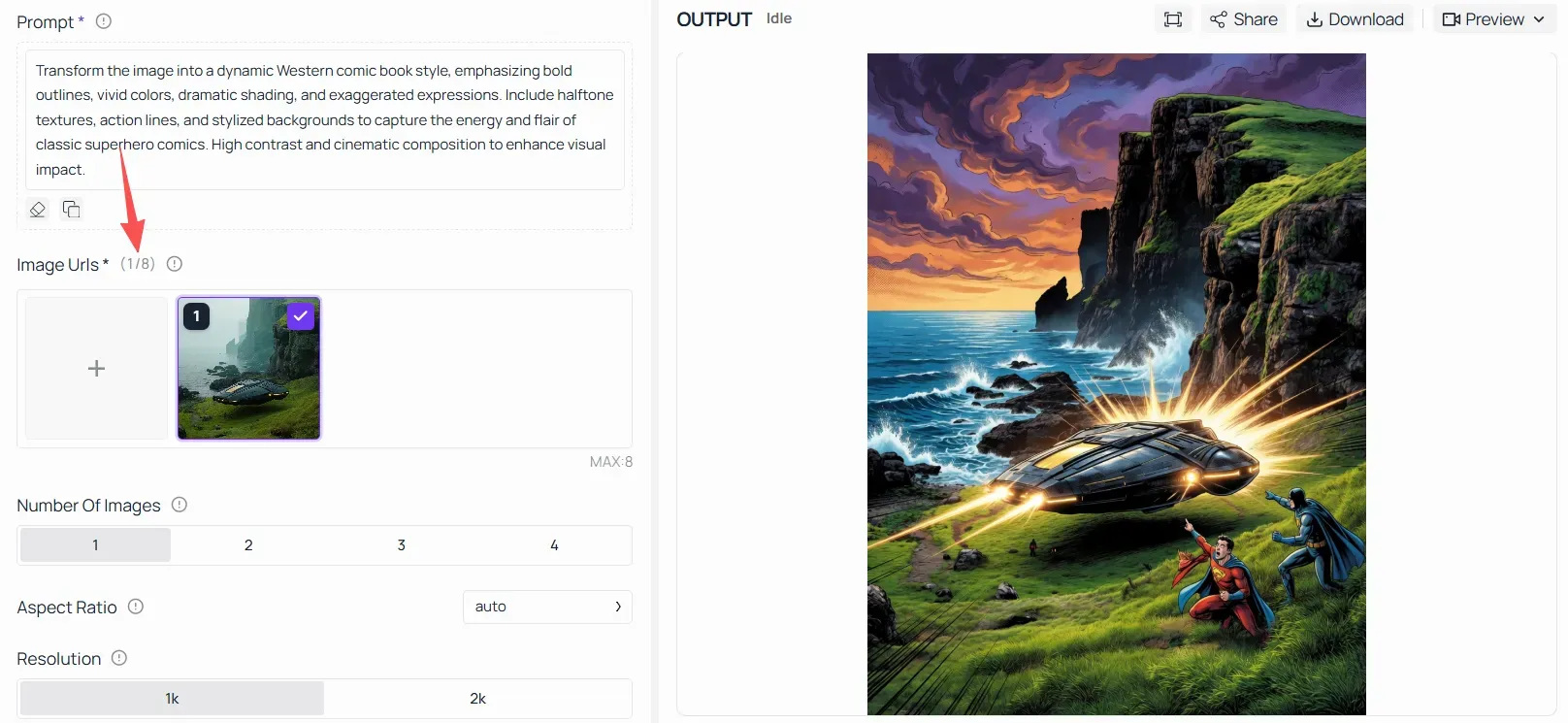
- Iterative Adjustments: If your pipeline demands strict subject and character consistency across multiple generations, you should transition from the basic text-to-image endpoint to the v1/images/edits (Image Editing) framework, which uses up to 8 source reference images to bind layout elements deterministically.
xAI Grok API Pricing, Rate Limits, and Cost Optimization
Before committing to a production API budget, it helps to understand exactly what you are paying for and where the limits sit.
xAI API Pricing for Image Generation
Unlike language models that meter usage via token vectors, the Grok Imagine API follows a flat, transparent per-image output billing structure. Based on the latest commercial schedules, the live production rates are:
| Model ID (API Parameter) | Cost Per Image | Infrastructure Tier | Target Workloads |
| grok-imagine-image | $0.02 per image | Standard Engine | Rapid prototyping, layout drafts, and fast iterations. |
| grok-imagine-image-quality | $0.05 per image | High-Fidelity Engine | Production-ready commercial assets and 2K high-definition rendering. |
The cost variance between these two tiers dictates meaningful budget design decisions when scaling a centralized pipeline. For context, generating 10,000 corporate assets on the standard performance tier requires a financial allocation of $200, whereas scaling that exact same volume on the premium tier drives the production budget up to $500.
Note: Pricing frameworks are localized and continuously updated directly within the xAI console environment, making runtime cost monitoring a development best practice.
Grok API Rate Limits
Grok API rate limits are strictly enforced per organization layer and API key to ensure infrastructure stability. While language models scale dynamically based on token volume, xAI provides transparent, explicit concurrency limits for its image generation ecosystem.
According to the official xAI console specifications, both live production image engines share an identical concurrency threshold:
- grok-imagine-image: 300 Requests Per Minute, 5 Requests Per Second
- grok-imagine-image-quality: 300 Requests Per Minute, 5 Requests Per Second
To build resilient, enterprise-grade production pipelines and prevent dropped payloads, engineering teams should actively monitor the standard HTTP response headers sent back by xAI servers at runtime:
- x-ratelimit-remaining: The specific number of pictures you can still make before hitting your current limit.
- x-ratelimit-reset: The exact Unix time clock showing when your total image count resets back to full.
Use a progressive wait time rather than hitting the system if your app is blocked due to a 429 Too Many Requests error. If you run a large company and need higher speed limits, you can ask for more system capacity. Just submit a request right inside your team dashboard on the xAI Console.
Cost Optimization Strategies
Deploying a production-ready generative art pipeline requires strict financial and infrastructure guardrails. Implement these practical cost-optimization strategies to protect your xAI API production budget at scale:
- Leverage grok-imagine-image for Prototyping: Run your prompt engineering experiments, automation syntax testing, and rough drafting on the standard performance tier ($0.02/image). Switch your configuration to the high-fidelity tier ($0.05/image) only when generating finalized, customer-facing corporate assets.
- Setup Permanent Server Caching: Never run the same exact prompt twice. Make a unique ID using SHA-256 with your text prompt, image shape, and size. Save the xAI image URL or raw data payload in a quick database like Redis. At the same time, move the real image file into your own secure cloud bucket on Amazon S3 or Google Cloud Storage.
- Consolidate Concurrency to Prevent Spikes: Since xAI enforces a strict 300 RPM/5 RPS limit per key, build an asynchronous queue or a reverse-proxy gateway in your backend to throttle non-urgent, internal testing generation jobs during sudden peak traffic cycles.
- Enforce User-Facing Generation Quotas: Protect your API wallet from viral user loops or rogue script bots. Embed strict validation middleware in your SaaS platform to cap daily or monthly generation counts per user token or account tier.
Future-Proofing with Hybrid Infra
Using a cloud API like xAI works great for quick image tasks. However, large business setups often face slow speeds and high data fees. This happens when you constantly pull heavy files back and forth between different tech companies.
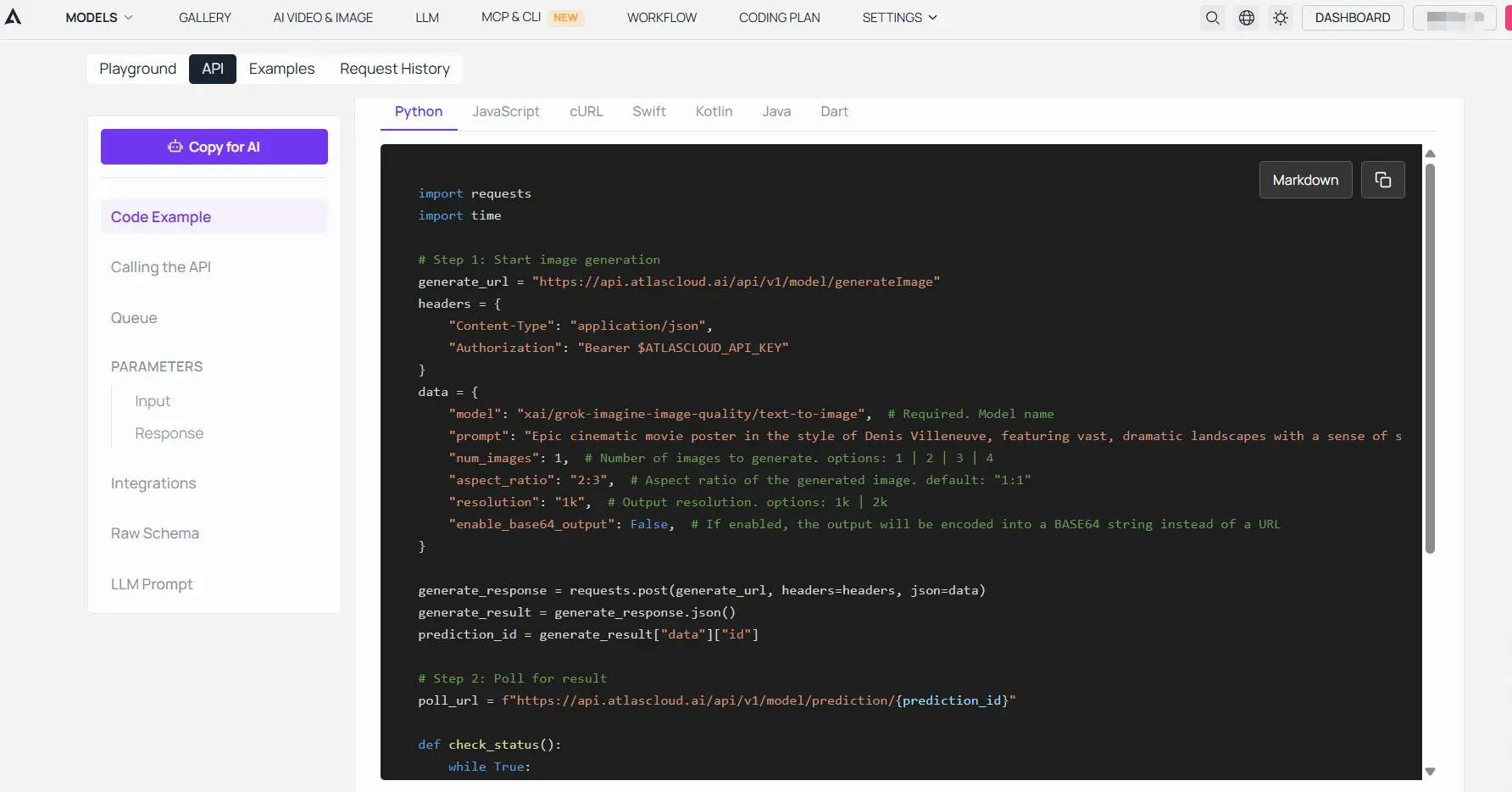
To maintain strict performance SLAs and achieve predictability at scale, advanced development teams often rely on high-performance compute environments like Atlas Cloud. Integrating your generative pipelines into a centralized cloud platform allows you to:
- Co-Locate Heavy Workloads: Deploy your internal embedding databases, fine-tuned agent frameworks, and custom pre-processing microservices within Atlas Cloud’s highly optimized AI infrastructure, cutting down edge-to-edge network lag.
- Streamline Asset Pipelines: Fetch your xAI-generated raw payloads directly into asynchronous workers managed seamlessly via Atlas Cloud compute instances, transforming image outputs into high-performance downstream data streams with minimal friction.
Troubleshooting Common Grok API Image Generation Errors
Even a well-structured integration hits friction. This API troubleshooting guide covers the most frequent Grok API error codes and how to resolve them quickly.
401 Unauthorized: Authentication Failures
A 401 response means the server rejected your credentials. One of the following is almost always the 401 unauthorized fix:
- The Authorization header is missing the Bearer prefix, note the space after "Bearer"
- The API key was copied with trailing whitespace or an incomplete string
- The key has been revoked or has not yet been activated in the xAI console
- The key is valid but scoped to a different product, not image generation
Check your key at console.x.ai and regenerate it if the issue persists.
429 Too Many Requests: Rate Limit Backoff
An exponential backoff strategy is needed to deal with 429 rate limits rather than fast retries, which compound the issue. A reliable pattern in Python:
plaintext1import time 2 3def request_with_backoff(func, retries=5): 4 for attempt in range(retries): 5 response = func() 6 if response.status_code == 429: 7 wait = 2 ** attempt 8 print(f"Rate limited. Retrying in {wait}s...") 9 time.sleep(wait) 10 else: 11 return response 12 raise Exception("Max retries exceeded")
This ensures your integration degrades gracefully under load without burning through retry budget.
Content Moderation Filter Triggers
The content moderation filter in xAI's image pipeline will block prompts that violate usage policies, returning either a 400 error or an empty data array. When this happens:
- Review your prompt for policy-violating language, explicit content, real person names in certain contexts, violent imagery.
- Simplify the prompt and remove ambiguous descriptive clauses.
- Consult xAI's usage policy documentation for category-specific guidance.
Moderation responses are not always verbose, so logging the full response body during development helps identify exactly which clause triggered the filter.
Comparing Grok API vs Gemini and ChatGPT API for Developers
Choosing between alternative image generation APIs comes down to what your project actually needs. Here is how xAI stacks up in a direct developer API comparison.
Feature-by-Feature Breakdown
Choosing between alternative image generation APIs comes down to what your ecosystem and budget actually demand. Here is how xAI stacks up against current market leaders in a direct, live developer API comparison:
| Criteria | xAI Grok API | Google Gemini API | OpenAI API |
| Active Image Model | grok-imagine-image / -quality | Imagen 3 | DALL-E 3 |
| Architecture Base | Proprietary Tuning (Flux-based) | Proprietary | Proprietary |
| Cost Per Image (Base) | $0.02 (Quality tier at $0.05) | From $0.03 | From $0.04 |
| Generation Speed | Fast (Sub-2-second engine) | Moderate | Moderate |
| Native Multimodality | Full (Text + Vision + Image + Video) | Full (Text + Vision + Image) | Full (Text + Vision + Image) |
| Max Resolution Tier | 2K HD (2048x2048 px) | 1K Standard | 1K Standard |
| Setup Complexity | Low (OpenAI SDK compatible) | Moderate (Vertex AI layer) | Low (Native OpenAI SDK) |
Where Grok API Wins
High-volume cost efficiency and structural simplicity remain Grok's sharpest competitive edges. At $0.02 per image, the base grok-imagine-image tier comfortably undercuts the standard entry rates of both Google Gemini and OpenAI for high-volume enterprise production or drafting workloads.
Beyond pricing, xAI's core advantage lies in its developer-friendly architecture:
- Fast Under 2-Second Speed: The base model makes images very quickly. This setup works perfectly for fast testing, live apps, and building quick app screens on the fly.
- Simple Swapping: The xAI setup works just like the OpenAI tool layout. You can switch your background tech to Grok by changing only two lines of code—the Base URL and your API Key. This helps you skip the long setup steps usually required by Google Cloud Vertex AI.
Where Competitors Have an Edge
Grok API vs Gemini is not a clean win across every dimension. Gemini and OpenAI offer deeper native multimodal integration, meaning image generation, vision understanding, and language tasks share a tighter unified context. For products that need conversational image editing or image-in, image-out workflows, those platforms currently offer more mature tooling.
Which Should You Choose?
- Go with Grok API if cost per image and straightforward REST setup are the top priorities.
- Go with Gemini if you need deep visual features and want to stay completely inside the Google Cloud setup.
- Go with OpenAI if you want the biggest helper community, easy plugins, and lots of shared code guides.
- Go with Atlas Cloud if you need to build and manage your own custom AI setup. It works best when you want total control over your own hardware, full data privacy, and solid business performance rather than just renting basic public tools.
Conclusion
The xAI developer ecosystem is still maturing, but the image generation layer is already production-ready for a wide range of applications. With Flux-based Grok Imagine engine under the hood, competitive per-image pricing, and a clean REST interface, xAI Grok API image generation sits comfortably among the leading next-gen image APIs available to developers today.
For teams looking to scale image generation without locking into expensive proprietary pipelines, Grok API offers a low-friction starting point. The cost advantage at volume is real, the setup is minimal, and the Flux-based Grok Imagine engine model handles a broad range of prompt styles reliably.





