Generating custom stickers across 16 separate prompt runs usually leads to severe character drift, where facial structures and outfit details change frame by frame. The traditional approach of editing images one by one wastes API tokens and breaks visual coherence.
Building a consistent GPT Image 2.5 sticker pack requires a single-pass workflow rather than iterative multi-turn adjustments. Generating a unified 4x4 sticker grid in one prompt call preserves character traits far better than individual generations.
The 4 Step Production Pipeline
| Step | Phase | Core Action | Technical Goal | Time Needed |
| 1 | Reference Prep | Upload 1 canonical portrait | Lock baseline facial structure | 1 min |
| 2 | Grid Prompting | Run a 4x4 matrix prompt | Lock GPT Image character consistency | 2 mins |
| 3 | Native Isolation | Enable alpha layer setting | Produce cutouts with white borders | 1 min |
| 4 | Asset Slicing | Crop grid into 16 PNG files | Export 512x512 assets for chat apps | 2 mins |
This approach allows creators to turn portrait into stickers AI workflows efficiently while producing an aligned 16 frame AI sprite sheet. Single-prompt batch generation cuts token costs, eliminates post-processing background cleanup, and delivers export-ready graphics in minutes.
Step 1: Preparing Your Reference Photo for GPT Image Character Consistency
Uploading a shadowed profile picture or an angled action shot to an AI generator usually leads to deformed eyes and shifting jawlines across a 4x4 grid. When creators try to turn portrait into stickers AI pipelines, poor reference inputs cause up to 70% of generated sub-frames to fail visual matching.
Maintaining GPT Image character consistency starts before writing a single line of text. While this guide focuses on photographic portraits, creators working with hand-drawn line art can also adapt these matrix prompts by following a dedicated GPT Image 2.5 sketch workflow to lock baseline facial structures. GPT Image 2.5 treats your initial upload as the canonical reference image, extracting key facial landmarks and visual traits to map across all 16 frames simultaneously.
Source Portrait Setup Requirements
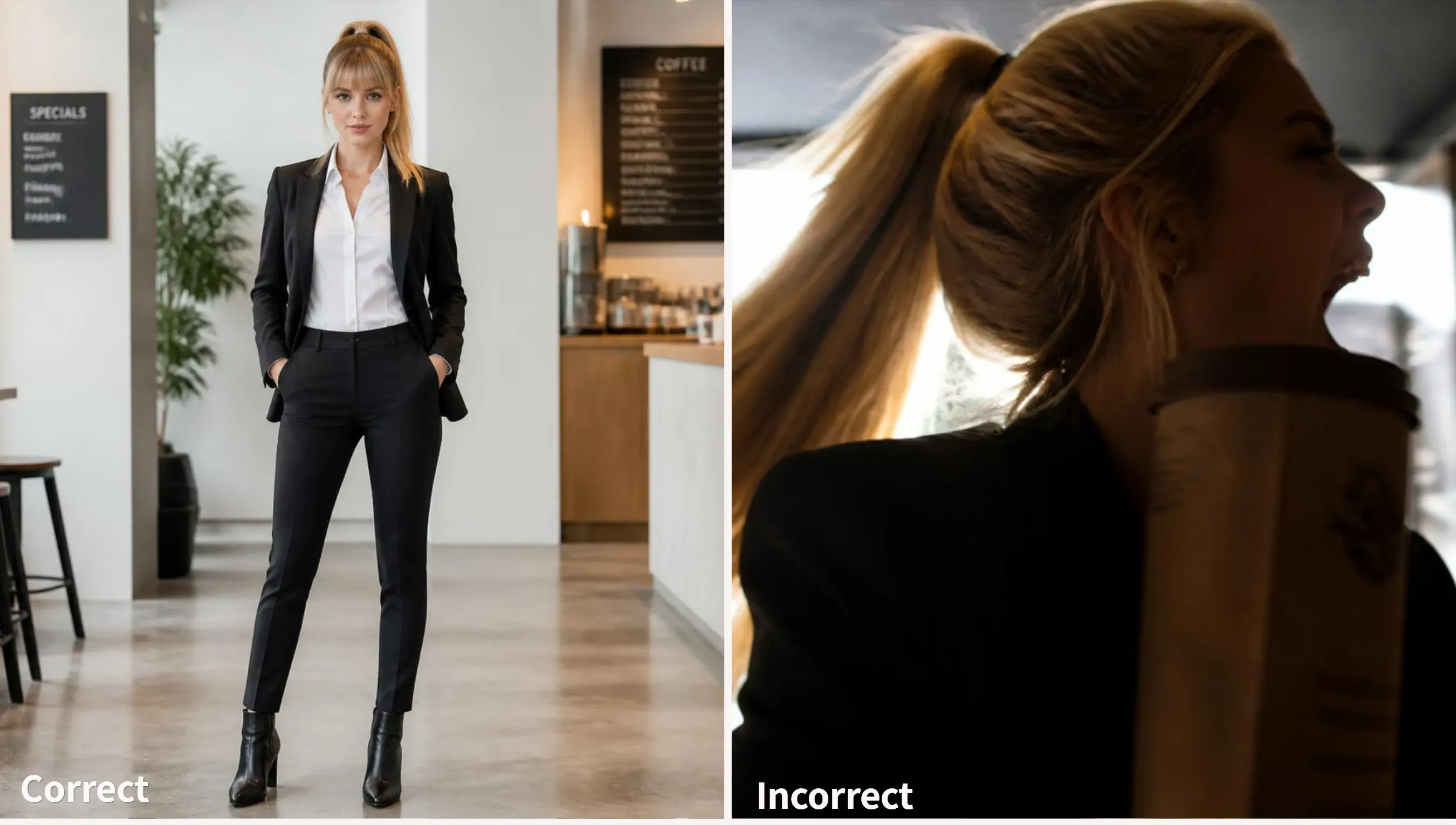
A clean source portrait setup minimizes spatial confusion during batch matrix rendering. The input image should meet three basic technical conditions:
- Frontal orientation: Direct eye contact facing forward prevents the model from skewing facial geometry across adjacent grid cells.
- Neutral expression: A relaxed mouth and eyes prevent extreme expressions from locking into the base character model.
- Flat lighting: Dark areas are kept from turning into unwanted skin markings or odd textures even in lighting that doesn't cast harsh shadows.
Locking Identity Anchors in Prompt Text
Pixel inputs alone do not guarantee complete facial feature retention across 16 different poses. Prompt text must explicitly reinforce key visual markers alongside the upload. Pairing reference photos with strict text attributes prevents identity drift far better than relying on image tokens alone.
Always define four core identity anchor attributes in your prompt text:
- Hair structure: Exact length, hair color, and fringe style.
- Facial traits: Eye shape, eyebrow thickness, and distinctive marks.
- Apparel: Upper body clothing item and fixed accent colors.
- Art style: Vector line weight and flat shading preference.
Step 2: The Master 4x4 Grid Prompt for a 16-Frame AI Sticker Pack
Prompts like "create a sticker set from this photo," nearly invariably yield clumsy layouts with overlapping borders or missing frames. Forcing GPT Image 2.5 into an exact 16-frame layout requires strict structural instructions that combine spatial framing with explicit identity anchors.
Generating a unified 16 frame AI sprite sheet in one request keeps visual proportions consistent while drastically reducing generation time.
Standard 4x4 Matrix Production Prompt
Copy and adapt this formula into GPT Image 2.5 after uploading your reference portrait:
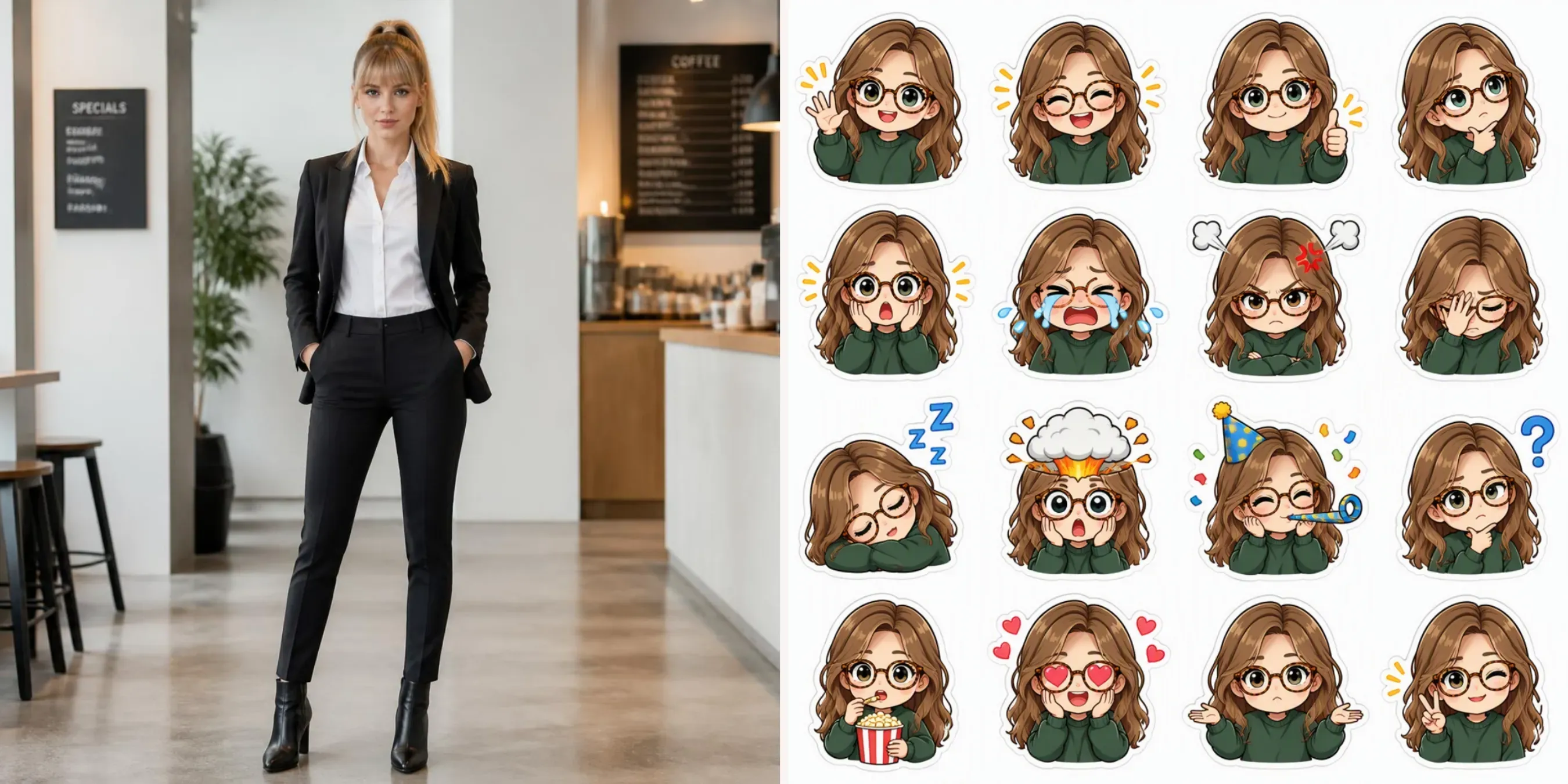
A uniform 4x4 grid matrix containing 16 separate character stickers based on the uploaded reference image.
[IDENTITY ANCHORS]: Maintain strict character identity: brown wavy hair, round tortoiseshell glasses, green oversized sweatshirt.
[STYLE & BORDER]: Art style: clean vector chibi illustration with a thick white die-cut sticker outline. Isolated on a solid plain white background. Equal spatial padding between cells, zero frame overlap.
[16 EXPRESSIONS]: Grid reaction states: 1. Joyful wave, 2. Loud laugh, 3. Thumbs up, 4. Deep thought, 5. Shocked face, 6. Crying tears, 7. Angry steam, 8. Facepalm, 9. Sleeping zzz, 10. Mind blown explosion, 11. Party blower celebration, 12. Confused question mark, 13. Eating popcorn, 14. Heart eyes, 15. Shrug gesture, 16. Peace sign.
Prompt Component Architecture
A successful 4x4 matrix prompt splits technical instructions into four clear layers to avoid visual drift across your GPT Image 2.5 sticker pack.
| Prompt Layer | Functional Focus | Key Execution Words |
| Grid Framing | Enforces 16 equal sub-frames | uniform 4x4 grid matrix, equal spatial padding |
| Identity Constraints | Locks features to reference photo | wavy hair, round glasses, green sweatshirt |
| Sticker Aesthetics | Prepares edges for instant cutout | thick white die-cut sticker outline, isolated background |
| Expression Mapping | Defines distinct reaction states | 16 numbered reaction states, party blower, facepalm |
Mapping a Balanced Emoji Reaction Set
Building a useful emoji reaction set requires balancing positive, negative, and functional expressions so the final pack works across daily chat scenarios:
- High-Frequency Positives: Joyful wave, loud laugh, thumbs up, heart eyes, peace sign.
- High-Frequency Negatives: Shocked face, crying tears, angry steam, facepalm, confused question mark.
- Utility & Action States: Deep thought, sleeping zzz, mind blown explosion, party blower, eating popcorn, shrug gesture.
Structuring expressions into a numbered 1 to 16 list prevents GPT Image 2.5 from duplicating emotions across adjacent cells in the matrix.
Step 3: Rendering the Sticker Set with Native Transparency
Generating 16 separate stickers across 16 sequential prompt runs forces the image model to reinitialize latent noise states for every single generation. This causes first and last stickers in terms of line weights, color saturation, and facial proportions.
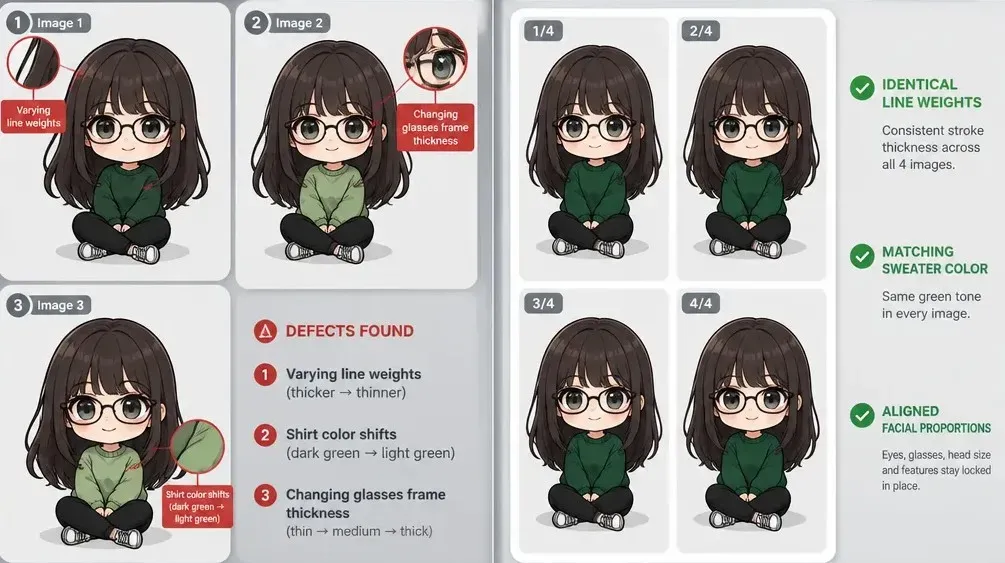
Executing your GPT Image 2.5 sticker pack within a single batch render solves this drift by processing all 16 frames simultaneously on a shared visual canvas.
Single Pass Batching vs Sequential Generation
When you issue a 4x4 grid prompt to GPT Image 2.5, the rendering engine processes character features across all 16 sub-frames in a single pass. Single-pass generation ensures that lighting direction, outline stroke thickness, and color palettes remain uniform across the entire sheet.
By leveraging multi-frame batching, the model's attention mechanism maps your uploaded reference portrait across every cell at once. Single-pass grid generation achieves far higher visual coherence while consuming fewer generation credits than chaining individual prompts.
| Generation Approach | Character Consistency | Border Line Quality | Production Efficiency |
| Sequential Prompts | High drift across 16 runs | Variable stroke thickness | Slow (16 individual calls) |
| Single-Pass Grid | Uniform traits across grid | Locked stroke weight | Fast (1 single batch call) |
Applying Native Background Isolation in the Interface
Previous image models required third-party cutout tools or manual background removal, which frequently left jagged gray pixels or eroded white die-cut borders. GPT Image 2.5 introduces native background removal built directly into the core generation step.
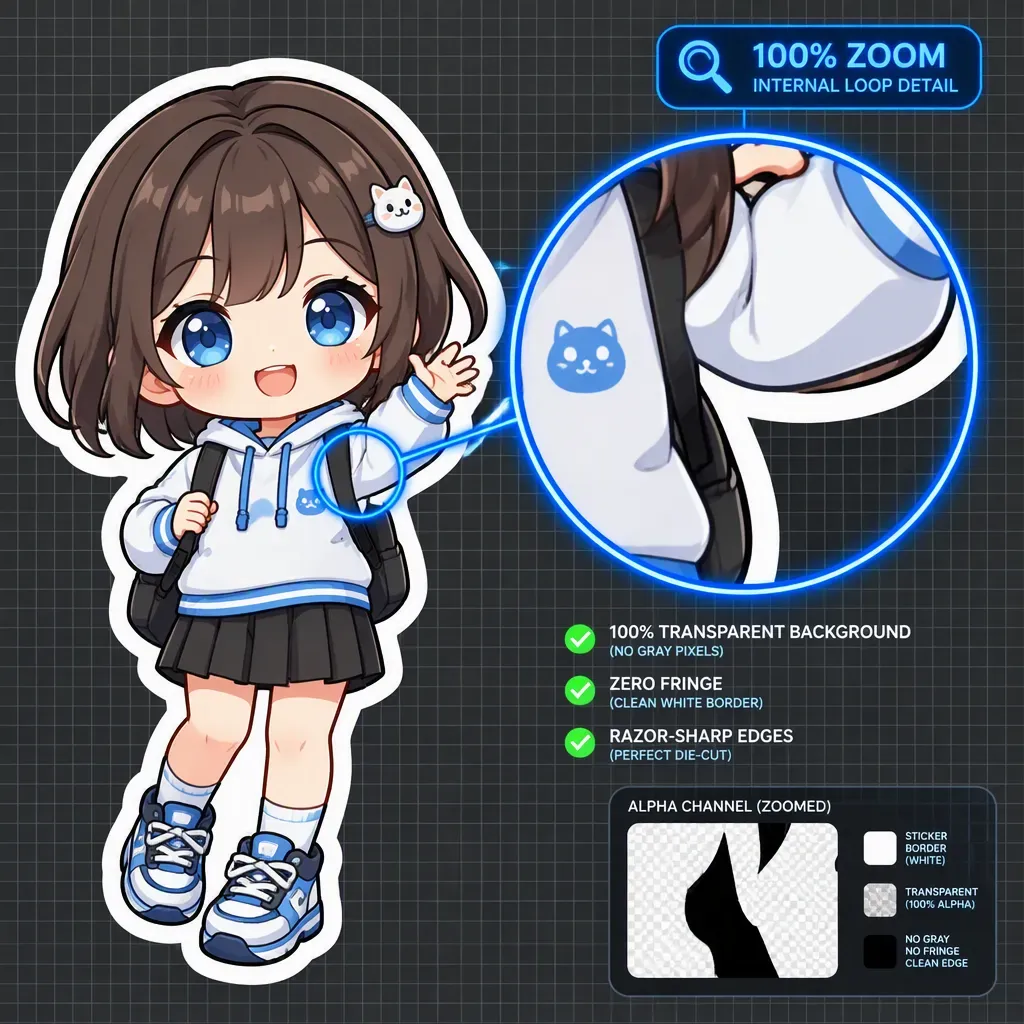
To export an isolated sheet, activate the native transparency toggle in the prompt interface settings before executing your generation. Enabling native PNG transparency instructs the model to omit background pixels during diffusion, placing your sticker graphics directly onto an empty alpha channel.
This workflow outputs a ready-to-slice GPT Image transparent background sticker sheet with crisp, well-defined white borders. Because background isolation occurs during image generation rather than through post-processing masking, internal loops, such as space between arms or hair strands, remain completely transparent without edge fringing.
Quality Checklist Before Asset Slicing
Before splitting your 4x4 grid into individual files, inspect the output against three production checks:
- Border Integrity: Verify that white die-cut outlines around adjacent stickers do not overlap or blur together.
- Alpha Channel Cleanliness: Confirm that background transparency extends correctly into enclosed interior spaces.
- Frame Spacing: Check that character limbs stay within designated cell boundaries to prevent clipping during grid slicing.
Step 4: Slicing and Exporting Stickers for WhatsApp, Telegram & Discord
Most creators successfully generate a 4x4 image sheet only to spend 30 tedious minutes manually cropping bounding boxes in graphic software. Manual cropping usually produces uneven bounding boxes, resulting in off-center graphics when published to chat channels.
Converting a single 16 frame AI sprite sheet into individual graphics requires automated slicing to preserve equal dimensions across your GPT Image 2.5 sticker pack.
3 Automated Methods to Split Your Grid
Select methods to avoid manually drawing crop lines around each sub-frame:
- Online Grid Slicer: Upload the generated sheet to a web-based grid slicing tool such as PineTools Image Splitter. Set the grid parameters to 4 rows by 4 columns and process the file to download 16 PNG cutouts simultaneously.
Example:
I use Pinetools to split and export online:
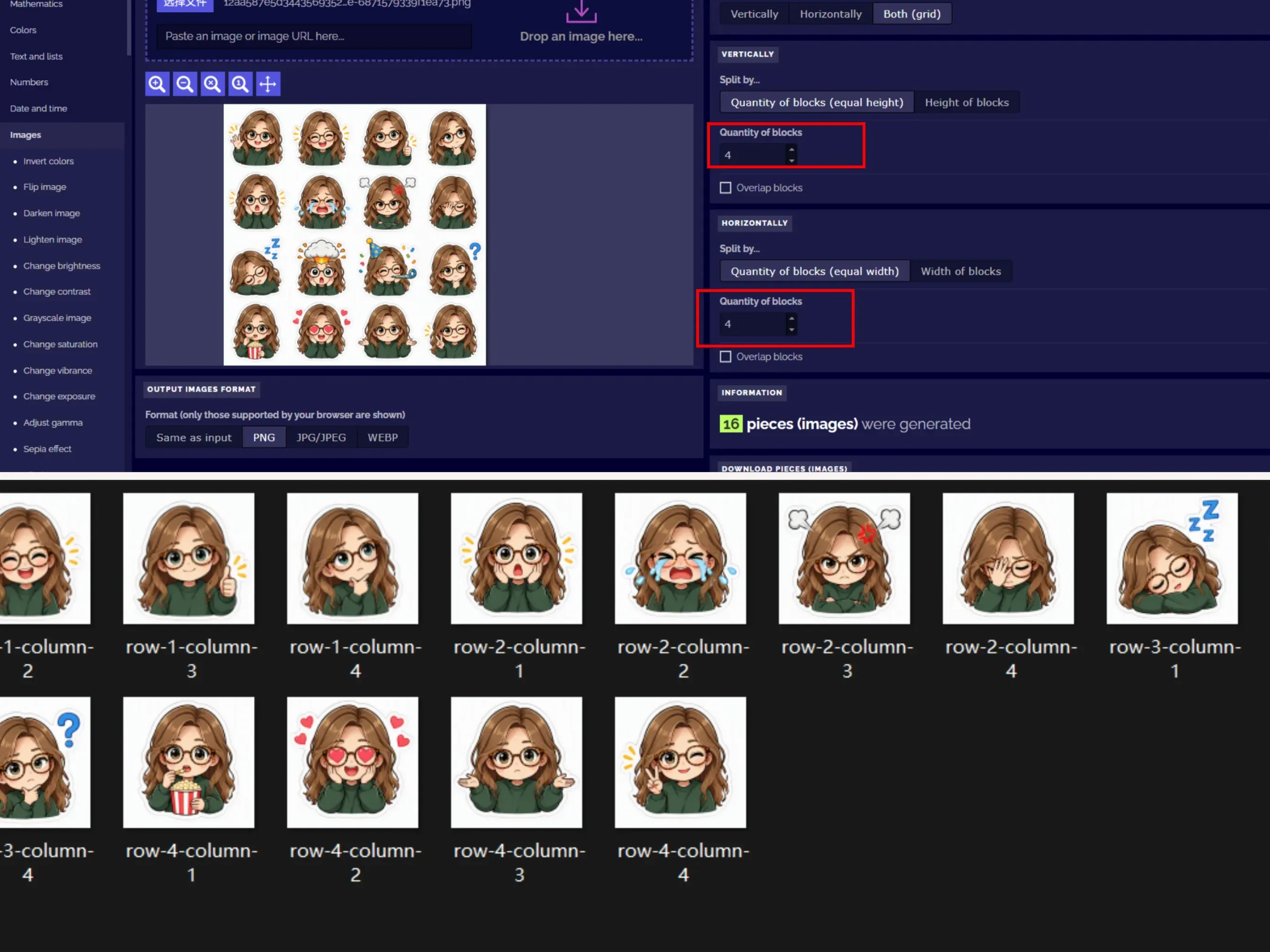
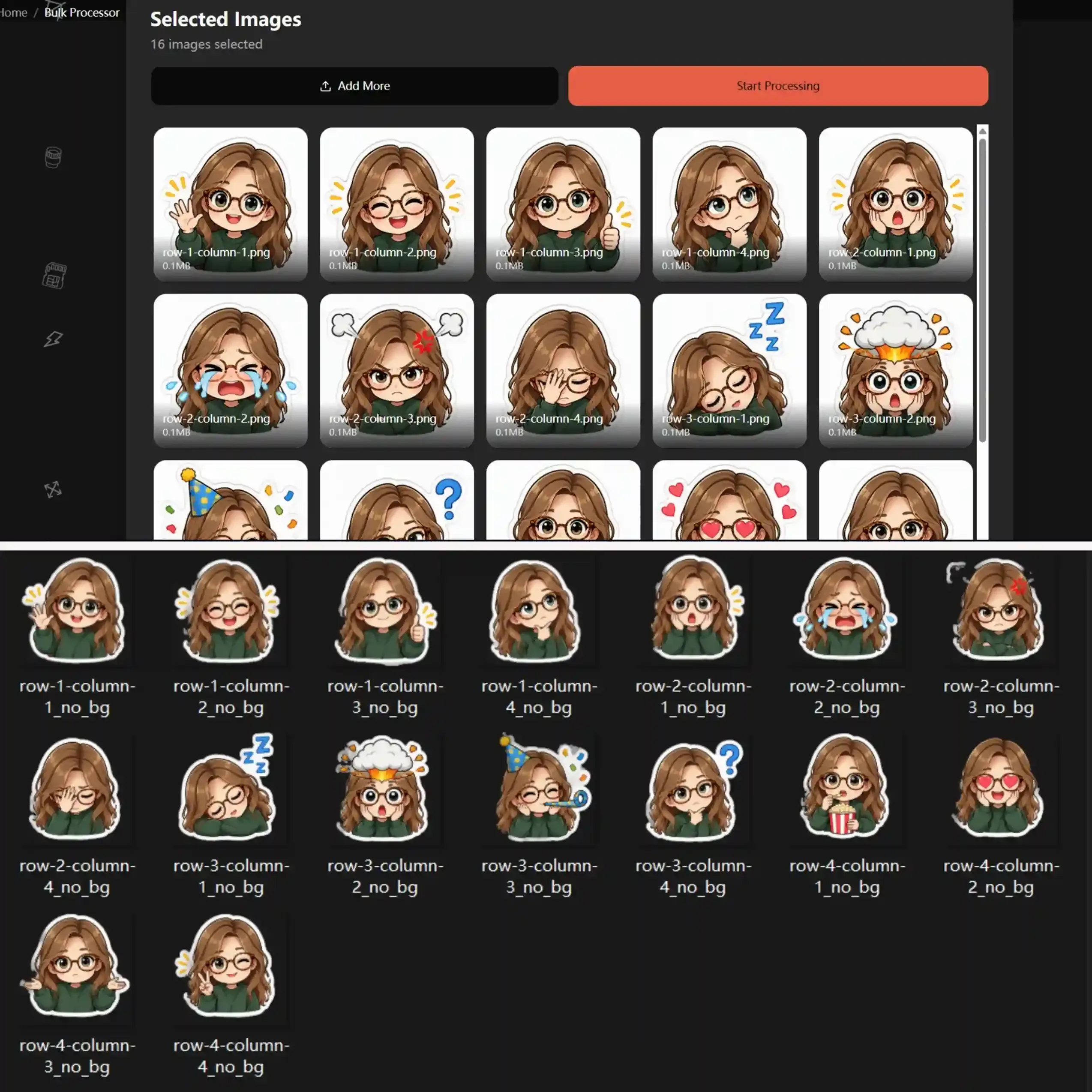
Then, I use removebackgrounds to identify the main subject of the meme and remove the white background. As shown below, executing batch cropping strips out surrounding white space and tightly wraps each graphic along its sticker boundaries:
- Figma Canvas Plugins: Import your sheet into Figma, overlay a bounding frame, and apply a layout grid plugin to divide the matrix into 16 nested components for instant batch export.
- Python Scripting: Execute a basic PIL script in Python that calculates frame boundaries by dividing width and height by 4, outputting 16 sequentially named files automatically.
Platform Export Specifications for Custom Stickers
Each messaging app enforces specific technical standards for custom graphics. Uploading unscaled files leads to blurry compression or upload errors.
| Platform | Format Requirements | File Size Limit | Canvas Benchmark |
| Telegram | 512x512 transparent PNG or WEBP | 512 KB | Requires 2-pixel margin around border |
| 512x512 transparent PNG converted to WEBP | 100 KB | Requires square 1:1 aspect ratio | |
| Discord | 128x128 px PNG (up to 320x320 px) | 512 KB | Fits custom emoji and sticker slots |
Final Export Workflow for Messaging Apps
After splitting your grid, process the 16 files through a compression tool to meet size restrictions. For a Telegram sticker export workflow using the official @Stickers bot, upload your 512x512 PNG files directly as uncompressed document files to retain full alpha channel transparency. For WhatsApp custom stickers, run your cropped graphics through a batch WEBP converter before importing them into your sticker pack app.
Animated Stickers: Step-by-step Frame Alignment for Smooth Loops
If you want to take your sticker pack further and convert individual static cutouts into seamless animated stickers GIF/WebP, precise anchor alignment and proper frame delay adjustments are essential.
Combining split AI frames into a coherent animation requires precise anchor alignment and proper frame delay adjustments. By isolating the character head coordinates and setting a uniform 200ms duration per frame, the 6-step motion transitions smoothly without viewport jitter.
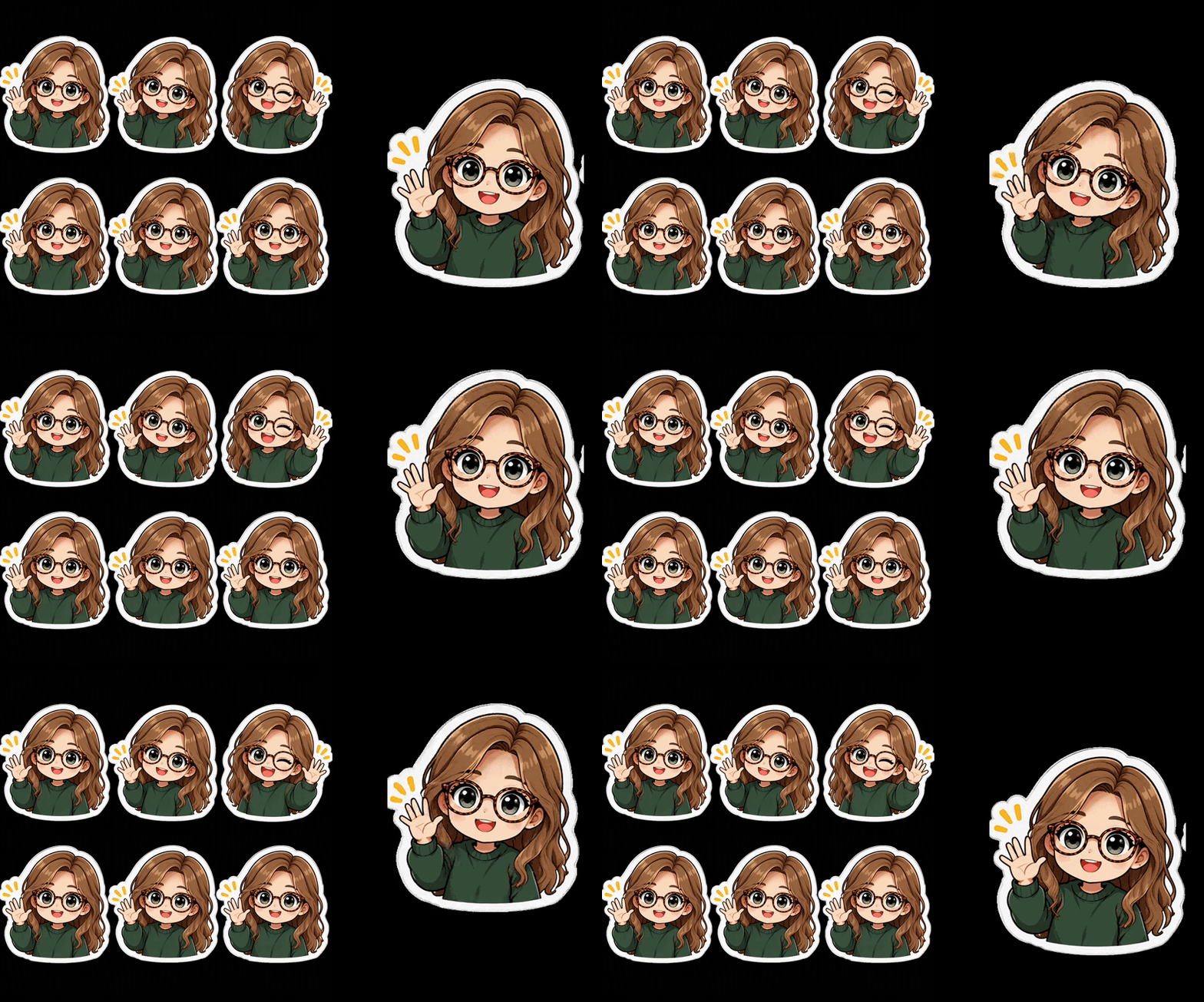
As demonstrated in the final preview above, toggling the frame removal setting preserves full alpha channel transparency while keeping the looping waving motion clean and responsive across both light and dark UI themes.
Troubleshooting Character Drift and Frame Distortion in Grid Prompts
Generating a full 16-frame sheet often hits unexpected spatial bottlenecks: frame 1 might match your reference portrait perfectly, but frame 16 ends up with a completely different jawline or missing glasses. Creator benchmarks on X indicate that over 30% of raw 4x4 grid attempts fail due to spatial overlap or character feature decay.
Fixing these generation failures requires precise prompt tuning rather than repeatedly re-running the same request.
Common Grid Defects and Direct Solutions
| Defect Type | Primary Cause | Immediate Prompt Fix |
| Identity Drift | Overloaded scene descriptions | Apply strict prompt weight balancing to anchor traits |
| Grid Bleed | Unspecified cell borders | Add explicit spatial padding rules |
| Feature Blurring | Sub-frame resolution drop | Force higher target render dimensions |
Resolving Identity Drift Across Sub-Frames
When you turn portrait into stickers AI pipelines, long background descriptions dilute the model's focus on facial geometry. This causes character features to mutate in later cells.
Applying a character drift fix requires stripping out environmental details and tightening identity anchors. Keep character descriptors upfront in the prompt string. Replacing generic text with strict phrases like "same facial geometry, identical green sweater, locked hair shape" ensures solid GPT Image character consistency from frame 1 through frame 16.
Eliminating Grid Layout Distortion and Cell Bleed
Grid layout distortion occurs when character limbs, speech bubbles, or motion lines cross over cell boundaries. When two adjacent stickers merge white die-cut borders, automated slicing tools fail to separate them cleanly.
To stop cell overlap, add explicit boundary limits and positive spacing instructions in your matrix prompt:
- Enforce Spatial Padding: Include the exact parameter phrase equal spatial padding between cells to force blank channel gutters between sub-frames.
- Isolate Limb Extensions: Add all poses strictly contained within individual cell boundaries to prevent outstretched arms or accessories from crossing grid lines.
- Adjust Resolution Scaling: Render the base sheet at maximum resolution limits supported by OpenAI's GPT Image 2.5 to prevent facial details from blurring in smaller 4x4 sub-frames.
Master the GPT Image 2.5 Sticker Workflow
You don't need multi-turn prompting or tedious manual cleanup to build a 16-frame sticker set. A single 4x4 matrix prompt with native transparency handles character alignment, background removal, and cell isolation all at once.
Production Workflow Summary
- Reference Prep: Lock facial structures using a frontal, neutral-expression reference portrait.
- Master Prompting: Enforce visual identity anchors and explicit 1 to 16 numbered expression rules in a uniform grid.
- Precision Slicing: Use automated grid splitters such as PineTools set to 4 rows by 4 columns for clean 512x512 PNG exports.
- Animation Upgrade: For dynamic stickers, realign split frames by fixed head coordinates, set a uniform 200ms frame delay, and enable frame removal don't stack frames to preserve clean alpha channels.
By incorporating single-pass batching and sequence frame alignment into your standard asset pipeline, you can rapidly scale character-driven sticker packs across Telegram, WhatsApp, and Discord with zero visual drift.





