ByteDance published the prompt itself. On July 27, 2026, a tester fed that exact prompt back into Seedream 5.0 Pro and posted the results side by side: the layout came out cleaner than the official demo, and the small print came out wrong. Doubled characters, invented glyphs, a seven-step workflow drawn as nine cards. Their summary, translated from the post: nothing like the advertised "dense text without errors."
This article verifies that report against the full-resolution images, maps where the errors cluster, and lists the prompt fixes that actually lower the typo rate.
Key Takeaways
- A July 27 test posted on X reran the Antarctic-station prompt from ByteDance's own launch post on Volcano Engine. The tester's verdict: better-looking, less crowded layout, small text full of typos.
- We checked the images at full resolution and confirmed ten distinct errors, from 极地 doubled into 极极 to a "seven-step" panel holding nine cards numbered 1-2-3-4-8-5-5-6-7.
- The launch post says infographic work requires the model to "render dense text without omissions," then concedes elsewhere that finer-grained text rendering still has room to improve. Both sentences are accurate. They just describe different font sizes.
- Every caption string in those reproductions was invented by the model, because the official prompt specifies panels, never the words inside them. Quoting exact strings is the single biggest fix.
- Rerunning the probe costs $0.036 per image on Atlas Cloud as of July 27, 2026, a limited-time 20% cut from the $0.045 list price.
Seedream 5.0 Pro Reruns ByteDance's Own Dense-Text Showcase
The launch post for Seedream 5.0 Pro devotes a full section to what it calls dense information delivery. It frames the bar first: infographic generation demands that "the model must simultaneously ensure data accuracy, render dense text without omissions, arrange a logical layout, and maintain professional aesthetics." The Chinese edition of that section phrases the same requirement as 密集文字无错漏, the wording the tester later quotes back. The flagship example is a visual chronicle of Antarctica's Qinling research station, and the post prints the prompt under the demo image: place the station building at the center, surround it with a development timeline, a bar chart comparing five stations, an energy pie chart, a monthly sunshine line chart, plus equipment photography, a summer weather panel, a seven-step field-operation flow, and sampling photos.
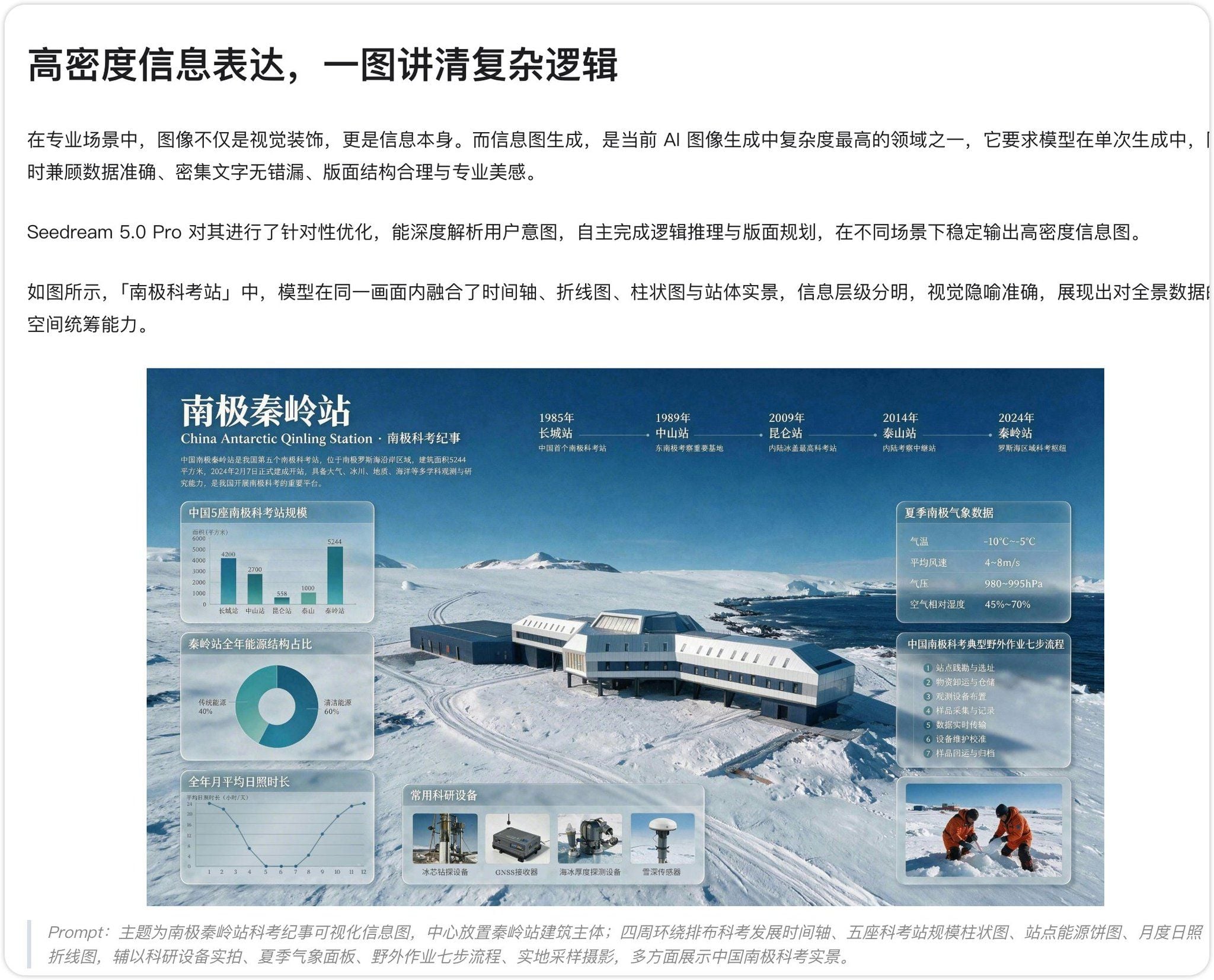
Source: ByteDance's launch post for Seedream 5.0 Pro, screenshot shared in the test thread.
That prompt is public, which makes it reproducible. On July 27, 2026, a X user ran it through Seedream 5.0 Pro on Volcano Engine, ByteDance's own cloud, and posted the official demo next to two of their outputs. The caption, translated from Chinese:
ByteDance's latest Seedream 5.0 Pro really disappoints in hands-on testing. Used the official blog case prompt, generated on Volcano Engine. The infographic layout is genuinely more attractive, less crowded. But the small text inside is riddled with typos. A completely different story from the advertised "dense text without errors."
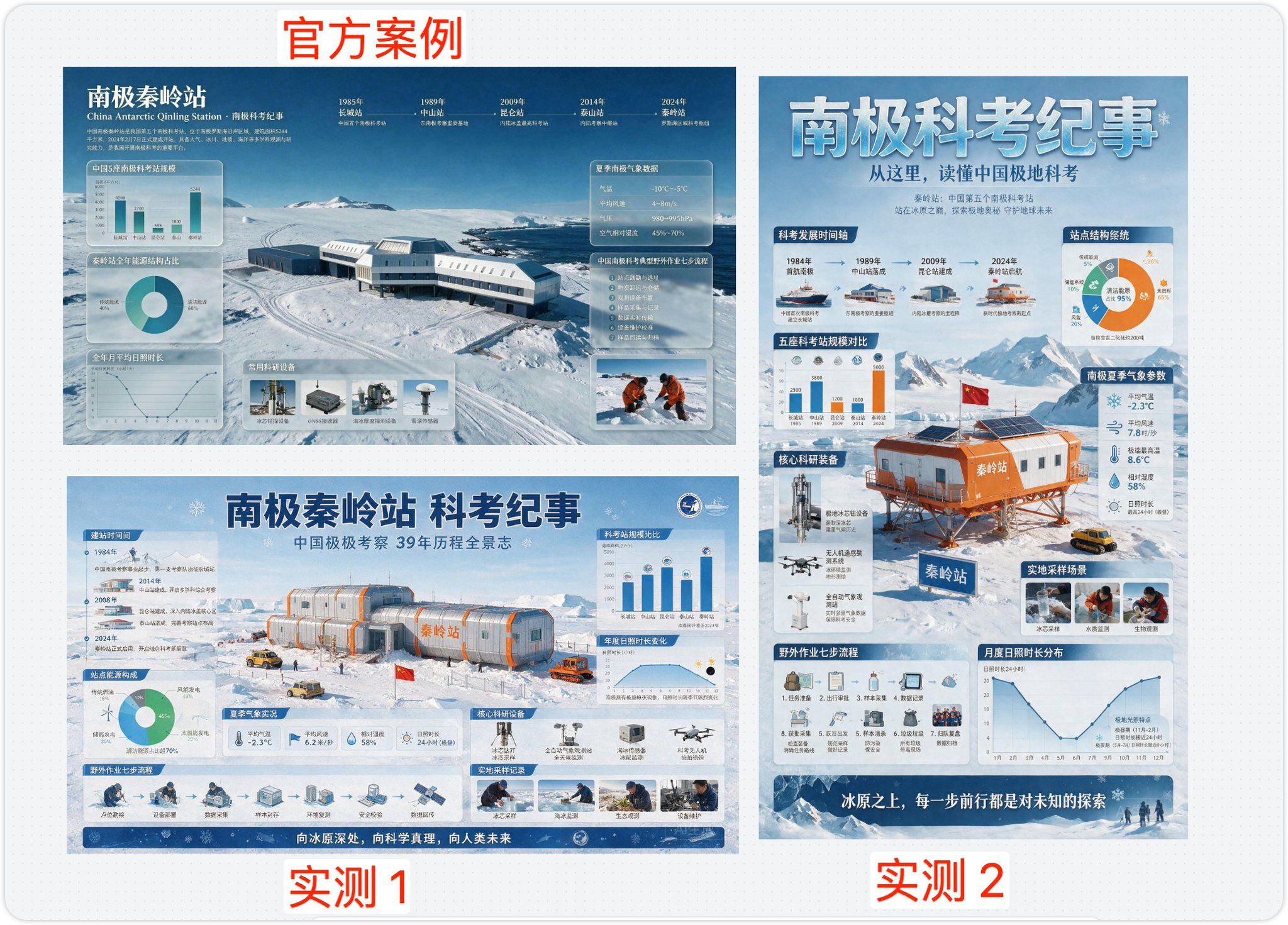
Source: the tester's reproduction post on X, July 27, 2026.
Note what the tester concedes up front: the layouts are good. Both reproductions space their panels more generously than the official demo. The complaint is confined to the words, and it holds up under zoom.
Verified Typos in the Seedream 5.0 Pro Renders
We pulled the full-resolution images from the post and read every legible label. The list below only includes errors we could confirm character by character. Blurrier suspects were left out.
| Where it appears | Intended text | What the render shows |
|---|---|---|
| Poster subtitle, run one | 中国极地考察 (China's polar expeditions) | 中国极极考察, character doubled |
| Panel header, run one | 建站时间 (construction timeline) | 建站时间间, character doubled |
| Timeline, run one | 中山站 completed 1989 | Dated 2014, placed before the 2008 entry |
| Drone caption, run one | A readable second line | 拍拍 followed by malformed strokes |
| Sunshine chart, run one | Ascending y-axis | Three consecutive ticks read 20; month axis ends at 22 |
| Wind speed, run two | 7.8 米/秒 (m/s) | 7.8 时/杪 in place of 米/秒 |
| Energy donut, run two | 太阳能 (solar) 65% | 太田形 65% |
| Workflow panel, run two | Seven steps, numbered 1-7 | Nine cards numbered 1, 2, 3, 4, 8, 5, 5, 6, 7 |
| Waste-removal card, run two | 垃圾带离现场 (carry waste off site) | Card titled 垃圾垃圾, caption 带高现场 |
| Sunshine chart, run two | Ascending y-axis | Ticks read 20, 20, 10, 10, 4, 0 |
Two of those deserve a closer look. The subtitle error sits in mid-size display type, so this is where the failure stops being a fine-print-only story:

Crop from the tester's reproduction post, enlarged for legibility.
And the workflow panel fails at something more basic than spelling. The header promises seven steps. The model drew nine cards and lost count of its own numbering:
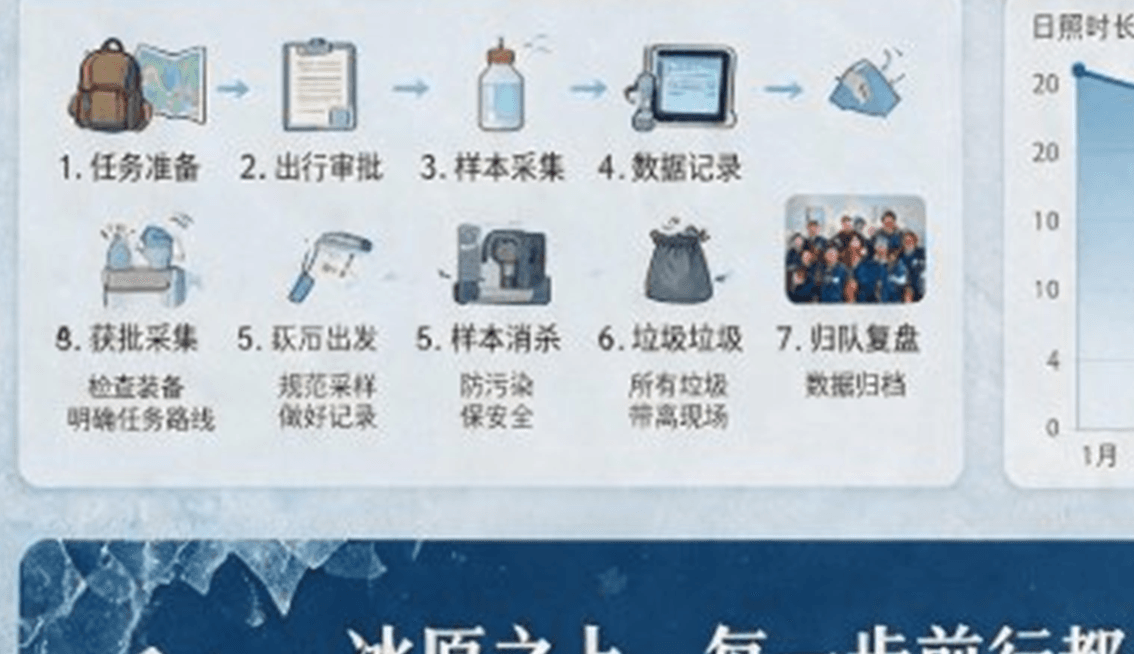
Crop from the same test post, enlarged for legibility.
For balance, the same zoom pass confirms real strengths. The main titles in both runs are clean, most panel headers are too, and run two's station bar chart gets all five station names with the right years, 1985 through 2024. The failure is not random noise across the canvas. It tracks font size, and it tracks element type.
Rerunning the Seedream 5.0 Pro Probe on Atlas Cloud
The two reproductions garble different spots. Run one doubles characters in its subtitle; run two spells its subtitle clean and breaks in its workflow panel instead. Errors move between runs, so a single generation proves little and cheap reruns are the honest way to measure. That was the original tester's setup too, two runs, not one.
Atlas Cloud is a practical bench for that. Seedream 5.0 Pro sits in the ByteDance family alongside 4.5 and Lite, so the same prompt can be checked across generations in one session. The Seedream 5.0 Pro playground takes a pasted prompt with no setup and quotes the price before each run: $0.036 per image as of July 27, 2026, under a "TWO WEEKS ONLY" 20% promotion off the $0.045 list price. Ten dollars covers about 277 runs, so a ten-run typo census of one prompt costs 36 cents.
One control matters more than the rest for dense text. Set the size explicitly to the 2K tier. The playground defaults to 2048×1152, the API defaults to 2048×2048, and small print needs every pixel it can get. The 1K comparison later in this article shows what happens without that pixel budget.
Seedream 5.0 Pro Dense-Text Failure Patterns
Lay the verified errors side by side and they sort into four repeatable patterns.
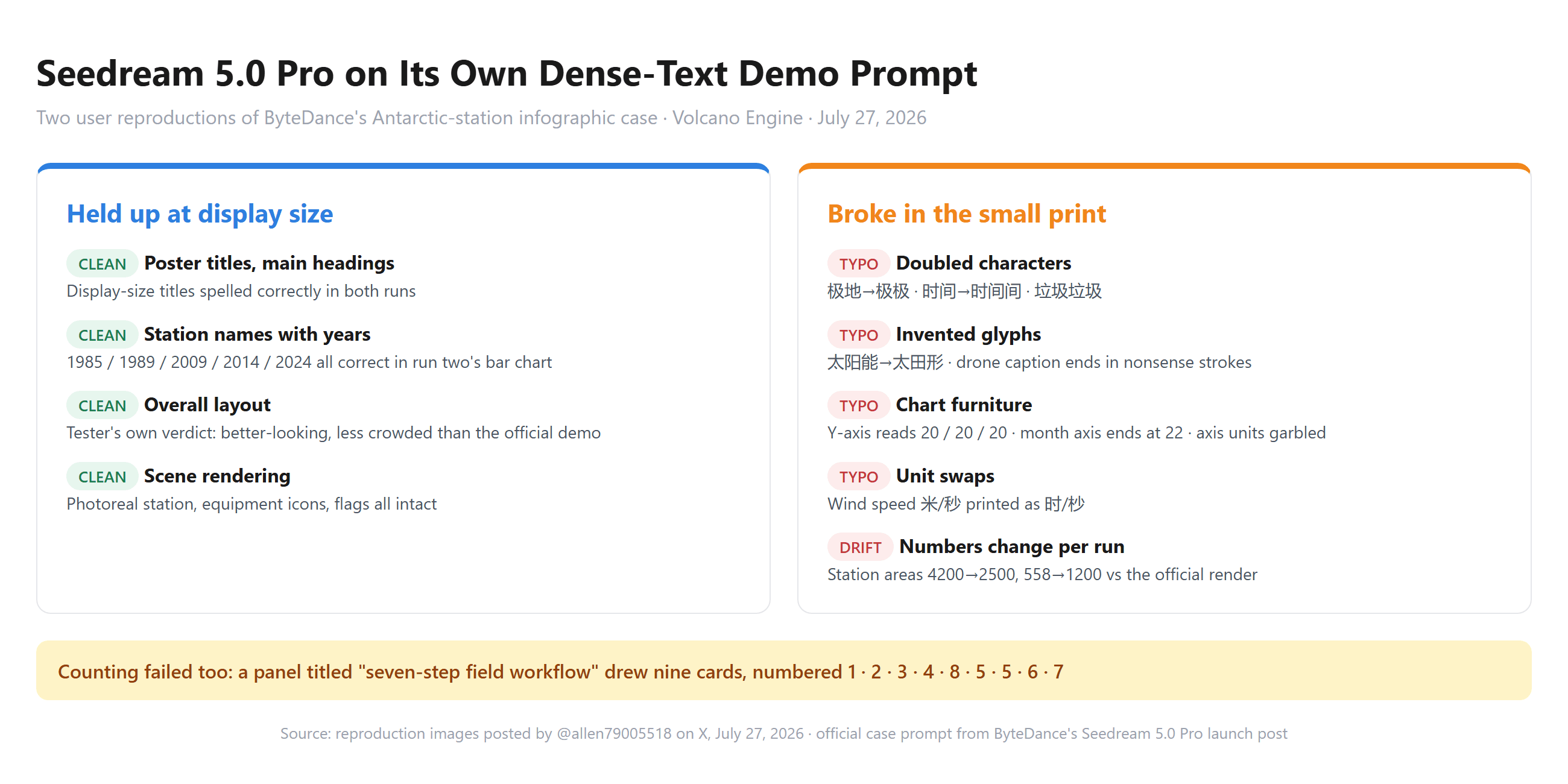
Error density scales with type size. The official demo and both reproductions spell their large headings correctly, and the confirmed errors sit almost entirely in caption-size text. Run one's subtitle typo shows the gradient reaches mid-size type as well. Our July 20 text rendering test found the same split: five exact display-size strings came back perfect while ByteDance's own RPG demo garbled its smallest labels.
Chinese small print fails by repetition or by invention. Three of the ten census entries are a character or word printed twice, and the rest of the character-level damage is invented glyph compounds like 太田形. If you proof a render in a hurry, scan for repeated characters first.
Chart furniture is the weakest zone. Both sunshine charts fail the same way, with duplicated axis ticks, and run one's bar chart garbles both its unit label and its source note. The plotted numbers are invented too: the official render lists the five station areas as 4200, 2700, 558, 1000, 5244, while run two's chart shows 2500, 3800, 1200, 1000, 5000 for the same buildings. The model draws pictures of charts. It does not compute them, and each run invents new values for anything the prompt leaves open.
Enumeration does not survive generation. The prompt asked for a seven-step field workflow. Run two drew a panel that says seven steps, filled it with nine cards, and numbered them out of order. Layout logic held, counting did not.
None of this contradicts ByteDance's own documentation. The same launch post that sets the "without omissions" bar admits "there is still room to improve in finer-grained text rendering." The gap between marketing section and limitations section is exactly the gap between headline type and caption type.
Seedream 5.0 Pro vs GPT-Image-2 at 1K Resolution
Eighteen minutes after the first post, the same tester published a second pair of images captioned "GPT-Image-2 vs Seedream 5.0 Pro (both is 1K)." The post names the models in that order and attaches two renders of a UN climate-action infographic. Neither image carries its own label, so the pairing below follows the caption's order.
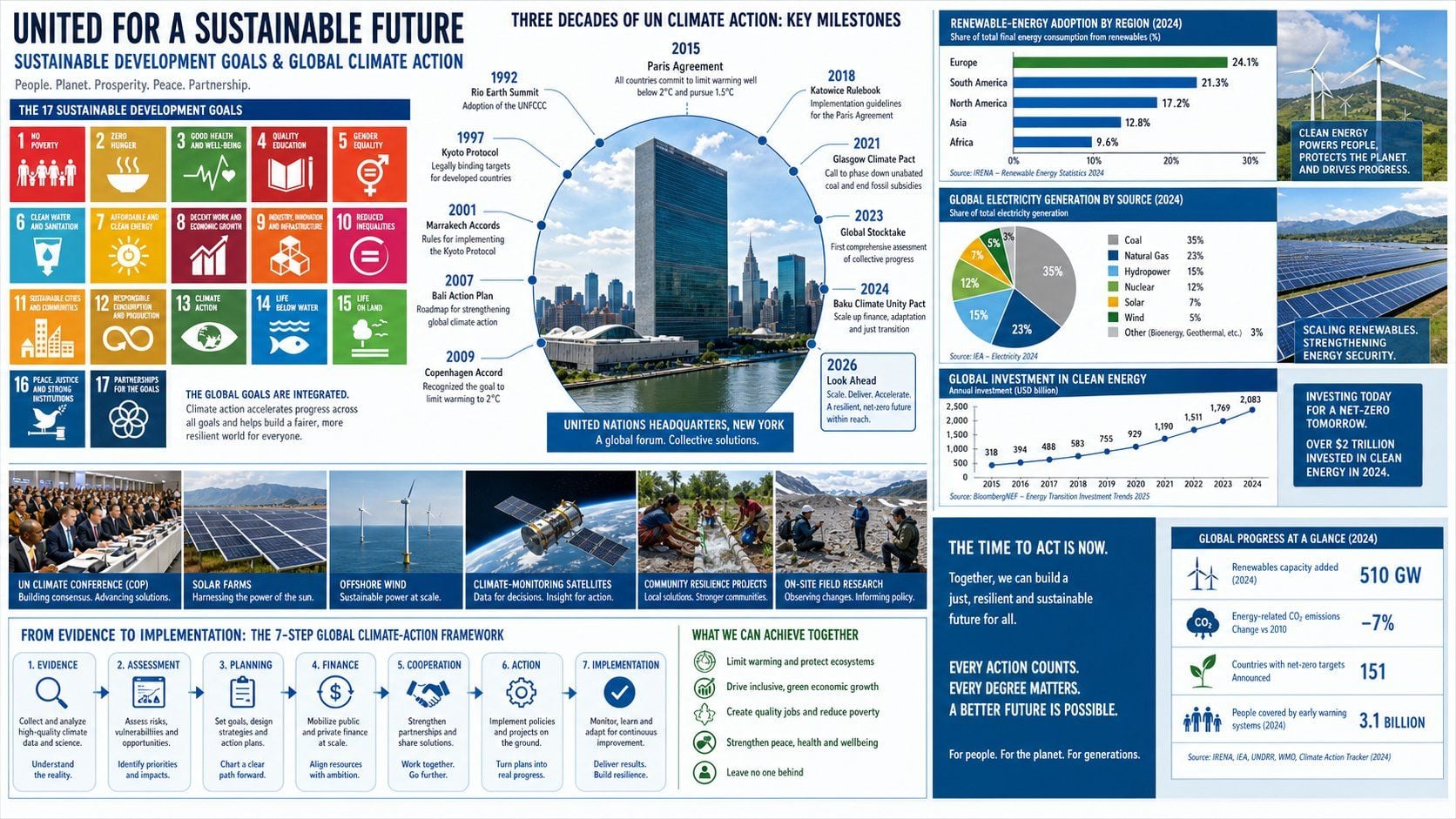
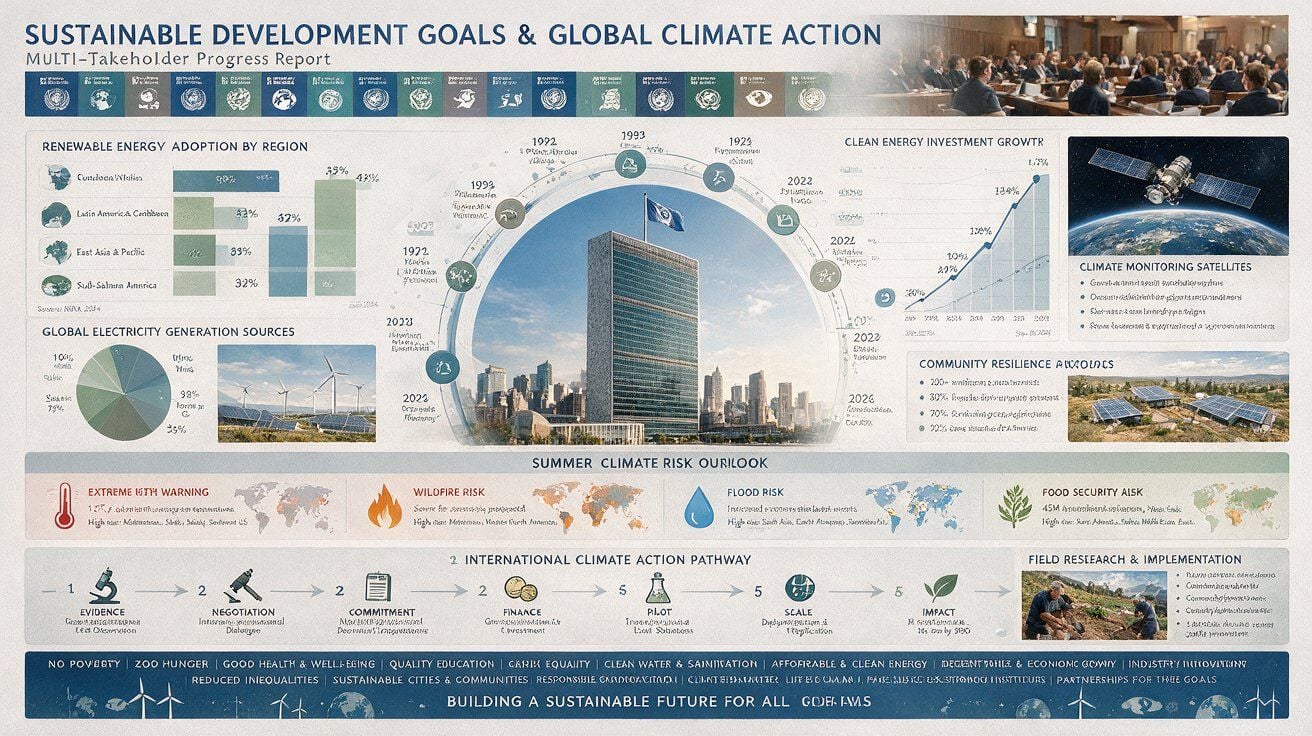
Both images from the tester's comparison post on X, July 27, 2026.
The difference is not subtle. In the first render, timeline entries, legend rows, and even invented source citations stay legible. In the second, the display headline survives, the subtitle reads "MULTI-TAKEHOLDER Progress Report" with the S dropped from stakeholder, and everything smaller collapses into unreadable letterforms.
Two cautions before treating that as a final ranking. This is one prompt, one theme, one pair of renders. And 1K allots the fewest pixels to exactly the caption sizes this article documents; Seedream 5.0 Pro's pixel budget runs to a 2048×2048 cap, four times the pixels of a 1K square. What the pair does establish: at a resolution floor both models share, one render keeps its fine print and the other loses it wholesale.
Troubleshooting Seedream 5.0 Pro Small-Print Errors
The official Antarctic prompt describes panels, never the words inside them. Every caption, unit, and axis label in those reproductions was the model's own invention, which is precisely where invention fails. The fix list below starts with the biggest lever.
| Symptom | Root cause | Fix |
|---|---|---|
| Captions exist but carry typos | Prompt never specified the strings | Quote every string you care about, with a position: panel header "科考发展时间轴", caption "冰芯采样". Drop text you are unwilling to spell out |
| Doubled characters (极极, 时间间) | Small-type glyph fidelity, stochastic | Fewer captions, set larger; rerun the prompt, in the July 27 pair no error repeated in the same location |
| Garbled axes, ticks, units | Charts are drawn, never computed | Supply axis range, tick values, and units in the prompt, or paste a real chart over the draft in an editor |
| Wrong item counts | Enumeration is not enforced | Enumerate explicitly: "exactly seven cards, numbered 1 to 7, titled..." with all seven titles quoted |
| Small print mushy at 1K | Pixel starvation | Generate at the 2K tier, with the size set explicitly as covered in the Atlas Cloud section |
| Numbers differ between runs | Model invents unspecified data | State every figure yourself, then proofread against your source before publishing |
| Residual fine-print errors after all of the above | Admitted finer-grained rendering gap | Use layer separation, then replace the smallest text with live type in a design tool |
The workflow that holds up in practice: let Seedream 5.0 Pro handle the composition, the photography, and the display type. Keep authorship of every string, every number, every count. Proof at 200% zoom, scanning for repeated characters first. Fix the last few captions in an editor rather than rerolling and hoping.
Frequently Asked Questions
Does Seedream 5.0 Pro render dense text without errors?
At display size, mostly yes. The large headings in the July 27 reproductions are spelled correctly, matching earlier exact-string poster tests. In caption-size text the answer is no: verified errors include doubled characters, invented glyphs, garbled chart axes, and a wrong unit. ByteDance's launch post concedes finer-grained text rendering still needs work.
Why does Seedream 5.0 Pro garble small Chinese text?
The confirmed failures follow two shapes: adjacent-character doubling, such as 极地 becoming 极极 or a card titled 垃圾垃圾, and invented glyph compounds, such as 太阳能 becoming 太田形. Small glyphs get too few pixels for reliable strokes, and any label the prompt leaves unspecified is generated rather than copied, which multiplies the risk.
Can prompt changes fix Seedream 5.0 Pro infographic typos?
They reduce them substantially, without eliminating them. The biggest single lever is quoting every visible string, since any caption left unspecified gets generated from scratch. Explicit enumeration fixes card counts, supplied figures stop number drift, and the 2K size tier gives small type enough pixels. Plan on proofing every render regardless.
What does rerunning the official prompt cost on Atlas Cloud?
$0.036 per image as of July 27, 2026, a limited-time 20% discount off the $0.045 list price, with $10 covering roughly 277 runs. Reproducing the tester's two-render probe costs about 7 cents.
Conclusion
This test worked because ByteDance published the prompt. Anyone can rerun the company's flagship dense-text case for pocket change, and the July 27 rerun produced a precise result: the layout claims held, the small-print claims did not. Nearly every verified error sits in text the prompt never spelled out, and the one instruction it did spell out for that zone, a seven-step flow, came back as nine cards.
That boundary is the practical takeaway. Until finer-grained rendering catches up, treat every caption the model wrote on its own as unproofed copy, because that is what it is.