An 8-second Veo 3.1 clip costs three times what the same 8 seconds costs on MiniMax H3. On the Artificial Analysis blind-vote leaderboard, it sits 145 Elo behind. That should be the end of the article.
Except Veo 3.1's API ships with audio generation turned off. The parameter is generate_audio, its schema default is false, and nothing in the response tells you the clip came back silent. MiniMax H3 has no such switch, because H3 generates picture and 32kHz stereo in the same pass and always has. So a large share of the "Veo looks better" takes floating around were built by putting a muted Google clip next to a Chinese model that showed up with a soundtrack.
I wanted to know what that 145-point gap actually looks like. So I took the single most viral format Veo ever produced, the glass-fruit ASMR cut, wrote one prompt, and ran it through both models with every setting pushed as far as each one goes. Audio on. Nothing shaved.
Then I kept going until I found the three places Google still wins, because they exist and nobody writing these comparisons seems to mention them.
Key takeaways
- On Artificial Analysis text-to-video with audio, MiniMax H3 scores 1,238 Elo against Veo 3.1's 1,093. That is a 145-point gap on blind votes (snapshot, 2026-08-06).
- Veo 3.1's
generate_audioparameter defaults tofalsein the API schema. If you call the API and never set it, you are comparing a silent Veo clip to an H3 clip that ships stereo by default.- H3 takes any whole second from 4 to 15. Veo 3.1 takes 4, 6 or 8. That is a structural ceiling, not a setting.
- Veo 3.1 does not appear on the Artificial Analysis video-editing leaderboard at all. H3 is number one on it.
- Veo 3.1 still wins on 4K output, on
seedplusnegative_promptreproducibility, and Veo 3.1 Lite is genuinely cheaper than anything H3 offers if 720p is enough for you.
MiniMax H3 vs Veo 3.1, One Prompt, Three Takes Back to Back
One prompt, three takes, in order: MiniMax H3 at 2K, Veo 3.1 at 1080p with audio explicitly switched on, Veo 3.1 Lite at 720p. Each segment keeps its own native audio track, so turn the sound on. Watch the last second of each take, and watch what the cheapest model does to the edges of its final frame.

A macro film set with a crystal glass watermelon on wet slate and two production monitors playing the same slice shot_The setup this article actually ran: one ASMR product spot, two models, one API key. Generated with openai/gpt-image-2/text-to-image._
Why MiniMax H3 vs Veo 3.1 Is Suddenly the Only Comparison Worth Running
MiniMax H3 arrived in July 2026 and did something no other model on the board has done. It landed in the top three of all three Artificial Analysis video arenas within weeks, and it did it as the only open-weights entry anywhere near the top.
Here is where the two models actually sit, pulled live rather than quoted from a press release (Artificial Analysis, August 2026):
Table A: Artificial Analysis Video Arena, snapshot 2026-08-06
| Leaderboard | MiniMax H3 | Veo 3.1 | Veo 3.1 Fast | Veo 3.1 Lite |
|---|---|---|---|---|
| Text-to-Video (with audio) | 1,238 (rank band 1-2, 6,830 votes) | 1,093 (band 11-15, 8,536 votes) | 1,091 | 1,089 |
| Image-to-Video | 1,189 (band 1-3) | 1,084 (band 8-12) | 1,077 | 1,065 |
| Video Editing | 1,132 (rank 1) | not on the board | not on the board | not on the board |
| Vendor list price, per minute of 1080p | $7.80 | $24.00 | $9.00 | $4.80 |
| Open weights | Yes | No | No | No |
Three things in that table deserve more attention than they get.
The 145-point gap is on the audio board. On text-to-video with audio, only Gemini Omni Flash (1,243) is ahead of H3, and it is inside the same statistical tie band. Veo 3.1 is eleventh. Voters listening to both clips picked H3 over Veo by a wide margin.
Veo 3.1 is not on the video-editing leaderboard. That board has eight models on it and H3 is first, nine points clear of Gemini Omni Flash. Google did not lose that comparison, it simply did not enter it. If your workflow is "generate, then change one thing in the shot", that distinction does not help you.
MiniMax's own announcement overstates one number, so do not repeat it. The official line says H3 leads second place on the editing board by 93 points. Second place is Gemini Omni Flash at 1,123, which is 9 points behind H3. The 93-point figure is the gap to Dreamina Seedance 2.0 at 1,037, which sits fifth. Both numbers are real, they just belong to different rows.
Why most head-to-heads get this wrong
Three failure modes, in descending order of how often I saw them:
- The silent Veo.
generate_audiodefaults tofalsein Veo 3.1's API schema. A developer who never touches it gets a mute clip and then scores it against H3's stereo mix. That is not a model comparison, that is a settings bug. Worth knowing: the Atlas Cloud web playground pre-enables the switch for you, so the trap bites people calling the API directly, which is most of the people publishing benchmarks. - Mismatched resolution. H3's default resolution on the API is
2K, but plenty of tests run it at768Pfor speed and then put the result next to a 1080p Veo frame. - Capping H3 at 8 seconds to be fair. It is not fair, it throws away nearly half of H3's duration range for the sake of a tidy table.
And to keep this honest, H3's own weak spots are real: packing the reference slots full tends to loosen prompt adherence rather than tighten it, its 2K tier is genuinely slow, and MiniMax itself does not position it as a film or animation model. In this run H3 also skewed stylised, reading the brief as polished cut-crystal product photography rather than the hyper-real object Veo produced.
MiniMax H3 vs Veo 3.1: Specs, Audio Behavior, and What One Second Buys
The method here is deliberately boring: one prompt, three endpoints, one API key, no editing. Both families are hosted side by side on Atlas Cloud, which is the only reason a same-prompt run is possible at all without two separate billing accounts and two different parameter dialects to reconcile. That is the whole product mention. The models are the subject.
Table B: capability matrix, from the live API schemas
| MiniMax H3 | Veo 3.1 | Veo 3.1 Lite | |
|---|---|---|---|
| Duration | Any whole second, 4 to 15 | 4, 6 or 8 | 4, 6 or 8 (1080p forces 8) |
| Resolution | 768P or 2K | 720p, 1080p, 4k | 720p, 1080p |
| Aspect ratio | 21:9, 16:9, 4:3, 1:1, 3:4, 9:16 | 16:9 or 9:16 only | 16:9 or 9:16 only |
| Audio | Native, always on, 32kHz stereo, no switch and no surcharge | generate_audio, default false | Always on, no switch |
| Reference inputs | refers[]: any mix of images, video and audio, 4 to 15 seconds | images: 1 to 3, and duration locked to 8 | None |
| seed | No | Yes | Yes |
| negative_prompt | No | Yes | No |
| Open weights | Yes, on Hugging Face | No | No |
| Price on Atlas Cloud, per second | $0.14 at 2K, $0.10 at 768P | $0.20 silent, $0.40 with audio | $0.05, audio included |
Read the last two rows together and you get the sharpest line in this entire comparison:
MiniMax H3 with the sound on is cheaper than Veo 3.1 with the sound off. $0.14 per second against $0.20.
Google's own price list agrees on the ceiling. Veo 3.1 is $0.40 per second at 720p and 1080p with audio included as the default rate, rising to $0.60 at 4K (Google Gemini API docs, August 2026). Atlas splits that into a silent tier at $0.20 and an audio tier at $0.40, so the moment you flip generate_audio to true your per-second cost doubles. H3 has no equivalent lever, because there is nothing to turn on.
One more asymmetry worth flagging before the run: H3's resolution and duration are both required fields on all three of its endpoints, and its text-to-video ratio defaults to 1:1. Send a bare prompt and you get a square video. Veo will happily default its way to a reasonable 16:9 720p clip.
MiniMax H3 vs Veo 3.1, Same Prompt, Both Models: The Full Run
One prompt for all three models, not a word changed between them. It is built to stress four things at once: hyper-real glass physics, which is Veo's home turf; native foley synced to the break; a single line of human voice-over; and a lower-third type card that fades in on the last second, which is where H3 claims an edge.
Copy this verbatim.
Plain1Extreme macro ASMR shot, 16:9. A hyper-realistic watermelon carved from clear 2crystal glass rests on a wet black slate slab. A mirror-polished chef's knife 3presses down and slices cleanly through it in one slow, continuous motion; the 4glass parts with a bright ringing crack and a spray of tiny translucent shards 5that scatter and tick across the slate. Cold blue rim light from the left, one 6warm practical behind. 100mm macro, shallow depth of field, slow push-in. 7Sound: the crisp ring of glass under the blade, shards ticking onto stone, low 8room tone. A calm woman's voice says: "Cut clean. Every single time." In the 9final second, crisp white sans-serif type fades in across the lower third 10reading CUT CLEAN.
Step 1: MiniMax H3 Text-to-Video at 2K
Open MiniMax H3 Text-to-Video, paste the prompt, then set three fields that all matter:
- Resolution:
2K. Required field. This is the top tier, 2560x1440 delivered on a 16:9 request. - Duration:
8. Required field. Matched to Veo's ceiling so the first comparison is like for like. - Ratio:
16:9. This is the one people miss. The default is1:1, and text-to-video rejectsadaptiveoutright with a 400. Leave it alone and you get a square clip.
There is no seed field and no negative prompt field. You get what the sampler gives you, and your only control is the prompt.
Billing: 8 seconds at $0.14 = $1.12, audio included. Budget patience too: this job took 455 seconds end to end. I tried four times to capture the finished playground run for this step and the 2K queue outlasted the browser session every time, so here is the API output itself instead, at 100 percent with no resampling.
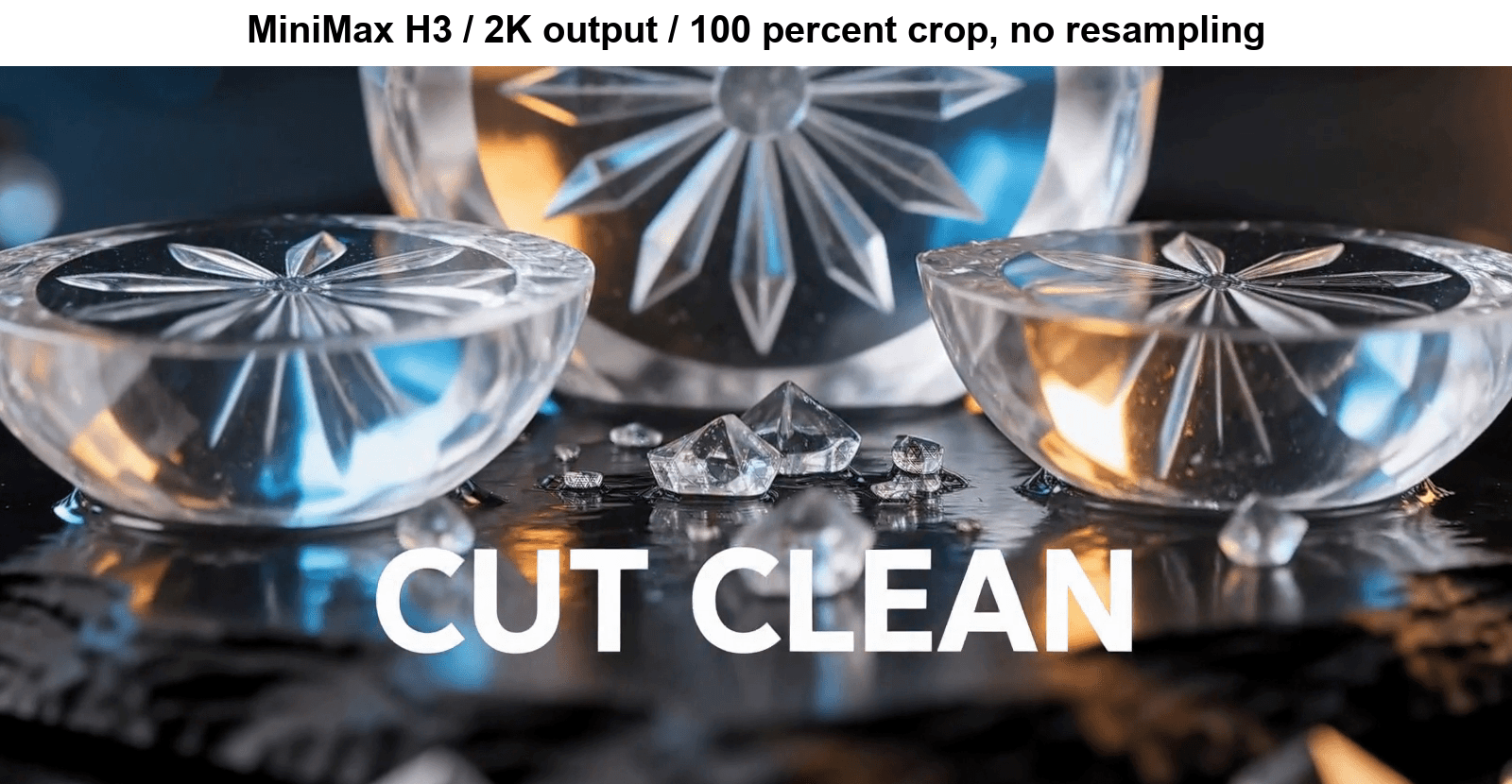
A 100 percent crop of the MiniMax H3 2K output showing crisp lower-third type and resolved glass facets_MiniMax H3, 2K, 8s, 16:9, cropped 1:1 out of the delivered 2560x1440 frame. The type edges are clean, individual glass shards on the slate hold their facets, and this is the tier the leaderboard votes were cast on._
Step 2: Veo 3.1 Text-to-Video, With Audio Switched On
Open Veo 3.1 Text-to-Video and paste the identical prompt. Settings:
- Resolution:
1080p. Veo's enum also offers4k, which H3 cannot match at all. Useful to know: 720p and 1080p bill at the same rate, so 1080p is free upside. - Duration:
8. The maximum. - Aspect ratio:
16:9. Only 16:9 and 9:16 exist here. generate_audio:true. This is the step the internet skips. The schema default isfalse, and a silent return does not look like an error.negative_prompt:blurry, warped text, extra fingers, motion blur on type. Free extra control that H3 does not offer.seed:12345. Also H3-free. Google gives you a repeatability handle.
Billing: 8 seconds at $0.40 = $3.20 with audio on. Leave generate_audio off and the same clip is $1.60 and silent.
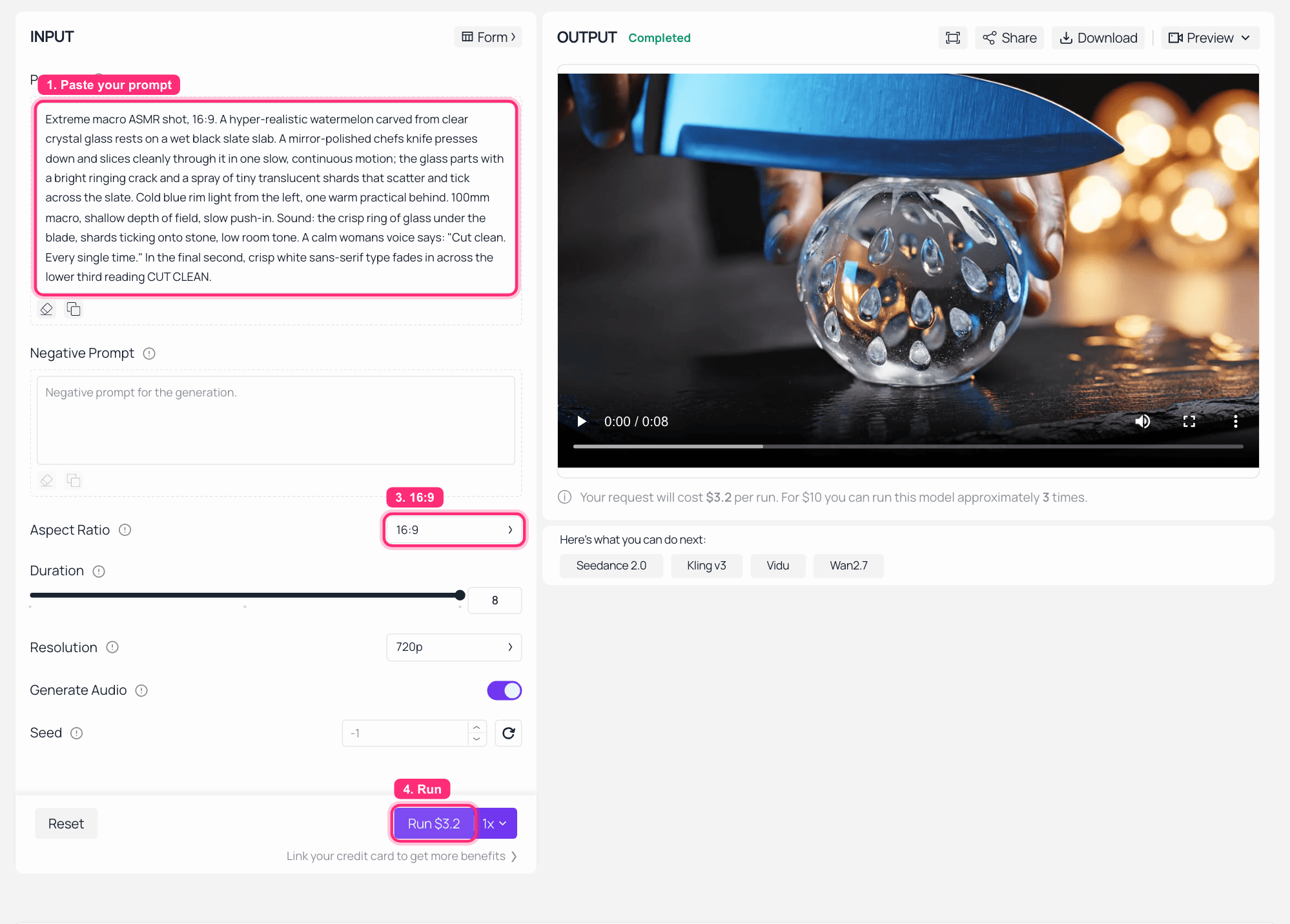
Veo 3.1 text-to-video playground on Atlas Cloud with the Generate Audio switch on and the finished clip playing in the output panel_Veo 3.1, run completed. The Generate Audio switch is on and the Run button reads $3.2, which is 8 seconds at the audio rate. This capture was left on the page's default 720p, which bills identically to 1080p; the 1080p clip in this article came from the same prompt through the API. Note the two empty fields, Negative Prompt and Seed, that MiniMax H3 has no equivalent for._
Step 3: Veo 3.1 Lite, the Cheap Seat
Open Veo 3.1 Lite Text-to-Video, same prompt again. Settings: 720p, 8 seconds, 16:9, seed 12345.
Note what is missing from this page: there is no audio switch, because Lite always generates audio. Note also the one trap in its schema, 1080p on Lite forces duration to 8, so a 4-second 1080p Lite clip is not a thing.
Billing: 8 seconds at $0.05 = $0.40. That is the cheapest finished clip with sound in this entire article, H3 included.
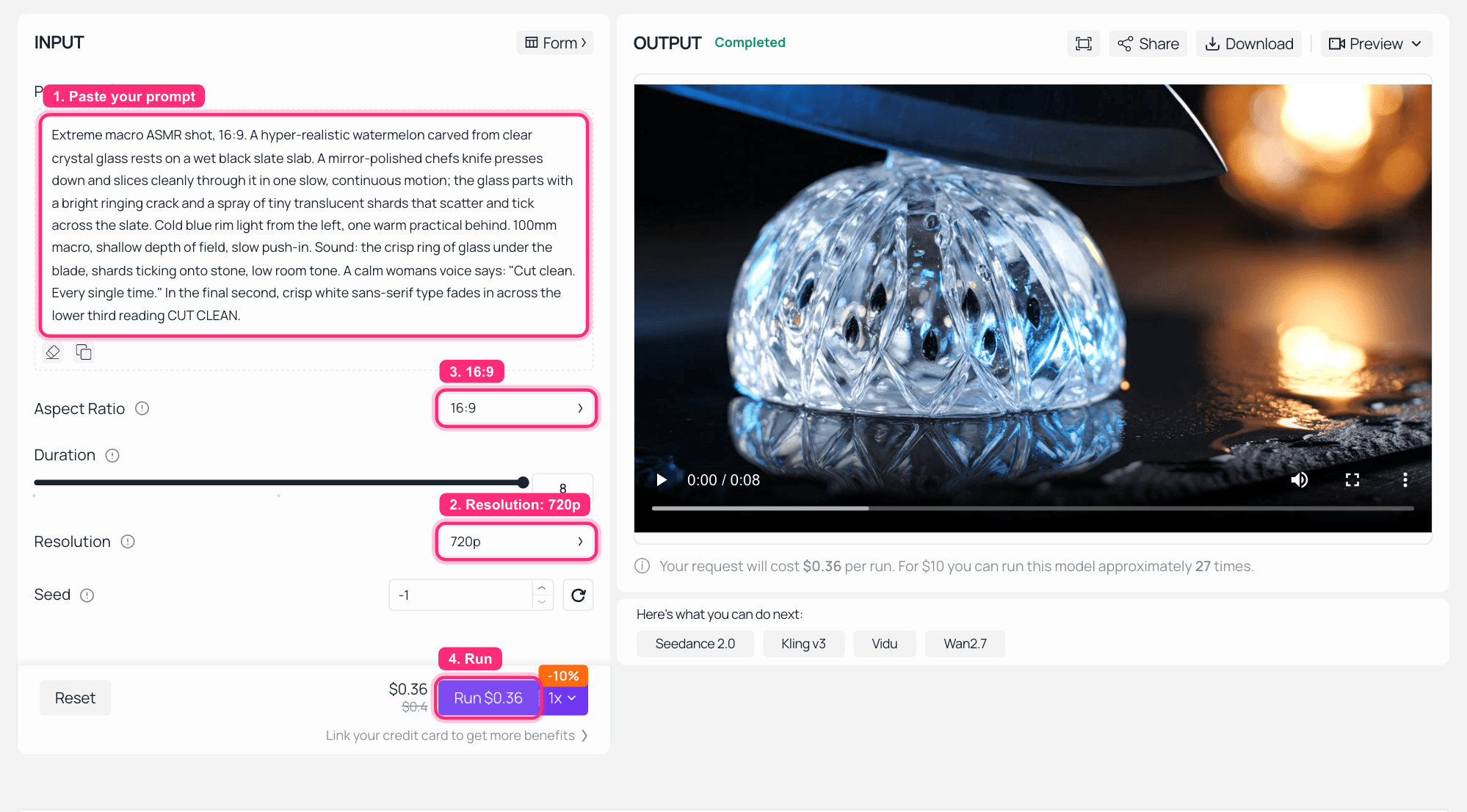
Veo 3.1 Lite playground on Atlas Cloud at 720p with no audio toggle present, finished clip in the output panel_Veo 3.1 Lite at 720p. There is no_ generateaudio control on this page at all, which is the point.
Step 4: Scoring MiniMax H3 vs Veo 3.1 on Five Axes
No model calls in this step, no cost. To be exact about what this is: one take per model, first attempt, no re-rolls. It is a like-for-like read of three clips, not a keeper-rate study.
Table D: what actually came back, one take each
| Axis | MiniMax H3 2K | Veo 3.1 1080p | Veo 3.1 Lite 720p | What decided it |
|---|---|---|---|---|
| Glass physics and realism | Clean but stylised | Best | Mid | Veo produced a believable glass object with a real shear plane and dust on the slate. H3 rendered a faceted cut-crystal ornament, closer to product CGI than to a photographed thing. |
| Reading the brief literally | Mid | Mid | Best on the object | Only Lite gave the glass melon a green rind and dark seeds. H3 and Veo both dropped the watermelon read and made a generic crystal sphere. |
| On-screen type | Best | Good | Poor | All three rendered CUT CLEAN legibly, which is rarer than it sounds. Only H3 at 2K put it in the lower third in the final second as asked. Lite blew it up across the middle of the frame and brought it in early. |
| Prompt adherence overall | Best | Mid | Worst | The brief said extreme macro, no people. H3 kept it clean. Veo added an unrequested hand. Lite invented two identical women in matching portrait cutouts on both edges of the final frame. |
| Usable on the first take | Yes | Yes | No | The Lite frame above is not fixable in post. |
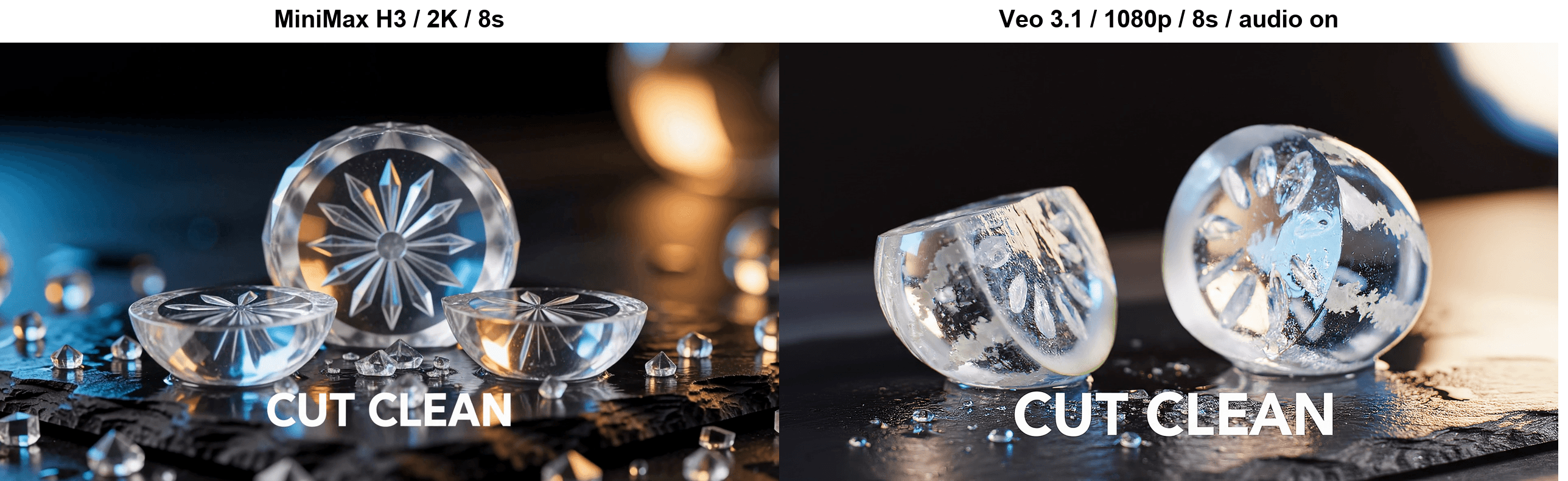
Matched frames from the MiniMax H3 and Veo 3.1 takes at the moment the lower-third type fades in
The same beat in both takes, the frame where CUT CLEAN fades in. Left MiniMax H3 at 2K, right Veo 3.1 at 1080p with audio on. Veo's glass reads more like a photographed object; H3's type is crisper and correctly placed.
The audio axis is a listening call, so the reel above is where you judge it. What is measurable: all three returned a continuous stereo track with no dead patches over 0.6 seconds. H3 delivers 32kHz stereo and mixes hot, mean level near -18 dB with peaks touching 0 dBFS. Veo 3.1 delivers 48kHz stereo at a conservative mean around -31 dB. H3's track is roughly 13 dB louder, which sounds like a more finished mix straight out of the model and also leaves you far less headroom to grade.
Step 5: The 15-Second Take Veo 3.1 Structurally Cannot Do
Same page as Step 1, same prompt, two fields changed: Duration 15, Resolution 768P, ratio still 16:9. No new screenshot, it is the same playground.
This is the step that has no Veo counterpart. Veo 3.1's duration enum is [4, 6, 8] on every one of its endpoints, and there is no plan, tier or flag that raises it. Google's own answer to wanting more is a separate video-extension feature (Google video generation docs, August 2026), which means generating 8-second blocks and joining them, which means matching grade and audio across the seams. H3 gives you one continuous take with one continuous audio bed.
Billing: 15 seconds at $0.10 = $1.50, which is less than half the cost of a single 8-second Veo 3.1 clip with audio.
MiniMax H3, 768P, 15 seconds, one unbroken take with one unbroken audio bed. Sound on. Veo 3.1 has no setting that produces this file. Note the engraving H3 invents along the blade: specified type it renders cleanly, invented type is nonsense.
Two honest notes on this take. It ran 485 seconds, the slowest job in the article, and its audio bed is noticeably sparser than the 8-second version, with real gaps around the three and eleven second marks. Longer is available, but longer is not free of consequences.
Total spend for the four tutorial steps: $1.12 + $3.20 + $0.40 + $1.50 = $6.22, single attempt per model, no re-rolls. The extra 768P eight-second run used in the next section added $0.80, and the playground captures were separate paid runs on top of that.
MiniMax H3 vs Veo 3.1: Where H3 Goes Past What Google Allows
Four capabilities on the H3 side of the table that are not slower or cheaper versions of Veo features, they are things Veo does not expose at all.
21:9 scope. H3's ratio enum includes 21:9, 4:3, 1:1 and 3:4 alongside the usual pair. Veo 3.1 and Lite both offer 16:9 or 9:16 and nothing else. If you are cutting a theatrical-format teaser, one of these models can frame it natively and the other needs a crop.
References that are not just images. H3's reference-to-video endpoint takes a refers[] array that mixes image, video and audio references to anchor a look, and it keeps the full 4 to 15 second range while doing it. Veo 3.1's reference-to-video takes an images array capped at 3 entries and its duration enum collapses to [8], so referencing locks you to eight seconds. One caution from experience: loading H3's reference slots to capacity tends to pull the output away from the prompt rather than toward it, so build up gradually.
2K is a re-render, not an upscale. This one surprised me and I have not seen it written anywhere. Run the identical prompt on H3 text-to-video at 768P and at 2K and you do not get the same film at two sizes. You get two different films. In this run the 768P take left the melon whole and upright with a candle burning behind it and slapped the type across the middle of the frame at the four-second mark. The 2K take broke the melon into three pieces, moved the background light, and placed the type small in the lower third in the final second, as written. Same prompt, same ratio, same seedless sampler.
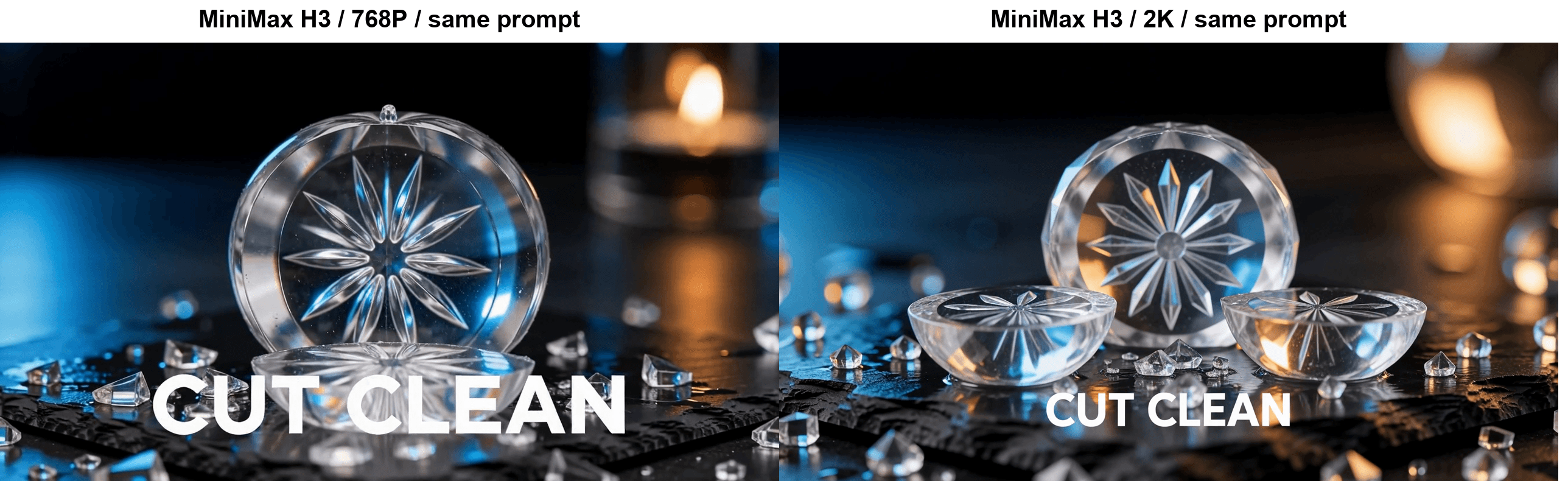
Side-by-side frames from the same prompt run at 768P and at 2K on MiniMax H3, showing different set dressing rather than the same shot at two sizes_Same prompt, same model, same ratio, 768P on the left and 2K on the right, both at the same timestamp. Different staging, different light, different type treatment. If you need composition to survive between tiers, lock the first frame with_ image-to-video instead.
No audio surcharge, ever. Stated plainly because it changes how you budget: there is no version of an H3 clip that costs less by being silent, and no version of a Veo 3.1 clip that has sound at the silent price.
To keep the ledger honest, three places Google genuinely wins and H3 has no answer:
- 4K. Veo 3.1's resolution enum includes
4k. H3 tops out at 2K. If a client contract says 4K master, this comparison ends here. seedandnegative_prompt. Veo lets you nudge repeatability and explicitly forbid failure modes. H3 gives you neither. On a shoot where you need to re-roll a near-miss without losing the whole look, that gap hurts.- Speed, sort of. Veo 3.1's model documentation quotes roughly 2 to 3 minutes for an 8-second 1080p clip. In this run, submitted concurrently, H3 at 2K took 455 seconds and Veo 3.1 at 1080p took 462 seconds, so they were effectively tied and both well over the quoted figure. Veo 3.1 Lite finished in 237 seconds, less than half of either. If you are iterating live in front of a client, Lite is the only one of the three that keeps up, and that is a real advantage the per-second price does not show.
What One Finished Ad Costs on MiniMax H3 vs Veo 3.1
Per-second prices are not what you spend. What you spend is per-second price multiplied by clips you threw away. The 30-second column below applies a 3:1 keeper ratio, three generations per usable take, which is a working assumption from normal production practice rather than something this run measured. Treat it as a scaling factor, not a benchmark.
Table C: real cost per delivered spot, Atlas Cloud pricing as of August 2026, no active discounts
| Endpoint and tier | $/second | One 8s clip | 30s spot at a 3:1 keeper ratio | Audio |
|---|---|---|---|---|
| MiniMax H3, 2K | $0.14 | $1.12 | $12.60 | Always on |
| MiniMax H3, 768P | $0.10 | $0.80 | $9.00 | Always on |
| Veo 3.1, silent | $0.20 | $1.60 | $18.00 | Off |
| Veo 3.1, audio on | $0.40 | $3.20 | $36.00 | On |
| Veo 3.1 Lite, 720p | $0.05 | $0.40 | $4.50 | Always on |
Two conclusions, and the second one is not the one I expected to write.
If you need 2K, or longer than 8 seconds, or a ratio other than 16:9 and 9:16, or native audio without a surcharge, H3 wins on cost by a wide margin. A 30-second spot at H3's top tier lands near a third of the same spot on Veo 3.1 with sound.
If 720p and 8 seconds are genuinely enough, Veo 3.1 Lite is the cheapest thing here, and it is not close. At $0.05 per second it is half of H3's cheapest tier, audio is included with no switch to forget, and it was twice as fast as either flagship. Anyone telling you H3 is unconditionally the cheap option has not looked at the Lite row. Google also lists Veo 3.1 Fast in between, at $0.10 per second at 720p in its own price list, though Atlas's catalogue and its model page quote different figures for that tier so treat Fast's exact number as unsettled.
The catch is what the discount buys you. This is the last frame Lite handed back on the first attempt:
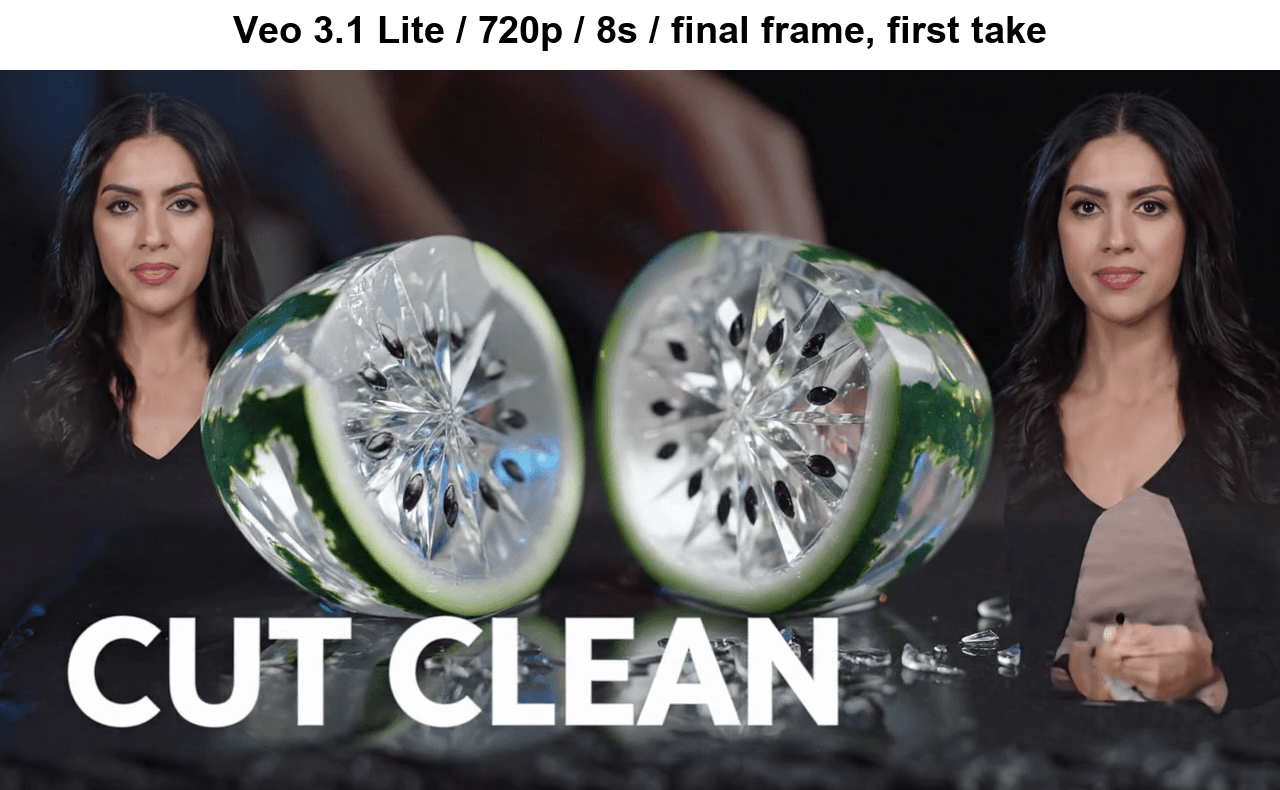
Final frame of the Veo 3.1 Lite take, with two identical hallucinated women in portrait cutouts on both edges of the frame_Veo 3.1 Lite, final frame, first take. The prompt mentioned a woman's voice; Lite decided to show her, twice, in matching cutouts. It also gave the melon the best green rind and seeds of the three models, which is what makes this frustrating rather than simply bad._
That is the honest shape of the cheap tier. It read the object better than either flagship and then broke the shot in a way you cannot fix in post. Cheap per second is not cheap per usable clip if the failure rate moves, so if you go Lite, budget for re-rolls rather than assuming the sticker price.
Open Weights, Excluded Territories, and the Part Nobody Reads
The weights are genuinely published. MiniMaxAI/MiniMax-H3 on Hugging Face is a 33B-parameter dense single-stream omni Transformer in BF16, shipping with two ready checkpoints, the full Qwen3-VL-32B text encoder and two autoencoders. Pull everything and it is roughly 499 GB. It is the current flagship, not a retired version, and among the top ranks of every Artificial Analysis video board it is the only open-weights entry.
Then you read the license, and it is doing more work than "open weights" suggests (Hugging Face, August 2026):
- §I.5 defines Excluded Territories as the European Union, the United Kingdom, the Republic of Korea and the United States of America. The grant applies worldwide except there.
- §V.4 goes further than deployment. You may not use, reproduce, modify, distribute or display the works or any of their Outputs outside the Applicable Territory.
- §IV.1 requires separate prior written authorization if your commercial products clear $20 million in yearly revenue.
- §IV.2 requires you to display "MiniMax H3" prominently in the UI of any commercial product built on it.
MiniMax has not left that hanging. The repository ships a licensing Q&A and an application form, and the license says the company will keep evaluating those jurisdictions and invites interested parties to apply. So the accurate framing is "not yet, ask us", not "banned forever". It is still a question to route past legal before you plan a US or EU product around the local weights.
And the local weights are not the API. Self-hosted H3-Base renders at a 768-pixel short edge; the 2K path runs through a separate regeneration stage on the API side. Open weights buy you a 768p model you control, not the 2K model that won those votes.
One thing I could not settle: whether Veo 3.1 output carries a SynthID watermark when served through a third-party API. Treat that as unverified. The H3 files in this run carried no visible watermark.
Frequently Asked Questions
Is MiniMax H3 actually better than Veo 3.1?
On blind votes with audio, yes, by 145 Elo on Artificial Analysis text-to-video, and H3 is first on the video-editing board that Veo 3.1 does not appear on. It also costs less per second with sound on than Veo does with sound off. Veo 3.1 still wins on 4K output and on seed plus negative_prompt control.
Why is my Veo 3.1 video silent?
Because generate_audio defaults to false on Veo 3.1 and Veo 3.1 Fast. Set it to true explicitly. Be aware this doubles your per-second cost, from $0.20 to $0.40 on Atlas Cloud. MiniMax H3 has no such parameter, since audio is generated in the same pass as picture. Veo 3.1 Lite also always generates audio.
Can MiniMax H3 make clips longer than Veo 3.1's 8 seconds?
Yes. H3 accepts any whole second from 4 to 15 as a single continuous take, both fields required on the request. Veo 3.1's duration enum is [4, 6, 8], hard. Going longer on Veo means generating 8-second blocks and extending or stitching them, then matching grade and audio across the joins.
MiniMax H3 has open weights. Does that make it free?
Not in the way most people mean. The full download runs about 499 GB, self-hosted H3-Base renders at a 768-pixel short edge, and 2K needs the API-side regeneration stage. The community license also excludes the EU, UK, South Korea and the US, and that restriction covers outputs, not just deployment, with a formal authorization channel open for those regions.
Which is cheaper for a finished 30-second ad, MiniMax H3 or Veo 3.1?
H3 at 2K works out near $12.60 for a 30-second spot at a 3:1 keeper ratio, against roughly $36.00 for Veo 3.1 with audio on. But Veo 3.1 Lite beats both at around $4.50 if 720p and 8-second blocks are acceptable. H3's cost advantage is conditional on wanting 2K, longer takes, wider ratio choice or free audio.
Does MiniMax H3 do 4K like Veo 3.1?
No. H3's resolution enum is 768P and 2K only. Veo 3.1's includes 4k, at $0.60 per second in Google's own pricing, and Veo 3.1 Lite explicitly does not support 4K either. If a 4K master is contractual, Veo 3.1 standard is the only one of these three that delivers it.





