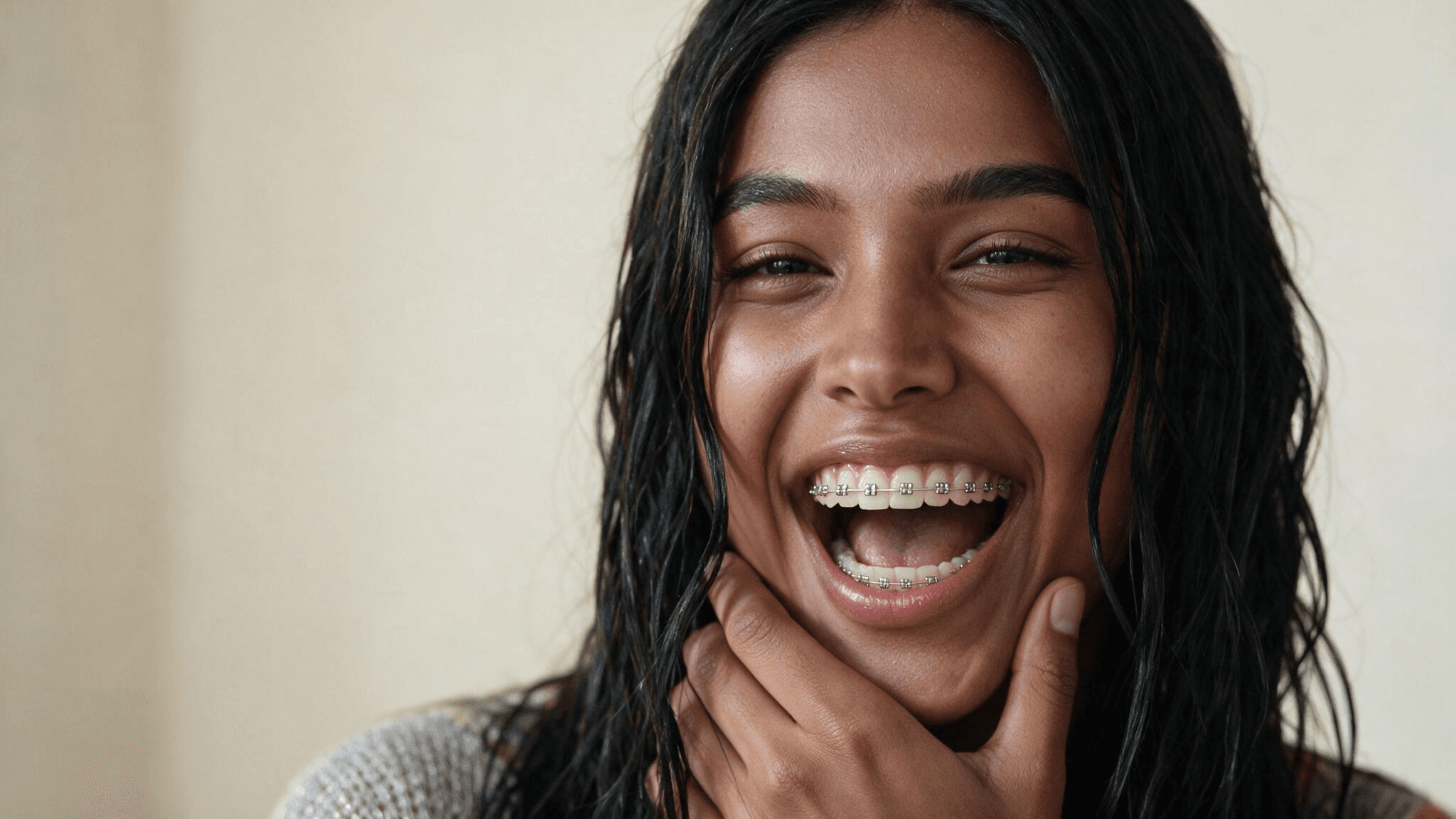
A woman looks into her phone with her lips pressed shut. Her hand comes up over her mouth, drops, and there they are: a full set of metal braces she did not have yesterday. The camera pushes in, and the caption asks what the comments are already arguing about. Do braces suit her?
That clip is the braces filter CapCut trend, and the braces are AI. One selfie in, a 10-second reveal out. Below: the templates behind the clips, the prompt we used to build the same reveal from one photo, and the question people ask before an orthodontist appointment, what would I look like with braces in metal, clear or color.
Key Takeaways
- The braces filter CapCut trend is a 10-second AI clip: a selfie hides its smile, then reveals metal braces.
- Ai by Leaha and trending braces by Kitty_CapCut, the two biggest AIbracestemplates, had each passed 70,000usesby October 29.
- TikTok's own brace and braces effects, not AI, sit behind posts with 1.7 and 1.8 million plays.
- You can build the same reveal in the Atlas Cloud video generator with Seedance 2.5, one photo and one prompt.
- A still with the braces you want makes a good last frame, which is how we made the dog version.
What Is the Braces Filter Trend on TikTok?
Two things share the name. The first is a TikTok camera effect: pick one called brace or braces, and brackets sit on your teeth while you talk. One July post using the brace effect had 1.7 million plays by October 29, and nothing in it is hidden or revealed.
The CapCut version has a plot. You upload a selfie, and the template turns it into a clip in which you cover your mouth, lower your hand and smile with braces that were not in the photo. A caption does the rest: "Trying the braces filter" or "Do braces suit me?"
![Braces filter CapCut template Braces Filter by rizky[NL] in four frames, closed lips at 0 and 3 seconds, a smile with metal braces at 5 seconds and the same smile at 9.5 seconds Template preview published by its creator on CapCut. The preview is a video; frames shown at 0, 3, 5 and 9.5 seconds.](https://static.atlascloud.ai/uploads/the_braces_filter_capcut_trend_hides_a_smile_then_reveals_ai_braces_in_10_second_2_bdb261158e.png)
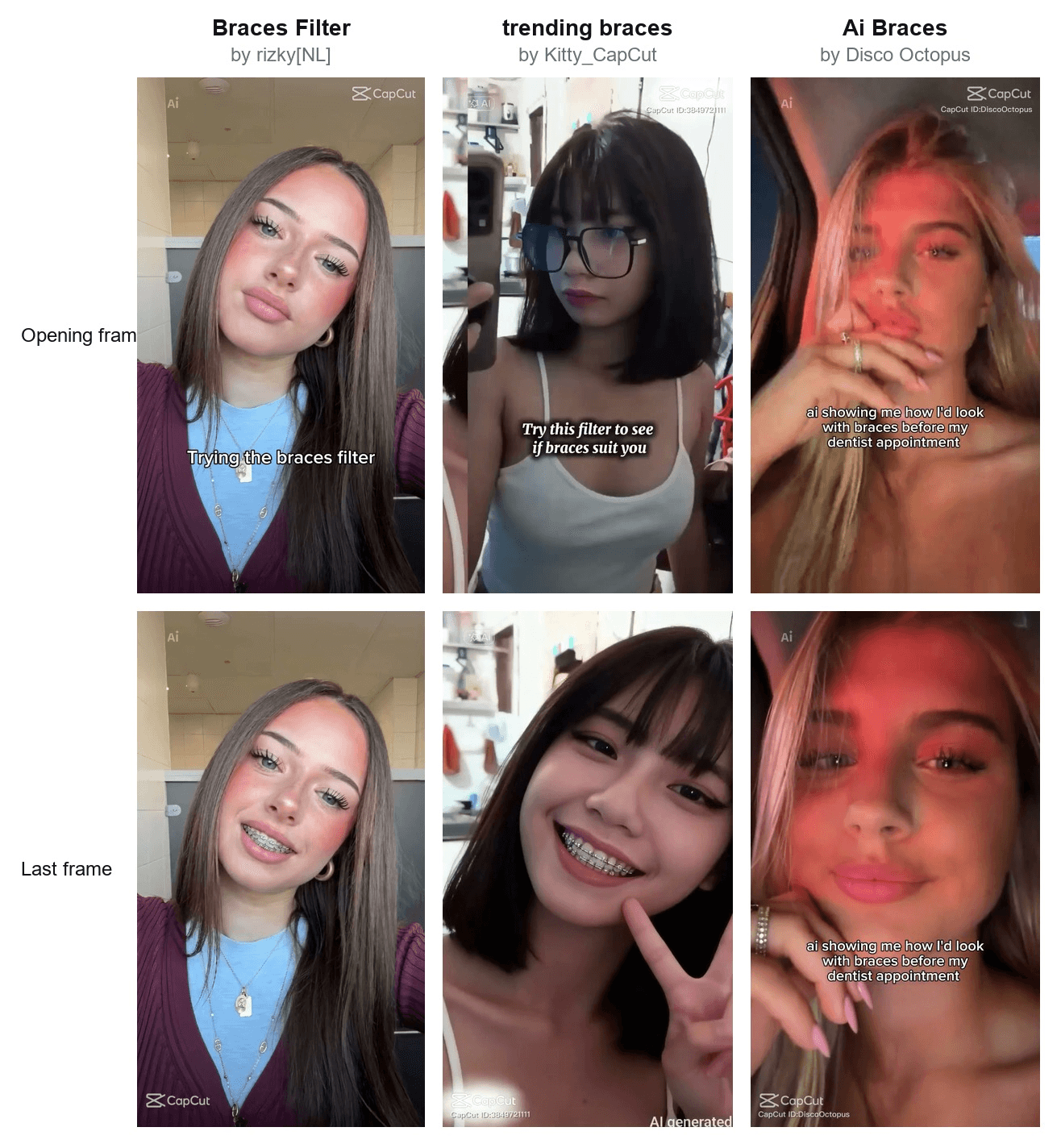
That template is Braces Filter by rizky[NL], up since June 16, 2026 with 47,778 uses by October 29. A late-August wave followed from CapCut Pioneer creators: this August 26 tutorial for the Ai Braces template had 48,100 plays. By October an orthodontic practice was posting its own version, captioned "Wait... it looks so real."
How to Make an AI Braces Video From One Selfie
A template decides how the reveal looks. A prompt lets you decide. Atlas Cloud runs Seedance 2.5, which animates the reveal from one photo while the face, the hair and the room stay put. Here is the clip it made from a selfie with closed lips:
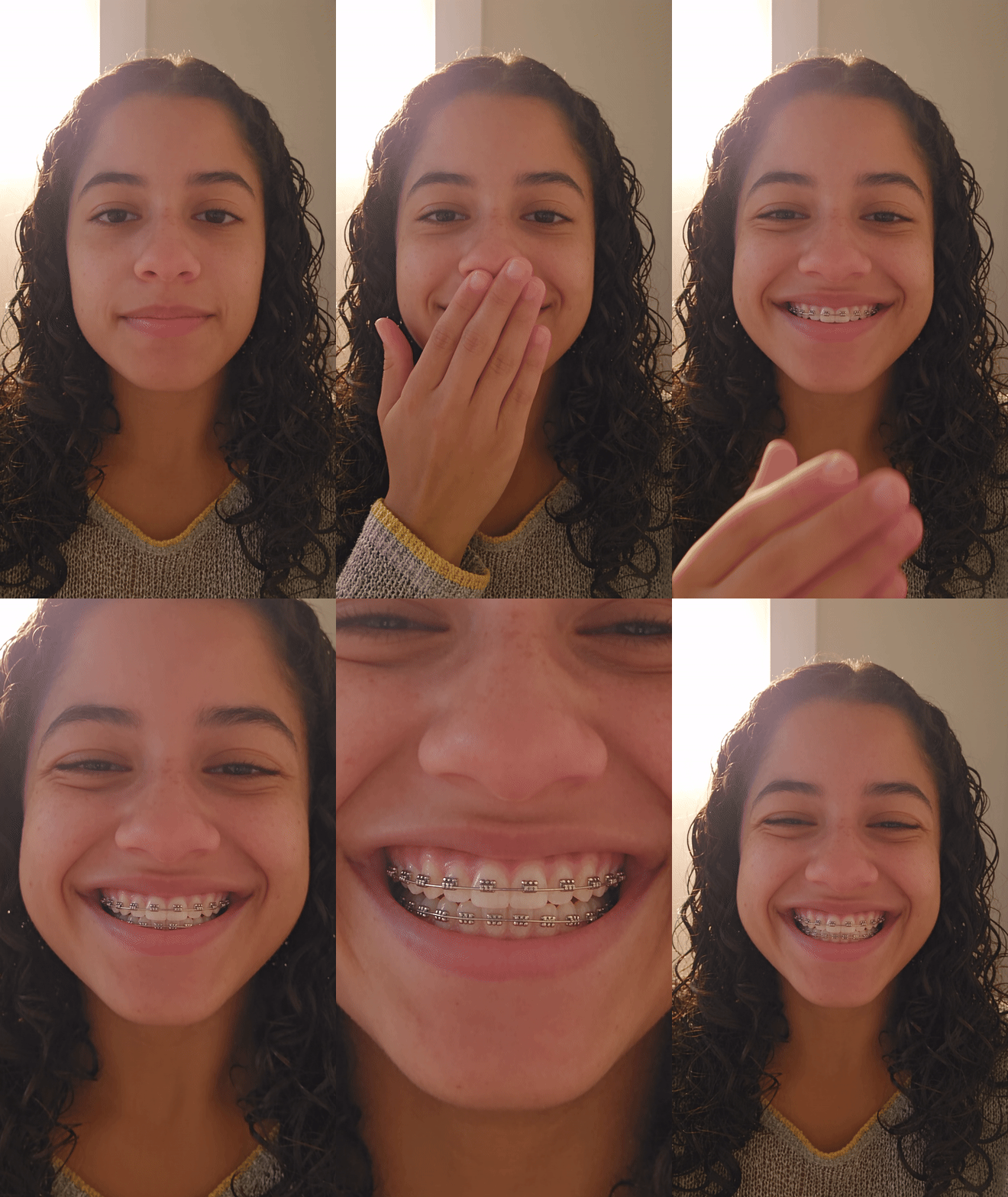
The hand comes up at 2 seconds and the braces are on by 4. The push-in lands at 7, with the brackets and the archwire filling the lower half of the frame, and she is still wearing them in the last frame. Check that first on any reveal clip: braces that fade before the end give the game away.
Method 1: Add Braces in the Atlas Cloud Video Generator
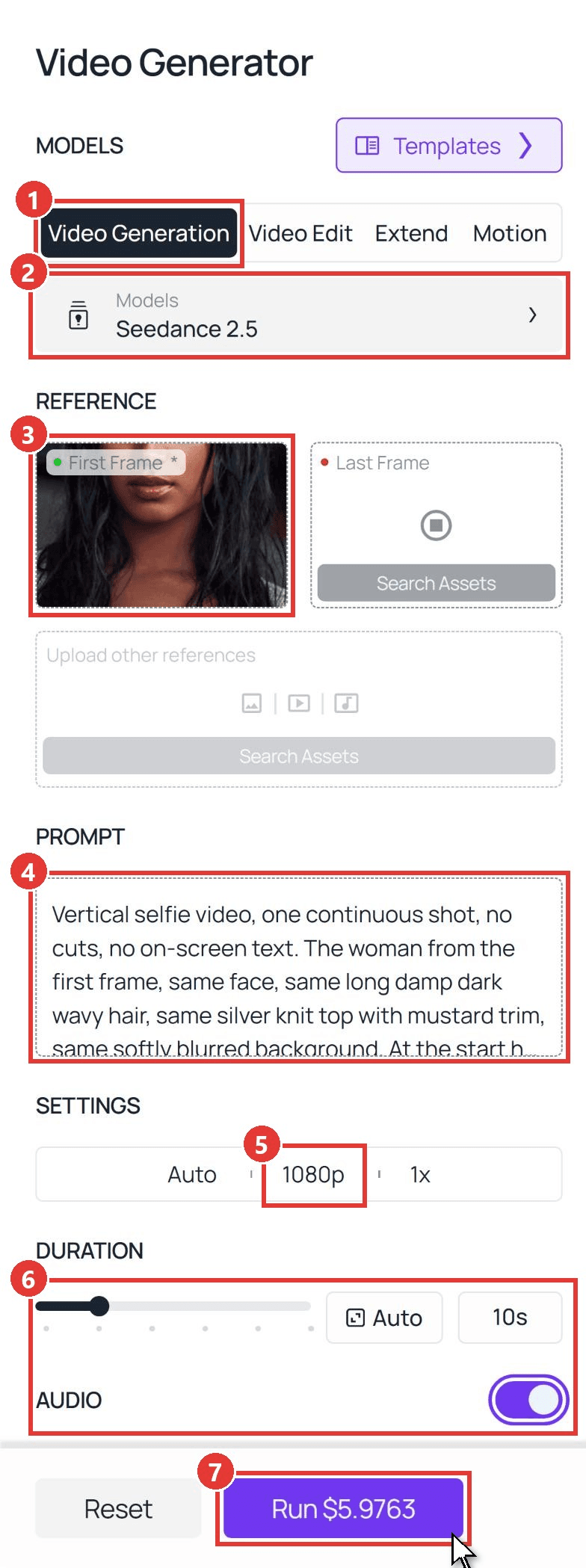
Sign in, open the Atlas Cloud AI video generator, and follow the numbers on the screenshot:
- Open the Video Generation tab.
- Keep Seedance 2.5 under Models.
- Upload your selfie into First Frame, cropped to 9:16, with closed lips so the braces have somewhere to come from. Leave Last Frame empty for now.
- Paste the prompt below into the Prompt box.
- Open Settings and pick 1080p.
- Set Duration to 10 seconds and leave Audio on.
- Click Run.
This is the exact prompt behind the clip above:
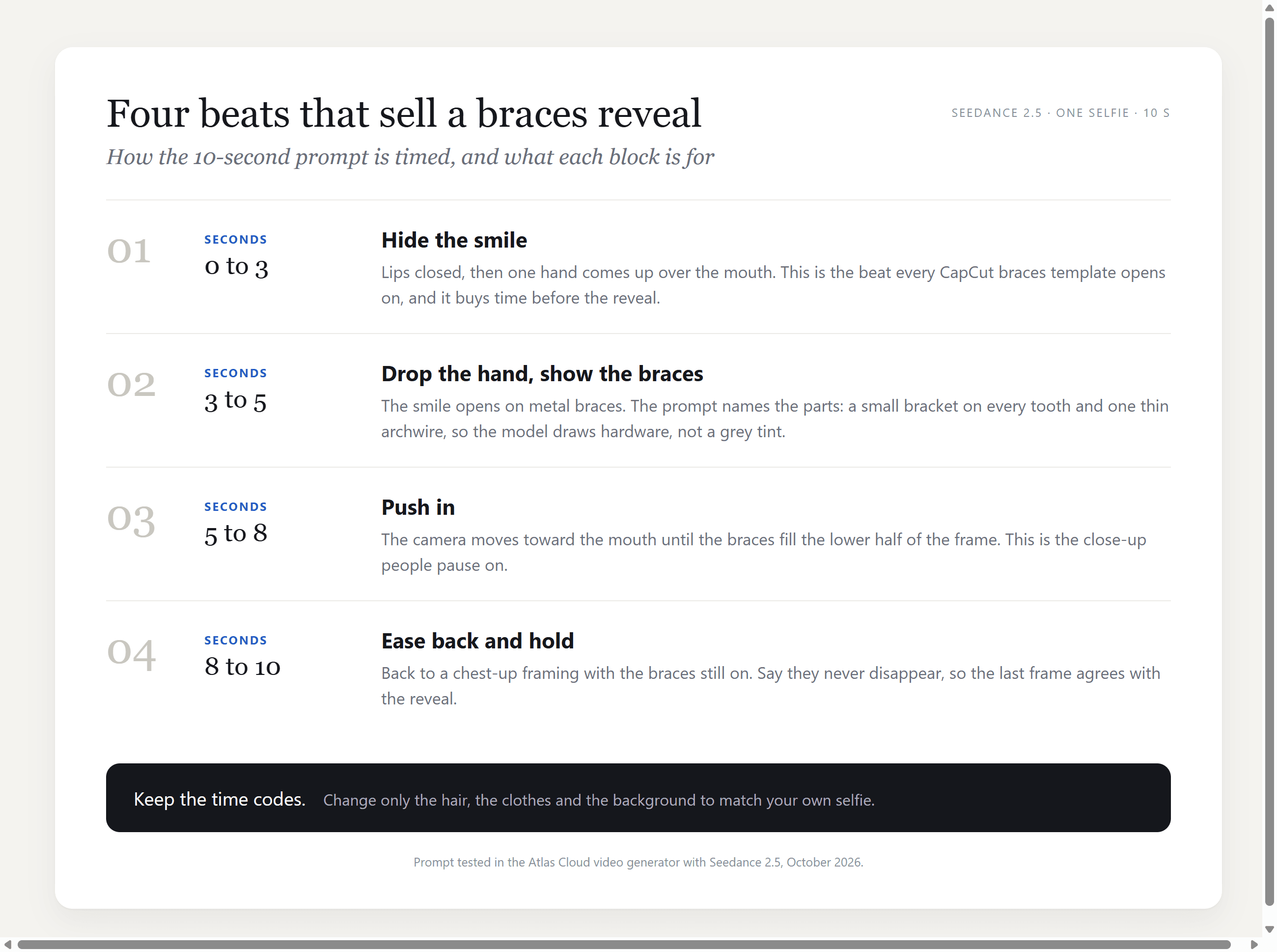
plaintext1Vertical selfie video, one continuous shot, no cuts, no on-screen text. The woman from the first frame, same face, same long damp dark wavy hair, same silver knit top with mustard trim, same softly blurred background. At the start her lips are closed and she looks into the camera. 20-3s: she lifts one hand and covers her mouth with her fingers, eyes crinkling as if she is hiding a smile. 33-5s: she slowly lowers her hand and breaks into a wide, open smile that shows her upper and lower teeth wearing metal braces: a small silver square bracket on every tooth, joined by one thin silver archwire. 45-8s: the camera pushes in slowly toward her mouth until the smile and the braces fill the lower half of the frame, and she laughs softly. 58-10s: the camera eases back to a chest-up selfie framing. She keeps smiling with the metal braces clearly visible until the last frame. The braces stay on her teeth the whole time and never disappear. 6Same face and skin tone throughout, natural skin texture, soft warm daylight, quiet room tone and one soft laugh as the only sound.
Swap the hair, the top and the background for what is in your photo. Leave the time codes alone until you have one clip you like.
Method 2: Send the Braces Prompt Through the API
Making a reveal for everyone in a group chat, or adding a braces button to your own app? The API takes the same photo and prompt in one request.
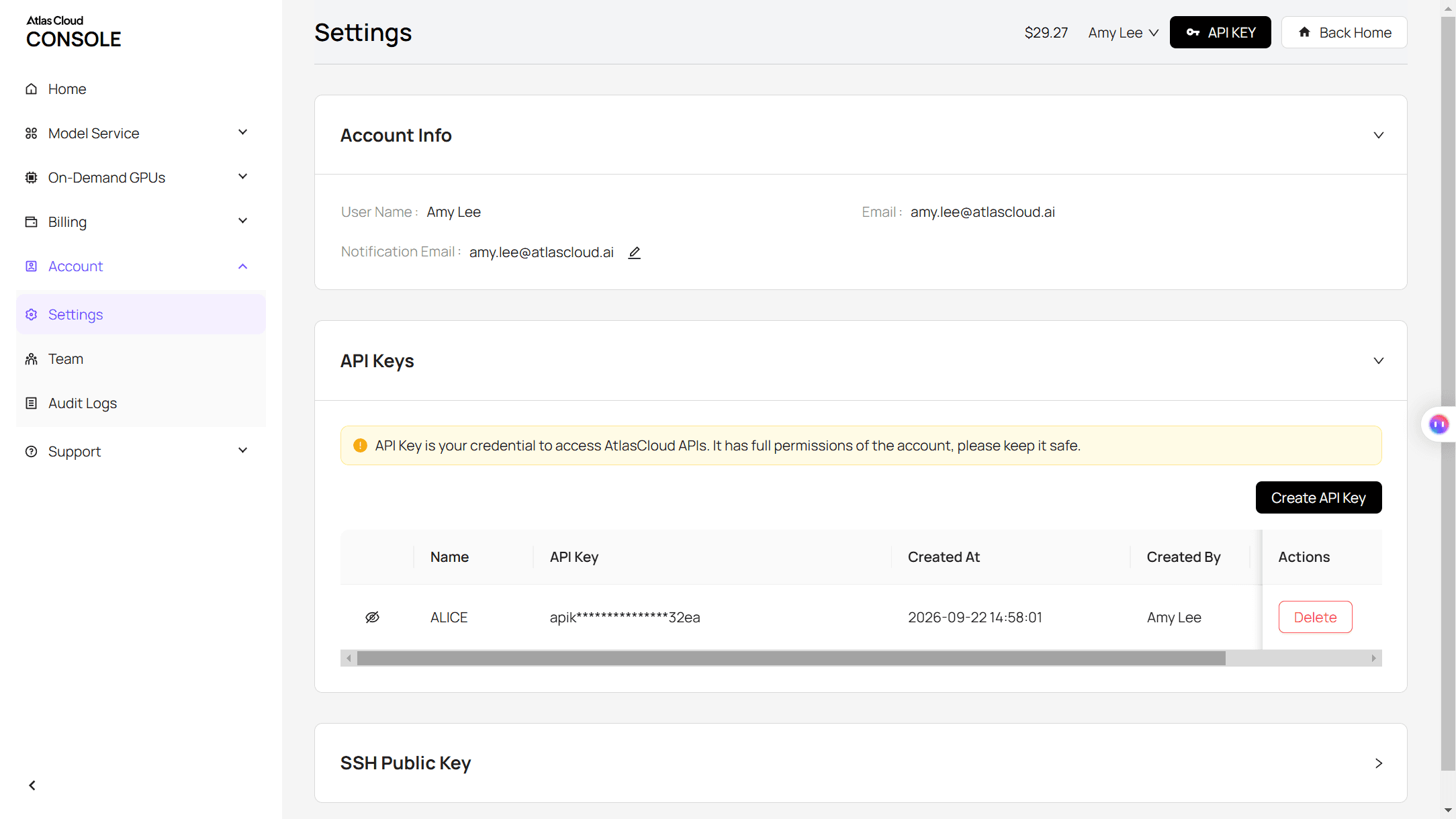
Step 1: Create an API key. In the console, open Settings and create a key under API Keys. One key works for every model on the platform.
Step 2: Check the request format. The Atlas Cloud API docs cover authentication, and the Seedance 2.5 image-to-video page lists the fields.
Step 3: Send the request and poll. Put a public URL of your 9:16 selfie in the image field:
plaintext1curl -X POST https://api.atlascloud.ai/api/v1/model/generateVideo \ 2 -H "Authorization: Bearer $ATLASCLOUD_API_KEY" \ 3 -H "Content-Type: application/json" \ 4 -d '{ 5 "model": "bytedance/seedance-2.5/image-to-video", 6 "prompt": "<paste the Method 1 prompt here>", 7 "image": "https://your-cdn.com/your-selfie-9x16.jpg", 8 "duration": 10, 9 "resolution": "1080p", 10 "generate_audio": true 11 }'
The response returns a prediction ID. Poll it until the status reads completed, then download the MP4 from the outputs array:
plaintext1curl https://api.atlascloud.ai/api/v1/model/prediction/<prediction_id> \ 2 -H "Authorization: Bearer $ATLASCLOUD_API_KEY"
Same endpoint and same key for every video model, so trying another model on the reveal is a one-line change to the model string.
A Do Braces Suit Me Filter Prompt That Hides, Then Reveals the Smile
The prompt has four time blocks, one per beat. The first keeps the mouth hidden. The second names the hardware, a bracket on every tooth and one thin archwire, so the model draws braces instead of a grey tint. The third moves the camera. The fourth says the braces stay until the last frame.
The same beats work on a subject that has never seen an orthodontist. For a second run we used a photo of a Maltese and one extra input: a still of the dog grinning with braces, made in the generator's Edit tab (more on that below) and uploaded as the Last Frame. The prompt then only had to carry the paw-over-muzzle beat and the push-in; the ending was locked:
[✅ 已完成 · 宠物版 GIF]

Alt: AI braces video of a white Maltese dog made with Seedance 2.5, the dog raises a paw to its mouth, lowers it and grins with metal braces while the camera pushes in on the teeth
Source photo of the Maltese by Nef Val on Pexels ; the clip was generated from it.
A last frame is the quickest way to control any reveal: make the still you want to end on, and the clip has to arrive there. Our guide to writing Seedance 2.5 prompts covers time codes in more depth.
Which Braces Filter CapCut Template Is Behind the Trend?
Search for braces templates on CapCut and three kinds come back. Only one kind adds AI braces to a face.
Template previews published by their creators on CapCut, checked on October 29, 2026.
| Template | On CapCut since | What the preview shows | Uses by October 29 |
|---|---|---|---|
| Ai (Leaha) | November 25, 2025 | A braces smile from the first second, captioned "Ai gives you braces" | 92,974 |
| trending braces (Kitty_CapCut) | October 30, 2025 | A mirror selfie in glasses, a wipe, then a braces smile with a peace sign | 71,388 |
| Braces Filter (rizky[NL]) | June 16, 2026 | Closed lips, then a braces smile from the 4-second mark | 47,778 |
| Ai Braces (Disco Octopus) | August 26, 2026 | A car selfie, a push-in on the braces, a closed-lip smile to end | 135 |
| Tooth Gems Reveal (Bisma Hunn) | August 27, 2026 | Hand over mouth, braces, then the brackets turn into colored tooth gems | 0 |
The other two kinds look alike in the thumbnail. Braces and BRACES TRANSITIONNNN are real before-and-after footage from people getting their braces off, and WHO IS THIS STRANGER, the biggest result at 133,224 uses, is a childhood-to-now glow-up with no braces in it. Every template we found that covers the mouth before the braces appear was an AI one.
C8vaL7g1WQE
What Would I Look Like With Braces in Metal, Clear or Color?
Most of Google's top results for this question are photo tools, and the question often comes with an appointment already booked: one template captions itself as AI showing how its creator would look with braces before a dentist appointment. A video shows the reveal; a still shows the braces. We made three from the same photo with Seedream 5.0 Pro in the generator's Edit tab, changing one line of the prompt each time:
Metal reads from any distance. Clear ceramic needs the tighter crop, because the brackets match the tooth color and the archwire is the only line left. Colored bands show as a row of dots along the wire, which is where the color sits on real braces too, on the elastic ties around each bracket. To put a color into the video, write the same phrase in the reveal block and the hold block, or upload the still as the Last Frame.
Frequently Asked Questions
Is there a free braces filter online?
The TikTok effects called brace and braces run inside the TikTok camera at no cost, and single posts using them have passed a million plays. CapCut's templates need the CapCut app and one photo. A reveal you control, with your own timing and color, runs through the Atlas Cloud generator and is priced per clip.
How much does a 10-second AI braces video cost?
A 10-second Seedance 2.5 image-to-video clip at 1080p is listed at $7.47 on Atlas Cloud, and the generator showed $5.98 with the 20% discount running on October 29. At 720p the list price was $3.80, or $3.04 discounted. Both clips in this article came out of one run each, so budget one clip per face.
Why do AI braces sometimes look painted on?
Because the prompt described a look, not an object. Braces are hardware: brackets bonded to each tooth and one wire through all of them. Name those parts and say they stay until the last frame; the clip above kept them visible from the reveal to the last frame.
Can I choose the braces color in the video?
Yes. Replace "metal braces" with "clear ceramic braces" or "metal braces with teal elastic bands" in both the reveal block and the hold block. For an exact shade, make a still with that color first and upload it as the Last Frame, the way the dog clip was made.
Is the result accurate enough to show my orthodontist?
As a look, yes: it shows the hardware on your own face. As a plan, no. The model does not know your bite or how your teeth will move, so treat it as a style preview and let the orthodontist decide the rest.
Conclusion
The braces filter started as a camera effect that followed your mouth around. The 2026 version is a short story with a setup and a payoff, and the payoff is a set of braces that were never there. Three CapCut templates carry most of it, while TikTok's in-camera effects draw play counts in the millions on their own.
Build it yourself and you choose the ending: one selfie, four time blocks, and a last frame if you want a specific color. That is the whole braces filter CapCut trend, and the bangs version and the bald version run on the same prompt shape.





