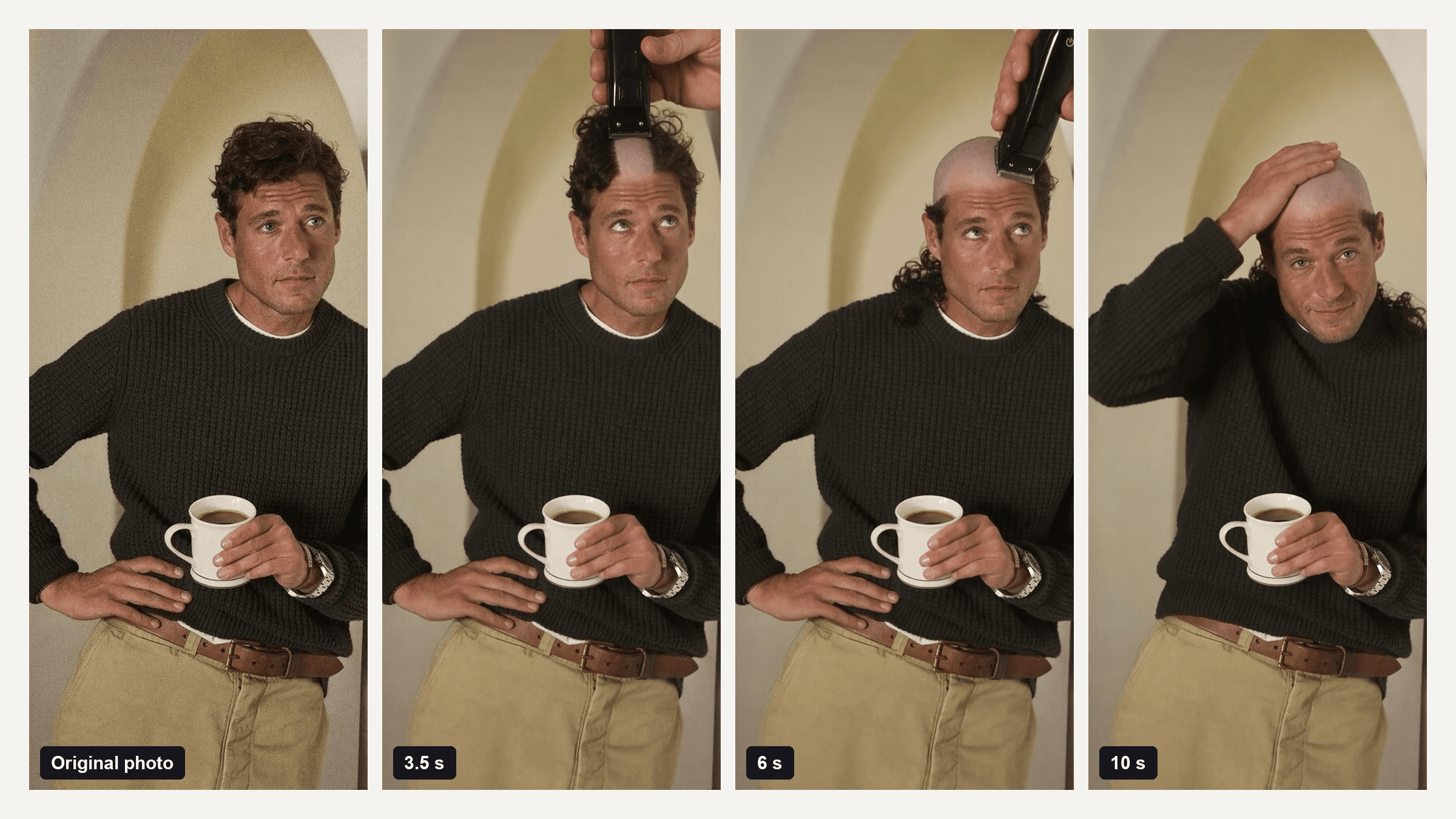
Your mom opens the clip you just sent. There you are, the same sweater, the same hallway, and a pair of clippers running straight back over your head. Ten seconds later the hair is gone and she is already typing in capitals.
That is the bald filter prank as it runs on TikTok right now: a short video of the shave itself, made from one selfie. This guide matches the CapCut templates behind it, separates it from the split-screen TikTok effect that tops Google for the same search, and shows how to make your own clip with one prompt.
Key Takeaways
- The current bald filter prank is a 10-second AI clip where clippers shave a selfie bald, not a static photo wipe.
- Two CapCut templates carry the trend, Hair shave prank and Headshave Ai, and each takes a single upload.
- OnTikTokthe same prank also runs as a split-screen face effect, so check which version your friend used.
- You can make the same clip on the Atlas Cloud video generator with Seedance 2.5, one photo, and one prompt.
- Name every part of the hair you want gone, top, sides and back, so the shave goes all the way.
What Is the Bald Filter Prank?
Older bald filters made the hair vanish. A photo app painted scalp over it, or a template melted it away in a second. The 2026 version shows the shave. One selfie goes in, and the clip that comes out shows a hand with electric clippers appearing at the hairline, cutting a strip, then another, until the head is smooth. The face never changes, which is what sells it.
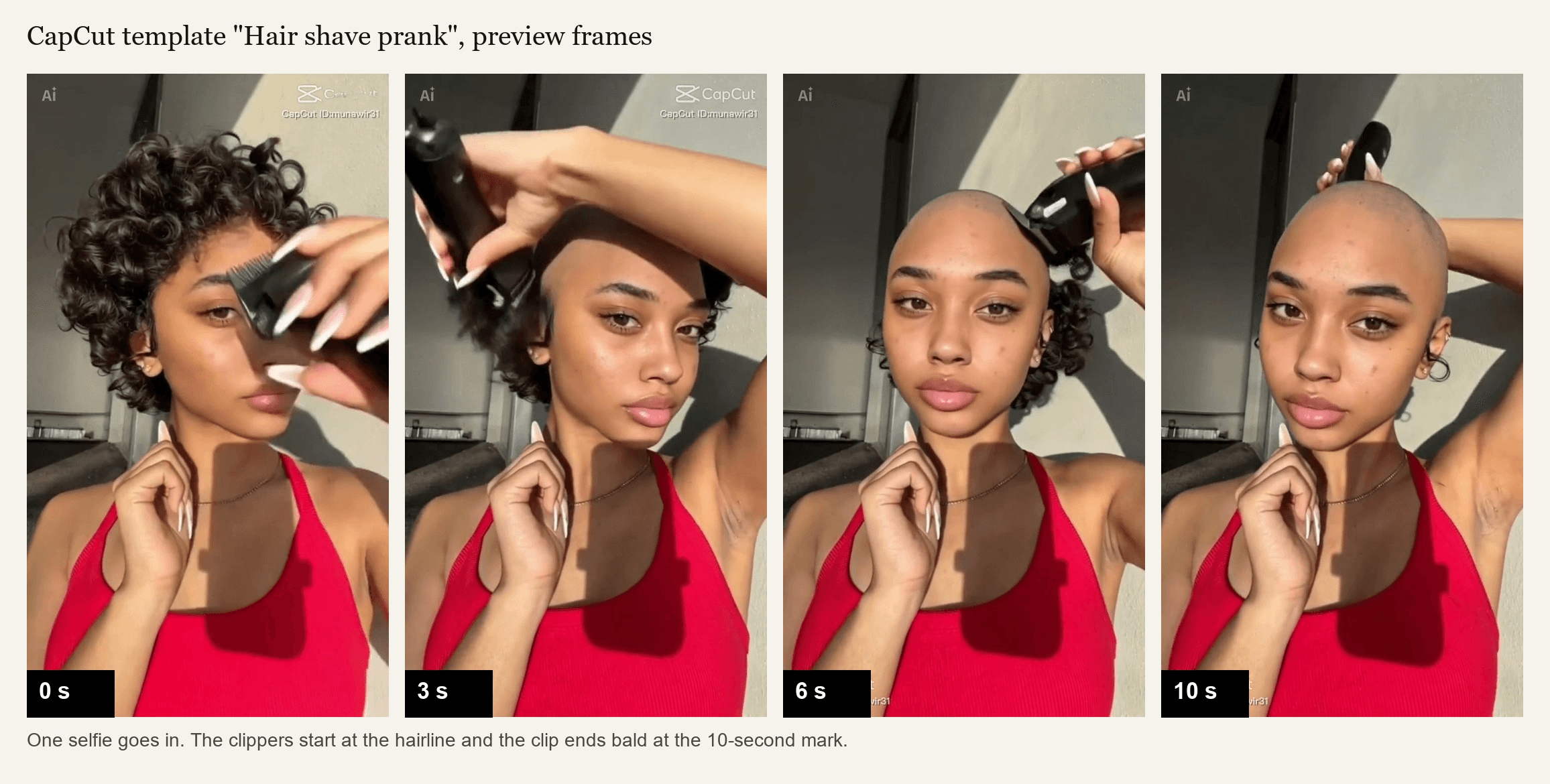
The template above, called Hair shave prank, has been on CapCut since late April 2026 and passed 291,000 uses by October 28. A second one, Headshave Ai, arrived in mid-September with the on-screen caption "Prank Your Mom With This Filter..." and spells out the use case. Tutorial captions since late September say the same thing, like "Sending this to my mom to see her funny reaction."
There is a third mechanic that confuses people. On October 28, the top US Google result for "bald filter prank" was b.e.n_rl's July 22 clip, a 7-second video with 1.3 million plays that uses a TikTok effect named Half Hair Cut.
The screen splits down the middle under the labels "Bald" and "Hair," and the hair side gives a creator who is bald in real life a mop of blond curls. No clippers, and nothing to upload. If a friend says they used "the bald filter," ask which one they mean before you try to copy it.
How to Make a Bald Filter Video With AI
The CapCut templates decide the pacing and the ending for you. A prompt lets you decide both: where the clippers start, how much hair falls, and whether the clip ends on a grin or a stunned stare.
Atlas Cloud runs Seedance 2.5, which takes one photo as the first frame and animates a 10-second shave from it while keeping the face, clothes and background from the photo.
Watch the coffee. The mug, the watch, the arch behind him and the knit of the sweater stay the same for ten seconds, because the model treats the first frame as the ground truth and moves only what the prompt asks for. The clippers cut one strip down the middle, then widen it. The curls left at his sides most likely trace back to the line "loose curls drop past his shoulders," so if you want the sides gone too, say so in the prompt.
Method 1: One Selfie in the Video Generator
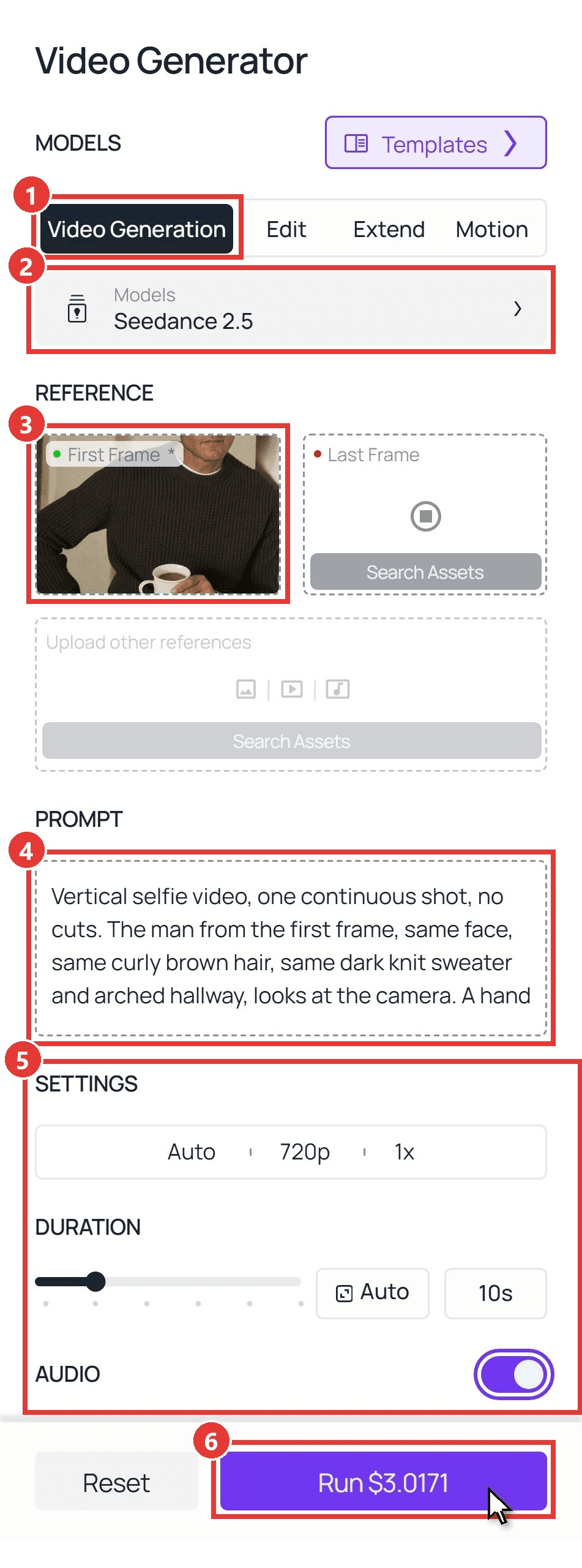
Sign in, open the AI video generator, and follow the numbers on the screenshot:
- Open the Video Generation tab.
- Keep Seedance 2.5 under Models.
- Upload your selfie into First Frame. Crop it to 9:16 first so the clip comes out vertical.
- Paste the prompt below.
- Set Duration to 10 and pick 720p under Settings. Leave Audio on for the clipper buzz.
- Click Run.
plaintext1Vertical selfie video, one continuous shot, no cuts. The man from the first frame, same face, same curly brown hair, same dark knit sweater and arched hallway, looks at the camera. A hand holding black electric hair clippers enters from the top right, switches them on, and runs them from the front of his hairline straight back over the crown. A clean bald strip appears with each pass and loose curls drop past his shoulders. After four or five passes the whole head is smooth and shaved. The clippers lift away, he raises his eyebrows, runs a palm over the bare scalp and gives a small surprised smile. Natural indoor light, skin tone and face unchanged throughout, clipper buzz as the only sound.
Swap the hair, clothing and background details for your own photo. Keep the two identity lines, "same face" near the start and "face unchanged" at the end, since they tell the model what must not move.
Method 2: Call Seedance 2.5 Through the API
Running the prank for a whole friend group, or wiring it into an app? The API takes the same photo and prompt, one request per person.
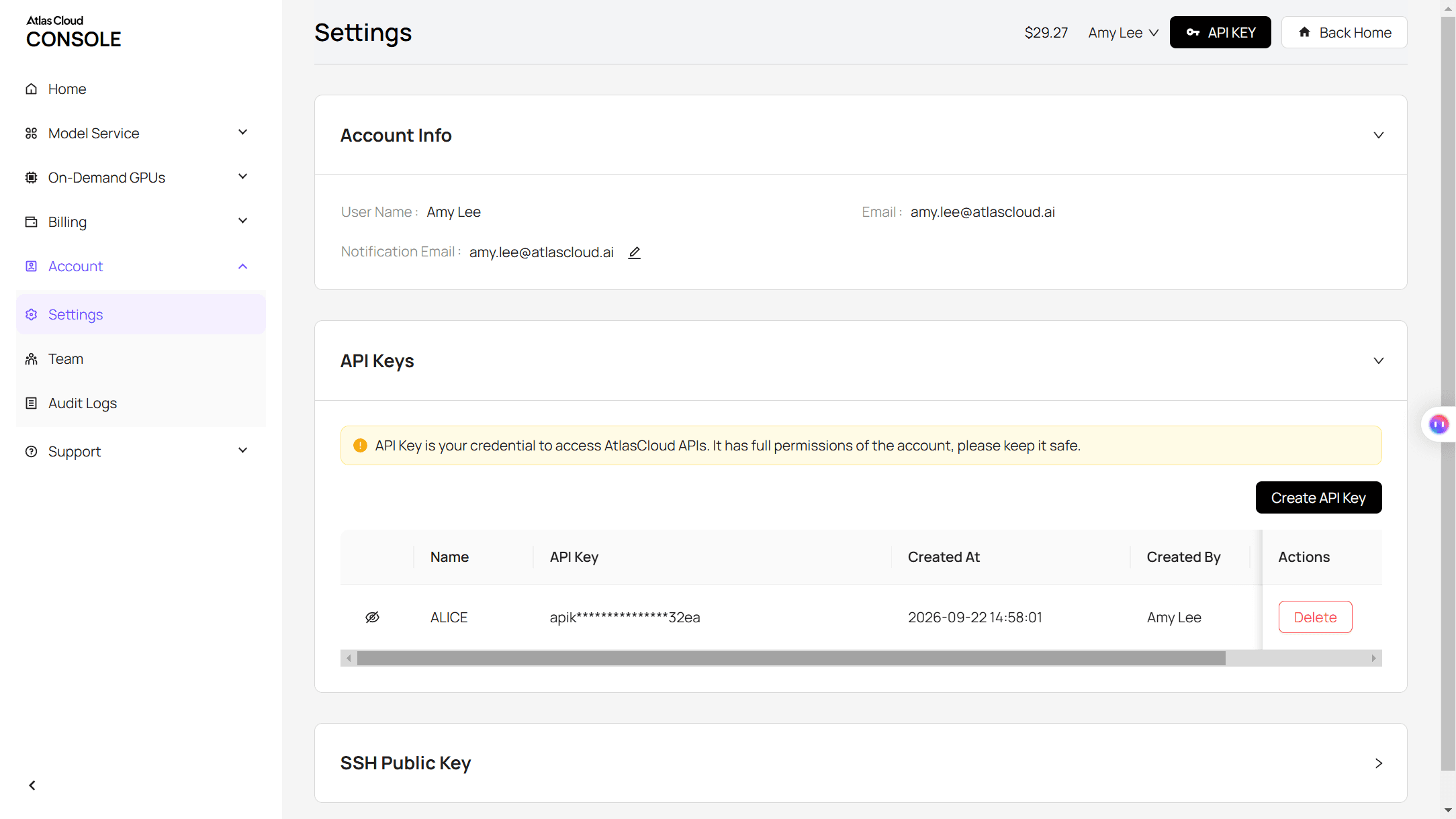
Step 1: Create an API key. In the console, open Settings and create a key under API Keys. One key works for every model.
Step 2: Check the request format. The Atlas Cloud docs cover authentication and the video endpoint.
Step 3: Send the request and poll. The selfie goes in the image field, and the image-to-video model takes the clip's aspect ratio from it:
plaintext1curl -X POST https://api.atlascloud.ai/api/v1/model/generateVideo \ 2 -H "Authorization: Bearer $ATLASCLOUD_API_KEY" \ 3 -H "Content-Type: application/json" \ 4 -d '{ 5 "model": "bytedance/seedance-2.5/image-to-video", 6 "prompt": "<paste the Method 1 prompt here>", 7 "image": "https://your-cdn.com/your-selfie-9x16.jpg", 8 "duration": 10, 9 "resolution": "720p", 10 "generate_audio": true 11 }'
Poll the returned prediction ID until the status reads completed, then download the clip from the outputs array:
plaintext1curl https://api.atlascloud.ai/api/v1/model/prediction/<prediction_id> \ 2 -H "Authorization: Bearer $ATLASCLOUD_API_KEY"
The endpoint and key stay the same across video models. To try the shave on another one, change the model string.
The Shaved Head Prank Prompt to Copy
The prompt above is built for a man with loose curls. Hair that is tied back, long, or covered by a fringe needs different wording, because the model has to know what it is removing. Here is the version we ran on a woman with her hair pulled back:
plaintext1Vertical selfie video, one continuous shot, no cuts. The woman from the first frame, same face, same light green top, hair pulled back tightly from her forehead, looks straight at the camera. A hand holding black electric hair clippers enters from the top of the frame, switches them on, and runs them from the center of her hairline straight back. A smooth bald strip appears with each pass, the tied-back hair comes away in short sections, and after five passes her whole head is bare. The clippers lift out of frame. She blinks twice, tilts her head, and breaks into a laugh. Same face and skin tone throughout, soft daylight, clipper buzz as the only sound.
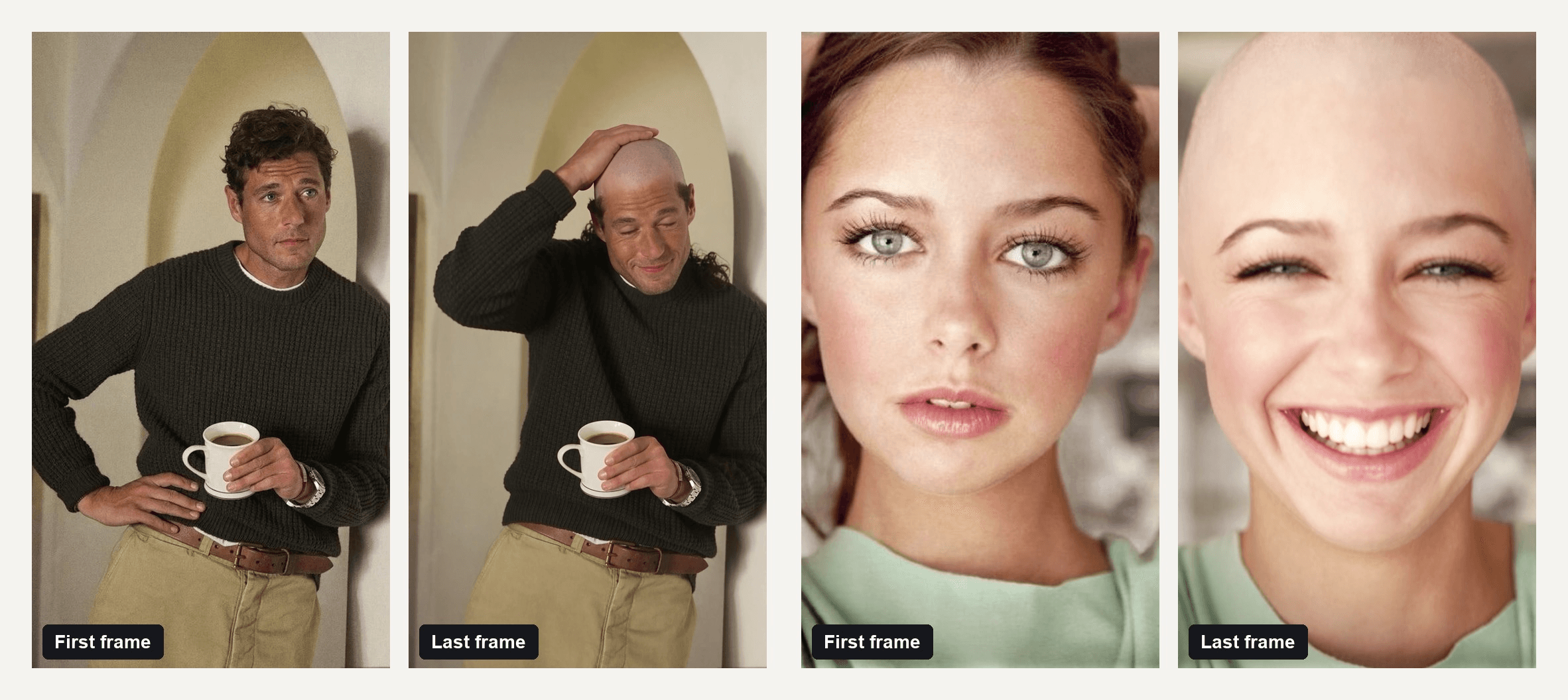
Her clip went all the way, crown to temples, and ended on the laugh the prompt asked for.
Three habits carried both runs. Describe the hair as it appears in the photo, not as you wish it looked. Name every part you want gone: top, sides and back. End on a reaction, because a clip that stops on a blank bald head reads like a glitch, while a laugh or a raised eyebrow reads like a prank.
Our guide to writing Seedance 2.5 prompts covers the same structure for longer clips.
Which Bald Filter CapCut Template Is the Trend Using?
CapCut has several templates with bald in the name, and only some of them show the shave. Here is how the four AI ones that turn up in tutorials and search results compare.
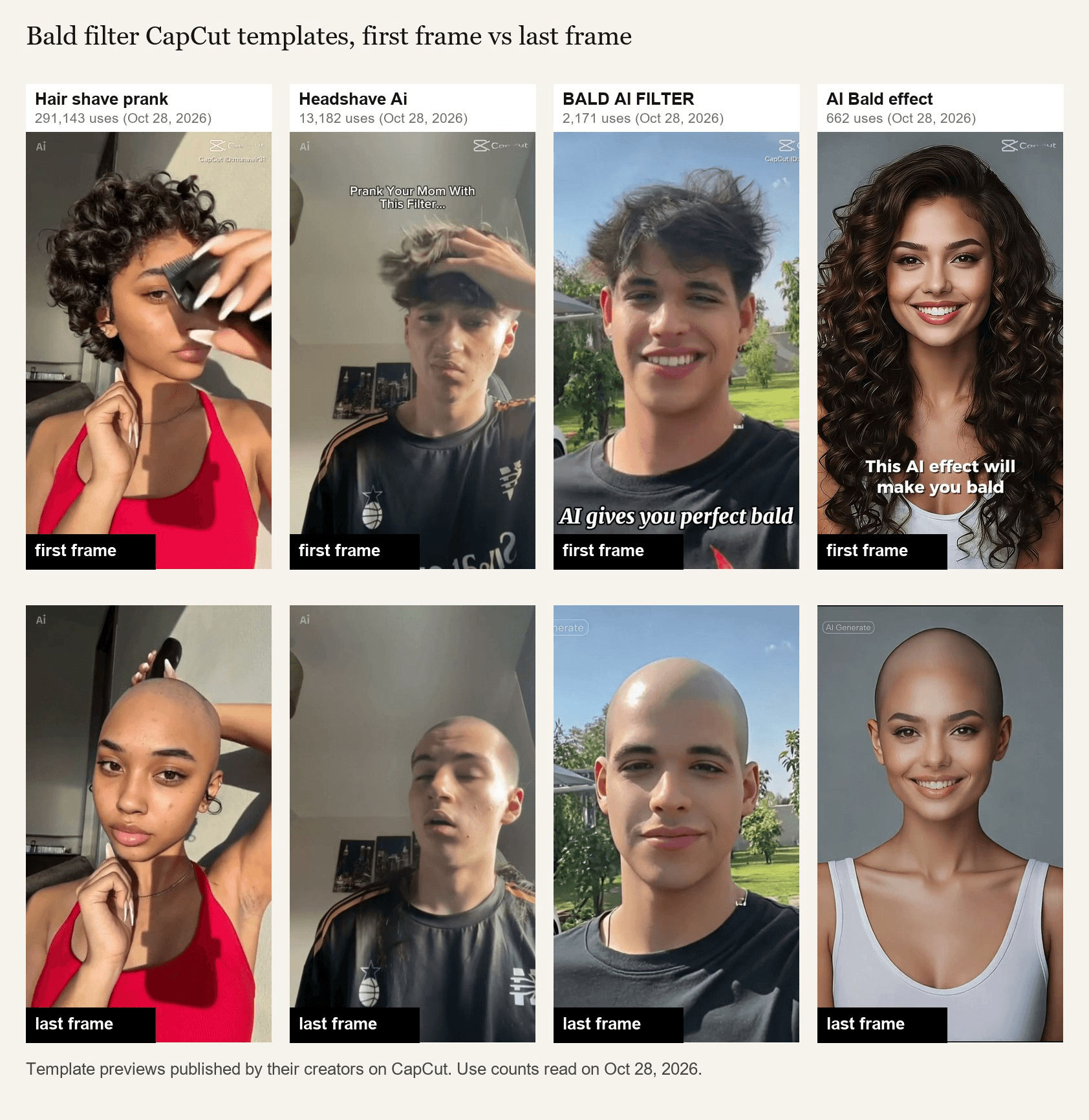
Template previews published by their creators on CapCut. Use counts read on October 28, 2026.
| Template | On CapCut since | Uploads | What happens | Matches the prank? |
|---|---|---|---|---|
| Hair shave prank | April 28, 2026 | 1 | Clippers run front to back over 10 seconds | Yes, this is the one |
| Headshave Ai | September 14, 2026 | 1 | Same shave, captioned "Prank Your Mom With This Filter..." | Yes |
| BALD AI FILTER | June 24, 2025 | 2 | Hair flies off in one clump, no clippers | Older look |
| AI Bald effect | July 3, 2025 | 2 | Hair recedes into a bald head, no clippers | Older look |
The two 2025 templates morph the hair away. The two 2026 templates show the tool doing it, and that change, clippers on screen, is what makes the new version believable enough to fool a parent. If you are matching a video someone sent you, look for the clippers.
AI Shaved Head Filter vs the TikTok Split-Screen Effect
The three mechanics get called the same thing in comments, so here they are side by side.
The static photo version is what most of the tools ranking for "shaved head filter" sell, and we covered it in the static bald filter preview guide. The split-screen effect lives inside the TikTok camera. The AI shaved head filter video is the only one that shows the shave happening.
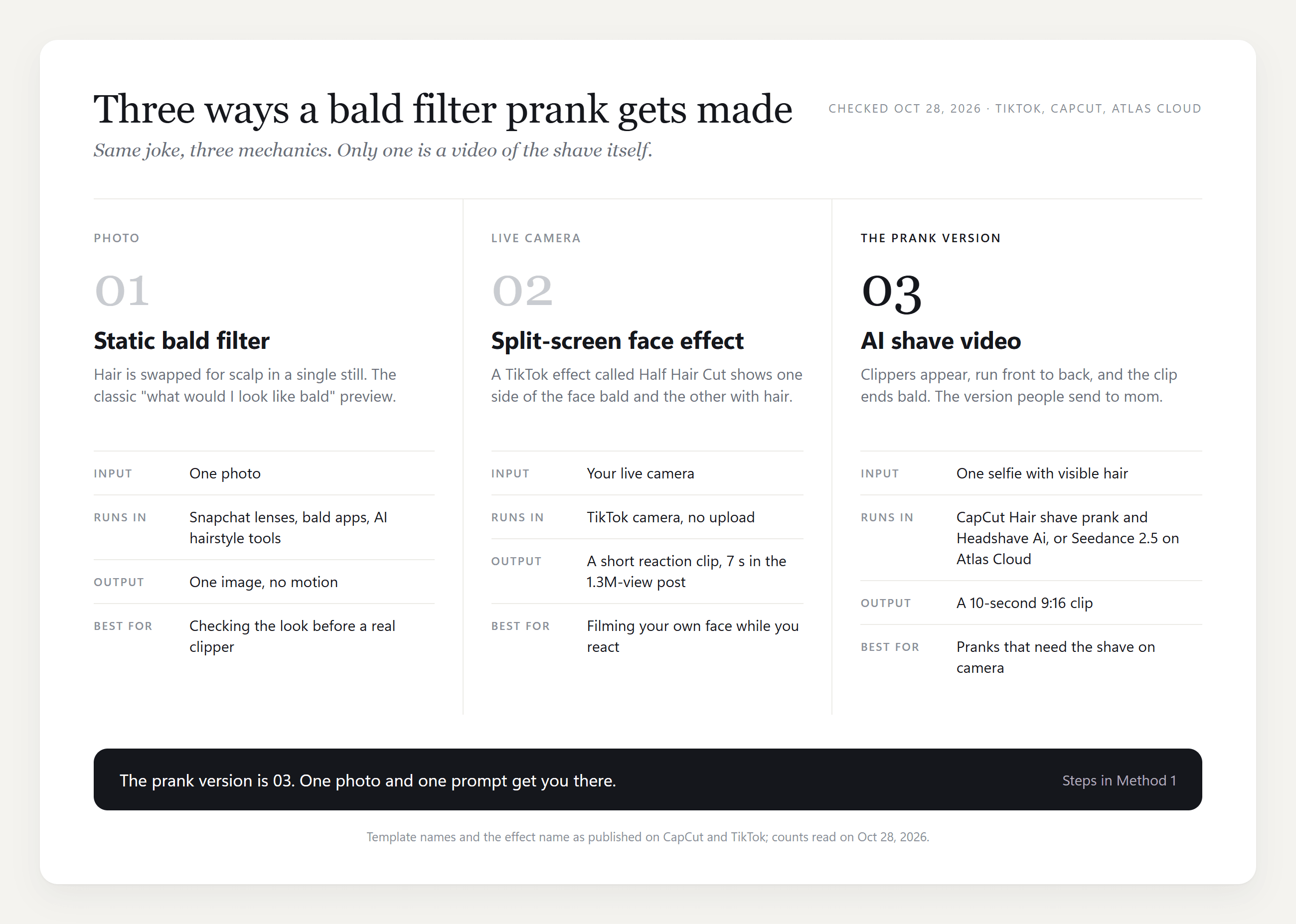
Pick by what you want the viewer to feel. A still gets a "you'd look fine bald" reply. The split-screen effect gets a laugh at your own reaction. The shave video gets the panicked phone call, which is the whole point of the prank.
How to Pull Off the Prank Mom Bald Filter Video
The clip is half the prank. The delivery is the other half, and the Headshave Ai caption already tells you who the target is.

Send the video, not a screenshot. A still gets inspected; a moving clip with clipper sound gets believed. Keep the caption short: "done" or "new look" works better than a paragraph. Then film the call, because the reaction is the part worth posting.
One line to respect: if someone in your family is actually losing hair, this is not the week for it.
Why Some Hair Shave Prank Clips Look Fake
A convincing clip starts with the photo. The shave needs hair to remove, room for the clippers to enter, and a frame that already matches the final format. The hairline and lighting tips from the static guide linked above still apply. This is what we checked on top of them for the video:
| What to check | Why it matters | What to do |
|---|---|---|
| Visible hair volume | The clippers need something to cut; a buzz cut or a hat leaves nothing to show | Pick a photo where hair stands away from the scalp |
| Headroom | The hand and clippers enter from the top of the frame | Leave a hand's width of space above the hair |
| A face that can react | The clip ends on an expression | No sunglasses, no hand over the mouth |
| 9:16 crop | Prank clips get watched full screen on a phone | Crop before upload |
| Resolution | Seedance 2.5 accepts 300 to 6,000 pixels on each side | Anything from a phone is fine |
| Still background | Fewer moving things behind the head means fewer things to hold steady | Walls, doors, kitchens |
Tied-back hair shaves cleanly and drops little, so the clip plays as a smooth reveal. For curls falling past the shoulders, let the hair down for the photo.
Frequently Asked Questions
What does a bald prank filter video cost?
The CapCut app is a free download. On Atlas Cloud a 10-second 720p clip from Seedance 2.5 is listed at $3.77 and runs at $3.02 with the 20 percent discount shown in the generator at the time of writing; 1080p is $7.42 list and $5.94 discounted. One clip is usually enough, because the prank only has to work once.
How long should a bald filter video be?
Ten seconds. Both CapCut templates run 10 seconds, the split-screen TikTok clip that tops Google runs 7, and anything past the reveal is dead air. Seedance 2.5 accepts 4 to 30 seconds, so you can go shorter for a Story and longer only if you add a second beat, like a friend walking in.
Does the head shave filter work on long hair?
Yes. Describe it in the prompt the way it looks in the photo ("long straight dark hair past the shoulders") so the model knows how much there is to remove. Long hair takes more passes, so give it room: 12 to 15 seconds instead of 10 keeps the shave from looking rushed.
Can I make an AI bald filter video without CapCut?
Yes. Method 1 above does it in a browser with one photo and the prompt, and Method 2 does it from code. The result is a plain MP4 you can post anywhere, with no app-specific export step.
Is this the same as the bald gf trend?
No. The bald gf trend from December 2025 ran on a 3-second CapCut template called U, whose preview is a still of a bald young woman, and tutorial captions tied it to "the honey i dont care abt your hair trend." The 2026 bald filter trend is the shave video. Same joke, different mechanic, and the templates are not interchangeable.
Conclusion
The bald filter went from a photo wipe to a 10-second shave, and that change is why it works as a prank now. The clippers on screen, the hair falling, the face that never changes: those details are what make a parent call back instead of scroll past. Two CapCut templates, Hair shave prank and Headshave Ai, carry the trend, and a split-screen TikTok effect rides alongside it under the same name.
If you want control over how the shave ends, one selfie and the prompt above get you there in the Atlas Cloud video generator, and the API does the same for a whole group. Describe the hair you actually have, name every part that goes, and end on a reaction. That is the whole bald filter prank, and the phone call it triggers is the part worth keeping.





